low oil pressure HONDA ODYSSEY 2023 Owners Manual
[x] Cancel search | Manufacturer: HONDA, Model Year: 2023, Model line: ODYSSEY, Model: HONDA ODYSSEY 2023Pages: 707, PDF Size: 23.9 MB
Page 110 of 707
108
uuIndicators uDriver Information Interface Wa rning and Information Messages
Instrument Panel
Driver Information Interface Warning and Information Messages
The following messages appear only on the driver information interface. Press the (home) button, select Warnings, then press the
ENTER button to see the message again with the system message indicator on.
MessageConditionExplanation
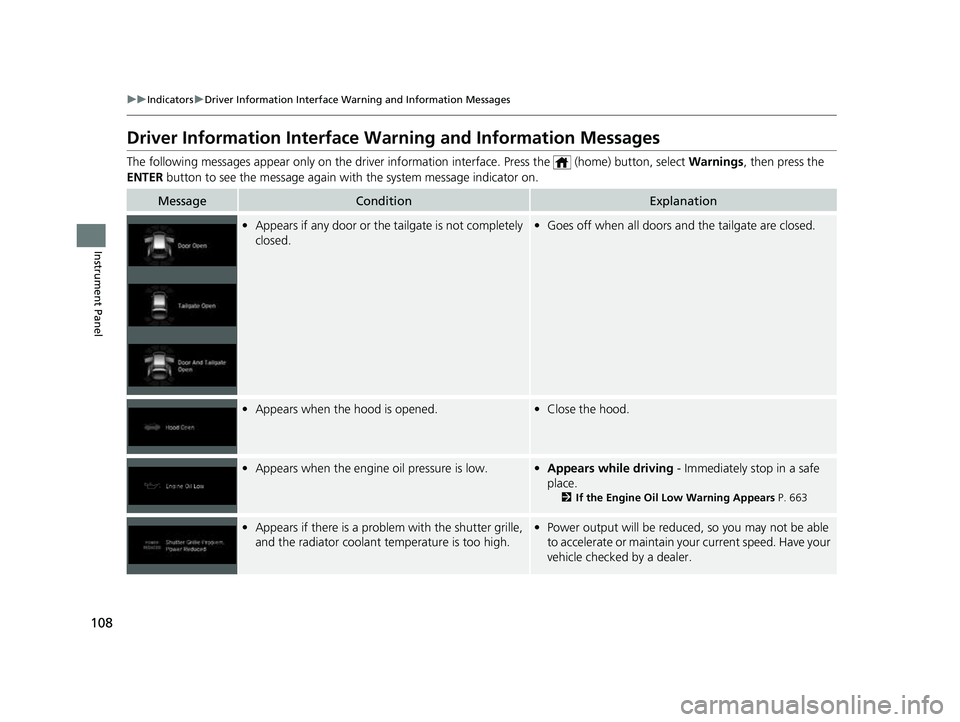
•Appears if any door or the tailgate is not completely
closed.•Goes off when all doors and the tailgate are closed.
•Appears when the hood is opened.•Close the hood.
•Appears when the engine oil pressure is low.•Appears while driving - Immediately stop in a safe
place.
2 If the Engine Oil Low Warning Appears P. 663
•Appears if there is a problem with the shutter grille,
and the radiator coolant temperature is too high.• Power output will be reduce d, so you may not be able
to accelerate or maintain your current speed. Have your
vehicle checked by a dealer.
23 US ODYSSEY-31THR6500.book 108 ページ 2022年1月24日 月曜日 午前11時35分
Page 481 of 707
Continued479
uuWhen Driving uStarting the Engine
Driving
■To stop the engine1Remote Engine Start with Vehicle Feedback
The engine may not start by the remote engine start if:
•You have disabled a remote engine start setting
using the audio/information screen.
•The power mode is not in VEHICLE OFF.
•The transmission is in a position other than ( P.
•The hood is open, or any door or the tailgate is unlocked.•You have already used the remote twice to start
the engine.
•The battery temp is too low or the battery charge is
too low.
•Another registered remo te is in the vehicle.•There is any antenna failure.
•The door is unlocked with the built-in key.
•The engine oil pressure is low.•The engine coolant temper ature is extremely high.
•The telematics unit* malfunctions.
•The security system alarm is not set.
The engine may stop whil e it is running if:
•You do not start the vehicl e within 10 minutes of
starting the engine with the remote.
•The engine is stopped by using the remote.
•The security system alarm is not set.•The door is unlocked with the built-in key.
•The hood is open, or any door, or the tailgate is
unlocked.
•Any door is open.
•The transmission is in a position other than ( P.•The engine coolant temper ature is extremely high.
•The battery is low.
•The engine oil pressure is low.•The Malfunction Indicator Lamp comes on if there
is a problem with the emissions control systems.
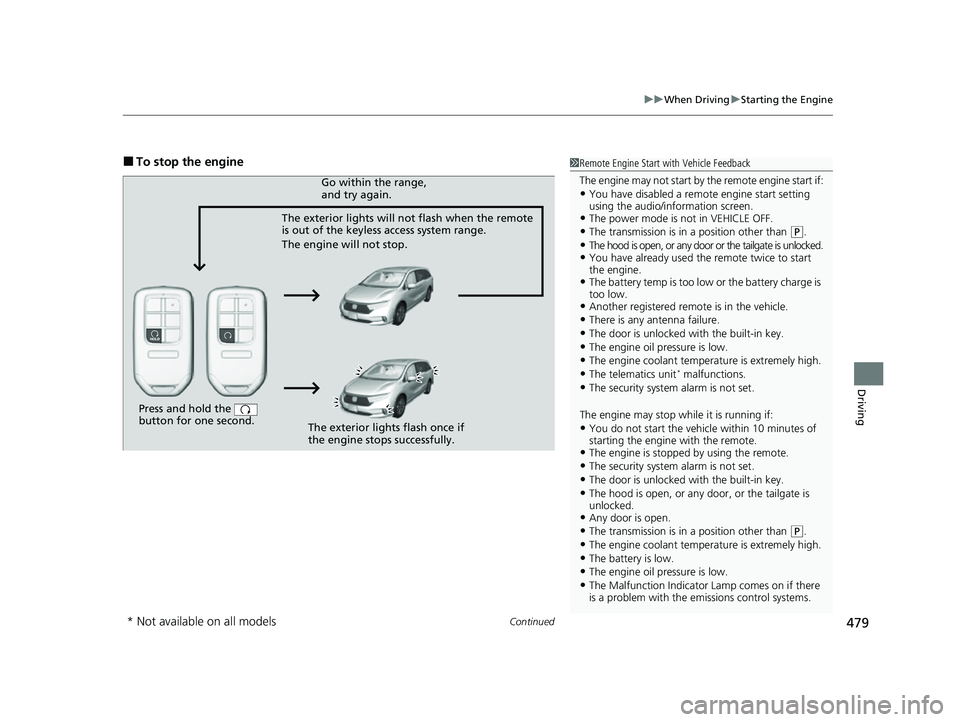
Press and hold the
button for one second.
The exterior lights will not flash when the remote
is out of the keyless access system range.
The engine will not stop.Go within the range,
and try again.
The exterior lights flash once if
the engine stops successfully.
* Not available on all models
23 US ODYSSEY-31THR6500.book 479 ページ 2022年1月24日 月曜日 午前11時35分
Page 587 of 707
585
Driving
Fuel Economy and CO2 Emissions
Improving Fuel Economy and Reducing CO2
Emissions
Achieving fuel economy and reducing CO2 emissions is dependent on several
factors, including driving conditions, load weight, idling time, driving habits, and
vehicle condition. Depending on these and other factors, you may not achieve the
rated fuel economy of this vehicle.
You can optimize your fuel economy with proper maintenance of your vehicle.
Always maintain your vehicle in accord ance with the messages displayed on the
driver information interface.
• Use engine oil with the viscosity recommended.
2 Recommended Engine Oil P. 600
•Maintain the specified tire pressure.
• Do not load the vehicle with excess cargo.
• Keep your vehicle clean. A buildup of snow or mud on your vehicle’s underside
adds weight and increases wind resistance.
■Maintenance and Fuel Economy
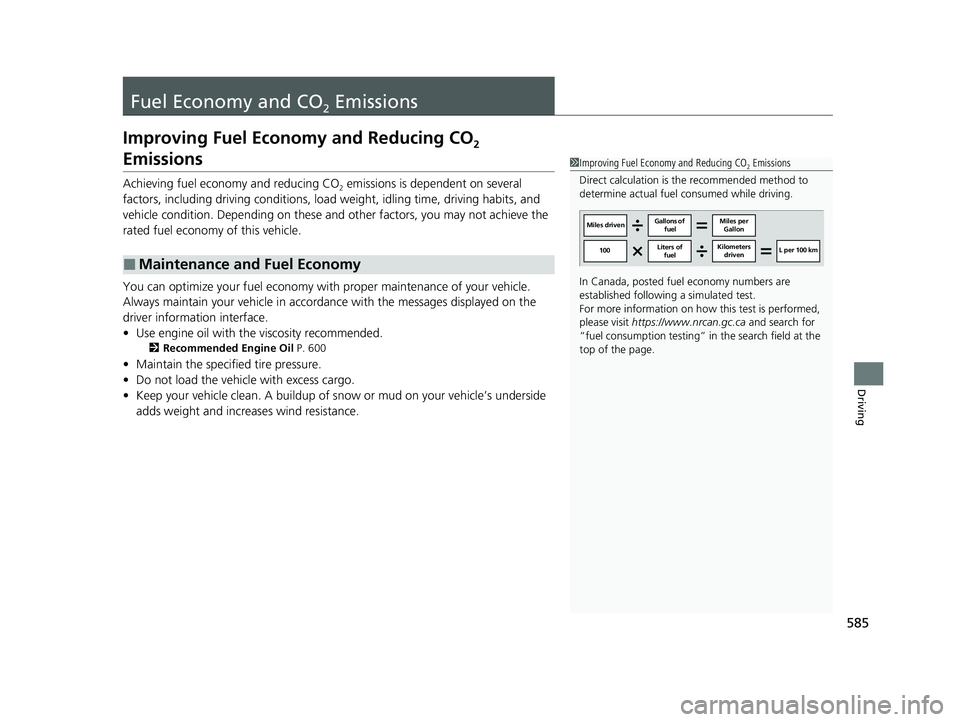
1Improving Fuel Economy and Reducing CO2 Emissions
Direct calculation is the recommended method to
determine actual fuel consumed while driving.
In Canada, posted fuel economy numbers are
established following a simulated test.
For more information on how this test is performed,
please visit https://www.nrcan.gc.ca and search for
“fuel consumption testing” in the search field at the
top of the page.
Miles driven Gallons of
fuel Miles per
Gallon
100 L per 100 km
Liters of
fuel Kilometers
driven
23 US ODYSSEY-31THR6500.book 585 ページ 2022年1月24日 月曜日 午前11時35分
Page 606 of 707
uuMaintenance Under the Hood uChanging the Engine Oil and Oil Filter
604
Maintenance
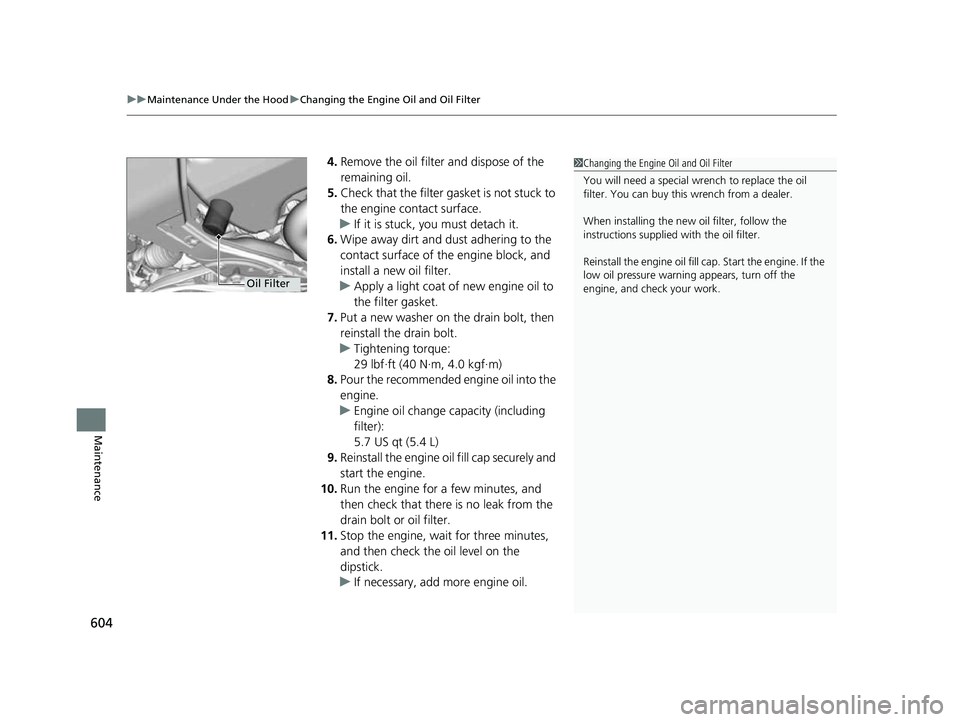
4. Remove the oil filter and dispose of the
remaining oil.
5. Check that the filter ga sket is not stuck to
the engine contact surface.
u If it is stuck, you must detach it.
6. Wipe away dirt and dust adhering to the
contact surface of the engine block, and
install a new oil filter.
u Apply a light coat of new engine oil to
the filter gasket.
7. Put a new washer on the drain bolt, then
reinstall the drain bolt.
u Tightening torque:
29 lbf∙ft (40 N∙m, 4.0 kgf∙m)
8. Pour the recommended engine oil into the
engine.
u Engine oil change capacity (including
filter):
5.7 US qt (5.4 L)
9. Reinstall the engine oi l fill cap securely and
start the engine.
10. Run the engine for a few minutes, and
then check that there is no leak from the
drain bolt or oil filter.
11. Stop the engine, wait for three minutes,
and then check the oil level on the
dipstick.
u If necessary, add more engine oil.1Changing the Engine Oil and Oil Filter
You will need a special wrench to replace the oil
filter. You can buy this wrench from a dealer.
When installing the new oil filter, follow the
instructions supplied with the oil filter.
Reinstall the engine oil fill cap. Start the engine. If the
low oil pressure warning appears, turn off the
engine, and check your work.
Oil Filter
23 US ODYSSEY-31THR6500.book 604 ページ 2022年1月24日 月曜日 午前11時35分
Page 642 of 707
uuCleaning uExterior Care
640
Maintenance
• Make sure to follow the instructions indicated on the automated car wash.
• Fold in the door mirrors.
• For models equipped with automatic inte rmittent wipers, turn the wipers off.
• Keep sufficient distance between the cleaning nozzl e and the vehicle body.
• Take particular care around the windows. St anding too close may cause water to
enter the vehicle interior.
• Do not spray high pressure water directly into the engine compartment. Instead,
use low pressure water and a mild detergent.
• Do not spray water directly onto the ca mera or the area around it. Water may
enter the lens and cause the camera to malfunction.
A good coat of automotive body wax helps protect your vehicle’s paint from the
elements. Wax will wear off over time and expose your vehicle’s paint to the
elements, so reapply as necessary.
If you get gasoline, oil, engine coolant, or battery fluid on resin coated parts, they
may be stained or the coating may peel. Prom ptly wipe it away using a soft cloth and
clean water.
■Using an Automated Car Wash
■Using High Pressure Cleaners
■Applying Wax
■Maintaining the Bumpers and Other Resin Coated Parts
1 Using an Automated Car Wash
When using an automated car wash that pulls the
vehicle through with a c onveyor, make sure the
transmission in
( N position.
2 If you want to keep the transmission in
(N
position [car wash mode] P. 488
1Applying Wax
NOTICE
Chemical solvents and st rong cleaners can damage
the paint, metal, and plasti c on your vehicle. Wipe
away spills immediately.
1 Maintaining the Bumpers an d Other Resin Coated Parts
Ask a dealer about the corr ect coating material when
you want to repair the painted surface of the parts
made of resin.
23 US ODYSSEY-31THR6500.book 640 ページ 2022年1月24日 月曜日 午前11時35分
Page 647 of 707
645
Handling the Unexpected
This chapter explains how to handle unexpected troubles.
ToolsTypes of Tools .................................. 646
If a Tire Goes Flat Changing a Flat Tire ......................... 647
Engine Does Not Start Checking the Engine ........................ 656
If the Remote Battery is Weak .......... 657
Emergency Engine Stop ................... 658
If the Battery Is Dead ....................... 659
Overheating How to Handle Overheating ............. 661
Indicator, Coming On/Blinking
If the Engine Oil Low Warning Appears ....... 663
If the Charging System Indicator Comes
On ................................................. 664
If the Malfunction Indicator Lamp Comes On or Blinks ................................... 664
If the Brake System Indicator (Red) Comes
On or Blinks ................................... 665
If the Brake System Indicator (Red) Comes On or Blinks at the Same Time When the Brake
System Indicator (Amber) Comes On ..... 666
If the Electric Power Steering (EPS) System Indicator Comes On ....................... 667
If the Low Tire Pressure/TPMS Indicator Comes On or Blinks........................ 667 If the Transmission System Indicator Blinks
along with the Warning Message... 668
Fuses Fuse Locations ................................. 669
Inspecting and Changing Fuses ........ 675
Emergency Towing ........................... 676
If You Cannot Unlock the Fuel Fill Door ... 677
If You Cannot Open the Tailgate .... 678
When You Cannot Close the Power Sliding Doors ................................... 680
Refueling
Refueling From a Portable Fuel Container .... 681
23 US ODYSSEY-31THR6500.book 645 ページ 2022年1月24日 月曜日 午前11時35分
Page 665 of 707
663
Handling the Unexpected
Indicator, Coming On/Blinking
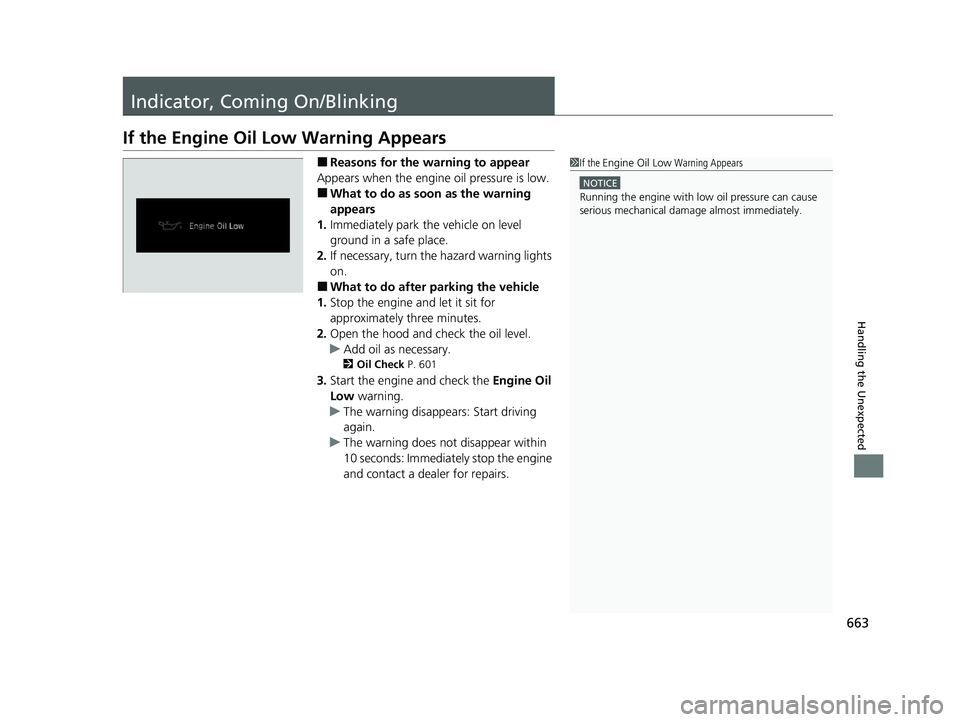
If the Engine Oil Low Warning Appears
■Reasons for the warning to appear
Appears when the engine oil pressure is low.
■What to do as soon as the warning
appears
1. Immediately park the vehicle on level
ground in a safe place.
2. If necessary, turn the hazard warning lights
on.
■What to do after parking the vehicle
1. Stop the engine and let it sit for
approximately three minutes.
2. Open the hood and ch eck the oil level.
u Add oil as necessary.
2 Oil Check P. 601
3.Start the engine and check the Engine Oil
Low warning.
u The warning disappears: Start driving
again.
u The warning does not disappear within
10 seconds: Immediately stop the engine
and contact a dealer for repairs.
1If the Engine Oil Low Warning Appears
NOTICE
Running the engine with low oil pressure can cause
serious mechanical damage almost immediately.
23 US ODYSSEY-31THR6500.book 663 ページ 2022年1月24日 月曜日 午前11時35分
Page 698 of 707
Index
696
Index
Index
A
ABS (Anti-lock Brake System)................... 567
AC Power Outlet ....................................... 242
Accessories and Modifications ................. 642
Accessory Power Sockets .......................... 240
Adaptive Cruise Control (ACC) with Low Speed Follow ........................................... 523
Additives
Coolant ................................................... 605
Engine Oil ................................................ 600
Washer .................................................... 609
Additives, Engine Oil ................................ 600
Adjusting Armrest ................................................... 228
Front and Second Row Outer and Third Row Outer Head Restraints Positions.............. 225
Front Seats .............................................. 212
Mirrors .................................................... 209
Second Row Seats ................................... 215
Steering Wheel ........................................ 208
Third Row Seats ....................................... 220
Agile Handling Assist ................................ 501
Air Conditioning System (Climate Control System) .................................................... 250
Changing the Mode ................................ 250
Defrosting the Windshield and Windows ............................................... 252
Dust and Pollen Filter ............................... 635
Sensors .................................................... 256
Using Automatic Climate Control ............ 250
Air Pressure ....................................... 622, 685 Airbags
........................................................ 49
Advanced Airbags ..................................... 55
Airbag Care............................................... 66
Event Data Recorder .................................... 0
Front Airbags (SRS) .................................... 52
Indicator.............................................. 63, 95
Knee Airbags............................................. 57
Passenger Airbag Off Indicator .................. 64
Sensors ..................................................... 49
Side Airbags .............................................. 60
Side Curtain Airbags.................................. 62
AM/FM Radio ............................................ 297
Android Auto
TM........................................ 335
Anti-lock Brake System (ABS) .................. 567
Indicator.................................................... 95
Apple CarPlay ........................................... 332
Armrest ..................................................... 228
AT&T Hotspot ........................................... 330
Audio Remote Controls ........................... 262
Audio System ............................................ 258
Adjusting the Sound................................ 291
Audio/Information Screen........................ 265
Auxiliary Input Jack.................................. 261
Display Setup .......................................... 292
Error Messages ........................................ 339
File Manager ........................................... 285
General Information ................................ 341
Home Screen........................................... 271
How to Delete a File ................................ 288
How to Transfer a File ............................. 285
How to Update Wirelessly ....................... 279 How to Update with a USB Device .......... 283
Limitations for Manual Operation ............ 293
MP3/WMA/AAC ............................. 313, 316
My Honda Music..................................... 316
Playing Social Playlist ............................... 322
Reactivating ............................................ 261
Recommended CDs ................................ 342
Remote Controls ..................................... 262
Security Code ......................................... 261
Selecting an Audio Source ...................... 293
Status Area ............................................. 276
System Updates ...................................... 279
Theft Protection ...................................... 261
USB Flash Drives...................................... 344
USB Ports ................................................ 259
Wallpaper Setup ..................................... 269
Audio/Information Screen ....................... 265
Authorized Manuals ................................ 694
Auto Door Locking/Unlocking ................ 160
Customize .............................................. 427
Auto High-Beam ...................................... 197
Indicator ................................................... 95
Auto Idle Stop Indicator (Green) ............ 100
Auto Idle Stop OFF Indicator ................... 100
Auto Idle Stop Suspend Indicator ........... 101
Auto Idle Stop System Indicator (Amber) ................................................... 100
Automatic Brake Hold
Indicator ................................................... 91
Automatic Brake Hold System Indicator ................................................... 91
23 US ODYSSEY-31THR6500.book 696 ページ 2022年1月24日 月曜日 午前11時35分
Page 702 of 707
700
Index
HDMITM Port.............................................. 368
Head Restraints ......................................... 225
Headlights ................................................. 192
Aiming .................................................... 610
Auto High-Beam ...................................... 197
Automatic Operation ............................... 193
Dimming ......................................... 192, 196
Operating ................................................ 192
Heated Steering Wheel ............................ 246
Heated Windshield Button ...................... 204
Heaters (Seat) .................................... 247, 248
HFL (HandsFreeLink ®)............................... 435
High Beam Indicator ................................... 97
HomeLink ® Universal Transceiver ............ 432
Honda App License Agreement ............... 345
Honda Sensing ®...................................... 509
HondaLink ®............................................. 324
I
Identification Numbers
Engine and Transmission.......................... 686
Vehicle Identification ............................... 686
Illumination Control
Knob ....................................................... 205
Immobilizer System .................................. 181
Indicator .................................................... 98
Indicators ..................................................... 88
Adaptive Cruise Control (ACC) with Low Speed Follow (Amber) ............................ 103 Adaptive Cruise Control (ACC) with Low
Speed Follow (White/Green) .................. 103
Anti-lock Brake System (ABS)..................... 95
Auto High-Beam ....................................... 95
Auto Idle Stop (Green)............................. 100
Auto Idle Stop OFF .................................. 100
Auto Idle Stop Suspend ........................... 101
Auto Idle Stop System (Amber) ................ 100
Automatic Brake Hold ............................... 91
Automatic Brake Hold System ................... 91
Charging System ............................... 92, 664
Cruise Mode (White/Green) ..................... 104
Econ Mode................................................ 99
Electric Power Steering (EPS) System .. 96, 667
Engine Oil Low Warning .......................... 663
Fog Light ................................................... 98
Gear Position............................................. 92
Hazard Warning ........................................ 97
High Beam ................................................ 97
Immobilizer System ................................... 98
Lane Keeping Assist System (LKAS) (Amber) ................................................. 102
Lane Keeping Assist System (LKAS) (White/Green)........................................ 102
Lights On .................................................. 98
Low Fuel ................................................... 94
Low Tire Pressure/TPMS ............. 97, 504, 667
Malfunction Indicator Lamp............... 91, 664
Normal Mode ............................................ 99
Parking Brake a nd Brake System
(Amber) ..................................... 89, 90, 666 Parking Brake and Brake System
(Red) ....................................... 88, 665, 666
Safety Support (Amber)........................... 104
Safety Support (Green/Gray) ................... 107
Seat Belt Reminder .............................. 41, 94
Security System Alarm............................... 98
Snow Mode .............................................. 99
Supplemental Restraint System ........... 63, 95
System Message ....................................... 99
Transmission System ......................... 93, 668
Turn Signal ............................................... 97
Vehicle Stability Assist
TM (VSA ®)
System ............................................ 96, 499
VSA ® OFF .......................................... 96, 500
Information .............................................. 683
Instant Fuel Economy .............................. 133
Instrument Panel ........................................ 87
Brightness Control .................................. 205
Integrated Sunshades .............................. 249
Interior Lights ........................................... 229
Interior Rearview Mirror ......................... 209
iPad ........................................................... 344
iPhone ....................................................... 344
iPod ................................................... 310, 344
J
Jack (Wheel Nut Wrench) ........................ 650
Jump Starting ........................................... 659
23 US ODYSSEY-31THR6500.book 700 ページ 2022年1月24日 月曜日 午前11時35分