ECO mode HONDA PASSPORT 2000 2.G User Guide
[x] Cancel search | Manufacturer: HONDA, Model Year: 2000, Model line: PASSPORT, Model: HONDA PASSPORT 2000 2.GPages: 267, PDF Size: 3.03 MB
Page 85 of 267
Shif
t Spee d Char t
The lower gears of the transmission are used for normal
acceleration of the vehicle to the
desired cruising speed. The
highest gear of the transmission is used to maintain the desiredspeed. The fifth gear is
recommended for use in
maintaining highway cruising speeds. Use of the fifth gear in
city traffic is not recommended.
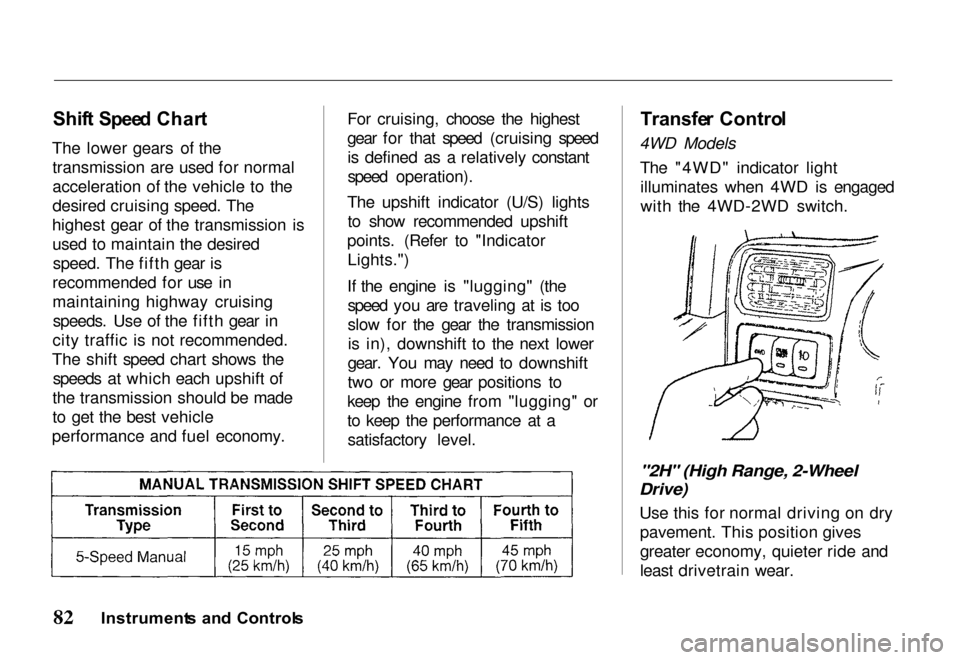
The shift speed chart shows the speeds at which each upshift of
the transmission should be made
to get the best vehicle
performance and fuel economy. For cruising, choose the highest
gear for that speed (cruising speed
is defined as a relatively constant
speed operation).
The upshift indicator (U/S) lights to show recommended upshift
points. (Refer to "Indicator Lights.")
If the engine is "lugging" (the speed you are traveling at is too
slow for the gear the transmissionis in), downshift to the next lower
gear. You may need to downshift
two or more gear positions to
keep the engine from "lugging" or
to keep the performance at a satisfactory level.
Transfe
r Contro l
4WD Models
The "4WD" indicator lightilluminates when 4WD is engaged
with the 4WD-2WD switch.
"2H" (High Range, 2-Wheel
Drive)
Use this for normal driving on drypavement. This position gives
greater economy, quieter ride and
least drivetrain wear.
Instrument s an d Control s
Page 100 of 267
Key
s an d Ignitio n
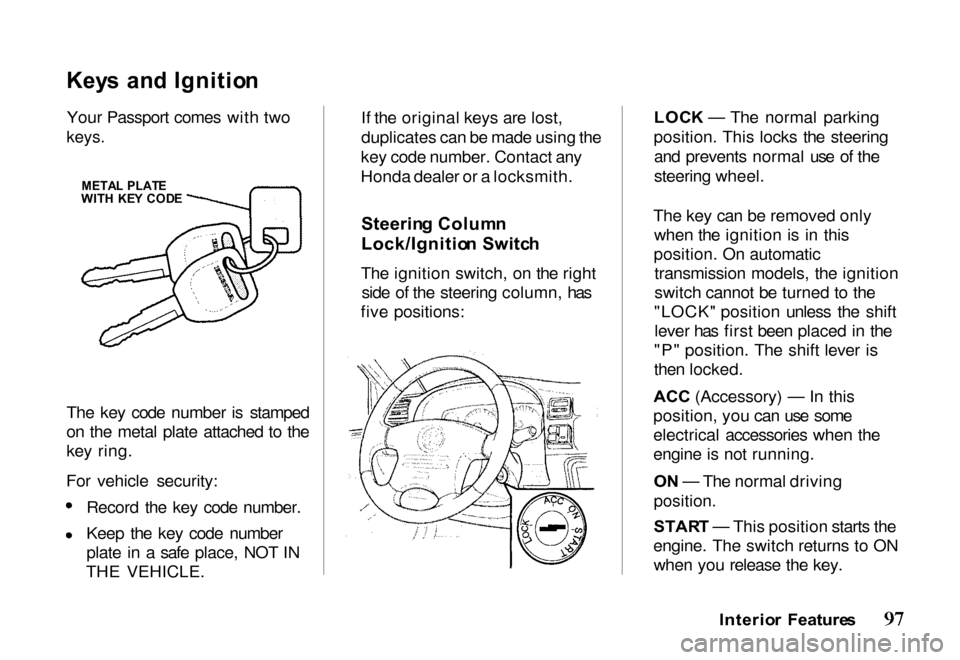
Your Passport comes with two
keys.
The key code number is stamped
on the metal plate attached to the
key ring.
For vehicle security: Record the key code number.
Keep the key code number
plate in a safe place, NOT IN
THE VEHICLE. If the original keys are lost,
duplicates can be made using the
key code number. Contact any
Honda dealer or a locksmith.
Steerin g Colum n
Lock/Ignitio n Switc h
The ignition switch, on the right side of the steering column, has
five positions: LOC
K — The normal parking
position. This locks the steering and prevents normal use of the
steering wheel.
The key can be removed only when the ignition is in this
position. On automatic transmission models, the ignition
switch cannot be turned to the
"LOCK" position unless the shift lever has first been placed in the
"P" position. The shift lever is
then locked.
ACC (Accessory) — In this
position, yo
u can use some
electrical accessories when the
engine is not running.
O N — The normal driving
position.
STAR T — This position starts the
engine. The switch returns to ON when you release the key.
Interior Feature s
META
L PLAT E
WIT H KE Y COD E
Page 121 of 267
Foot/Defros
t — Air
comes from the floor
outlets, windshield defroster
outlets and side window defroster
outlets. When you select
Foot/Defrost, the A/C turns on (if it is not already on), and outside
air is selected automatically.
Because of the automatic
operation, you will not see the
light in the A/C button. The system goes back to your formersettings when you move the knob
to any other position.
When the windshield glass and door glass are foggy or frosty, use
this Foot/Defrost mode to clear
off the glass while maintaining the
heating performance.
Defrost — Air is
conditioned and
delivered from the windshield
defroster outlets with a small amount delivered from the side
window defroster outlets. This
position is recommended for conditions of severe fogging andicing only. When you select
Defrost, the A/C turns on (if it is not already on), and outside air is
selected automatically. Because of
the automatic operation, you will
not see the light in the A/C button.
The system goes back to your former settings when you movethe knob to any other position.
Operatin g Tip s — Use the heater
with the air-source selector lever
at the outside air position. This
will minimize windshield
clouding while quickly warming
the interior of the vehicle. For
best results, engage the A/C
compressor to minimize windshield clouding.
Ventilatio
n
Your vehicle has a flow-through
ventilation system that provides
a supply of outside air into the
vehicle when it is moving and the
air-source selector lever is in the
outside air position. When the vehicle is not in motion, you can
get a steady flow of outside air
with the heater or air conditioning
blower running.
With the side windows closed and
the air-source selector lever in the
outside air position, the flow-
through ventilation system
provides outside air flow into the
front air inlet grilles, through the vehicle and out the rear air
exhaust outlet.
Comfor t an d Convenienc e Feature s
Page 126 of 267
Adjustin
g th e Soun d
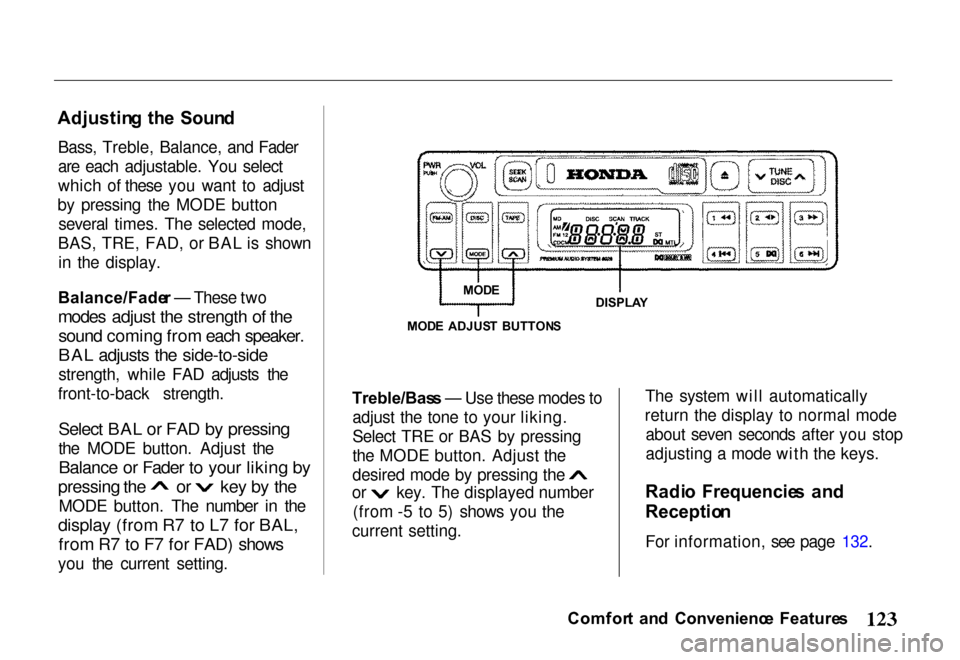
Bass, Treble, Balance, and Fader
are each adjustable. You select
which of these you want to adjust
by pressing the MODE button several times. The selected mode,
BAS, TRE, FAD, or BAL is shown in the display.
Balance/Fade r — These two
modes adjust the strength of the
sound coming from each speaker.
BAL adjusts the side-to-side
strength, while FAD adjusts the
front-to-back strength.
Select BAL or FAD by pressing
the MODE button. Adjust the
Balance or Fader to your liking by pressing the or key by the
MODE button. The number in the
display (from R7 to L7 for BAL, from R7 to F7 for FAD) shows
you the current setting. Treble/Bas
s — Use these modes to
adjust the tone to your liking.
Select TRE or BAS by pressing
the MODE button. Adjust the desired mode by pressing the
or key. The displayed number
(from -5 to 5) shows you the
current setting. The system will automatically
return the display to normal mode about seven seconds after you stop
adjusting a mode with the keys.
Radi o Frequencie s an d
Receptio n
For information, see page 132.
Comfor t an d Convenienc e Feature s
MOD
E ADJUS T BUTTON S
DISPLA
Y
MOD
E
Page 127 of 267
Operatin
g th e Cassett e Playe r
The ignition switch must be in
ACCESSORY or ON. Make sure the tape opening on the cassette is
facing to the right, then insert the
cassette most of the way into the slot. The system will pull it in the
rest of the way, and begin to play.
The tape direction indicator will light to show you which side of the cassette is playing. The
indicates the side you inserted
facing upward is now playing. If
you want to play the other side, press the (preset 2) button.
If the cassette was recorded using
Dolby noise reduction, turn it on
by pressing the (preset 5)
button. You will see in the
display.
You can switch between the
cassette and the radio by pressing the FM/AM and TAPE buttons.
When you press the FM/AM
button with a cassette playing, the
radio begins to play and the cassette stops but does not eject.
To begin playing the cassette at the same point, press the TAPE
button.
When the system reaches the end
of the tape, it will automatically
reverse direction and play the
other side. If you want to remove
the cassette from the drive, press
the EJECT button.
When you turn off the ignitionswitch, the system stops the tape
but does not eject the cassette. It
will begin to play when you turn
the ignition switch back on. To
eject the tape, even with the ignition switch off, press the
EJECT button.
Tap
e Searc h Function s
With a cassette playing, you can use the FF, REW, or APS function
to find a desired program.
FF/RE W — Fast Forward and
Rewind move the tape rapidly. Press and release the button
(preset 1) to rewind, or the
button (preset 3) to fast forward.
You will see REW or FF in the display. Press the button to
return to PLAY mode. If the system reaches the end of the tape
while in fast forward or rewind, it
automatically stops that function,
reverses direction, and begins to
play.
Comfor t an d Convenienc e Feature s
Page 134 of 267
2. Use the TUNE, SEEK, or
SCAN function to find a
desired station.
3. Pick the Preset button you want for that station. Press the
button and hold it until you
hear a beep.
4. Repeat steps 1 to 3 to store a total of six stations on AM
and twelve on FM.
Once a station's frequency is stored, simply press and release
the proper preset button to tune to
it. The number of the preset
button you have selected is shown in the display.
Adjustin
g th e Soun d
Bass, Treble, Balance, and Fader
are each adjustable. You select
which you want to adjust by
pushing the Audio Control knob several times. The selected mode,
BAS, TRE, BAL, or FAD, is shown in the display.
Balance/Fade r — These two
modes adjust the strength of the
sound coming from each speaker.
BAL adjusts the side-to-side
strength, while FAD adjusts the
front-to-back strength.
Select BAL or FAD by pressing the Audio Control knob. Adjust
the Balance or Fader to your
liking by turning the knob (without pressing in on it). The
number in the display (from R7 to
L7 for BAL, from R7 to F7 for
FAD) shows you the current
setting.
Treble/Bas
s — Use these modes to
adjust the tone to your liking.
Select TRE or BAS by pressing
the Audio Control knob. Adjust
the displayed mode to your liking
by turning the knob (without
pressing in on it). The displayed
number (from -5 to 5) shows you the current setting.
The system automatically returns the display to normal mode aboutseven seconds after you stop
pressing or turning the Audio
Control knob.
Comfor t an d Convenienc e Feature s
Page 139 of 267
FF/RE
W — Fast Forward and
Rewind move the tape rapidly.
Press and release the REW side of the TUNE bar to rewind, or the
FF side to fast forward. You will see REW or FF in the display.
Press the same side of the tune bar to return to PLAY mode.
If the system reaches the end of
the tape while in fast forward or
rewind, it automatically stops that function, reverses direction, and
begins to play.
AP S — The Automatic Program
Search (APS) function allows you
to find the beginning of a song or passage. Use the (preset 1) or
(preset 2) button to activate
APS.
For example, the first song on the
cassette is playing, and you want to listen to the third song. Press twice; you will see FF and 2 in
the display. The system will fast
forward the tape to the beginning of
the third song, then return to PLAY
mode.
To return to the beginning of the current song or passage, press
once. To return to the beginning of
the previous song, press
twice.
If the system reaches the end of
the tape before finding the
selected song or passage, it
reverses direction and returns to
PLAY mode.
To cancel APS before it finds the desired song, press the or
button again.
REPEA
T — The Repeat function
continuously repeats the current song or passage. Press the RPT
(preset 5) button to activate it. You will see RPT in the display.
When the system reaches the end
of the current song or passage, it
automatically goes into rewind.
When it gets to the beginning of
the same song or passage, the
system returns to PLAY mode.
This continues until you
deactivate Repeat by pressing the
RPT button again.
SKI P — The SKIP function fast
forwards over areas of blank tape.
Press the SKIP (preset 6) button
to activate it. You will see SKIP in the display. After the system
finds approximately 15 seconds of
blank tape, it goes into fast
forward. When it senses the
beginning of the next song or
passage, or reaches the end of the tape, it returns to PLAY mode.
Comfor t an d Convenienc e Feature s
Page 140 of 267
The APS, Repeat, and Skip
functions use silent periods on the
tape to find the end of a song or
passage. These features may not work to your satisfaction if thereis almost no gap betweenselections, a high noise level
between selections, or a silent
period in the middle of a
selection.
Carin g fo r th e Cassett e Playe r
The cassette player picks up dirt
and oxides from the tape. This
contamination builds up over time
and causes the sound quality to
degrade. To prevent this, you should clean the player after every
30 hours of use. Your dealer has a
cleaning kit available.
If you do not clean the cassette
player regularly, it may eventually become impossible to remove the contamination with a normal
cleaning kit.
Use 100-minute or shorter
cassettes. Cassettes longer than
that use thinner tape that may
break or jam the drive.
Look at a cassette before youinsert it. If the tape is loose,
tighten it by turning one of the
hubs with a pencil or your finger. If the label is peeling off, removeit from the cassette or it could
cause the cassette to jam in the
player. Never try to insert a
warped or damaged cassette in the
player.
The player automatically ejects
cassettes that do not play properly. If it ejects a cassette before it
begins to play, it is probably defective and should not be inserted again. You may have a
cassette suddenly stop playing,
reverse directions once or twice, and then eject. This is normally an
indication the tape is wound
unevenly. It should play after the
tape is manually rewound.
When they are not in use, store cassettes in their cases to protect
them from dust and moisture.
Never place cassettes where they
will be exposed to direct sunlight,
high heat, or high humidity. If a
cassette is exposed to extreme
heat or cold, let it reach a
moderate temperature before inserting it in the player.
Never try to insert foreign objects
into the cassette player.
Comfor t an d Convenienc e Feature s
Page 150 of 267
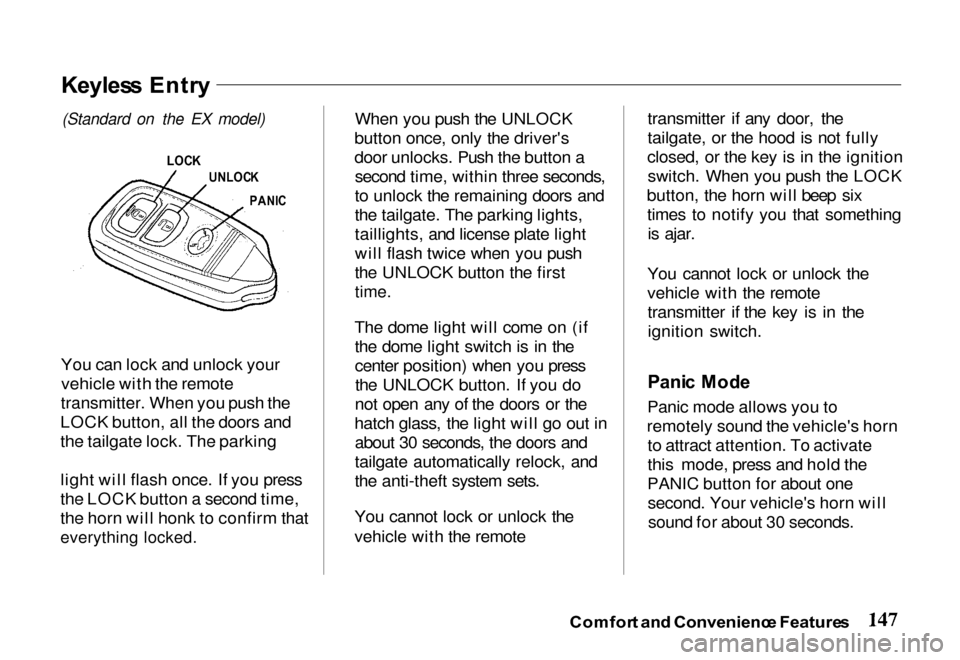
You can lock and unlock your
vehicle with the remote
transmitter. When you push the
LOCK button, all the doors and
the tailgate lock. The parking
light will flash once. If you press
the LOCK button a second time,
the horn will honk to confirm that
everything locked.
When you push the UNLOCK
button once, only the driver's
door unlocks. Push the button a second time, within three seconds,
to unlock the remaining doors and
the tailgate. The parking lights,
taillights, and license plate light
will flash twice when you push
the UNLOCK button the first
time.
The dome light will come on (if the dome light switch is in the
center position) when you pressthe UNLOCK button. If you do
not open any of the doors or the
hatch glass, the light will go out in about 30 seconds, the doors and
tailgate automatically relock, and
the anti-theft system sets.
You cannot lock or unlock the
vehicle with the remote transmitter if any door, the
tailgate, or the hood is not fully
closed, or the key is in the ignition switch. When you push the LOCK
button, the horn will beep six times to notify you that somethingis ajar.
You cannot lock or unlock the
vehicle with the remote transmitter if the key is in the
ignition switch.
Pani c Mod e
Panic mode allows you to
remotely sound the vehicle's horn to attract attention. To activate
this mode, press and hold the
PANIC button for about one second. Your vehicle's horn willsound for about 30 seconds.
Comfor t an d Convenienc e Feature s
Keyles s Entr y
(Standard on
the EX model)
LOC K
UNLOC K
PANI C
Page 151 of 267
To cancel panic mode before 30
seconds, press any button on the
remote transmitter. You can also turn the ignition switch to
ACCESSORY.
Anti-Thef
t Syste m
The anti-theft system is designed
to protect your vehicle and its contents from theft. Any attempt
to forcibly open any door, the
tailgate, or the hood without using
the key or the remote transmitterwill cause the system to alarm.
The horn sounds and the headlights flash for approximately
three minutes. The starter motor
circuit is disabled so the engine
cannot be started. After threeminutes, the system resets. Activatin
g th e Syste m
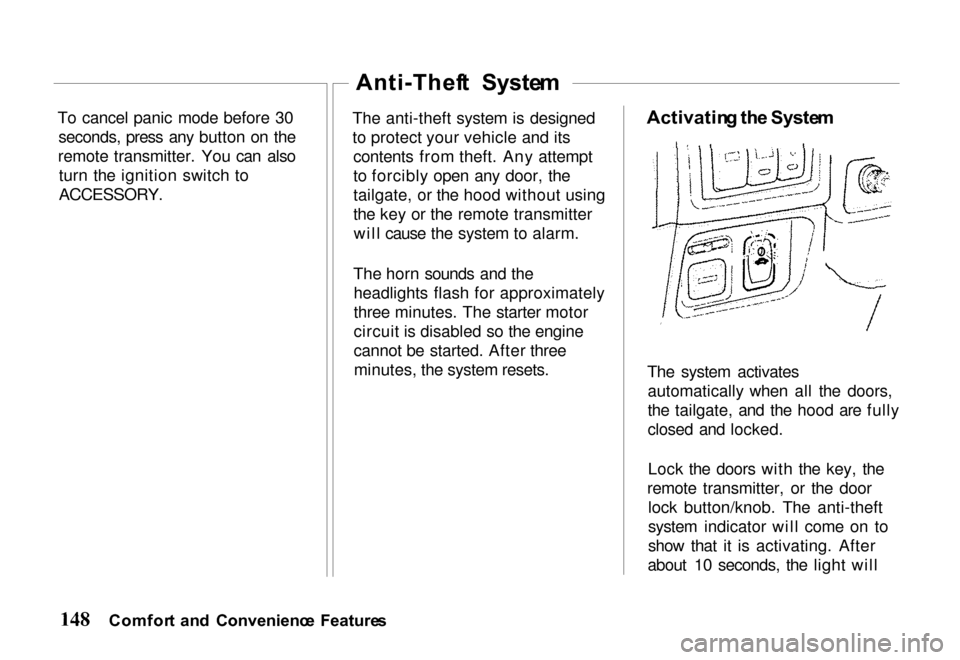
The system activates automatically when all the doors,
the tailgate, and the hood are fully
closed and locked.
Lock the doors with the key, the
remote transmitter, or the door lock button/knob. The anti-theft
system indicator will come on to
show that it is activating. After
about 10 seconds, the light will
Comfor t an d Convenienc e Feature s