display HONDA PASSPORT 2002 2.G User Guide
[x] Cancel search | Manufacturer: HONDA, Model Year: 2002, Model line: PASSPORT, Model: HONDA PASSPORT 2002 2.GPages: 294, PDF Size: 3.97 MB
Page 138 of 294

135Comfort and Convenience Features
2. Use the TUNE, SEEK, or
SCAN function to find a
desired station.
3. Pick the Preset button you want for that station. Press the
button and hold it until you
hear a beep.
4. Repeat steps 1 to 3 to store a total of six stations on AM
and twelve on FM.
Once a station’ s frequency is
stored, simply press and release
the proper preset button to tune to
it. The number of the preset
button you have selected is shown
in the display. Adjusting the Sound
Bass, Treble, Balance, and Fader
are each adjustable. You select
which you want to adjust by
pushing the Audio Control knob
several times. The selected mode,
BAS, TRE, BAL, or FAD, is
shown in the display.
Balance/Fader
– These two
modes adjust the strength of the
sound coming from each speaker.
BAL adjusts the side-to-side
strength, while FAD adjusts the
front-to-back strength.
Select BAL or FAD by pressing
the Audio Control knob. Adjust
the Balance or Fader to your
liking by turning the knob
(without pressing in on it). The
number in the display (from R7 to
L7 for BAL, from R7 to F7 for
FAD) shows you the current
setting. Treble/Bass
– Use these modes to
adjust the tone to your liking.
Select TRE or BAS by pressing
the Audio Control knob. Adjust
the displayed mode to your liking
by turning the knob (without
pressing in on it). The displayed
number (from -5 to 5) shows you
the current setting.
The system automatically returns
the display to normal mode about
seven seconds after you stop
pressing or turning the Audio
Control knob.
Page 143 of 294

140Comfort and Convenience Features
FF/REW
– Fast Forward and
Rewind move the tape rapidly.
Press and release the REW side of
the TUNE bar to rewind, or the
FF side to fast forward. You will
see REW or FF in the display.
Press the same side of the tune bar
to return to PLAY mode.
If the system reaches the end of
the tape while in fast forward or
rewind, it automatically stops that
function, reverses direction, and
begins to play.
APS – The Automatic Program
Search (APS) function allows you
to find the beginning of a song or
passage. Use the
(preset 1) or
(preset 2) button to activate
APS.
For example, the first song on the
cassette is playing, and you want
to listen to the third song. Press
twice; you will see FF and 2 in
the display. The system will fast
forward the tape to the beginning of
the third song, then return to PLAY
mode.
To return to the beginning of the
current song or passage, press
once. To return to the beginning of
the previous song, press
twice.
If the system reaches the end of
the tape before finding the
selected song or passage, it
reverses direction and returns to
PLAY mode.
To cancel APS before it finds the
desired song, press the
or
button again.
REPEAT – The Repeat function
continuously repeats the current
song or passage. Press the RPT
(preset 5) button to activate it. You will see RPT in the display.
When the system reaches the end
of the current song or passage, it
automatically goes into rewind.
When it gets to the beginning of
the same song or passage, the
system returns to PLAY mode.
This continues until you
deactivate Repeat by pressing the
RPT button again.
SKIP
– The SKIP function fast
forwards over areas of blank tape.
Press the SKIP (preset 6) button
to activate it. You will see SKIP
in the display. After the system
finds approximately 15 seconds of
blank tape, it goes into fast
forward. When it senses the
beginning of the next song or
passage, or reaches the end of the
tape, it returns to PLAY mode.
Page 145 of 294
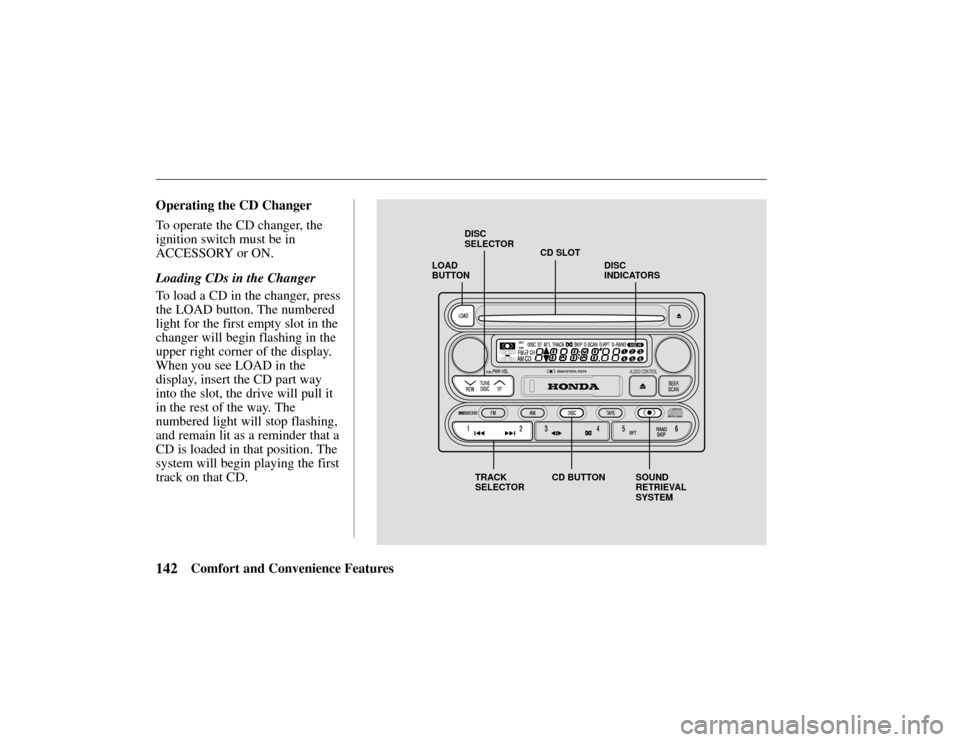
LOAD
BUTTONCD SLOT
DISC
SELECTOR
TRACK
SELECTOR CD BUTTON SOUND
RETRIEVAL
SYSTEMDISC
INDICATORS
142Comfort and Convenience Features
Operating the CD Changer
To operate the CD changer, the
ignition switch must be in
ACCESSORY or ON.
Loading CDs in the Changer
To load a CD in the changer, press
the LOAD button. The numbered
light for the first empty slot in the
changer will begin flashing in the
upper right corner of the display.
When you see LOAD in the
display, insert the CD part way
into the slot, the drive will pull it
in the rest of the way. The
numbered light will stop flashing,
and remain lit as a reminder that a
CD is loaded in that position. The
system will begin playing the first
track on that CD.
Page 146 of 294

143Comfort and Convenience Features
Repeat this procedure to load CDs
in the remaining positions in the
changer.
To load more than one CD in a
single operation, press and hold
the LOAD button until you hear a
beep. Load the first CD as
described above. After the first
CD loads, the light for the next
open position will begin blinking.
Insert the next CD part way into
the slot. Continue this procedure
until all six slots are loaded. If
you do not want to load CDs into
all six positions, press the LOAD
button again after the last CD has
loaded. That CD will begin
playing.
Playing CDs
Press the DISC button to switch to
the CD changer. The CD that is
currently loaded will begin
playing. The disc and track
numbers are shown in the display.
To select a different disc, press the
TUNE/DISC button:
to select
the next disc, or
to select the
previous disc.
To change tracks, press and
release the
(preset 2) button to
advance one track at a time, or the
(preset 1) button to return to
the beginning of the current track.
Press
again to select the
previous track.
To move rapidly within a track,
press and hold the
button to
move forward, or the
button
to move backward. Release the
button when the system reaches
the point you want.
You can switch to the radio or the
cassette player by pressing the
FM, AM, or TAPE button. To switch back to the CD changer,
press the DISC button. The CD
will begin playing where it left
off.
To remove a CD from the
changer, select the CD with the
TUNE/DISC button, then press
and release the EJECT button
next to the slot.
To remove all the CDs from the
changer, press and hold the
EJECT button until you hear a
beep. The CDs will eject in order.
Sound Retrieval System
– The
Sound Retrieval System function
adds richness to the sound of the
CDs. To activate it, press the
button. This turns on the first
level of sound expansion. Press
the button a second time to take it
to the second level. Press the
button again to turn off the
feature.
Page 147 of 294
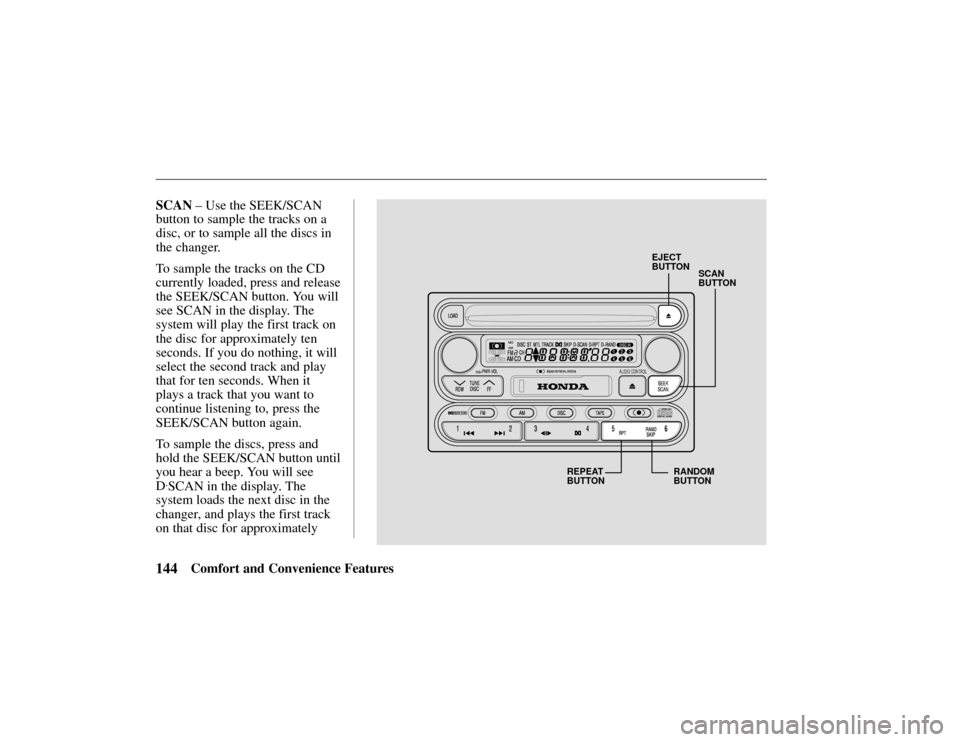
SCAN
BUTTON
EJECT
BUTTON
REPEAT
BUTTON RANDOM
BUTTON
144Comfort and Convenience Features
SCAN
– Use the SEEK/SCAN
button to sample the tracks on a
disc, or to sample all the discs in
the changer.
To sample the tracks on the CD
currently loaded, press and release
the SEEK/SCAN button. You will
see SCAN in the display. The
system will play the first track on
the disc for approximately ten
seconds. If you do nothing, it will
select the second track and play
that for ten seconds. When it
plays a track that you want to
continue listening to, press the
SEEK/SCAN button again.
To sample the discs, press and
hold the SEEK/SCAN button until
you hear a beep. You will see
D
.SCAN in the display. The
system loads the next disc in the
changer, and plays the first track
on that disc for approximately
Page 148 of 294

145Comfort and Convenience Features
ten seconds. If you do nothing, it
will load the second disc and play
the first track for ten seconds.
When it plays a disc that you want
to continue listening to, press
SEEK/SCAN again.
REPEAT
– Use the RPT (preset
5) button to continuously play the
current track or disc.
To keep repeating the current
track, press and release the RPT
button. You will see RPT in the
display. The system will
continuously replay the current
track. Press the RPT button again
to turn it off.
To repeat the current disc, press
and hold the RPT button until you
hear a beep. You will see D
.RPT
in the display. The system plays through the disc currently loaded.
At the end of the disc, instead of
loading the next disc in the
changer, it will return to the
beginning of the current disc.
Press the RPT button again to turn
it off.
RANDOM
– Use the RAND
(preset 6) button to randomly
play, or “shuffle” the tracks on the
disc or discs in the changer. With
this activated, the system plays
the tracks in random order, rather
than in the order they are recorded
on the CD or CDs.
To shuffle the tracks on the CD
currently loaded, press and release
the RAND button. You will see
RAND in the display. The system
plays the tracks on the current disc in random order. When all
the tracks have been played, it
will load the next CD and play
those tracks in random order. To
turn off random play, press the
RAND button again.
To include all the loaded CDs in
the random selection, press and
hold RAND until you hear a beep.
You will see D
.RAND in the
display. With this activated, the
system randomly selects what
track to play next from all the
CDs in the changer. After playing
a track, it may select another track
on that same disc, or it may load a
different CD and play a track on
it. This continues until you turn
off random play by pressing the
RAND button again.
Page 156 of 294
153Comfort and Convenience Features
begin blinking rapidly to indicate
the system is active.
Deactivating the System
Unlocking the doors or the
tailgate with the key or the remote
transmitter turns off the system.
You can also turn the ignition
switch to the
ACCESSORY
position.
Doing any of the above will also
reset an alarming system before
the three minutes have elapsed.
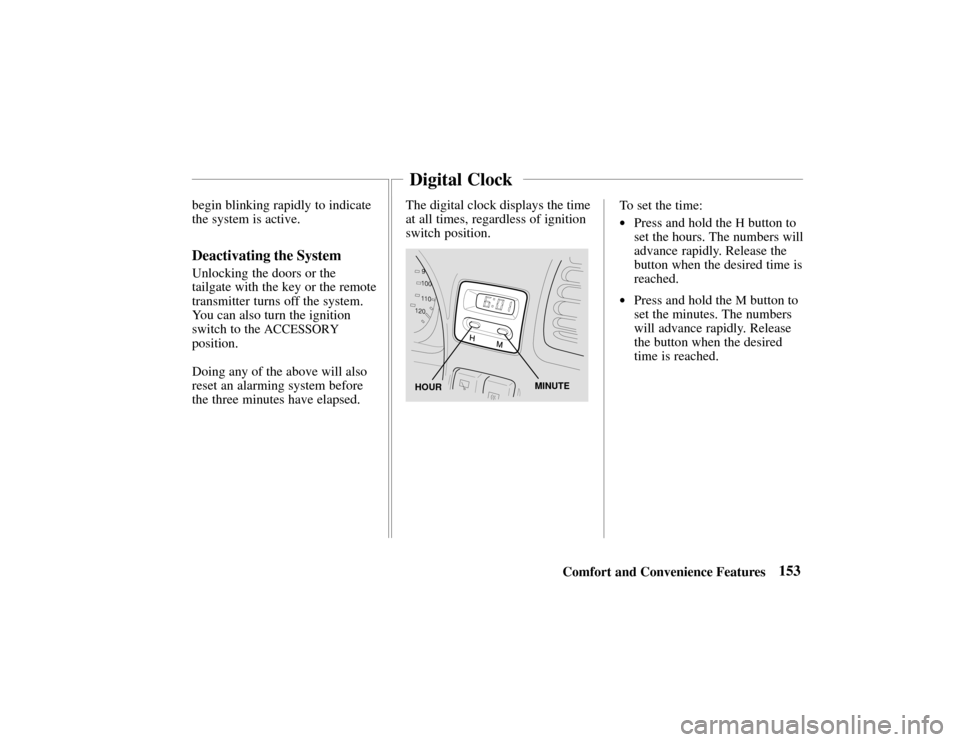
The digital clock displays the time
at all times, regardless of ignition
switch position.
HOURMINUTE
To set the time:
•Press and hold the H button to
set the hours. The numbers will
advance rapidly. Release the
button when the desired time is
reached.
•Press and hold the M button to
set the minutes. The numbers
will advance rapidly. Release
the button when the desired
time is reached.
Digital Clock