lights HONDA PASSPORT 2002 2.G Owner's Manual
[x] Cancel search | Manufacturer: HONDA, Model Year: 2002, Model line: PASSPORT, Model: HONDA PASSPORT 2002 2.GPages: 294, PDF Size: 3.97 MB
Page 134 of 294
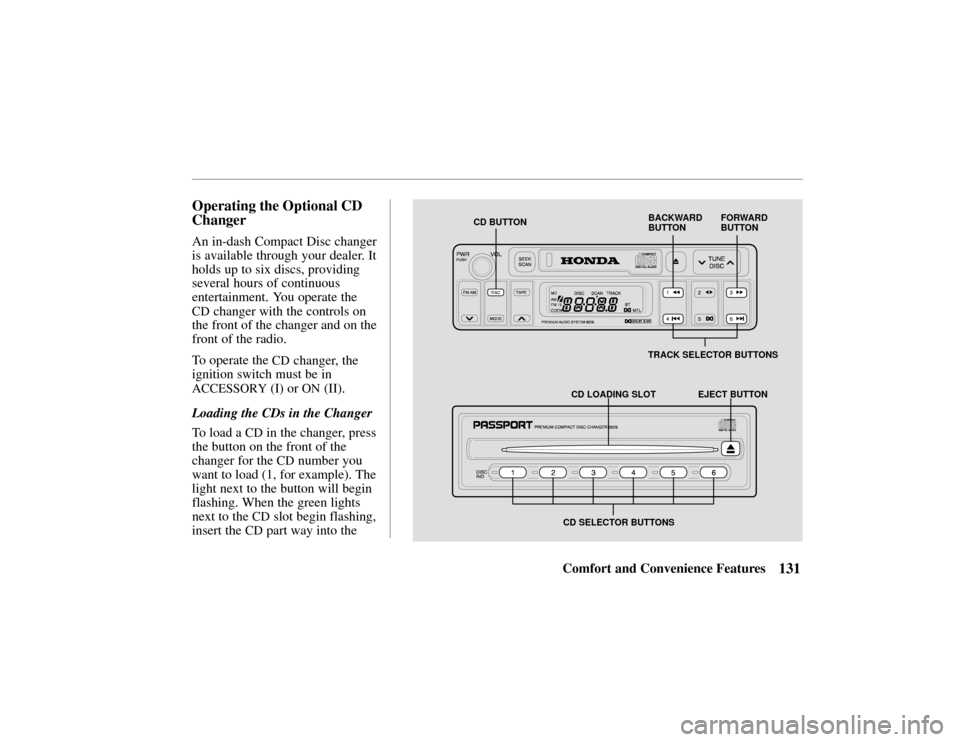
CD BUTTONFORWARD
BUTTON
BACKWARD
BUTTON
TRACK SELECTOR BUTTONS
CD LOADING SLOT EJECT BUTTON
CD SELECTOR BUTTONS
131Comfort and Convenience Features
Operating the Optional CD
Changer
An in-dash Compact Disc changer
is available through your dealer. It
holds up to six discs, providing
several hours of continuous
entertainment. You operate the
CD changer with the controls on
the front of the changer and on the
front of the radio.
To operate the
CD changer, the
ignition switch must be in
ACCESSORY (I) or ON (II).
Loading the CDs in the Changer
To load a
CD in the changer, press
the button on the front of the
changer for the
CD number you
want to load (1, for example). The
light next to the button will begin
flashing. When the green lights
next to the
CD slot begin flashing,
insert the
CD part way into the
Page 154 of 294
151Comfort and Convenience Features
(Standard on the
EX model)
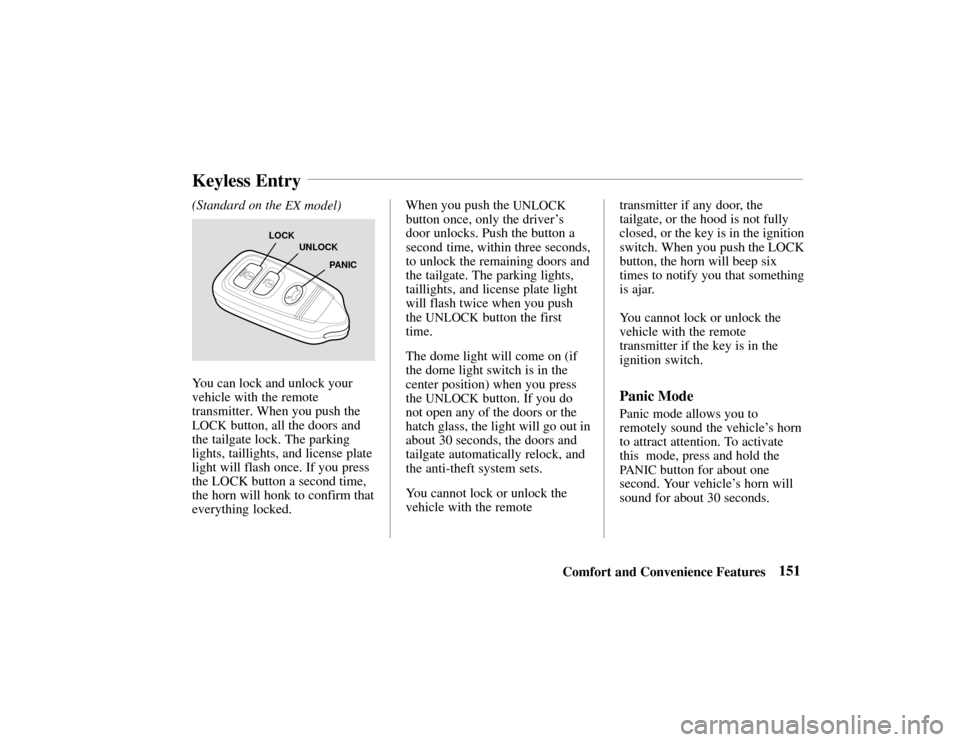
LOCK
UNLOCK
PANIC
You can lock and unlock your
vehicle with the remote
transmitter. When you push the
LOCK button, all the doors and
the tailgate lock. The parking
lights, taillights, and license plate
light will flash once. If you press
the LOCK button a second time,
the horn will honk to confirm that
everything locked. When you push the
UNLOCK
button once, only the driver
’s
door unlocks. Push the button a
second time, within three seconds,
to unlock the remaining doors and
the tailgate. The parking lights,
taillights, and license plate light
will flash twice when you push
the
UNLOCK button the first
time.
The dome light will come on (if
the dome light switch is in the
center position) when you press
the
UNLOCK button. If you do
not open any of the doors or the
hatch glass, the light will go out in
about 30 seconds, the doors and
tailgate automatically relock, and
the anti-theft system sets.
You cannot lock or unlock the
vehicle with the remote transmitter if any door, the
tailgate, or the hood is not fully
closed, or the key is in the ignition
switch. When you push the LOCK
button, the horn will beep six
times to notify you that something
is ajar.
You cannot lock or unlock the
vehicle with the remote
transmitter if the key is in the
ignition switch.Panic Mode
Panic mode allows you to
remotely sound the vehicle’
s horn
to attract attention. To activate
this mode, press and hold the
PA N I C button for about one
second. Your vehicle ’s horn will
sound for about 30 seconds.
Keyless Entry
Page 155 of 294
152Comfort and Convenience Features
To cancel panic mode before 30
seconds, press any button on the
remote transmitter. You can also
turn the ignition switch to
ACCESSORY.
The anti-theft system is designed
to protect your vehicle and its
contents from theft. Any attempt
to forcibly open any door, the
tailgate, or the hood without using
the key or the remote transmitter
will cause the system to alarm.
The horn sounds and the
headlights flash for approximately
three minutes. The starter motor
circuit is disabled so the engine
cannot be started. After three
minutes, the system resets.Activating the System
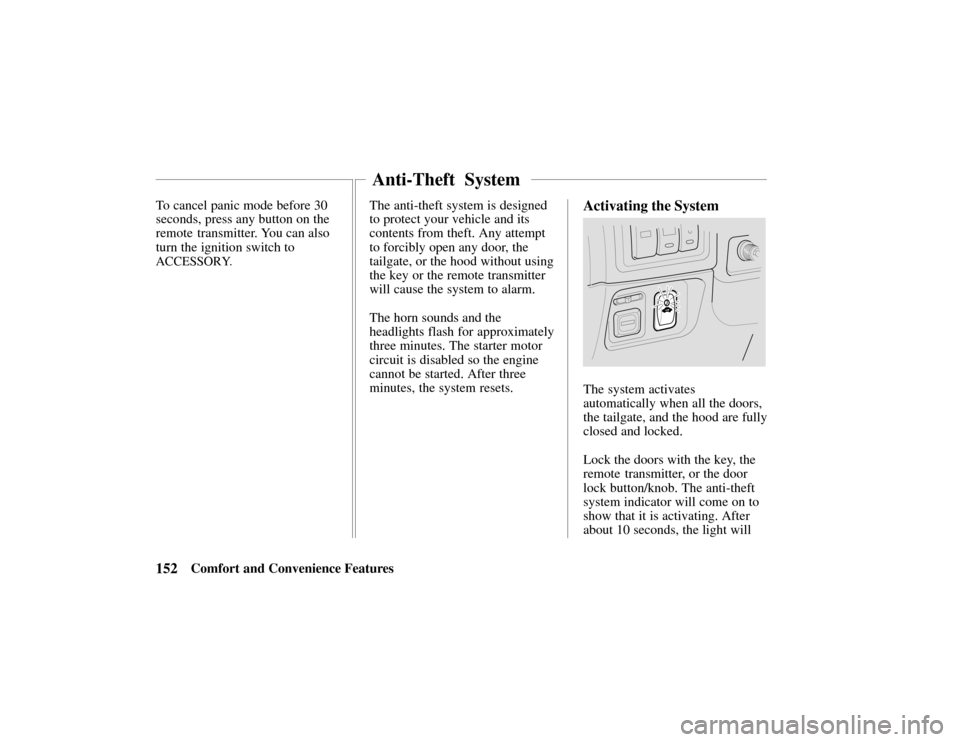
The system activates
automatically when all the doors,
the tailgate, and the hood are fully
closed and locked.
Lock the doors with the key, the
remote transmitter, or the door
lock button/knob. The anti-theft
system indicator will come on to
show that it is activating. After
about 10 seconds, the light will
Anti-Theft System
Page 158 of 294
155Driving Tips
Before Driving156
. . . . . . . . . . .
Starting the Engine157 . . . . .
New Vehicle Break-In 158 . . . . .
Parking 158 . . . . . . . . . . . . . . . .
Brakes 159 . . . . . . . . . . . . . . . . .
Tires 163 . . . . . . . . . . . . . . . . . .
Inflation 164 . . . . . . . . . . . . .
Inspection 165 . . . . . . . . . . . .
Maintenance 166 . . . . . . . . . .
Tire Rotation 166 . . . . . . . . . .
Replacing Tires
and Wheels 166 . . . . . . . . . .
Wheels and Tires 167 . . . . . .
Traction 168 . . . . . . . . . . . . . .
Tire Chains 168 . . . . . . . . .
Wheel Replacement
Considerations 169 . . . . . . .
Fuel Economy 170 . . . . . . . . . . .
Three-Way Catalytic
Converter 172 . . . . . . . . . . . . . Operation in
Foreign Countries 173
. . . . . . .
Accessories & Modifications173
Carrying Cargo175 . . . . . . . . . . .
Trailer Towing 178 . . . . . . . . . . .
Trailer Hitches 180 . . . . . . . .
Safety Chain181 . . . . . . . . . .
Trailer Lights181 . . . . . . . . . .
Tires181 . . . . . . . . . . . . . . . . .
Trailer Brakes181 . . . . . . . . .
Equipment Check182 . . . . . .
Limited Slip Differential 182 . . .
Driving Tips
Page 159 of 294
156 Driving Tips
Driving Guidelines
Your Honda has higher ground
clearance than a passenger car
designed for use only on
pavement. Higher ground
clearance has many advantages
for off-road driving. It allows you
to travel over bumps, obstacles,
and rough terrain. It also provides
good visibility so you can
anticipate problems earlier.
These advantages come at some
cost. Because your vehicle is
taller and rides higher off the
ground, it has a high center of
gravity. This means that your
vehicle can tip or roll over if you
make abrupt turns. Utility
vehicles have a significantly
higher rollover rate than other
types of vehicles. To prevent rollover or loss of
control:
•
Take corners at slower speeds
than you would with a
passenger car.
• Avoid sharp turns and abrupt
maneuvers whenever possible.
• Do not modify your vehicle in
any way that would raise the
center of gravity (see page 174).
•Do not carry heavy cargo on
the roof (see page 177).
For off-road driving guidelines,
see the Off-Road Driving
Information booklet that came
with your vehicle.
Before Entering the Vehicle
1. Check that the windows, mirrors, lights and reflectors
are clean and unobstructed. 2. Check the tires to see if they
are low or flat. You will need
a pressure gauge to tell if tires
are properly inflated.
3. Check that all lights work.
4. Check for fluid leaks.
5. Be sure everything is properly stowed.
6. Check the area behind the vehicle if you are about to
back up.
Before Driving the Vehicle
1. Lock all doors.
2. Adjust the seat and anymovable head restraints.
3. Adjust the inside and outside mirrors.
4. Check that all the indicator lights work when the key
Before Driving
Page 161 of 294

158Driving Tips
You may drive your new vehicle
from its very first mile/kilometer
without following a formal
“break-in” schedule. However,
there are things you can do during
the first few hundred miles/
kilometers of driving that will add
to the future performance and
economy of your vehicle.
It is recommended that your speed
during the first 500 miles (800
kilometers) be limited to a
maximum of 55 mph (90 km/h)
and that you do not drive for long
periods at any one constant speed,
either fast or slow. During this
period, avoid full-throttle starts
and, if possible, avoid hard stops;
especially during the first 200
miles (320 kilometers) of driving.
Always drive at moderate speed
until the engine has completely
warmed up.
When leaving your vehicle
unattended:
•Set the parking brake.
•Place the shift lever in
“P”
(Park) position for automatic
transmission.
•When parking a vehicle equipped
with a manual transmission on an
upward slope, or on a level
surface, place the shift lever in
the “1st” position.
•When parking a vehicle
equipped with a manual
transmission on a downward
slope, place the shift lever in
the “
R” (Reverse) position.
•Turn the key to the “LOCK”
position.
•Remove the key. The beeper
will remind you.
•Close all windows and lock all
doors.
•Check to make certain the
lights are turned off. The
beeper will remind you.
•If your vehicle is equipped with
a transfer case (4
WD), make
sure the shift lever is in 4
H or
4
L.
Parking Tips
•Never drive the vehicle with
the parking brake set. This can
overheat the rear brakes,
reducing their effectiveness and
causing excessive wear or
damage.
•Always apply the parking brake
whenever you leave the vehicle,
whether it is equipped with a
manual or automatic transmission.
New Vehicle Break-InParking
Page 165 of 294

162Driving Tips
Self-Adjusting Brakes
The brakes on this vehicle are
self-adjusting. They have been
designed so that periodic brake
adjustment is not needed.
The brakes adjust themselves each
time you firmly apply them.
Thus, if the brake pedal goes down
farther than normal due to a lack of
adjustment, drive backward and
forward a few times. Apply the
brakes intermittently.
See your Honda dealer if the
brake pedal height does not return
to normal or if there is a rapid
increase in pedal travel. Either is a
sign of other brake trouble. Also,
see your Honda dealer if the
parking brake needs adjustment.
Braking Tips
Control your vehicle’s speed on a
steep or long downhill grade by
shifting the transmission to a
lower gear. Constantly using the
brakes can cause them to overheat
and lose effectiveness.
Resting your foot on the brake
pedal when you are not intending
to brake (“riding the brakes”) can cause them to overheat. This
reduces their effectiveness, wears
them out faster, and can reduce
fuel mileage. It also causes your
brake lights to stay on all the time,
confusing drivers behind you.
Brake Wear Indicators
The front and rear brakes have
built-in wear indicators. These make a high-pitched squealing or
cricket-like warning sound when
the brake pads or linings are worn
to the point of replacement. The
sound may come and go or be
heard all the time when the vehicle
is moving, but may stop when the
brake pedal is pushed down firmly.
Expensive damage can result if
pads or linings are not replaced
immediately when needed.
Driving on Slippery Surfaces
Driving, steering, and braking
traction are reduced when the
road is coated with water, snow,
ice, gravel, or other materials.
Slow down and adjust your
driving to such conditions. It is
important to slow down when it is
slippery because stopping
Page 173 of 294

170Driving Tips
Driving for Best Fuel
Economy
How, where, and when you drive
all affect how many miles/
kilometers you can get from a
gallon/liter of fuel. The careful
attention you give your vehicle as
far as maintenance and repairs
will also help fuel economy.
Fuel Selection
Use only unleaded gasoline
meeting federal government
regulations. The federal
government specifies the
minimum octane rating number of
unleaded gasoline. Unleaded
gasoline must be used for proper
emissions control system
operation. It will also minimize
spark plug fouling. The use of
leaded gasoline can damage the
emissions control system andcould result in loss of warranty
coverage.
“Jackrabbit” Starts
You can save fuel (and prolong
engine and tire life) by avoiding
fast starts away from lights and
stop signs.
Stop-and-Go Driving
Frequent stop-and-go driving
during a trip will cut down on
your miles per gallon (kilometers
per liter). Plan even your short
shopping trips to take advantage
of through streets to avoid traffic
lights. Pace your driving to avoid
unplanned stops.
Excessive Idling
An idling engine uses fuel, too. If
you’re faced with more than a few
minutes wait and you
’re not intraffic, it is better to turn off the
key and start the engine again
later.
Repetitive Harsh Stopping
Harsh stops can also waste fuel;
instead of moving the vehicle, the
energy is wasted as heat in
braking. Energy in the form of
fuel is also needed to accelerate
back to driving speed.
Lubricants
A well-lubricated vehicle means
less friction between moving
parts. This manual lists the proper
lubrication intervals in the
“Care
and Maintenance ” section.
Air Cleaner
Your vehicle gets its power from a
mixture of fuel and air. The air is
taken into the engine through the
Fuel Economy
Page 177 of 294

174 Driving Tips
systems, such as the
SRS
and
anti-lock brake system.
However, if electronic accessories
are improperly installed, or
exceed your vehicle ’s electrical
system capacity, they can interfere
with the operation of your vehicle,
or even cause the airbags to
deploy.
Before installing any accessory:
• Make sure the accessory does
not obscure any lights, or
interfere with proper vehicle
operation or performance.
• Be sure electronic accessories
do not overload electrical
circuits (see page 240).
•Have the installer contact your
Honda dealer for assistance
before installing any electronic
accessory. If possible, have your dealer
inspect the final installation.
Modifications
Do not remove any original
equipment or modify your vehicle
in any way that would alter its
design or operation. This could
make your vehicle unsafe and
illegal to drive.
For example, do not make any
modifications that would change
the ride height of your vehicle, or
install wheels and tires with a
different overall diameter.
Such modifications can adversely
affect handling, and interfere with
the operation of the vehicle
’s
anti-lock brakes and other
systems.
In addition, any modifications that
decrease ground clearance increase the chance of
undercarriage parts striking a
curb, speed bump, or other raised
object, which could cause your
airbags to deploy.
Do not modify your steering
wheel or any other part of your
Supplemental Restraint System.
Modifications could make the
system ineffective.
Additional Safety Precaution
Do not attach or place objects on
the airbag covers. Any object
attached to, or placed on, the
covers marked “
SRS,” in the
center of the steering wheel and
on top of the dashboard, could
interfere with the proper operation
of the airbags. Or, if the airbags
inflate, the objects could be
propelled inside the vehicle and
hurt someone.
Page 184 of 294

181Driving Tips
Safety Chain
Always use suitable safety chains
between your vehicle and the
trailer.
Check with your trailer
manufacturer for the required
equipment. Cross the safety
chains under the hitch and attach
them to the trailer hitch hardware.
This will prevent the trailer from
dropping to the ground in the
event the hitch disengages. For
proper use and installation,
consult your trailer manufacturer.
Trailer Lights
Trailer lights and equipment must
comply with federal, state and
local regulations. Check with your
local recreational vehicle dealer
for the requirements in your area.Use only equipment designed for
your vehicle.
Improper equipment or
installation can cause damage to
your vehicle’
s electrical system
and affect your vehicle warranty.
Consult your Honda dealer for
installation.
Tires
Always check the condition of
your vehicle’ s tires and trailer ’s
tires before operation. Replace
worn or damaged tires before
operation.
Inflate tire pressure to the
recommended cold tire pressure
indicated in the tire
manufacturer ’ s warranty booklet
in the glove box packet. Check the tire manufacturer
’s
requirements when replacement
tires are installed on your vehicle.
Trailer tire condition, size, load
rating, and proper inflation
pressure should be in accordance
with the tire manufacturer ’s
specifications. Improper tire size
and inflation can cause tire
failure, possibly resulting in
vehicle damage and personal
injury.
Trailer Brakes
Trailers with a total weight of
1,000 pounds or more require
trailer brakes. If your trailer is
equipped with a braking system,
make sure it conforms to federal,
state, and local equipment
regulations.