turn signal HONDA PASSPORT 2002 2.G Owners Manual
[x] Cancel search | Manufacturer: HONDA, Model Year: 2002, Model line: PASSPORT, Model: HONDA PASSPORT 2002 2.GPages: 294, PDF Size: 3.97 MB
Page 54 of 294
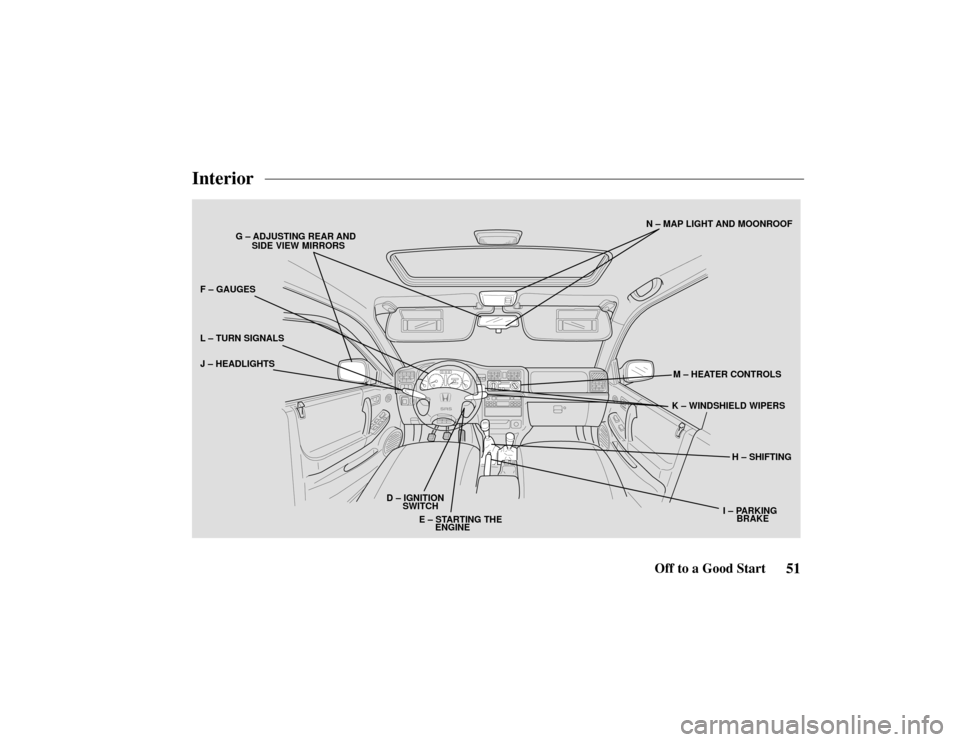
D – IGNITION
F – GAUGES
G – ADJUSTING REAR AND
SIDE VIEW MIRRORS
H – SHIFTING
I – PARKING
J – HEADLIGHTS
K – WINDSHIELD WIPERS
L
– TURN SIGNALS
M – HEATER CONTROLS
N – MAP LIGHT AND MOONROOF
E – STARTING THE ENGINE
SWITCH
BRAKE
51Off to a Good Start
Interior
Page 55 of 294
52 Off to a Good Start
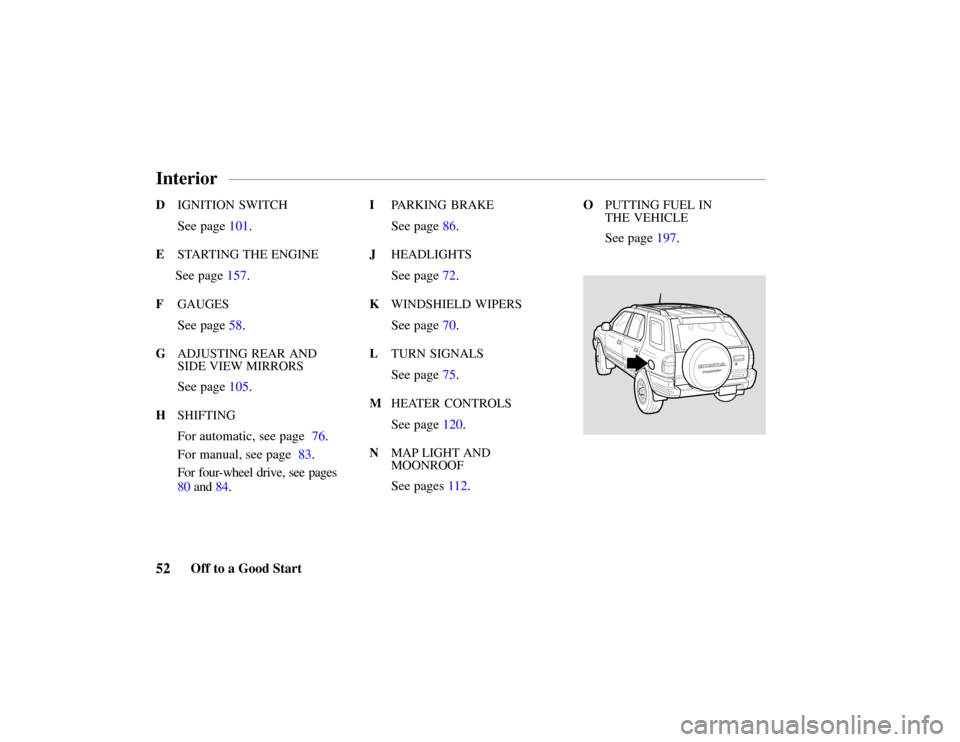
D IGNITION SWITCH
See page 101.
E STARTING THE ENGINE
See page 157.
FGAUGES
See page 58.
GADJUSTING REAR AND
SIDE VIEW MIRRORS
See page 105.
HSHIFTING
For automatic, see page 76.
For manual, see page 83.
For four-wheel drive, see pages
80 and 84.
I PARKING BRAKE
See page 86.
JHEADLIGHTS
See page 72.
KWINDSHIELD WIPERS
See page 70.
LTURN SIGNALS
See page 75.
MHEATER CONTROLS
See page 120.
NMAP LIGHT AND
MOONROOF
See pages 112.
OPUTTING FUEL IN
THE VEHICLE
See page 197.
Interior
Page 58 of 294
55Instruments and Controls
This section explains the controls
and displays that contribute to the
daily operation of your Honda.
All the essential controls are
within easy reach.
Control Locations56
. . . . . . . . .
Indicators and Gauges 57 . . . . . .
Gauges 58 . . . . . . . . . . . . . . . . . .
Tachometer 58 . . . . . . . . . . . .
Speedometer 58
. . . . . . . . . . .
Odometer 58 . . . . . . . . . . . . .
Trip Odometer/
Reset Knob 58 . . . . . . . . . . .
Fuel Gauge 59 . . . . . . . . . . . .
Engine Coolant
Temperature Gauge 60 . . . .
Indicator Lights 61 . . . . . . . . . . .
Switches70 . . . . . . . . . . . . . . . . .
Windshield Wiper/Washer 70
Headlights 72 . . . . . . . . . . . . .
Illumination Control 73 . . . . .
Rear Window Defogger 74 . .
Rear Window Wiper/
Washer 74 . . . . . . . . . . . . . .
Turn Signals75 . . . . . . . . . . . .
Hazard Warning Flasher 76 . . Automatic Transmission76
. . . .
Transfer Control
(4WD Models)80 . . . . . . . . .
5-Speed Manual Transmission 83 Transfer Control
(4WD Models)84 . . . . . . . . .
Parking Brake 86 . . . . . . . . . . . .
Accelerator Pedal87 . . . . . . . . . .
Clutch Pedal 87 . . . . . . . . . . . . .
Instruments and Controls
Page 60 of 294
57Instruments and Controls
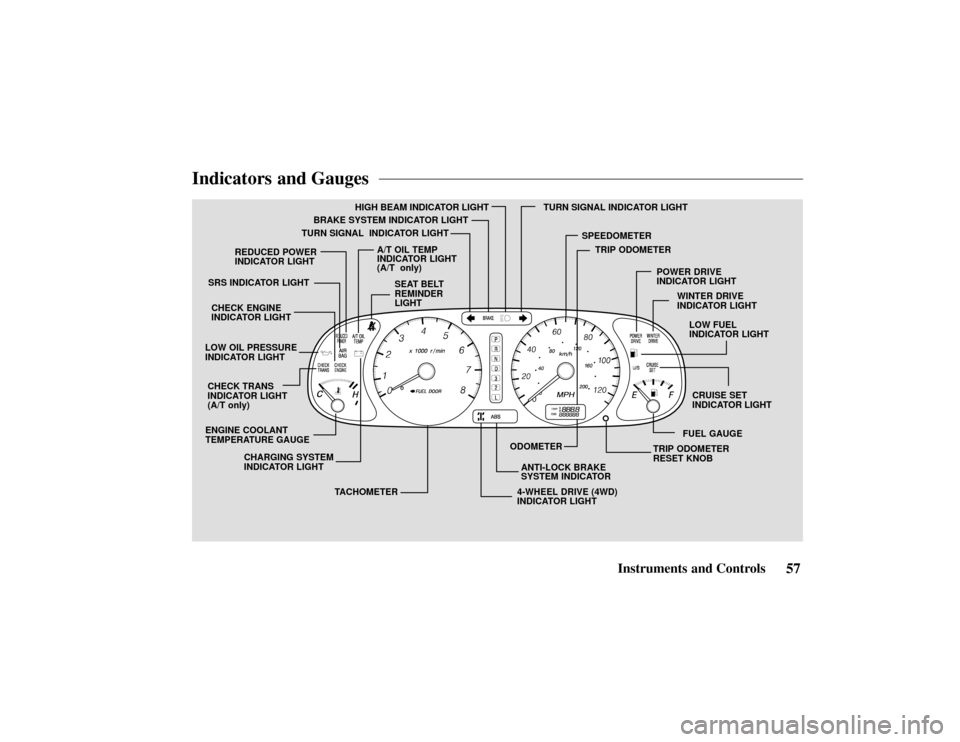
Indicators and Gauges
ENGINE COOLANT
TEMPERATURE GAUGEANTI-LOCK BRAKE
SYSTEM INDICATOR
A/T OIL TEMP
INDICATOR LIGHT
(A/T only)
CHECK TRANS
INDICATOR LIGHT
(A/T only) SRS INDICATOR LIGHT
CHECK ENGINE
INDICATOR LIGHT
TACHOMETER
TURN SIGNAL INDICATOR LIGHT
4-WHEEL DRIVE (4WD)
INDICATOR LIGHT
HIGH BEAM INDICATOR LIGHT
SPEEDOMETER
ODOMETER TRIP ODOMETER
RESET KNOB
CHARGING SYSTEM
INDICATOR LIGHT BRAKE SYSTEM INDICATOR LIGHT
LOW OIL PRESSURE
INDICATOR LIGHT TURN SIGNAL INDICATOR LIGHT
FUEL GAUGE
SEAT BELT
REMINDER
LIGHT
CRUISE SET
INDICATOR LIGHT
WINTER DRIVE
INDICATOR LIGHT
POWER DRIVE
INDICATOR LIGHT
TRIP ODOMETER
LOW FUEL
INDICATOR LIGHT
REDUCED POWER
INDICATOR LIGHT
Page 66 of 294
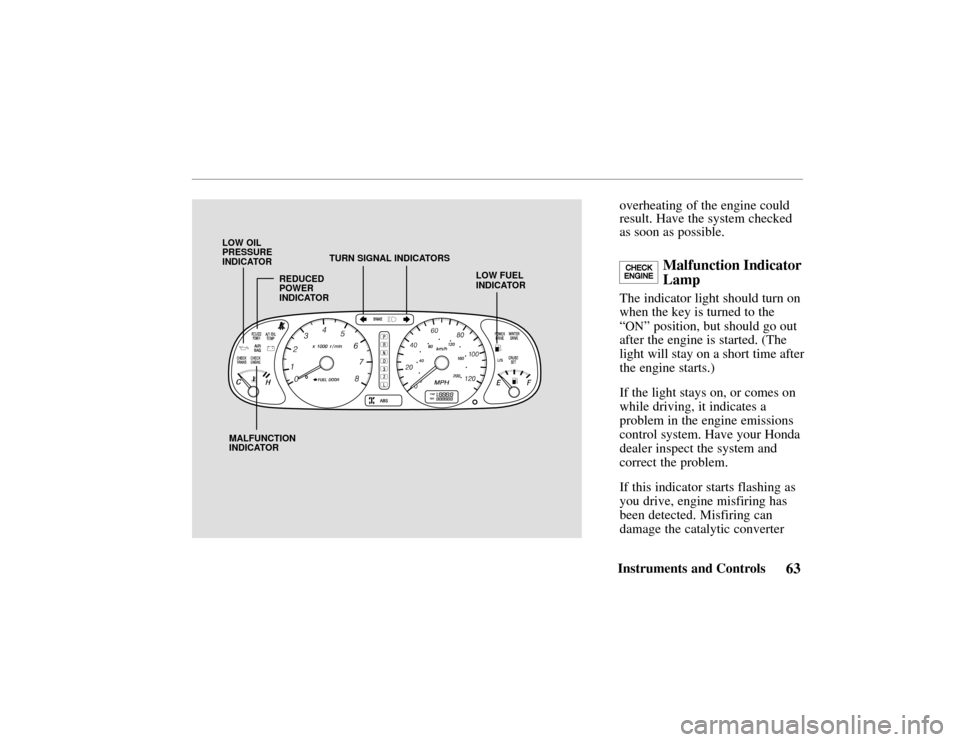
LOW FUEL
INDICATOR
MALFUNCTION
INDICATOR TURN SIGNAL INDICATORS
LOW OIL
PRESSURE
INDICATOR
REDUCED
POWER
INDICATOR
63Instruments and Controls
overheating of the engine could
result. Have the system checked
as soon as possible.
Malfunction Indicator
Lamp
The indicator light should turn on
when the key is turned to the
“
ON” position, but should go out
after the engine is started. (The
light will stay on a short time after
the engine starts.)
If the light stays on, or comes on
while driving, it indicates a
problem in the engine emissions
control system. Have your Honda
dealer inspect the system and
correct the problem.
If this indicator starts flashing as
you drive, engine misfiring has
been detected. Misfiring can
damage the catalytic converter
Page 67 of 294

64Instruments and Controls
and the engine. Stop as soon as it
is safe, turn off the engine, and
call for assistance.
If you keep driving with the
malfunction indicator lamp on,
you can damage your vehicle ’s
emissions controls and engine.
Those repairs may not be covered
by your vehicle’ s warranties.
Reduced Power
Indicator
This light comes on for a few
seconds when you turn the key to
the “ON” position
If it comes on at any other time, it
indicates that there is a problem in
the throttle “drive-by-wire”
system. With the light on, your
vehicle goes into “limp home” mode — the engine runs on three
cylinders, and the accelerator
pedal no longer controls engine
speed.
As soon as it is safe, pull off the
road and turn off the engine.
Restart the engine to reset the
system. If the light remains on, or
comes on again while driving,
have the vehicle towed to your
Honda dealer for repair.
Turn Signal
Indicators
A green light flashing on the
instrument panel lets you know
that the front and rear turn signal
lights are working. If the light
stays on and does not flash, check
for a burned out bulb. If there is
no light when the lever is moved,
check the fuse and bulb.
Whenever the Hazard Warning Flasher Switch is on, both turn
signals will flash.
Low Fuel Indicator
This light comes on when the tank
becomes nearly empty. Fill up the
tank as soon as possible.
If the low fuel indicator light
comes on when the fuel tank is
not nearly empty, have the fuel
tank sensing unit and related
components inspected and
repaired by your Honda dealer.
Driving on a road with many
sharp curves may cause the fuel
indicator light to blink
intermittently. This is normal.
Page 78 of 294
75Instruments and Controls
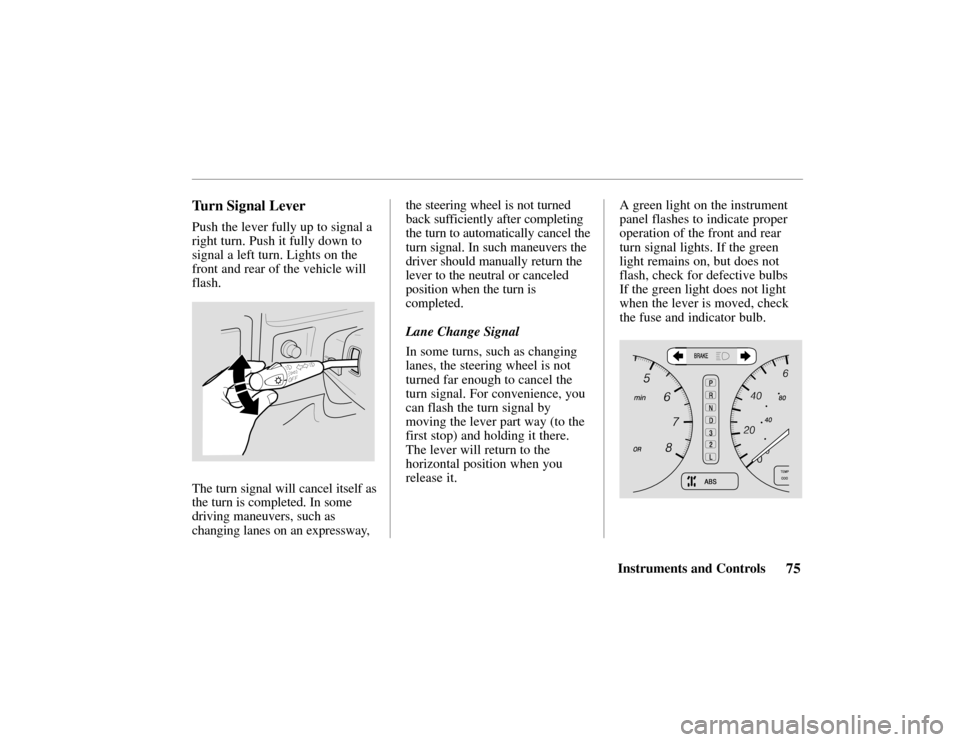
Turn Signal Lever
Push the lever fully up to signal a
right turn. Push it fully down to
signal a left turn. Lights on the
front and rear of the vehicle will
flash.
The turn signal will cancel itself as
the turn is completed. In some
driving maneuvers, such as
changing lanes on an expressway,the steering wheel is not turned
back sufficiently after completing
the turn to automatically cancel the
turn signal. In such maneuvers the
driver should manually return the
lever to the neutral or canceled
position when the turn is
completed.
Lane Change Signal
In some turns, such as changing
lanes, the steering wheel is not
turned far enough to cancel the
turn signal. For convenience, you
can flash the turn signal by
moving the lever part way (to the
first stop) and holding it there.
The lever will return to the
horizontal position when you
release it.
A green light on the instrument
panel flashes to indicate proper
operation of the front and rear
turn signal lights. If the green
light remains on, but does not
flash, check for defective bulbs
If the green light does not light
when the lever is moved, check
the fuse and indicator bulb.
Page 79 of 294
76Instruments and Controls
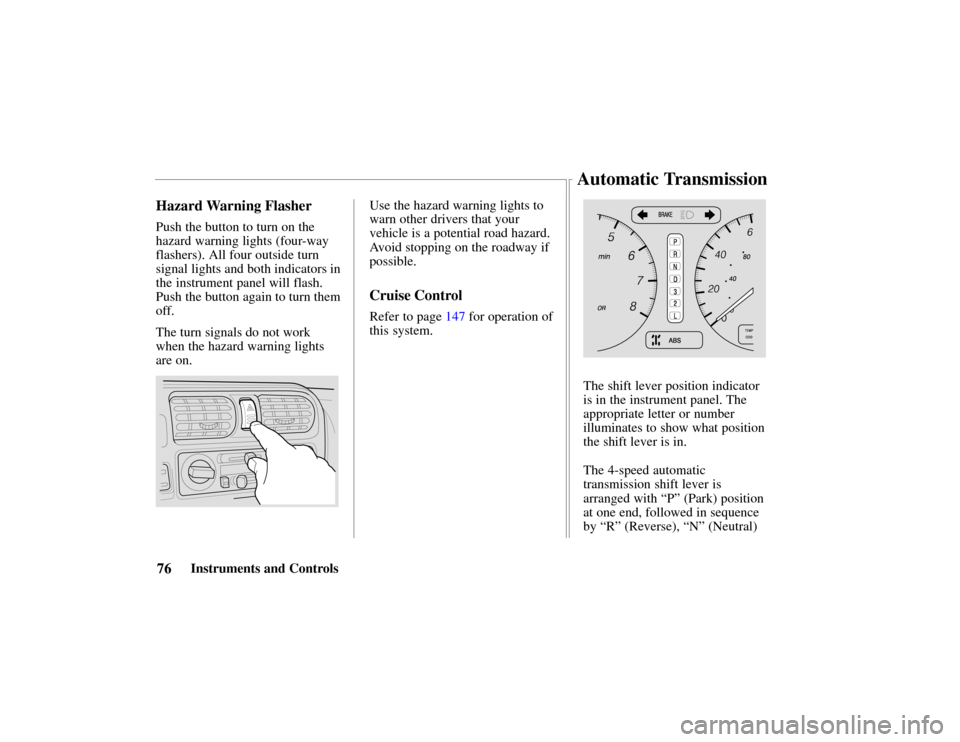
Hazard Warning Flasher
Push the button to turn on the
hazard warning lights (four-way
flashers). All four outside turn
signal lights and both indicators in
the instrument panel will flash.
Push the button again to turn them
off.
The turn signals do not work
when the hazard warning lights
are on.
Use the hazard warning lights to
warn other drivers that your
vehicle is a potential road hazard.
Avoid stopping on the roadway if
possible.
Cruise Control
Refer to page 147 for operation of
this system.
The shift lever position indicator
is in the instrument panel. The
appropriate letter or number
illuminates to show what position
the shift lever is in.
The 4-speed automatic
transmission shift lever is
arranged with “P” (Park) position
at one end, followed in sequence
by “R” (Reverse), “N” (Neutral)
Automatic Transmission
Page 128 of 294
125Comfort and Convenience Features
AM/FM/Cassette Stereo
Audio System
For LX and EX models
Your Honda’s audio system
provides clear reception on both
AM and FM bands, while the
preset buttons allow you to easily
select your favorite stations.
The cassette system features
Dolby B* noise reduction,
automatic sensing of chromium-
dioxide (CrO
2) tape, and
autoreverse for continuous play.
* Dolby noise reduction manufactured under
license from Dolby Laboratories Licensing
Corporation. “
DOLBY” and the symbol
are trademarks of Dolby Laboratories
Licensing Corporation.
Operating the Radio
The ignition switch must be in
ACCESSORY or ON. Turn the
system on by pressing the
PWR/
VOL knob. Adjust the volume by
turning the
PWR/VOL knob.
The band and frequency that the
radio was last tuned to is
displayed. To change bands, press
the
AM or FM button. On the FM
band, ST will be displayed if the
station is broadcasting in stereo.
Stereo reproduction on
AM is not
available.
You can use any of three methods
to find radio stations on the
selected band:
TUNE, SEEK, or
the
Preset buttons.
TUNE – Use the TUNE bar to tune
the radio to a desired frequency.
Press the right side (
) to tune to
a higher frequency, or the left side (
) to tune to a lower frequency.
The frequency numbers will start
to change rapidly. Release the bar
when the display reaches the
desired frequency. To change the
frequency in small increments,
press and release the
TUNE bar
quickly.
SEEK – The SEEK function
searches the band for a station
with a strong signal. To activate it,
press and release the
SEEK/SCAN
button. The system scans upward
from the current frequency. It
stops when it finds a station with
a strong signal.
Preset – You can store the
frequencies of your favorite radio
stations in the six preset buttons.
Each button will store one
frequency on the
AM band, and
two on the
FM band (FM1 and
FM2).
Audio System
Page 136 of 294

133Comfort and Convenience Features
AM/FM/Cassette/CD
Changer Stereo
Audio System
For EX-L model
Your Honda’s audio system
provides clear reception on both
AM and FM bands, while the
preset buttons allow you to easily
select your favorite stations.
The CD changer holds up to six
discs, providing several hours of
continuous entertainment.
The cassette system features
Dolby B* noise reduction,
automatic sensing of chromium-
dioxide (CrO
2) tape, and
autoreverse for continuous play.
* Dolby noise reduction manufactured under
license from Dolby Laboratories Licensing
Corporation. “
DOLBY” and the symbol
are trademarks of Dolby Laboratories
Licensing Corporation.
Operating the Radio
The ignition switch must be in
ACCESSORY or ON. Turn the
system on by pressing the
PWR/VOL knob. Adjust the
volume by turning the PWR/VOL
knob.
The band and frequency that the
radio was last tuned to is
displayed. To change bands, press
the AM or FM button. Press the
FM button again to switch
between FM1 and FM2. On the
FM band, ST will be displayed if
the station is broadcasting in
stereo. Stereo reproduction on
AM is not available.
You can use any of four methods
to find radio stations on the
selected band: TUNE, SEEK,
SCAN , or the Preset buttons.
TUNE – Use the TUNE bar to
tune the radio to a desired frequency. Press the right side
(
) to tune to a higher frequency,
or the left side (
) to tune to a
lower frequency. The frequency
numbers will start to change
rapidly. Release the bar when the
display reaches the desired
frequency. To change the
frequency in small increments,
press and release the TUNE bar
quickly.
SEEK – The SEEK function
searches the band for a station
with a strong signal. To activate it,
press and release the
SEEK/SCAN button. The system
scans up the band from the current
frequency. It stops when it finds a
station with a strong signal.
SCAN – The SCAN function
samples all the stations with
strong signals on the selected
band. To activate it, press and
hold the SEEK/SCAN button until