windshield HONDA PASSPORT 2022 Owners Manual
[x] Cancel search | Manufacturer: HONDA, Model Year: 2022, Model line: PASSPORT, Model: HONDA PASSPORT 2022Pages: 607, PDF Size: 20.86 MB
Page 8 of 607
6
Quick Reference Guide
Quick Reference Guide
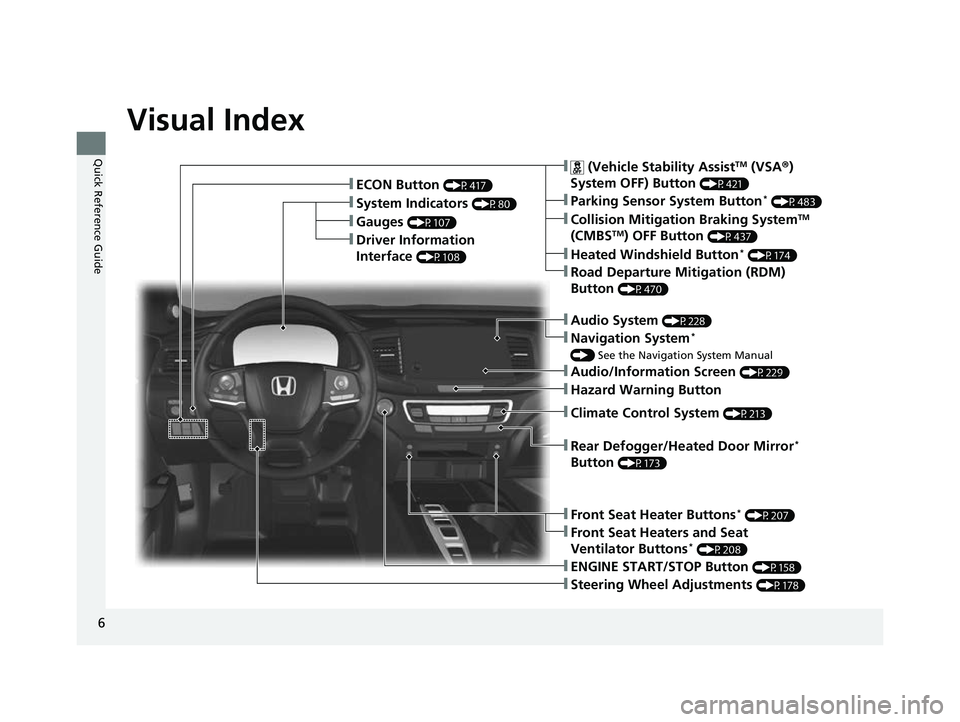
Visual Index
❚Gauges (P107)
❚Driver Information
Interface
(P108)
❚System Indicators (P80)
❚ECON Button (P417)
❚Audio System (P228)
❚Navigation System*
() See the Navigation System Manual
❚ (Vehicle Stability AssistTM (VSA ®)
System OFF) Button
(P421)
❚Collision Mitigation Braking SystemTM
(CMBSTM) OFF Button (P437)
❚Heated Windshield Button* (P174)
❚Road Departure Mitigation (RDM)
Button
(P470)
❚Parking Sensor System Button* (P483)
❚Steering Wheel Adjustments (P178)
❚ENGINE START/STOP Button (P158)
❚Front Seat Heater Buttons* (P207)
❚Front Seat Heaters and Seat
Ventilator Buttons* (P208)
❚Rear Defogger/Heated Door Mirror*
Button
(P173)
❚Audio/Information Screen (P229)
❚Hazard Warning Button
❚Climate Control System (P213)
22 PASSPORT-31TGS6300.book 6 ページ 2021年10月6日 水曜日 午前10時2分
Page 12 of 607
Visual Index
10
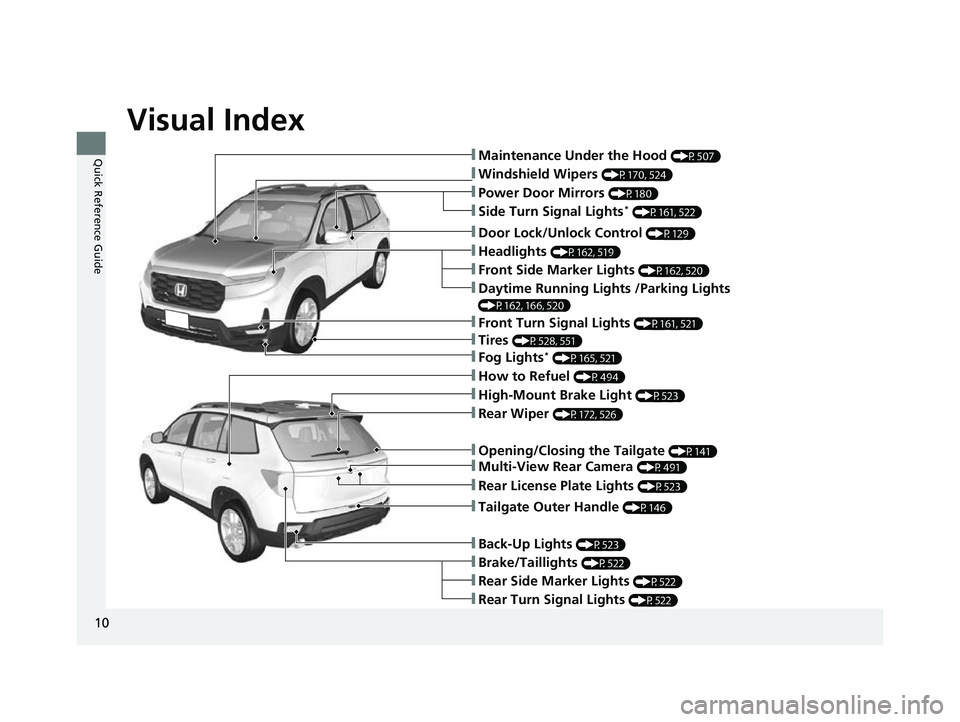
Quick Reference Guide❚Maintenance Under the Hood (P507)
❚Windshield Wipers (P170, 524)
❚Tires (P528, 551)
❚Power Door Mirrors (P180)
❚Headlights (P162, 519)
❚Front Side Marker Lights (P162, 520)
❚Side Turn Signal Lights* (P161, 522)
❚Daytime Running Lights /Parking Lights
(P162, 166, 520)
❚How to Refuel (P494)
❚High-Mount Brake Light (P523)
❚Rear Wiper (P172, 526)
❚Rear Side Marker Lights (P522)
❚Rear Turn Signal Lights (P522)
❚Brake/Taillights (P522)
❚Opening/Closing the Tailgate (P141)
❚Door Lock/Unlock Control (P129)
❚Fog Lights* (P165, 521)
❚Front Turn Signal Lights (P161, 521)
❚Back-Up Lights (P523)
❚Tailgate Outer Handle (P146)
❚Multi-View Rear Camera (P491)
❚Rear License Plate Lights (P523)
22 PASSPORT-31TGS6300.book 10 ページ 2021年10月6日 水曜日 午前10時2分
Page 18 of 607
16
Quick Reference Guide
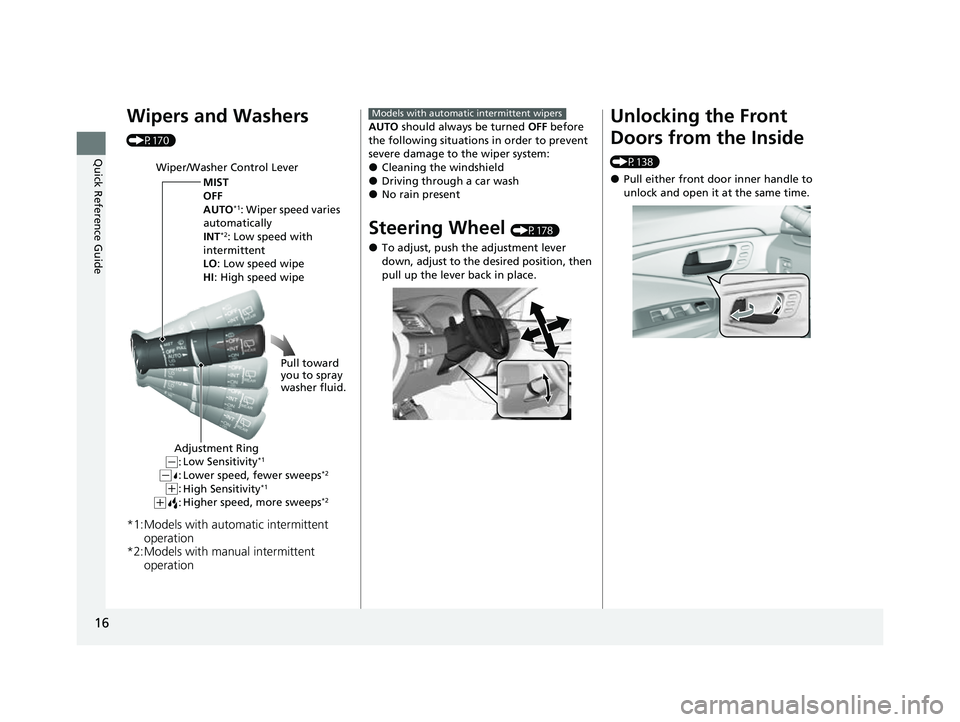
Wipers and Washers
(P170)
*1:Models with automatic intermittent operation
*2:Models with manual intermittent operation
Wiper/Washer Control Lever
MIST
OFF
AUTO
*1: Wiper speed varies
automatically
INT
*2: Low speed with
intermittent
LO: Low speed wipe
HI : High speed wipe
Pull toward
you to spray
washer fluid.
Adjustment Ring
Low Sensitivity*1
Lower speed, fewer sweeps*2
High Sensitivity*1
Higher speed, more sweeps*2(+:
( +:(-:(-:
AUTO should always be turned OFF before
the following situations in order to prevent
severe damage to the wiper system:
●Cleaning the windshield●Driving through a car wash●No rain present
Steering Wheel (P178)
●To adjust, push the adjustment lever
down, adjust to the desired position, then
pull up the lever back in place.
Models with automatic intermittent wipersUnlocking the Front
Doors from the Inside
(P138)
●Pull either front door inner handle to
unlock and open it at the same time.
22 PASSPORT-31TGS6300.book 16 ページ 2021年10月6日 水曜日 午前10時2分
Page 21 of 607
19
Quick Reference Guide
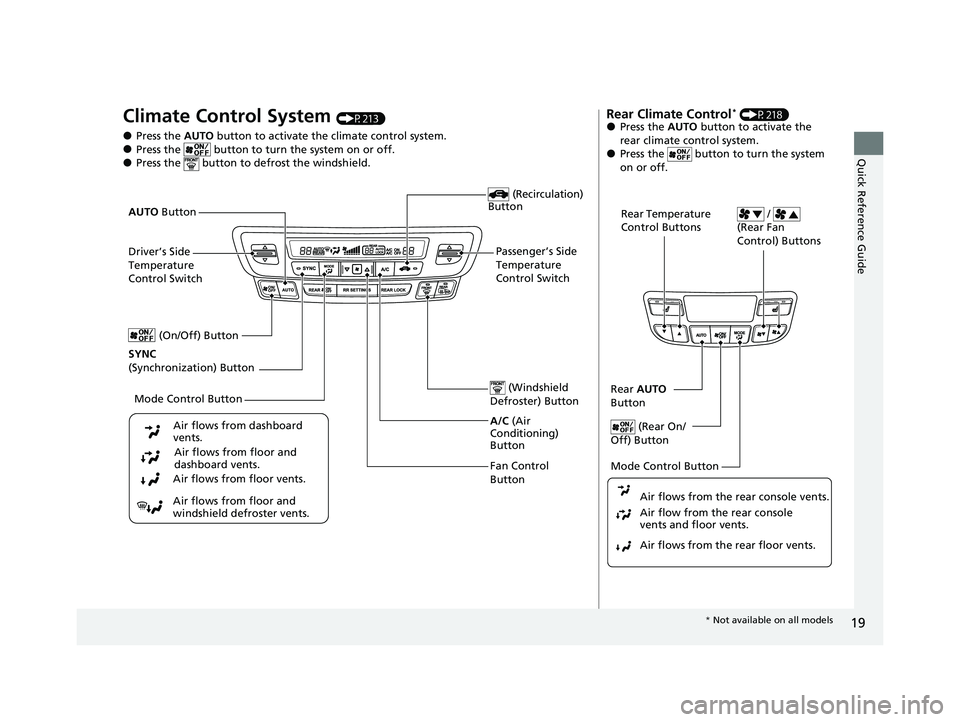
Climate Control System (P213)
●Press the AUTO button to activate th e climate control system.●Press the button to turn the system on or off.●Press the button to de frost the windshield.
Fan Control
Button (Windshield
Defroster) Button
A/C (Air
Conditioning)
Button
Air flows from floor and
windshield defroster vents. Air flows from floor vents. Air flows from floor and
dashboard vents.
Air flows from dashboard
vents.
(Recirculation)
Button
Passenger’s Side
Temperature
Control Switch
AUTO
Button
Driver’s Side
Temperature
Control Switch
Mode Control Button
SYNC
(Synchronization) Button (On/Off) Button
Rear Climate Control* (P218)●Press the
AUTO button to activate the
rear climate control system.
●Press the button to turn the system
on or off.
Rear Temperature
Control Buttons /
(Rear Fan
Control) Buttons
Rear AUTO
Button
(Rear On/
Off) Button
Mode Control Button
Air flows from the rear floor vents. Air flow from the rear console
vents and floor vents. Air flows from the rear console vents.
* Not available on all models
22 PASSPORT-31TGS6300.book 19 ページ 2021年10月6日 水曜日 午前10時2分
Page 27 of 607
25
Quick Reference Guide
Honda Sensing® (P431)
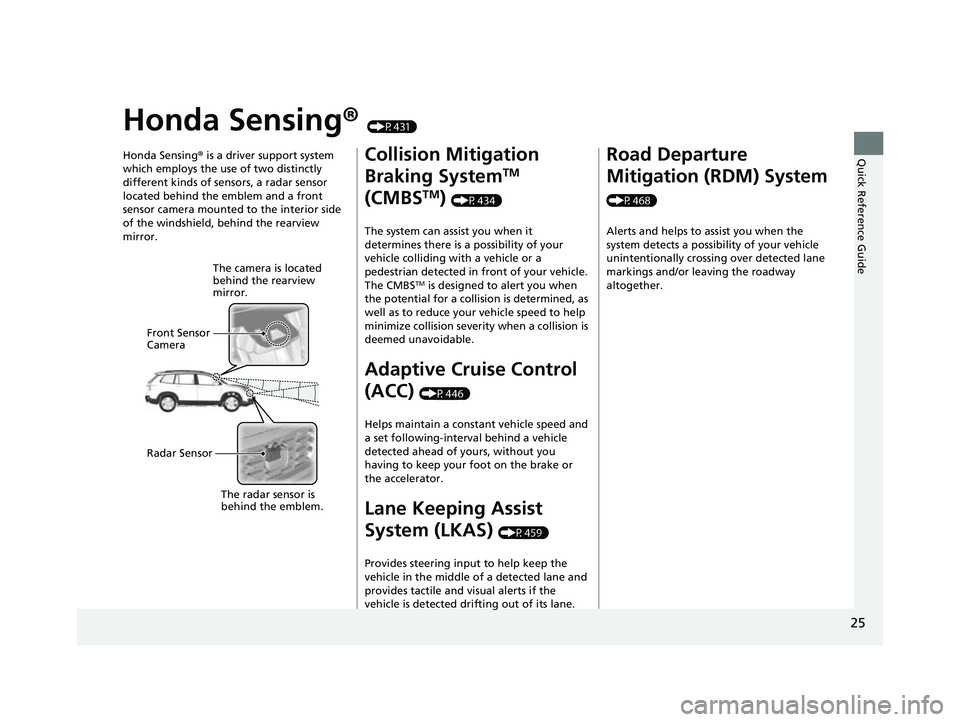
Honda Sensing ® is a driver support system
which employs the use of two distinctly
different kinds of sensors, a radar sensor
located behind the emblem and a front
sensor camera mounted to the interior side
of the windshield, behind the rearview
mirror.
The camera is located
behind the rearview
mirror.
Front Sensor
Camera
Radar Sensor
The radar sensor is
beh
i
nd the emblem.
Collision Mitigation
Braking System
TM
(CMBS
TM) (P434)
The system can assist you when it
determines there is a possibility of your
vehicle colliding with a vehicle or a
pedestrian detected in front of your vehicle.
The CMBS
TM is designed to alert you when
the potential for a collision is determined, as
well as to reduce your vehicle speed to help
minimize collision severity when a collision is
deemed unavoidable.
Adaptive Cruise Control
(ACC)
(P446)
Helps maintain a constant vehicle speed and
a set following-interval behind a vehicle
detected ahead of yours, without you
having to keep your foot on the brake or
the accelerator.
Lane Keeping Assist
System (LKAS)
(P459)
Provides steering input to help keep the
vehicle in the middle of a detected lane and
provides tactile and visual alerts if the
vehicle is detected drifting out of its lane.
Road Departure
Mitigation (RDM) System
(P468) Alerts and helps to assist you when the
system detects a possibility of your vehicle
unintentionally crossing over detected lane
markings and/or leaving the roadway
altogether.
22 PASSPORT-31TGS6300.book 25 ページ 2021年10月6日 水曜日 午前10時2分
Page 28 of 607
26
Quick Reference Guide
Maintenance (P497)
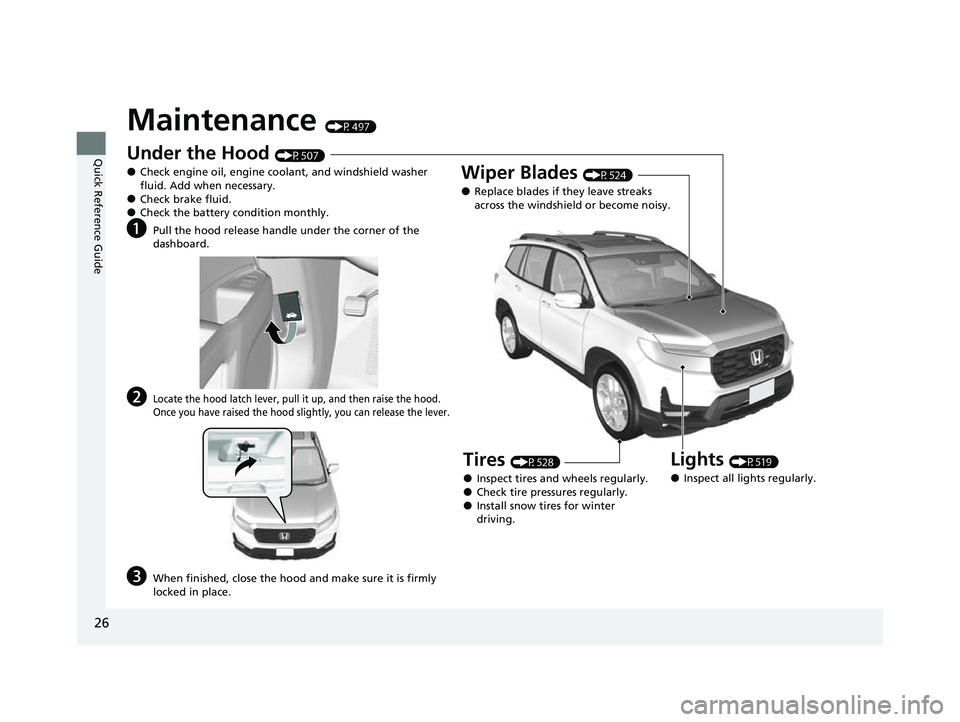
Under the Hood (P507)
●Check engine oil, engine coolant, and windshield washer
fluid. Add when necessary.
●Check brake fluid.●Check the battery condition monthly.
aPull the hood release handle under the corner of the
dashboard.
bLocate the hood latch lever, pull it up, and then raise the hood.
Once you have raised the hood slightly, you can release the lever.
cWhen finished, close the hood and make sure it is firmly
locked in place.
Lights (P519)
●Inspect all lights regularly.
Wiper Blades (P524)
●Replace blades if they leave streaks
across the windshield or become noisy.
Tires (P528)
●Inspect tires and wheels regularly.●Check tire pressures regularly.●Install snow tires for winter
driving.
22 PASSPORT-31TGS6300.book 26 ページ 2021年10月6日 水曜日 午前10時2分
Page 169 of 607
167
uuOperating the Switches Around the Steering Wheel uAuto High-Beam
Continued
Controls
Auto High-Beam
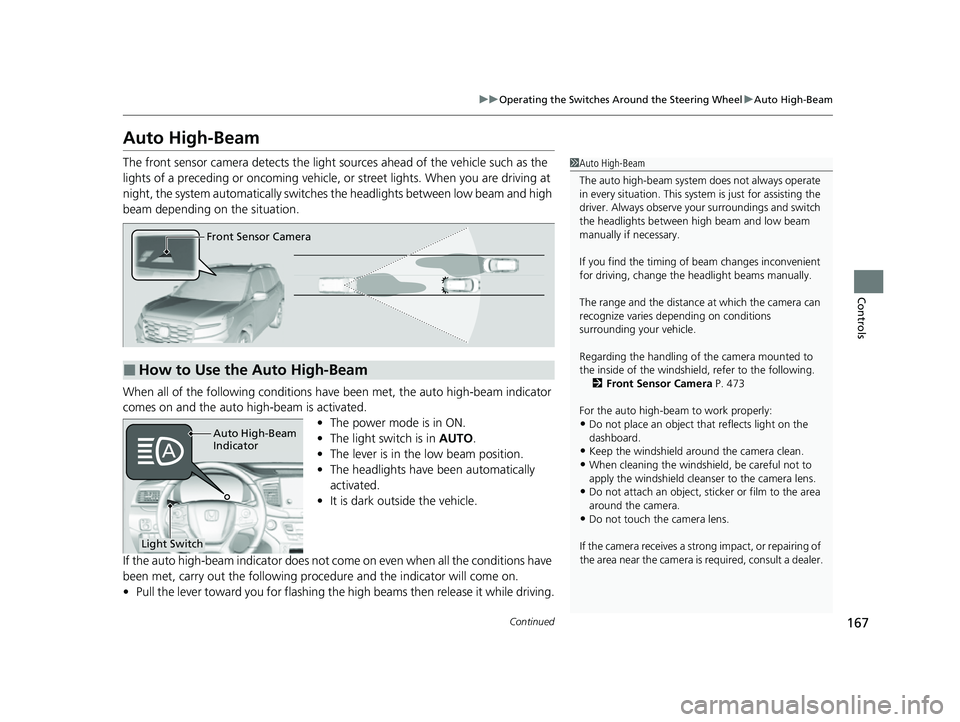
The front sensor camera detects the light sources ahead of the vehicle such as the
lights of a preceding or oncoming vehicle, or street lights. When you are driving at
night, the system automatically switches the headlights between low beam and high
beam depending on the situation.
When all of the following conditions have been met, the auto high-beam indicator
comes on and the auto high-beam is activated.
•The power mode is in ON.
• The light switch is in AUTO.
• The lever is in the low beam position.
• The headlights have been automatically
activated.
• It is dark outside the vehicle.
If the auto high-beam indica tor does not come on even when all the conditions have
been met, carry out the following procedure and the indicator will come on.
• Pull the lever toward you for flashing the high beams then release it while driving.1Auto High-Beam
The auto high-beam system does not always operate
in every situation. This syst em is just for assisting the
driver. Always observe your surroundings and switch
the headlights between high beam and low beam
manually if necessary.
If you find the timing of beam changes inconvenient
for driving, change the headlight beams manually.
The range and the distance at which the camera can
recognize varies de pending on conditions
surrounding your vehicle.
Regarding the handling of the camera mounted to
the inside of the windshiel d, refer to the following.
2 Front Sensor Camera P. 473
For the auto high-beam to work properly:
•Do not place an object that reflects light on the
dashboard.
•Keep the windshield around the camera clean.
•When cleaning the windshield, be careful not to
apply the windshield cleans er to the camera lens.
•Do not attach an object, sticker or film to the area
around the camera.
•Do not touch the camera lens.
If the camera receives a st rong impact, or repairing of
the area near the camera is required, consult a dealer.
■How to Use the Auto High-Beam
Front Sensor Camera
Auto High-Beam
Indicator
Light Switch
22 PASSPORT-31TGS6300.book 167 ページ 2021年10月6日 水曜日 午前10時2分
Page 170 of 607
uuOperating the Switches Around the Steering Wheel uAuto High-Beam
168
Controls
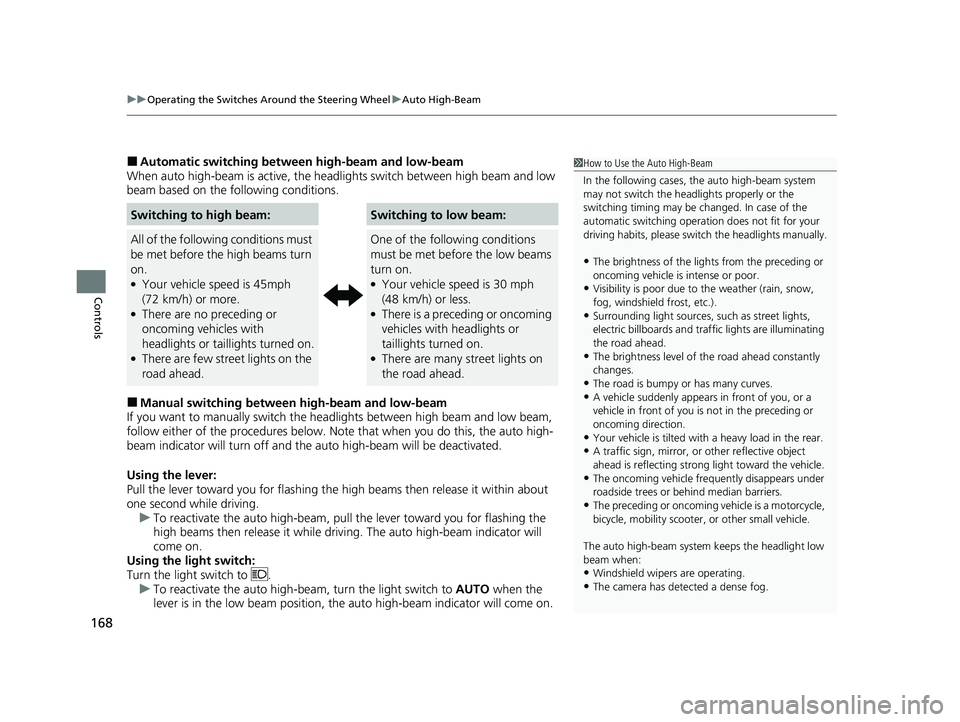
■Automatic switching between high-beam and low-beam
When auto high-beam is acti ve, the headlights switch between high beam and low
beam based on the following conditions.
■Manual switching between high-beam and low-beam
If you want to manually switch the headlights between high beam and low beam,
follow either of the proced ures below. Note that when you do this, the auto high-
beam indicator will turn off and the auto high-beam will be deactivated.
Using the lever:
Pull the lever toward you fo r flashing the high beams th en release it within about
one second while driving. u To reactivate the auto high-beam, pull the lever toward you for flashing the
high beams then release it while driving. The auto high-beam indicator will
come on.
Using the light switch:
Turn the light switch to . u To reactivate the auto high-be am, turn the light switch to AUTO when the
lever is in the low beam position, the auto high-beam indicator will come on.
Switching to high beam:Switching to low beam:
All of the following conditions must
be met before the high beams turn
on.
●Your vehicle speed is 45mph
(72 km/h) or more.
●There are no preceding or
oncoming vehicles with
headlights or taillights turned on.
●There are few street lights on the
road ahead.
One of the following conditions
must be met before the low beams
turn on.
●Your vehicle speed is 30 mph
(48 km/h) or less.
●There is a preceding or oncoming
vehicles with headlights or
taillights turned on.
●There are many street lights on
the road ahead.
1How to Use the Auto High-Beam
In the following cases, th e auto high-beam system
may not switch the head lights properly or the
switching timing may be ch anged. In case of the
automatic switching operation does not fit for your
driving habits, please swit ch the headlights manually.
•The brightness of the lights from the preceding or
oncoming vehicle is intense or poor.
•Visibility is poor due to the weather (rain, snow,
fog, windshield frost, etc.).
•Surrounding light sources, such as street lights,
electric billboards and traf fic lights are illuminating
the road ahead.
•The brightness level of th e road ahead constantly
changes.
•The road is bumpy or has many curves.•A vehicle suddenly appears in front of you, or a
vehicle in front of you is not in the preceding or
oncoming direction.
•Your vehicle is tilted with a heavy load in the rear.•A traffic sign, mirror, or other reflective object
ahead is reflecting strong light toward the vehicle.
•The oncoming vehicle freq uently disappears under
roadside trees or be hind median barriers.
•The preceding or oncoming vehicle is a motorcycle,
bicycle, mobility scooter, or other small vehicle.
The auto high-beam system keeps the headlight low
beam when:
•Windshield wipers are operating.
•The camera has dete cted a dense fog.
22 PASSPORT-31TGS6300.book 168 ページ 2021年10月6日 水曜日 午前10時2分
Page 171 of 607
169
uuOperating the Switches Around the Steering Wheel uAuto High-Beam
Controls
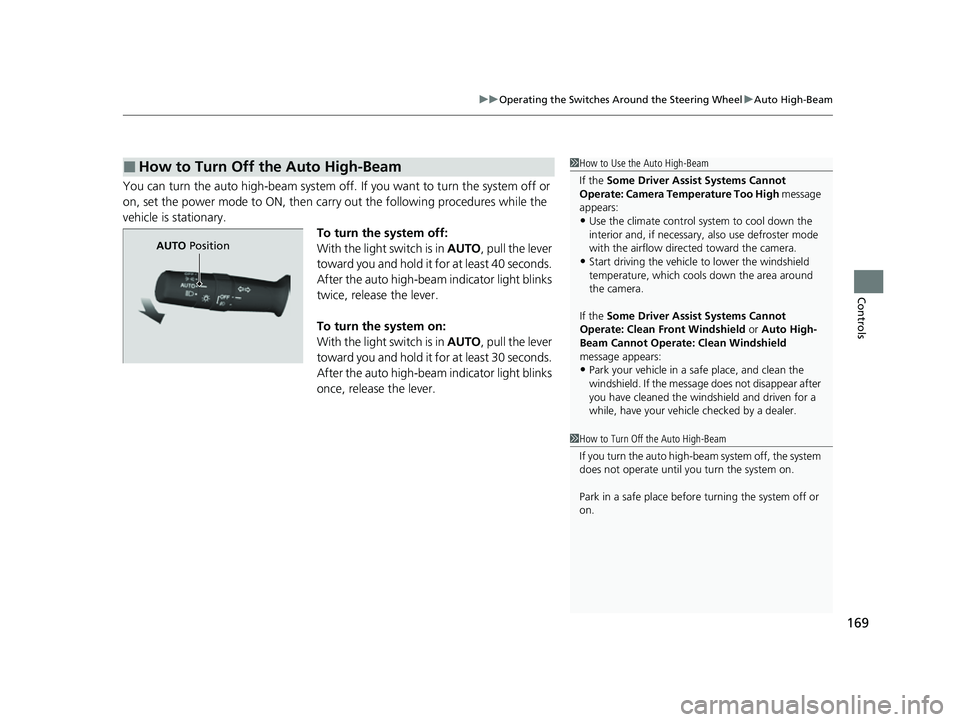
You can turn the auto high-beam system off. If you want to turn the system off or
on, set the power mode to ON, then carry out the following procedures while the
vehicle is stationary.
To turn the system off:
With the light switch is in AUTO, pull the lever
toward you and hold it for at least 40 seconds.
After the auto high-beam indicator light blinks
twice, release the lever.
To turn the system on:
With the light switch is in AUTO, pull the lever
toward you and hold it for at least 30 seconds.
After the auto high-beam indicator light blinks
once, release the lever.
■How to Turn Off the Auto High-Beam1 How to Use the Auto High-Beam
If the Some Driver Assist Systems Cannot
Operate: Camera Temperature Too High message
appears:
•Use the climate control system to cool down the
interior and, if necessary, also use defroster mode
with the airflow directed toward the camera.
•Start driving the vehicle to lower the windshield
temperature, which cool s down the area around
the camera.
If the Some Driver Assist Systems Cannot
Operate: Clean Front Windshield or Auto High-
Beam Cannot Operate: Clean Windshield
message appears:
•Park your vehicle in a sa fe place, and clean the
windshield. If the message does not disappear after
you have cleaned the winds hield and driven for a
while, have your vehicle checked by a dealer.
1 How to Turn Off the Auto High-Beam
If you turn the au to high-beam system off, the system
does not operate until you turn the system on.
Park in a safe place before turning the system off or
on.
AUTO Position
22 PASSPORT-31TGS6300.book 169 ページ 2021年10月6日 水曜日 午前10時2分
Page 172 of 607
170
uuOperating the Switches Around the Steering Wheel uWipers and Washers
Controls
Wipers and Washers
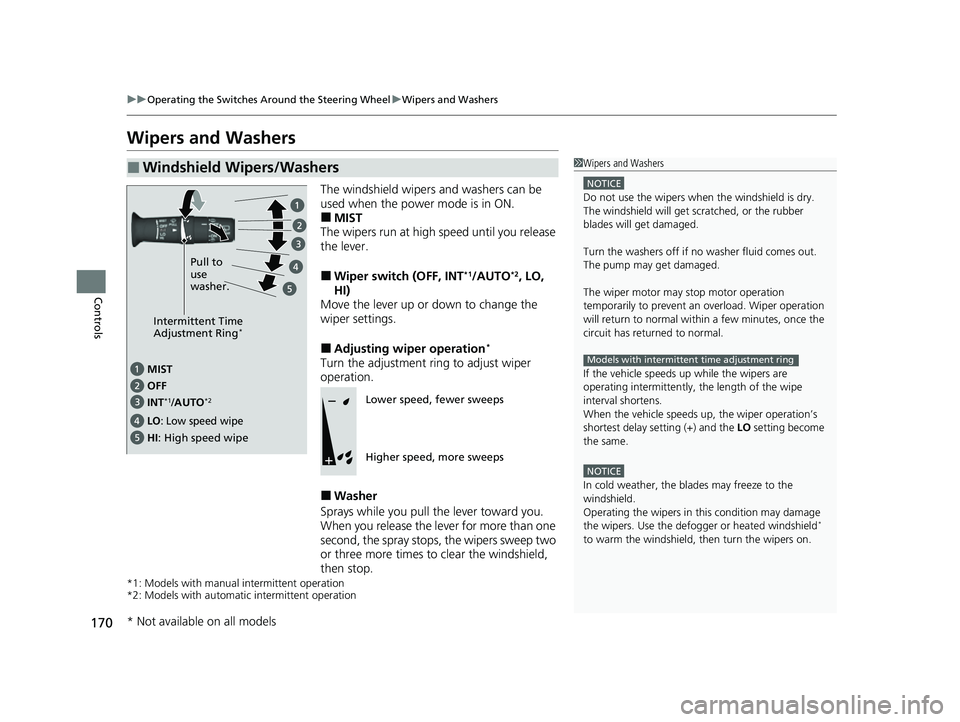
The windshield wipers and washers can be
used when the power mode is in ON.
■MIST
The wipers run at high speed until you release
the lever.
■Wiper switch (OFF, INT*1/AUTO*2, LO,
HI)
Move the lever up or down to change the
wiper settings.
■Adjusting wiper operation*
Turn the adjustment ri ng to adjust wiper
operation.
■Washer
Sprays while you pull the lever toward you.
When you release the lever for more than one
second, the spray stops, the wipers sweep two
or three more times to clear the windshield,
then stop.
*1: Models with manual intermittent operation
*2: Models with automati c intermittent operation
■Windshield Wipers/Washers1Wipers and Washers
NOTICE
Do not use the wipers when the windshield is dry.
The windshield will get sc ratched, or the rubber
blades will get damaged.
Turn the washers off if no washer fluid comes out.
The pump may get damaged.
The wiper motor may stop motor operation
temporarily to prevent an overload. Wiper operation
will return to normal within a few minutes, once the
circuit has returned to normal.
If the vehicle speeds up while the wipers are
operating intermittently, the length of the wipe
interval shortens.
When the vehicle speeds up, the wiper operation’s
shortest delay se tting (+) and the LO setting become
the same.
NOTICE
In cold weather, the blades may freeze to the
windshield.
Operating the wipers in th is condition may damage
the wipers. Use the defogge r or heated windshield
*
to warm the windshield, then turn the wipers on.
Models with intermittent time adjustment ring
Intermittent Time
Adjustment Ring*
MIST
INT
*1/AUTO*2OFF
LO: Low speed wipe
HI: High speed wipe Pull to
use
washer.
Lower speed, fewer sweeps
Higher speed, more sweeps
* Not available on all models
22 PASSPORT-31TGS6300.book 170 ページ 2021年10月6日 水曜日 午前10時2分