light HONDA PASSPORT 2023 Owners Manual
[x] Cancel search | Manufacturer: HONDA, Model Year: 2023, Model line: PASSPORT, Model: HONDA PASSPORT 2023Pages: 610, PDF Size: 20.93 MB
Page 471 of 610
uuHonda Sensing ®u Road Departure Mitigation (RDM) System
470
Driving
The system activates when all the following conditions are met:
• The vehicle is traveling between about 45 and 90 mph (72 and 145 km/h).
• The vehicle is on a straight or slightly curved road.
• The turn signals are off.
• The brake pedal is not depressed.
• The wipers are not in continuous operation.
• The system makes a determination that the driver is not actively accelerating,
braking, or steering.
■How the System Activates1How the System Activates
The RDM system may automa tically shut off and the
indicator comes and stays on.
2 Indicators P. 82
RDM system function can be impacted when the
vehicle is:
•Not driven within a traffic lane.•Driven on the inside edge of a curve, or outside of
a lane.
•Driven in a narrow lane.
23 PASSPORT-31TGS6400.book 470 ページ 2022年8月5日 金曜日 午後9時2分
Page 473 of 610
472
uuHonda Sensing ®u Road Departure Mitigation (RDM) System
Driving
The system may not properly detect lane ma rkings and the position of your vehicle
under certain conditions. Some examples of these conditions are listed below.
■Environmental conditions
• Driving in bad weather (rain, fog, snow, etc.).
• Sudden changes between light and dark, such as an entrance or exit of a tunnel.
• There is little contrast between la ne lines and the roadway surface.
• Driving into low sunlight (e.g., at dawn or dusk).
• Strong light is reflected onto the roadway.
• Driving in the shadows of trees, buildings, etc.
• Shadows of adjacent objects are parallel to lane markings.
• Roadway objects or structures are misinterpreted as lane markers.
• Reflections on the interi or of the windshield.
• Driving at night or in a dark condition such as a tunnel.
■RDM Conditions and Limitations
23 PASSPORT-31TGS6400.book 472 ページ 2022年8月5日 金曜日 午後9時2分
Page 474 of 610
473
uuHonda Sensing ®u Road Departure Mitigation (RDM) System
Driving
■Roadway conditions
• Driving on a snowy or wet roadway (obs cured lane marking, vehicle tracks,
reflected lights, road spray, high contrast).
• Driving on a road with temporary lane markings.
• Faint, multiple, or varied lane markings are visible on the roadway due to road
repairs or old lane markings.
• The roadway has merging, split, or crossing lines (e.g., such as at an intersection
or crosswalk).
• The lane markings are extremel y narrow, wide, or changing.
• The vehicle in front of you is driving near the lane lines.
• The road is hilly or the vehicle is approaching the crest of a hill.
• Driving on rough or unpaved roads, or over bumpy surfaces.
• When objects on the road (curb, guard rail, pylons, etc.) are recognized as white
lines (or yellow lines).
• Driving on roads with double lines.
■Vehicle conditions
• Headlight lenses are dirty or the h eadlights are not properly adjusted.
• The outside of the windshield is streaked or blocked by dirt, mud, leaves, wet
snow, etc.
• The inside of the windshield is fogged.
• The camera temperature gets too high.
• An abnormal tire or wheel condition (inco rrect sizes, varied sizes or construction,
improperly inflated, co mpact spare tire, etc.).
• The vehicle is tilted due to a heavy load or suspension modifications.
• When tire chains are installed.
• The vehicle is towing a trailer.
23 PASSPORT-31TGS6400.book 473 ページ 2022年8月5日 金曜日 午後9時2分
Page 479 of 610
uuBraking uBrake System
478
Driving
Your vehicle is equipped with disc brakes at all four wheels. A vacuum power assist
helps reduce the effort needed on the brake pedal. The brake assist system increases
the stopping force when you depress th e brake pedal hard in an emergency
situation. The anti-lock brake system (ABS ) helps you retain steering control when
braking very hard.
2 Brake Assist System P. 480
2 Anti-lock Brake System (ABS) P. 479
■Foot Brake1Foot Brake
Check the brakes after driving through deep water,
or if there is a buildup of road surface water. If
necessary, dry the brakes by lightly depressing the
pedal several times.
If you hear a continuous me tallic friction sound when
applying the brakes, this is caused by the brake wear
indicator rubbing on the brake rotor and indicates
that the brake pads need to be replaced. Have the
vehicle checked by a deal er. If you hear only an
occasional squeak or squeal when you initially apply
the brake pedal, this may be normal and caused by
high frequency vibration of the brake pads against
the rotating brake disc.
Constantly using the brake pedal while going down a
long hill builds up heat, which reduces the brake
effectiveness. Apply engine braking by taking your
foot off the accelerator pe dal and downshifting to a
lower gear.
Do not rest your foot on the brake pedal while
driving, as it will lightly apply the brakes and cause
them to lose effectiveness over time and reduce pad
life. It will also conf use drivers behind you.
23 PASSPORT-31TGS6400.book 478 ページ 2022年8月5日 金曜日 午後9時2分
Page 480 of 610
479
uuBraking uAnti-lock Brake System (ABS)
Driving
Anti-lock Brake System (ABS)
Helps prevent the wheels from locking up, and helps you retain steering control by
pumping the brakes rapidly, much faster than you can.
The electronic brake distribu tion (EBD) system, which is part of the ABS, also
balances the front-to-rear braking distribution according to vehicle loading.
You should never pu mp the brake pedal. Let the ABS work for you by always
keeping firm, steady pressure on the brake pe dal. This is sometimes referred to as
“stomp and steer.”
■ABS operation
The brake pedal may pulsate slightly when the ABS is working. Depress the brake
pedal and keep holding the pedal firmly do wn. On dry pavement, you will need to
press on the brake pedal very hard before th e ABS activates. However, you may feel
the ABS activate immediately if you are trying to stop on snow or ice.
ABS may activate when you depres s the brake pedal when driving on:
• Wet or snow covered roads.
• Roads paved with stone.
• Roads with uneven surf aces, such as potholes, cracks, manholes, etc.
When the vehicle speed goes unde r 6 mph (10 km/h), the ABS stops.
■ABS1Anti-lock Brake System (ABS)
NOTICE
The ABS may not function correctly if you use a tire of
the incorrect size or type.
If the ABS indicator comes on while driving, there
may be a problem with the system.
While normal braking will not be affected, there is a
possibility that the ABS wi ll not be operating. Have
your vehicle checked by a dealer immediately.
The ABS is not designed for the purpose of reducing
the time or distance it takes for a vehicle to stop: It is
designed to limit brake lockup which can lead to
skidding and loss of steering control.
In the following cases, yo ur vehicle may need more
distance to stop than a vehicle without the ABS:
•You are driving on rough or uneven road surfaces,
such as gravel or snow.
•The tires are equipped with snow chains.
The following may be observed with the ABS system:
•Motor sounds coming from the engine
compartment when the brakes are applied, or when
system checks are being performed after the engine
has been started and while the vehicle accelerates.
•Brake pedal and/or the vehicle body vibration when
ABS activates.
These vibrations and sou nds are normal to ABS
systems and are no cause for concern.
23 PASSPORT-31TGS6400.book 479 ページ 2022年8月5日 金曜日 午後9時2分
Page 481 of 610
480
uuBraking uBrake Assist System
Driving
Brake Assist System
Designed to assist the driver by generati ng greater braking force when you depress
the brake pedal hard during emergency braking.
■Brake assist system operation
Press the brake pedal firmly for more powerful braking.
When brake assist operates, the pedal ma y wiggle slightly and an operating noise
may be heard. This is normal. Keep holding the brake pedal firmly down.
23 PASSPORT-31TGS6400.book 480 ページ 2022年8月5日 金曜日 午後9時2分
Page 487 of 610
486
uuParking Your Vehicle uParking Sensor System*
Driving
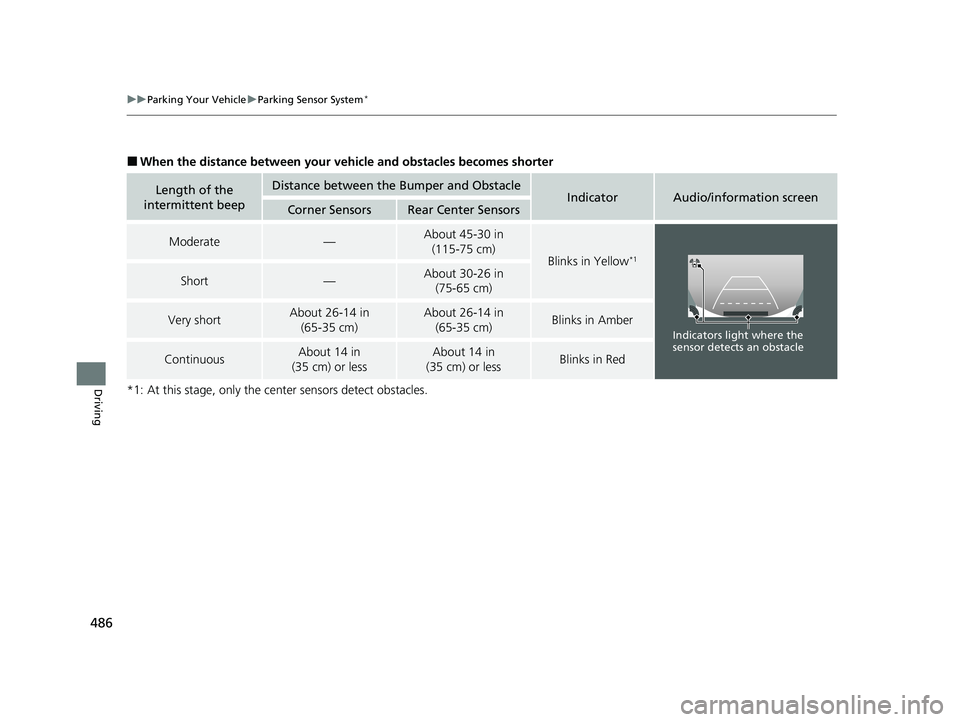
■When the distance between your ve hicle and obstacles becomes shorter
*1: At this stage, only the ce nter sensors detect obstacles.
Length of the
intermittent beepDistance between the Bumper and ObstacleIndicatorAudio/information screenCorner SensorsRear Center Sensors
Moderate—About 45-30 in (115-75 cm)
Blinks in Yellow*1
Short—About 30-26 in (75-65 cm)
Very shortAbout 26-14 in
(65-35 cm)About 26-14 in (65-35 cm)Blinks in Amber
ContinuousAbout 14 in
(35 cm) or lessAbout 14 in
(35 cm) or lessBlinks in Red
Indicators light where the
sensor detects an obstacle
23 PASSPORT-31TGS6400.book 486 ページ 2022年8月5日 金曜日 午後9時2分
Page 493 of 610
492
Driving
Multi-View Rear Camera
About Your Multi-View Rear Camera
The audio/information screen can display your vehicle’s rear view. The display
automatically changes to a rear view when the gear position is changed to
(R.
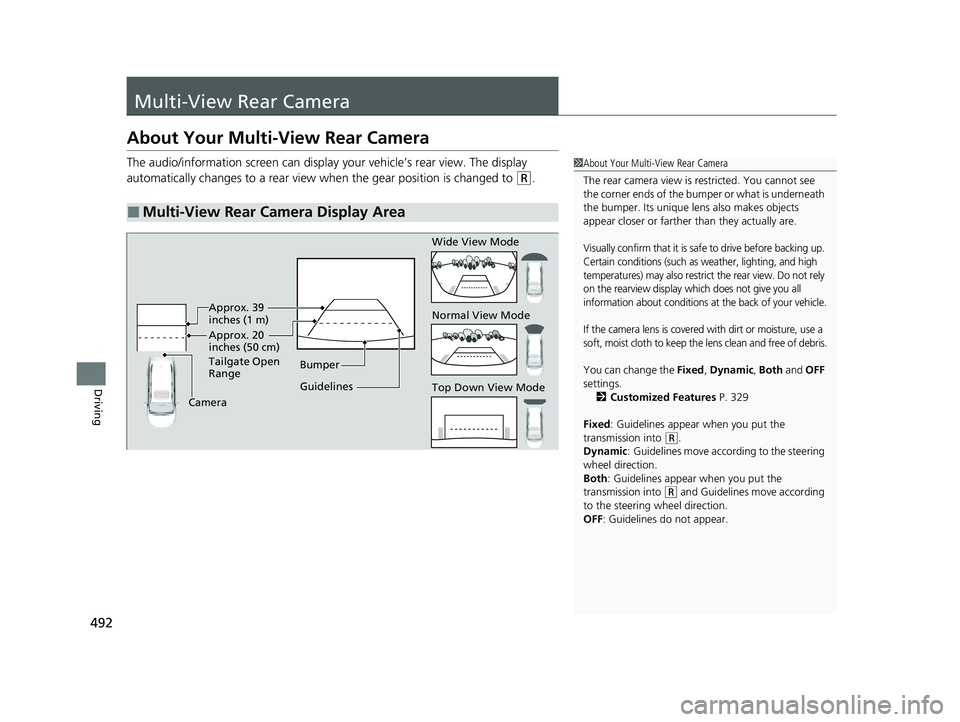
■Multi-View Rear Camera Display Area
1About Your Multi-View Rear Camera
The rear camera view is restricted. You cannot see
the corner ends of the bumper or what is underneath
the bumper. Its unique le ns also makes objects
appear closer or farther than they actually are.
Visually confirm that it is safe to drive before backing up.
Certain conditions (such as weather, lighting, and high
temperatures) may also restrict the rear view. Do not rely
on the rearview display which does not give you all
information about conditions at the back of your vehicle.
If the camera lens is covered with dirt or moisture, use a
soft, moist cloth to keep the lens clean and free of debris.
You can change the Fixed, Dynamic , Both and OFF
settings. 2 Customized Features P. 329
Fixed: Guidelines appear when you put the
transmission into
( R.
Dynamic : Guidelines move according to the steering
wheel direction.
Both : Guidelines appear when you put the
transmission into
( R and Guidelines move according
to the steering wheel direction.
OFF: Guidelines do not appear.
Guidelines Bumper
Camera Approx. 20
inches (50 cm)
Tailgate Open
Range Approx. 39
inches (1 m) Wide View Mode
Normal View Mode
Top Down View Mode
23 PASSPORT-31TGS6400.book 492 ページ 2022年8月5日 金曜日 午後9時2分
Page 500 of 610
499
Maintenance
This chapter discusses basic maintenance.
Before Performing MaintenanceInspection and Maintenance ............ 500
Safety When Performing Maintenance..... 501Parts and Fluids Used in Maintenance Service ........................................... 502
Maintenance Minder
TM..................... 503
Maintenance Under the Hood
Maintenance Items Under the Hood ..... 509Opening the Hood ........................... 510
Engine Compartment Cover ............. 511
Recommended Engine Oil ................ 512
Oil Check ......................................... 513
Adding Engine Oil ............................ 514
Changing the Engine Oil and Oil Filter ..... 515Engine Coolant ................................ 517
Transmission Fluid ............................ 519
Brake Fluid ....................................... 520
Refilling Window Washer Fluid......... 520
Replacing Light Bulbs ....................... 521
Checking and Maintaining Wiper
Blades .......................................... 526
Checking and Maintaining Tires
Checking Tires ................................. 530
Tire and Loading Information Label .. 531
Tire Labeling .................................... 531
DOT Tire Quality Grading (U.S. Vehicles) .. 533
Wear Indicators ............................... 535
Tire Service Life ................................ 535
Tire and Wheel Replacement ........... 536
Tire Rotation .................................... 537
Winter Tires ..................................... 538
Battery ............................................... 539
Remote Transmitter Care ................. 541
Climate Control System Maintenance..... 542
Cleaning
Interior Care .................................... 544
Exterior Care.................................... 546
Accessories and Modifications ........ 549
23 PASSPORT-31TGS6400.book 499 ページ 2022年8月5日 金曜日 午後9時2分
Page 501 of 610
500
Maintenance
Before Performing Maintenance
Inspection and Maintenance
For your safety, perform all listed inspections and maintenance to keep your vehicle
in good condition. If you become aware of an y abnormality (noise, smell, insufficient
brake fluid, oil residue on the ground, etc.), have your vehicle inspected by a dealer.
(Note, however, that service at a dealer is not mandatory to keep your warranties in
effect.)
■Routine inspections
Perform inspections before long distance trips, when washing the vehicle, or when
refueling.
2 Maintenance P. 28
■Periodic inspections
• Check the brake fluid level monthly.
2 Checking the Brake Fluid P. 520
•Check the tire pressure monthly. Examin e the tread for wear and foreign objects.
2Checking and Maintaining Tires P. 530
•Check the operation of the exterior lights monthly.
2 Replacing Light Bulbs P. 521
•Check the condition of the wiper bl ades at least every six months.
2Checking and Maintaining Wiper Blades P. 526
■Types of Inspection and Maintenance
1Inspection and Maintenance
Maintenance, replacement, or repair of
emissions control devices and systems may be
done by any automotive repair establishment or
individuals using parts that are “certified” to
EPA standards.
According to state and fede ral regulations, failure to
perform maintenance on the maintenance main
items marked with # will not void your emissions
warranties. However, all ma intenance services should
be performed in accordan ce with the intervals
indicated by the driver information interface.
2 Maintenance Service Items P. 506
If you want to perform complex maintenance tasks
that require more skills a nd tools, you can purchase a
subscription to the Service Express website at
www.techinfo.honda.com .
2 Authorized Manuals P. 596
If you want to perform ma intenance yourself, make
sure that you have the necessary tools and skills first.
After performing maintenanc e, update the records in
the separate maintenance booklet.
U.S. models
23 PASSPORT-31TGS6400.book 500 ページ 2022年8月5日 金曜日 午後9時2分