towing HONDA PASSPORT 2023 Owner's Manual
[x] Cancel search | Manufacturer: HONDA, Model Year: 2023, Model line: PASSPORT, Model: HONDA PASSPORT 2023Pages: 610, PDF Size: 20.93 MB
Page 453 of 610
uuHonda Sensing ®u Adaptive Cruise Control (ACC)
452
Driving
The system may automatically shut off and the ACC indicator will come on under
certain conditions. Some examples of th ese conditions are listed below. Other
conditions may reduce some of the ACC functions.
2 Front Sensor Camera P. 474
2 Radar Sensor P. 476
■Environmental conditions
Driving in bad weather (r ain, fog, snow, etc.).
■Roadway conditions
Driving on a snowy or wet roadway (obscure d lane marking, vehicle tracks, reflected
lights, road spray, high contrast).
■Vehicle conditions
• The outside of the windshie ld is blocked by dirt, mud, leaves, wet snow, etc.
• An abnormal tire or wheel condition (incor rect sizes, varied sizes or construction,
improperly inflated, comp act spare tire, etc.).
• The camera temperature gets too high.
• The parking brake is applied.
• When the front grille is dirty.
• The vehicle is tilted due to a heav y load or suspension modifications.
• When tire chains are installed.
• The vehicle is towing a trailer.
■ACC Conditions and Limitations1ACC Conditions and Limitations
If you need the radar sensor to be repaired, or
removed, or the radar se nsor cover is strongly
impacted, turn off the system by pressing the MAIN
button and take your vehicle to a dealer.
Have your vehicle checked by a dealer if you find any
unusual behavior of the system (e.g., the warning
message appears too frequently).
If the front of the vehicle is impacted in any of the
following situations, the ra dar sensor may not work
properly. Have your vehi cle checked by a dealer:
•The vehicle mounted onto a bump, curb, chock,
embankment, etc.
•You drive the vehicle where water is deep.
•Your vehicle has a frontal collision.
23 PASSPORT-31TGS6400.book 452 ページ 2022年8月5日 金曜日 午後9時2分
Page 469 of 610
468
uuHonda Sensing ®u Lane Keeping Assist System (LKAS)
Driving
• Driving on roads with double lines.
■Vehicle conditions
• Headlight lenses are dirty or the headlights are not properly adjusted.
• The outside of the windshield is streake d or blocked by dirt, mud, leaves, wet
snow, etc.
• The inside of the windshield is fogged.
• The camera temperature gets too high.
• An abnormal tire or wheel condition (incor rect sizes, varied sizes or construction,
improperly inflated, comp act spare tire, etc.).
• The vehicle is tilted due to a heav y load or suspension modifications.
• The vehicle is towing a trailer.
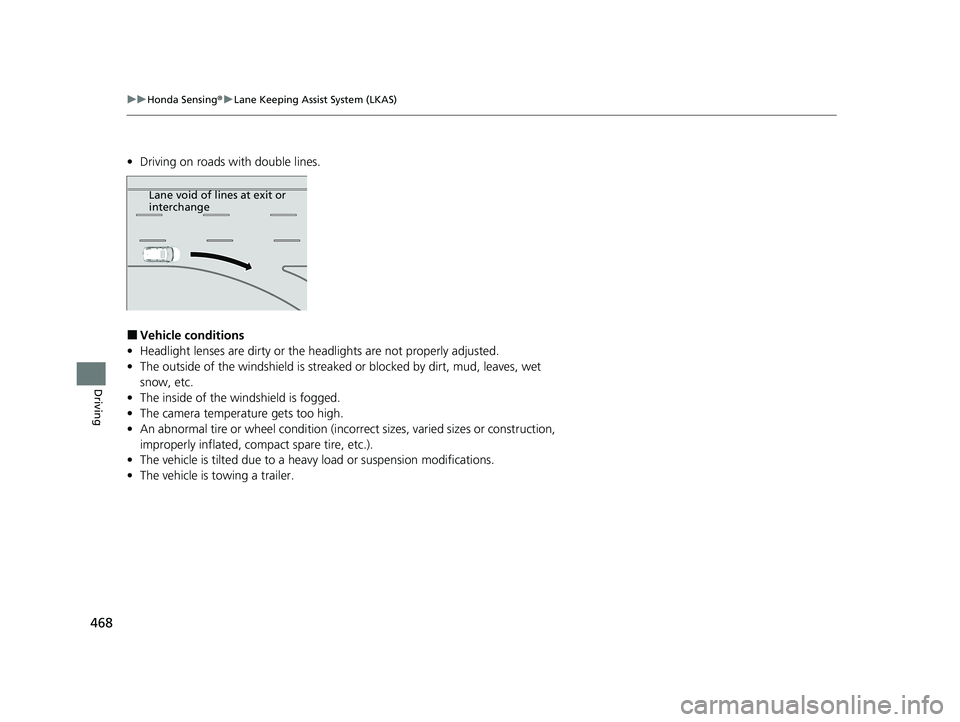
Lane void of lines at exit or
interchange
23 PASSPORT-31TGS6400.book 468 ページ 2022年8月5日 金曜日 午後9時2分
Page 474 of 610
473
uuHonda Sensing ®u Road Departure Mitigation (RDM) System
Driving
■Roadway conditions
• Driving on a snowy or wet roadway (obs cured lane marking, vehicle tracks,
reflected lights, road spray, high contrast).
• Driving on a road with temporary lane markings.
• Faint, multiple, or varied lane markings are visible on the roadway due to road
repairs or old lane markings.
• The roadway has merging, split, or crossing lines (e.g., such as at an intersection
or crosswalk).
• The lane markings are extremel y narrow, wide, or changing.
• The vehicle in front of you is driving near the lane lines.
• The road is hilly or the vehicle is approaching the crest of a hill.
• Driving on rough or unpaved roads, or over bumpy surfaces.
• When objects on the road (curb, guard rail, pylons, etc.) are recognized as white
lines (or yellow lines).
• Driving on roads with double lines.
■Vehicle conditions
• Headlight lenses are dirty or the h eadlights are not properly adjusted.
• The outside of the windshield is streaked or blocked by dirt, mud, leaves, wet
snow, etc.
• The inside of the windshield is fogged.
• The camera temperature gets too high.
• An abnormal tire or wheel condition (inco rrect sizes, varied sizes or construction,
improperly inflated, co mpact spare tire, etc.).
• The vehicle is tilted due to a heavy load or suspension modifications.
• When tire chains are installed.
• The vehicle is towing a trailer.
23 PASSPORT-31TGS6400.book 473 ページ 2022年8月5日 金曜日 午後9時2分
Page 484 of 610
483
uuParking Your Vehicle uParking Sensor System*
Continued
Driving
Parking Sensor System*
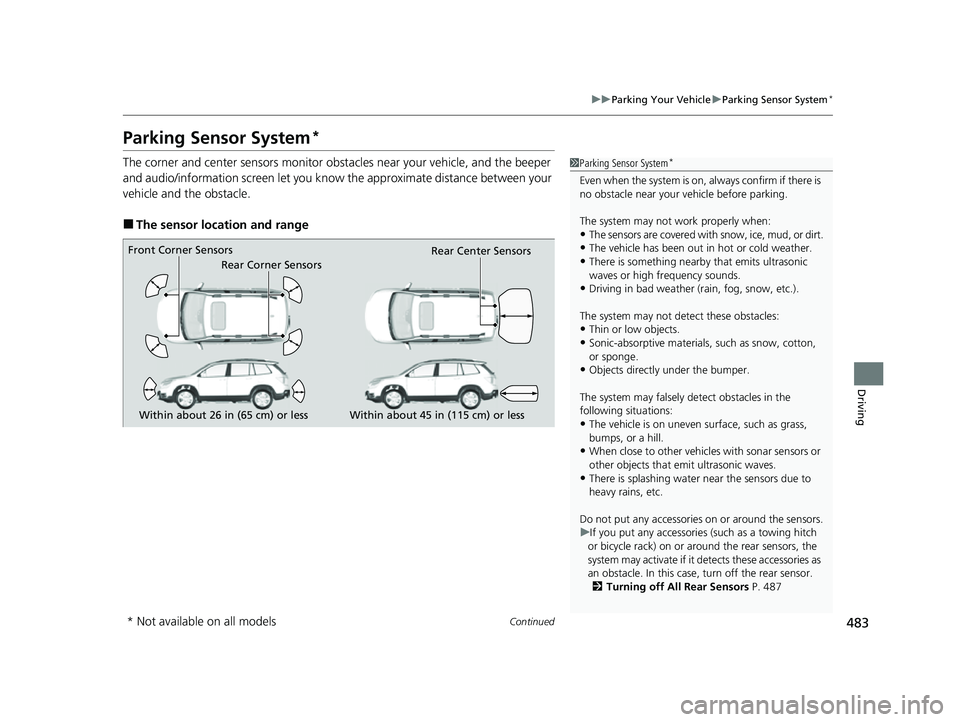
The corner and center sensors monitor obst acles near your vehicle, and the beeper
and audio/information screen let you know the approximate distance between your
vehicle and the obstacle.
■The sensor location and range
1 Parking Sensor System*
Even when the system is on, always confirm if there is
no obstacle near your ve hicle before parking.
The system may not work properly when:
•The sensors are covered with snow, ice, mud, or dirt.
•The vehicle has been out in hot or cold weather.
•There is something nearby that emits ultrasonic
waves or high frequency sounds.
•Driving in bad weather (rain, fog, snow, etc.).
The system may not de tect these obstacles:
•Thin or low objects.
•Sonic-absorptive materials, such as snow, cotton,
or sponge.
•Objects directly under the bumper.
The system may falsely de tect obstacles in the
following situations:
•The vehicle is on uneven su rface, such as grass,
bumps, or a hill.
•When close to other vehicl es with sonar sensors or
other objects that em it ultrasonic waves.
•There is splashing water near the sensors due to
heavy rains, etc.
Do not put any accessories on or around the sensors.
u If you put any accessorie s (such as a towing hitch
or bicycle rack) on or around the rear sensors, the
system may activate if it detects these accessories as
an obstacle. In this case, turn off the rear sensor. 2 Turning off All Rear Sensors P. 487
Within about 26 in (65 cm) or less
Front Corner Sensors
Rear Corner Sensors
Rear Center Sensors
Within about 45 in (115 cm) or less
* Not available on all models
23 PASSPORT-31TGS6400.book 483 ページ 2022年8月5日 金曜日 午後9時2分
Page 507 of 610
506
uuMaintenance MinderTMuTo Use Maintenance MinderTM
Maintenance
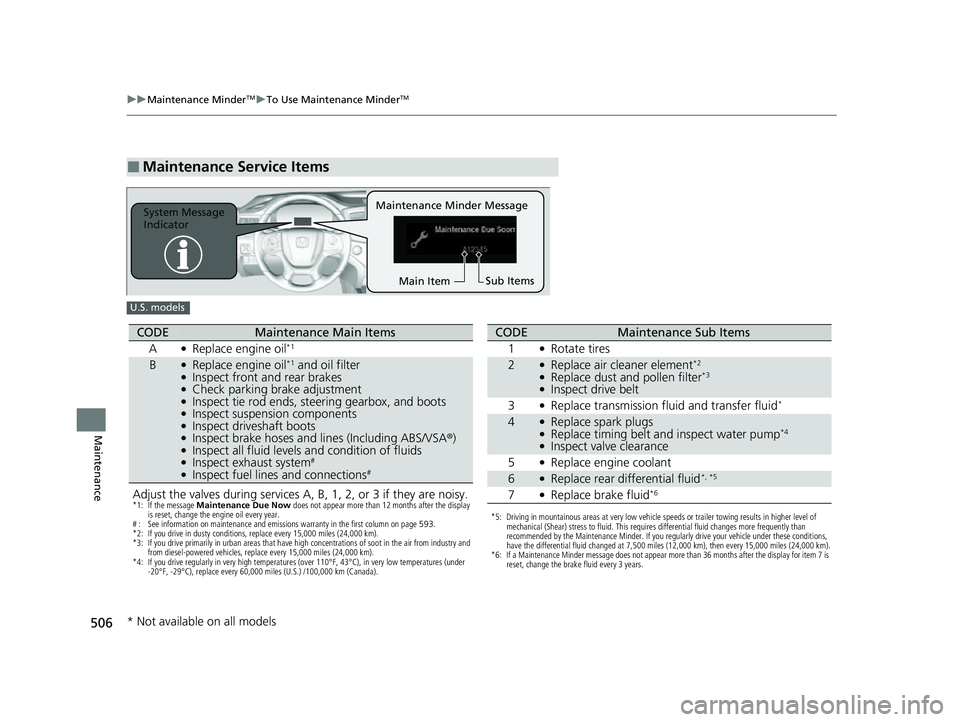
■Maintenance Service Items
Maintenance Minder Message
System Message
Indicator
Sub Items
Main Item
U.S. models
Adjust the valves during services A, B, 1, 2, or 3 if they are noisy.*1: If the message Maintenance Due Now does not appear more than 12 months after the display
is reset, change the engine oil every year.
# : See information on maintenance and emissions warranty in the first column on page 593.
*2: If you drive in dusty conditions, replace every 15,000 miles (24,000 km).
*3: If you drive primarily in urban areas that have high concentrations of soot in the air from industry and from diesel-powered vehicles, replace every 15,000 miles (24,000 km).
*4: If you drive regularly in very high temperatures (over 110°F, 43°C), in very low temperatures (under -20°F, -29°C), replace every 60,000 miles (U.S.) /100,000 km (Canada).
CODEMaintenance Main Items
A
●Replace engine oil*1
B●Replace engine oil*1 and oil filter●Inspect front and rear brakes●Check parking brake adjustment●Inspect tie rod ends, steering gearbox, and boots●Inspect suspension components●Inspect driveshaft boots●Inspect brake hoses and li nes (Including ABS/VSA®)●Inspect all fluid levels and condition of fluids●Inspect exhaust system#
●Inspect fuel lines and connections#
*5: Driving in mountainous areas at very low vehicle speeds or trailer towing results in higher level of
mechanical (Shear) stress to fluid. This requires differential fluid changes more frequently than
recommended by the Maintenance Minder. If you regularly drive your vehicle under these conditions,
have the differential fluid changed at 7,500 miles (12,000 km), then every 15,000 miles (24,000 km).
*6: If a Maintenance Minder message does not appear more than 36 months after the display for item 7 is reset, change the brake fluid every 3 years.
CODEMaintenance Sub Items
1
●Rotate tires
2●Replace air cleaner element*2
●Replace dust and pollen filter*3
●Inspect drive belt
3
●Replace transmission fluid and transfer fluid*
4●Replace spark plugs●Replace timing belt and inspect water pump*4
●Inspect valve clearance
5
●Replace engine coolant
6●Replace rear differential fluid*, *5
7●Replace brake fluid*6
* Not available on all models
23 PASSPORT-31TGS6400.book 506 ページ 2022年8月5日 金曜日 午後9時2分
Page 508 of 610
507
uuMaintenance MinderTMuTo Use Maintenance MinderTM
Continued
Maintenance
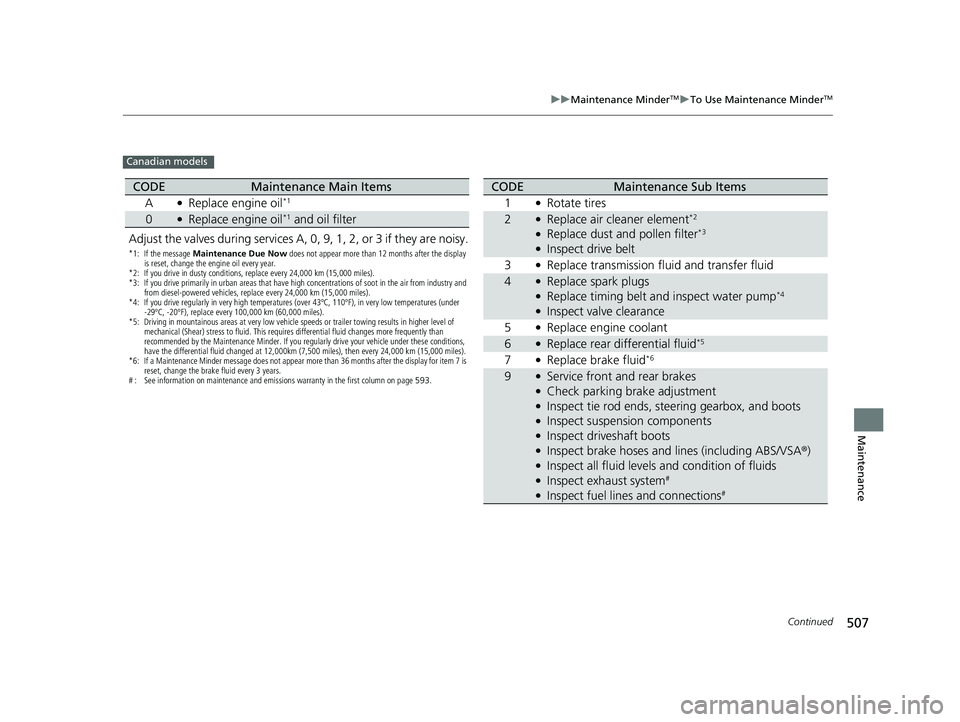
Canadian models
Adjust the valves during services A, 0, 9, 1, 2, or 3 if they are noisy.
*1: If the message Maintenance Due Now does not appear more than 12 months after the display
is reset, change the engine oil every year.
*2: If you drive in dusty conditions, replace every 24,000 km (15,000 miles).
*3: If you drive primarily in urban areas that have high concentrations of soot in the air from industry and from diesel-powered vehicles, replace every 24,000 km (15,000 miles).
*4: If you drive regularly in very high temperatures (over 43ºC, 110ºF), in very low temperatures (under -29ºC, -20ºF), replace every 100,000 km (60,000 miles).
*5: Driving in mountainous areas at very low vehicle speeds or trailer towing results in higher level of mechanical (Shear) stress to fluid. This requires differential fluid changes more frequently than
recommended by the Maintenance Minder. If you regularly drive your vehicle under these conditions,
have the differential fluid changed at 12,000km (7,500 miles), then every 24,000 km (15,000 miles).
*6: If a Maintenance Minder message does not appear more than 36 months after the display for item 7 is reset, change the brake fluid every 3 years.
# : See information on maintenance and emissions warranty in the first column on page 593.
CODEMaintenance Main Items
A
●Replace engine oil*1
0●Replace engine oil*1 and oil filter
CODEMaintenance Sub Items
1
●Rotate tires
2●Replace air cleaner element*2
●Replace dust and pollen filter*3
●Inspect drive belt
3
●Replace transmission fluid and transfer fluid
4●Replace spark plugs●Replace timing belt and inspect water pump*4
●Inspect valve clearance
5
●Replace engine coolant
6●Replace rear differential fluid*5
7●Replace brake fluid*6
9●Service front and rear brakes●Check parking brake adjustment●Inspect tie rod ends, st eering gearbox, and boots●Inspect suspension components●Inspect driveshaft boots●Inspect brake hoses and lines (including ABS/VSA ®)●Inspect all fluid levels and condition of fluids●Inspect exhaust system#
●Inspect fuel lines and connections#
23 PASSPORT-31TGS6400.book 507 ページ 2022年8月5日 金曜日 午後9時2分
Page 552 of 610
551
Handling the Unexpected
This chapter explains how to handle unexpected troubles.
ToolsTypes of Tools .................................. 552
If a Tire Goes Flat Changing a Flat Tire ......................... 553
Engine Does Not Start Checking the Engine ........................ 561
If the Keyless Remote Battery is Weak .. 563
Emergency Engine Stop ................... 564
If the Battery Is Dead ....................... 565
Overheating How to Handle Overheating ............. 568 Indicator, Coming On/Blinking
If the Engine Oil Low Warning Appears ........ 570If the Charging System Indicator Comes
On ................................................. 571
If the Malfunction Indicator Lamp Comes On or Blinks ................................... 571
If the Brake System Indicator (Red) Comes
On ................................................. 572
If the Electric Power Steering (EPS) System Indicator Comes On ....................... 572
If the Low Tire Pressure/Tire Pressure Monitoring System (TPMS) Indicator
Comes On or Blinks........................ 573 If the Transmission I
ndicator Blinks along
with the Warning Message ............ 574
Fuses Fuse Locations ................................. 575
Inspecting and Changing Fuses ........ 579
Emergency Towing ........................... 580
If You Cannot Unlock the Fuel Fill Door.. 581
Refueling
Refueling From a Portable Fuel
Container ................................... 582
If You Cannot Open the Tailgate .... 583
23 PASSPORT-31TGS6400.book 551 ページ 2022年8月5日 金曜日 午後9時2分
Page 555 of 610
uuIf a Tire Goes Flat uChanging a Flat Tire
554
Handling the Unexpected
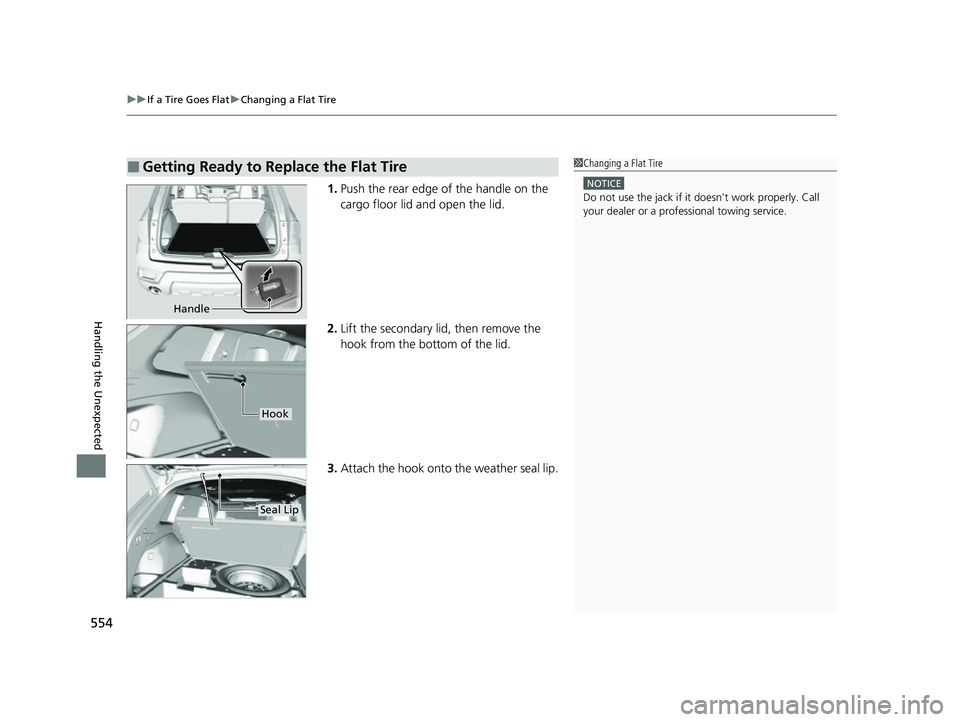
1. Push the rear edge of the handle on the
cargo floor lid and open the lid.
2. Lift the secondary lid, then remove the
hook from the bottom of the lid.
3. Attach the hook onto the weather seal lip.
■Getting Ready to Replace the Flat Tire1Changing a Flat Tire
NOTICE
Do not use the jack if it doesn’t work properly. Call
your dealer or a prof essional towing service.
Handle
Hook
Seal Lip
23 PASSPORT-31TGS6400.book 554 ページ 2022年8月5日 金曜日 午後9時2分
Page 562 of 610
561Continued
Handling the Unexpected
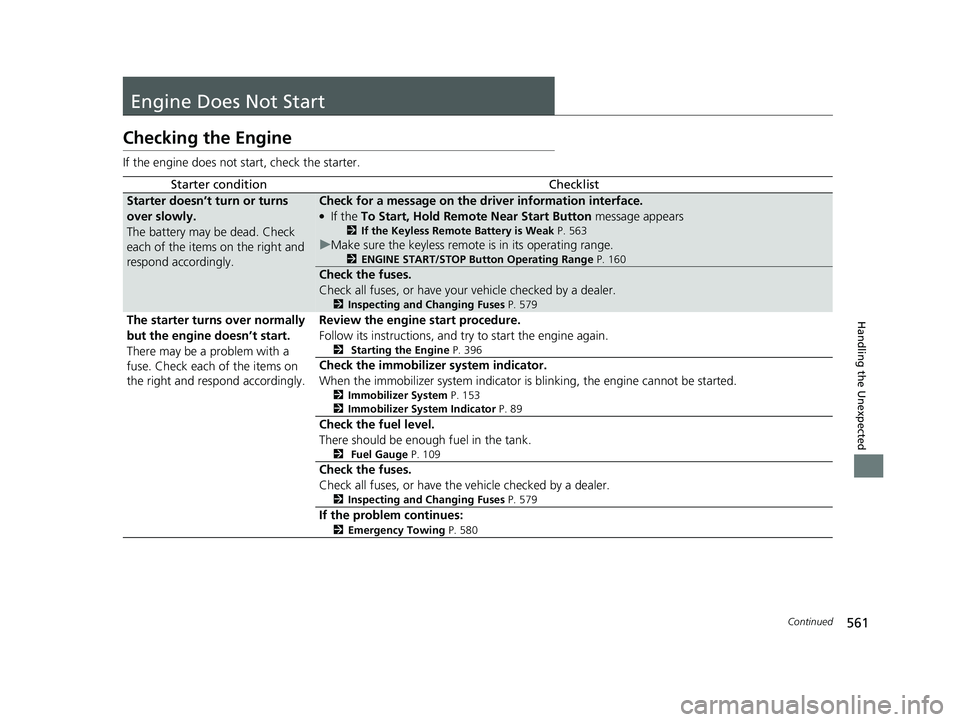
Engine Does Not Start
Checking the Engine
If the engine does not start, check the starter.
Starter conditionChecklist
Starter doesn’t turn or turns
over slowly.
The battery may be dead. Check
each of the items on the right and
respond accordingly.Check for a message on the driver information interface.
●If the To Start, Hold Remote Near Start Button message appears
2If the Keyless Remote Battery is Weak P. 563
uMake sure the keyless remote is in its operating range.
2 ENGINE START/STOP Button Operating Range P. 160
Check the fuses.
Check all fuses, or have your vehicle checked by a dealer.
2Inspecting and Changing Fuses P. 579
The starter turns over normally
but the engine doesn’t start.
There may be a problem with a
fuse. Check each of the items on
the right and respond accordingly. Review the engine start procedure.
Follow its instructions, and try
to start the engine again.
2 Starting the Engine P. 396
Check the immobilize r system indicator.
When the immobilizer system indicator is blinking, the engine cannot be started.
2 Immobilizer System P. 153
2 Immobilizer System Indicator P. 89
Check the fuel level.
There should be enough fuel in the tank.
2 Fuel Gauge P. 109
Check the fuses.
Check all fuses, or have the vehicle checked by a dealer.
2Inspecting and Changing Fuses P. 579
If the problem continues:
2Emergency Towing P. 580
23 PASSPORT-31TGS6400.book 561 ページ 2022年8月5日 金曜日 午後9時2分
Page 575 of 610
574
uuIndicator, Coming On/Blinking uIf the Transmission Indicator Blinks along with the Warning Message
Handling the Unexpected
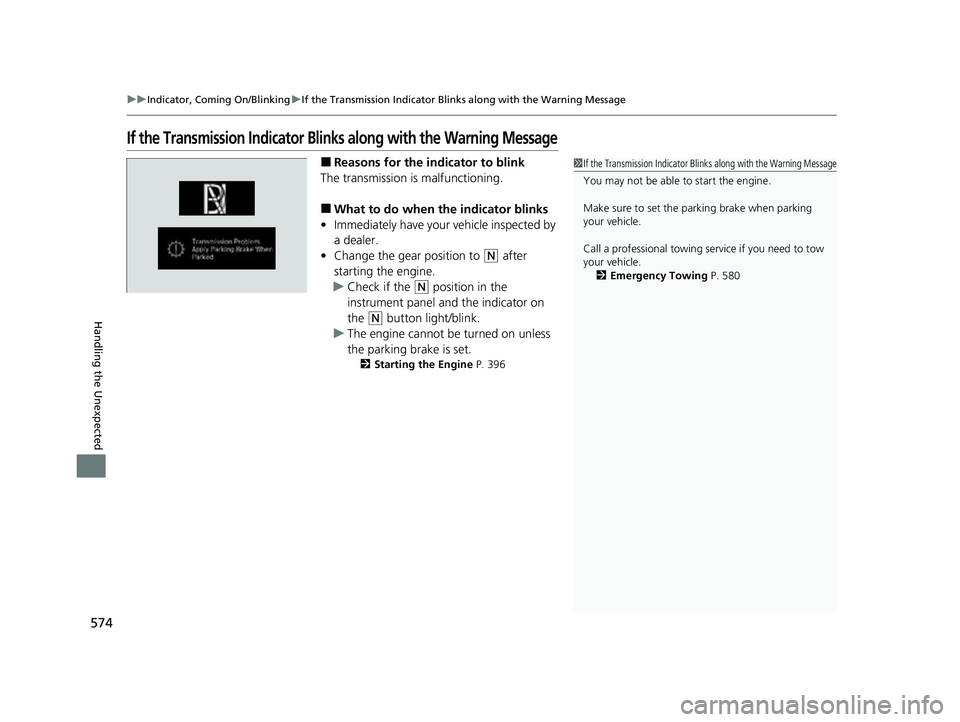
If the Transmission Indicator Blinks along with the Warning Message
■Reasons for the in dicator to blink
The transmission is malfunctioning.
■What to do when the indicator blinks
• Immediately have your vehicle inspected by
a dealer.
• Change the gear position to
(N after
starting the engine.
u Check if the
(N position in the
instrument panel and the indicator on
the
(N button light/blink.
u The engine cannot be turned on unless
the parking brake is set.
2 Starting the Engine P. 396
1If the Transmission Indicator Blin ks along with the Warning Message
You may not be able to start the engine.
Make sure to set the pa rking brake when parking
your vehicle.
Call a professional towing service if you need to tow
your vehicle.
2 Emergency Towing P. 580
23 PASSPORT-31TGS6400.book 574 ページ 2022年8月5日 金曜日 午後9時2分