tailgate HONDA PILOT 2007 1.G User Guide
[x] Cancel search | Manufacturer: HONDA, Model Year: 2007, Model line: PILOT, Model: HONDA PILOT 2007 1.GPages: 319, PDF Size: 4.53 MB
Page 106 of 319
The individual map lights in the
second and third rows cannot be
turned on.
Door
Activated
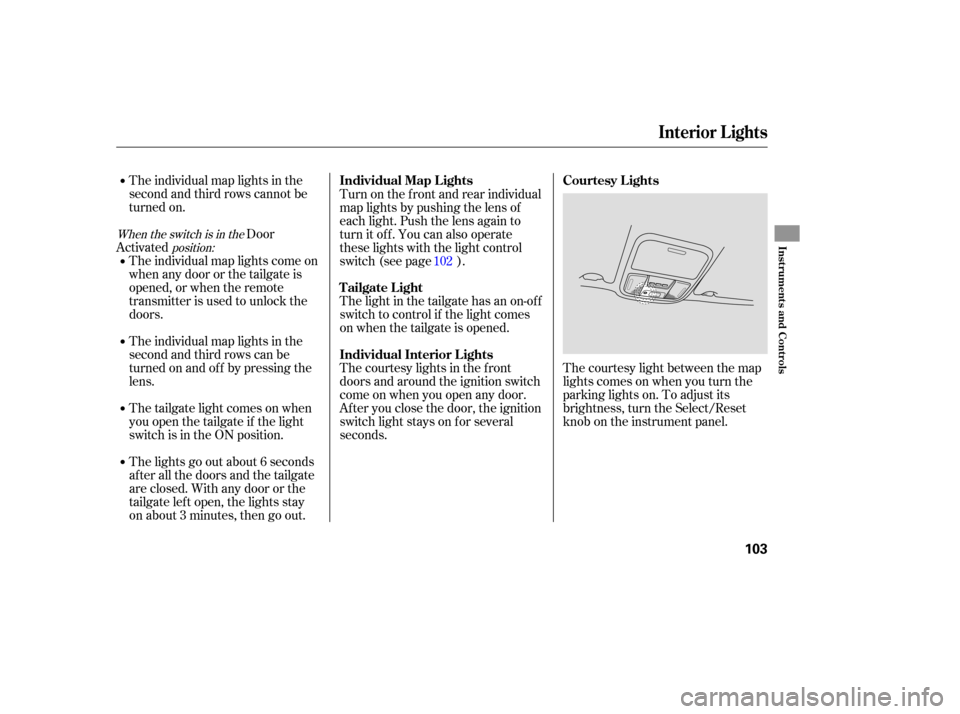
The courtesy light between the map
lights comes on when you turn the
parking lights on. To adjust its
brightness, turn the Select/Reset
knob on the instrument panel.
The
individual map lights come on
whenanydoororthetailgateis
opened, or when the remote
transmitter is used to unlock the
doors.
The individual map lights in the
second and third rows can be
tu rn ed on and off by pressing the
lens.
The tailgate light comes on when
you open the tailgate if the light
switch is in the ON position.
The lights go out about 6 seconds
after all the doors and the tailgate
are closed. With any door or the
tailgate left open, the lights stay
on about 3 minutes, then go out. The
light in the tailgate has an on-o ff
switch to control if the light comes
on when the tailgate is opened.
The courtesy lights in the front
doors and around the ignition switch
come on when you open any door.
After you close the door, the ignition
switch light stays on for several
seconds. Turn on the front and rear individual
map lights by pushing the lens of
each light. Push the lens again to
turn it off. You can also operate
these lights with the light control
switch (see page ). 102
When the switch is in the
position:
Interior Lights
Courtesy Lights
Individual Map L ights
Tailgate Light
Individual Interior L ights
Inst rument s and Cont rols
103
Page 112 of 319

Air conditioning places an extra load
on the engine. Watch the engine
coolant temperatu re gauge (see page
). If it moves near the red zone,
turn of f the A/C until the gauge
reading returns to normal.
Turn on the A/C by pressing the
button. The indicator in the button
comesonwhenafanspeedis
selected (LX model), or the
display shows A/C ON (EX and
EX-L models).
Make sure the temperature is set
to maximum cool.
Select .
If the outside air is humid, select
recirculation mode. If the outside
air is dry, select f resh air mode.
Set the f an to the desired speed.
The system automatically
turns on the A/C and switches to
recirculation mode. Air f lows f rom
the center and side vents in the
dashboard. In this mode, you cannot
turn of f the A/C and also cannot
switch to f resh air mode.
When you switch to f rom , the A/C stays on, and you
can turn it on and of f manually.
When you switch to another mode,
the A/C returns to its original setting,
either on or of f , as displayed by the
A/C indicator. The f low-through ventilation system
draws in outside air, circulates it
through the interior, then discharges
it through vents near the tailgate.
Set the temperature to the lower
limit.
Make sure the A/C is of f .
Select and fresh air mode.
Set the f an to the desired speed.
The heater uses engine coolant to
warm the air. If the engine is cold, it
will be several minutes bef ore you
f eel warm air coming f rom the
system. Select and fresh air mode.
Set the f an to the desired speed.
Adjust the warmth of the air with
the temperature control dial.
1.
2.
3.
4.
1.
2.
3.
4.
1.
2.
3. 5.71On LX models
Vents, Heating, and A/C
Using the A/C
Ventilation
MA X A /C
Using the Heater
Features
109
Page 177 of 319
The security system helps to protect
your vehicle and valuables from theft.
The horn sounds and a combination
of headlights, parking lights, side
marker lights, and taillights flash if
someone attempts to break into your
vehicle. This alarm continues for 2
minutes, then the system resets. To
reset an alarm system before the 2
minutes have elapsed, unlock the
driver’s front door with the key or
the remote transmitter. The
security system will not set if
the hood, the tailgate, or any door is
not fully closed. If the system will not
set, check the Door and Tailgate
Open Monitor on the instrument
panel (see page ) to see if the
doors and the tailgate are f ully
closed. Since it is not part of the
monitor display, manually check the
hood.
Do not attempt to alter this system
or add other devices to it.
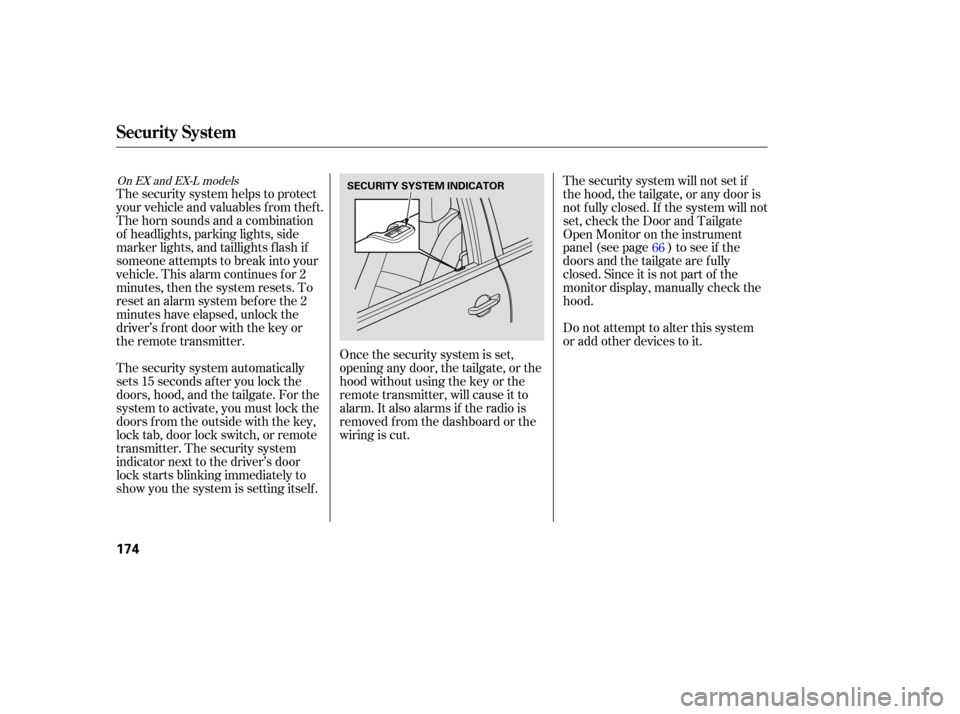
The security system automatically
sets 15 seconds after you lock the
doors, hood, and the tailgate. For the
system to activate, you must lock the
doors f rom the outside with the key,
lock tab, door lock switch, or remote
transmitter. The security system
indicator next to the driver’s door
lock starts blinking immediately to
show you the system is setting itself . Once the security system is set,
opening any door, the tailgate, or the
hood without using the key or the
remote transmitter, will cause it to
alarm. It also alarms if the radio is
removed f rom the dashboard or the
wiring is cut. 66
On EX and EX-L models
Security System
174
SECURITY SYSTEM INDICATOR
Page 198 of 319

Store or secure all items that could
be thro wn around and hurt
someone during a crash. If
you use an accessory roof rack,
the roof rack weight limit may be
lower. Refer to the info rmation that
came with your roof rack.
Theseparationnetcanbeusedto
hold back soft, lightweight items
stored in the cargo area. Heavy
items should be properly secured on
the floor of the cargo area. The net
may not prevent heavy items from
being thrown forward in a crash or a
sudden stop.
Be
sure items placed on the floor
behind the front seats cannot roll
under the seats and interfere with
the driver’s ability to operate the
pedals, the proper operation of the
seats, or proper operation of the
sensors under the seats.
Keep the glove box closed while
driving. If it is open, a passenger
could injure their knees during a
crash or sudden stop. The
cargo cover can be used to
cover the cargo area behind the third
row seats. When the third row seats
are folded down, the cargo cover can
be exte nded over the larger area. Do
not install the cover over the larger
area if the third row seats are not
folded down.
Ifyoufoldthesecondorthirdrow
seats
down, tie down items that
could be thrown about the vehicle
during a crash or sudden stop.
Also, keep all cargo below the
bottom of the windows. If it is
higher, it could interfere with the proper operation of the side
curtain airbags.
If you carry large items that
prevent you f rom closing the
tailgate, exhaust gas can enter the
passenger area. To avoid the
possibility of
, f ollow the instructions
on page . Distribute cargo evenly on the
f loor of the cargo area, placing the
heaviest items on the bottom and
as far forward as possible. Tie
down items that could be thrown
about the vehicle during a crash or
sudden stop.
If you carry any items on a roof
rack,besurethetotalweightof
the rack and the items does not
exceed 165 lbs (75 kg). 57
Carrying Cargo
Optional Separation Net
Optional Cargo Cover
Carrying Items in the Passenger
Compartment
carbon monoxide
poisoning
Carrying Cargo in the Cargo A rea
Bef ore Driving
195
Page 199 of 319
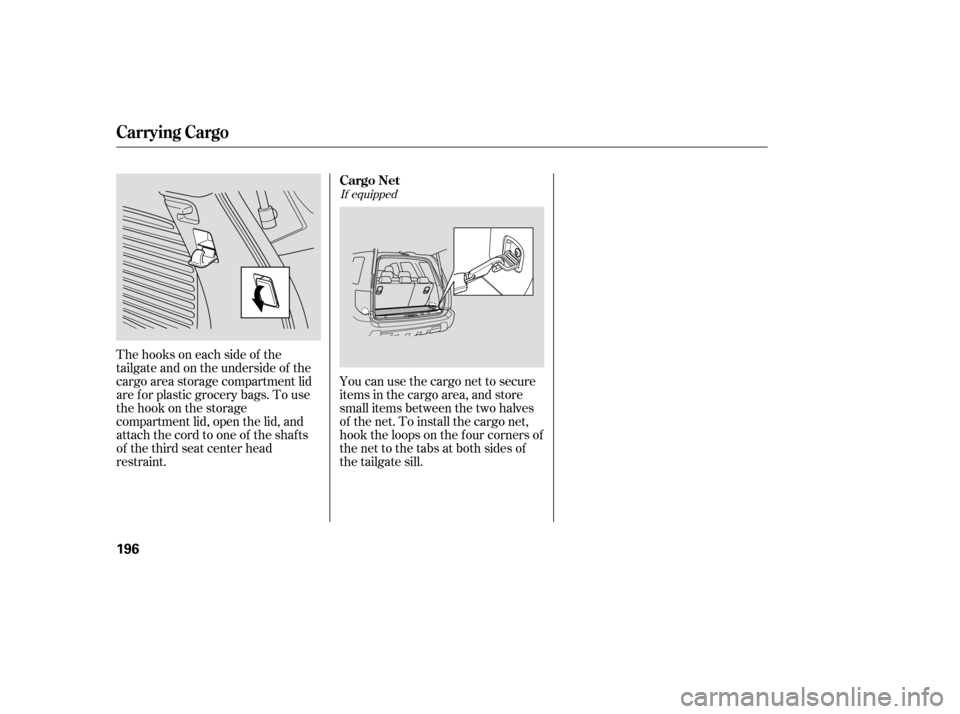
Thehooksoneachsideof the
tailgate and on the underside of the
cargo area storage compartment lid
are f or plastic grocery bags. To use
the hook on the storage
compartment lid, open the lid, and
attach the cord to one of the shafts
of the third seat center head
restraint.You can use the cargo net to secure
items in the cargo area, and store
small items between the two halves
of the net. To install the cargo net,
hook the loops on the f our corners of
the net to the tabs at both sides of
the tailgate sill.
If equipped
Carrying Cargo
Cargo Net
196
Page 202 of 319

If the engine does not start within
15 seconds, or starts but stalls
right away, repeat step 4 with the
accelerator pedal pressed halfway
down. If the engine starts, release
pressu re on the accelerator pedal
so the engine does not race.
If the engine fails to start, press
the accelerator pedal all the way
down, and hold it there while
starting to clear flooding. If the
engine still does not start, return
to step 5.
Check
the steering wheel
ad justment (see page ).
Make sure the doors and the
tailgate are secu rely closed and
locked.
Fasten your seat belt. Check that
your passengers have fastened
their seat belts (see page ).
Wh en you start the engine, check
the gauges and indicato rs in the
instrument panel (see page ). Without
touching the accelerator
pedal, turn the ignition key to the
START (III) position. Do not hold
the key in the START (III)
position for more than 15 seconds
at a time. If the engine does not
start right away, pause for at least
10 seconds before trying again.
Make
sure the shift lever is in
Park. Press on the brake pedal.
In
cold weather, turn off all
electrical accessories to reduce
the drain on the battery.
Apply
the parking brake. 5.
6.
1.
2.
3.
4.
78
61
15
6.
7.
8.
9.
79
Driving
Guidelines, Starting the Engine
Starting theEngine
Driving
199
The engine is harder to start in cold
weather. Also, the thinner air found at
altitudes above 8,000 feet (2,400
meters) adds to this problem.
The immobilizer system protects your
veh icle from theft. If an improperly-
coded key (or other device) is used, the
engine’s f uel system is disabled. For
more inf ormation, see page .
Page 222 of 319
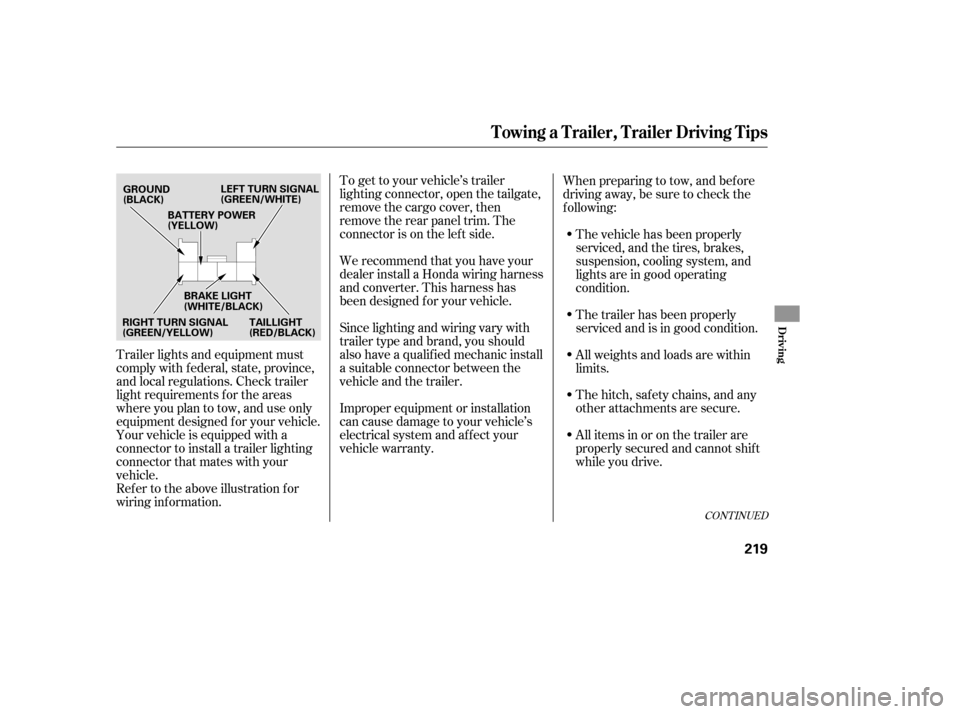
To get to your vehicle’s trailer
lighting connector, open the tailgate,
remove the cargo cover, then
remove the rear panel trim. The
connector is on the lef t side.
Trailer lights and equipment must
comply with f ederal, state, province,
and local regulations. Check trailer
light requirements f or the areas
where you plan to tow, and use only
equipment designed f or your vehicle.
Your vehicle is equipped with a
connector to install a trailer lighting
connector that mates with your
vehicle.
Ref er to the above illustration f or
wiring information. We recommend that you have your
dealer install a Honda wiring harness
and converter. This harness has
been designed f or your vehicle.
Since lighting and wiring vary with
trailer type and brand, you should
also have a qualif ied mechanic install
a suitable connector between the
vehicleandthetrailer.
Improper equipment or installation
can cause damage to your vehicle’s
electrical system and af f ect your
vehicle warranty.When preparing to tow, and bef ore
driving away, be sure to check the
f ollowing:
The vehicle has been properly
serviced, and the tires, brakes,
suspension, cooling system, and
lights are in good operating
condition.
The trailer has been properly
serviced and is in good condition.
All weights and loads are within
limits.
Thehitch,safetychains,andany
other attachments are secure.
All items in or on the trailer are
properly secured and cannot shif t
while you drive.
CONT INUED
Towing a Trailer, Trailer Driving Tips
Driving
219
GROUND
(BLACK) LEFT TURN SIGNAL
(GREEN/WHITE)
RIGHT TURN SIGNAL
(GREEN/YELLOW) BRAKE LIGHT
(WHITE/BLACK)
TAILLIGHT
(RED/BLACK)
BATTERY POWER
(YELLOW)
Page 255 of 319
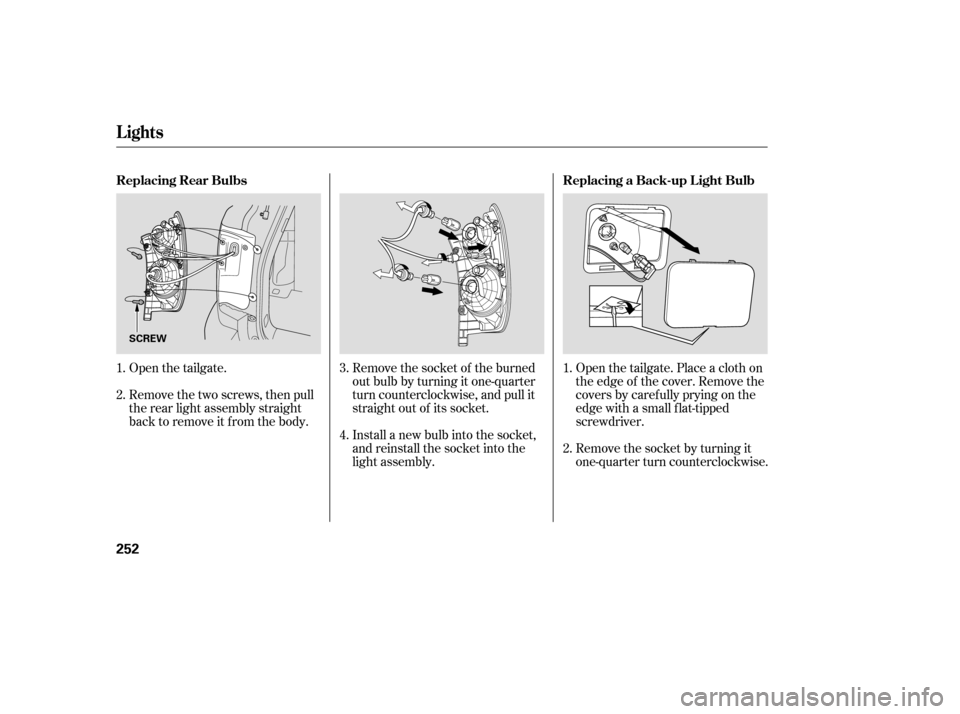
Open the tailgate.
Remove the two screws, then pull
the rear light assembly straight
back to remove it from the body.Open the tailgate. Place a cloth on
the edge of the cover. Remove the
covers by caref ully prying on the
edge with a small f lat-tipped
screwdriver.
Remove the socket by turning it
one-quarter turn counterclockwise.
Remove the socket of the burned
out bulb by turning it one-quarter
turn counterclockwise, and pull it
straight out of its socket.
Install a new bulb into the socket,
and reinstall the socket into the
light assembly. 1.
1.
2. 3.
2.
4.
Lights
Replacing Rear Bulbs
Replacing a Back-up L ight Bulb
252
SCREW
Page 256 of 319
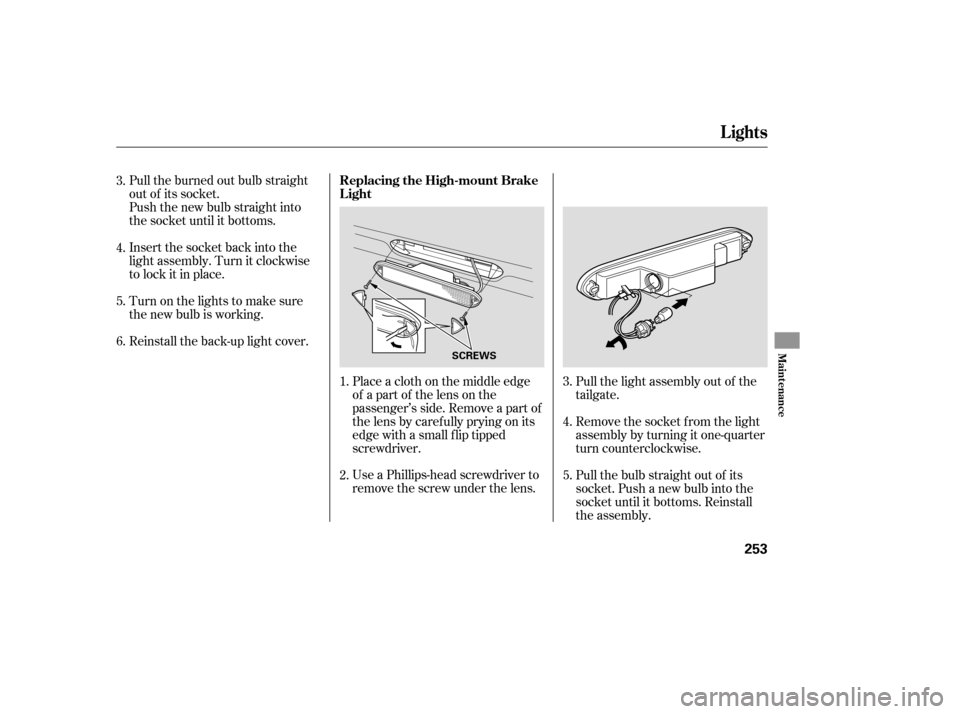
Use a Phillips-head screwdriver to
remove the screw under the lens. Place a cloth on the middle edge
of a part of the lens on the
passenger’s side. Remove a part of
the lens by caref ully prying on its
edge with a small f lip tipped
screwdriver.
Reinstall the back-up light cover. Pull the burned out bulb straight
out of its socket.
Push the new bulb straight into
the socket until it bottoms.
Insert the socket back into the
light assembly. Turn it clockwise
to lock it in place.
Pull the light assembly out of the
tailgate.
Pull the bulb straight out of its
socket. Push a new bulb into the
socket until it bottoms. Reinstall
the assembly. Remove the socket f rom the light
assembly by turning it one-quarter
turn counterclockwise.
Turn on the lights to make sure
the new bulb is working.
1. 4.
5. 3.
2.
4.
5.
6. 3.
Lights
Replacing the High-mount Brake
Light
Maint enance
253
SCREWS
Page 266 of 319

Fill the f uel tank.
Change the engine oil and f ilter.Block the rear wheels.
Wash and dry the exterior
completely.
Cleantheinterior.Makesurethe
carpeting, floor mats, etc., are
completely dry.
If you need to park your vehicle f or
an extended period (more than 1
month), there are several things you
should do to prepare it f or storage.
Proper preparation helps prevent
deterioration and makes it easier to
get your vehicle back on the road. If
possible, store your vehicle indoors. Leave one window open slightly (if
the vehicle is being stored
indoors).Cover the vehicle with a
‘‘breathable’’ cover, one made
f rom a porous material such as
cotton. Non-porous materials, such
as plastic sheeting, trap moisture,
which can damage the paint.
Support the f ront wiper blade
arms with a f olded towel or rag so
they do not touch the windshield. Disconnect the battery.
Leave the parking brake off. Put
the transmission in Park. To minimize sticking, apply a
silicone spray lubricant to all door
and tailgate seals. Also, apply a
vehiclebodywaxtothepainted
surfaces that mate with the door
and tailgate seals.If possible, periodically run the
engine until it reaches f ull
operating temperature (the
cooling f ans cycle on and of f
twice). Pref erably, do this once a
month.
If the vehicle is to be stored f or a
longer period, it should be
supported on jackstands so the
tires are of f the ground.
Vehicle Storage
Maint enance
263