navigation system HONDA PILOT 2011 2.G Owners Manual
[x] Cancel search | Manufacturer: HONDA, Model Year: 2011, Model line: PILOT, Model: HONDA PILOT 2011 2.GPages: 574, PDF Size: 14.02 MB
Page 394 of 574
For the best picture, always keep the
rearview camera clean, and do not
cover the camera lens. To avoid
scratching the lens when you clean it,
use a moist, sof t cloth.
Since the rearview camera display
area is limited, you should always
back up slowly and caref ully, and
look behind you f or obstacles.
When the system is af f ected by
some electrical equipment or
devices generating an ultrasonic
wave.
When operating the vehicle in bad
weather.
The system may not sense thin or
low objects, or sonic-absorptive
materials such as snow, cotton, or
sponge.
The system cannot sense objects
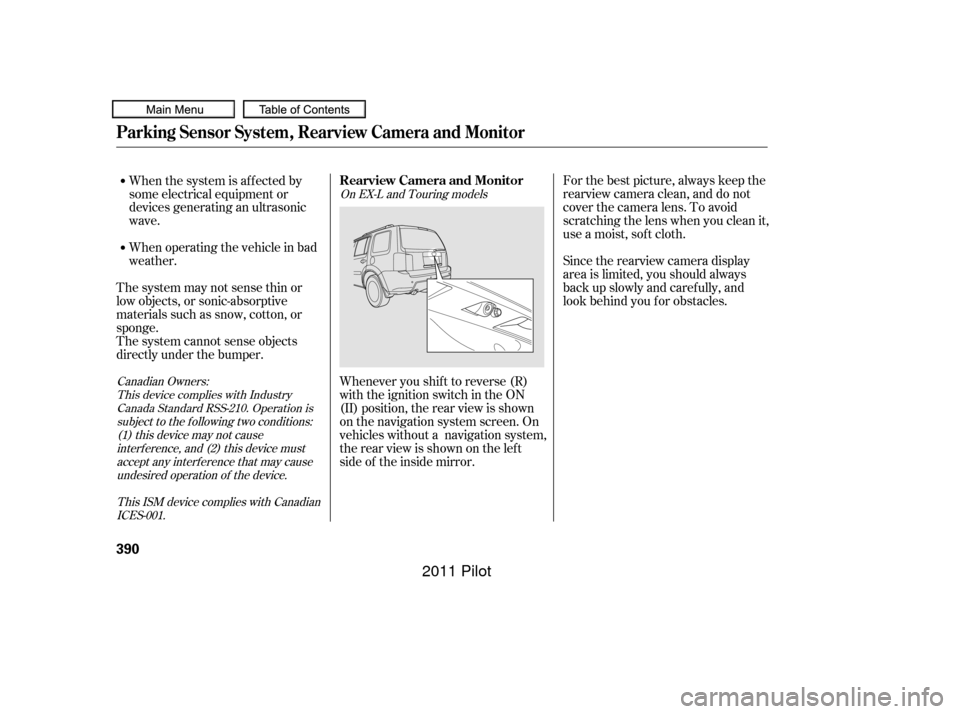
directly under the bumper. Whenever you shif t to reverse (R)
with the ignition switch in the ON
(II) position, the rear view is shown
on the navigation system screen. On
vehicles without a navigation system,
the rear view is shown on the lef t
side of the inside mirror.
This device complies with IndustryCanada Standard RSS-210. Operation issubject to the f ollowing two conditions:(1) this device may not causeinterf erence, and (2) this device mustaccept any interf erence that may causeundesired operation of the device.
Canadian Owners:
This ISM device complies with CanadianICES-001. On EX-L and Touring models
Parking Sensor System, Rearview Camera and Monitor
Rearview Camera and Monitor
390
10/01/26 19:30:23 31SZA620_395
2011 Pilot
Page 395 of 574
Monitor brightness is adjusted
automatically by sensors. If you use
the monitor continuously at high
temperature, the monitor will
gradually dim.
The inside mirror will be hot when
you use the monitor f or an extended
period of time.
If a bright light (such as sunlight) is
shining on the inside mirror, the
image may be dif f icult to see.
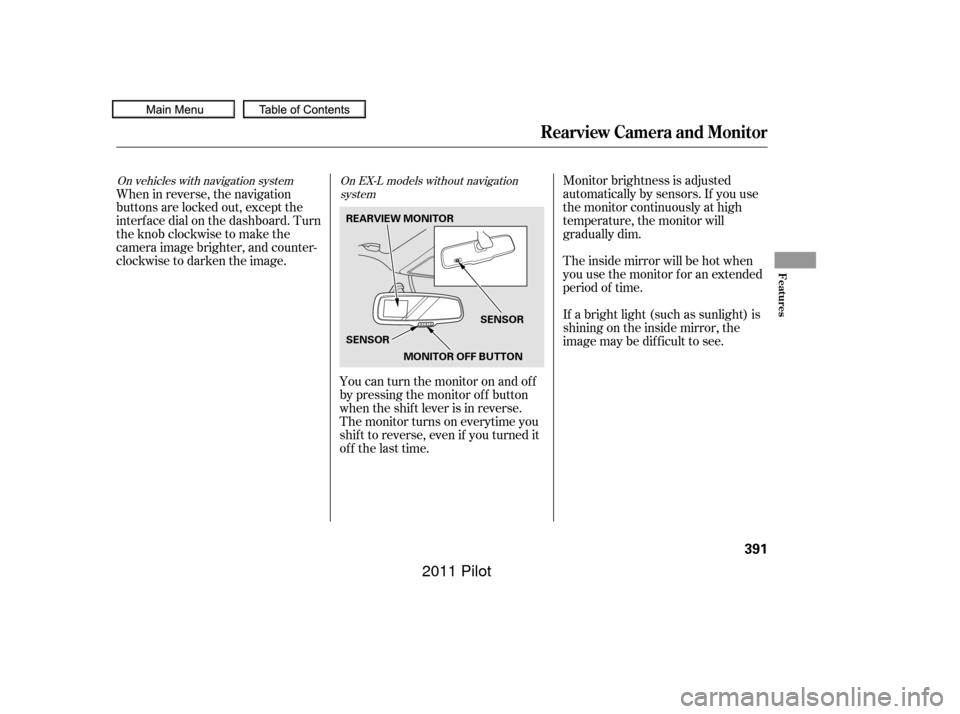
When in reverse, the navigation
buttons are locked out, except the
interf ace dial on the dashboard. Turn
the knob clockwise to make the
camera image brighter, and counter-
clockwise to darken the image.
You can turn the monitor on and of f
by pressing the monitor of f button
when the shif t lever is in reverse.
The monitor turns on everytime you
shif t to reverse, even if you turned it
of f the last time.On vehicles with navigation system On EX-L models without navigation system
Rearview Camera and Monitor
Features
391
REARVIEW MONITOR
SENSORSENSOR
MONITOR OFF BUTTON
10/01/26 19:30:32 31SZA620_396
2011 Pilot
Page 400 of 574
Screw the fuel fill cap back on
until it clicks at least once.If the system still detects a leak in
the vehicle’s evaporative emissions
system, the malf unction indicator
lamp (MIL) comes on. If the f uel f ill
cap was not already tightened, turn
the engine of f , and check or
retighten the f uel f ill cap until it
clicks at least once. The MIL should
go off after several days of normal
driving once the cap is tightened or
replaced. If the MIL does not go of f ,
have your vehicle inspected by a
dealer. For more inf ormation, see
page .
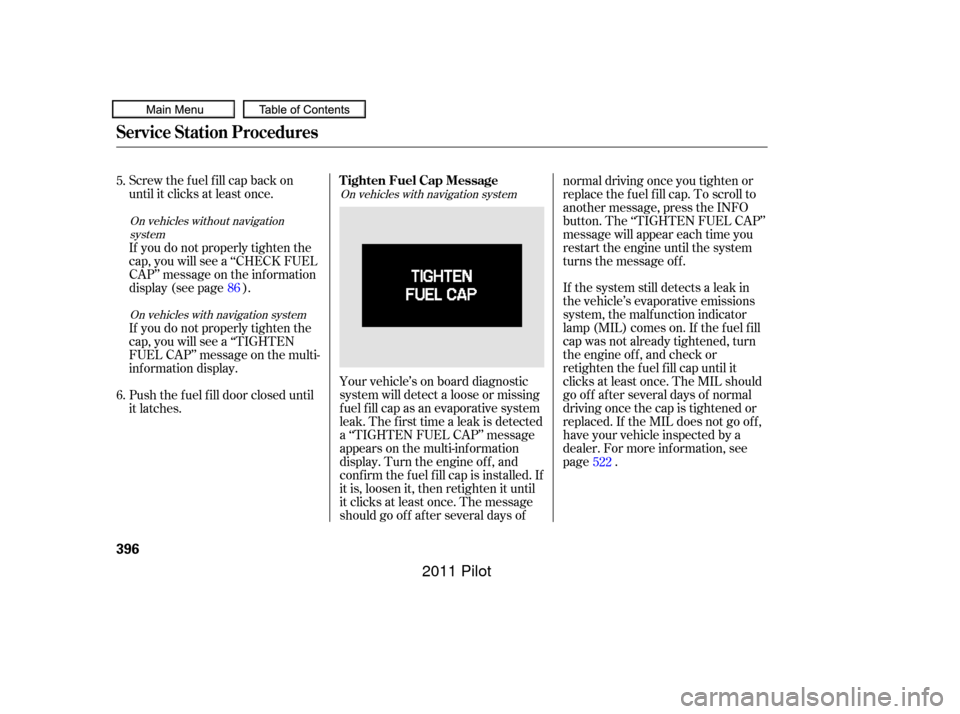
Your vehicle’s on board diagnostic
system will detect a loose or missing
f uel f ill cap as an evaporative system
leak. The f irst time a leak is detected
a ‘‘TIGHTEN FUEL CAP’’ message
appears on the multi-inf ormation
display. Turn the engine of f , and
conf irm the f uel f ill cap is installed. If
it is, loosen it, then retighten it until
it clicks at least once. The message
should go of f af ter several days of normal driving once you tighten or
replace the f uel f ill cap. To scroll to
another message, press the INFO
button. The ‘‘TIGHTEN FUEL CAP’’
message will appear each time you
restart the engine until the system
turns the message of f .
If you do not properly tighten the
cap, you will see a ‘‘CHECK FUEL
CAP’’ message on the inf ormation
display (see page ).
If you do not properly tighten the
cap, you will see a ‘‘TIGHTEN
FUEL CAP’’ message on the multi-
inf ormation display.
Push the f uel f ill door closed until
it latches.
5.
6.
522
86
On vehicles without navigation
system
On vehicles with navigation system On vehicles with navigation system
Tighten Fuel Cap Message
Service Station Procedures
396
10/01/26 19:31:19 31SZA620_401
2011 Pilot
Page 416 of 574

If this message is on, the ignition
switchhastobeheldinthe
START (III) position manually
until the engine starts. The
ignitionswitchcanbeheldinthat
position up to 15 seconds.
Even though you may be able to
start the engine manually without
the auto control mode of the starter
system, have your dealer inspect
your vehicle.
If there is a problem with the starter
system, you will see a ‘‘CHECK
STARTER SYSTEM’’ message on
the multi-information display when
the ignition switch is turned to the
ON (II) position. You will also see
this message when the auto control
mode of the starter system has a
problem.
On vehicles with navigation system
Starting the Engine
Check Starter System Message
412
U.S.
CanadaThe engine is harder to start in cold
weather. Also, the thinner air f ound at
altitudes above 8,000 f eet (2,400
meters) adds to this problem.
10/01/26 19:34:34 31SZA620_417
2011 Pilot
Page 417 of 574

CONT INUED
These indicators on the instrument
panel show which position the shif t
lever is in.
The ‘‘D’’ indicator comes on f or a
f ew seconds when you turn the
ignition switch to the ON (II)
position. If it f lashes while driving (in
any shif t position), it indicates a
possible problem in the transmission.If the malf unction indicator lamp
comes on along with the ‘‘D’’
indicator, there is a problem with the
automatic transmission control
system. Avoid rapid acceleration, and
have the transmission checked by
your dealer as soon as possible.
When the ‘‘D’’ indicator warns of a
possible problem with the
transmission, you will see a ‘‘CHECK
TRANSMISSION’’ message on the
multi-inf ormation display (see page
). To shif t f rom any position, press
f irmly on the brake pedal and the
release button on the side of the
shiftlever.Youcannotshiftoutof
Park when the ignition switch is in
the LOCK (0) or ACCESSORY (I)
position.
96
On vehicles with navigation system
Shif t L ever Position Indicators
Shif ting
Automatic Transmission
Driving
413
U.S. model is shown.
10/01/26 19:34:46 31SZA620_418
2011 Pilot
Page 424 of 574

When the low tire pressure indicator
is on, one or more of your tires is
signif icantly underinf lated. You
should stop and check your tires as
soon as possible, and inf late them to
the proper pressure as indicated on
the vehicle’s tire inf ormation placard.
If you think you can saf ely drive a
short distance to a service station,
proceed slowly, and inf late the tire to
the recommended pressure shown
on the driver’s doorjamb.
If the tire is f lat, or if the tire
pressure is too low to continue
driving, replace the tire with the
compact spare tire (see page ).
If you cannot make the low tire
pressure indicator go out af ter
inf lating the tires to the specif ied
values, have your dealer check the
system as soon as possible.Driving on a signif icantly under
inf lated tire causes the tire to
overheat and can lead to tire failure.
Underinf lation also reduces f uel
efficiency and tire tread life, and may
af f ect the vehicle’s handling and
stopping ability.
Becausetirepressurevariesby
temperature and other conditions,
the low tire pressure indicator may
come on unexpectedly.
Each tire has its own pressure
sensor (not including the spare tire).
If the air pressure of a tire becomes
signif icantly low while driving, the
sensor in that tire immediately sends
a signal that causes the low tire
pressure indicator to come on. Your vehicle is equipped with a tire
pressure monitoring system (TPMS)
that turns on every time you start the
engine and monitors the pressure in
your tires while driving.
508
On vehicles without navigation systemLow Tire Pressure
Indicator
Tire Pressure Monitoring System (TPMS)
420
10/01/26 19:35:58 31SZA620_425
2011 Pilot
Page 427 of 574

CONT INUED
If you think you can saf ely drive a
short distance to a service station,
proceed slowly to the station, then
inflate the tire to the recommended
pressure.
If the tire is f lat, or if the tire
pressure is too low to continue
driving, replace the tire with the
compact spare tire (see page ).
Driving on a signif icantly under-
inf lated tire causes the tire to
overheat and can lead to tire failure.
Under-inf lation also reduces f uel
efficiency and tire tread life, and may
af f ect the vehicle’s handling and
stopping ability.
Becausetirepressurevariesby
temperature and other conditions,
the low tire pressure/TPMS
indicator may come on unexpectedly.
When the low tire pressure/TPMS
indicator is on, one or more of your
tires is signif icantly underinf lated.
Youshouldstopandcheckyourtires
as soon as possible, and inflate them
to the proper pressure as indicated
on the vehicle’s tire inf ormation
placard.
It is possible that the pressures
shown on the multi-inf ormation
display and the pressures you
manually measure are slightly
dif f erent.
If the dif f erence is signif icant or you
cannot make the low tire pressure/
TPMS indicator and message on the
multi-inf ormation display go out af ter
inf lating the tires to the specif ied
values, have your dealer check the
system as soon as possible.
Each tire has its own pressure
sensor. If the air pressure of a tire
becomes signif icantly low, the
sensor in that tire immediately sends
a signal that causes the low tire
pressure/TPMS indicator in the
instrument panel to come on. If this
happens, you will see which tire is
losing pressure on the multi-
inf ormation display along with a
‘‘CHECK TIRE PRESSURE’’
message. Your vehicle is equipped with a tire
pressure monitoring system (TPMS)
that turns on every time you start the
engine and monitors the pressure in
your tires while driving.
509On vehicles with navigation systemLow Tire Pressure/
TPMS Indicator
Tire Pressure Monitoring System (TPMS)
Driving
423
10/01/26 19:36:33 31SZA620_428
2011 Pilot
Page 434 of 574
on loose or
uneven surf aces, such as gravel or
snow, than a vehicle without anti-
lock. It only helps with steering
control during braking.
such as trying to take a
corner too f ast or making a sudden
lane change. Always drive at a safe
speed f or the road and weather
conditions.
Always steer moderately
when you are braking hard. Severe
or sharp steering wheel movement
can still cause your vehicle to veer
into oncoming traffic or off the road.
If the ABS indicator and the brake
system indicator come on together,
and the parking brake is f ully
released, the EBD system may also
be shut down.
If this indicator comes on, the anti-
lock f unction of the braking system
has shut down. The brakes still work
like a conventional system, but
without anti-lock. You should have
your dealer inspect your vehicle as
soon as possible.
If the indicator comes on while
driving, test the brakes as instructed
on page . You will also see a ‘‘CHECK ABS
SYSTEM’’ message on the multi-
inf ormation display (see page ). If this happens, you will also see
‘‘CHECK ABS SYSTEM’’ and
‘‘CHECK BRAKE SYSTEM’’
messages on the multi-inf ormation
display.
Test your brakes as instructed on
page . If the brakes f eel normal,
drive slowly and have your vehicle
repaired by your dealer as soon as
possible. Avoid sudden hard braking
which could cause the rear wheels to
lock up and possibly lead to a loss of
control.
The VSA indicator will come on
alongwiththeABSindicator.
523
523
95
On vehicles with navigation system On vehicles with navigation system
Anti-lock Brakes (ABS)
A vehicle with A BS may require a
longer distance to stop A BS does not reduce the time or
distance it takes to stop the
vehicle. Important Saf ety Reminders
A BS will not prevent a skid that
results f rom changing direction
abruptly,
A BS cannot prevent a loss of
stability.
ABS Indicator
430
10/01/26 19:37:45 31SZA620_435
2011 Pilot
Page 435 of 574

The vehicle stability assist (VSA)
system helps to stabilize the vehicle
during cornering if the vehicle turns
more or less than desired. It also
assists you in maintaining traction
while accelerating on loose or
slippery road surf aces. It does this
by regulating the engine’s output and
by selectively applying the brakes.
When VSA activates, you may notice
that the engine does not respond to
the accelerator in the same way it
does at other times. There may also
be some noise f rom the VSA
hydraulic system. You will also see
the VSA activation indicator blink.
The VSA system cannot enhance the
vehicle’s driving stability in all
situations and does not control your
vehicle’s entire braking system. It is
still your responsibility to drive and
corner at reasonable speeds and to
leave a sufficient margin of safety.When VSA activates, you will see the
VSA activation indicator blink.
If this indicator comes on while
driving, pull to the side of the road
when it is saf e, and turn of f the
engine. Reset the system by
restarting the engine. If the VSA
system indicator stays on or comes
back on while driving, have the VSA
system inspected by your dealer.
The main f unction of the
VSA system is generally known as
Electronic Stability Control (ESC).
The system also includes a traction
control f unction.
If the indicator does not come on
when the ignition switch is turned to
the ON (II) position, there may be a
problem with the VSA system. Have
your dealer inspect your vehicle as
soon as possible.
You will also see a ‘‘CHECK VSA
SYSTEM’’ message on the multi-
inf ormation display if there is a
problem with the VSA system.
CONT INUED
On vehicles with navigation system
VSA A ctivation Indicator
Vehicle Stability Assist
(VSA ) System Indicator
Vehicle Stability A ssist (VSA), aka Electronic Stability Control (ESC), System
Driving
431
NOTE:
10/01/26 19:37:59 31SZA620_436
2011 Pilot
Page 436 of 574
VSA is turned on every time you
start the engine, even if you turned it
off the last time you drove the
vehicle.
In certain unusual conditions when
your vehicle gets stuck in shallow
mud or f resh snow, it may be easier
to free it with the VSA temporarily
switched of f . When the VSA system
is of f , the traction control system is
alsooff.Youshouldonlyattemptto
f ree your vehicle with the VSA of f if
you are not able to f ree it when the
VSA is on.
Immediately af ter f reeing your
vehicle, be sure to switch the VSA on
again. We do not recommend driving
your vehicle with the VSA and
traction control systems switched off.
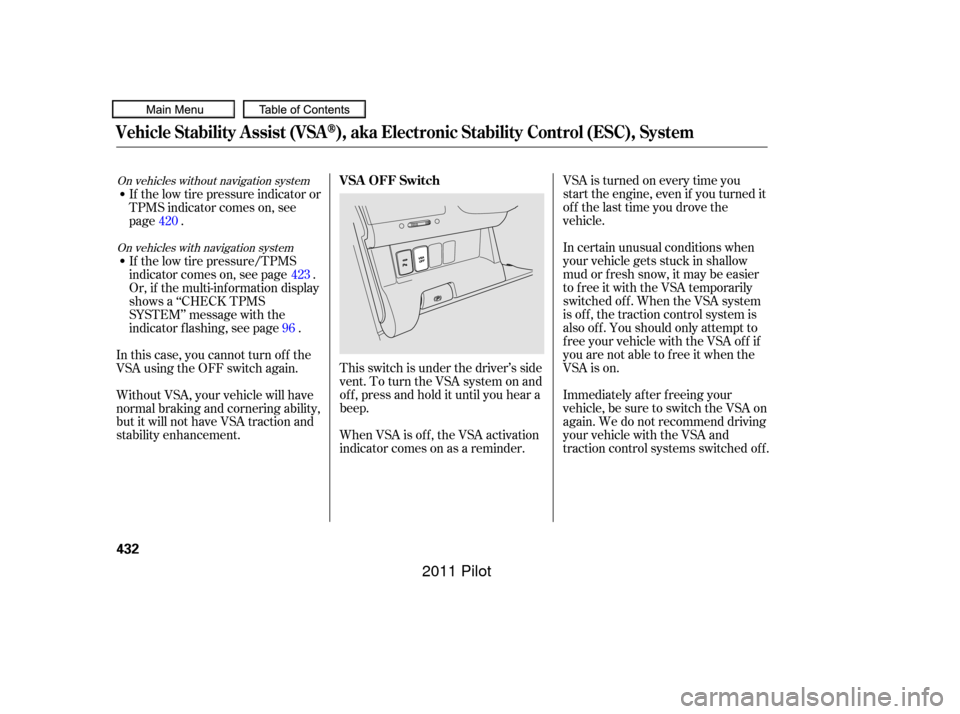
This switch is under the driver’s side
vent. To turn the VSA system on and
of f , press and hold it until you hear a
beep.
When VSA is off, the VSA activation
indicator comes on as a reminder.
If the low tire pressure indicator or
TPMS indicator comes on, see
page .
If the low tire pressure/TPMS
indicator comes on, see page .
Or, if the multi-inf ormation display
shows a ‘‘CHECK TPMS
SYSTEM’’ message with the
indicator f lashing, see page .
In this case, you cannot turn of f the
VSA using the OFF switch again.
Without VSA, your vehicle will have
normal braking and cornering ability,
but it will not have VSA traction and
stability enhancement. 420
423
96On vehicles without navigation system
On vehicles with navigation systemVSA OFF Switch
Vehicle Stability A ssist (VSA), aka Electronic Stability Control (ESC), System
432
10/01/26 19:38:13 31SZA620_437
2011 Pilot