Door HONDA PILOT 2013 2.G User Guide
[x] Cancel search | Manufacturer: HONDA, Model Year: 2013, Model line: PILOT, Model: HONDA PILOT 2013 2.GPages: 488, PDF Size: 10.18 MB
Page 29 of 488
uuFor Safe DrivinguYour Vehicle's Safety Features
28
Safe DrivingFor the safety of you and your passengers, make a habit of checking these items
each time before you drive.
•After everyone has entered the vehicle, be sure all doors and the tailgate are
closed and locked. Locking the doors and the tailgate helps prevent an occupant
from being ejected and an outsider from unexpectedly opening a door or the
tailgate.
2Locking/Unlocking the Doors from the Inside P. 103
•Adjust your seat to a position suitable for driving. Be sure the front seats are
adjusted as far to the rear as possible while allowing the driver to control the
vehicle. Sitting too close to a front airbag can result in serious or fatal injury in a
crash.
2Adjusting the Seats P. 137
•Adjust head restraints to the proper position. Head restraints are most effective
when the center of the head restraint aligns with the center of your head. Taller
persons should adjust their head restraint to the highest position.
2Adjusting the Head Restraints P. 141
•Always wear your seat belt, and make sure you wear it properly. Confirm that any
passengers are properly belted as well.
2Fastening a Seat Belt P. 32
•Protect children by using seat belts or child seats according to a child's age, height
and weight.
2Child Safety P. 52
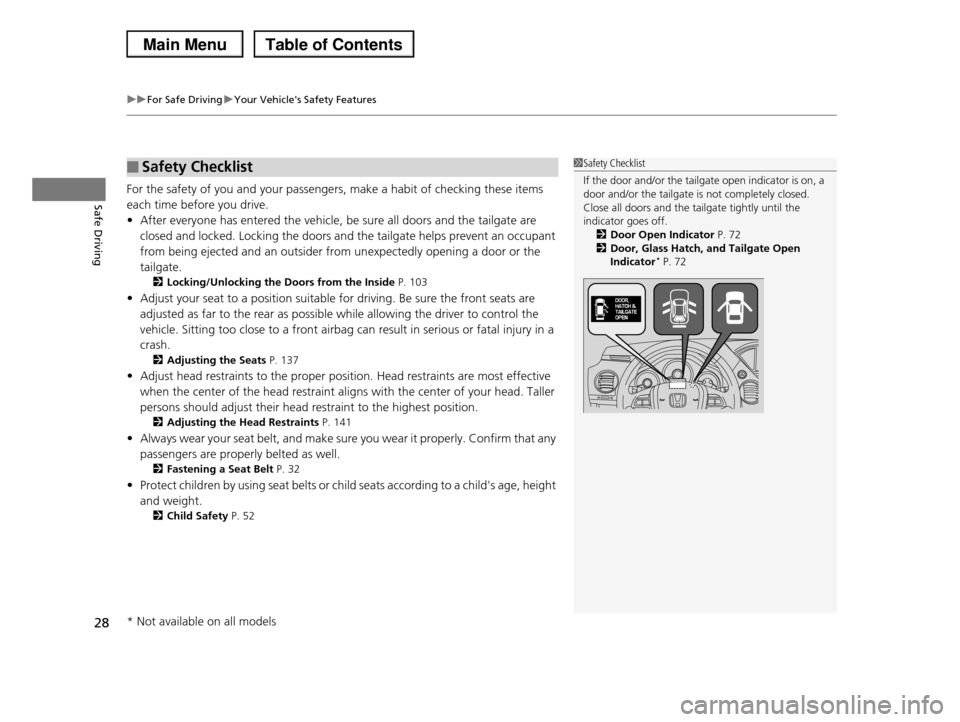
■Safety Checklist1Safety Checklist
If the door and/or the tailgate open indicator is on, a
door and/or the tailgate is not completely closed. Close all doors and the tailgate tightly until the
indicator goes off.
2Door Open Indicator P. 722Door, Glass Hatch, and Tailgate Open
Indicator* P. 72
* Not available on all models
Page 34 of 488
Continued33
uuSeat BeltsuFastening a Seat Belt
Safe Driving
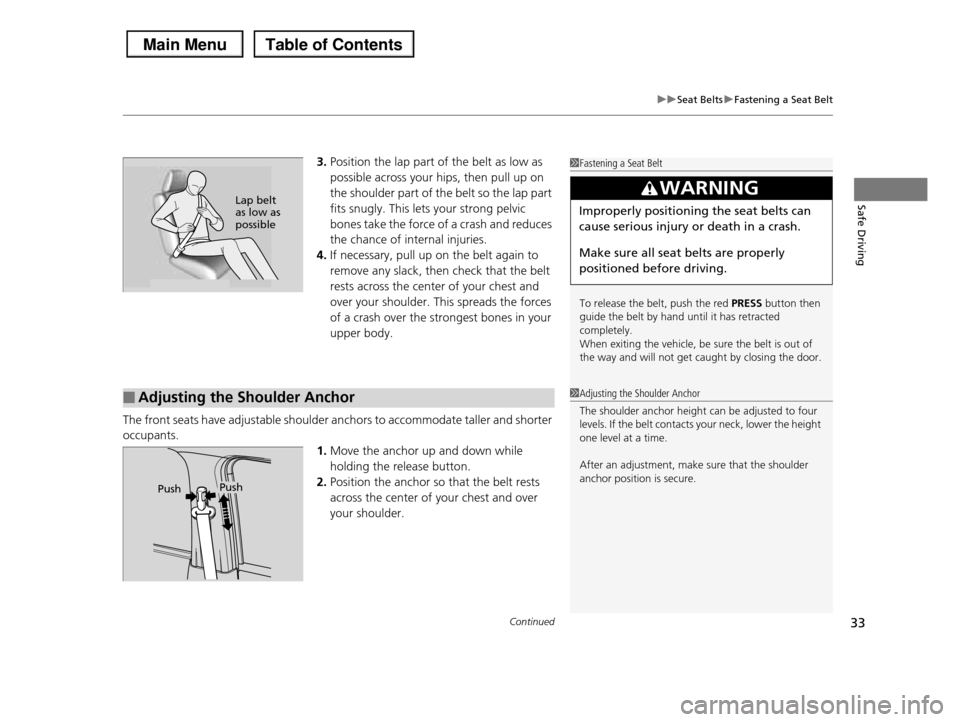
3.Position the lap part of the belt as low as
possible across your hips, then pull up on
the shoulder part of the belt so the lap part
fits snugly. This lets your strong pelvic
bones take the force of a crash and reduces
the chance of internal injuries.
4.If necessary, pull up on the belt again to
remove any slack, then check that the belt
rests across the center of your chest and
over your shoulder. This spreads the forces
of a crash over the strongest bones in your
upper body.
The front seats have adjustable shoulder anchors to accommodate taller and shorter
occupants.
1.Move the anchor up and down while
holding the release button.
2.Position the anchor so that the belt rests
across the center of your chest and over
your shoulder.
1Fastening a Seat Belt
To release the belt, push the red PRESS button then guide the belt by hand until it has retracted
completely.
When exiting the vehicle, be sure the belt is out of the way and will not get caught by closing the door.
3WARNING
Improperly positioning the seat belts can
cause serious injury or death in a crash.
Make sure all seat belts are properly
positioned before driving.
Lap belt as low as possible
■Adjusting the Shoulder Anchor1Adjusting the Shoulder Anchor
The shoulder anchor height can be adjusted to four levels. If the belt contacts your neck, lower the height
one level at a time.
After an adjustment, make sure that the shoulder
anchor position is secure.PushPush
Page 54 of 488
53
uuChild SafetyuProtecting Child Passengers
Safe Driving
•Any child who is too small to wear a seat belt correctly must be restrained in an
approved child seat that is properly secured to the vehicle using either the lap belt
portion of the lap/shoulder belt or the lower anchors of the LATCH system.
•Never hold a child on your lap because it is impossible to protect them in the
event of a collision.
•Never put a seat belt over yourself and a child. During a crash, the belt would
likely press deep into the child and cause serious or fatal injuries.
•Never let two children use the same seat belt. Both children could be very
seriously injured in a crash.
•Do not allow children to operate the doors, windows or seat adjustments.
•Do not leave children in the vehicle unattended, especially in hot weather when
the inside of the vehicle can get hot enough to kill them. They could also activate
vehicle controls causing it to move unexpectedly.
1Protecting Child Passengers
To deactivate a lockable retractor, release the buckle and allow the seat belt to wind up all the way.
To remind you of the passenger's front airbag hazards and child safety, your vehicle warning came
with a label on the dashboard (U.S. models) and has
labels on the front visors. Please read and follow the instructions on these labels.
2Safety Labels P. 66
3WARNING
Allowing a child to play with a seat belt or
wrap one around their neck can result in
serious injury or death.
Instruct children not to play with any seat
belt and make sure any unused seat belt a
child can reach is buckled, fully retracted,
and locked.
Page 66 of 488
65
Safe Driving
Exhaust Gas Hazard
Carbon Monoxide Gas
The engine exhaust from this vehicle contains carbon monoxide, a colorless,
odorless, and highly toxic gas. As long as you properly maintain your vehicle, carbon
monoxide gas will not get into the interior.
■Have the exhaust system inspected for leaks whenever
•The exhaust system is making an unusual noise.
•The exhaust system may have been damaged.
•The vehicle is raised for an oil change.
When you operate a vehicle with the tailgate open, airflow can pull exhaust gas into
the interior and create a hazardous condition. If you must drive with the tailgate
open, open all the windows and set the climate control system as shown below.
1.Select the fresh air mode.
2.Select the mode.
3.Set the fan speed to high.
4.Set the temperature control to a comfortable setting.
Adjust the climate control system in the same manner if you sit in your parked
vehicle with the engine running.
1Carbon Monoxide Gas
An enclosed area such as a garage can quickly fill up with carbon monoxide gas.
Do not run the engine with the garage door closed.
Even when the garage door is open, drive out of the garage immediately after starting the engine.
3WARNING
Carbon monoxide gas is toxic.
Breathing it can cause unconsciousness and
even kill you.
Avoid any enclosed areas or activities that
expose you to carbon monoxide.
Page 67 of 488
66
Safe Driving
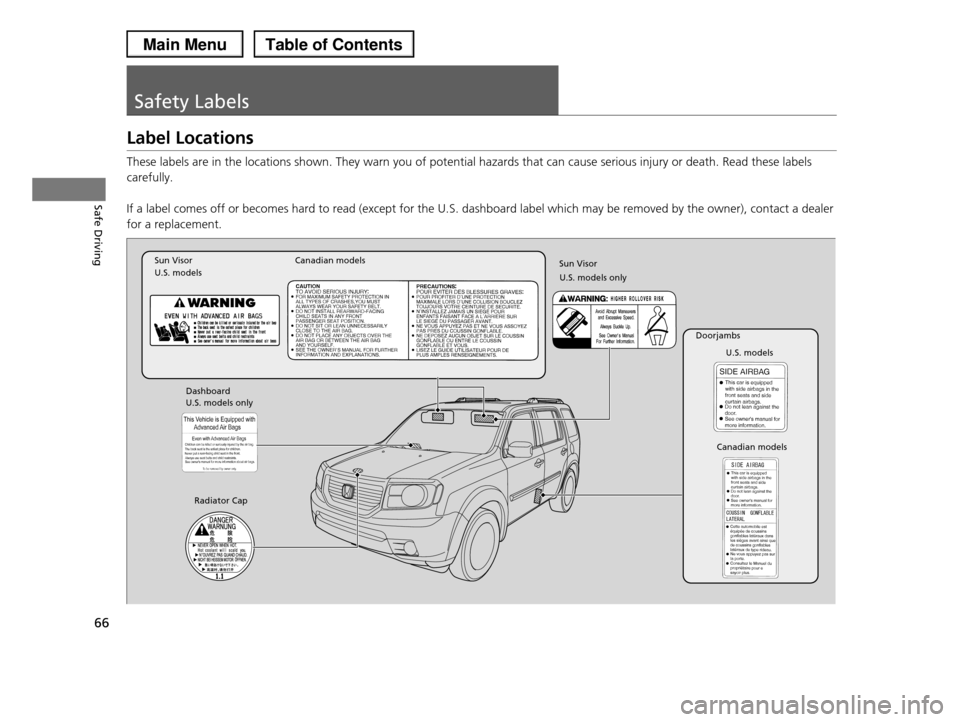
Safety Labels
Label Locations
These labels are in the locations shown. They warn you of potential hazards that can cause serious injury or death. Read these labels
carefully.
If a label comes off or becomes hard to read (except for the U.S. dashboard label which may be removed by the owner), contact a dealer
for a replacement.
Sun Visor U.S. modelsCanadian models
Radiator Cap
U.S. models
U.S. models onlyDashboard
Canadian models
Doorjambs
U.S. models only
Sun Visor
Page 73 of 488
72
uuIndicatorsu
Instrument Panel
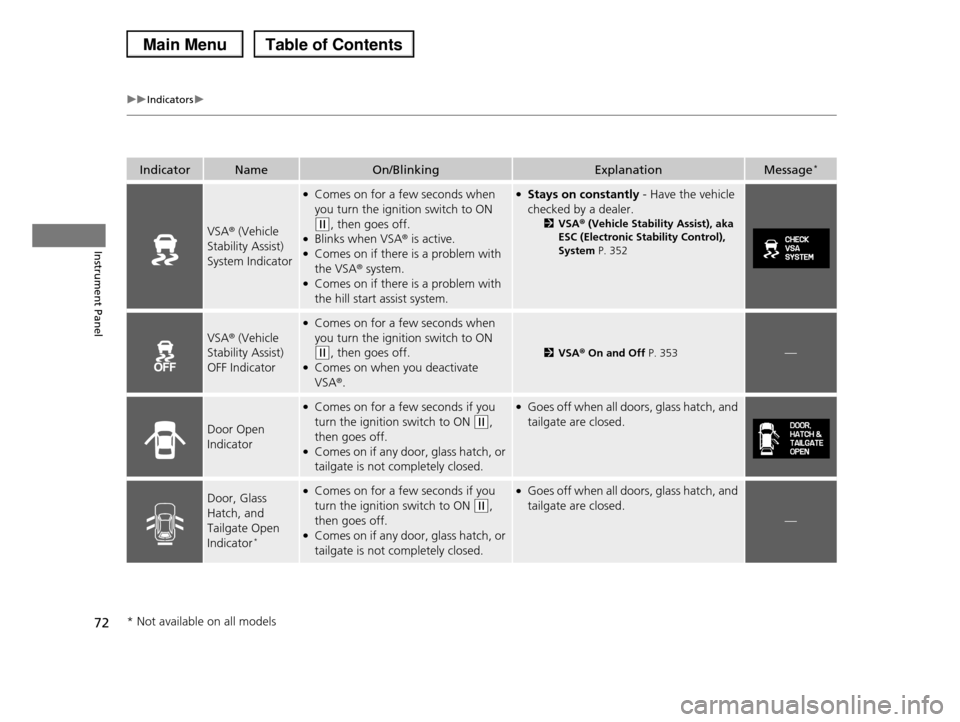
IndicatorNameOn/BlinkingExplanationMessage*
VSA® (Vehicle
Stability Assist)
System Indicator
●Comes on for a few seconds when
you turn the ignition switch to ON
(w, then goes off.●Blinks when VSA® is active.●Comes on if there is a problem with
the VSA® system.●Comes on if there is a problem with
the hill start assist system.
●Stays on constantly - Have the vehicle
checked by a dealer.
2VSA® (Vehicle Stability Assist), aka ESC (Electronic Stability Control),
System P. 352
VSA® (Vehicle
Stability Assist)
OFF Indicator
●Comes on for a few seconds when
you turn the ignition switch to ON
(w, then goes off.●Comes on when you deactivate
VSA®.
2VSA® On and Off P. 353—
Door Open
Indicator
●Comes on for a few seconds if you
turn the ignition switch to ON (w,
then goes off.●Comes on if any door, glass hatch, or
tailgate is not completely closed.
●Goes off when all doors, glass hatch, and
tailgate are closed.
Door, Glass
Hatch, and
Tailgate Open
Indicator*
●Comes on for a few seconds if you
turn the ignition switch to ON (w,
then goes off.●Comes on if any door, glass hatch, or
tailgate is not completely closed.
●Goes off when all doors, glass hatch, and
tailgate are closed.
—
* Not available on all models
Page 76 of 488
75
uuIndicatorsu
Continued
Instrument Panel
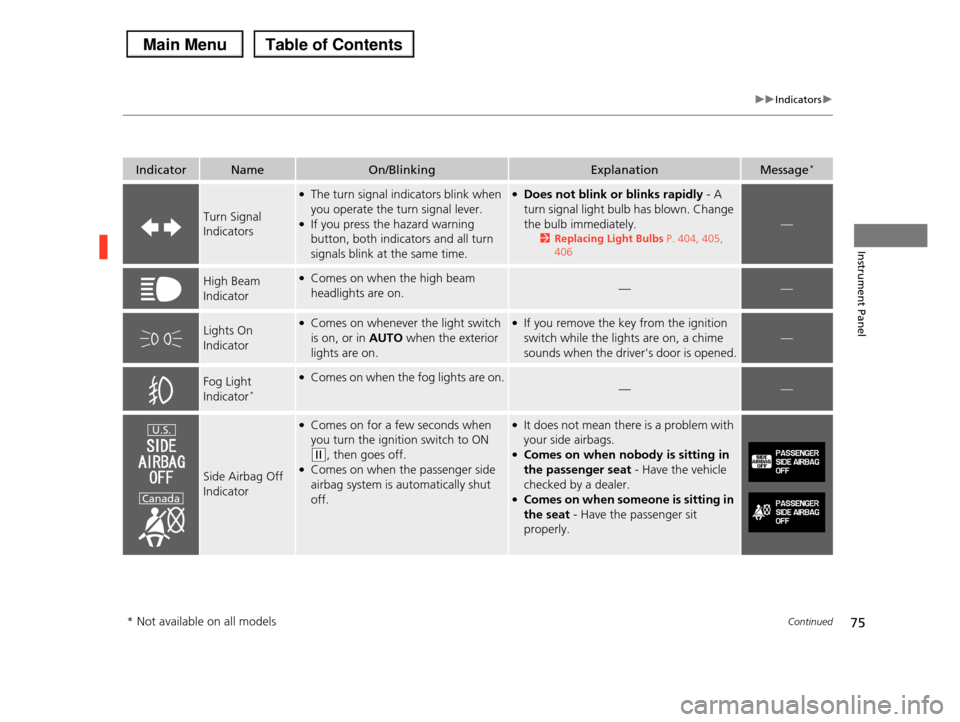
IndicatorNameOn/BlinkingExplanationMessage*
Turn Signal
Indicators
●The turn signal indicators blink when
you operate the turn signal lever.●If you press the hazard warning
button, both indicators and all turn
signals blink at the same time.
●Does not blink or blinks rapidly - A
turn signal light bulb has blown. Change
the bulb immediately.
2Replacing Light Bulbs P. 404, 405,
406
—
High Beam
Indicator
●Comes on when the high beam
headlights are on.——
Lights On
Indicator
●Comes on whenever the light switch
is on, or in AUTO when the exterior
lights are on.
●If you remove the key from the ignition
switch while the lights are on, a chime
sounds when the driver's door is opened.
—
Fog Light
Indicator*
●Comes on when the fog lights are on.——
Side Airbag Off
Indicator
●Comes on for a few seconds when
you turn the ignition switch to ON
(w, then goes off.●Comes on when the passenger side
airbag system is automatically shut
off.
●It does not mean there is a problem with
your side airbags.●Comes on when nobody is sitting in
the passenger seat - Have the vehicle
checked by a dealer.●Comes on when someone is sitting in
the seat - Have the passenger sit
properly.
U.S.
Canada
* Not available on all models
Page 79 of 488
78
uuIndicatorsuMulti-Information Display Warning and Information Messages*
Instrument Panel
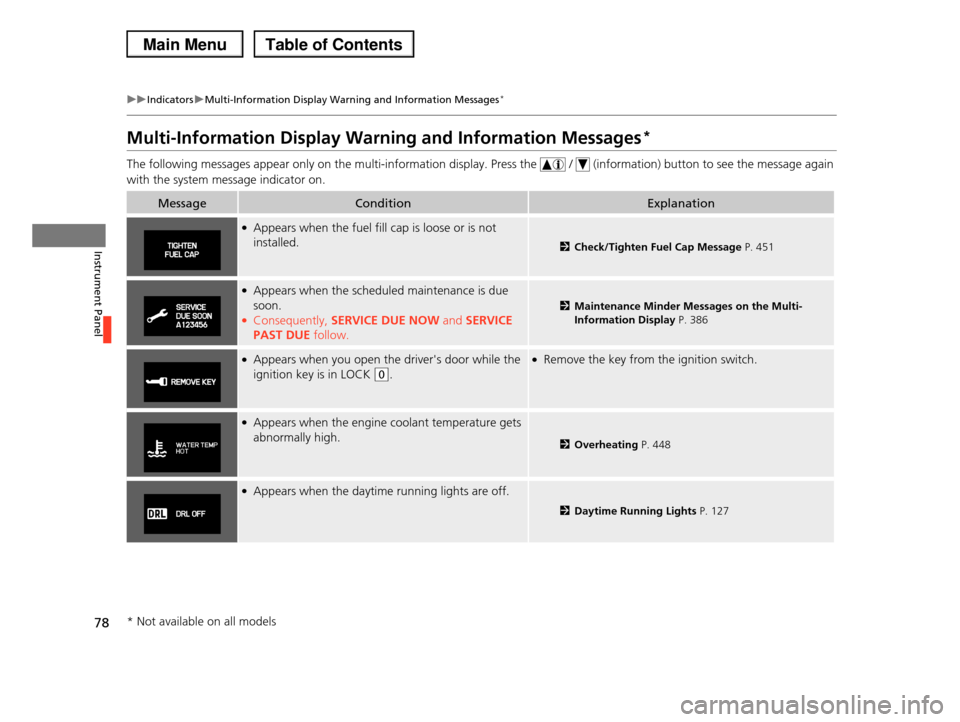
Multi-Information Display Warning and Information Messages*
The following messages appear only on the multi-information display. Press the / (information) button to see the message again
with the system message indicator on.
MessageConditionExplanation
●Appears when the fuel fill cap is loose or is not
installed.2Check/Tighten Fuel Cap Message P. 451
●Appears when the scheduled maintenance is due
soon.●Consequently, SERVICE DUE NOW and SERVICE
PAST DUE follow.
2Maintenance Minder Messages on the Multi-
Information Display P. 386
●Appears when you open the driver's door while the
ignition key is in LOCK (0.
●Remove the key from the ignition switch.
●Appears when the engine coolant temperature gets
abnormally high.2Overheating P. 448
●Appears when the daytime running lights are off.
2Daytime Running Lights P. 127
* Not available on all models
Page 91 of 488
uuGauges and DisplaysuMulti-Information Display*
90
Instrument Panel
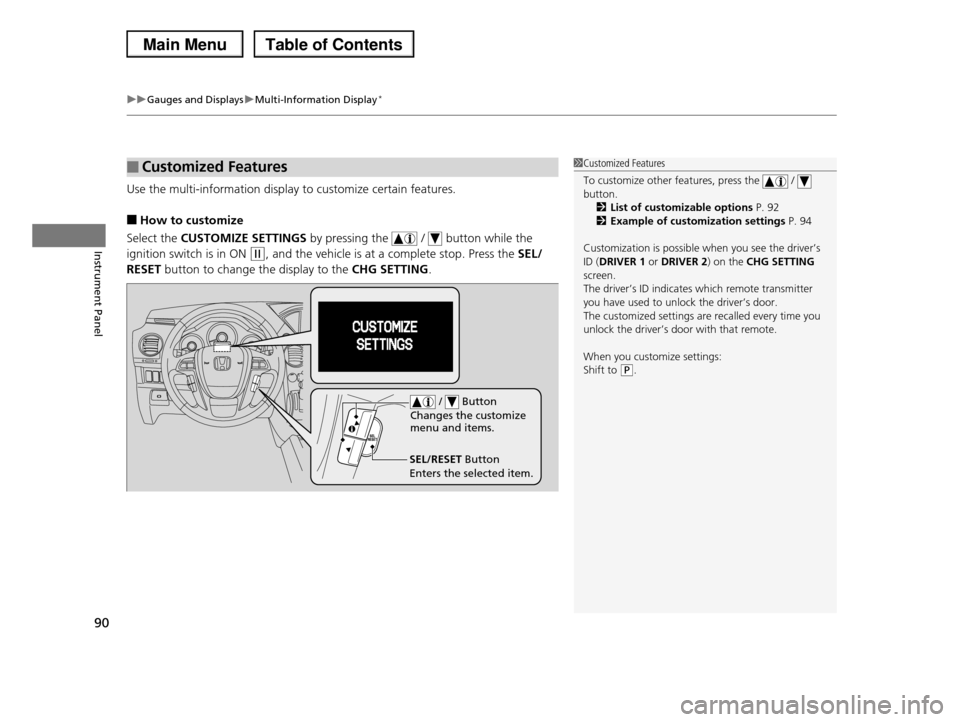
Use the multi-information display to customize certain features.
■How to customize
Select the CUSTOMIZE SETTINGS by pressing the / button while the
ignition switch is in ON (w, and the vehicle is at a complete stop. Press the SEL/
RESET button to change the display to the CHG SETTING.
■Customized Features1Customized Features
To customize other features, press the / button.
2List of customizable options P. 92
2Example of customization settings P. 94
Customization is possible when you see the driver’s
ID (DRIVER 1 or DRIVER 2) on the CHG SETTING screen.
The driver’s ID indicates which remote transmitter
you have used to unlock the driver’s door. The customized settings are recalled every time you
unlock the driver’s door with that remote.
When you customize settings:
Shift to (P.
SEL/RESET Button
Enters the selected item.
/ Button
Changes the customize menu and items.
Page 92 of 488
91
uuGauges and DisplaysuMulti-Information Display*
Continued
Instrument Panel
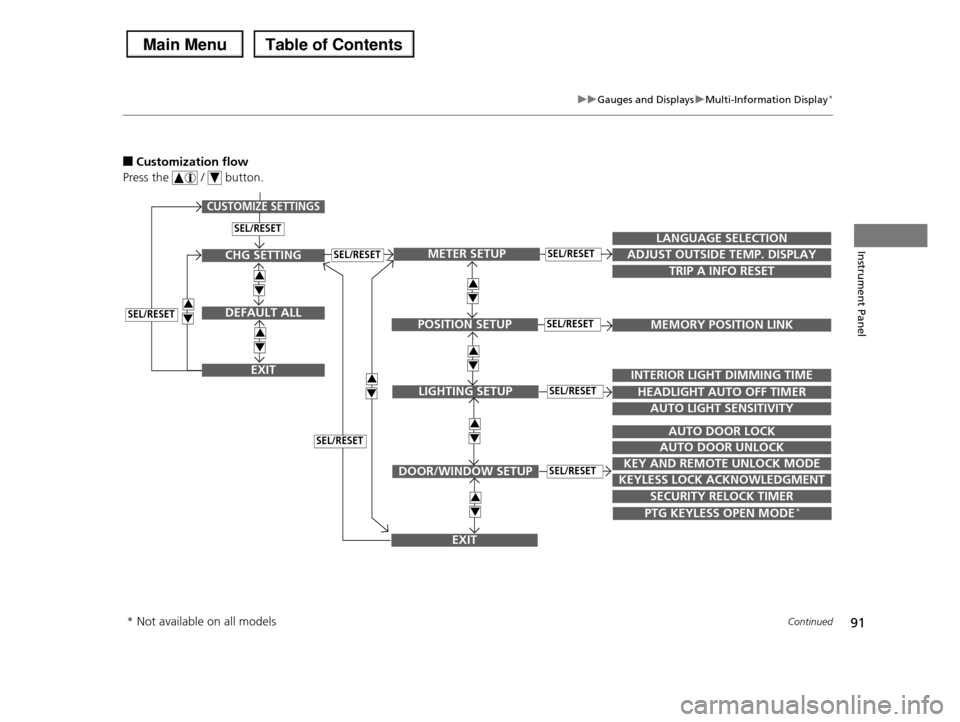
■Customization flow
Press the / button.
SEL/RESET
CUSTOMIZE SETTINGS
SECURITY RELOCK TIMER
TRIP A INFO RESET
LANGUAGE SELECTION
ADJUST OUTSIDE TEMP. DISPLAY
MEMORY POSITION LINK
INTERIOR LIGHT DIMMING TIME
HEADLIGHT AUTO OFF TIMER
AUTO LIGHT SENSITIVITY
AUTO DOOR LOCK
AUTO DOOR UNLOCK
KEY AND REMOTE UNLOCK MODE
KEYLESS LOCK ACKNOWLEDGMENT
3
4
3
4
METER SETUP
POSITION SETUP
LIGHTING SETUP
DOOR/WINDOW SETUP
SEL/RESET
SEL/RESET
SEL/RESET
SEL/RESET
PTG KEYLESS OPEN MODE*
3
4
3
4
EXIT
CHG SETTING
DEFAULT ALL
EXIT
SEL/RESET
3
4
3
4
3
4SEL/RESET
SEL/RESET
3
4
* Not available on all models