battery HONDA PILOT 2013 2.G User Guide
[x] Cancel search | Manufacturer: HONDA, Model Year: 2013, Model line: PILOT, Model: HONDA PILOT 2013 2.GPages: 488, PDF Size: 10.18 MB
Page 157 of 488
uuInterior Lights/Interior Convenience ItemsuInterior Convenience Items
156
Controls
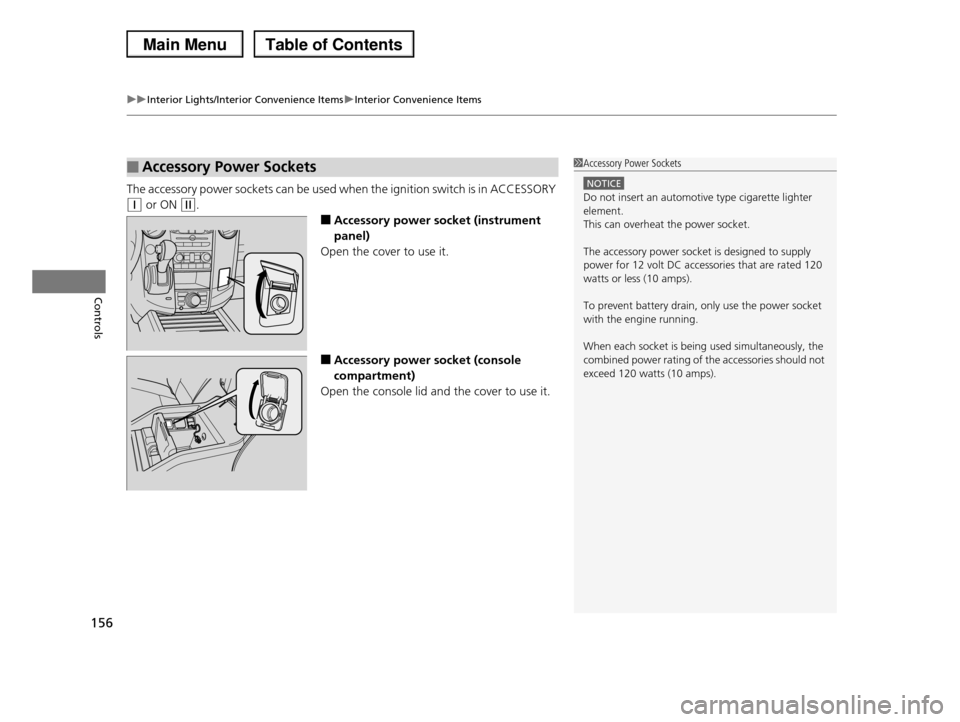
The accessory power sockets can be used when the ignition switch is in ACCESSORY
(q or ON (w.
■Accessory power socket (instrument
panel)
Open the cover to use it.
■Accessory power socket (console
compartment)
Open the console lid and the cover to use it.
■Accessory Power Sockets1Accessory Power Sockets
NOTICE
Do not insert an automotive type cigarette lighter element.
This can overheat the power socket.
The accessory power socket is designed to supply
power for 12 volt DC accessories that are rated 120
watts or less (10 amps).
To prevent battery drain, only use the power socket
with the engine running.
When each socket is being used simultaneously, the
combined power rating of the accessories should not exceed 120 watts (10 amps).
Page 163 of 488
uuInterior Lights/Interior Convenience ItemsuInterior Convenience Items
162
Controls
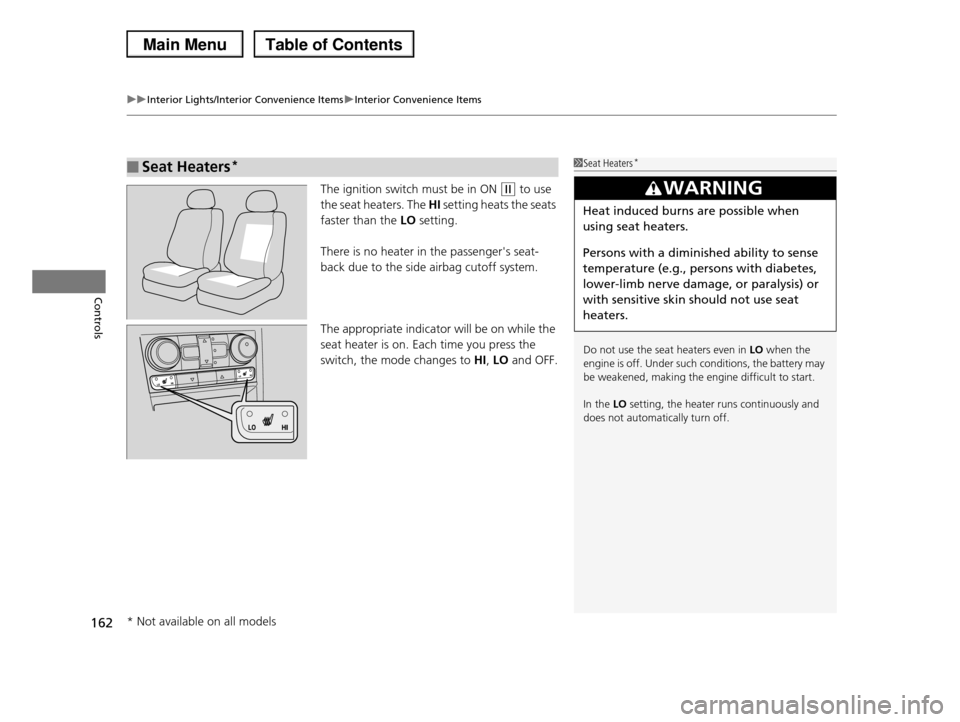
The ignition switch must be in ON (w to use
the seat heaters. The HI setting heats the seats
faster than the LO setting.
There is no heater in the passenger's seat-
back due to the side airbag cutoff system.
The appropriate indicator will be on while the
seat heater is on. Each time you press the
switch, the mode changes to HI, LO and OFF.
■Seat Heaters*1Seat Heaters*
Do not use the seat heaters even in LO when the engine is off. Under such conditions, the battery may
be weakened, making the engine difficult to start.
In the LO setting, the heater runs continuously and
does not automatically turn off.
3WARNING
Heat induced burns are possible when
using seat heaters.
Persons with a diminished ability to sense
temperature (e.g., persons with diabetes,
lower-limb nerve damage, or paralysis) or
with sensitive skin should not use seat
heaters.
* Not available on all models
Page 175 of 488
174
uuAudio SystemuAudio System Theft Protection
Features
Audio System Theft Protection
The audio system is disabled when it is disconnected from the power source, such as
when the battery is disconnected or goes dead.
■Reactivating the audio system
1.Turn the ignition switch to ON (w, and turn on the audio system.
uIf you turn the ignition switch to ACCESSORY (q, you will be requested to
enter the audio security code. See step 3.
2.Press and hold the power button again for more than two seconds.
uThe audio system is reactivated when the system’s control unit recognizes that
the system is in your vehicle.
If the control unit fails to recognize, ENTER CODE appears on the audio/
information screen.
3.Enter the audio security code using the preset buttons. If you enter an incorrect
digit, continue to the last digit, then try again. If you do not enter the code
correctly after 10 tries, leave the system for one hour before trying again, or visit
a dealer to have the system reset.
1Audio System Theft Protection
We recommend that you write down the serial
number in this owner’s manual.
You can find out about your serial number and
security code from a dealer.
You can register the security code at Owner Link
(owners.honda.com.), and find information on how to retrieve the serial number and obtain the code at
radio-navicode.honda.com.
See the Navigation System Manual for details.
U.S. models
Models with navigation system
Models without navigation system
Except LX models
Page 280 of 488
279
uuBluetooth® HandsFreeLink®uUsing HFL
Features
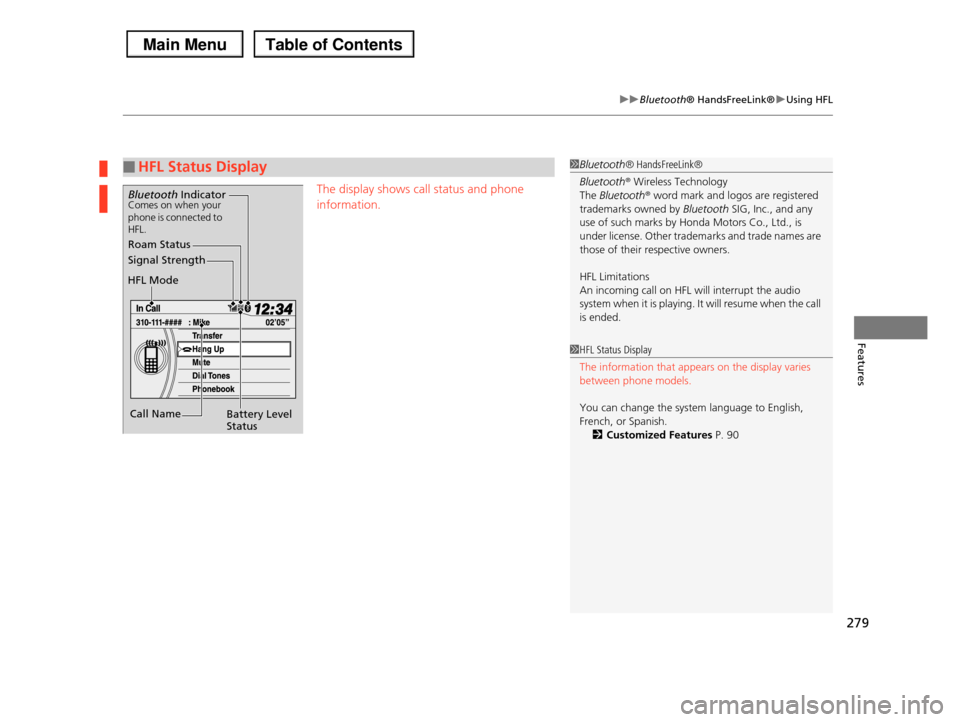
The display shows call status and phone
information.
■HFL Status Display1Bluetooth® HandsFreeLink®
Bluetooth® Wireless Technology
The Bluetooth® word mark and logos are registered
trademarks owned by Bluetooth SIG, Inc., and any use of such marks by Honda Motors Co., Ltd., is
under license. Other trademarks and trade names are
those of their respective owners.
HFL Limitations
An incoming call on HFL will interrupt the audio system when it is playing. It will resume when the call
is ended.
Signal Strength
HFL Mode
Battery Level Status
Roam Status
Call Name
Bluetooth IndicatorComes on when your phone is connected to HFL.
1HFL Status Display
The information that appears on the display varies
between phone models.
You can change the system language to English,
French, or Spanish.
2Customized Features P. 90
Page 284 of 488
Continued283
uuBluetooth® HandsFreeLink®uHFL Menus
Features
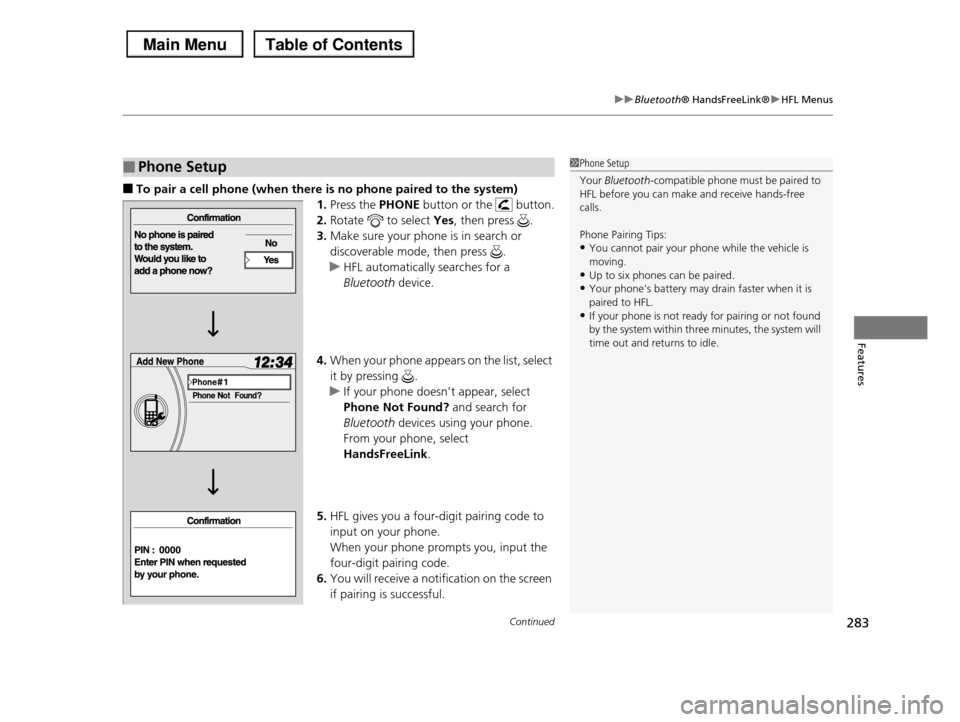
■To pair a cell phone (when there is no phone paired to the system)
1.Press the PHONE button or the button.
2.Rotate to select Yes, then press .
3.Make sure your phone is in search or
discoverable mode, then press .
uHFL automatically searches for a
Bluetooth device.
4.When your phone appears on the list, select
it by pressing .
uIf your phone doesn’t appear, select
Phone Not Found? and search for
Bluetooth devices using your phone.
From your phone, select
HandsFreeLink.
5.HFL gives you a four-digit pairing code to
input on your phone.
When your phone prompts you, input the
four-digit pairing code.
6.You will receive a notification on the screen
if pairing is successful.
■Phone Setup1Phone Setup
Your Bluetooth-compatible phone must be paired to HFL before you can make and receive hands-free
calls.
Phone Pairing Tips:
•You cannot pair your phone while the vehicle is
moving.•Up to six phones can be paired.
•Your phone's battery may drain faster when it is
paired to HFL.•If your phone is not ready for pairing or not found
by the system within three minutes, the system will
time out and returns to idle.
Page 303 of 488
uuBluetooth® HandsFreeLink®uUsing HFL
302
Features
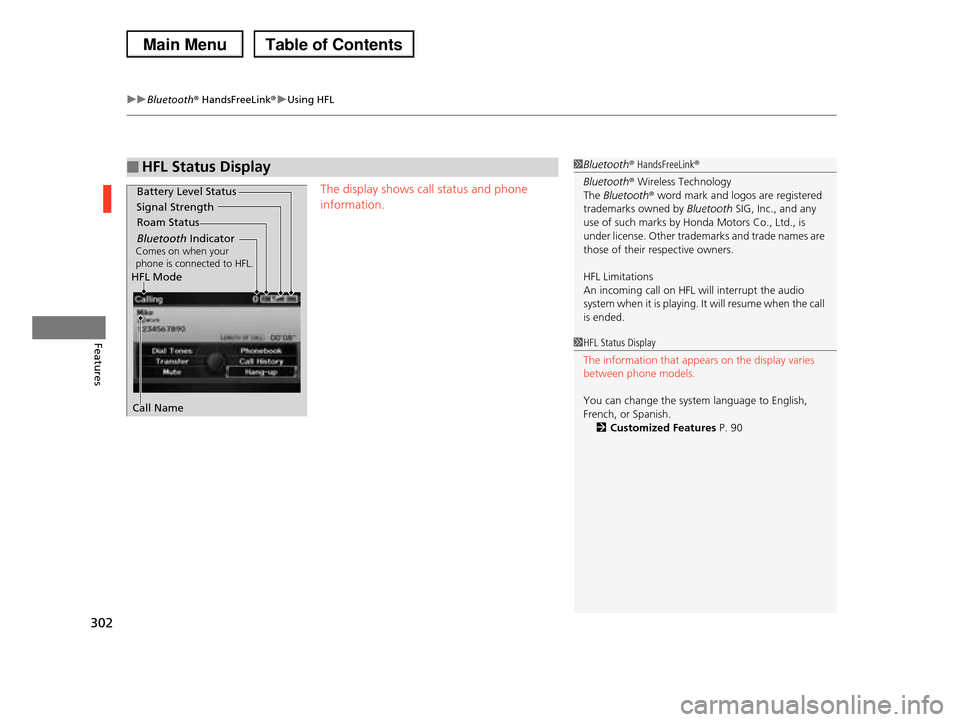
The display shows call status and phone
information.
■HFL Status Display1Bluetooth® HandsFreeLink®
Bluetooth® Wireless Technology
The Bluetooth® word mark and logos are registered trademarks owned by Bluetooth SIG, Inc., and any
use of such marks by Honda Motors Co., Ltd., is
under license. Other trademarks and trade names are
those of their respective owners.
HFL Limitations
An incoming call on HFL will interrupt the audio system when it is playing. It will resume when the call
is ended.
Signal Strength
HFL Mode
Battery Level Status
Roam Status
Call Name
Bluetooth IndicatorComes on when your phone is connected to HFL.
1HFL Status Display
The information that appears on the display varies between phone models.
You can change the system language to English, French, or Spanish.
2Customized Features P. 90
Page 306 of 488
Continued305
uuBluetooth® HandsFreeLink®uHFL Menus
Features
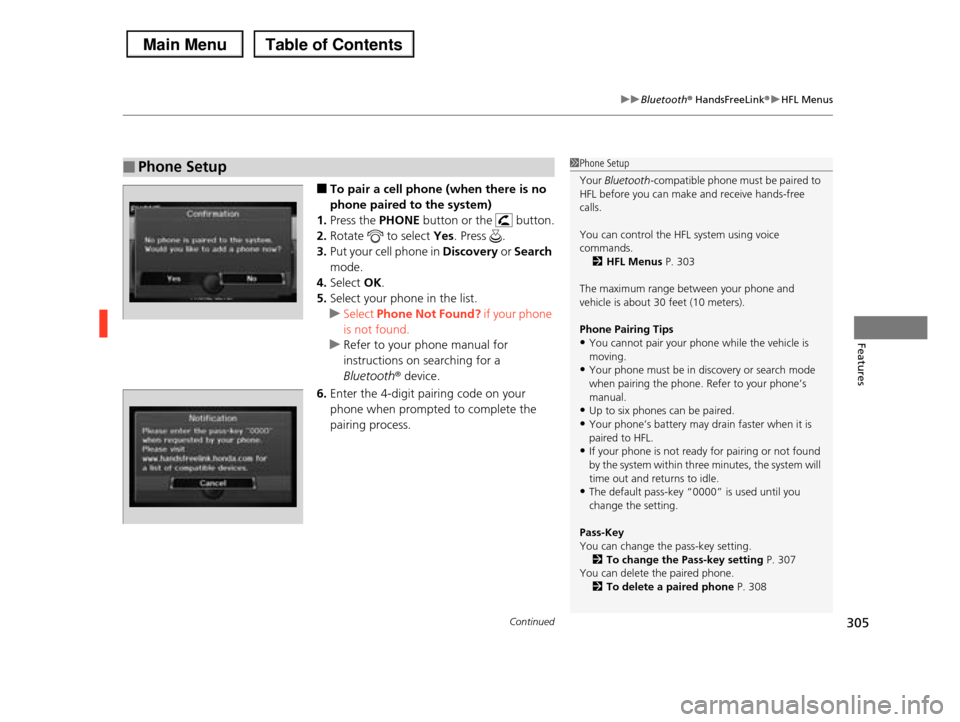
■To pair a cell phone (when there is no
phone paired to the system)
1.Press the PHONE button or the button.
2.Rotate to select Yes. Press .
3.Put your cell phone in Discovery or Search
mode.
4.Select OK.
5.Select your phone in the list.
uSelect Phone Not Found? if your phone
is not found.
uRefer to your phone manual for
instructions on searching for a
Bluetoothr device.
6.Enter the 4-digit pairing code on your
phone when prompted to complete the
pairing process.
■Phone Setup1Phone Setup
Your Bluetooth-compatible phone must be paired to HFL before you can make and receive hands-free
calls.
You can control the HFL system using voice
commands.
2HFL Menus P. 303
The maximum range between your phone and
vehicle is about 30 feet (10 meters).
Phone Pairing Tips
•You cannot pair your phone while the vehicle is moving.
•Your phone must be in discovery or search mode
when pairing the phone. Refer to your phone’s manual.
•Up to six phones can be paired.
•Your phone’s battery may drain faster when it is
paired to HFL.•If your phone is not ready for pairing or not found
by the system within three minutes, the system will
time out and returns to idle.•The default pass-key “0000” is used until you
change the setting.
Pass-Key
You can change the pass-key setting.
2To change the Pass-key setting P. 307You can delete the paired phone.
2To delete a paired phone P. 308
Page 320 of 488
319
uuBluetooth® HandsFreeLink®uHFL Menus
Features
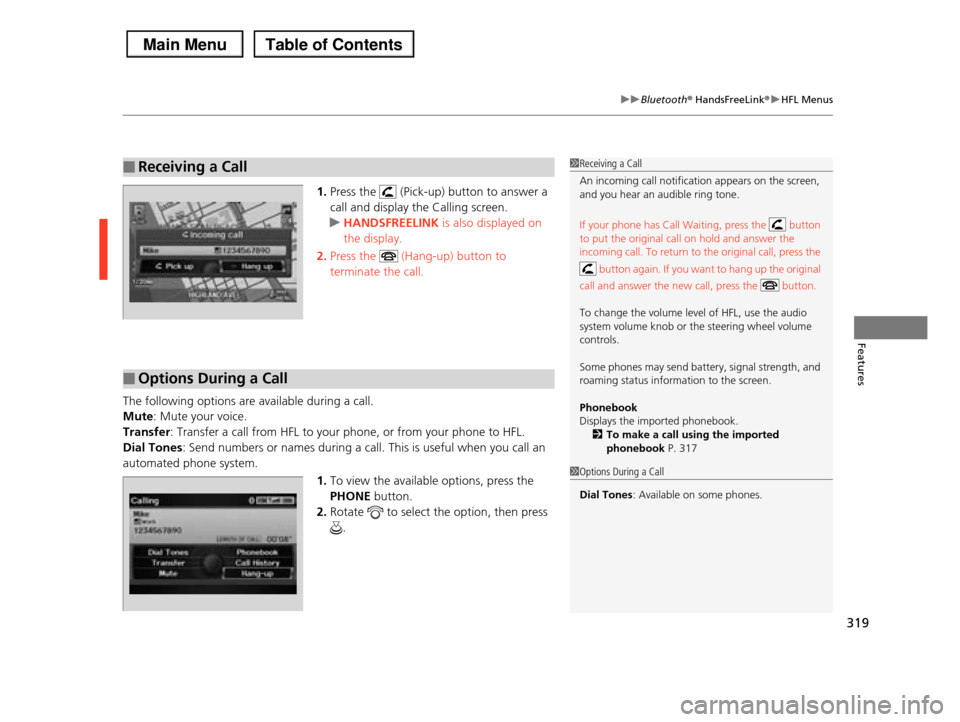
1.Press the (Pick-up) button to answer a
call and display the Calling screen.
uHANDSFREELINK is also displayed on
the display.
2.Press the (Hang-up) button to
terminate the call.
The following options are available during a call.
Mute: Mute your voice.
Transfer: Transfer a call from HFL to your phone, or from your phone to HFL.
Dial Tones: Send numbers or names during a call. This is useful when you call an
automated phone system.
1.To view the available options, press the
PHONE button.
2.Rotate to select the option, then press
.
■Receiving a Call1Receiving a Call
An incoming call notification appears on the screen, and you hear an audible ring tone.
If your phone has Call Waiting, press the button
to put the original call on hold and answer the
incoming call. To return to the original call, press the
button again. If you want to hang up the original
call and answer the new call, press the button.
To change the volume level of HFL, use the audio
system volume knob or the steering wheel volume
controls.
Some phones may send battery, signal strength, and
roaming status information to the screen.
Phonebook
Displays the imported phonebook.2To make a call using the imported
phonebook P. 317
■Options During a Call
1Options During a Call
Dial Tones: Available on some phones.
Page 343 of 488
342
Driving
When Driving
Starting the Engine
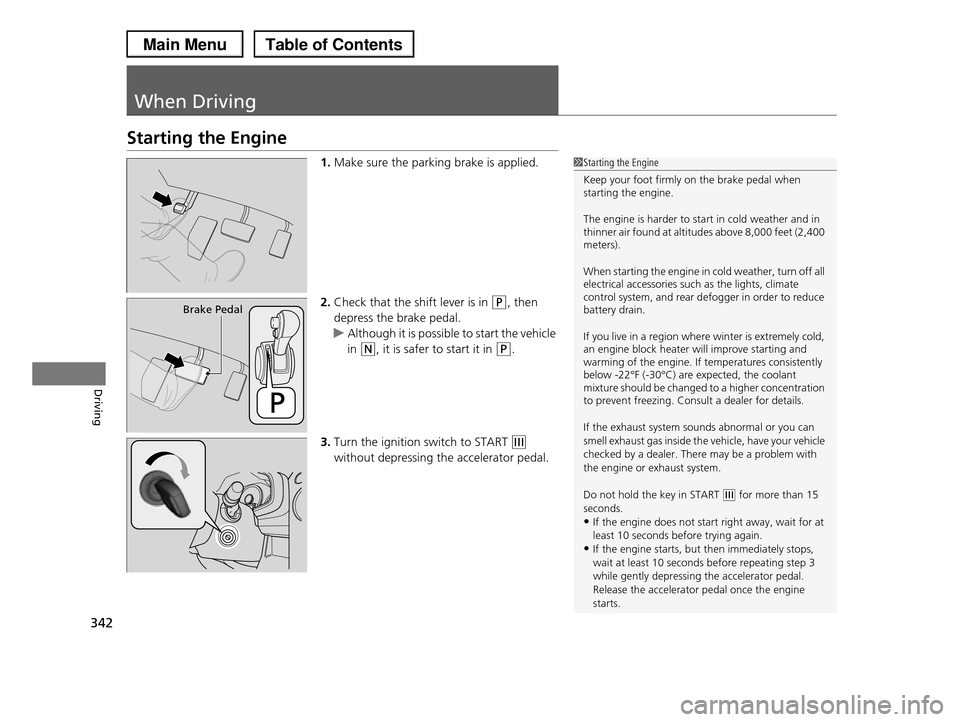
1.Make sure the parking brake is applied.
2.Check that the shift lever is in (P, then
depress the brake pedal.
uAlthough it is possible to start the vehicle
in (N, it is safer to start it in (P.
3.Turn the ignition switch to START (e
without depressing the accelerator pedal.
1Starting the Engine
Keep your foot firmly on the brake pedal when starting the engine.
The engine is harder to start in cold weather and in thinner air found at altitudes above 8,000 feet (2,400 meters).
When starting the engine in cold weather, turn off all electrical accessories such as the lights, climate control system, and rear defogger in order to reduce battery drain.
If you live in a region where winter is extremely cold, an engine block heater will improve starting and warming of the engine. If temperatures consistently below -22°F (-30°C) are expected, the coolant mixture should be changed to a higher concentration to prevent freezing. Consult a dealer for details.
If the exhaust system sounds abnormal or you can
smell exhaust gas inside the vehicle, have your vehicle
checked by a dealer. There may be a problem with the engine or exhaust system.
Do not hold the key in START (e for more than 15 seconds.
•If the engine does not start right away, wait for at
least 10 seconds before trying again.•If the engine starts, but then immediately stops,
wait at least 10 seconds before repeating step 3
while gently depressing the accelerator pedal.Release the accelerator pedal once the engine
starts.
Brake Pedal
Page 378 of 488
377
Maintenance
This chapter discusses basic maintenance.
Before Performing MaintenanceInspection and Maintenance ............ 378Safety When Performing Maintenance..... 379Parts and Fluids Used in Maintenance Service ........................................... 380Maintenance Minder™.................... 381Maintenance Under the HoodMaintenance Items Under the Hood ..... 389Opening the Hood ........................... 390 Recommended Engine Oil ................ 392 Oil Check ......................................... 393Adding Engine Oil ............................ 394Changing the Engine Oil and Oil Filter ..... 395
Engine Coolant ................................ 397Transmission Fluid ............................ 399Brake Fluid ....................................... 400 Power Steering Fluid ........................ 400 Refilling Window Washer Fluid......... 401Replacing Light Bulbs....................... 402Checking and Maintaining Wiper Blades.... 410Checking and Maintaining TiresChecking Tires ................................. 414Tire and Loading Information Label ...... 415Tire Labeling .................................... 415DOT Tire Quality Grading (U.S. Vehicles)....... 417Wear Indicators................................ 419
Tire Service Life ................................ 419Tire and Wheel Replacement ........... 420Tire Rotation .................................... 421 Winter Tires ..................................... 422Battery............................................... 423Remote Transmitter CareReplacing the Button Battery ........... 424Remote Control and Wireless Headphone Care*........................... 425Climate Control System Maintenance..... 427Cleaning
Interior Care .................................... 428 Exterior Care.................................... 430
* Not available on all models