brake HONDA PILOT 2013 2.G User Guide
[x] Cancel search | Manufacturer: HONDA, Model Year: 2013, Model line: PILOT, Model: HONDA PILOT 2013 2.GPages: 488, PDF Size: 10.18 MB
Page 106 of 488
105
uuLocking and Unlocking the DoorsuAuto Door Locking/Unlocking
Controls
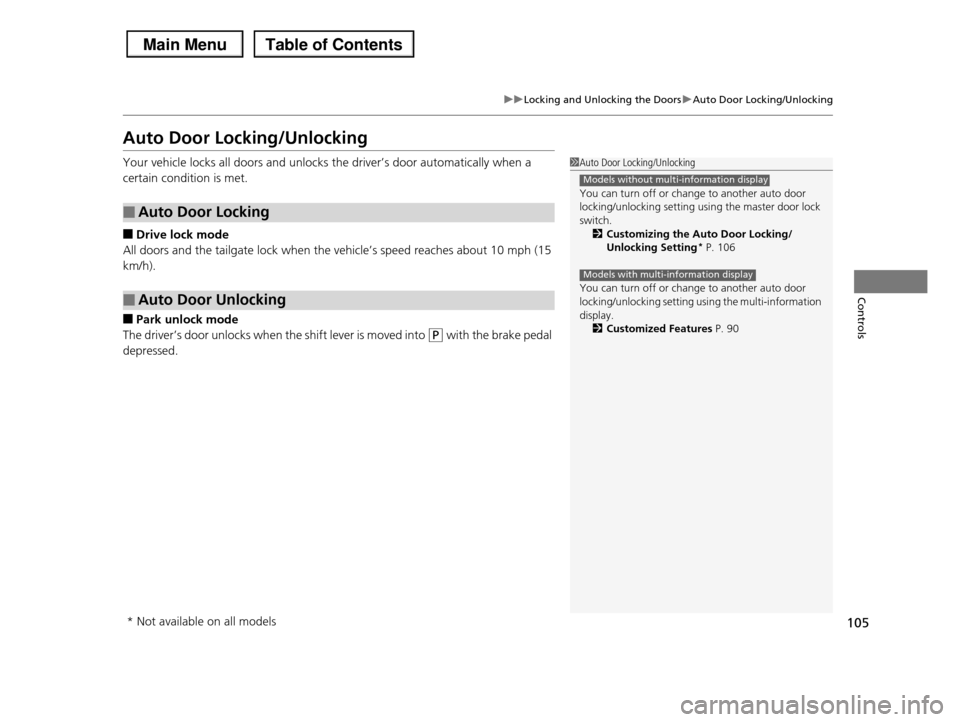
Auto Door Locking/Unlocking
Your vehicle locks all doors and unlocks the driver’s door automatically when a
certain condition is met.
■Drive lock mode
All doors and the tailgate lock when the vehicle’s speed reaches about 10 mph (15
km/h).
■Park unlock mode
The driver’s door unlocks when the shift lever is moved into (P with the brake pedal
depressed.
■Auto Door Locking
■Auto Door Unlocking
1Auto Door Locking/Unlocking
You can turn off or change to another auto door
locking/unlocking setting using the master door lock
switch.2Customizing the Auto Door Locking/
Unlocking Setting* P. 106
You can turn off or change to another auto door
locking/unlocking setting using the multi-information display.
2Customized Features P. 90
Models without multi-information display
Models with multi-information display
* Not available on all models
Page 107 of 488
106
uuLocking and Unlocking the DoorsuCustomizing the Auto Door Locking/Unlocking Setting*
Controls
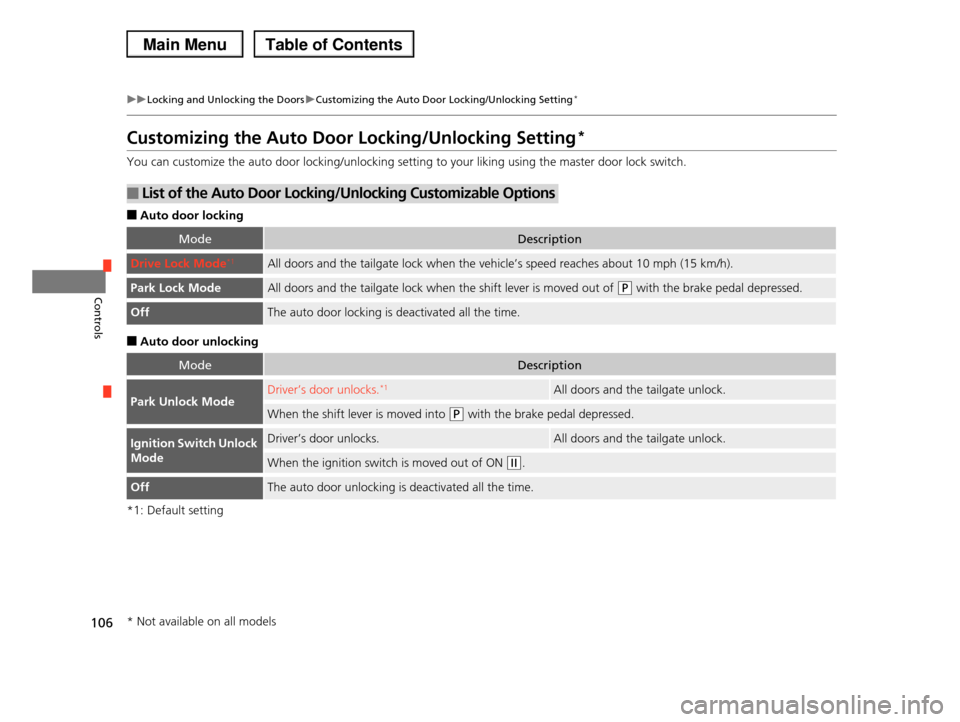
Customizing the Auto Door Locking/Unlocking Setting*
You can customize the auto door locking/unlocking setting to your liking using the master door lock switch.
■Auto door locking
■Auto door unlocking
*1: Default setting
■List of the Auto Door Locking/Unlocking Customizable Options
ModeDescription
Drive Lock Mode*1All doors and the tailgate lock when the vehicle’s speed reaches about 10 mph (15 km/h).
Park Lock ModeAll doors and the tailgate lock when the shift lever is moved out of (P with the brake pedal depressed.
OffThe auto door locking is deactivated all the time.
ModeDescription
Park Unlock ModeDriver’s door unlocks.*1All doors and the tailgate unlock.
When the shift lever is moved into (P with the brake pedal depressed.
Ignition Switch Unlock
Mode
Driver’s door unlocks.All doors and the tailgate unlock.
When the ignition switch is moved out of ON (w.
OffThe auto door unlocking is deactivated all the time.
* Not available on all models
Page 108 of 488
107
uuLocking and Unlocking the DoorsuCustomizing the Auto Door Locking/Unlocking Setting*
Continued
Controls
*1: Default setting
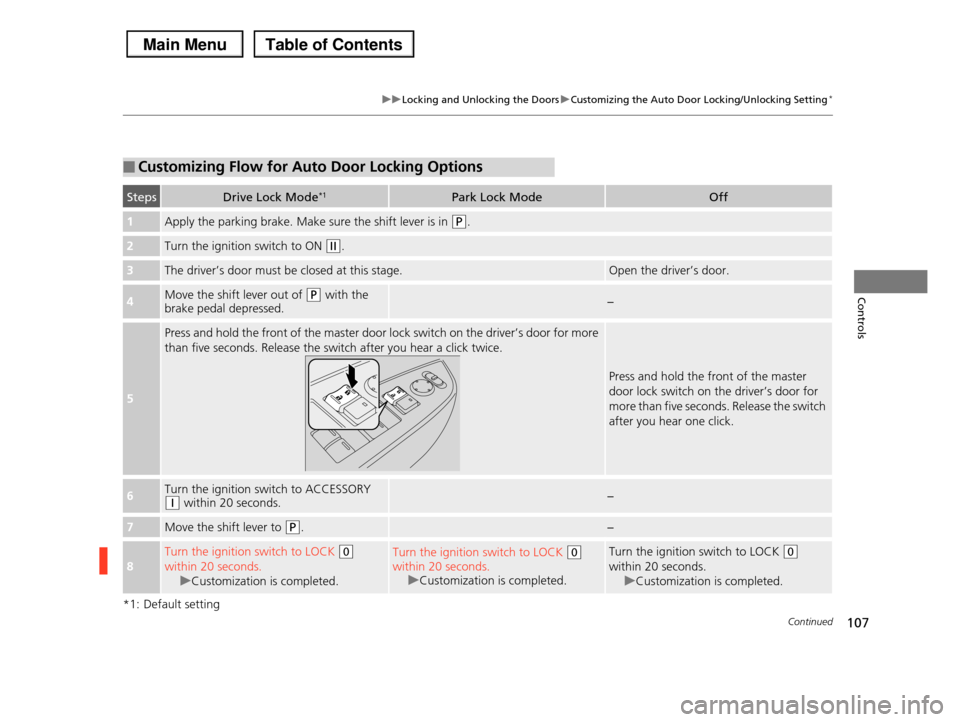
■Customizing Flow for Auto Door Locking Options
StepsDrive Lock Mode*1Park Lock ModeOff
1Apply the parking brake. Make sure the shift lever is in (P.
2Turn the ignition switch to ON (w.
3The driver’s door must be closed at this stage.Open the driver’s door.
4Move the shift lever out of (P with the brake pedal depressed.−
5
Press and hold the front of the master door lock switch on the driver’s door for more
than five seconds. Release the switch after you hear a click twice.
Press and hold the front of the master
door lock switch on the driver’s door for
more than five seconds. Release the switch
after you hear one click.
6Turn the ignition switch to ACCESSORY (q within 20 seconds.−
7Move the shift lever to (P.−
8
Turn the ignition switch to LOCK (0
within 20 seconds.
uCustomization is completed.
Turn the ignition switch to LOCK (0
within 20 seconds.
uCustomization is completed.
Turn the ignition switch to LOCK (0
within 20 seconds.
uCustomization is completed.
Page 109 of 488
108
uuLocking and Unlocking the DoorsuCustomizing the Auto Door Locking/Unlocking Setting*
Controls
*1: Default setting
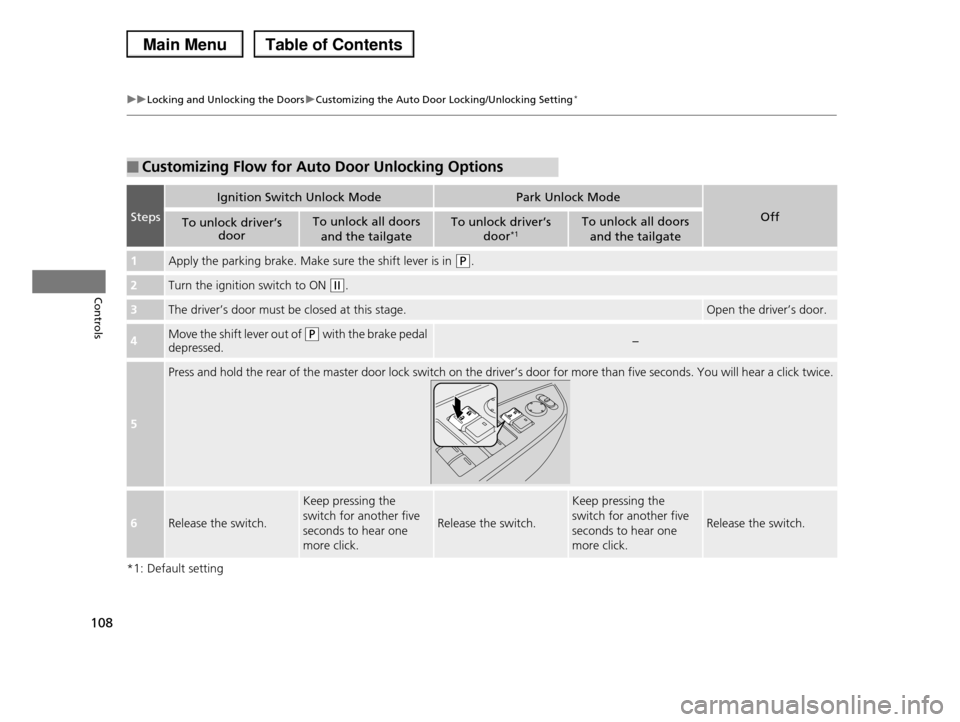
■Customizing Flow for Auto Door Unlocking Options
Steps
Ignition Switch Unlock ModePark Unlock Mode
OffTo unlock driver’s door
To unlock all doors
and the tailgate
To unlock driver’s
door*1To unlock all doors
and the tailgate
1Apply the parking brake. Make sure the shift lever is in (P.
2Turn the ignition switch to ON (w.
3The driver’s door must be closed at this stage.Open the driver’s door.
4Move the shift lever out of (P with the brake pedal
depressed.−
5
Press and hold the rear of the master door lock switch on the driver’s door for more than five seconds. You will hear a click twice.
6Release the switch.
Keep pressing the
switch for another five
seconds to hear one
more click.
Release the switch.
Keep pressing the
switch for another five
seconds to hear one
more click.
Release the switch.
Page 114 of 488
Continued113
uuOpening and Closing the TailgateuOpening/Closing the Power Tailgate*
Controls
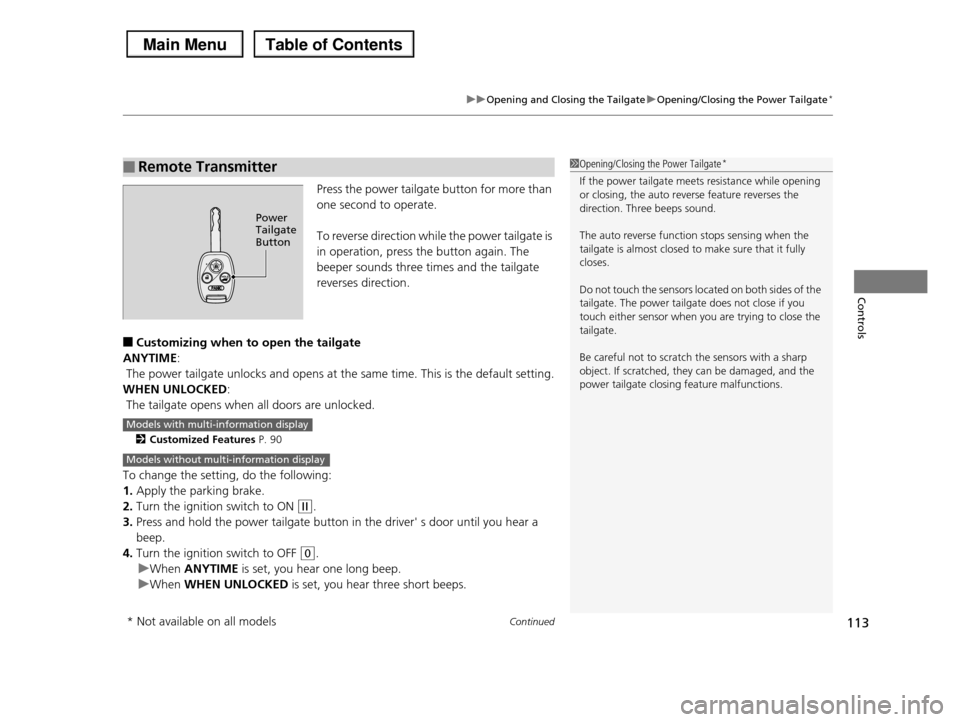
Press the power tailgate button for more than
one second to operate.
To reverse direction while the power tailgate is
in operation, press the button again. The
beeper sounds three times and the tailgate
reverses direction.
■Customizing when to open the tailgate
ANYTIME:
The power tailgate unlocks and opens at the same time. This is the default setting.
WHEN UNLOCKED:
The tailgate opens when all doors are unlocked.
2Customized Features P. 90
To change the setting, do the following:
1.Apply the parking brake.
2.Turn the ignition switch to ON (w.
3.Press and hold the power tailgate button in the driver' s door until you hear a
beep.
4.Turn the ignition switch to OFF (0.
uWhen ANYTIME is set, you hear one long beep.
uWhen WHEN UNLOCKED is set, you hear three short beeps.
■Remote Transmitter1Opening/Closing the Power Tailgate*
If the power tailgate meets resistance while opening
or closing, the auto reverse feature reverses the direction. Three beeps sound.
The auto reverse function stops sensing when the tailgate is almost closed to make sure that it fully
closes.
Do not touch the sensors located on both sides of the
tailgate. The power tailgate does not close if you
touch either sensor when you are trying to close the tailgate.
Be careful not to scratch the sensors with a sharp object. If scratched, they can be damaged, and the
power tailgate closing feature malfunctions.
Power Tailgate Button
Models with multi-information display
Models without multi-information display
* Not available on all models
Page 128 of 488
127
uuOperating the Switches Around the Steering WheeluFog Lights*
Controls
Fog Lights*
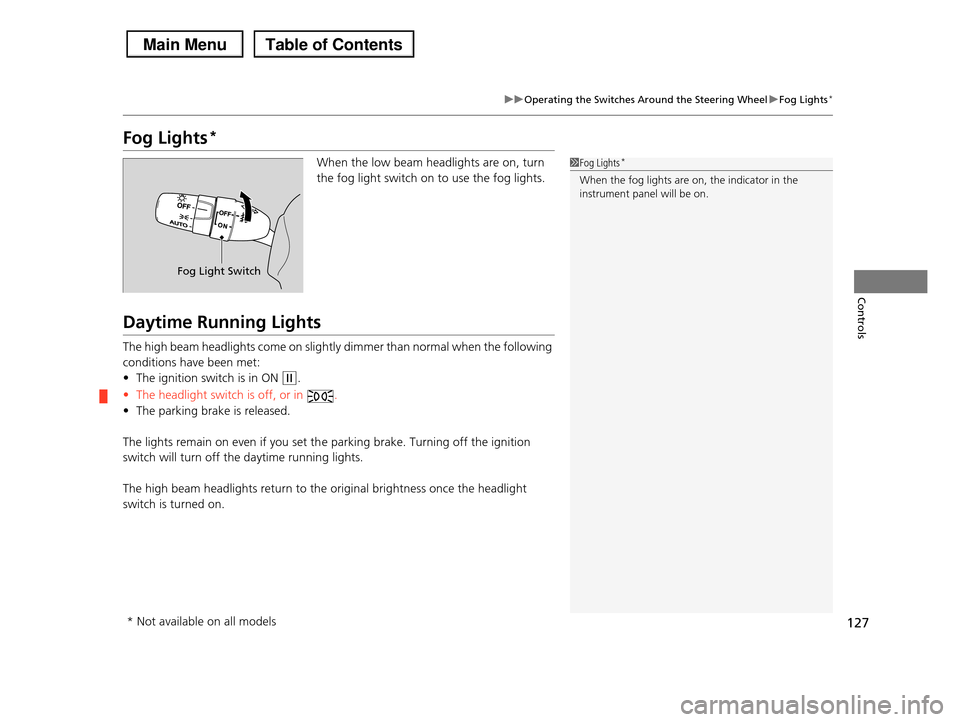
When the low beam headlights are on, turn
the fog light switch on to use the fog lights.
Daytime Running Lights
The high beam headlights come on slightly dimmer than normal when the following
conditions have been met:
•The ignition switch is in ON (w.
•The headlight switch is off, or in .
•The parking brake is released.
The lights remain on even if you set the parking brake. Turning off the ignition
switch will turn off the daytime running lights.
The high beam headlights return to the original brightness once the headlight
switch is turned on.
1Fog Lights*
When the fog lights are on, the indicator in the
instrument panel will be on.
Fog Light Switch
* Not available on all models
Page 134 of 488
133
uuOperating the Switches Around the Steering WheeluDriving Position Memory System*
Controls
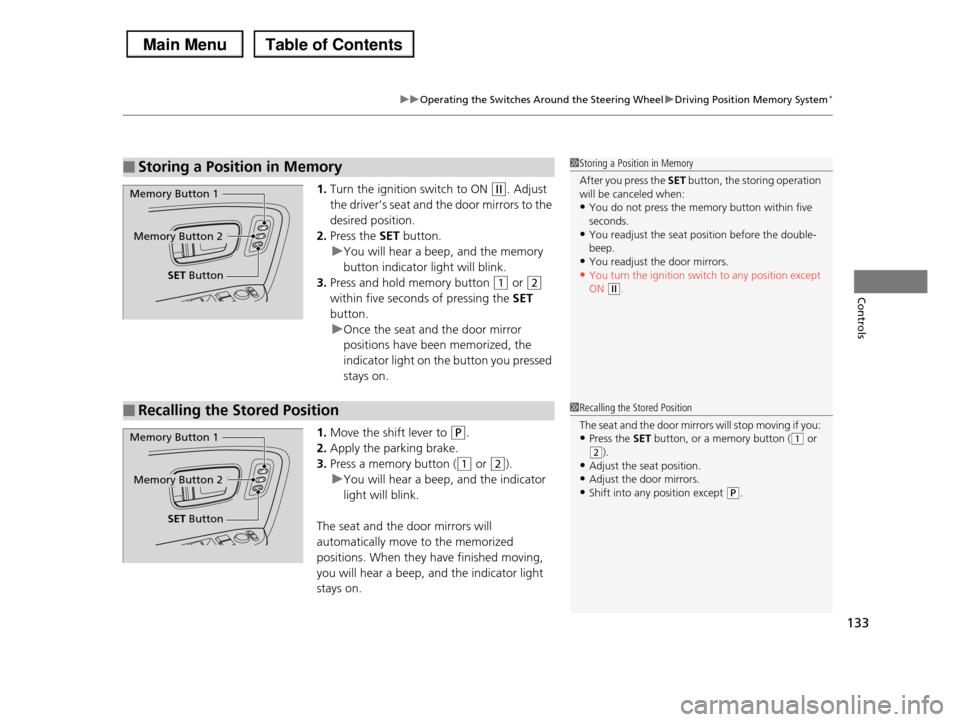
1.Turn the ignition switch to ON (w. Adjust
the driver’s seat and the door mirrors to the
desired position.
2.Press the SET button.
uYou will hear a beep, and the memory
button indicator light will blink.
3.Press and hold memory button (1 or (2
within five seconds of pressing the SET
button.
uOnce the seat and the door mirror
positions have been memorized, the
indicator light on the button you pressed
stays on.
1.Move the shift lever to (P.
2.Apply the parking brake.
3.Press a memory button ((1 or (2).
uYou will hear a beep, and the indicator
light will blink.
The seat and the door mirrors will
automatically move to the memorized
positions. When they have finished moving,
you will hear a beep, and the indicator light
stays on.
■Storing a Position in Memory1Storing a Position in Memory
After you press the SET button, the storing operation will be canceled when:
•You do not press the memory button within five
seconds.•You readjust the seat position before the double-
beep.
•You readjust the door mirrors.•You turn the ignition switch to any position except
ON (w.
Memory Button 1
Memory Button 2
SET Button
■Recalling the Stored Position1Recalling the Stored Position
The seat and the door mirrors will stop moving if you:
•Press the SET button, or a memory button ((1 or (2).
•Adjust the seat position.
•Adjust the door mirrors.•Shift into any position except (P.
Memory Button 1
Memory Button 2
SET Button
Page 147 of 488
146
uuAdjusting the SeatsuRear Seats
Controls
Rear Seats
The second row seats can fold down separately to allow for additional storage
space.
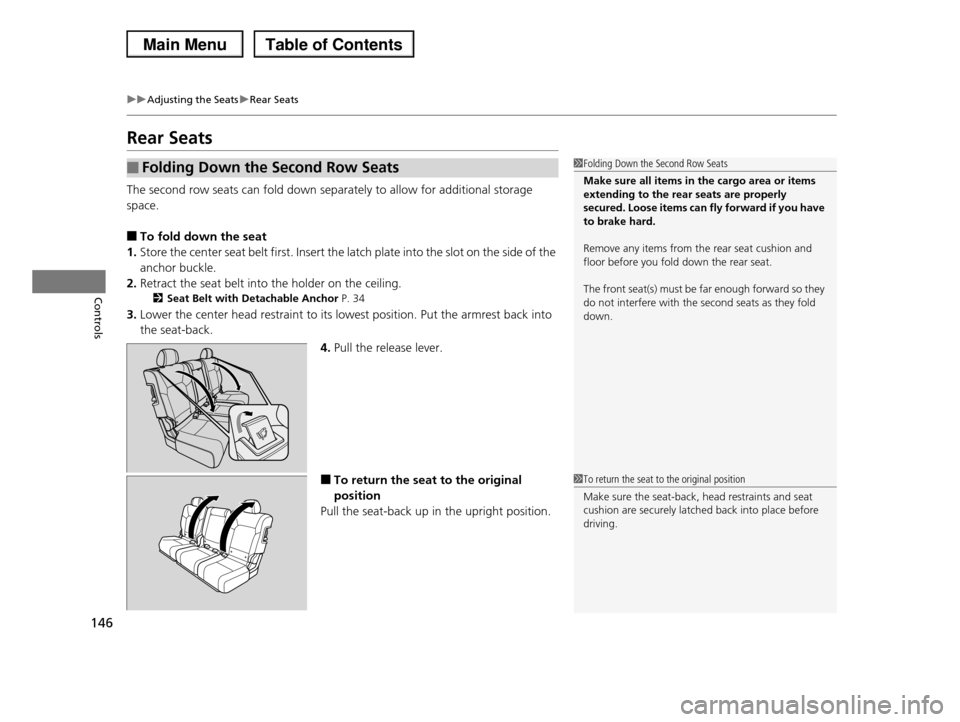
■To fold down the seat
1.Store the center seat belt first. Insert the latch plate into the slot on the side of the
anchor buckle.
2.Retract the seat belt into the holder on the ceiling.
2Seat Belt with Detachable Anchor P. 34
3.Lower the center head restraint to its lowest position. Put the armrest back into
the seat-back.
4.Pull the release lever.
■To return the seat to the original
position
Pull the seat-back up in the upright position.
■Folding Down the Second Row Seats1Folding Down the Second Row Seats
Make sure all items in the cargo area or items extending to the rear seats are properly
secured. Loose items can fly forward if you have
to brake hard.
Remove any items from the rear seat cushion and
floor before you fold down the rear seat.
The front seat(s) must be far enough forward so they
do not interfere with the second seats as they fold down.
1To return the seat to the original position
Make sure the seat-back, head restraints and seat cushion are securely latched back into place before
driving.
Page 148 of 488
Continued147
uuAdjusting the SeatsuRear Seats
Controls
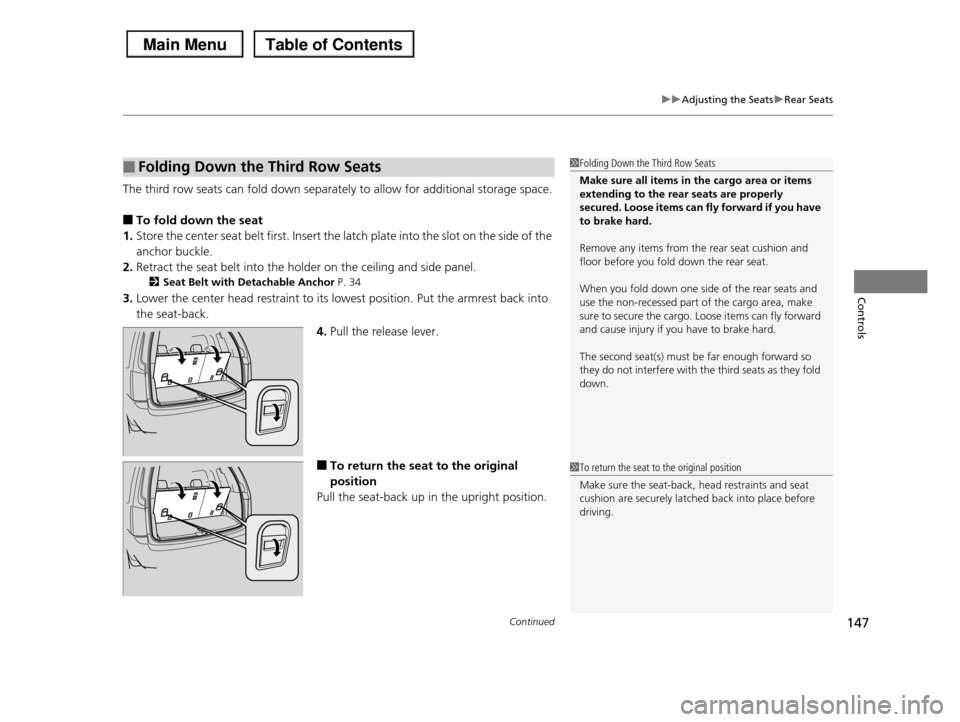
The third row seats can fold down separately to allow for additional storage space.
■To fold down the seat
1.Store the center seat belt first. Insert the latch plate into the slot on the side of the
anchor buckle.
2.Retract the seat belt into the holder on the ceiling and side panel.
2Seat Belt with Detachable Anchor P. 34
3.Lower the center head restraint to its lowest position. Put the armrest back into
the seat-back.
4.Pull the release lever.
■To return the seat to the original
position
Pull the seat-back up in the upright position.
■Folding Down the Third Row Seats1Folding Down the Third Row Seats
Make sure all items in the cargo area or items extending to the rear seats are properly
secured. Loose items can fly forward if you have
to brake hard.
Remove any items from the rear seat cushion and
floor before you fold down the rear seat.
When you fold down one side of the rear seats and
use the non-recessed part of the cargo area, make sure to secure the cargo. Loose items can fly forward
and cause injury if you have to brake hard.
The second seat(s) must be far enough forward so
they do not interfere with the third seats as they fold
down.
1To return the seat to the original position
Make sure the seat-back, head restraints and seat
cushion are securely latched back into place before driving.
Page 324 of 488
323
Driving
This chapter discusses driving, refueling, and information on items such as accessories.
Before DrivingDriving Preparation .......................... 324 Maximum Load Limit........................ 327Towing a TrailerTowing Preparation .......................... 329Driving Safely with a Trailer .............. 338Towing Your Vehicle ........................ 339Off-Highway Driving GuidelinesGeneral Information ......................... 340Important Safety Precautions............ 340Avoiding Trouble ............................. 341When DrivingStarting the Engine .......................... 342Precautions While Driving................. 344
Automatic Transmission ................... 345Shifting ............................................ 346Cruise Control ................................. 348VSA® (Vehicle Stability Assist), aka ESC (Electronic Stability Control), System ...... 352VTM (Variable Torque Management)-4r System*............................................. 354TPMS (Tire Pressure Monitoring System) ... 355Tire Pressure Monitoring System (TPMS) - Required Federal Explanation ......... 357BrakingBrake System ................................... 360ABS (Anti-lock Brake System) ........... 362
Brake Assist System ......................... 363Parking Your VehicleWhen Stopped ................................ 364Parking Sensor System*................... 365Rearview Camera*............................ 369Multi-View Rear Camera*................ 370Refueling
Fuel Information .............................. 371
How to Refuel ................................. 372
Fuel Economy.................................... 374
Accessories and Modifications
Accessories ...................................... 375
Modifications................................... 375
* Not available on all models