reset HONDA PILOT 2013 2.G User Guide
[x] Cancel search | Manufacturer: HONDA, Model Year: 2013, Model line: PILOT, Model: HONDA PILOT 2013 2.GPages: 488, PDF Size: 10.18 MB
Page 92 of 488
91
uuGauges and DisplaysuMulti-Information Display*
Continued
Instrument Panel
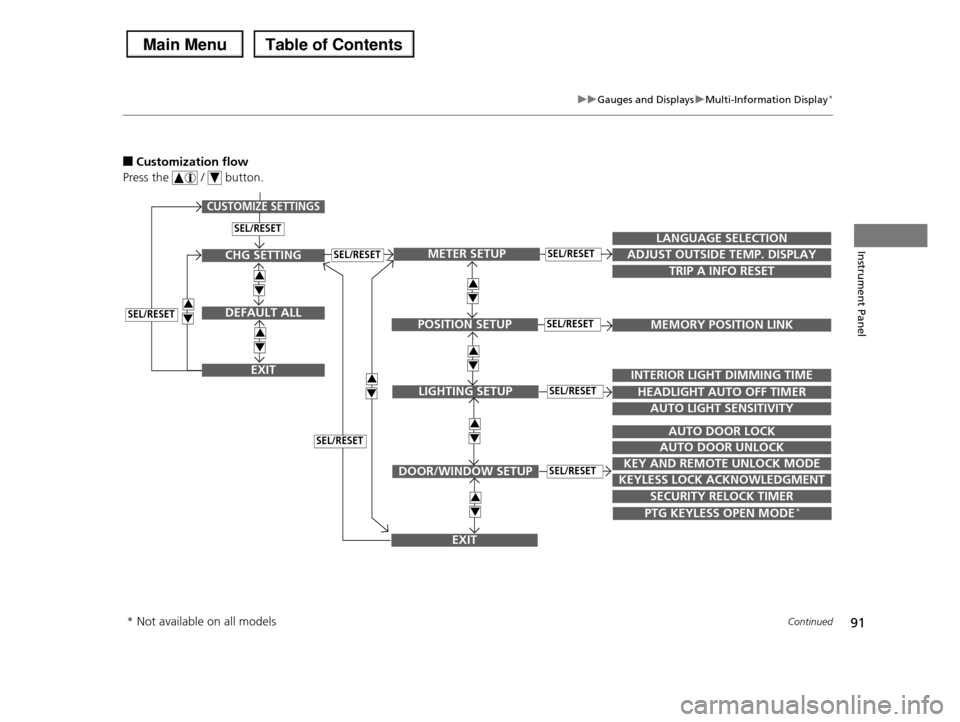
■Customization flow
Press the / button.
SEL/RESET
CUSTOMIZE SETTINGS
SECURITY RELOCK TIMER
TRIP A INFO RESET
LANGUAGE SELECTION
ADJUST OUTSIDE TEMP. DISPLAY
MEMORY POSITION LINK
INTERIOR LIGHT DIMMING TIME
HEADLIGHT AUTO OFF TIMER
AUTO LIGHT SENSITIVITY
AUTO DOOR LOCK
AUTO DOOR UNLOCK
KEY AND REMOTE UNLOCK MODE
KEYLESS LOCK ACKNOWLEDGMENT
3
4
3
4
METER SETUP
POSITION SETUP
LIGHTING SETUP
DOOR/WINDOW SETUP
SEL/RESET
SEL/RESET
SEL/RESET
SEL/RESET
PTG KEYLESS OPEN MODE*
3
4
3
4
EXIT
CHG SETTING
DEFAULT ALL
EXIT
SEL/RESET
3
4
3
4
3
4SEL/RESET
SEL/RESET
3
4
* Not available on all models
Page 93 of 488
92
uuGauges and DisplaysuMulti-Information Display*
Instrument Panel
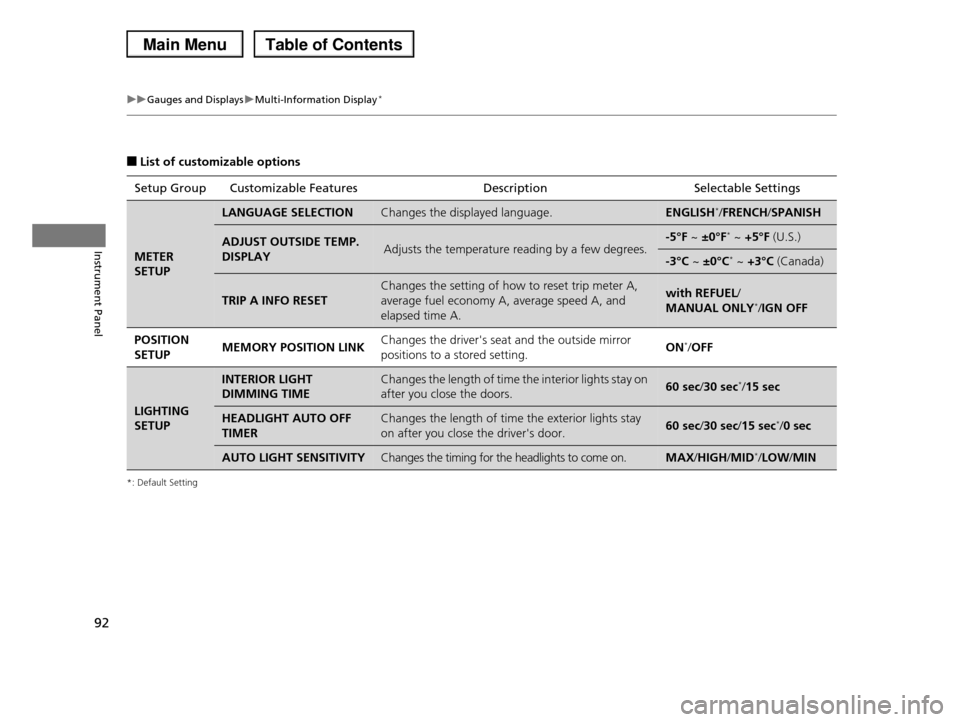
■List of customizable options
*: Default Setting
Setup Group Customizable FeaturesDescriptionSelectable Settings
METER
SETUP
LANGUAGE SELECTIONChanges the displayed language.ENGLISH*/FRENCH/SPANISH
ADJUST OUTSIDE TEMP.
DISPLAYAdjusts the temperature reading by a few degrees.-5°F ~ ±0°F* ~ +5°F (U.S.)
-3°C ~ ±0°C* ~ +3°C (Canada)
TRIP A INFO RESET
Changes the setting of how to reset trip meter A,
average fuel economy A, average speed A, and
elapsed time A.
with REFUEL/
MANUAL ONLY*/IGN OFF
POSITION
SETUPMEMORY POSITION LINKChanges the driver's seat and the outside mirror
positions to a stored setting.ON*/OFF
LIGHTING
SETUP
INTERIOR LIGHT
DIMMING TIME
Changes the length of time the interior lights stay on
after you close the doors.60 sec/30 sec*/15 sec
HEADLIGHT AUTO OFF
TIMER
Changes the length of time the exterior lights stay
on after you close the driver's door.60 sec/30 sec/15 sec*/0 sec
AUTO LIGHT SENSITIVITYChanges the timing for the headlights to come on.MAX/HIGH/MID*/LOW/MIN
Page 94 of 488
93
uuGauges and DisplaysuMulti-Information Display*
Continued
Instrument Panel
*1:Not available on all models
*2: Default Setting
Setup Group Customizable FeaturesDescription Selectable Settings
DOOR/
WINDOW
SETUP
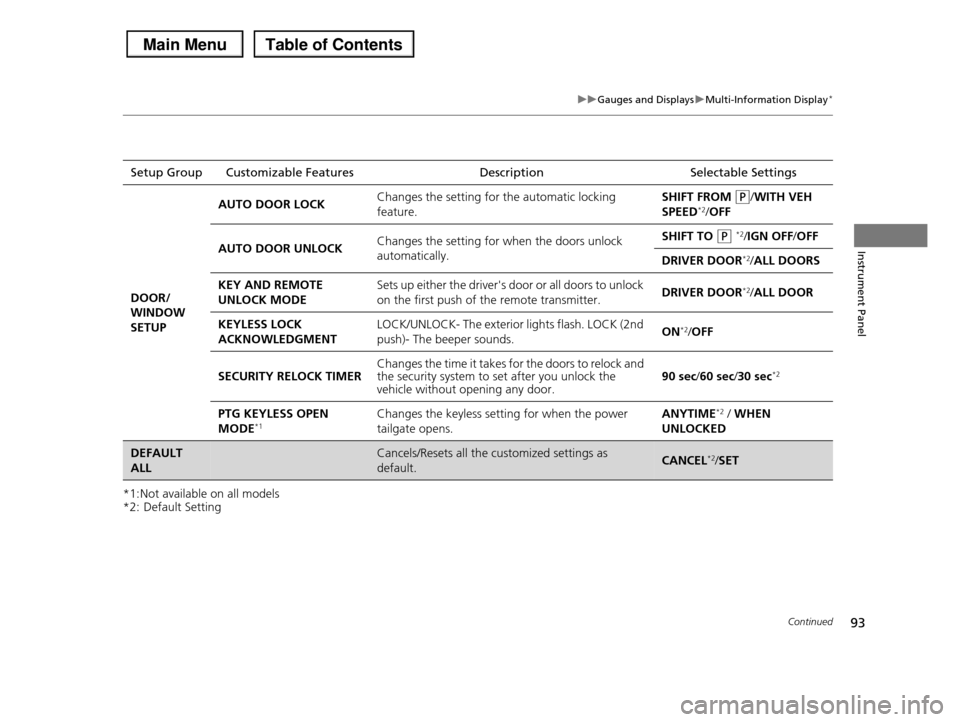
AUTO DOOR LOCKChanges the setting for the automatic locking
feature.
SHIFT FROM (P/WITH VEH
SPEED*2/OFF
AUTO DOOR UNLOCKChanges the setting for when the doors unlock
automatically.
SHIFT TO (P *2/IGN OFF/OFF
DRIVER DOOR*2/ALL DOORS
KEY AND REMOTE
UNLOCK MODE
Sets up either the driver's door or all doors to unlock
on the first push of the remote transmitter.DRIVER DOOR*2/ALL DOOR
KEYLESS LOCK
ACKNOWLEDGMENT
LOCK/UNLOCK- The exterior lights flash. LOCK (2nd
push)- The beeper sounds.ON*2/OFF
SECURITY RELOCK TIMERChanges the time it takes for the doors to relock and the security system to set after you unlock the vehicle without opening any door.90 sec/60 sec/30 sec*2
PTG KEYLESS OPEN
MODE*1Changes the keyless setting for when the power
tailgate opens.
ANYTIME*2 / WHEN
UNLOCKED
DEFAULT
ALL
Cancels/Resets all the customized settings as
default.CANCEL*2/SET
Page 95 of 488
94
uuGauges and DisplaysuMulti-Information Display*
Instrument Panel
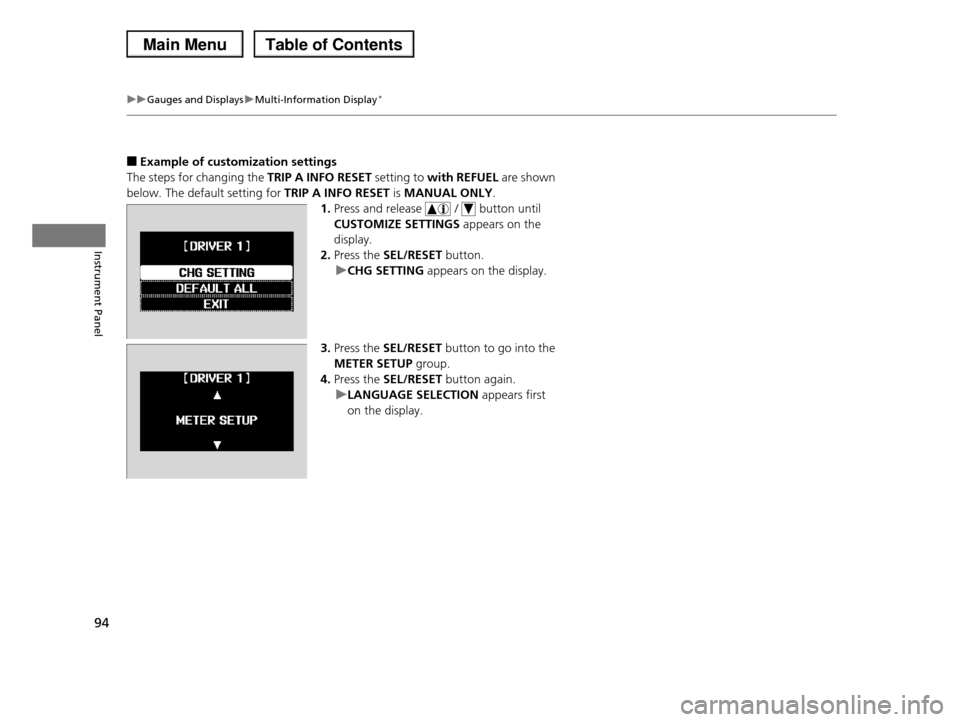
■Example of customization settings
The steps for changing the TRIP A INFO RESET setting to with REFUEL are shown
below. The default setting for TRIP A INFO RESET is MANUAL ONLY.
1.Press and release / button until
CUSTOMIZE SETTINGS appears on the
display.
2.Press the SEL/RESET button.
uCHG SETTING appears on the display.
3.Press the SEL/RESET button to go into the
METER SETUP group.
4.Press the SEL/RESET button again.
uLANGUAGE SELECTION appears first
on the display.
Page 96 of 488
95
uuGauges and DisplaysuMulti-Information Display*
Instrument Panel
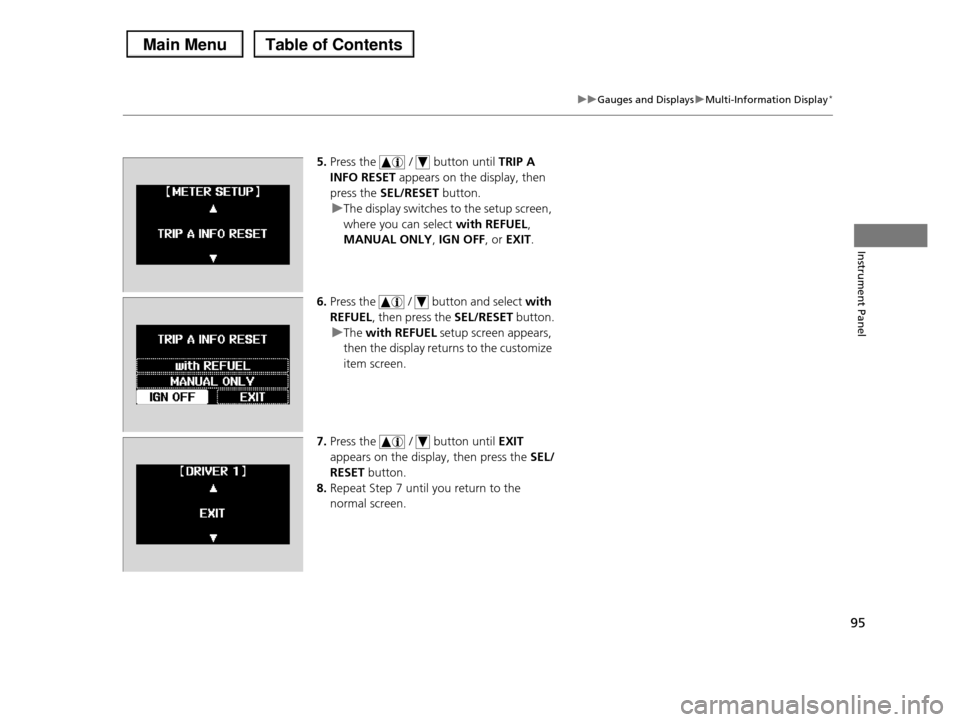
5.Press the / button until TRIP A
INFO RESET appears on the display, then
press the SEL/RESET button.
uThe display switches to the setup screen,
where you can select with REFUEL,
MANUAL ONLY, IGN OFF, or EXIT.
6.Press the / button and select with
REFUEL, then press the SEL/RESET button.
uThe with REFUEL setup screen appears,
then the display returns to the customize
item screen.
7.Press the / button until EXIT
appears on the display, then press the SEL/
RESET button.
8.Repeat Step 7 until you return to the
normal screen.
Page 131 of 488
130
uuOperating the Switches Around the Steering WheeluBrightness Control
Controls
Brightness Control
When the ignition switch is in ON (w, you can
use the brightness control knob to adjust
instrument panel brightness.
Brighten: Turn the knob to the right.
Dim: Turn the knob to the left.
You will hear a beep when the brightness
reaches minimum or maximum. The
information display*/multi-information
display* will return to its original state several
seconds after you adjust the brightness.
■Brightness level indicator
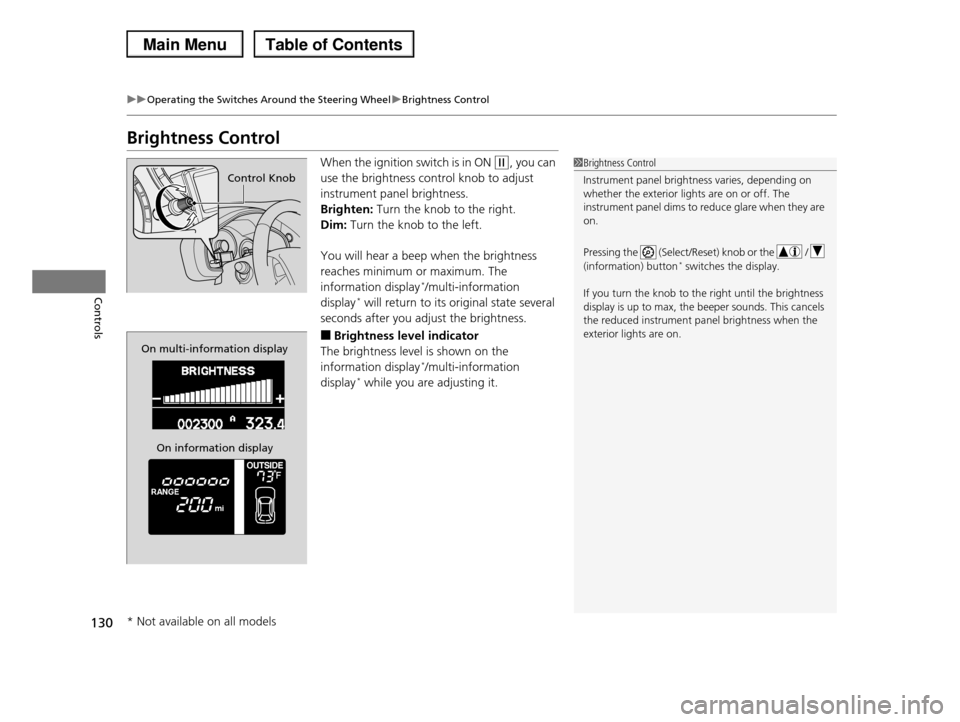
The brightness level is shown on the
information display*/multi-information
display* while you are adjusting it.
1Brightness Control
Instrument panel brightness varies, depending on
whether the exterior lights are on or off. The
instrument panel dims to reduce glare when they are on.
Pressing the (Select/Reset) knob or the /
(information) button* switches the display.
If you turn the knob to the right until the brightness
display is up to max, the beeper sounds. This cancels the reduced instrument panel brightness when the
exterior lights are on.
Control Knob
On multi-information display
On information display
* Not available on all models
Page 133 of 488

132
uuOperating the Switches Around the Steering WheeluDriving Position Memory System*
Controls
Driving Position Memory System*
You can store two driver’s seat and door mirror positions with the driving position
memory system.
When you unlock and open the driver’s door with a remote transmitter, the seat and
door mirrors adjust automatically to one of the two preset positions.
The multi-information display shows you which remote transmitter you used to
unlock the vehicle when you enter.
•Driver 1 transmitter is linked to memory button 1.
•Driver 2 transmitter is linked to memory button 2.
1Driving Position Memory System*
Using the multi-information display, you can disable
the automatic seat adjustment function.
2Customized Features P. 90
The customize setting is also stored by the Driver 1
and 2 transmitters. What setting is recalled next time depends on which transmitter you use to unlock and
open the driver's door.
Driver 1Driver 2
* Not available on all models
Page 175 of 488
174
uuAudio SystemuAudio System Theft Protection
Features
Audio System Theft Protection
The audio system is disabled when it is disconnected from the power source, such as
when the battery is disconnected or goes dead.
■Reactivating the audio system
1.Turn the ignition switch to ON (w, and turn on the audio system.
uIf you turn the ignition switch to ACCESSORY (q, you will be requested to
enter the audio security code. See step 3.
2.Press and hold the power button again for more than two seconds.
uThe audio system is reactivated when the system’s control unit recognizes that
the system is in your vehicle.
If the control unit fails to recognize, ENTER CODE appears on the audio/
information screen.
3.Enter the audio security code using the preset buttons. If you enter an incorrect
digit, continue to the last digit, then try again. If you do not enter the code
correctly after 10 tries, leave the system for one hour before trying again, or visit
a dealer to have the system reset.
1Audio System Theft Protection
We recommend that you write down the serial
number in this owner’s manual.
You can find out about your serial number and
security code from a dealer.
You can register the security code at Owner Link
(owners.honda.com.), and find information on how to retrieve the serial number and obtain the code at
radio-navicode.honda.com.
See the Navigation System Manual for details.
U.S. models
Models with navigation system
Models without navigation system
Except LX models
Page 178 of 488
Continued177
uuAudio System Basic OperationuAudio/Information Screen*
Features
Shows the current audio information.
2Audio System Basic Operation P. 175
Shows the instant fuel economy, average fuel economy, distance (trip meter),
average speed, elapsed time, and range.
2Instant Fuel Economy P. 82
2Trip Meter P. 82
2Range P. 82
■Average speed
Shows the average speed in mph (U.S.) or km/h (Canada).
■Elapsed time
Shows the time during one drive cycle.
Shows a clock screen or an image you import.
2Wallpaper Setup P. 179
Minimizes the display by only showing the compass, audio status, and clock on the
upper part of the display.
■Audio Display
■Trip Computer
■Wallpaper
■Minimum Display
1Trip Computer
You can reset the trip computer.
2Trip Computer P. 88
Page 182 of 488
181
uuAudio System Basic OperationuAudio/Information Screen*
Continued
Features
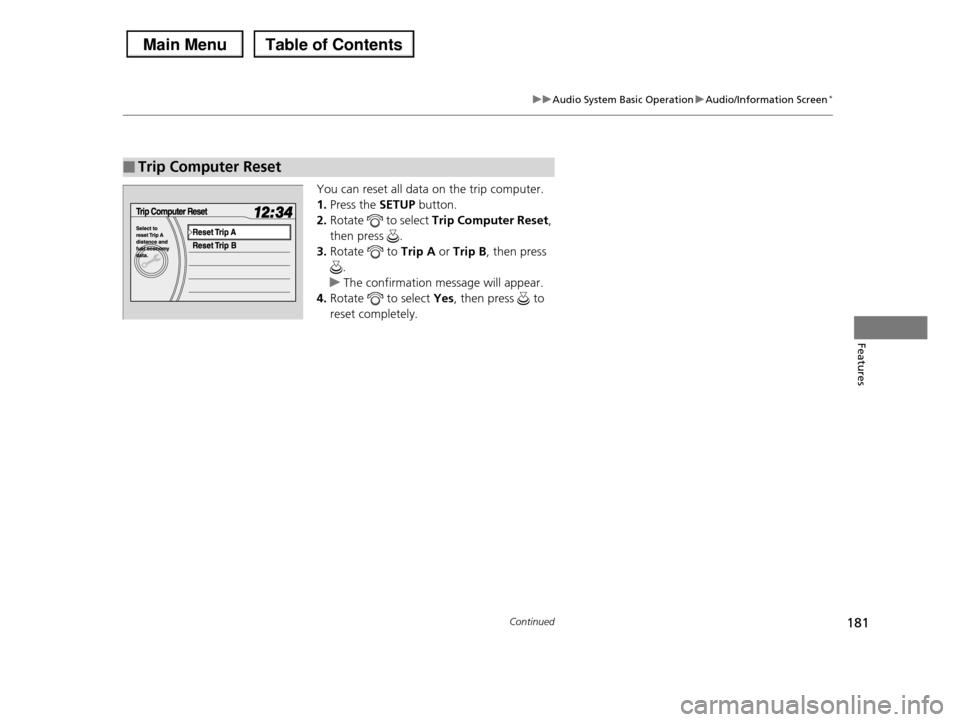
You can reset all data on the trip computer.
1.Press the SETUP button.
2.Rotate to select Trip Computer Reset,
then press .
3.Rotate to Trip A or Trip B, then press
.
uThe confirmation message will appear.
4.Rotate to select Yes, then press to
reset completely.
■Trip Computer Reset