engine HONDA PILOT 2013 2.G Owner's Manual
[x] Cancel search | Manufacturer: HONDA, Model Year: 2013, Model line: PILOT, Model: HONDA PILOT 2013 2.GPages: 488, PDF Size: 10.18 MB
Page 111 of 488
110
Controls
Opening and Closing the Tailgate
Precautions for Opening/Closing the Tailgate
Always make sure individuals and objects are clear of the tailgate before opening or
closing it.
■Opening the tailgate
•Open the tailgate all the way.
uIf it is not fully opened, the tailgate may come down accidentally by its own
weight.
•Be careful when it is windy. The wind may cause the tailgate to close.
■Closing the tailgate
Keep the tailgate closed while driving to:
uAvoid possible damage.
uPrevent exhaust gas from leaking into the vehicle.
2Carbon Monoxide Gas P. 65
1Precautions for Opening/Closing the Tailgate
Be careful not to hit your head on the tailgate or to
put your hands between the tailgate and the cargo area when closing the tailgate.
When operating the power tailgate, make sure there is enough space around your vehicle. People near the
tailgate may be seriously hurt if the tailgate hits or
closes on their heads. Be especially cautious if children are around.
When you are storing or picking up luggage from the cargo area while the engine is idling, do not stand in
front of the exhaust pipe. You may get burned.
Do not allow any passenger in the cargo space. They
may get hurt during hard braking, a sudden
acceleration, or a crash.
3WARNING
Closing a power tailgate while anyone is in
the path of the tailgate can cause serious
injury.
Make sure everyone is clear before closing
the tailgate.
Models with power tailgate
Page 119 of 488
118
Controls
Security System
Immobilizer System
The immobilizer system prevents a key that has not been pre-registered from
starting the engine. Each key contains electronic transmitters that use electronic
signals to verify the key.
Pay attention to the following when inserting the key into the ignition switch:
•Do not allow objects that emit strong radio waves near the ignition switch.
•Make sure the key is not covered by or touching a metal object.
•Do not bring a key from another vehicle's immobilizer system near the ignition
switch.
Security System Alarm*
The security system alarm activates when the doors, tailgate, glass hatch, or hood is
opened without the key, or remote transmitter.
■When the security system alarm activates
The horn sounds intermittently, and all the exterior lights flash.
■To deactivate the security system alarm
Unlock the vehicle using the key or remote transmitter. The system, along with the
horn and flashing lights, is deactivated.
1Immobilizer System
NOTICE
Leaving the ignition key in the vehicle can result in
theft or accidental movement of the vehicle.
Always take the ignition key with you whenever you leave the vehicle unattended.
Do not alter the system or add other devices to it.Doing so may damage the system and make your
vehicle inoperable.
1Security System Alarm*
The security alarm continues for a maximum of two minutes until the security system alarm deactivates.
* Not available on all models
Page 125 of 488
124
Controls
Operating the Switches Around the Steering Wheel
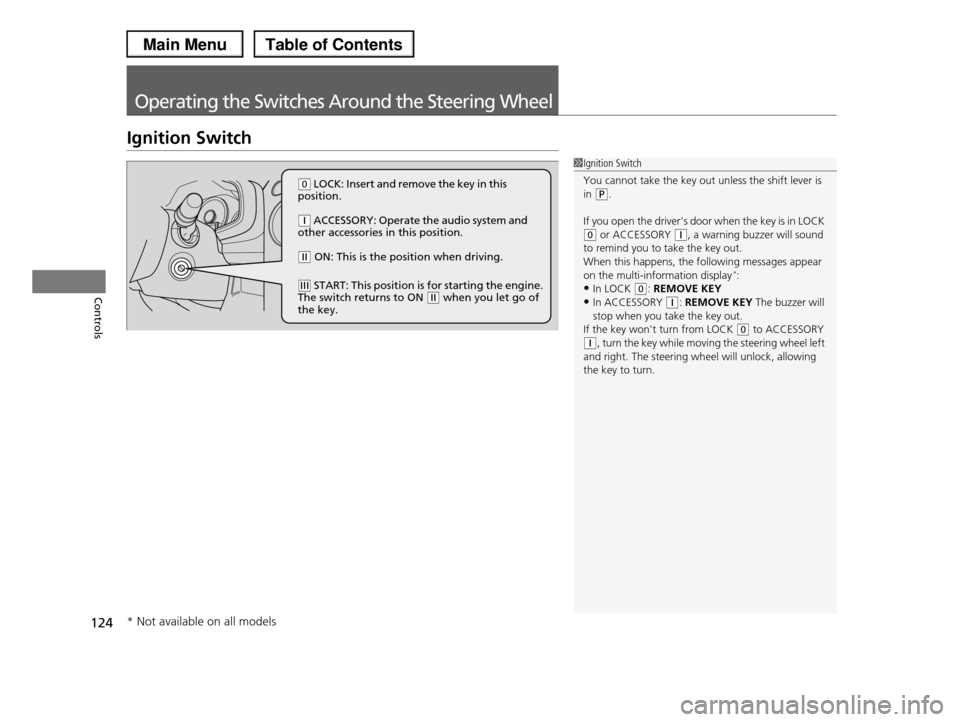
Ignition Switch
1Ignition Switch
You cannot take the key out unless the shift lever is in (P.
If you open the driver's door when the key is in LOCK (0 or ACCESSORY (q, a warning buzzer will sound
to remind you to take the key out.
When this happens, the following messages appear on the multi-information display*:
•In LOCK (0: REMOVE KEY
•In ACCESSORY (q: REMOVE KEY The buzzer will stop when you take the key out.
If the key won't turn from LOCK (0 to ACCESSORY
(q, turn the key while moving the steering wheel left and right. The steering wheel will unlock, allowing
the key to turn.
(0 LOCK: Insert and remove the key in this position.
(q ACCESSORY: Operate the audio system and other accessories in this position.
(w ON: This is the position when driving.
(e START: This position is for starting the engine. The switch returns to ON (w when you let go of the key.
* Not available on all models
Page 126 of 488
125
uuOperating the Switches Around the Steering WheeluTurn Signals
Continued
Controls
Turn Signals
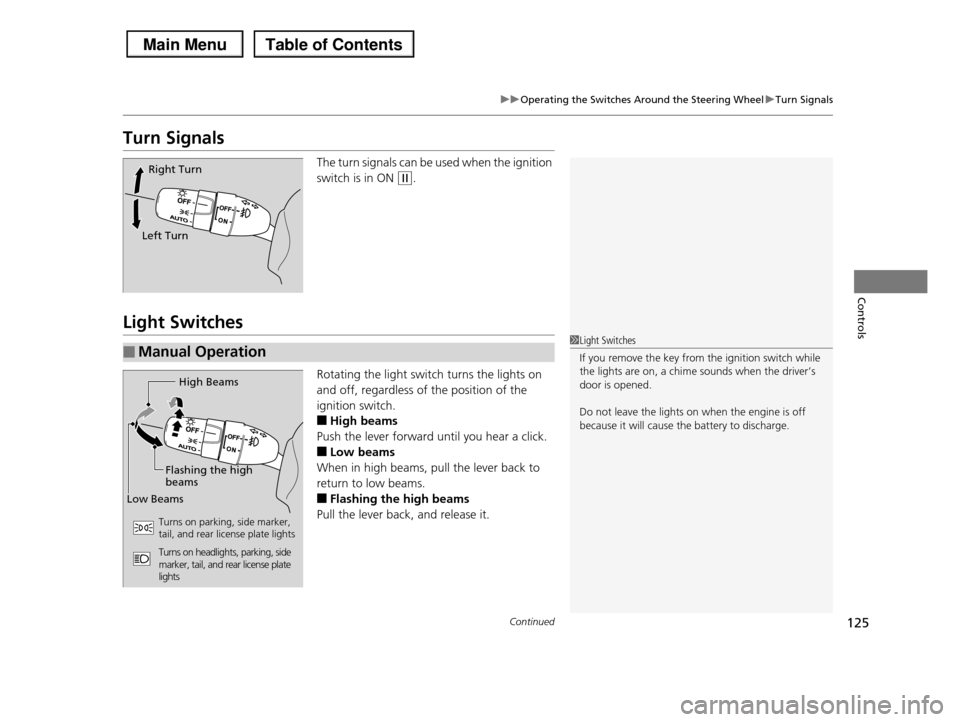
The turn signals can be used when the ignition
switch is in ON (w.
Light Switches
Rotating the light switch turns the lights on
and off, regardless of the position of the
ignition switch.
■High beams
Push the lever forward until you hear a click.
■Low beams
When in high beams, pull the lever back to
return to low beams.
■Flashing the high beams
Pull the lever back, and release it.
Right Turn
Left Turn
■Manual Operation1Light Switches
If you remove the key from the ignition switch while the lights are on, a chime sounds when the driver’s
door is opened.
Do not leave the lights on when the engine is off
because it will cause the battery to discharge.
High Beams
Flashing the high beams
Low Beams
Turns on parking, side marker, tail, and rear license plate lights
Turns on headlights, parking, side marker, tail, and rear license plate lights
Page 132 of 488
131
uuOperating the Switches Around the Steering WheeluRear Defogger/Heated Door Mirror* Button
Controls
Rear Defogger/Heated Door Mirror* Button
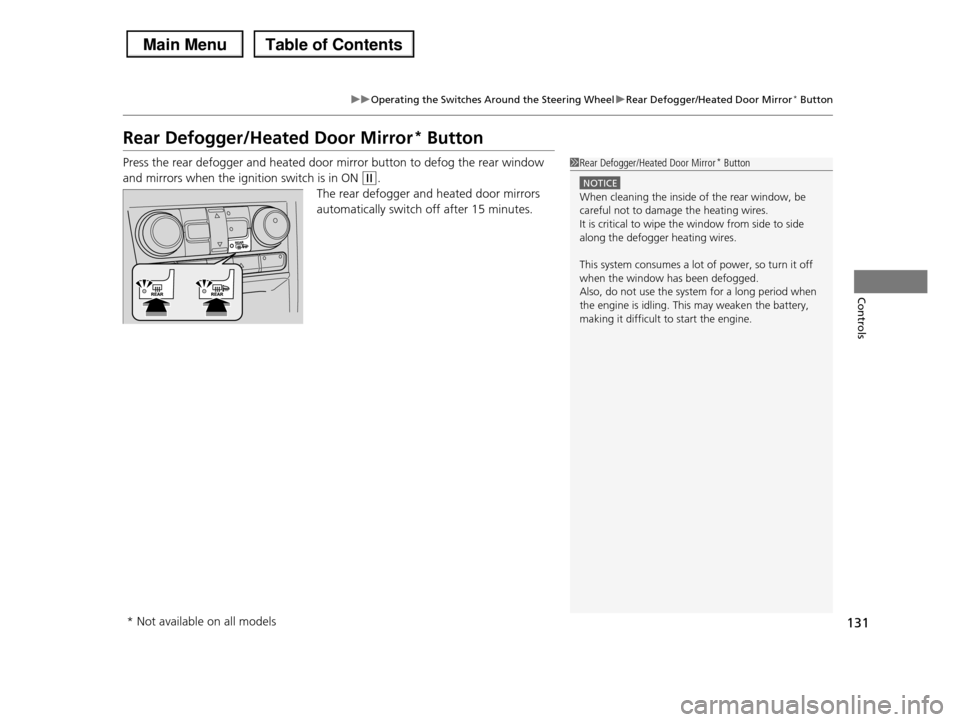
Press the rear defogger and heated door mirror button to defog the rear window
and mirrors when the ignition switch is in ON (w.
The rear defogger and heated door mirrors
automatically switch off after 15 minutes.
1Rear Defogger/Heated Door Mirror* Button
NOTICE
When cleaning the inside of the rear window, be careful not to damage the heating wires.
It is critical to wipe the window from side to side
along the defogger heating wires.
This system consumes a lot of power, so turn it off
when the window has been defogged. Also, do not use the system for a long period when
the engine is idling. This may weaken the battery,
making it difficult to start the engine.
* Not available on all models
Page 145 of 488
uuAdjusting the SeatsuAdjusting the Seat Positions
144
Controls
Head restraints can be removed for cleaning or repair.
To remove a head restraint:
Pull the restraint up as far as it will go. Then push the release button, and pull the
restraint up and out.
To reinstall a head restraint:
Insert the legs back in place, then adjust the head restraint to an appropriate height
while pressing the release button. Pull up on the restraint to make sure it is locked
in position.
After all occupants have adjusted their seats and head restraints, and put on their
seat belts, it is very important that they continue to sit upright, well back in their
seats, with their feet on the floor, until the vehicle is safely parked and the engine is
off.
Sitting improperly can increase the chance of injury during a crash. For example, if
an occupant slouches, lies down, turns sideways, sits forward, leans forward or
sideways, or puts one or both feet up, the chance of injury during a crash is greatly
increased.
In addition, an occupant who is out of position in the front seat can be seriously or
fatally injured in a crash by striking interior parts of the vehicle or being struck by an
inflating front airbag.
■Removing and Reinstalling the Head Restraints
■Maintain a Proper Sitting Position
1Removing and Reinstalling the Head Restraints
3WARNING
Failure to reinstall, or correctly reinstall, the
head restraints can result in severe injury
during a crash.
Always replace the head restraints before
driving.
1Maintain a Proper Sitting Position
3WARNING
Sitting improperly or out of position can
result in serious injury or death in a crash.
Always sit upright, well back in the seat,
with your feet on the floor.
Page 157 of 488
uuInterior Lights/Interior Convenience ItemsuInterior Convenience Items
156
Controls
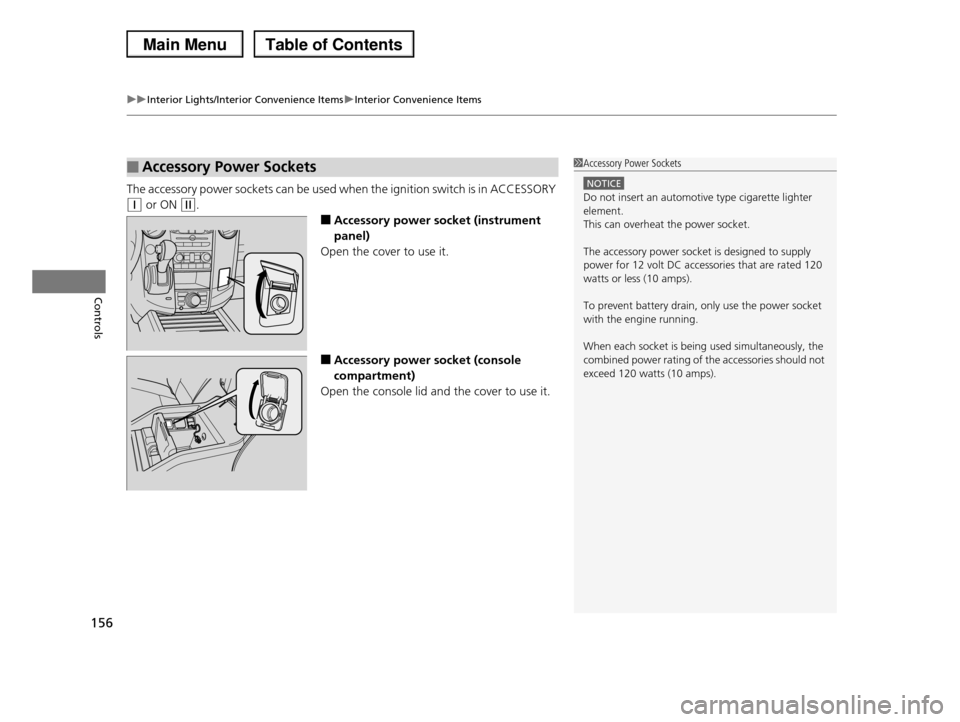
The accessory power sockets can be used when the ignition switch is in ACCESSORY
(q or ON (w.
■Accessory power socket (instrument
panel)
Open the cover to use it.
■Accessory power socket (console
compartment)
Open the console lid and the cover to use it.
■Accessory Power Sockets1Accessory Power Sockets
NOTICE
Do not insert an automotive type cigarette lighter element.
This can overheat the power socket.
The accessory power socket is designed to supply
power for 12 volt DC accessories that are rated 120
watts or less (10 amps).
To prevent battery drain, only use the power socket
with the engine running.
When each socket is being used simultaneously, the
combined power rating of the accessories should not exceed 120 watts (10 amps).
Page 159 of 488
uuInterior Lights/Interior Convenience ItemsuInterior Convenience Items
158
Controls
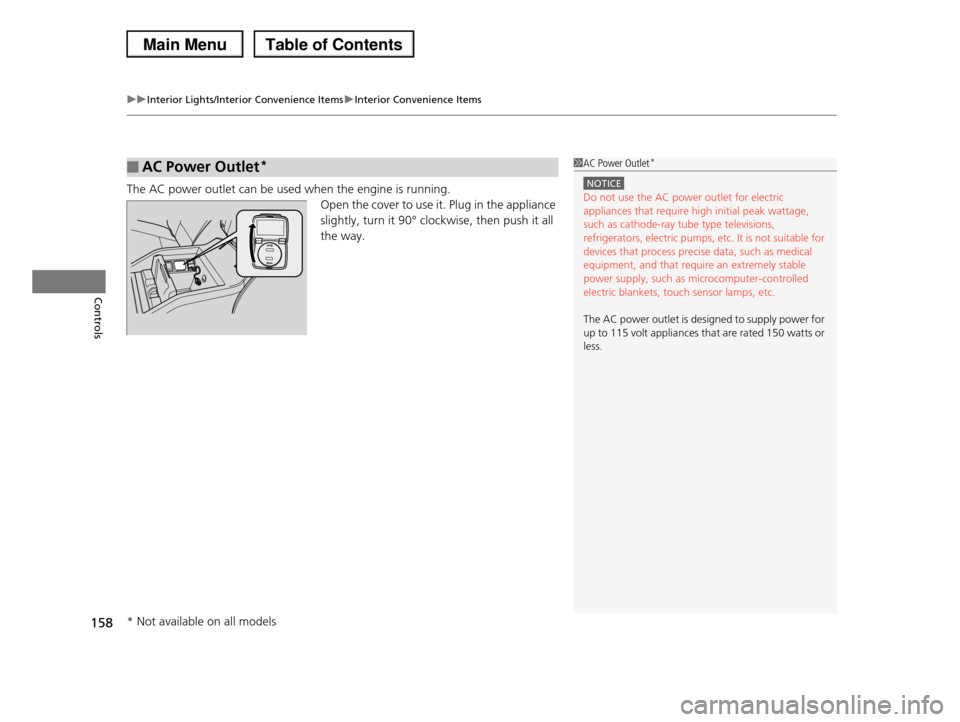
The AC power outlet can be used when the engine is running.
Open the cover to use it. Plug in the appliance
slightly, turn it 90° clockwise, then push it all
the way.
■AC Power Outlet*1AC Power Outlet*
NOTICE
Do not use the AC power outlet for electric appliances that require high initial peak wattage,
such as cathode-ray tube type televisions,
refrigerators, electric pumps, etc. It is not suitable for devices that process precise data, such as medical
equipment, and that require an extremely stable
power supply, such as microcomputer-controlled electric blankets, touch sensor lamps, etc.
The AC power outlet is designed to supply power for up to 115 volt appliances that are rated 150 watts or
less.
* Not available on all models
Page 163 of 488
uuInterior Lights/Interior Convenience ItemsuInterior Convenience Items
162
Controls
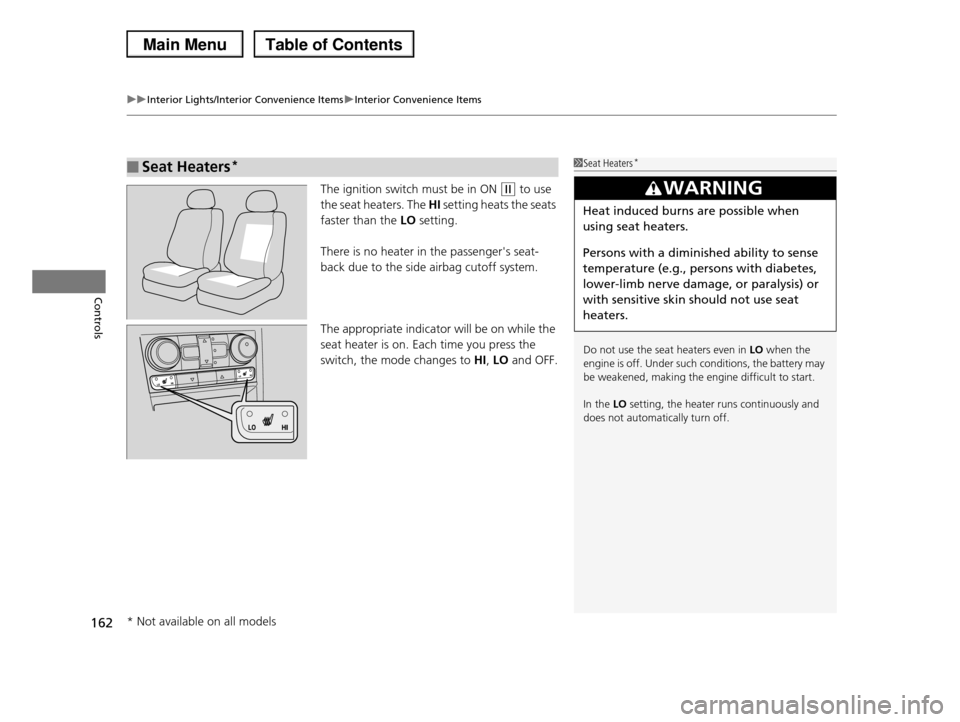
The ignition switch must be in ON (w to use
the seat heaters. The HI setting heats the seats
faster than the LO setting.
There is no heater in the passenger's seat-
back due to the side airbag cutoff system.
The appropriate indicator will be on while the
seat heater is on. Each time you press the
switch, the mode changes to HI, LO and OFF.
■Seat Heaters*1Seat Heaters*
Do not use the seat heaters even in LO when the engine is off. Under such conditions, the battery may
be weakened, making the engine difficult to start.
In the LO setting, the heater runs continuously and
does not automatically turn off.
3WARNING
Heat induced burns are possible when
using seat heaters.
Persons with a diminished ability to sense
temperature (e.g., persons with diabetes,
lower-limb nerve damage, or paralysis) or
with sensitive skin should not use seat
heaters.
* Not available on all models
Page 166 of 488
165Continued
Controls
Climate Control System
Using Automatic Climate Control
The automatic climate control system maintains the interior temperature you select.
The system also selects the proper mix of heated or cooled air that will raise or lower
the interior temperature to your preference as quickly as possible.
Use the system when the engine is running.
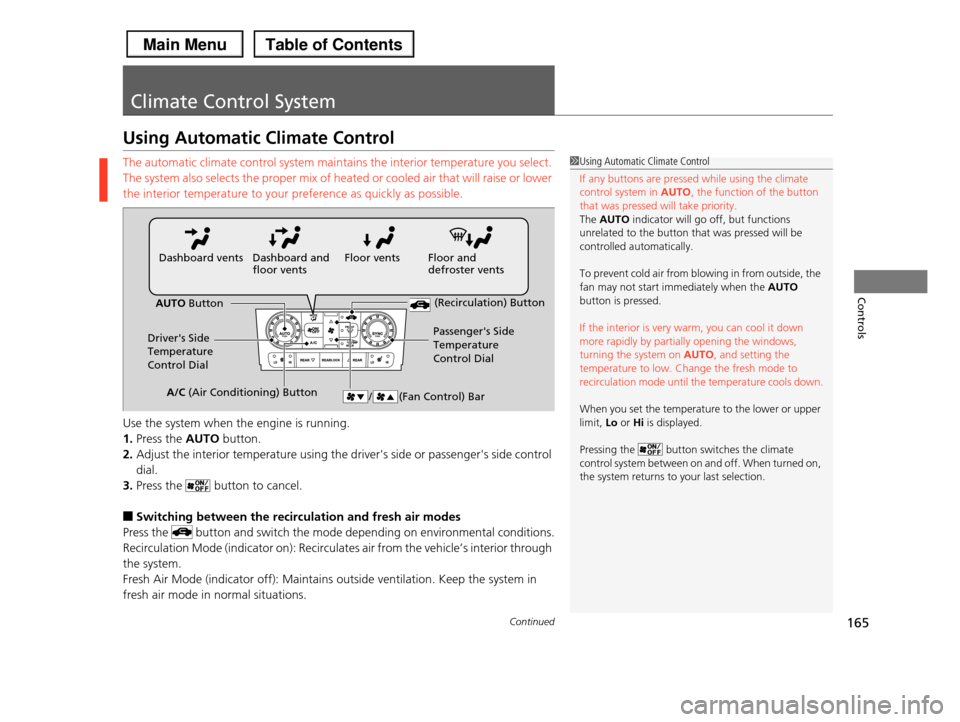
1.Press the AUTO button.
2.Adjust the interior temperature using the driver's side or passenger's side control
dial.
3.Press the button to cancel.
■Switching between the recirculation and fresh air modes
Press the button and switch the mode depending on environmental conditions.
Recirculation Mode (indicator on): Recirculates air from the vehicle’s interior through
the system.
Fresh Air Mode (indicator off): Maintains outside ventilation. Keep the system in
fresh air mode in normal situations.
1Using Automatic Climate Control
If any buttons are pressed while using the climate
control system in AUTO, the function of the button that was pressed will take priority.
The AUTO indicator will go off, but functions
unrelated to the button that was pressed will be
controlled automatically.
To prevent cold air from blowing in from outside, the
fan may not start immediately when the AUTO button is pressed.
If the interior is very warm, you can cool it down more rapidly by partially opening the windows,
turning the system on AUTO, and setting the
temperature to low. Change the fresh mode to recirculation mode until the temperature cools down.
When you set the temperature to the lower or upper limit, Lo or Hi is displayed.
Pressing the button switches the climate control system between on and off. When turned on,
the system returns to your last selection.
Floor and defroster ventsFloor ventsDashboard and floor ventsDashboard vents
AUTO Button
Driver's Side Temperature
Control Dial
Passenger's Side
Temperature
Control Dial
/ (Fan Control) Bar
(Recirculation) Button
A/C (Air Conditioning) Button