ignition HONDA PILOT 2013 2.G Owner's Manual
[x] Cancel search | Manufacturer: HONDA, Model Year: 2013, Model line: PILOT, Model: HONDA PILOT 2013 2.GPages: 488, PDF Size: 10.18 MB
Page 81 of 488
80
Instrument Panel
Gauges and Displays
Gauges
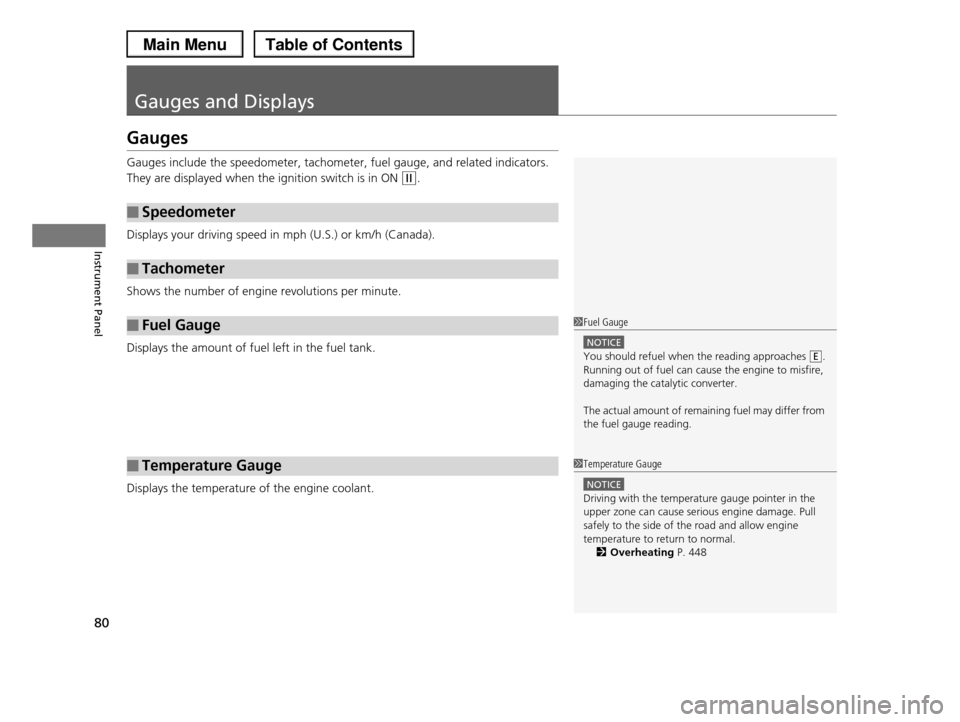
Gauges include the speedometer, tachometer, fuel gauge, and related indicators.
They are displayed when the ignition switch is in ON (w.
Displays your driving speed in mph (U.S.) or km/h (Canada).
Shows the number of engine revolutions per minute.
Displays the amount of fuel left in the fuel tank.
Displays the temperature of the engine coolant.
■Speedometer
■Tachometer
■Fuel Gauge
■Temperature Gauge
1Fuel Gauge
NOTICE
You should refuel when the reading approaches .
Running out of fuel can cause the engine to misfire, damaging the catalytic converter.
The actual amount of remaining fuel may differ from
the fuel gauge reading.
E
1Temperature Gauge
NOTICE
Driving with the temperature gauge pointer in the
upper zone can cause serious engine damage. Pull
safely to the side of the road and allow engine temperature to return to normal.
2Overheating P. 448
Page 85 of 488
uuGauges and DisplaysuInformation Display*
84
Instrument Panel
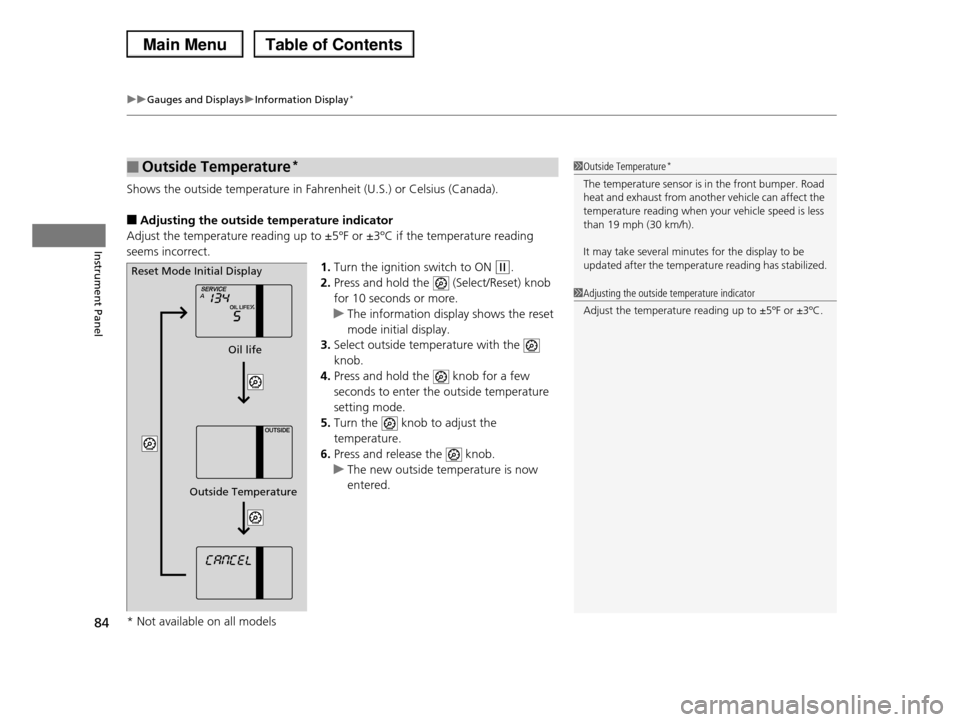
Shows the outside temperature in Fahrenheit (U.S.) or Celsius (Canada).
■Adjusting the outside temperature indicator
Adjust the temperature reading up to ±5ºF or ±3ºC if the temperature reading
seems incorrect.
1.Turn the ignition switch to ON (w.
2.Press and hold the (Select/Reset) knob
for 10 seconds or more.
uThe information display shows the reset
mode initial display.
3.Select outside temperature with the
knob.
4.Press and hold the knob for a few
seconds to enter the outside temperature
setting mode.
5.Turn the knob to adjust the
temperature.
6.Press and release the knob.
uThe new outside temperature is now
entered.
■Outside Temperature*1Outside Temperature*
The temperature sensor is in the front bumper. Road
heat and exhaust from another vehicle can affect the temperature reading when your vehicle speed is less
than 19 mph (30 km/h).
It may take several minutes for the display to be
updated after the temperature reading has stabilized.
1Adjusting the outside temperature indicator
Adjust the temperature reading up to ±5ºF or ±3ºC.
Reset Mode Initial Display
Oil life
Outside Temperature
* Not available on all models
Page 91 of 488
uuGauges and DisplaysuMulti-Information Display*
90
Instrument Panel
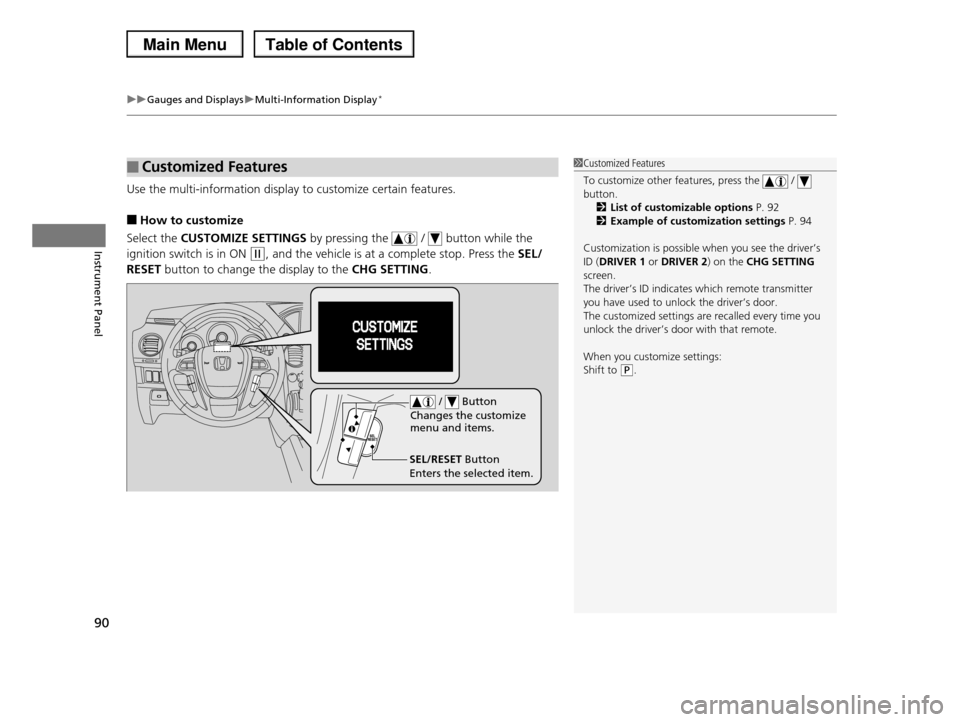
Use the multi-information display to customize certain features.
■How to customize
Select the CUSTOMIZE SETTINGS by pressing the / button while the
ignition switch is in ON (w, and the vehicle is at a complete stop. Press the SEL/
RESET button to change the display to the CHG SETTING.
■Customized Features1Customized Features
To customize other features, press the / button.
2List of customizable options P. 92
2Example of customization settings P. 94
Customization is possible when you see the driver’s
ID (DRIVER 1 or DRIVER 2) on the CHG SETTING screen.
The driver’s ID indicates which remote transmitter
you have used to unlock the driver’s door. The customized settings are recalled every time you
unlock the driver’s door with that remote.
When you customize settings:
Shift to (P.
SEL/RESET Button
Enters the selected item.
/ Button
Changes the customize menu and items.
Page 98 of 488
97
Controls
This chapter explains how to operate the various controls necessary for driving.
Setting the Clock................................ 98Locking and Unlocking the DoorsKey Types and Functions .................... 99 Locking/Unlocking the Doors from the Outside .......................................... 101Locking/Unlocking the Doors from the Inside ............................................. 103Childproof Door Locks ..................... 104Auto Door Locking/Unlocking .......... 105Opening and Closing the Tailgate... 110Security System................................ 118Immobilizer System .......................... 118Security System Alarm*.................... 118Opening and Closing the Windows..... 120
Opening and Closing the Moonroof*...... 123Operating the Switches Around the Steering WheelIgnition Switch ................................. 124 Turn Signals ..................................... 125 Light Switches.................................. 125Fog Lights*...................................... 127Daytime Running Lights ................... 127Wipers and Washers ........................ 128Brightness Control ........................... 130 Rear Defogger/Heated Door Mirror* Button ........................................... 131Driving Position Memory System*.... 132Adjusting the Steering Wheel........... 134
Adjusting the Mirrors....................... 135Interior Rearview Mirror ................... 135 Power Door Mirrors ......................... 136Adjusting the Seats.......................... 137Adjusting the Seat Positions ............. 137Interior Lights/Interior Convenience Items................................................ 150Interior Lights .................................. 150Interior Convenience Items .............. 152Climate Control System................... 165Using Automatic Climate Control .... 165Automatic Climate Control Sensors ...... 170
* Not available on all models
Page 99 of 488
98
Controls
Setting the Clock
Clock
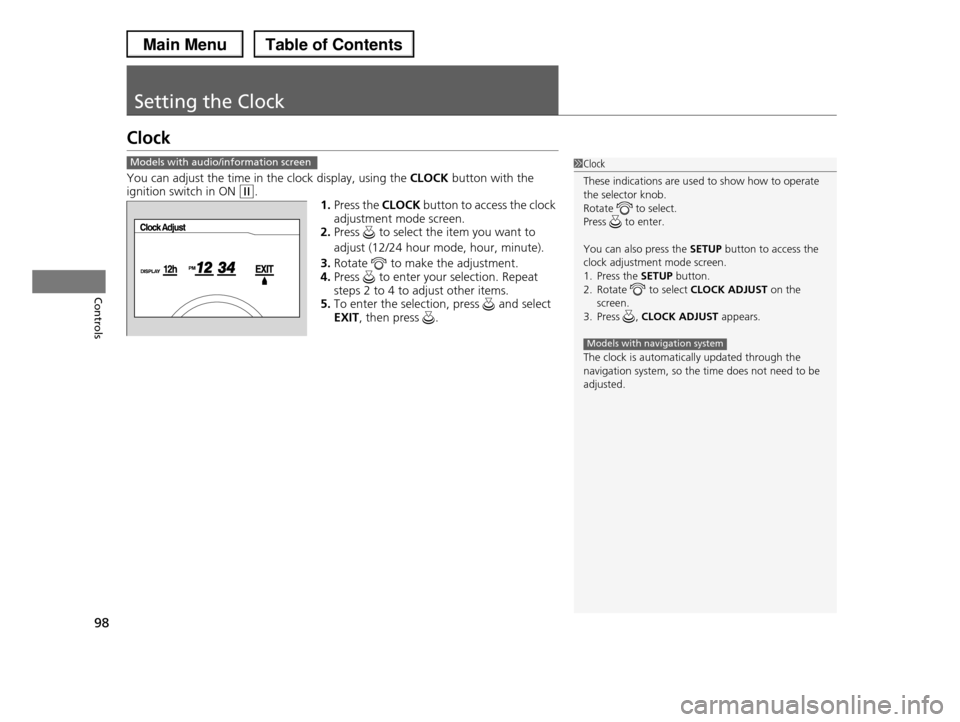
You can adjust the time in the clock display, using the CLOCK button with the ignition switch in ON (w.
1.Press the CLOCK button to access the clock
adjustment mode screen.2.Press to select the item you want to
adjust (12/24 hour mode, hour, minute).
3.Rotate to make the adjustment.4.Press to enter your selection. Repeat
steps 2 to 4 to adjust other items.
5.To enter the selection, press and select EXIT, then press .
Models with audio/information screen1Clock
These indications are used to show how to operate
the selector knob.
Rotate to select. Press to enter.
You can also press the SETUP button to access the clock adjustment mode screen.
1. Press the SETUP button.
2. Rotate to select CLOCK ADJUST on the screen.
3. Press , CLOCK ADJUST appears.
The clock is automatically updated through the
navigation system, so the time does not need to be adjusted.
Models with navigation system
Page 103 of 488
uuLocking and Unlocking the DoorsuLocking/Unlocking the Doors from the Outside
102
Controls
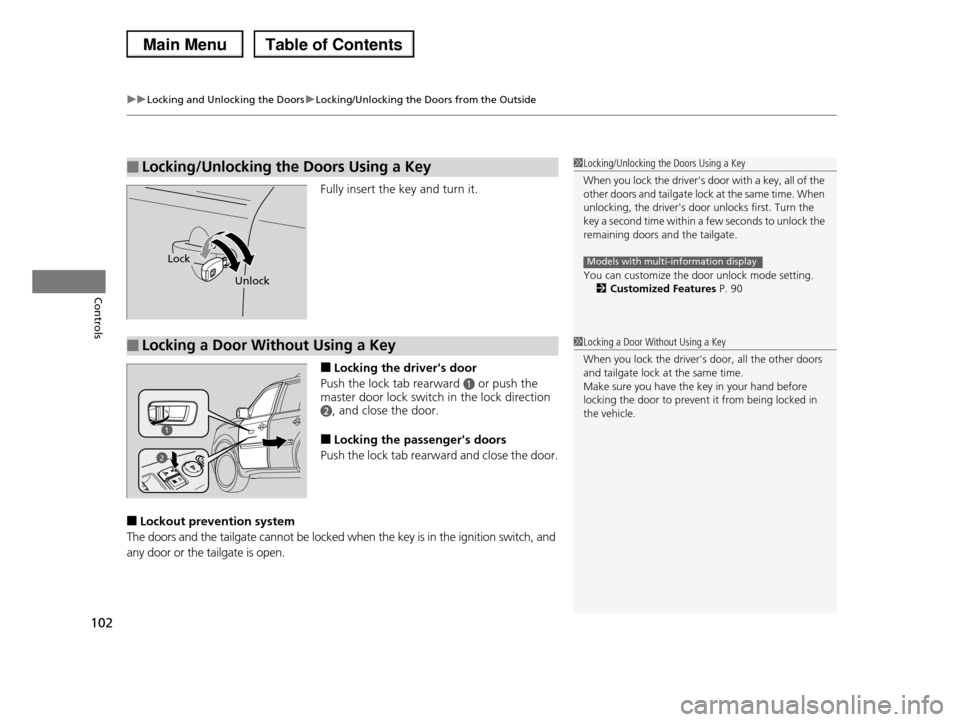
Fully insert the key and turn it.
■Locking the driver's door
Push the lock tab rearward a or push the master door lock switch in the lock direction
b, and close the door.
■Locking the passenger's doors
Push the lock tab rearward and close the door.
■Lockout prevention system
The doors and the tailgate cannot be locked when the key is in the ignition switch, and
any door or the tailgate is open.
■Locking/Unlocking the Doors Using a Key1Locking/Unlocking the Doors Using a Key
When you lock the driver's door with a key, all of the other doors and tailg a t e l o c k a t t h e s a m e t i m e . W h e n
unlocking, the driver's door unlocks first. Turn the
key a second time within a few seconds to unlock the remaining doors and the tailgate.
You can customize the door unlock mode setting.
2Customized Features P. 90
Models with multi-information displayLock
Unlock
■Locking a Door Without Using a Key1Locking a Door Without Using a Key
When you lock the driver's door, all the other doors
and tailgate lock at the same time.
Make sure you have the key in your hand before locking the door to prevent it from being locked in
the vehicle.
2
Page 107 of 488
106
uuLocking and Unlocking the DoorsuCustomizing the Auto Door Locking/Unlocking Setting*
Controls
Customizing the Auto Door Locking/Unlocking Setting*
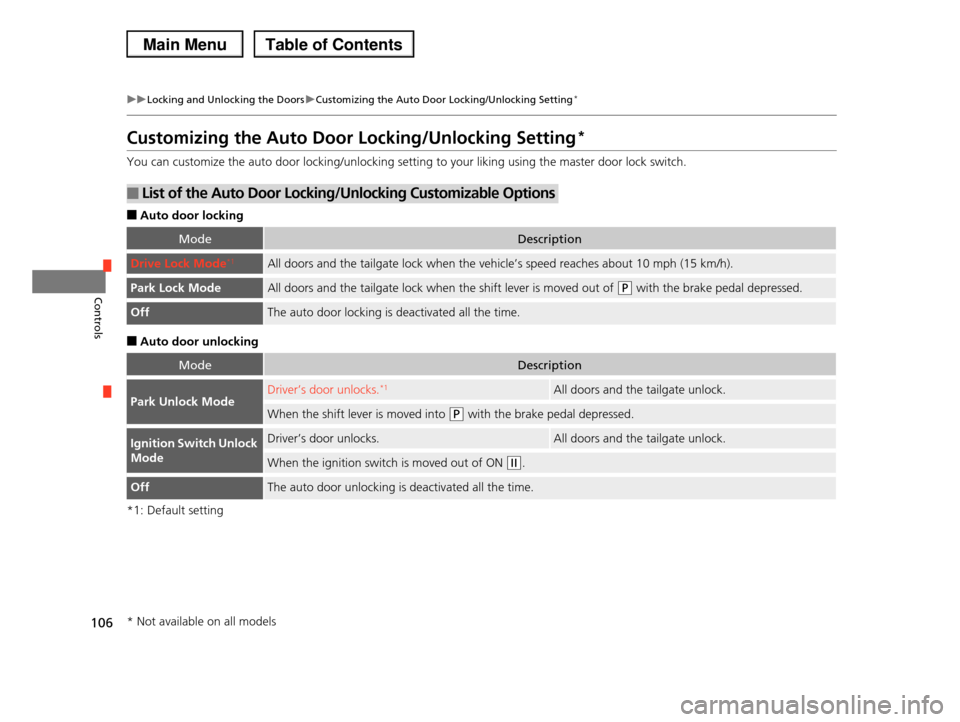
You can customize the auto door locking/unlocking setting to your liking using the master door lock switch.
■Auto door locking
■Auto door unlocking
*1: Default setting
■List of the Auto Door Locking/Unlocking Customizable Options
ModeDescription
Drive Lock Mode*1All doors and the tailgate lock when the vehicle’s speed reaches about 10 mph (15 km/h).
Park Lock ModeAll doors and the tailgate lock when the shift lever is moved out of (P with the brake pedal depressed.
OffThe auto door locking is deactivated all the time.
ModeDescription
Park Unlock ModeDriver’s door unlocks.*1All doors and the tailgate unlock.
When the shift lever is moved into (P with the brake pedal depressed.
Ignition Switch Unlock
Mode
Driver’s door unlocks.All doors and the tailgate unlock.
When the ignition switch is moved out of ON (w.
OffThe auto door unlocking is deactivated all the time.
* Not available on all models
Page 108 of 488
107
uuLocking and Unlocking the DoorsuCustomizing the Auto Door Locking/Unlocking Setting*
Continued
Controls
*1: Default setting
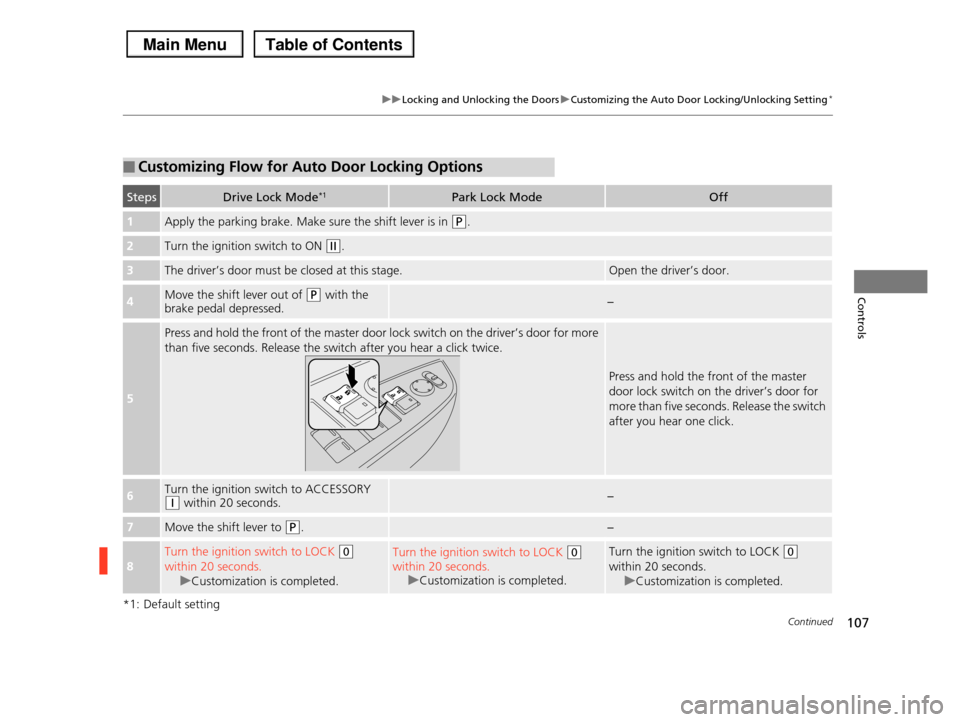
■Customizing Flow for Auto Door Locking Options
StepsDrive Lock Mode*1Park Lock ModeOff
1Apply the parking brake. Make sure the shift lever is in (P.
2Turn the ignition switch to ON (w.
3The driver’s door must be closed at this stage.Open the driver’s door.
4Move the shift lever out of (P with the brake pedal depressed.−
5
Press and hold the front of the master door lock switch on the driver’s door for more
than five seconds. Release the switch after you hear a click twice.
Press and hold the front of the master
door lock switch on the driver’s door for
more than five seconds. Release the switch
after you hear one click.
6Turn the ignition switch to ACCESSORY (q within 20 seconds.−
7Move the shift lever to (P.−
8
Turn the ignition switch to LOCK (0
within 20 seconds.
uCustomization is completed.
Turn the ignition switch to LOCK (0
within 20 seconds.
uCustomization is completed.
Turn the ignition switch to LOCK (0
within 20 seconds.
uCustomization is completed.
Page 109 of 488
108
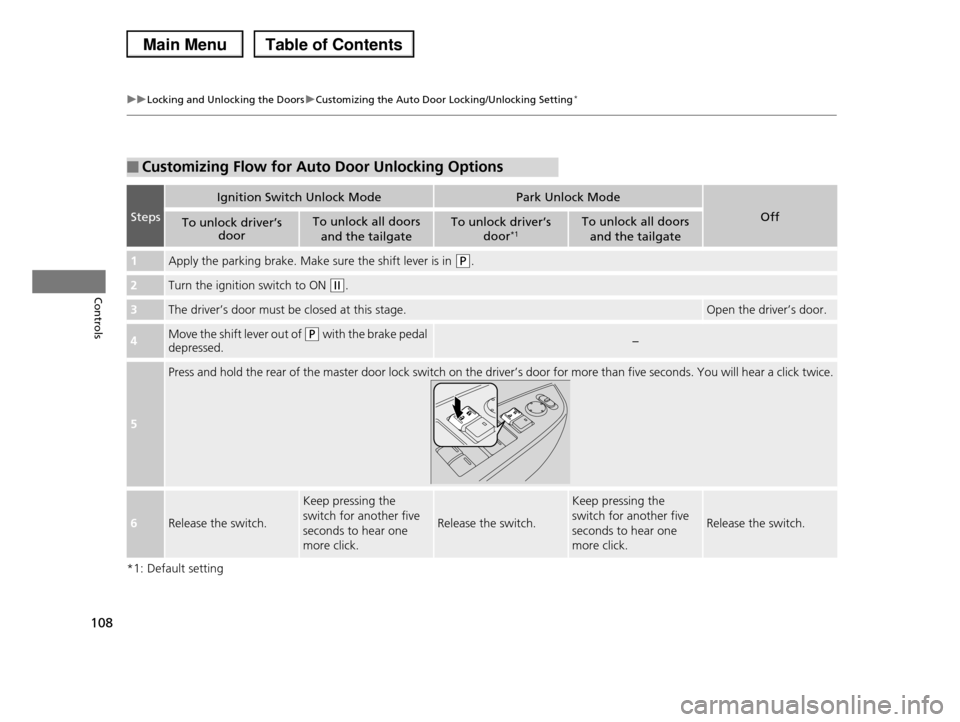
uuLocking and Unlocking the DoorsuCustomizing the Auto Door Locking/Unlocking Setting*
Controls
*1: Default setting
■Customizing Flow for Auto Door Unlocking Options
Steps
Ignition Switch Unlock ModePark Unlock Mode
OffTo unlock driver’s door
To unlock all doors
and the tailgate
To unlock driver’s
door*1To unlock all doors
and the tailgate
1Apply the parking brake. Make sure the shift lever is in (P.
2Turn the ignition switch to ON (w.
3The driver’s door must be closed at this stage.Open the driver’s door.
4Move the shift lever out of (P with the brake pedal
depressed.−
5
Press and hold the rear of the master door lock switch on the driver’s door for more than five seconds. You will hear a click twice.
6Release the switch.
Keep pressing the
switch for another five
seconds to hear one
more click.
Release the switch.
Keep pressing the
switch for another five
seconds to hear one
more click.
Release the switch.
Page 110 of 488
109
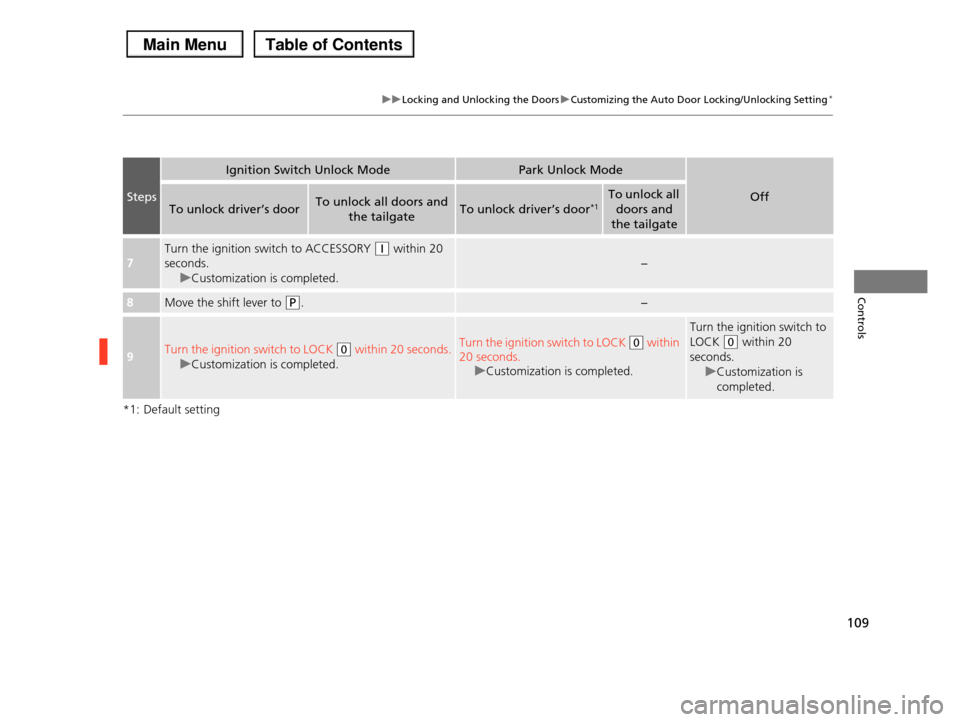
uuLocking and Unlocking the DoorsuCustomizing the Auto Door Locking/Unlocking Setting*
Controls
*1: Default setting
Steps
Ignition Switch Unlock ModePark Unlock Mode
OffTo unlock driver’s doorTo unlock all doors and
the tailgateTo unlock driver’s door*1To unlock all
doors and
the tailgate
7
Turn the ignition switch to ACCESSORY (q within 20
seconds.
uCustomization is completed.
−
8Move the shift lever to (P.−
9Turn the ignition switch to LOCK (0 within 20 seconds.
uCustomization is completed.
Turn the ignition switch to LOCK (0 within
20 seconds.
uCustomization is completed.
Turn the ignition switch to
LOCK (0 within 20
seconds.
uCustomization is
completed.