oil HONDA PILOT 2013 2.G Owner's Manual
[x] Cancel search | Manufacturer: HONDA, Model Year: 2013, Model line: PILOT, Model: HONDA PILOT 2013 2.GPages: 488, PDF Size: 10.18 MB
Page 389 of 488
uuMaintenance Minder™uTo Use Maintenance MinderTM
388
Maintenance
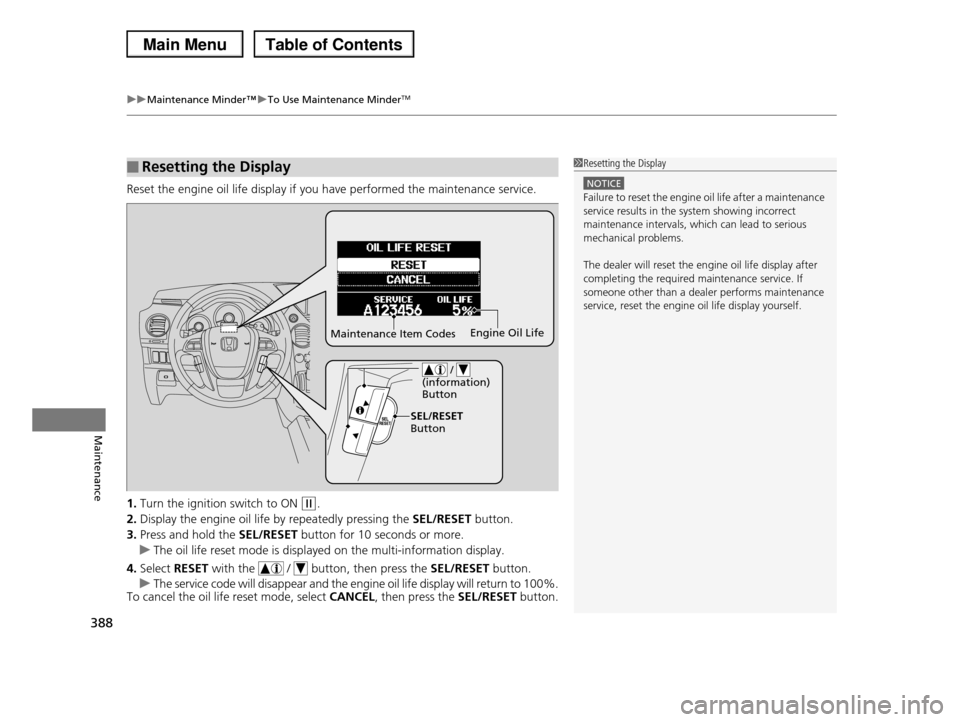
Reset the engine oil life display if you have performed the maintenance service.
1.Turn the ignition switch to ON (w.
2.Display the engine oil life by repeatedly pressing the SEL/RESET button.
3.Press and hold the SEL/RESET button for 10 seconds or more.
uThe oil life reset mode is displayed on the multi-information display.
4.Select RESET with the / button, then press the SEL/RESET button.
uThe service code will disappear and the engine oil life display will return to 100%.To cancel the oil life reset mode, select CANCEL, then press the SEL/RESET button.
■Resetting the Display1Resetting the Display
NOTICE
Failure to reset the engine oil life after a maintenance service results in the system showing incorrect
maintenance intervals, which can lead to serious
mechanical problems.
The dealer will reset the engine oil life display after
completing the required maintenance service. If someone other than a dealer performs maintenance
service, reset the engine oil life display yourself.
Maintenance Item CodesEngine Oil Life
/ (information) Button
SEL/RESET Button
Page 390 of 488
389
Maintenance
Maintenance Under the Hood
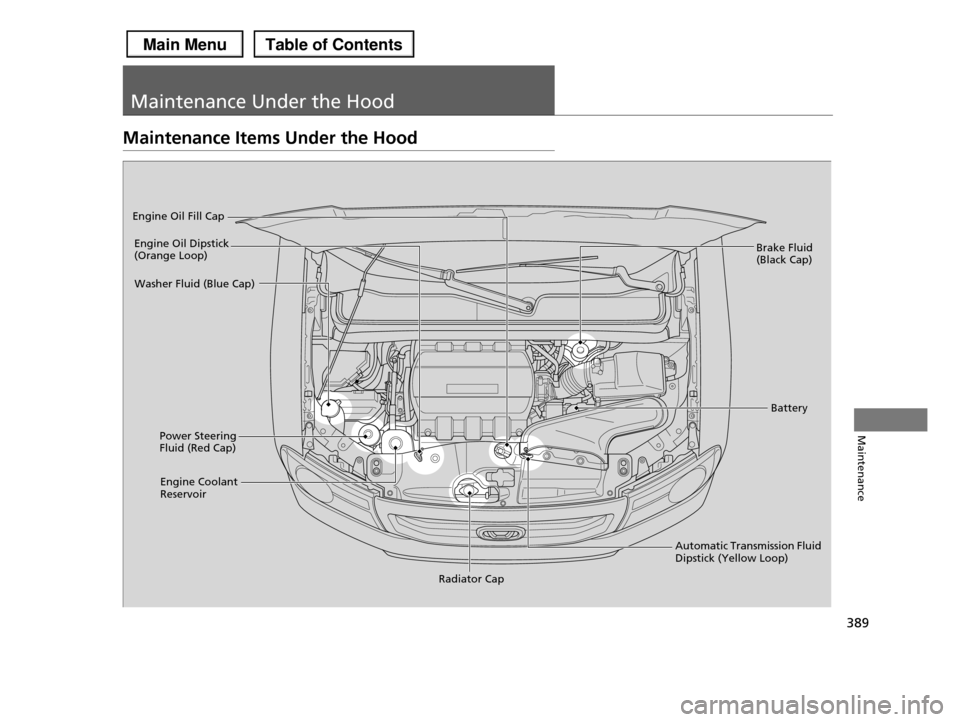
Maintenance Items Under the Hood
Brake Fluid (Black Cap)
Engine Coolant Reservoir
Radiator Cap
Washer Fluid (Blue Cap)
Engine Oil Dipstick (Orange Loop)
Engine Oil Fill Cap
Automatic Transmission Fluid Dipstick (Yellow Loop)
Battery
Power Steering Fluid (Red Cap)
Page 393 of 488
392
uuMaintenance Under the HooduRecommended Engine Oil
Maintenance
Recommended Engine Oil
Oil is a major contributor to your engine's
performance and longevity. If you drive the
vehicle with insufficient or deteriorated oil,
the engine may fail or be damaged.
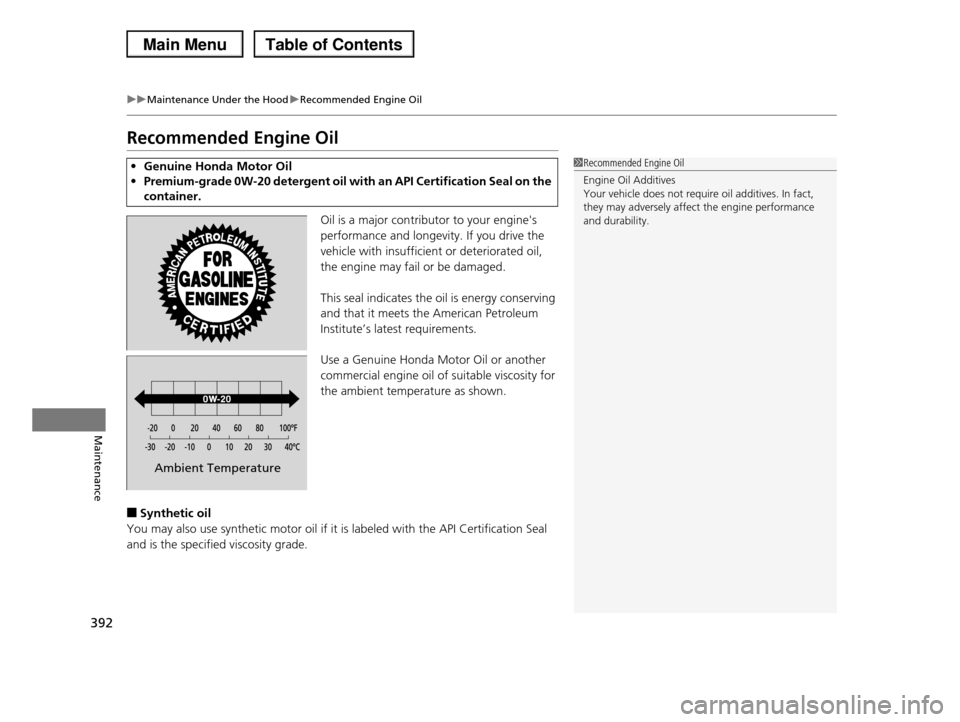
This seal indicates the oil is energy conserving
and that it meets the American Petroleum
Institute’s latest requirements.
Use a Genuine Honda Motor Oil or another
commercial engine oil of suitable viscosity for
the ambient temperature as shown.
■Synthetic oil
You may also use synthetic motor oil if it is labeled with the API Certification Seal
and is the specified viscosity grade.
•Genuine Honda Motor Oil
•Premium-grade 0W-20 detergent oil with an API Certification Seal on the
container.
1Recommended Engine Oil
Engine Oil Additives
Your vehicle does not require oil additives. In fact, they may adversely affect the engine performance
and durability.
Ambient Temperature
Page 394 of 488
393
uuMaintenance Under the HooduOil Check
Maintenance
Oil Check
We recommend that you check the engine oil level every time you refuel.
Park the vehicle on level ground.
Wait approximately three minutes after turning the engine off before you check the
oil.
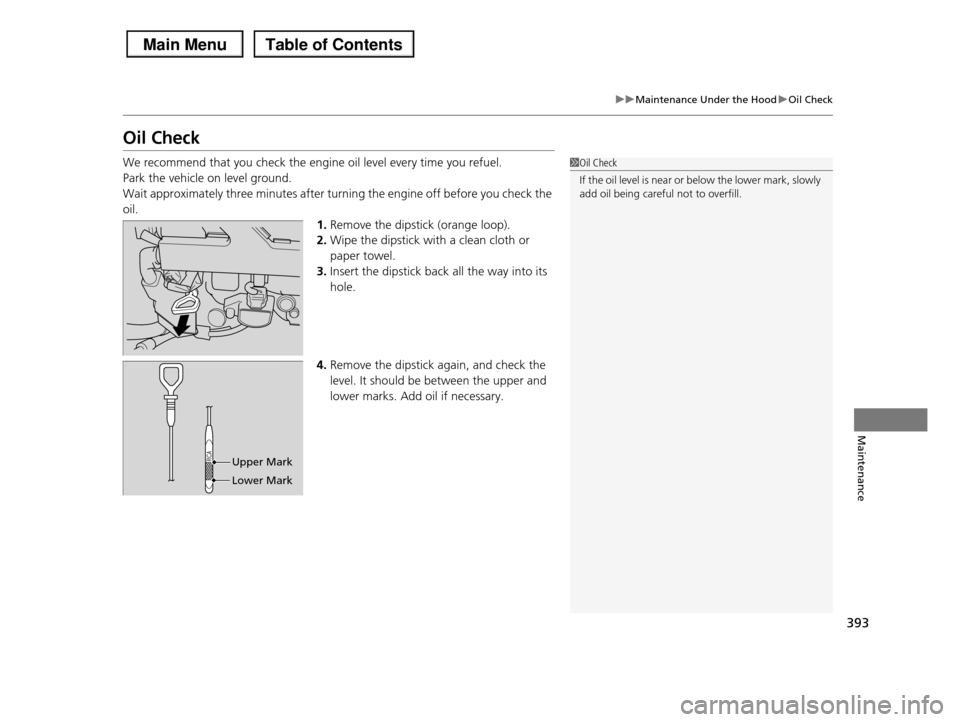
1.Remove the dipstick (orange loop).
2.Wipe the dipstick with a clean cloth or
paper towel.
3.Insert the dipstick back all the way into its
hole.
4.Remove the dipstick again, and check the
level. It should be between the upper and
lower marks. Add oil if necessary.
1Oil Check
If the oil level is near or below the lower mark, slowly
add oil being careful not to overfill.
Upper Mark
Lower Mark
Page 395 of 488
394
uuMaintenance Under the HooduAdding Engine Oil
Maintenance
Adding Engine Oil
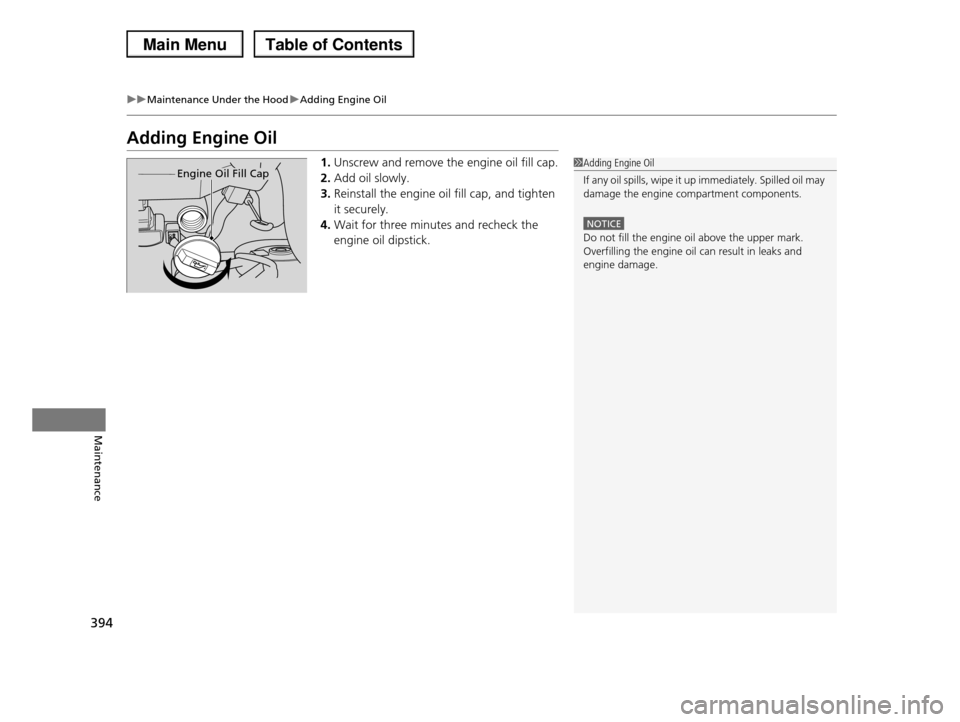
1.Unscrew and remove the engine oil fill cap.
2.Add oil slowly.
3.Reinstall the engine oil fill cap, and tighten
it securely.
4.Wait for three minutes and recheck the
engine oil dipstick.
1Adding Engine Oil
If any oil spills, wipe it up immediately. Spilled oil may
damage the engine compartment components.
NOTICE
Do not fill the engine oil above the upper mark.
Overfilling the engine oil can result in leaks and engine damage.
Engine Oil Fill Cap
Page 396 of 488
395
uuMaintenance Under the HooduChanging the Engine Oil and Oil Filter
Continued
Maintenance
Changing the Engine Oil and Oil Filter
You must change the engine oil and oil filter regularly in order to maintain the
engine's lubrication. The engine may be damaged if they are not changed regularly.
Change the oil and filter in accordance with the maintenance message on the
information display*/multi-information display*.
1.Run the engine until it reaches normal
operating temperature, and then turn the
engine off.
2.Open the hood and remove the engine oil
fill cap.
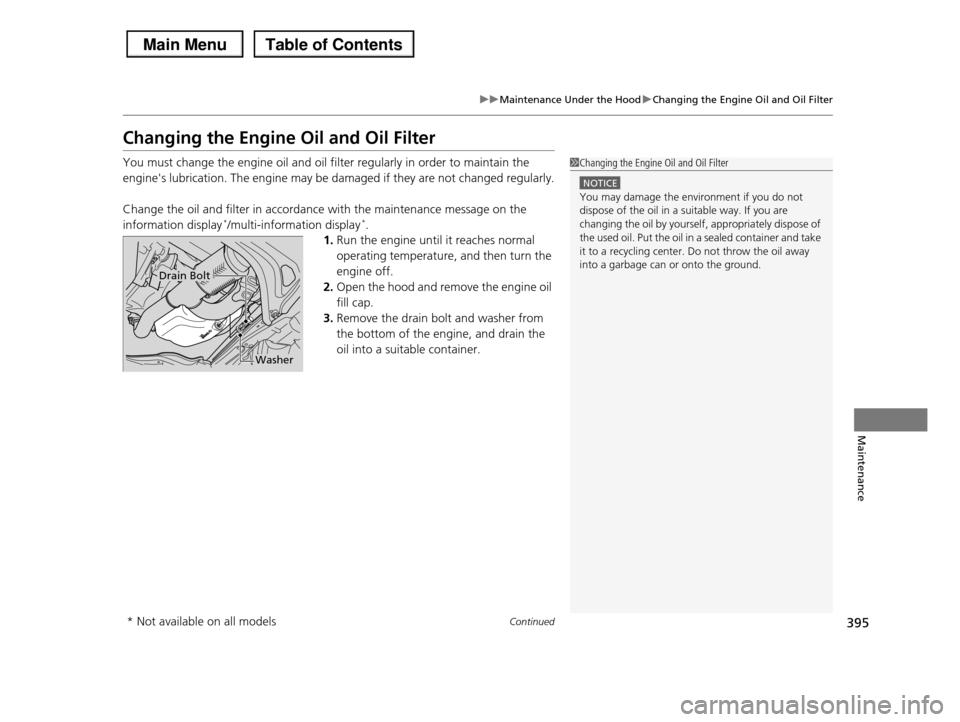
3.Remove the drain bolt and washer from
the bottom of the engine, and drain the
oil into a suitable container.
1Changing the Engine Oil and Oil Filter
NOTICE
You may damage the environment if you do not dispose of the oil in a suitable way. If you are
changing the oil by yourself, appropriately dispose of
the used oil. Put the oil in a sealed container and take
it to a recycling center. Do not throw the oil away into a garbage can or onto the ground.Drain Bolt
Washer
* Not available on all models
Page 397 of 488
uuMaintenance Under the HooduChanging the Engine Oil and Oil Filter
396
Maintenance
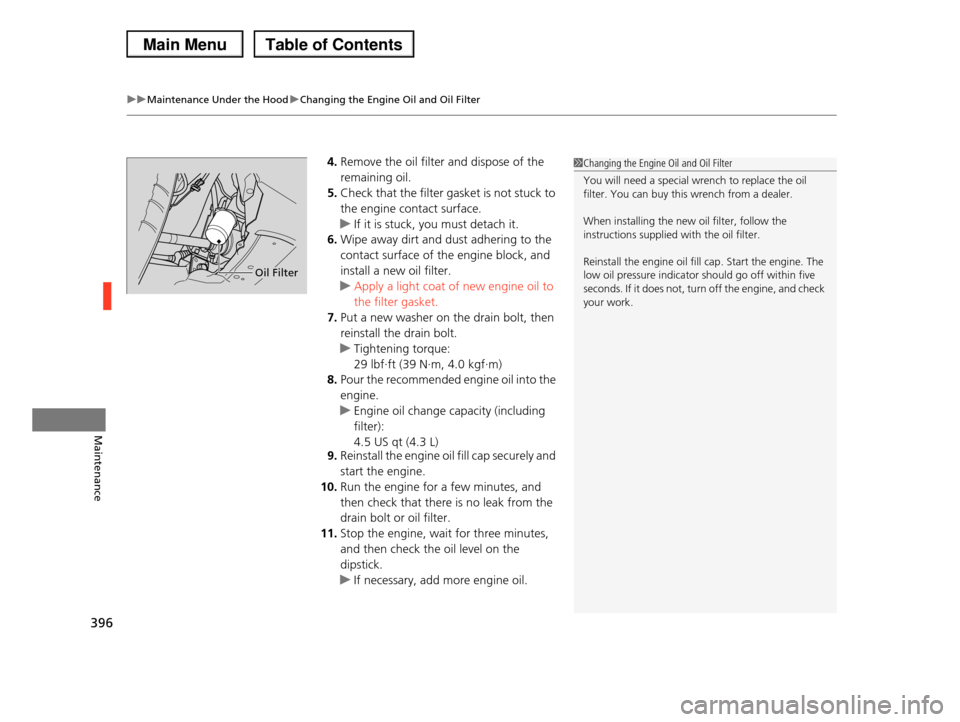
4.Remove the oil filter and dispose of the
remaining oil.
5.Check that the filter gasket is not stuck to
the engine contact surface.
uIf it is stuck, you must detach it.
6.Wipe away dirt and dust adhering to the
contact surface of the engine block, and
install a new oil filter.
uApply a light coat of new engine oil to
the filter gasket.
7.Put a new washer on the drain bolt, then
reinstall the drain bolt.
uTightening torque:
29 lbf∙ft (39 N∙m, 4.0 kgf∙m)
8.Pour the recommended engine oil into the
engine.
uEngine oil change capacity (including
filter):
4.5 US qt (4.3 L)
9.Reinstall the engine oil fill cap securely and
start the engine.
10.Run the engine for a few minutes, and
then check that there is no leak from the
drain bolt or oil filter.
11.Stop the engine, wait for three minutes,
and then check the oil level on the
dipstick.
uIf necessary, add more engine oil.
1Changing the Engine Oil and Oil Filter
You will need a special wrench to replace the oil filter. You can buy this wrench from a dealer.
When installing the new oil filter, follow the instructions supplied with the oil filter.
Reinstall the engine oil fill cap. Start the engine. The low oil pressure indicator should go off within five
seconds. If it does not, turn off the engine, and check
your work.
Oil Filter
Page 403 of 488
402
Maintenance
Replacing Light Bulbs
Headlight Bulbs
When replacing, use the following bulbs.
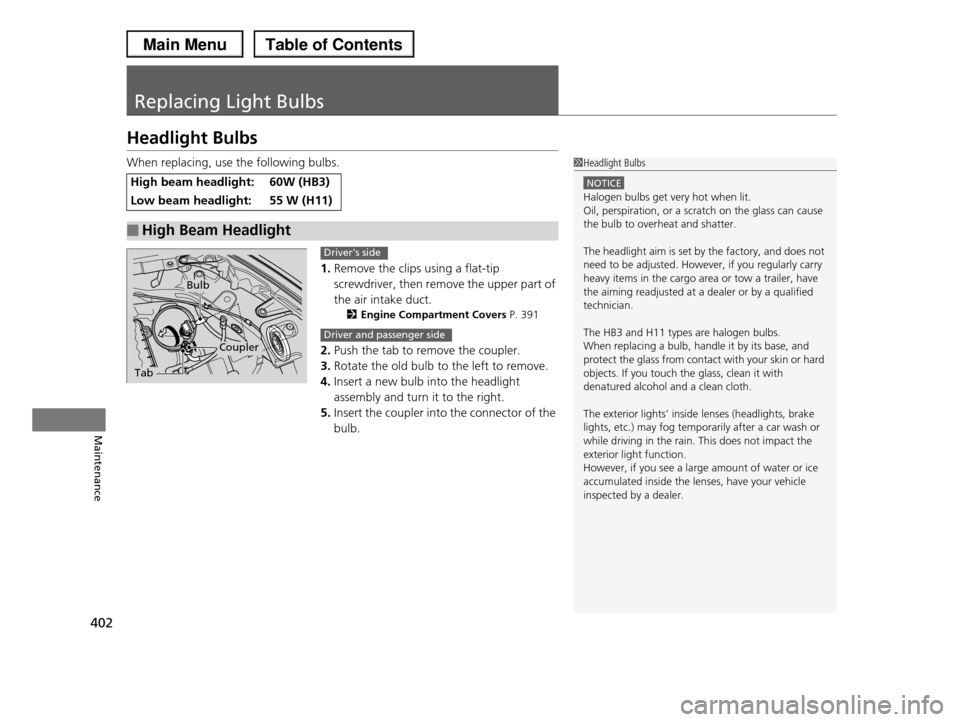
1.Remove the clips using a flat-tip
screwdriver, then remove the upper part of
the air intake duct.
2Engine Compartment Covers P. 391
2.Push the tab to remove the coupler.
3.Rotate the old bulb to the left to remove.
4.Insert a new bulb into the headlight
assembly and turn it to the right.
5.Insert the coupler into the connector of the
bulb.
High beam headlight:60W (HB3)
Low beam headlight:55 W (H11)
■High Beam Headlight
1Headlight Bulbs
NOTICE
Halogen bulbs get very hot when lit.
Oil, perspiration, or a scratch on the glass can cause the bulb to overheat and shatter.
The headlight aim is set by the factory, and does not need to be adjusted. However, if you regularly carry
heavy items in the cargo area or tow a trailer, have
the aiming readjusted at a dealer or by a qualified technician.
The HB3 and H11 types are halogen bulbs.
When replacing a bulb, handle it by its base, and protect the glass from contact with your skin or hard
objects. If you touch the glass, clean it with
denatured alcohol and a clean cloth.
The exterior lights' inside lenses (headlights, brake
lights, etc.) may fog temporarily after a car wash or while driving in the rain. This does not impact the
exterior light function.
However, if you see a large amount of water or ice accumulated inside the lenses, have your vehicle
inspected by a dealer.
Tab
Coupler
Bulb
Driver's side
Driver and passenger side
Page 404 of 488
Continued403
uuReplacing Light BulbsuFog Light Bulbs*
Maintenance
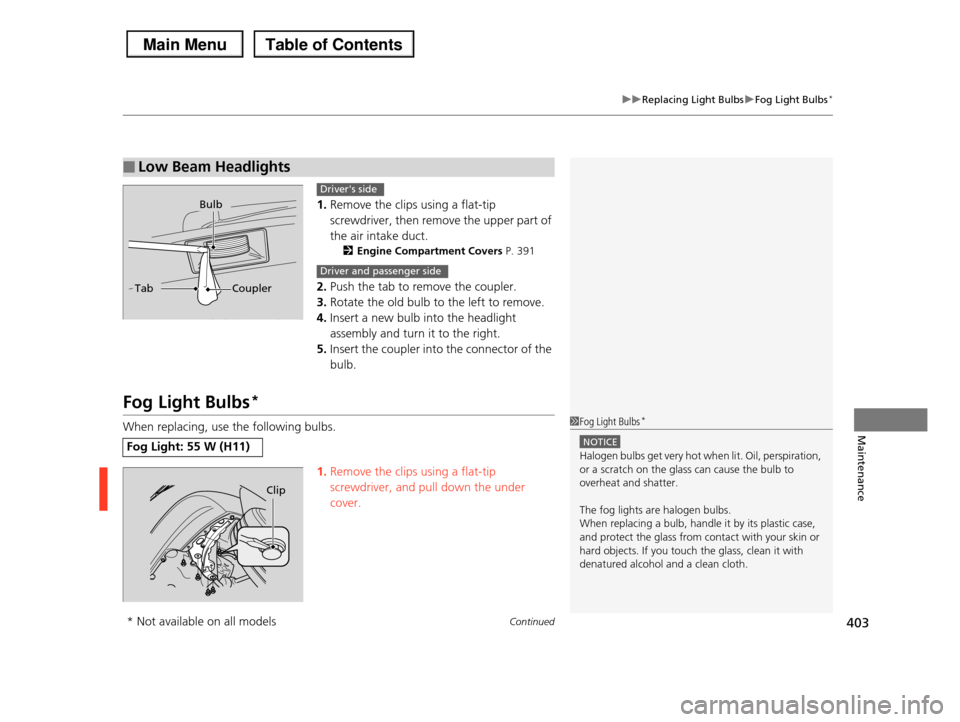
1.Remove the clips using a flat-tip
screwdriver, then remove the upper part of
the air intake duct.
2Engine Compartment Covers P. 391
2.Push the tab to remove the coupler.
3.Rotate the old bulb to the left to remove.
4.Insert a new bulb into the headlight
assembly and turn it to the right.
5.Insert the coupler into the connector of the
bulb.
Fog Light Bulbs*
When replacing, use the following bulbs.
1.Remove the clips using a flat-tip
screwdriver, and pull down the under
cover.
■Low Beam Headlights
Bulb
TabCoupler
Driver's side
Driver and passenger side
Fog Light: 55 W (H11)
1Fog Light Bulbs*
NOTICE
Halogen bulbs get very hot when lit. Oil, perspiration,
or a scratch on the glass can cause the bulb to
overheat and shatter.
The fog lights are halogen bulbs.
When replacing a bulb, handle it by its plastic case, and protect the glass from contact with your skin or
hard objects. If you touch the glass, clean it with
denatured alcohol and a clean cloth.
Clip
* Not available on all models
Page 432 of 488
431
uuCleaninguExterior Care
Maintenance
A good coat of automotive body wax helps protect your vehicle’s paint from the
elements. Wax will wear off over time and expose your vehicle’s paint to the
elements, so reapply as necessary.
If you get gasoline, oil, engine coolant, or battery fluid on resin coated parts, they
may be stained or the coating may peel. Promptly wipe it away using a soft cloth and
clean water.
Wipe using a glass cleaner.
Aluminum is susceptible to deterioration caused by salt and other road
contaminants. Use a sponge and mild detergent to wipe away promptly.
Be careful not to use harsh chemicals (including some commercial wheel cleaners) or
a stiff brush. They can damage the clear coat of the aluminum alloy wheels that
helps keep the aluminum from corroding and tarnishing.
■Applying Wax
■Maintaining the Bumpers and Other Resin Coated Parts
■Cleaning the Window
■Maintaining Aluminum Wheels*
1Applying Wax
NOTICE
Chemical solvents and strong cleaners can damage the paint, metal, and plastic on your vehicle. Wipe up
spills immediately.
1Maintaining the Bumpers and Other Resin Coated Parts
Ask a dealer about the correct coating material when you want to repair the painted surface of the parts
made of resin.
1Cleaning the Window
Wires are mounted to the inside of the rear window. Wipe along the same direction as the wires with a
soft cloth so as not to damage them.
* Not available on all models