display HONDA PILOT 2013 2.G Service Manual
[x] Cancel search | Manufacturer: HONDA, Model Year: 2013, Model line: PILOT, Model: HONDA PILOT 2013 2.GPages: 488, PDF Size: 10.18 MB
Page 181 of 488
180
uuAudio System Basic OperationuAudio/Information Screen*
Features
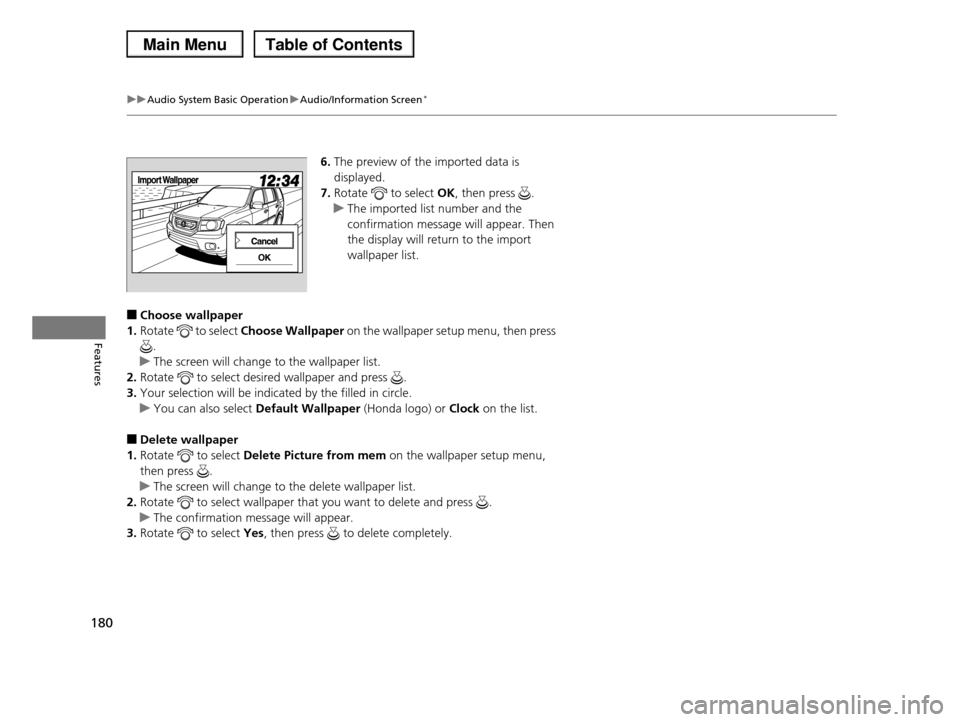
6.The preview of the imported data is
displayed.
7.Rotate to select OK, then press .
uThe imported list number and the
confirmation message will appear. Then
the display will return to the import
wallpaper list.
■Choose wallpaper
1.Rotate to select Choose Wallpaper on the wallpaper setup menu, then press
.
uThe screen will change to the wallpaper list.
2.Rotate to select desired wallpaper and press .
3.Your selection will be indicated by the filled in circle.
uYou can also select Default Wallpaper (Honda logo) or Clock on the list.
■Delete wallpaper
1.Rotate to select Delete Picture from mem on the wallpaper setup menu,
then press .
uThe screen will change to the delete wallpaper list.
2.Rotate to select wallpaper that you want to delete and press .
uThe confirmation message will appear.
3.Rotate to select Yes, then press to delete completely.
Page 183 of 488
182
uuAudio System Basic OperationuAudio/Information Screen*
Features
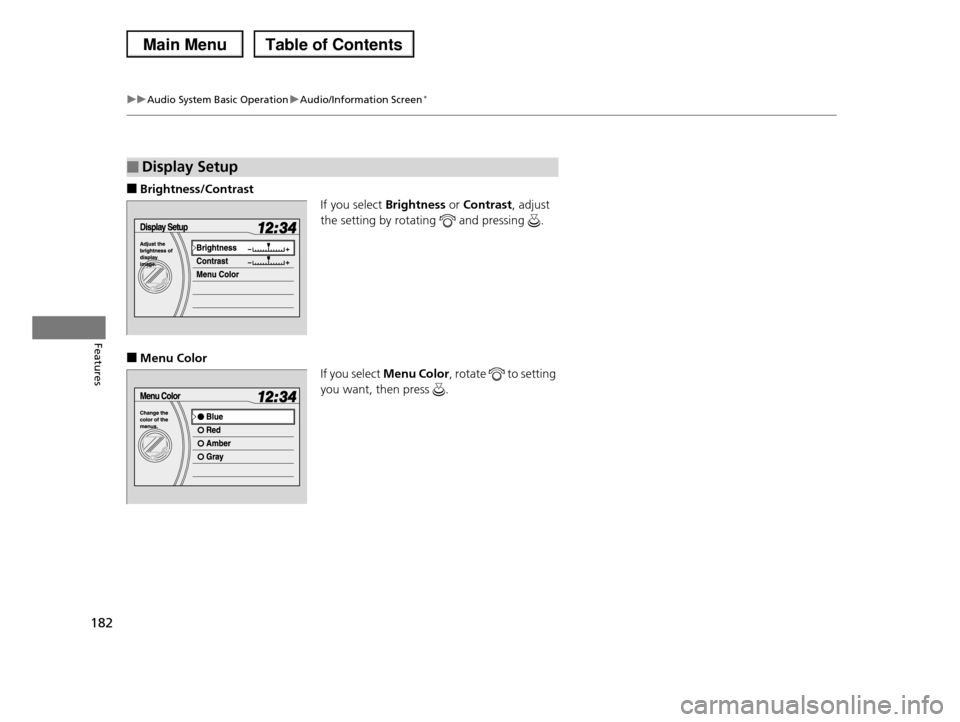
■Brightness/Contrast
If you select Brightness or Contrast, adjust
the setting by rotating and pressing .
■Menu Color
If you select Menu Color, rotate to setting
you want, then press .
■Display Setup
Page 187 of 488
186
uuAudio System Basic OperationuPlaying the AM/FM Radio
Features
Playing the AM/FM Radio
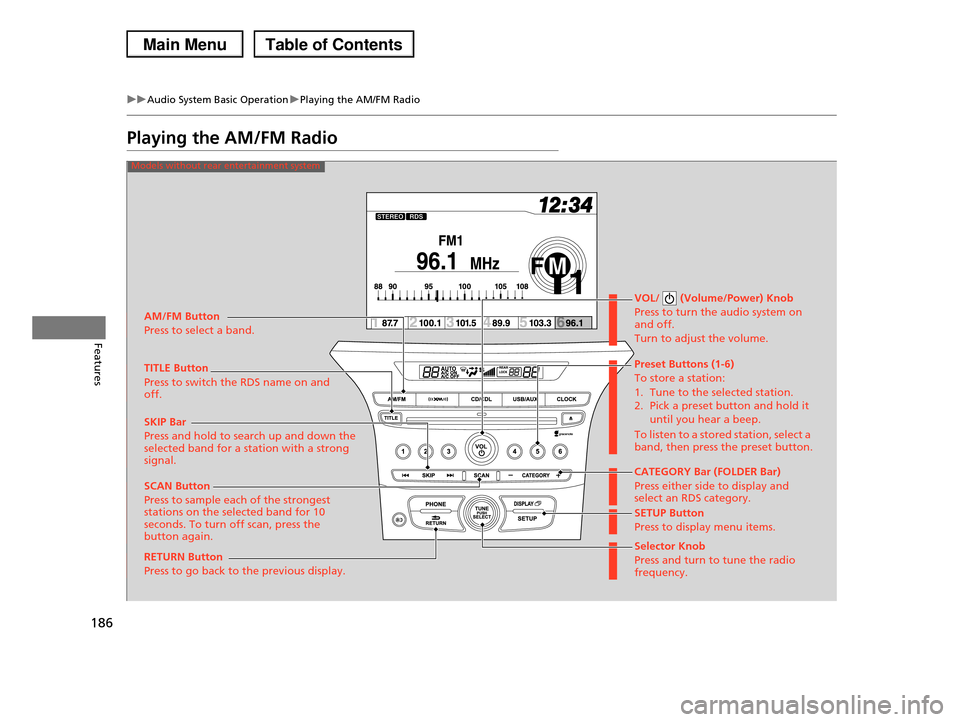
Selector Knob
Press and turn to tune the radio frequency.
SCAN Button
Press to sample each of the strongest stations on the selected band for 10 seconds. To turn off scan, press the button again.
VOL/ (Volume/Power) Knob
Press to turn the audio system on and off.
Turn to adjust the volume.
Preset Buttons (1-6)
To store a station:
1. Tune to the selected station. 2. Pick a preset button and hold it
until you hear a beep.
To listen to a stored station, select a band, then press the preset button.
SKIP Bar
Press and hold to search up and down the selected band for a station with a strong signal.CATEGORY Bar (FOLDER Bar)
Press either side to display and select an RDS category.
TITLE Button
Press to switch the RDS name on and off.
AM/FM Button
Press to select a band.
RETURN Button
Press to go back to the previous display.
SETUP Button
Press to display menu items.
Models without rear entertainment system
Page 188 of 488
187
uuAudio System Basic OperationuPlaying the AM/FM Radio
Continued
Features
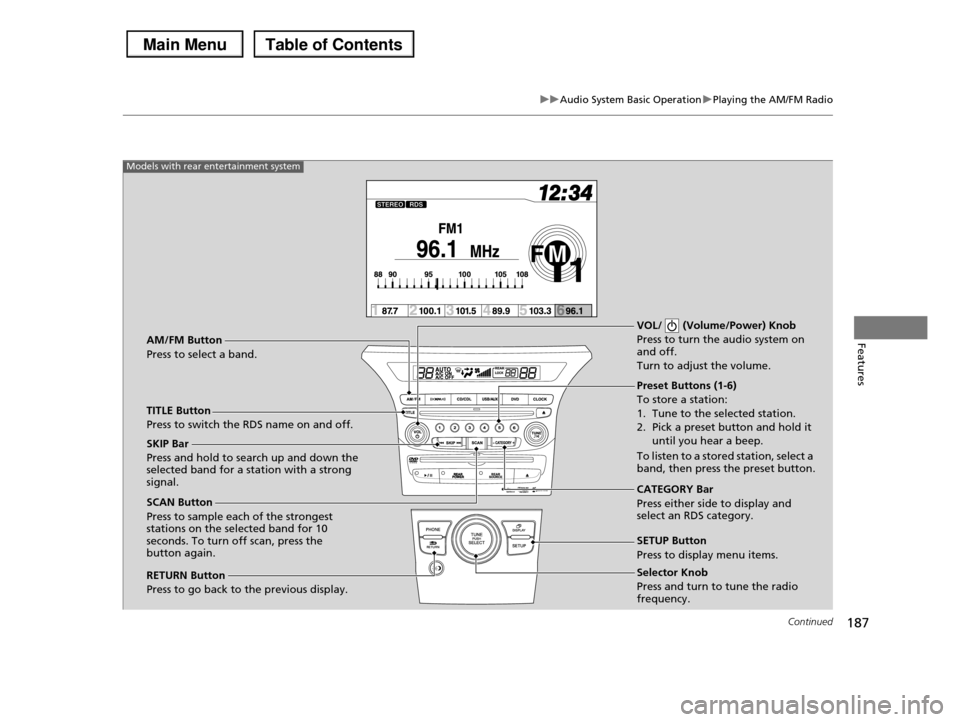
Selector Knob
Press and turn to tune the radio frequency.
SCAN Button
Press to sample each of the strongest stations on the selected band for 10 seconds. To turn off scan, press the button again.
VOL/ (Volume/Power) Knob
Press to turn the audio system on and off.
Turn to adjust the volume.
Preset Buttons (1-6)
To store a station:
1. Tune to the selected station.
2. Pick a preset button and hold it until you hear a beep.
To listen to a stored station, select a band, then press the preset button.
SKIP Bar
Press and hold to search up and down the selected band for a station with a strong signal.CATEGORY Bar
Press either side to display and select an RDS category.
TITLE Button
Press to switch the RDS name on and off.
AM/FM Button
Press to select a band.
RETURN Button
Press to go back to the previous display.
SETUP Button
Press to display menu items.
Models with rear entertainment system
Page 189 of 488
uuAudio System Basic OperationuPlaying the AM/FM Radio
188
Features
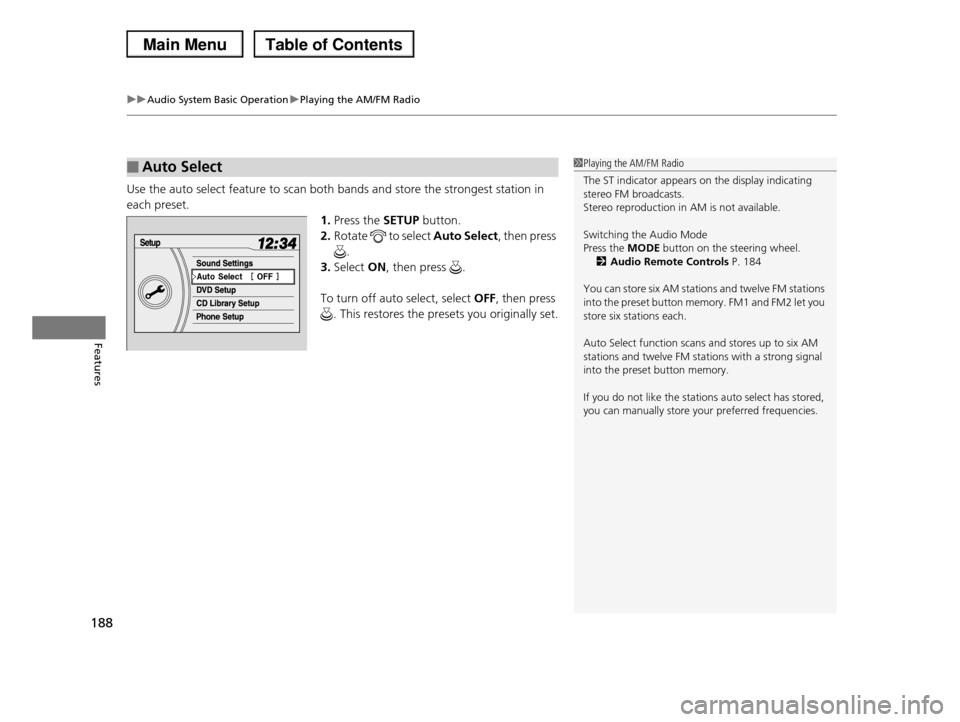
Use the auto select feature to scan both bands and store the strongest station in
each preset.
1.Press the SETUP button.
2.Rotate to select Auto Select, then press
.
3.Select ON, then press .
To turn off auto select, select OFF, then press
. This restores the presets you originally set.
■Auto Select1Playing the AM/FM Radio
The ST indicator appears on the display indicating stereo FM broadcasts.
Stereo reproduction in AM is not available.
Switching the Audio Mode
Press the MODE button on the steering wheel.
2Audio Remote Controls P. 184
You can store six AM stations and twelve FM stations
into the preset button memory. FM1 and FM2 let you store six stations each.
Auto Select function scans and stores up to six AM stations and twelve FM stations with a strong signal
into the preset button memory.
If you do not like the stations auto select has stored,
you can manually store your preferred frequencies.
Page 190 of 488
189
uuAudio System Basic OperationuPlaying the AM/FM Radio
Features
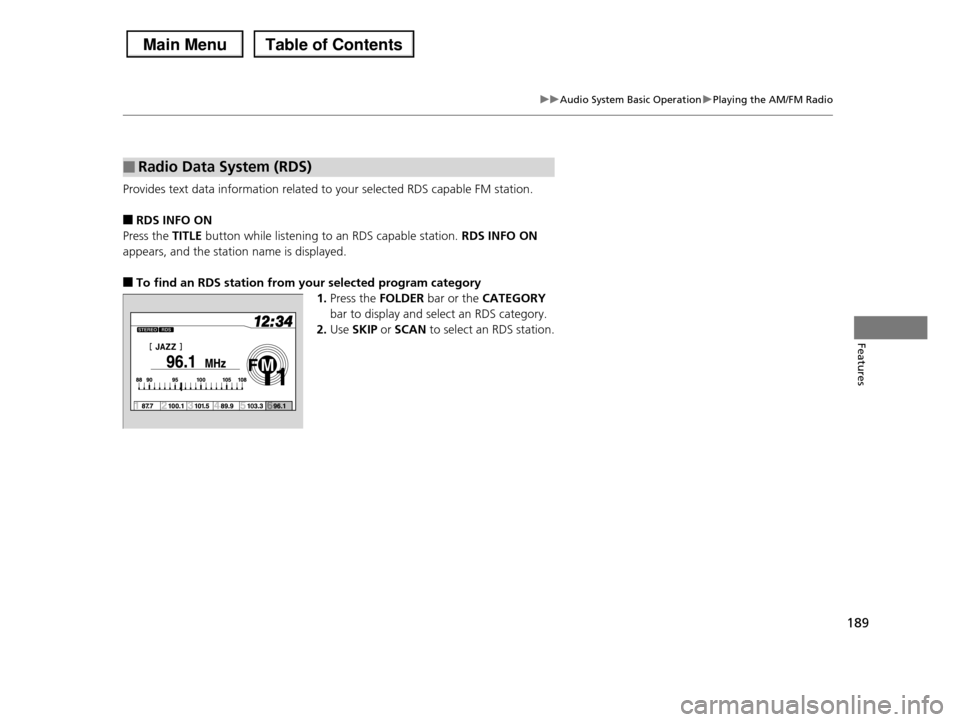
Provides text data information related to your selected RDS capable FM station.
■RDS INFO ON
Press the TITLE button while listening to an RDS capable station. RDS INFO ON
appears, and the station name is displayed.
■To find an RDS station from your selected program category
1.Press the FOLDER bar or the CATEGORY
bar to display and select an RDS category.
2.Use SKIP or SCAN to select an RDS station.
■Radio Data System (RDS)
Page 191 of 488
190
uuAudio System Basic OperationuPlaying the XM® Radio*
Features
Playing the XM® Radio*
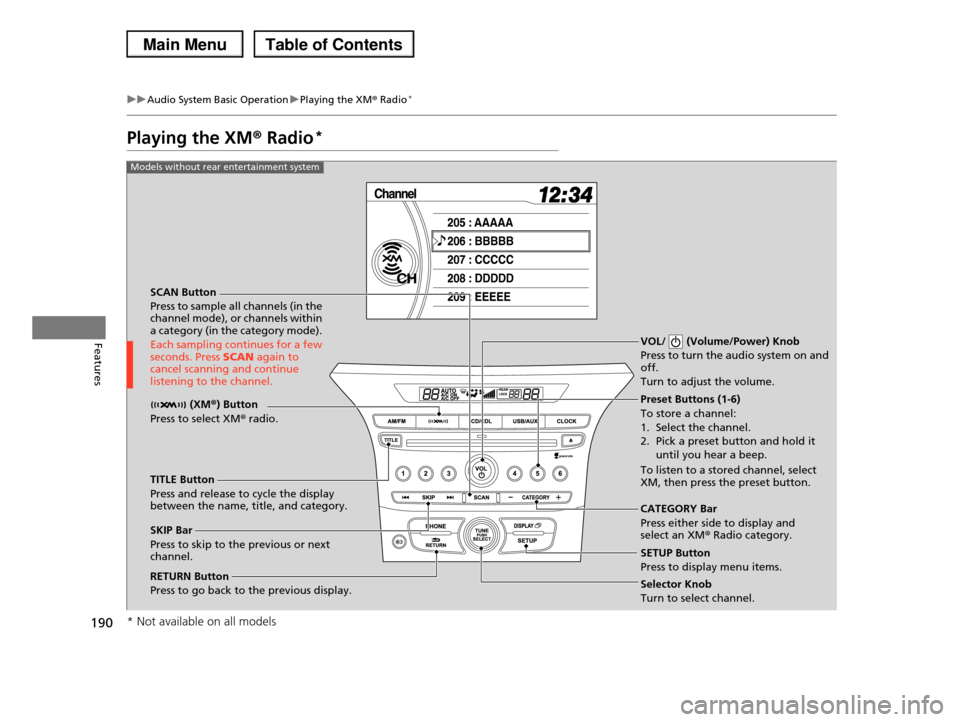
SCAN Button
Press to sample all channels (in the channel mode), or channels within a category (in the category mode).
Each sampling continues for a few seconds. Press SCAN again to cancel scanning and continue listening to the channel.
VOL/ (Volume/Power) Knob
Press to turn the audio system on and off.
Turn to adjust the volume.
Preset Buttons (1-6)
To store a channel:
1. Select the channel.
2. Pick a preset button and hold it
until you hear a beep.
To listen to a stored channel, select XM, then press the preset button.
SKIP Bar
Press to skip to the previous or next channel.
CATEGORY Bar
Press either side to display and select an XM® Radio category.
TITLE Button
Press and release to cycle the display between the name, title, and category.
(XM®) Button
Press to select XM® radio.
RETURN Button
Press to go back to the previous display.Selector Knob
Turn to select channel.
SETUP Button
Press to display menu items.
Models without rear entertainment system
* Not available on all models
Page 192 of 488
191
uuAudio System Basic OperationuPlaying the XM® Radio*
Continued
Features
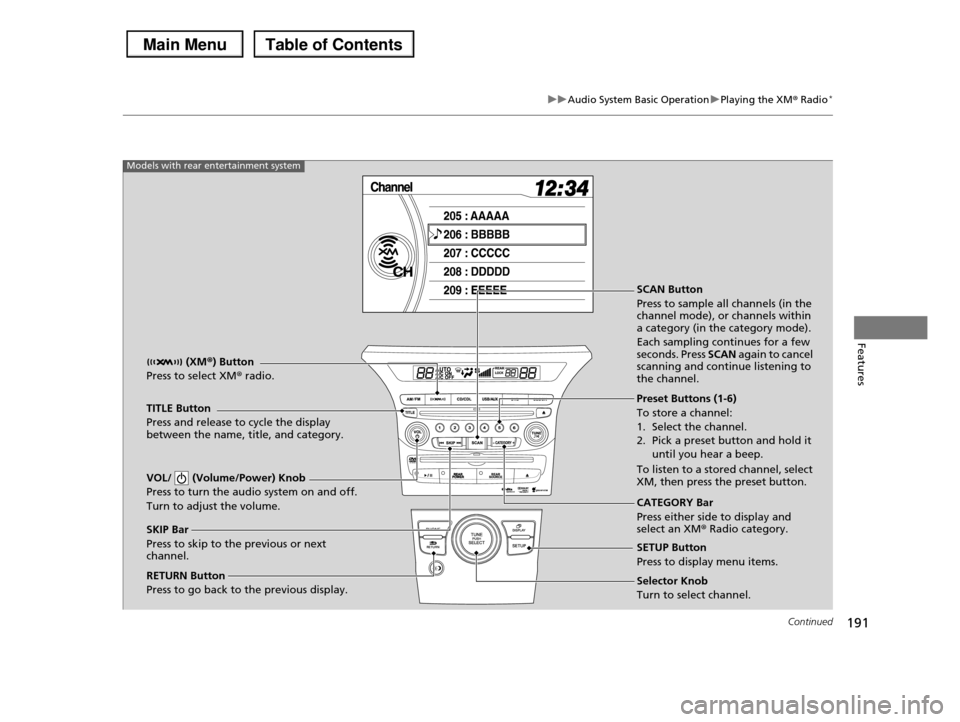
SCAN Button
Press to sample all channels (in the channel mode), or channels within a category (in the category mode).
Each sampling continues for a few seconds. Press SCAN again to cancel scanning and continue listening to the channel.
VOL/ (Volume/Power) Knob
Press to turn the audio system on and off.
Turn to adjust the volume.
Preset Buttons (1-6)
To store a channel:
1. Select the channel.
2. Pick a preset button and hold it
until you hear a beep.
To listen to a stored channel, select XM, then press the preset button.
SKIP Bar
Press to skip to the previous or next channel.
CATEGORY Bar
Press either side to display and select an XM® Radio category.
TITLE Button
Press and release to cycle the display between the name, title, and category.
(XM®) Button
Press to select XM® radio.
RETURN Button
Press to go back to the previous display.Selector Knob
Turn to select channel.
SETUP Button
Press to display menu items.
Models with rear entertainment system
Page 193 of 488
uuAudio System Basic OperationuPlaying the XM® Radio*
192
Features
1.Press the button to select the XM® radio band (XM1 or XM2).
2.Press and hold the TITLE button to switch between the channel mode and
category mode.
If you press the SETUP button, rotate to select XM Mode, and press . You
can select channel mode or category mode by turning and pressing the selector
knob.
3.Select a channel using the TUNE ( ), SKIP, CATEGORY, SCAN, or preset
buttons.
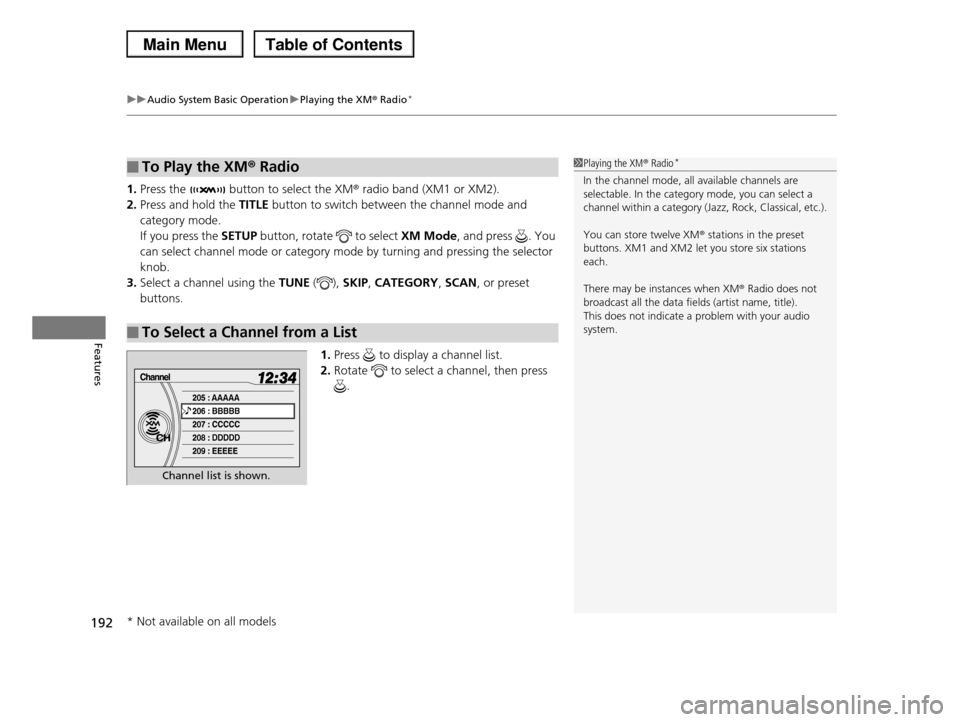
1.Press to display a channel list.
2.Rotate to select a channel, then press
.
■To Play the XM® Radio
■To Select a Channel from a List
1Playing the XM® Radio*
In the channel mode, all available channels are selectable. In the category mode, you can select a
channel within a category (Jazz, Rock, Classical, etc.).
You can store twelve XM® stations in the preset
buttons. XM1 and XM2 let you store six stations
each.
There may be instances when XM® Radio does not
broadcast all the data fields (artist name, title). This does not indicate a problem with your audio
system.
Channel list is shown.
* Not available on all models
Page 194 of 488
193
uuAudio System Basic OperationuPlaying a CD
Continued
Features
Playing a CD
Your audio system supports audio CDs, CD-Rs and CD-RWs in either MP3, WMA, or
AAC format. With the CD loaded, press the CD button.
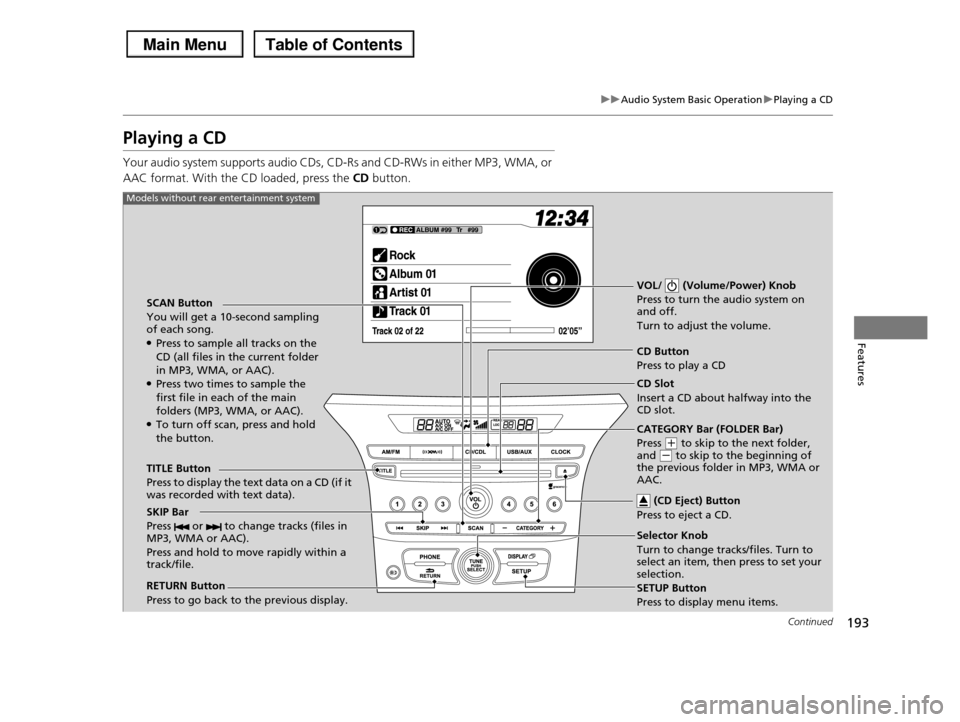
SCAN Button
You will get a 10-second sampling of each song.●Press to sample all tracks on the CD (all files in the current folder
in MP3, WMA, or AAC).●Press two times to sample the first file in each of the main
folders (MP3, WMA, or AAC).●To turn off scan, press and hold the button.
VOL/ (Volume/Power) Knob
Press to turn the audio system on and off.
Turn to adjust the volume.
CD Button
Press to play a CD
TITLE Button
Press to display the text data on a CD (if it was recorded with text data).
RETURN Button
Press to go back to the previous display.
Selector Knob
Turn to change tracks/files. Turn to select an item, then press to set your selection.
SETUP Button
Press to display menu items.
Models without rear entertainment system
CD Slot
Insert a CD about halfway into the CD slot.
(CD Eject) Button
Press to eject a CD.SKIP Bar
Press or to change tracks (files in MP3, WMA or AAC).
Press and hold to move rapidly within a track/file.
CATEGORY Bar (FOLDER Bar)
Press (+ to skip to the next folder, and (- to skip to the beginning of the previous folder in MP3, WMA or AAC.