lock HONDA PILOT 2013 2.G Workshop Manual
[x] Cancel search | Manufacturer: HONDA, Model Year: 2013, Model line: PILOT, Model: HONDA PILOT 2013 2.GPages: 488, PDF Size: 10.18 MB
Page 133 of 488

132
uuOperating the Switches Around the Steering WheeluDriving Position Memory System*
Controls
Driving Position Memory System*
You can store two driver’s seat and door mirror positions with the driving position
memory system.
When you unlock and open the driver’s door with a remote transmitter, the seat and
door mirrors adjust automatically to one of the two preset positions.
The multi-information display shows you which remote transmitter you used to
unlock the vehicle when you enter.
•Driver 1 transmitter is linked to memory button 1.
•Driver 2 transmitter is linked to memory button 2.
1Driving Position Memory System*
Using the multi-information display, you can disable
the automatic seat adjustment function.
2Customized Features P. 90
The customize setting is also stored by the Driver 1
and 2 transmitters. What setting is recalled next time depends on which transmitter you use to unlock and
open the driver's door.
Driver 1Driver 2
* Not available on all models
Page 135 of 488
134
uuOperating the Switches Around the Steering WheeluAdjusting the Steering Wheel
Controls
Adjusting the Steering Wheel
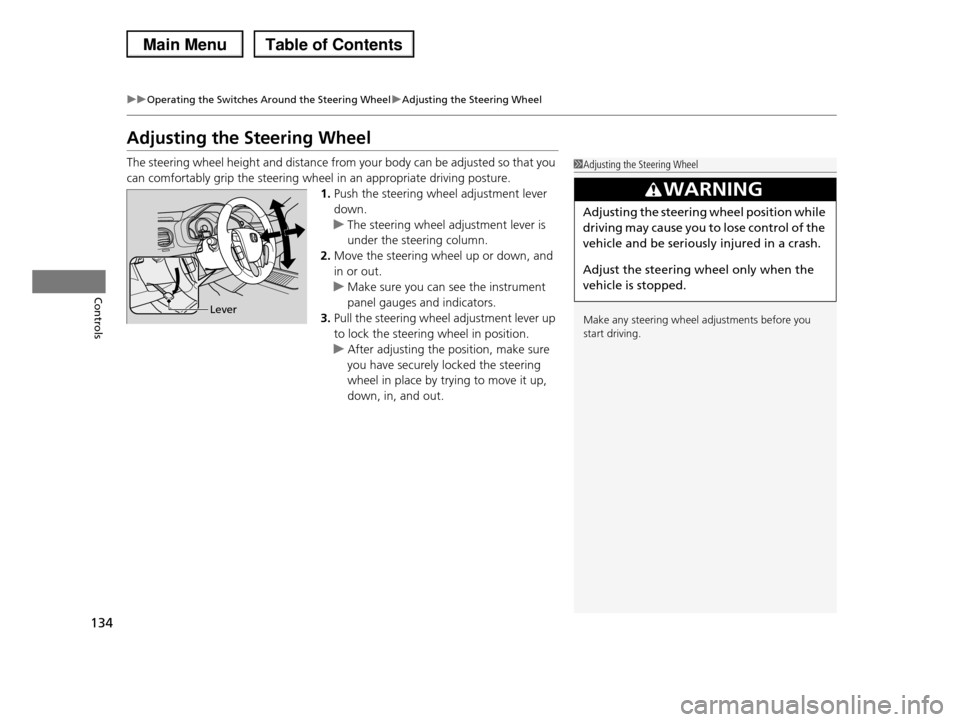
The steering wheel height and distance from your body can be adjusted so that you
can comfortably grip the steering wheel in an appropriate driving posture.
1.Push the steering wheel adjustment lever
down.
uThe steering wheel adjustment lever is
under the steering column.
2.Move the steering wheel up or down, and
in or out.
uMake sure you can see the instrument
panel gauges and indicators.
3.Pull the steering wheel adjustment lever up
to lock the steering wheel in position.
uAfter adjusting the position, make sure
you have securely locked the steering
wheel in place by trying to move it up,
down, in, and out.
1Adjusting the Steering Wheel
Make any steering wheel adjustments before you
start driving.
3WARNING
Adjusting the steering wheel position while
driving may cause you to lose control of the
vehicle and be seriously injured in a crash.
Adjust the steering wheel only when the
vehicle is stopped.
Lever
Page 139 of 488
uuAdjusting the SeatsuAdjusting the Seat Positions
138
Controls
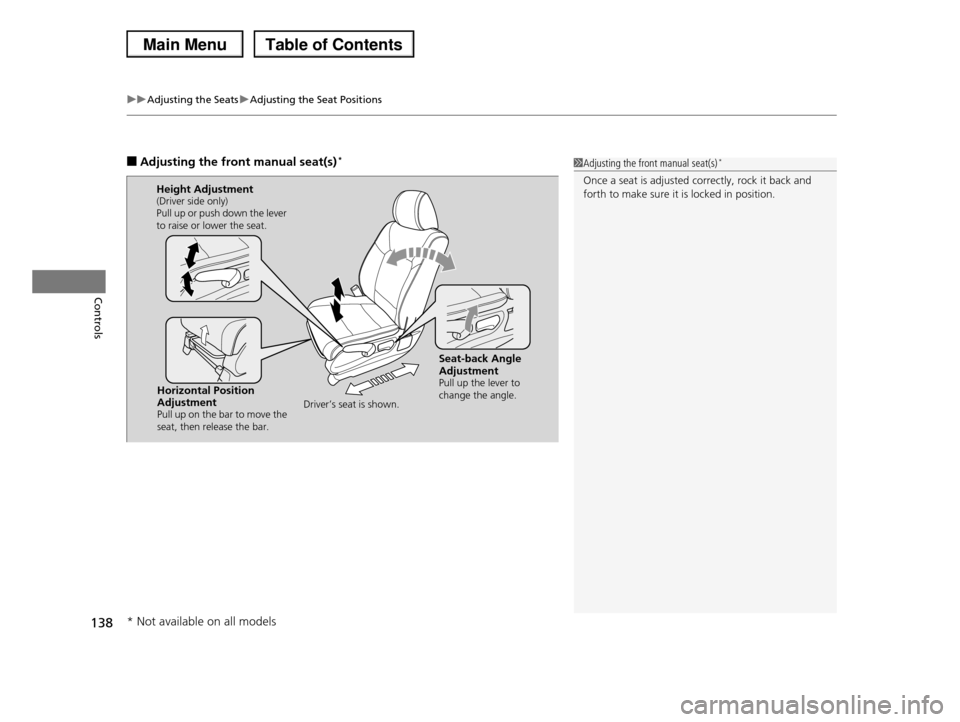
■Adjusting the front manual seat(s)*1Adjusting the front manual seat(s)*
Once a seat is adjusted correctly, rock it back and forth to make sure it is locked in position.
Horizontal Position AdjustmentPull up on the bar to move the seat, then release the bar.
Height Adjustment(Driver side only)Pull up or push down the lever to raise or lower the seat.
Seat-back Angle AdjustmentPull up the lever to change the angle.Driver’s seat is shown.
* Not available on all models
Page 140 of 488
Continued139
uuAdjusting the SeatsuAdjusting the Seat Positions
Controls
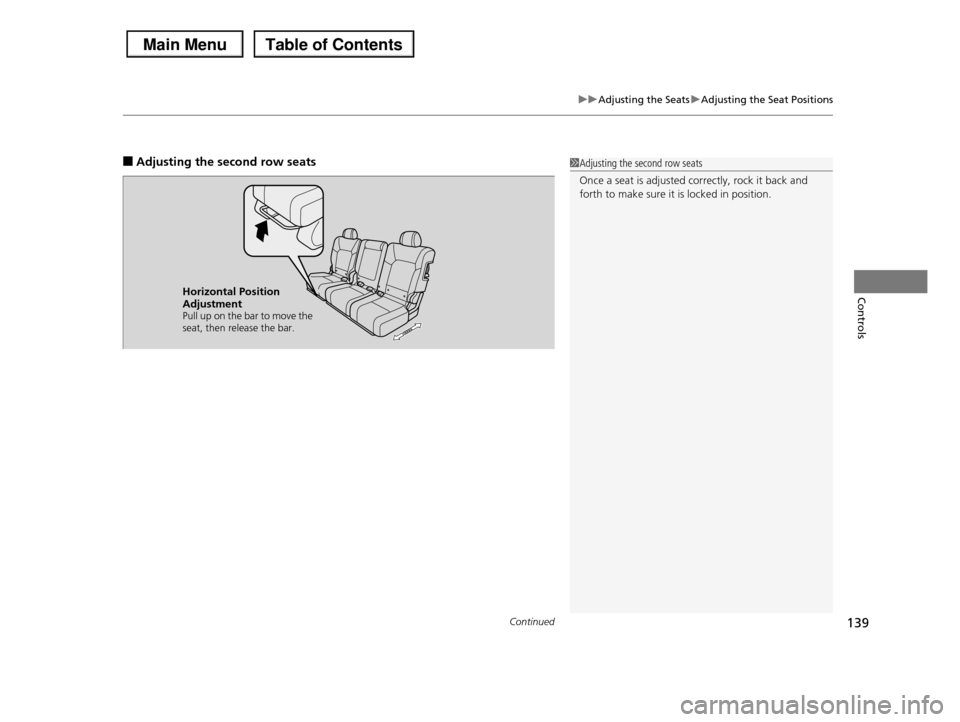
■Adjusting the second row seats1Adjusting the second row seats
Once a seat is adjusted correctly, rock it back and forth to make sure it is locked in position.
Horizontal Position AdjustmentPull up on the bar to move the seat, then release the bar.
Page 145 of 488
uuAdjusting the SeatsuAdjusting the Seat Positions
144
Controls
Head restraints can be removed for cleaning or repair.
To remove a head restraint:
Pull the restraint up as far as it will go. Then push the release button, and pull the
restraint up and out.
To reinstall a head restraint:
Insert the legs back in place, then adjust the head restraint to an appropriate height
while pressing the release button. Pull up on the restraint to make sure it is locked
in position.
After all occupants have adjusted their seats and head restraints, and put on their
seat belts, it is very important that they continue to sit upright, well back in their
seats, with their feet on the floor, until the vehicle is safely parked and the engine is
off.
Sitting improperly can increase the chance of injury during a crash. For example, if
an occupant slouches, lies down, turns sideways, sits forward, leans forward or
sideways, or puts one or both feet up, the chance of injury during a crash is greatly
increased.
In addition, an occupant who is out of position in the front seat can be seriously or
fatally injured in a crash by striking interior parts of the vehicle or being struck by an
inflating front airbag.
■Removing and Reinstalling the Head Restraints
■Maintain a Proper Sitting Position
1Removing and Reinstalling the Head Restraints
3WARNING
Failure to reinstall, or correctly reinstall, the
head restraints can result in severe injury
during a crash.
Always replace the head restraints before
driving.
1Maintain a Proper Sitting Position
3WARNING
Sitting improperly or out of position can
result in serious injury or death in a crash.
Always sit upright, well back in the seat,
with your feet on the floor.
Page 151 of 488
150
Controls
Interior Lights/Interior Convenience Items
Interior Lights
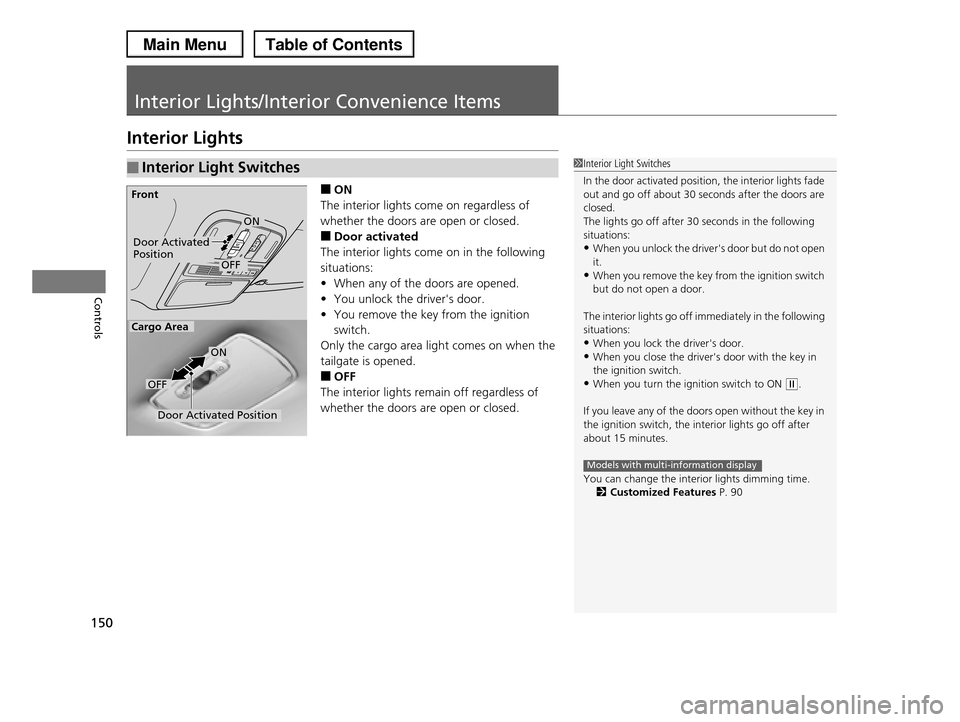
■ON
The interior lights come on regardless of
whether the doors are open or closed.
■Door activated
The interior lights come on in the following
situations:
•When any of the doors are opened.
•You unlock the driver's door.
•You remove the key from the ignition
switch.
Only the cargo area light comes on when the
tailgate is opened.
■OFF
The interior lights remain off regardless of
whether the doors are open or closed.
■Interior Light Switches1Interior Light Switches
In the door activated position, the interior lights fade out and go off about 30 seconds after the doors are
closed.
The lights go off after 30 seconds in the following
situations:•When you unlock the driver's door but do not open
it.
•When you remove the key from the ignition switch but do not open a door.
The interior lights go off immediately in the following situations:
•When you lock the driver's door.
•When you close the driver's door with the key in the ignition switch.
•When you turn the ignition switch to ON (w.
If you leave any of the doors open without the key in
the ignition switch, the interior lights go off after
about 15 minutes.
You can change the interior lights dimming time.2Customized Features P. 90
Models with multi-information display
Door Activated PositionOFF
Front
Door Activated Position
ON
OFF
Cargo Area
ON
Page 153 of 488
152
uuInterior Lights/Interior Convenience ItemsuInterior Convenience Items
Controls
Interior Convenience Items
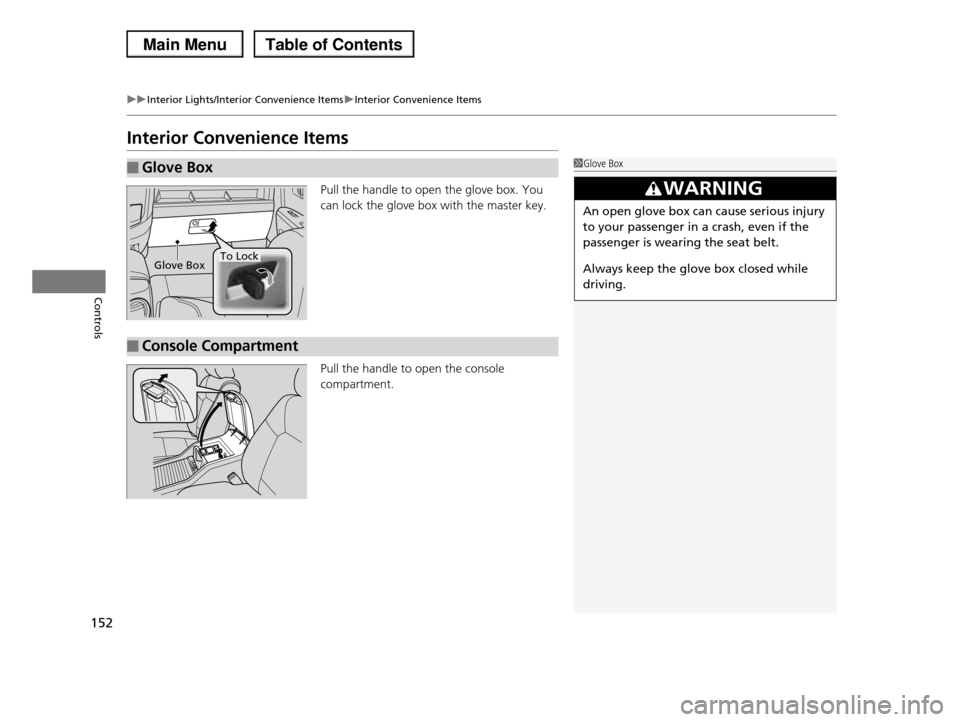
Pull the handle to open the glove box. You
can lock the glove box with the master key.
Pull the handle to open the console
compartment.
■Glove Box1Glove Box
3WARNING
An open glove box can cause serious injury
to your passenger in a crash, even if the
passenger is wearing the seat belt.
Always keep the glove box closed while
driving.
Glove BoxTo Lock
■Console Compartment
Page 159 of 488
uuInterior Lights/Interior Convenience ItemsuInterior Convenience Items
158
Controls
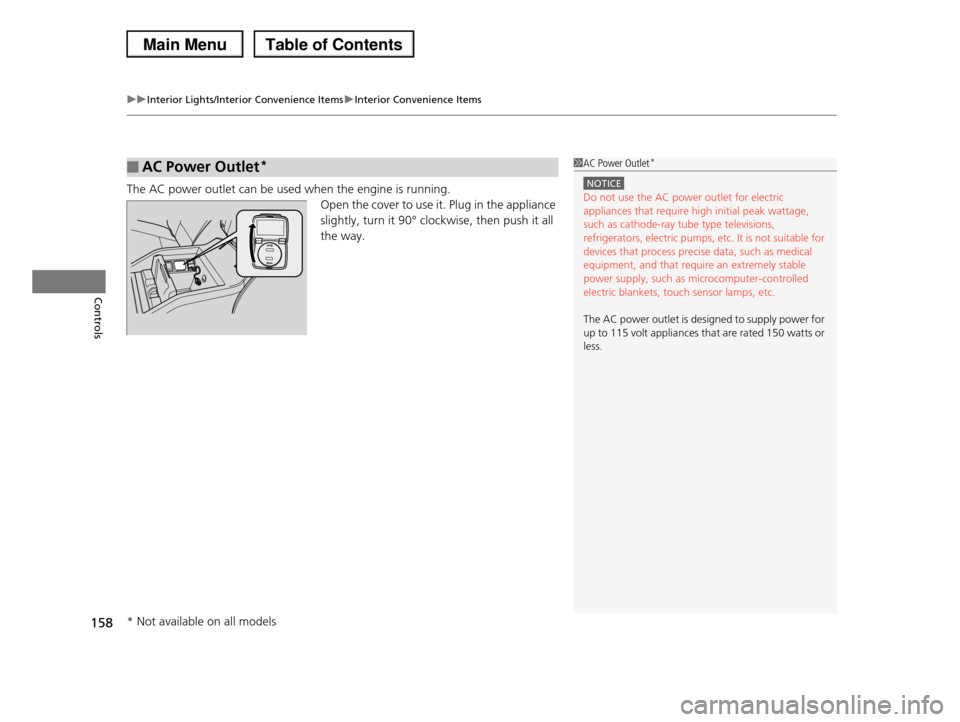
The AC power outlet can be used when the engine is running.
Open the cover to use it. Plug in the appliance
slightly, turn it 90° clockwise, then push it all
the way.
■AC Power Outlet*1AC Power Outlet*
NOTICE
Do not use the AC power outlet for electric appliances that require high initial peak wattage,
such as cathode-ray tube type televisions,
refrigerators, electric pumps, etc. It is not suitable for devices that process precise data, such as medical
equipment, and that require an extremely stable
power supply, such as microcomputer-controlled electric blankets, touch sensor lamps, etc.
The AC power outlet is designed to supply power for up to 115 volt appliances that are rated 150 watts or
less.
* Not available on all models
Page 169 of 488
168
uuClimate Control SystemuRear Climate Control System
Controls
Rear Climate Control System
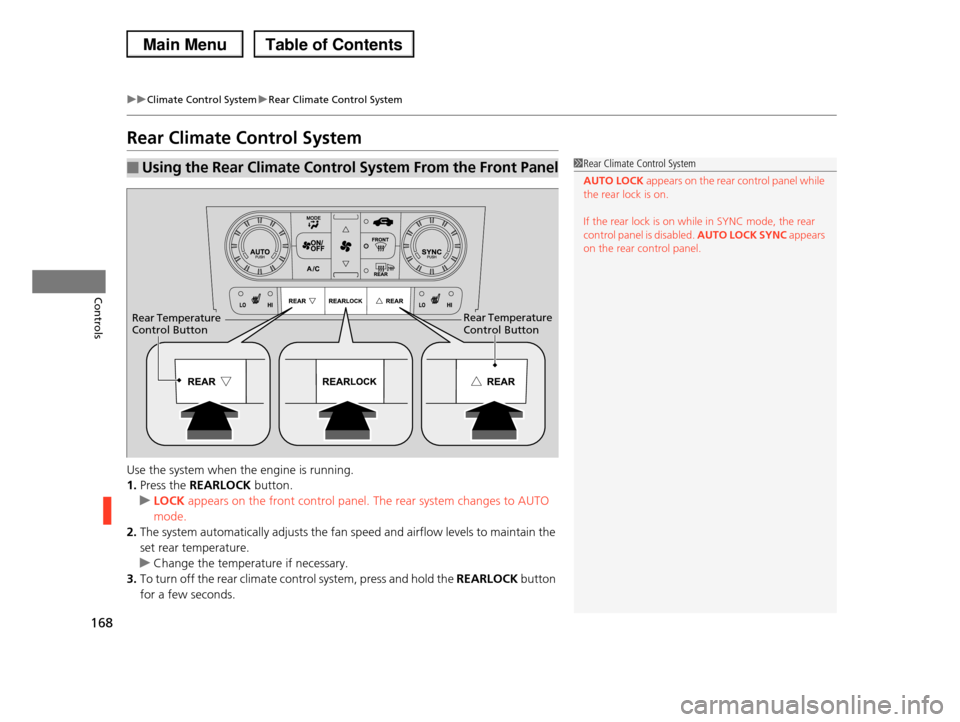
Use the system when the engine is running.
1.Press the REARLOCK button.
uLOCK appears on the front control panel. The rear system changes to AUTO
mode.
2.The system automatically adjusts the fan speed and airflow levels to maintain the
set rear temperature.
uChange the temperature if necessary.
3.To turn off the rear climate control system, press and hold the REARLOCK button
for a few seconds.
■Using the Rear Climate Control System From the Front Panel1Rear Climate Control System
AUTO LOCK appears on the rear control panel while the rear lock is on.
If the rear lock is on while in SYNC mode, the rear control panel is disabled. AUTO LOCK SYNC appears
on the rear control panel.
Rear Temperature Control ButtonRear Temperature Control Button
Page 170 of 488
169
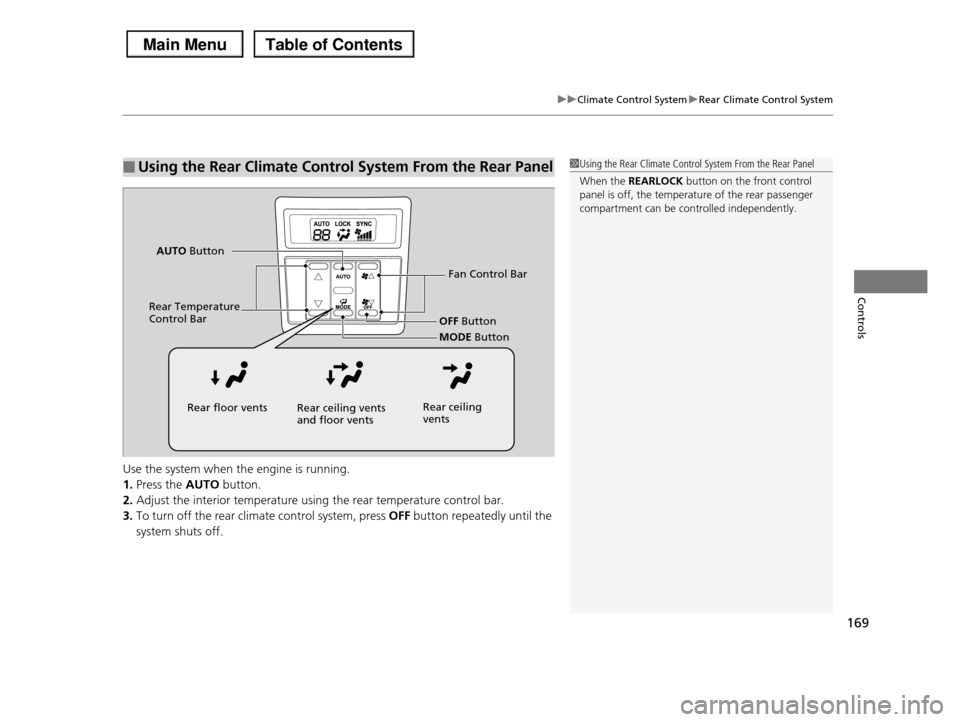
uuClimate Control SystemuRear Climate Control System
Controls
Use the system when the engine is running.
1.Press the AUTO button.
2.Adjust the interior temperature using the rear temperature control bar.
3.To turn off the rear climate control system, press OFF button repeatedly until the
system shuts off.
■Using the Rear Climate Control System From the Rear Panel1Using the Rear Climate Control System From the Rear Panel
When the REARLOCK button on the front control
panel is off, the temperature of the rear passenger
compartment can be controlled independently.
Fan Control Bar
Rear Temperature Control BarOFF Button
MODE Button
AUTO Button
Rear floor ventsRear ceiling vents and floor ventsRear ceiling vents