lock HONDA PILOT 2013 2.G Repair Manual
[x] Cancel search | Manufacturer: HONDA, Model Year: 2013, Model line: PILOT, Model: HONDA PILOT 2013 2.GPages: 488, PDF Size: 10.18 MB
Page 178 of 488
Continued177
uuAudio System Basic OperationuAudio/Information Screen*
Features
Shows the current audio information.
2Audio System Basic Operation P. 175
Shows the instant fuel economy, average fuel economy, distance (trip meter),
average speed, elapsed time, and range.
2Instant Fuel Economy P. 82
2Trip Meter P. 82
2Range P. 82
■Average speed
Shows the average speed in mph (U.S.) or km/h (Canada).
■Elapsed time
Shows the time during one drive cycle.
Shows a clock screen or an image you import.
2Wallpaper Setup P. 179
Minimizes the display by only showing the compass, audio status, and clock on the
upper part of the display.
■Audio Display
■Trip Computer
■Wallpaper
■Minimum Display
1Trip Computer
You can reset the trip computer.
2Trip Computer P. 88
Page 181 of 488
180
uuAudio System Basic OperationuAudio/Information Screen*
Features
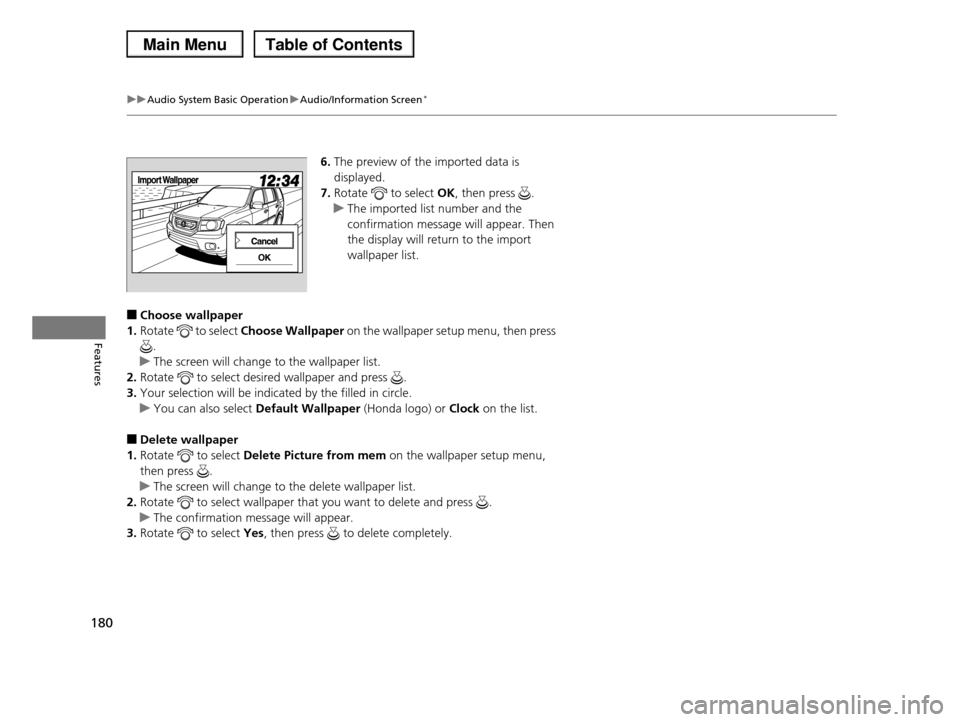
6.The preview of the imported data is
displayed.
7.Rotate to select OK, then press .
uThe imported list number and the
confirmation message will appear. Then
the display will return to the import
wallpaper list.
■Choose wallpaper
1.Rotate to select Choose Wallpaper on the wallpaper setup menu, then press
.
uThe screen will change to the wallpaper list.
2.Rotate to select desired wallpaper and press .
3.Your selection will be indicated by the filled in circle.
uYou can also select Default Wallpaper (Honda logo) or Clock on the list.
■Delete wallpaper
1.Rotate to select Delete Picture from mem on the wallpaper setup menu,
then press .
uThe screen will change to the delete wallpaper list.
2.Rotate to select wallpaper that you want to delete and press .
uThe confirmation message will appear.
3.Rotate to select Yes, then press to delete completely.
Page 273 of 488
272
Features
General Information on the Audio System
XM® Radio Service*
1.You need your radio ID ready before registering for subscription.
To see the ID on the display: Turn the selector knob until 0 appears.
2.Have your radio ID and credit card number ready, and either call or visit the XM®
website to subscribe.
Press the (XM®) button and stay in this mode for about 30 minutes until the
service is activated. Make sure your vehicle is in an open area with good reception.
LOADING: XM® is loading the audio or program information.
Ch Off Air: The channel is not currently broadcasting.
Ch Unauthorized: The encryption code is being updated. Channels 0 and 1 still
work normally.
NO SIGNAL: The signal is too weak in the current location.
Ch Unavailable: No such channel exists, the channel is not part of your
subscription, or the artist or title information is unavailable.
CHECK ANTENNA: There is a problem with the XM® antenna. Contact a dealer.
■Subscribing to XM® Radio
■Receiving XM® Radio
■XM® Radio Display Messages
1Subscribing to XM® Radio
Contact Information for XM® Radio:US: XM® Radio at www.siriusxm.com or (800) 852-
9696
Canada: XM® Canada at www.xmradio.ca, or (877) 209-0079
1Receiving XM® Radio
The XM® satellites are in orbit over the equator, therefore, objects south of the vehicle may cause
satellite reception interruptions. Satellite signals are
more likely to be blocked by tall buildings and mountains the farther north you travel from the
equator.
You may experience reception problems under the
following circumstances:
•In a location with an obstruction to the south of your vehicle.
•In tunnels
•On the lower level of a multi-tiered road•Large items carried on the roof rack
* Not available on all models
Page 276 of 488
275
uuGeneral Information on the Audio SystemuCompatible iPod® and USB Flash Drives
Features
Compatible iPod® and USB Flash Drives
•Use a recommended USB flash drive of 256 MB or higher.
•Some digital audio players may not be compatible.
•Some USB flash drives (e.g., a device with security lockout) may not work.
•Some software files may not allow for audio play or text data display.
•Some versions of MP3, WMA, or AAC formats may be unsupported.
■iPod® Model Compatibility
Model
iPod classic ® 80GB/160GB
iPod classic ® 120GB
iPod classic ® 160GB (launch in 2009)
iPod ® (5th generation)
iPod nano ®
iPod touch ®
■USB Flash Drives
1iPod® Model Compatibility
This system may not work with all software versions
of these devices.
1USB Flash Drives
Files on the USB flash drive are played in their stored
order. This order may be different from the order displayed on your PC or device.
Page 324 of 488
323
Driving
This chapter discusses driving, refueling, and information on items such as accessories.
Before DrivingDriving Preparation .......................... 324 Maximum Load Limit........................ 327Towing a TrailerTowing Preparation .......................... 329Driving Safely with a Trailer .............. 338Towing Your Vehicle ........................ 339Off-Highway Driving GuidelinesGeneral Information ......................... 340Important Safety Precautions............ 340Avoiding Trouble ............................. 341When DrivingStarting the Engine .......................... 342Precautions While Driving................. 344
Automatic Transmission ................... 345Shifting ............................................ 346Cruise Control ................................. 348VSA® (Vehicle Stability Assist), aka ESC (Electronic Stability Control), System ...... 352VTM (Variable Torque Management)-4r System*............................................. 354TPMS (Tire Pressure Monitoring System) ... 355Tire Pressure Monitoring System (TPMS) - Required Federal Explanation ......... 357BrakingBrake System ................................... 360ABS (Anti-lock Brake System) ........... 362
Brake Assist System ......................... 363Parking Your VehicleWhen Stopped ................................ 364Parking Sensor System*................... 365Rearview Camera*............................ 369Multi-View Rear Camera*................ 370Refueling
Fuel Information .............................. 371
How to Refuel ................................. 372
Fuel Economy.................................... 374
Accessories and Modifications
Accessories ...................................... 375
Modifications................................... 375
* Not available on all models
Page 325 of 488
324
Driving
Before Driving
Driving Preparation
Check the following items before you start driving.
•Make sure there are no obstructions on the windows, door mirrors, exterior
lights, or other parts of the vehicle.
uRemove any frost, snow, or ice.
uRemove any snow on the roof, as this can slip down and obstruct your field of
vision while driving. If frozen solid, remove ice once it has softened.
uWhen removing ice from around the wheels, be sure not to damage the wheel
or wheel components.
•Make sure the hood is securely closed.
uIf the hood opens while driving, your front view will be blocked.
•Make sure the tires are in good condition.
uCheck air pressures, and check for damage and excessive wear.
2Checking and Maintaining Tires P. 414
•Make sure there are no people or objects behind or around the vehicle.
uThere are blind spots from the inside.
■Exterior Checks1Exterior Checks
NOTICE
When doors are frozen shut, use warm water around
the door edges to melt any ice. Do not try to force
them open, as this can damage the rubber trim around the doors. When done, wipe dry to avoid
further freezing.
Do not pour warm water into the key cylinder.
You will be unable to insert key if the water freezes in
the hole.
Heat from the engine and exhaust can ignite
flammable materials left under the hood, causing a fire. If you've parked your vehicle for an extended
period, inspect and remove any debris that may have
collected, such as dried grass and leaves that have fallen or have been carried in for use as a nest by a
small animal. Also check under the hood for leftover
flammable materials after you or someone else has performed maintenance on your vehicle.
Page 326 of 488
Continued325
uuBefore DrivinguDriving Preparation
Driving
•Store or secure all items on board properly.
uCarrying too much cargo, or improperly storing it, can affect your vehicle's
handling, stability, stopping distance, and tires, and make it unsafe.
2Maximum Load Limit P. 327
•Do not pile items higher than the seat height.
uThey can block your view and may be thrown forward in the event of sudden
braking.
•Do not place anything in the front seat footwells. Make sure to secure the floor
mat.
uAn object or unsecured floor mat can interfere with your brake and accelerator
pedal operation while driving.
•If you have any animals on board, do not let them move around in the vehicle.
uThey may interfere with driving and a crash could occur.
•Securely close and lock all doors and the tailgate.
2Locking/Unlocking the Doors from the Inside P. 103
•Adjust your seating position properly.
uAdjust the head restraint, too.
2Adjusting the Seats P. 137
2Adjusting the Head Restraints P. 141
•Adjust the mirrors and steering wheel properly for your driving.
uAdjust them while sitting in the proper driving position.
2Adjusting the Steering Wheel P. 134
2Adjusting the Mirrors P. 135
■Interior Checks1Interior Checks
The headlight aim is set by the factory, and does not need to be adjusted. However, if you regularly carry
heavy items in the cargo area or tow a trailer, have
the aiming readjusted at a dealer or by a qualified technician.
Page 340 of 488
339
uuTowing a TraileruTowing Your Vehicle
Driving
•Monitor your temperature gauge. If it nears the red (Hot) mark, turn off the
climate control system and reduce speed. Pull to the side of the road safely to cool
down the engine if necessary.
•Shift to the (d position if the transmission shifts frequently.
If the tires slip when retrieving a boat from the water, shift to (1, and turn on VTM-
4r lock. Disengage VTM-4r lock as soon as the boat is out of the water to prevent
damage to the VTM-4r system.
Towing Your Vehicle
Your vehicle is not designed to be towed behind a motor home. If your vehicle needs
to be towed in an emergency, refer to the emergency towing information.
2Emergency Towing P. 459
■Driving in Hilly Terrain
■Retrieving a Boat
Page 343 of 488
342
Driving
When Driving
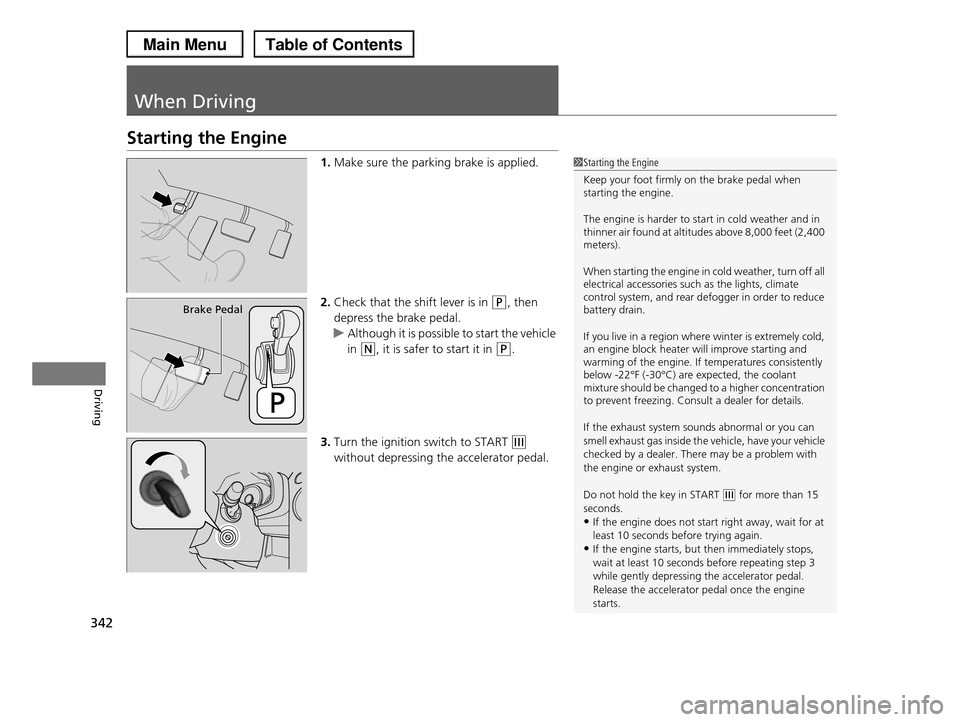
Starting the Engine
1.Make sure the parking brake is applied.
2.Check that the shift lever is in (P, then
depress the brake pedal.
uAlthough it is possible to start the vehicle
in (N, it is safer to start it in (P.
3.Turn the ignition switch to START (e
without depressing the accelerator pedal.
1Starting the Engine
Keep your foot firmly on the brake pedal when starting the engine.
The engine is harder to start in cold weather and in thinner air found at altitudes above 8,000 feet (2,400 meters).
When starting the engine in cold weather, turn off all electrical accessories such as the lights, climate control system, and rear defogger in order to reduce battery drain.
If you live in a region where winter is extremely cold, an engine block heater will improve starting and warming of the engine. If temperatures consistently below -22°F (-30°C) are expected, the coolant mixture should be changed to a higher concentration to prevent freezing. Consult a dealer for details.
If the exhaust system sounds abnormal or you can
smell exhaust gas inside the vehicle, have your vehicle
checked by a dealer. There may be a problem with the engine or exhaust system.
Do not hold the key in START (e for more than 15 seconds.
•If the engine does not start right away, wait for at
least 10 seconds before trying again.•If the engine starts, but then immediately stops,
wait at least 10 seconds before repeating step 3
while gently depressing the accelerator pedal.Release the accelerator pedal once the engine
starts.
Brake Pedal
Page 345 of 488
344
uuWhen DrivinguPrecautions While Driving
Driving
Precautions While Driving
Utility vehicles have a significantly higher rollover rate than other types of vehicles.
To prevent rollovers or loss of control:
•Take corners at slower speeds than you would with a passenger vehicle.
•Avoid sharp turns and abrupt maneuvers whenever possible.
•Do not modify your vehicle in any way that you would raise the center of gravity.
•Do not carry heavy cargo on the roof.
Avoid driving in deep water and on flooded roads. This can damage the engine,
driveline, or cause electrical component failure.
If there is a strong impact with something under the vehicle, stop in a safe location.
Check the underside of the vehicle for damage or any fluid leaks.
■Driving Guidelines for Your Utility Vehicle
■In Rain
■Other Precautions
1Driving Guidelines for Your Utility Vehicle
Failure to operate your vehicle correctly might result in a crash or a rollover.2Important Handling Information P. 262Precautions While Driving P. 344
1Precautions While Driving
NOTICE
Do not operate the shift lever while pressing the accelerator pedal. You could damage the transmission.
If the ignition switch is turned to ACCESSORY (q or LOCK (0 while driving, the engine will shut down and all steering and brake power assist functions will stop, making it difficult to control the vehicle.
Do not put the shift lever in (N, as you will lose engine braking (and acceleration) performance.
During the first 600 miles (1,000 km) of operation, avoid sudden acceleration or full throttle operation so as not to damage the engine or powertrain.
Avoid hard braking for the first 200 miles (300 km).You should also follow this when the brake pads are replaced.