ECO mode HONDA PILOT 2013 2.G Repair Manual
[x] Cancel search | Manufacturer: HONDA, Model Year: 2013, Model line: PILOT, Model: HONDA PILOT 2013 2.GPages: 488, PDF Size: 10.18 MB
Page 263 of 488
uuRear Entertainment System*uOperating the System
262
Features
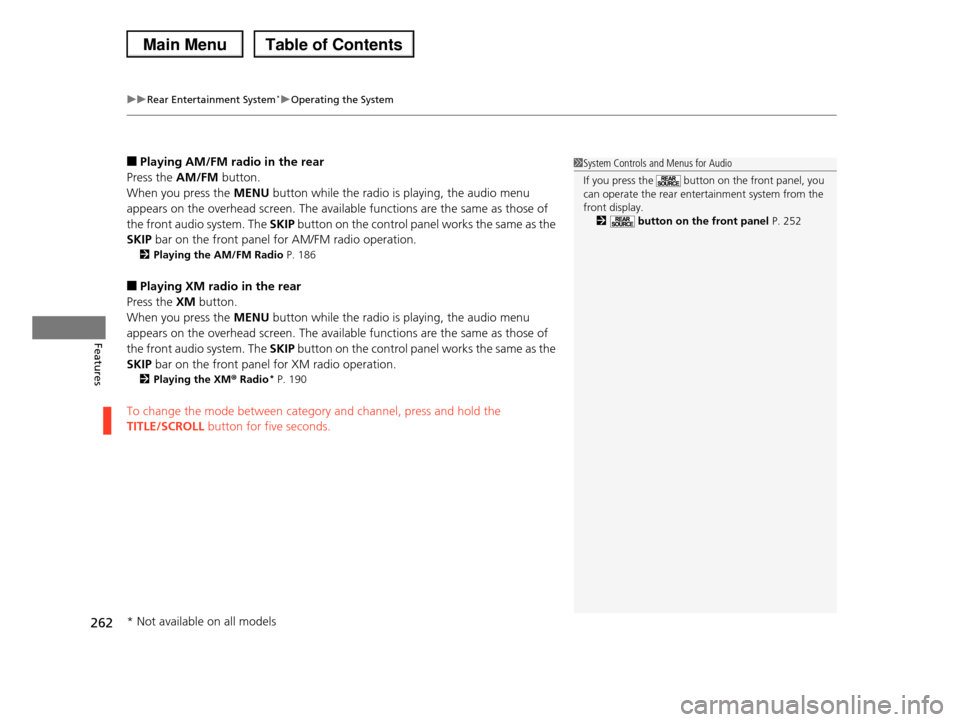
■Playing AM/FM radio in the rear
Press the AM/FM button.
When you press the MENU button while the radio is playing, the audio menu
appears on the overhead screen. The available functions are the same as those of
the front audio system. The SKIP button on the control panel works the same as the
SKIP bar on the front panel for AM/FM radio operation.
2Playing the AM/FM Radio P. 186
■Playing XM radio in the rear
Press the XM button.
When you press the MENU button while the radio is playing, the audio menu
appears on the overhead screen. The available functions are the same as those of
the front audio system. The SKIP button on the control panel works the same as the
SKIP bar on the front panel for XM radio operation.
2Playing the XM® Radio* P. 190
To change the mode between category and channel, press and hold the
TITLE/SCROLL button for five seconds.
1System Controls and Menus for Audio
If you press the button on the front panel, you can operate the rear entertainment system from the
front display.
2 button on the front panel P. 252
* Not available on all models
Page 264 of 488
263
uuRear Entertainment System*uOperating the System
Features
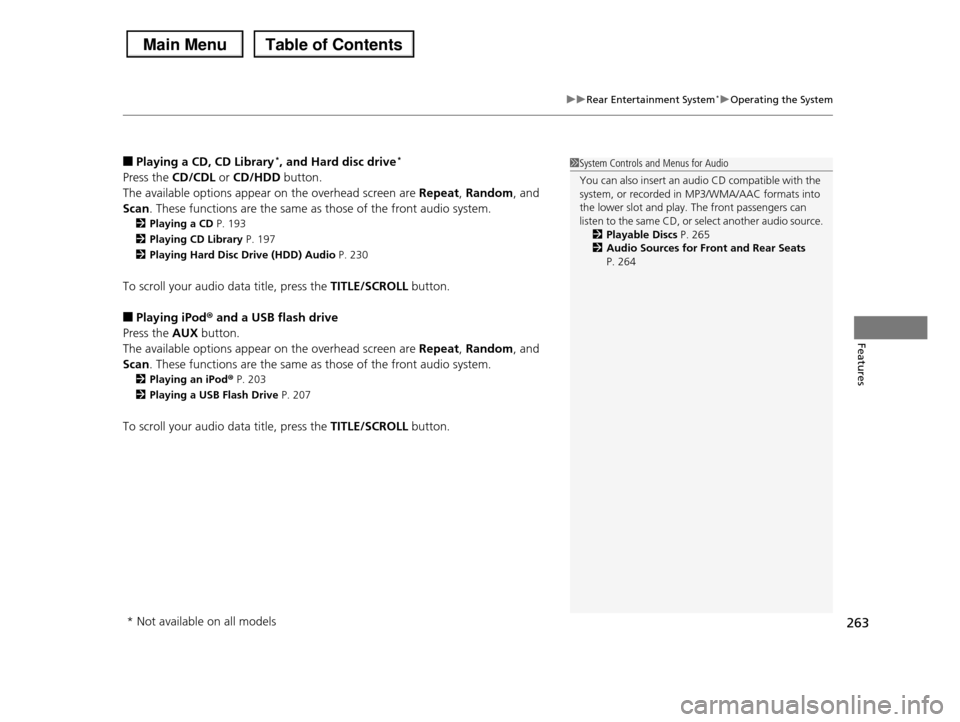
■Playing a CD, CD Library*, and Hard disc drive*
Press the CD/CDL or CD/HDD button.
The available options appear on the overhead screen are Repeat, Random, and
Scan. These functions are the same as those of the front audio system.
2Playing a CD P. 193
2Playing CD Library P. 197
2Playing Hard Disc Drive (HDD) Audio P. 230
To scroll your audio data title, press the TITLE/SCROLL button.
■Playing iPod® and a USB flash drive
Press the AUX button.
The available options appear on the overhead screen are Repeat, Random, and
Scan. These functions are the same as those of the front audio system.
2Playing an iPod® P. 203
2Playing a USB Flash Drive P. 207
To scroll your audio data title, press the TITLE/SCROLL button.
1System Controls and Menus for Audio
You can also insert an audio CD compatible with the system, or recorded in MP3/WMA/AAC formats into
the lower slot and play. The front passengers can
listen to the same CD, or select another audio source.2Playable Discs P. 265
2Audio Sources for Front and Rear Seats
P. 264
* Not available on all models
Page 268 of 488
267
uuAudio Error MessagesuCD Player
Features
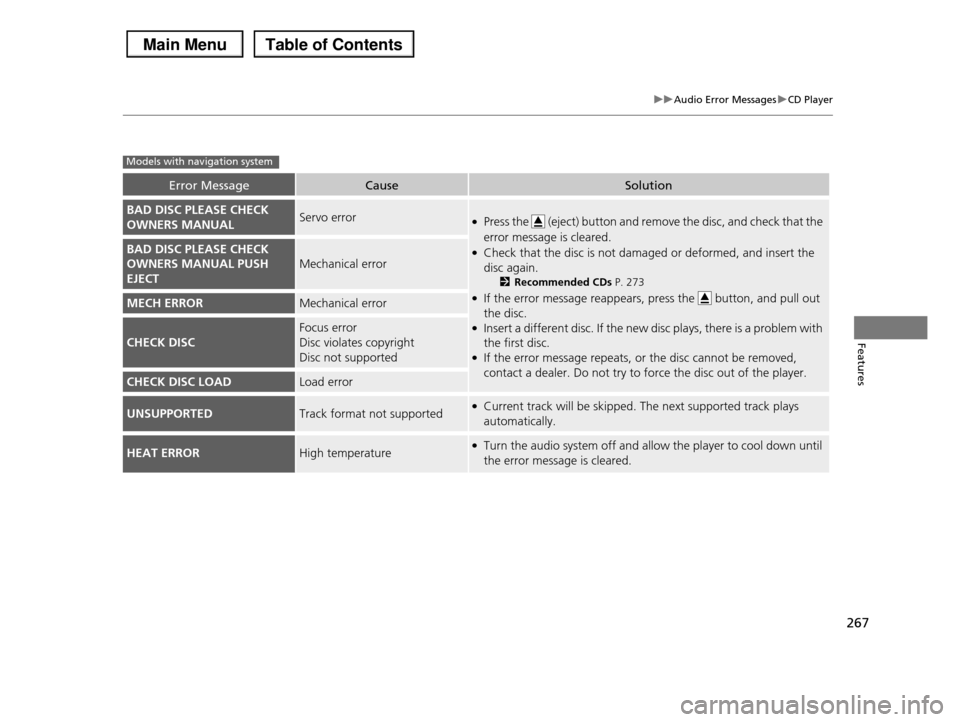
Error MessageCauseSolution
BAD DISC PLEASE CHECK
OWNERS MANUALServo error●Press the (eject) button and remove the disc, and check that the
error message is cleared.
●Check that the disc is not damaged or deformed, and insert the
disc again.
2Recommended CDs P. 273
●If the error message reappears, press the button, and pull out
the disc.●Insert a different disc. If the new disc plays, there is a problem with
the first disc.●If the error message repeats, or the disc cannot be removed,
contact a dealer. Do not try to force the disc out of the player.
BAD DISC PLEASE CHECK
OWNERS MANUAL PUSH
EJECT
Mechanical error
MECH ERRORMechanical error
CHECK DISC
Focus error
Disc violates copyright
Disc not supported
CHECK DISC LOADLoad error
UNSUPPORTEDTrack format not supported●Current track will be skipped. The next supported track plays
automatically.
HEAT ERRORHigh temperature●Turn the audio system off and allow the player to cool down until
the error message is cleared.
Models with navigation system
Page 269 of 488
268
uuAudio Error MessagesuiPod®/USB Flash Drive
Features
iPod®/USB Flash Drive
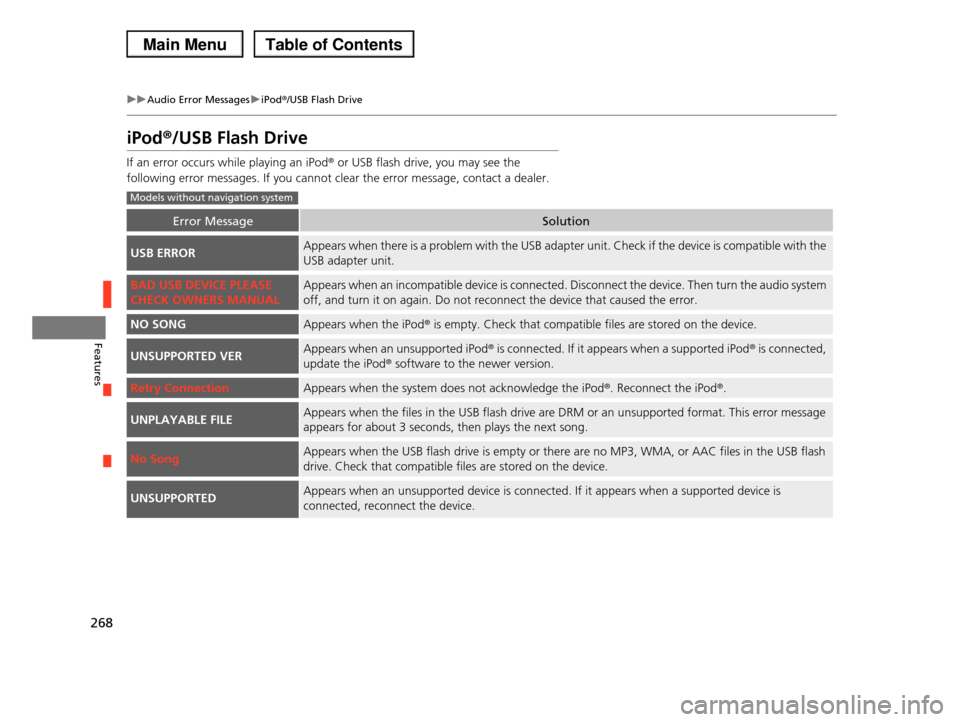
If an error occurs while playing an iPod® or USB flash drive, you may see the
following error messages. If you cannot clear the error message, contact a dealer.
Error MessageSolution
USB ERRORAppears when there is a problem with the USB adapter unit. Check if the device is compatible with the
USB adapter unit.
BAD USB DEVICE PLEASE
CHECK OWNERS MANUAL
Appears when an incompatible device is connected. Disconnect the device. Then turn the audio system
off, and turn it on again. Do not reconnect the device that caused the error.
NO SONGAppears when the iPod® is empty. Check that compatible files are stored on the device.
UNSUPPORTED VERAppears when an unsupported iPod® is connected. If it appears when a supported iPod® is connected,
update the iPod® software to the newer version.
Retry ConnectionAppears when the system does not acknowledge the iPod®. Reconnect the iPod®.
UNPLAYABLE FILEAppears when the files in the USB flash drive are DRM or an unsupported format. This error message
appears for about 3 seconds, then plays the next song.
No SongAppears when the USB flash drive is empty or there are no MP3, WMA, or AAC files in the USB flash
drive. Check that compatible files are stored on the device.
UNSUPPORTEDAppears when an unsupported device is connected. If it appears when a supported device is
connected, reconnect the device.
Models without navigation system
Page 270 of 488
269
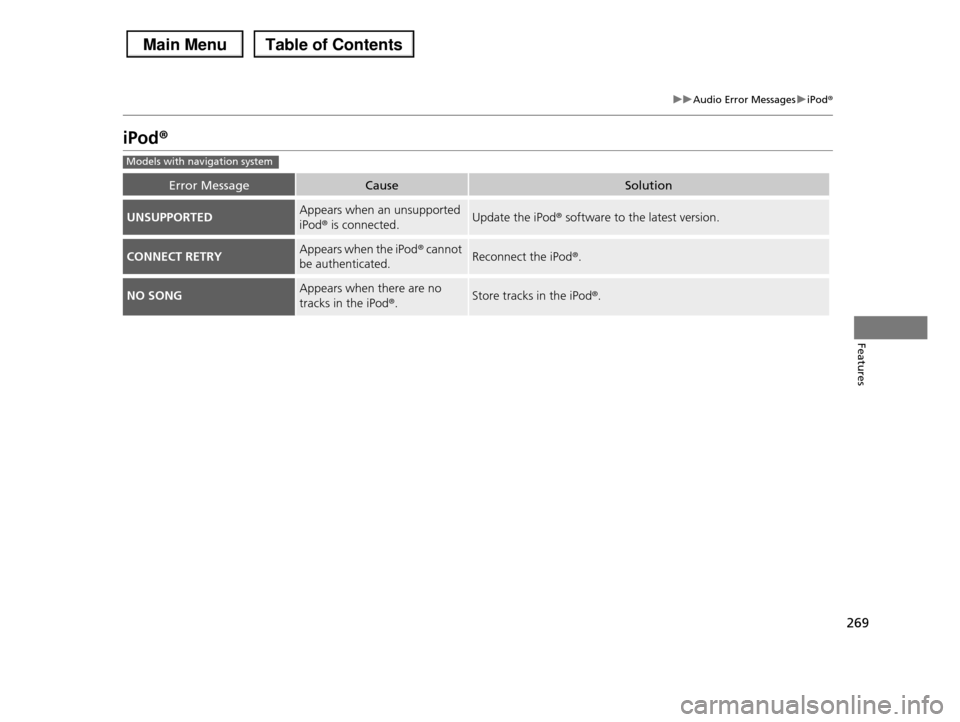
uuAudio Error MessagesuiPodr
Features
iPodr
Error MessageCauseSolution
UNSUPPORTEDAppears when an unsupported
iPodr is connected.Update the iPodr software to the latest version.
CONNECT RETRYAppears when the iPodr cannot
be authenticated.Reconnect the iPodr.
NO SONGAppears when there are no
tracks in the iPodr.Store tracks in the iPodr.
Models with navigation system
Page 271 of 488
270
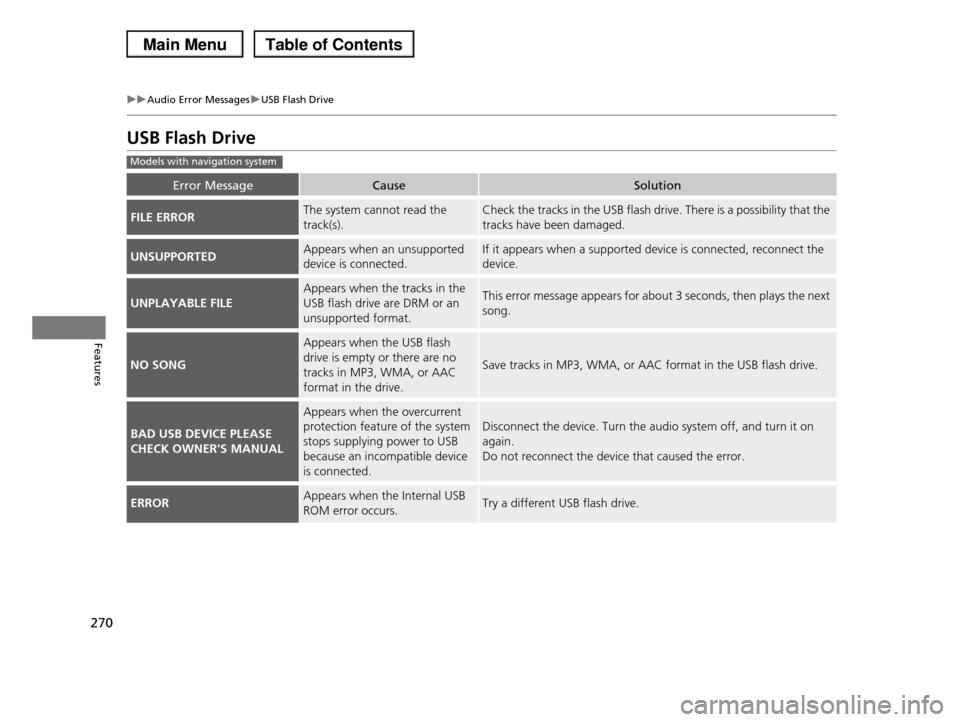
uuAudio Error MessagesuUSB Flash Drive
Features
USB Flash Drive
Error MessageCauseSolution
FILE ERRORThe system cannot read the
track(s).
Check the tracks in the USB flash drive. There is a possibility that the
tracks have been damaged.
UNSUPPORTEDAppears when an unsupported
device is connected.
If it appears when a supported device is connected, reconnect the
device.
UNPLAYABLE FILE
Appears when the tracks in the
USB flash drive are DRM or an
unsupported format.
This error message appears for about 3 seconds, then plays the next
song.
NO SONG
Appears when the USB flash
drive is empty or there are no
tracks in MP3, WMA, or AAC
format in the drive.
Save tracks in MP3, WMA, or AAC format in the USB flash drive.
BAD USB DEVICE PLEASE
CHECK OWNER'S MANUAL
Appears when the overcurrent
protection feature of the system
stops supplying power to USB
because an incompatible device
is connected.
Disconnect the device. Turn the audio system off, and turn it on
again.
Do not reconnect the device that caused the error.
ERRORAppears when the Internal USB
ROM error occurs.Try a different USB flash drive.
Models with navigation system
Page 276 of 488
275
uuGeneral Information on the Audio SystemuCompatible iPod® and USB Flash Drives
Features
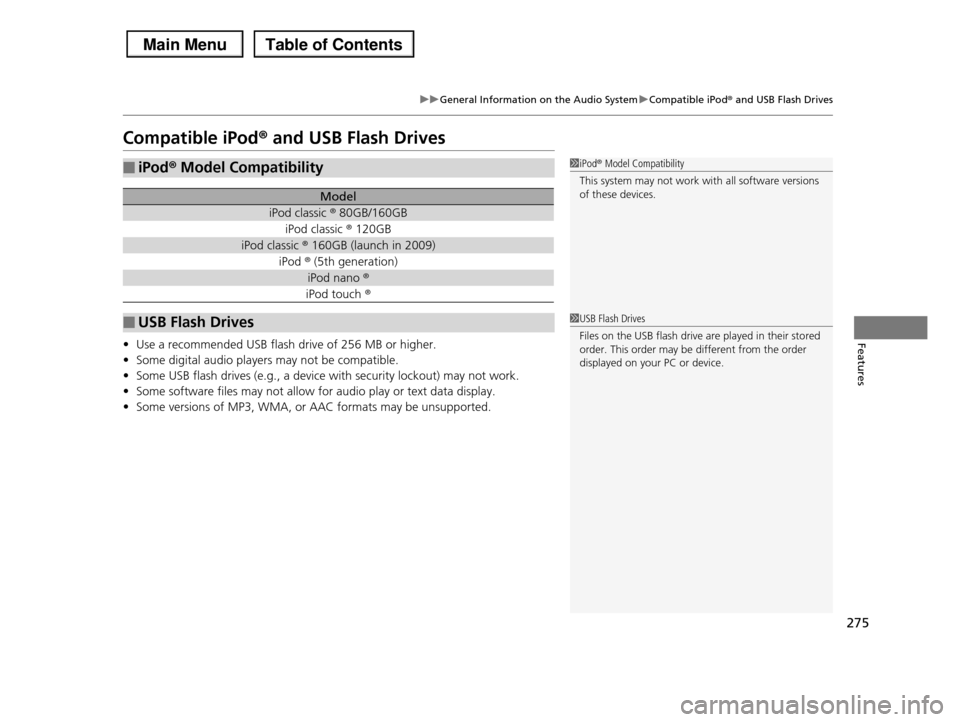
Compatible iPod® and USB Flash Drives
•Use a recommended USB flash drive of 256 MB or higher.
•Some digital audio players may not be compatible.
•Some USB flash drives (e.g., a device with security lockout) may not work.
•Some software files may not allow for audio play or text data display.
•Some versions of MP3, WMA, or AAC formats may be unsupported.
■iPod® Model Compatibility
Model
iPod classic ® 80GB/160GB
iPod classic ® 120GB
iPod classic ® 160GB (launch in 2009)
iPod ® (5th generation)
iPod nano ®
iPod touch ®
■USB Flash Drives
1iPod® Model Compatibility
This system may not work with all software versions
of these devices.
1USB Flash Drives
Files on the USB flash drive are played in their stored
order. This order may be different from the order displayed on your PC or device.
Page 277 of 488
276
Features
HomeLink® Universal Transceiver*
The HomeLink® Universal Transceiver can be programmed to operate up to three
remote controlled devices around your home, such as garage doors, lighting, or
home security systems.
Refer to the safety information that comes with your garage door opener to test that
the safety features are functioning properly. If you do not have the safety
information, contact the manufacturer.
Before programming HomeLink, make sure that people and objects are out of the
way of the garage or gate to prevent potential injury or damage.
When programming a garage door opener, park just outside the garage door’s
path.
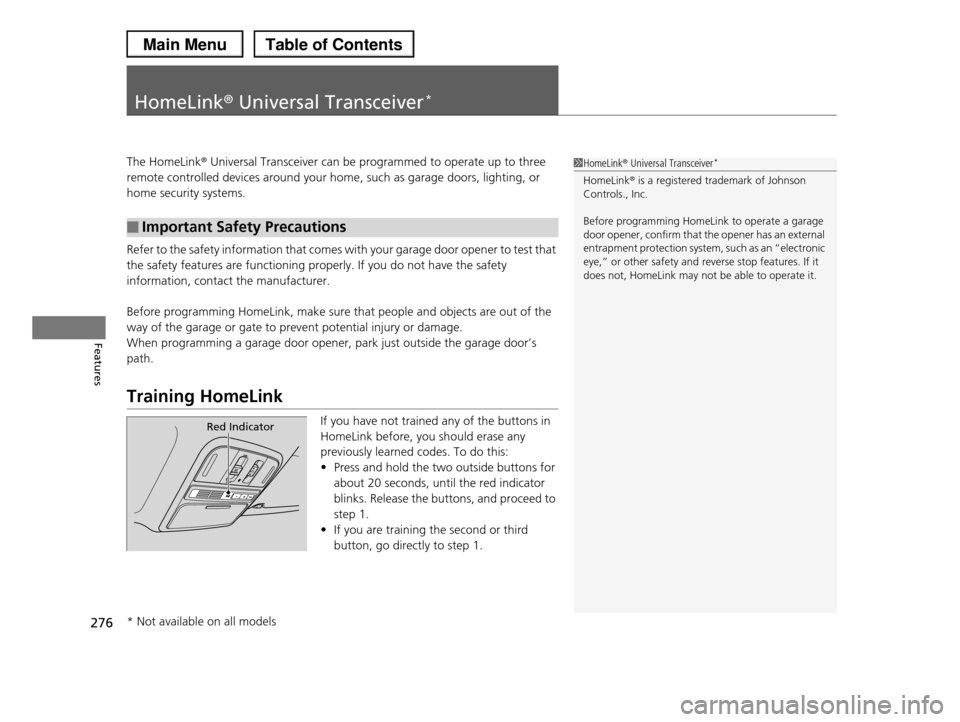
Training HomeLink
If you have not trained any of the buttons in
HomeLink before, you should erase any
previously learned codes. To do this:
•Press and hold the two outside buttons for
about 20 seconds, until the red indicator
blinks. Release the buttons, and proceed to
step 1.
•If you are training the second or third
button, go directly to step 1.
■Important Safety Precautions
1HomeLink® Universal Transceiver*
HomeLink® is a registered trademark of Johnson Controls., Inc.
Before programming HomeLink to operate a garage door opener, confirm that the opener has an external
entrapment protection system, such as an “electronic
eye,” or other safety and reverse stop features. If it does not, HomeLink may not be able to operate it.
Red Indicator
* Not available on all models
Page 324 of 488
323
Driving
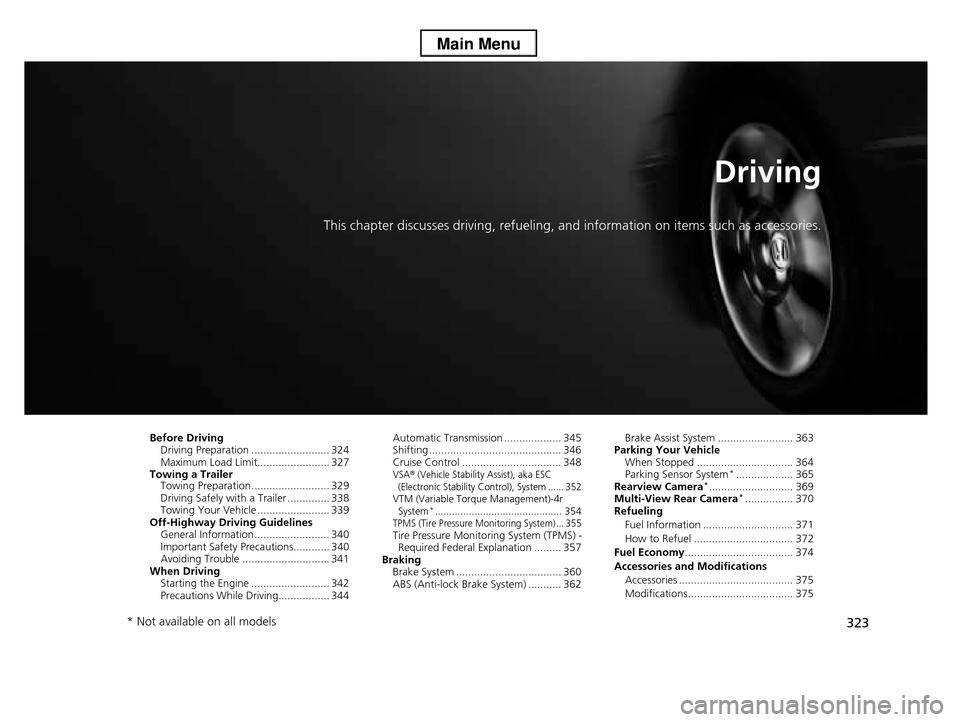
This chapter discusses driving, refueling, and information on items such as accessories.
Before DrivingDriving Preparation .......................... 324 Maximum Load Limit........................ 327Towing a TrailerTowing Preparation .......................... 329Driving Safely with a Trailer .............. 338Towing Your Vehicle ........................ 339Off-Highway Driving GuidelinesGeneral Information ......................... 340Important Safety Precautions............ 340Avoiding Trouble ............................. 341When DrivingStarting the Engine .......................... 342Precautions While Driving................. 344
Automatic Transmission ................... 345Shifting ............................................ 346Cruise Control ................................. 348VSA® (Vehicle Stability Assist), aka ESC (Electronic Stability Control), System ...... 352VTM (Variable Torque Management)-4r System*............................................. 354TPMS (Tire Pressure Monitoring System) ... 355Tire Pressure Monitoring System (TPMS) - Required Federal Explanation ......... 357BrakingBrake System ................................... 360ABS (Anti-lock Brake System) ........... 362
Brake Assist System ......................... 363Parking Your VehicleWhen Stopped ................................ 364Parking Sensor System*................... 365Rearview Camera*............................ 369Multi-View Rear Camera*................ 370Refueling
Fuel Information .............................. 371
How to Refuel ................................. 372
Fuel Economy.................................... 374
Accessories and Modifications
Accessories ...................................... 375
Modifications................................... 375
* Not available on all models
Page 330 of 488
329Continued
Driving
Towing a Trailer
Towing Preparation
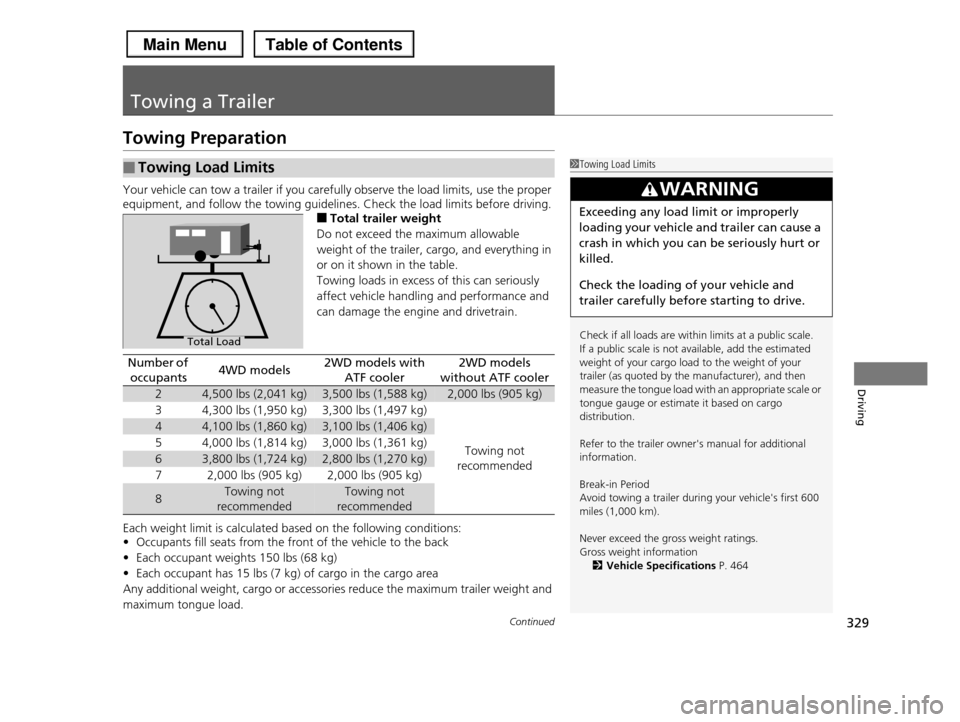
Your vehicle can tow a trailer if you carefully observe the load limits, use the proper
equipment, and follow the towing guidelines. Check the load limits before driving.
■Total trailer weight
Do not exceed the maximum allowable
weight of the trailer, cargo, and everything in
or on it shown in the table.
Towing loads in excess of this can seriously
affect vehicle handling and performance and
can damage the engine and drivetrain.
Each weight limit is calculated based on the following conditions:
•Occupants fill seats from the front of the vehicle to the back
•Each occupant weights 150 lbs (68 kg)
•Each occupant has 15 lbs (7 kg) of cargo in the cargo area
Any additional weight, cargo or accessories reduce the maximum trailer weight and
maximum tongue load.
■Towing Load Limits1Towing Load Limits
Check if all loads are within limits at a public scale.
If a public scale is not available, add the estimated
weight of your cargo load to the weight of your trailer (as quoted by the manufacturer), and then
measure the tongue load with an appropriate scale or
tongue gauge or estimate it based on cargo distribution.
Refer to the trailer owner's manual for additional information.
Break-in Period Avoid towing a trailer during your vehicle's first 600
miles (1,000 km).
Never exceed the gross weight ratings.
Gross weight information
2Vehicle Specifications P. 464
3WARNING
Exceeding any load limit or improperly
loading your vehicle and trailer can cause a
crash in which you can be seriously hurt or
killed.
Check the loading of your vehicle and
trailer carefully before starting to drive.
Total Load
Number of
occupants4WD models2WD models with
ATF cooler
2WD models
without ATF cooler
24,500 lbs (2,041 kg)3,500 lbs (1,588 kg)2,000 lbs (905 kg)
34,300 lbs (1,950 kg)3,300 lbs (1,497 kg)
Towing not
recommended
44,100 lbs (1,860 kg)3,100 lbs (1,406 kg)
54,000 lbs (1,814 kg)3,000 lbs (1,361 kg)
63,800 lbs (1,724 kg)2,800 lbs (1,270 kg)
72,000 lbs (905 kg)2,000 lbs (905 kg)
8Towing not
recommended
Towing not
recommended