light HONDA PILOT 2013 2.G Repair Manual
[x] Cancel search | Manufacturer: HONDA, Model Year: 2013, Model line: PILOT, Model: HONDA PILOT 2013 2.GPages: 488, PDF Size: 10.18 MB
Page 339 of 488
338
uuTowing a TraileruDriving Safely with a Trailer
Driving
Driving Safely with a Trailer
•Have the trailer properly serviced and keep it in good condition.
•Make sure that all the weights and load in the vehicle and trailer are within limits.
2Towing Load Limits P. 329
•When towing more than 3,500lbs (1,590 kg), use of gasoline with a pump octane
number of 91 or higher is recommended.
uTowing performance can be affected by high altitude, high temperature, or
steep uphill.
•Securely attach the hitch, safety chains, and other necessary parts to the trailer.
•Securely store all the items in and on the trailer so that they do not shift while
driving.
•Check if the lights and brakes on the trailer are working properly.
•Check the pressures of the trailer tires, including the spare.
•Drive slower than normal.
•Obey posted speed limits for vehicles with trailers.
•Use the (D position when towing a trailer on level roads.
•Turn more slowly and with a wider turning arc than normal.
•Allow more time and distance for braking.
•Do not brake or turn suddenly.
■Things You Need To Know Before Towing a Trailer
■Towing Speeds and Gears
■Turning and Braking
1Driving Safely with a Trailer
Parking In addition to the normal precautions, place wheel
chocks at each of the trailer's tires.
Page 343 of 488
342
Driving
When Driving
Starting the Engine
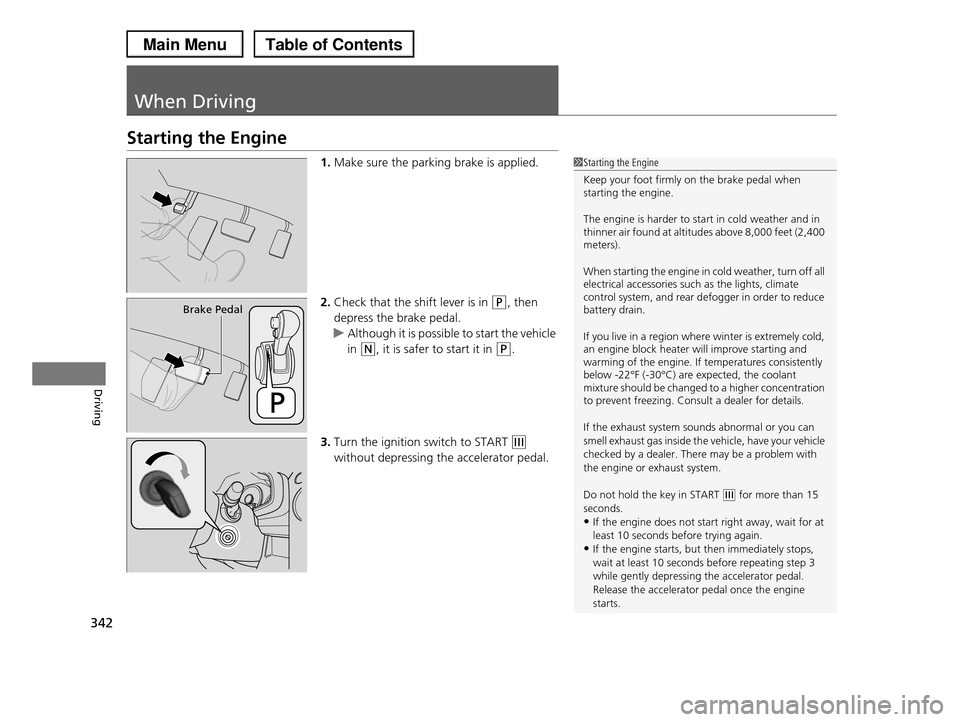
1.Make sure the parking brake is applied.
2.Check that the shift lever is in (P, then
depress the brake pedal.
uAlthough it is possible to start the vehicle
in (N, it is safer to start it in (P.
3.Turn the ignition switch to START (e
without depressing the accelerator pedal.
1Starting the Engine
Keep your foot firmly on the brake pedal when starting the engine.
The engine is harder to start in cold weather and in thinner air found at altitudes above 8,000 feet (2,400 meters).
When starting the engine in cold weather, turn off all electrical accessories such as the lights, climate control system, and rear defogger in order to reduce battery drain.
If you live in a region where winter is extremely cold, an engine block heater will improve starting and warming of the engine. If temperatures consistently below -22°F (-30°C) are expected, the coolant mixture should be changed to a higher concentration to prevent freezing. Consult a dealer for details.
If the exhaust system sounds abnormal or you can
smell exhaust gas inside the vehicle, have your vehicle
checked by a dealer. There may be a problem with the engine or exhaust system.
Do not hold the key in START (e for more than 15 seconds.
•If the engine does not start right away, wait for at
least 10 seconds before trying again.•If the engine starts, but then immediately stops,
wait at least 10 seconds before repeating step 3
while gently depressing the accelerator pedal.Release the accelerator pedal once the engine
starts.
Brake Pedal
Page 347 of 488
346
uuWhen DrivinguShifting
Driving
Shifting
Change the shift position in accordance with your driving needs.
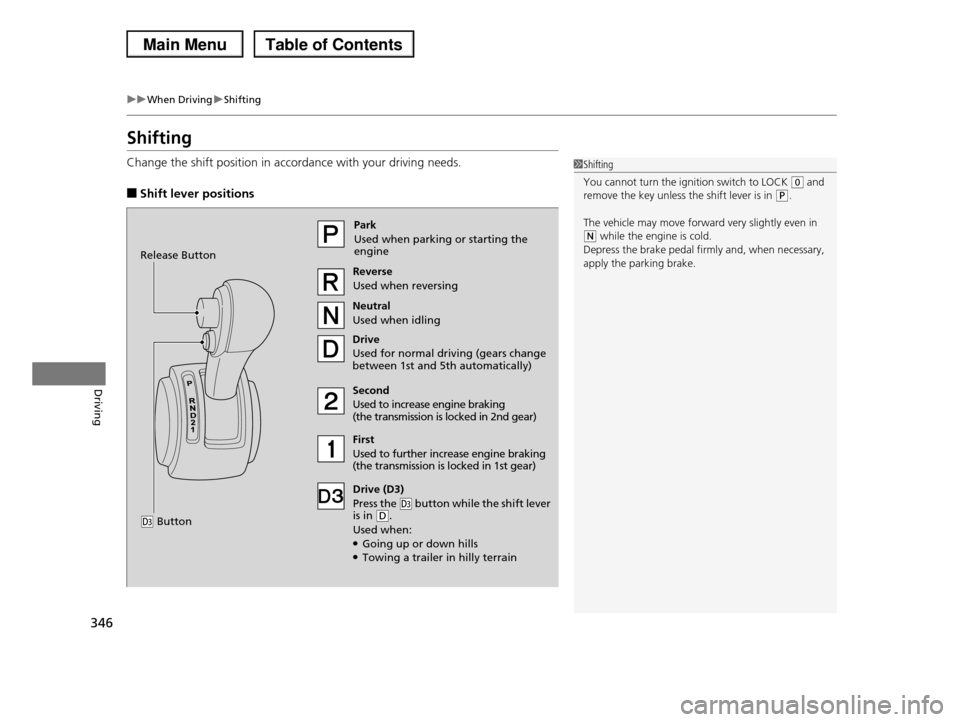
■Shift lever positions
1Shifting
You cannot turn the ignition switch to LOCK (0 and remove the key unless the shift lever is in (P.
The vehicle may move forward very slightly even in (N while the engine is cold.
Depress the brake pedal firmly and, when necessary,
apply the parking brake.
Park
Used when parking or starting the engine
Reverse
Used when reversing
Neutral
Used when idling
Drive
Used for normal driving (gears change between 1st and 5th automatically)
Drive (D3)
Press the (d button while the shift lever is in (D.
Used when:●Going up or down hills●Towing a trailer in hilly terrain
Second
Used to increase engine braking (the transmission is locked in 2nd gear)
First
Used to further increase engine braking (the transmission is locked in 1st gear)
Release Button
(d Button
Page 348 of 488
347
uuWhen DrivinguShifting
Driving
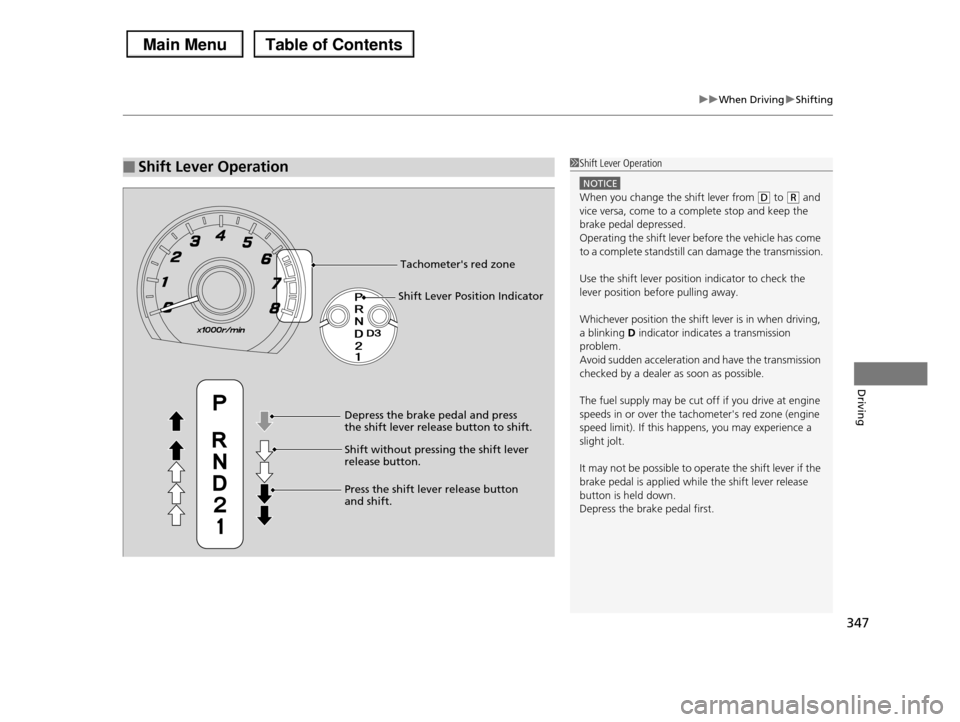
■Shift Lever Operation1Shift Lever Operation
NOTICE
When you change the shift lever from (D to (R and vice versa, come to a complete stop and keep the
brake pedal depressed.
Operating the shift lever before the vehicle has come to a complete standstill can damage the transmission.
Use the shift lever position indicator to check the lever position before pulling away.
Whichever position the shift lever is in when driving, a blinking D indicator indicates a transmission
problem.
Avoid sudden acceleration and have the transmission checked by a dealer as soon as possible.
The fuel supply may be cut off if you drive at engine speeds in or over the tachometer's red zone (engine
speed limit). If this happens, you may experience a
slight jolt.
It may not be possible to operate the shift lever if the
brake pedal is applied while the shift lever release button is held down.
Depress the brake pedal first.
Tachometer's red zone
Shift Lever Position Indicator
Depress the brake pedal and press the shift lever release button to shift.
Shift without pressing the shift lever release button.
Press the shift lever release button and shift.
Page 355 of 488
354
uuWhen DrivinguVTM (Variable Torque Management)-4r System*
Driving
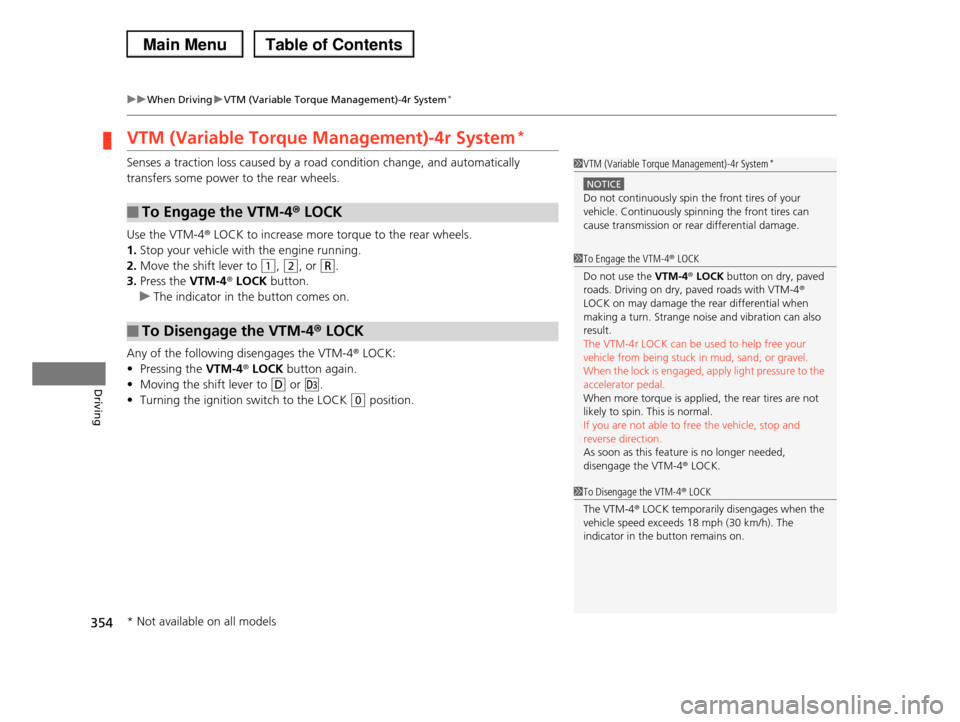
VTM (Variable Torque Management)-4r System*
Senses a traction loss caused by a road condition change, and automatically
transfers some power to the rear wheels.
Use the VTM-4r LOCK to increase more torque to the rear wheels.
1.Stop your vehicle with the engine running.
2.Move the shift lever to (1, (2, or (R.
3.Press the VTM-4r LOCK button.
uThe indicator in the button comes on.
Any of the following disengages the VTM-4r LOCK:
•Pressing the VTM-4r LOCK button again.
•Moving the shift lever to (D or (d.
•Turning the ignition switch to the LOCK (0 position.
■To Engage the VTM-4r LOCK
■To Disengage the VTM-4r LOCK
1VTM (Variable Torque Management)-4r System*
NOTICE
Do not continuously spin the front tires of your vehicle. Continuously spinning the front tires can
cause transmission or rear differential damage.
1To Engage the VTM-4r LOCK
Do not use the VTM-4r LOCK button on dry, paved roads. Driving on dry, paved roads with VTM-4r
LOCK on may damage the rear differential when
making a turn. Strange noise and vibration can also result.
The VTM-4r LOCK can be used to help free your
vehicle from being stuck in mud, sand, or gravel.When the lock is engaged, apply light pressure to the
accelerator pedal.
When more torque is applied, the rear tires are not likely to spin. This is normal.
If you are not able to free the vehicle, stop and
reverse direction. As soon as this feature is no longer needed,
disengage the VTM-4r LOCK.
1To Disengage the VTM-4r LOCK
The VTM-4r LOCK temporarily disengages when the
vehicle speed exceeds 18 mph (30 km/h). The
indicator in the button remains on.
* Not available on all models
Page 357 of 488
uuWhen DrivinguTPMS (Tire Pressure Monitoring System)
356
Driving
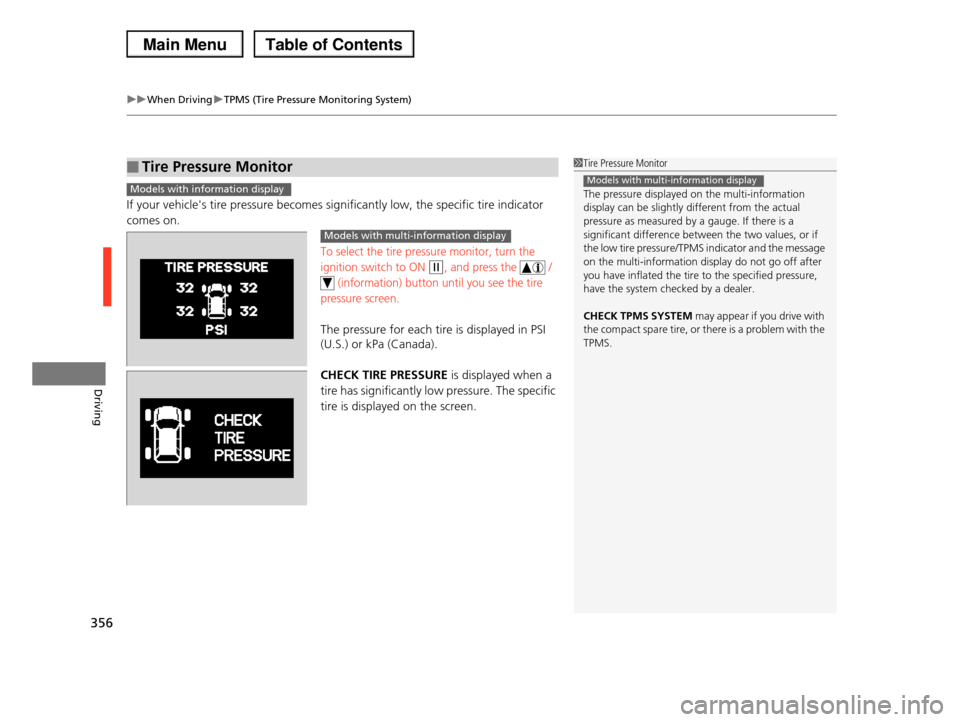
If your vehicle's tire pressure becomes significantly low, the specific tire indicator
comes on.
To select the tire pressure monitor, turn the
ignition switch to ON (w, and press the /
(information) button until you see the tire
pressure screen.
The pressure for each tire is displayed in PSI
(U.S.) or kPa (Canada).
CHECK TIRE PRESSURE is displayed when a
tire has significantly low pressure. The specific
tire is displayed on the screen.
■Tire Pressure Monitor1Tire Pressure Monitor
The pressure displayed on the multi-information
display can be slightly different from the actual
pressure as measured by a gauge. If there is a significant difference between the two values, or if
the low tire pressure/TPMS indicator and the message
on the multi-information display do not go off after you have inflated the tire to the specified pressure,
have the system checked by a dealer.
CHECK TPMS SYSTEM may appear if you drive with
the compact spare tire, or there is a problem with the
TPMS.
Models with multi-information displayModels with information display
Models with multi-information display
Page 362 of 488
361
uuBrakinguBrake System
Driving
Your vehicle is equipped with disc brakes at all four wheels. A vacuum power assist
helps reduce the effort needed on the brake pedal. The brake assist system increases
the stopping force when you depress the brake pedal hard in an emergency
situation. The anti-lock brake system (ABS) helps you retain steering control when
braking very hard.
2Brake Assist System P. 363
2ABS (Anti-lock Brake System) P. 362
■Foot Brake1Foot Brake
Check the brakes after driving through deep water, or if there is a buildup of road surface water. If
necessary, dry the brakes by lightly depressing the
pedal several times.
If you hear a continuous metallic friction sound when
applying the brakes, the brake pads need to be replaced. Have the vehicle checked by a dealer.
Constantly using the brake pedal while going down a long hill builds up heat, which reduces the brake
effectiveness. Apply engine braking by taking your
foot off the accelerator pedal and downshifting to a lower gear.
Do not rest your foot on the brake pedal while driving, as it will lightly apply the brakes and cause
them to lose effectiveness over time and reduce pad
life. It will also confuse drivers behind you.
Page 363 of 488
362
uuBrakinguABS (Anti-lock Brake System)
Driving
ABS (Anti-lock Brake System)
Helps prevent the wheels from locking up, and helps you retain steering control by
pumping the brakes rapidly, much faster than you.
The electronic brake distribution (EBD) system, which is part of the ABS, also
balances the front-to-rear braking distribution according to vehicle loading.
You should never pump the brake pedal. Let the ABS work for you by always
keeping firm, steady pressure on the brake pedal. This is sometimes referred to as
“stomp and steer.”
■ABS operation
The brake pedal may pulsate slightly when the ABS is working. Keep holding the
pedal firmly down. On dry pavement, you will need to press on the brake pedal very
hard before the ABS activates. However, you may feel the ABS activate immediately
if you are trying to stop on snow or ice.
When the vehicle speed goes under 6 mph (10 km/h), the ABS stops.
■ABS1ABS (Anti-lock Brake System)
NOTICE
The ABS may not function correctly if you use an incorrect tire type and size.
When the ABS indicator comes on while driving, there may be a problem with the system.
While normal braking is not affected, there is a
possibility of the ABS not operating. Have the vehicle checked by a dealer immediately.
The ABS does not reduce the time or distance it takes to stop the vehicle. It only helps with steering control
during hard braking.
In the following cases, your vehicle may need more stopping distance than a vehicle without the ABS:
•When driving on rough road surfaces, including
when driving on uneven surfaces, such as gravel or snow.
•When tire chains are installed.
You may hear a motor sound coming from the
engine compartment while system checks are being
performed immediately after starting the engine or while driving. This is normal.
Page 364 of 488
363
uuBrakinguBrake Assist System
Driving
Brake Assist System
Designed to assist the driver by generating greater braking force when you depress
the brake pedal hard during emergency braking.
■Brake assist system operation
Press the brake pedal firmly for more powerful braking.
When brake assist operates, the pedal may wiggle slightly and an operating noise
may be heard. This is normal. Keep holding the brake pedal firmly down.
Page 370 of 488
369
Driving
Rearview Camera*
About Your Rearview Camera
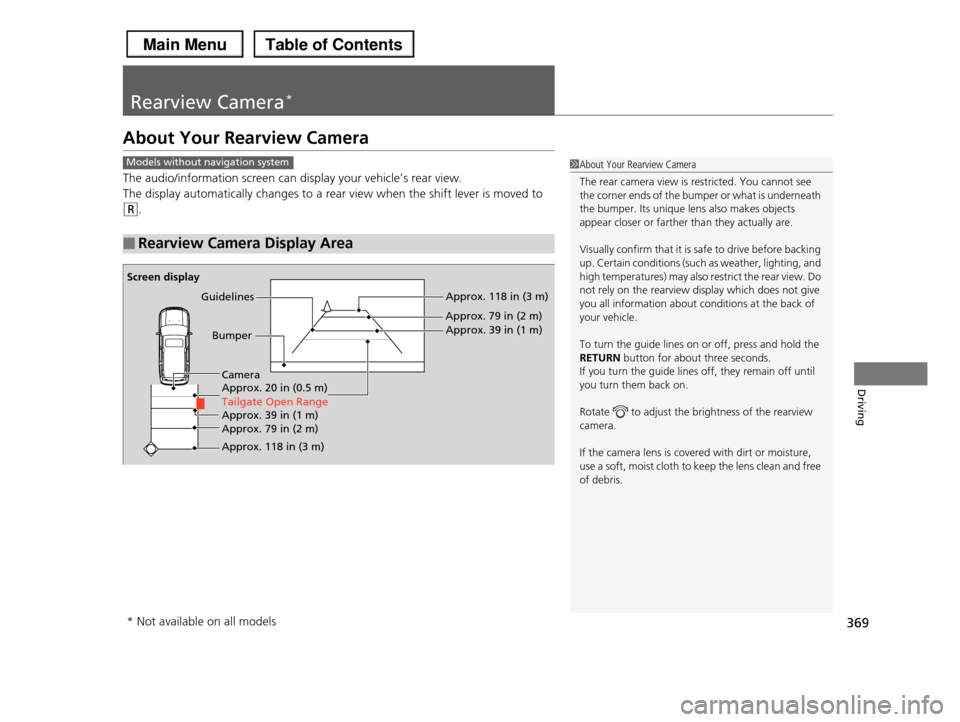
The audio/information screen can display your vehicle’s rear view.
The display automatically changes to a rear view when the shift lever is moved to
(R.
■Rearview Camera Display Area
1About Your Rearview Camera
The rear camera view is restricted. You cannot see
the corner ends of the bumper or what is underneath
the bumper. Its unique lens also makes objects appear closer or farther than they actually are.
Visually confirm that it is safe to drive before backing up. Certain conditions (such as weather, lighting, and
high temperatures) may also restrict the rear view. Do
not rely on the rearview display which does not give you all information about conditions at the back of
your vehicle.
To turn the guide lines on or off, press and hold the
RETURN button for about three seconds.
If you turn the guide lines off, they remain off until you turn them back on.
Rotate to adjust the brightness of the rearview camera.
If the camera lens is covered with dirt or moisture, use a soft, moist cloth to keep the lens clean and free
of debris.
Models without navigation system
Screen display
Bumper
GuidelinesApprox. 118 in (3 m)
Approx. 79 in (2 m)
Approx. 39 in (1 m)
Approx. 20 in (0.5 m)
Tailgate Open Range
Approx. 118 in (3 m)
Approx. 79 in (2 m) Approx. 39 in (1 m)
Camera
* Not available on all models