navigation system HONDA PILOT 2014 2.G User Guide
[x] Cancel search | Manufacturer: HONDA, Model Year: 2014, Model line: PILOT, Model: HONDA PILOT 2014 2.GPages: 488, PDF Size: 12.11 MB
Page 220 of 488
219
uu Audio System Basic Operation u Playing the AM/FM Radio
Continued
Features
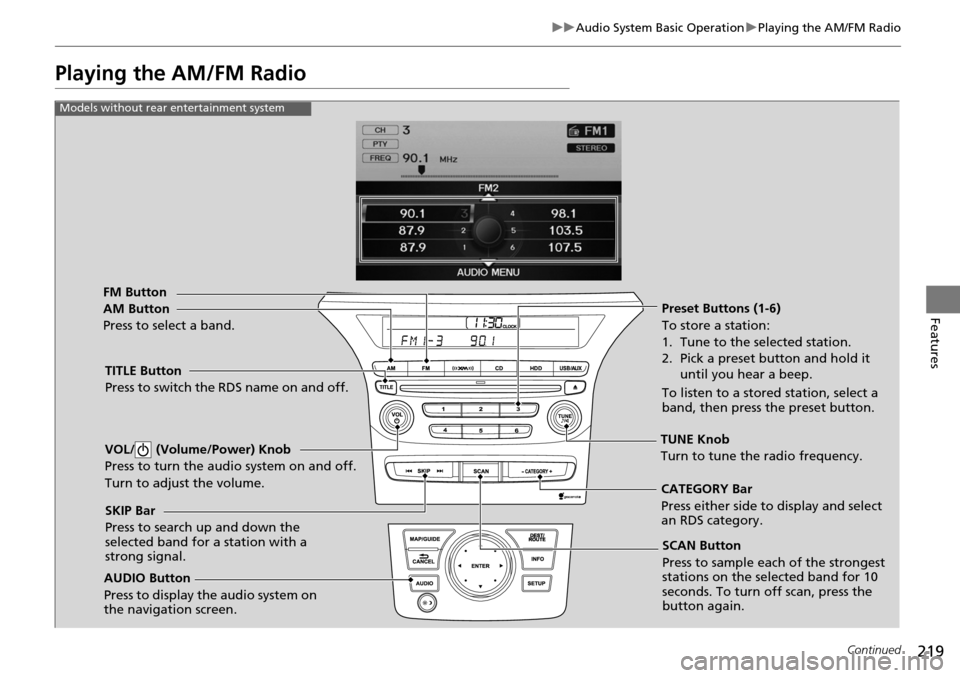
Playing the AM/FM Radio
FM Button
TITLE Button
Press to switch the RDS name on and off.
SCAN Button
Press to sample each of the strongest
stations on the selected band for 10
seconds. To turn off scan, press the
button again.
VOL/ (Volume/Power) Knob
Press to turn the a
udio system on and off.
Turn to adjust the volume.
Preset Buttons (1-6)
To store a station:
1. Tune to the selected station.
2. Pick a preset button and hold it until you hear a beep.
To listen to a stored station, select a
band, then press the preset button.
SKIP Bar
Press to search up and down the
selected band for a station with a
strong signal.
AUDIO Button
Press to display the audio system on
the navigation screen.
AM Button
Press to select a band.
CATEGORY Bar
Press either side to display and select
an RDS category.
Models without rear entertainment system
TUNE Knob
Turn to tune the radio frequency.
Page 221 of 488
220
uu Audio System Basic Operation u Playing the AM/FM Radio
Features
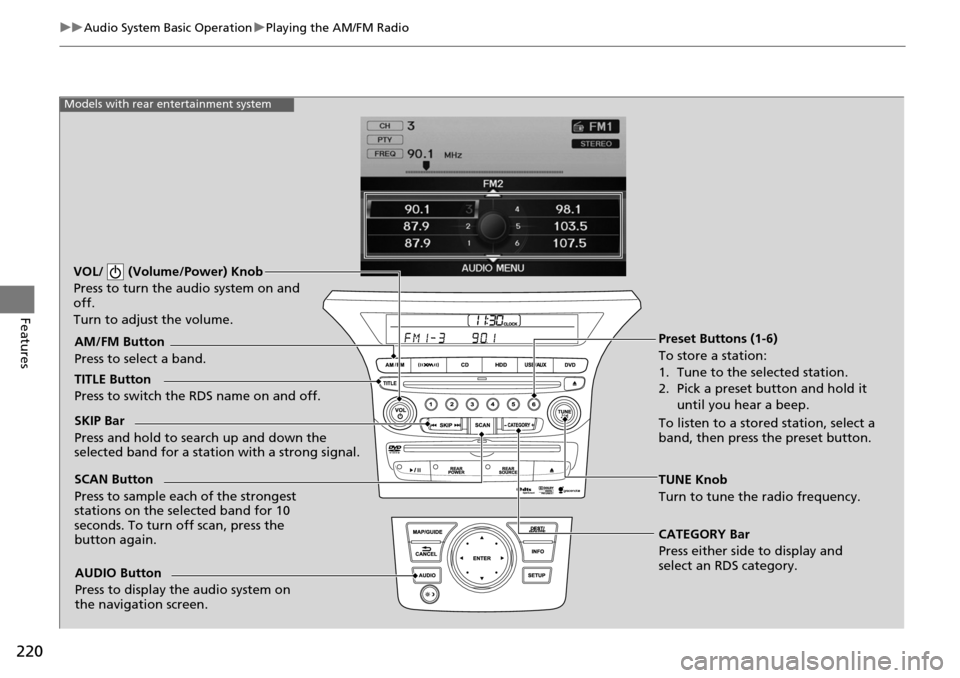
Models with rear entertainment system
TUNE Knob
Turn to tune the radio frequency.
SCAN Button
Press to sample each of the strongest
stations on the selected band for 10
seconds. To turn
off scan, press the
button again.
VOL/ (Volume/Power) Knob
Press to turn the audio system on and
off.
Turn to adjust the volume.
Preset Buttons (1-6)
To store a station:
1. Tune to the selected station.
2. Pick a preset button and hold it
until you hear a beep.
To listen to a stored station, select a
band, then press the preset button.
SKIP Bar
Press and hold to search up and down the
selected band for a stati
on with a strong signal.
CATEGORY Bar
Press either side to display and
select an RDS category.
TITLE Button
Press to switch the RDS name on and off. AM/FM Button
Press to select a band.
AUDIO Button
Press to display the audio system on
the navigation screen.
Page 224 of 488
223
uu Audio System Basic Operation u Playing the XM ® Radio
Continued
Features
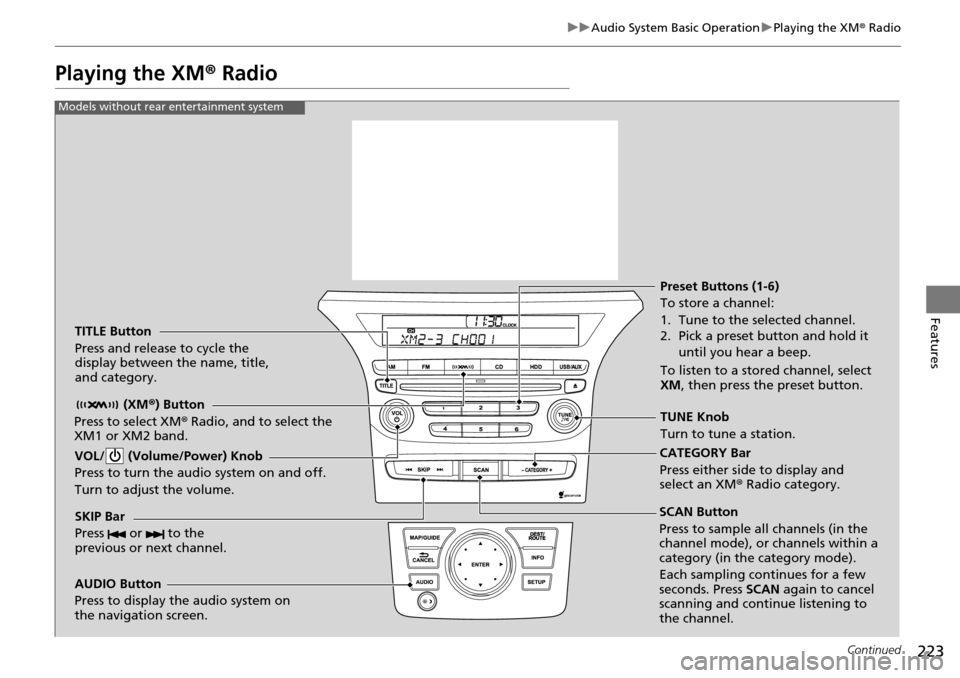
Playing the XM ® Radio
TITLE Button
Press and release to cycle the
display between the name, title,
and category.
(XM®) Button
Press to select XM® Radio, and to select the
XM1 or XM2 band.
VOL/ (Volume/Power) Knob
Press to turn the audio system on and off.
Turn to adjust the volume.
SKIP Bar
Press or to the
previous or next channel.
CATEGORY Bar
Press either side to display and
select an XM r Radio category.
TUNE Knob
Turn to tune a station. Preset Buttons (1-6)
To store a channel:
1. Tune to the selected channel.
2. Pick a preset button and hold it
until you hear a beep.
To listen to a stored channel, select
XM , then press the preset button.
SCAN Button
Press to sample all channels (in the
channel mode), or channels within a
category (in the category mode).
Each sampling continues for a few
seconds. Press SCAN again to cancel
scanning and continue listening to
the channel.
Models without rear entertainment system
AUDIO Button
Press to display the audio system on
the navigation screen.
Page 225 of 488
224
uu Audio System Basic Operation u Playing the XM ® Radio
Features
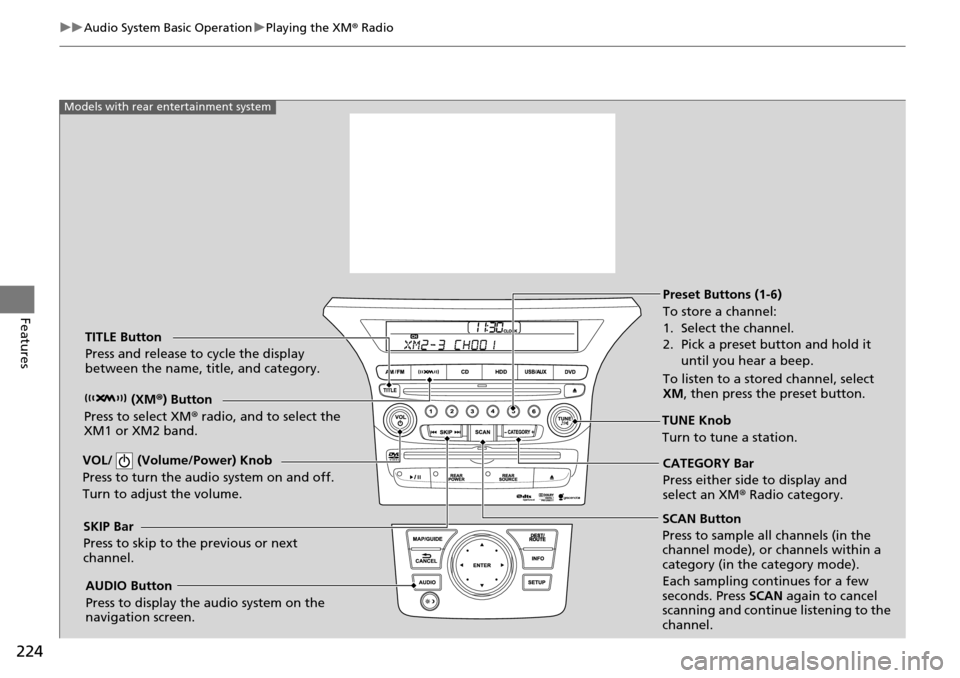
SCAN Button
Press to sample all channels (in the
channel mode), or channels within a
category (in the category mode).
Each sampling continues for a few
seconds. Press SCAN again to cancel
scanning and continue listening to the
channel.
VOL/ (Volume/Power) Knob
Press to turn the a
udio system on and off.
Turn to adjust the volume.
Preset Buttons (1-6)
To store a channel:
1. Select the channel.
2. Pick a preset button and hold it until you hear a beep.
To listen to a stored channel, select
XM , then press the preset button.
SKIP Bar
Press to skip to the previous or next
channel. CATEGORY Bar
Press either side to display and
select an XM
® Radio category.
TITLE Button
Press and release to cycle the display
between the name, title, and category.
(XM®) Button
Press to select XM ® radio, and to select the
XM1 or XM2 band.
TUNE Knob
Turn to tune a station.
AUDIO Button
Press to display the audio system on the
navigation screen.
Models with rear entertainment system
Page 227 of 488
226
uu Audio System Basic Operation u Playing a CD
Features
Playing a CD
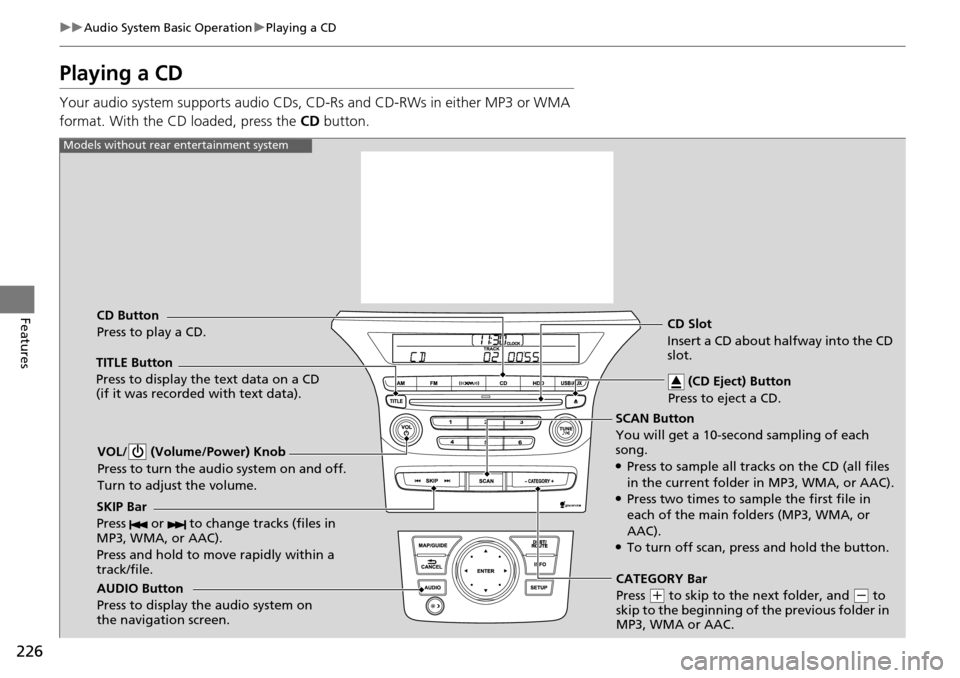
Your audio system supports audio CDs, CD-Rs and CD-RWs in either MP3 or WMA
format. With the CD loaded, press the CD button.
SCAN Button
You will get a 10-second sampling of each
song.
●Press to sample all tracks on the CD (all files
in the current folder in MP3, WMA, or AAC).
●Press two times to sample the first file in
each of the main folders (MP3, WMA, or
AAC).
●To turn off scan, press and hold the button.
VOL/ (Volume/Power) Knob
Press to turn the audio system on and off.
Turn to adjust the volume.
CD Slot
Insert a CD about halfway into the CD
slot.
AUDIO Button
Press to display the audio system on
the navigation screen. CD Button
Press to play a CD. (CD Eject) Button
Press to eject a CD.
Models without rear entertainment system
TITLE Button
Press to display the text data on a CD
(if it was recorded with text data).
SKIP Bar
Press or to change tracks (files in
MP3, WMA, or AAC).
Press and hold to mo ve rapidly within a
track/file.
CATEGORY Bar
Press
(
+
to skip to the next folder, and (
-
to
skip to the beginning of the previous folder in
MP3, WMA or AAC.
Page 228 of 488
227
uu Audio System Basic Operation u Playing a CD
Continued
Features
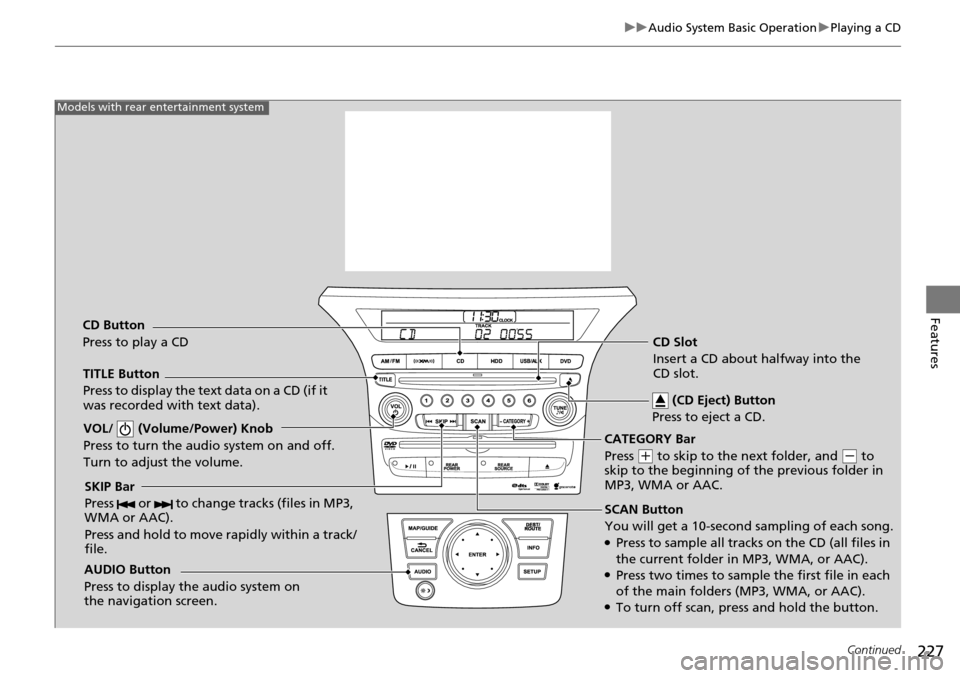
SCAN Button
You will get a 10-second sampling of each song.
●Press to sample all tracks on the CD (all files in
the current folder in MP3, WMA, or AAC).
●Press two times to sample the first file in each
of the main folders (MP3, WMA, or AAC).
●To turn off scan, pre ss and hold the button.
VOL/ (Volume/Power) Knob
Press to turn the audi
o system on and off.
Turn to adjust the volume.
SKIP Bar
Press or to change tracks (files in MP3,
WMA or AAC).
Press and hold to move rapidly within a track/
file.
TITLE Button
Press to display the text data on a CD (if it
was recorded with text data).
AUDIO Button
Press to display the audio system on
the navigation screen.
Models with rear entertainment system
CD Button
Press to play a CD CD Slot
Insert a CD about halfway into the
CD slot.
(CD Eject) Button
Press to eject a CD.
CATEGORY Bar
Press
(
+
to skip to the next folder, and (
-
to
skip to the beginning of the previous folder in
MP3, WMA or AAC.
Page 231 of 488
230
uu Audio System Basic Operation u Playing Hard Disc Drive (HDD) Audio
Features
Playing Hard Disc Drive (HDD) Audio
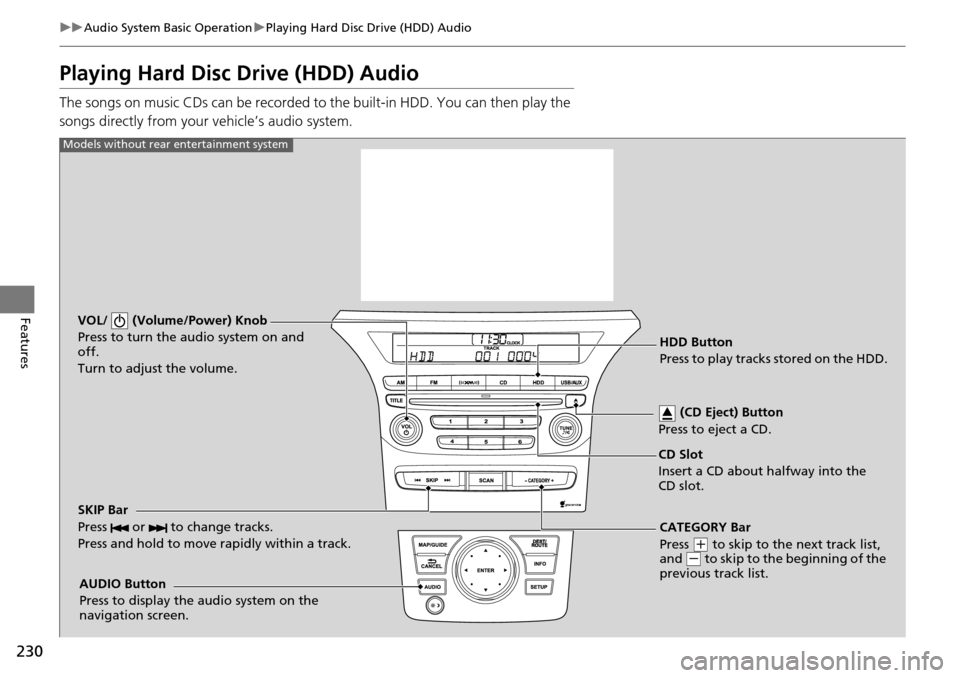
The songs on music CDs can be recorded to the built-in HDD. You can then play the
songs directly from your vehicle’s audio system.
VOL/ (Volume/Power) Knob
Press to turn the audio system on and
off.
Turn to adjust the volume.
HDD Button
Press to play tracks stored on the HDD.
AUDIO Button
Press to display the audio system on the
navigation screen.
Models without rear entertainment system
CD Slot
Insert a CD about halfway into the
CD slot. (CD Eject) Button
Press to eject a CD.
SKIP Bar
Press or to change tracks.
Press and hold to move rapidly within a track.
CATEGORY Bar
Press
(
+
to skip to the next track list,
and (
-
to skip to the beginning of the
previous track list.
Page 232 of 488
231
uu Audio System Basic Operation u Playing Hard Disc Drive (HDD) Audio
Continued
Features
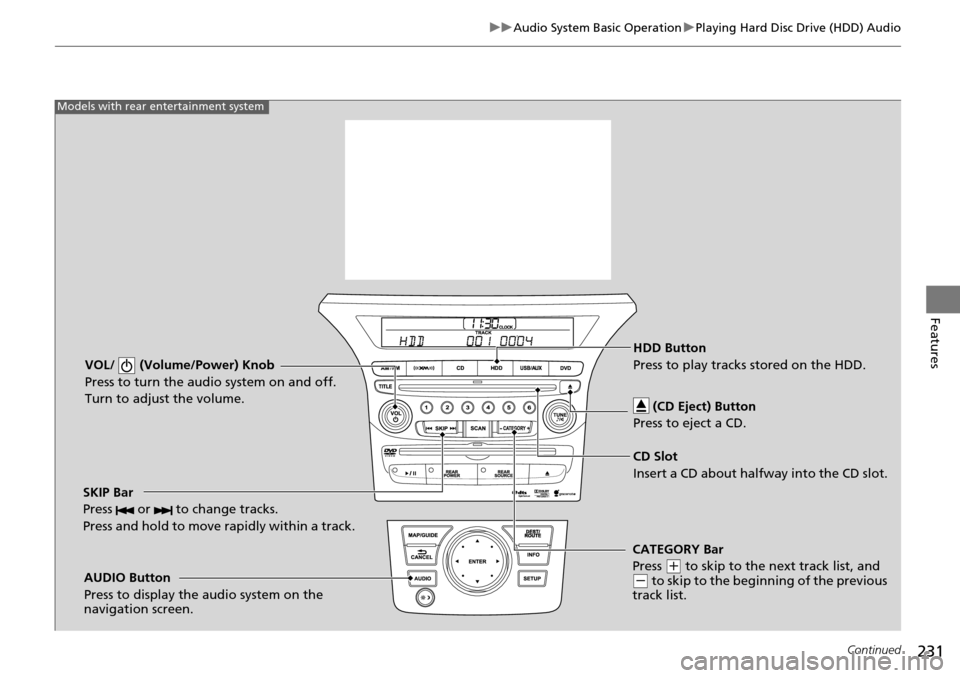
VOL/ (Volume/Power) Knob
Press to turn the audio system on and off.
Turn to adjust the volume.
SKIP Bar
Press or to change tracks.
Press and hold to move rapidly within a track.
AUDIO Button
Press to display the audio system on the
navigation screen.
Models with rear entertainment system
HDD Button
Press to play tracks stored on the HDD.
CD Slot
Insert a CD about halfway into the CD slot. (CD Eject) Button
Press to eject a CD.
CATEGORY Bar
Press
(
+
to skip to the next track list, and (
-
to skip to the begi nning of the previous
track list.
Page 241 of 488
240
uu Audio System Basic Operation u Playing an iPod ®
Features
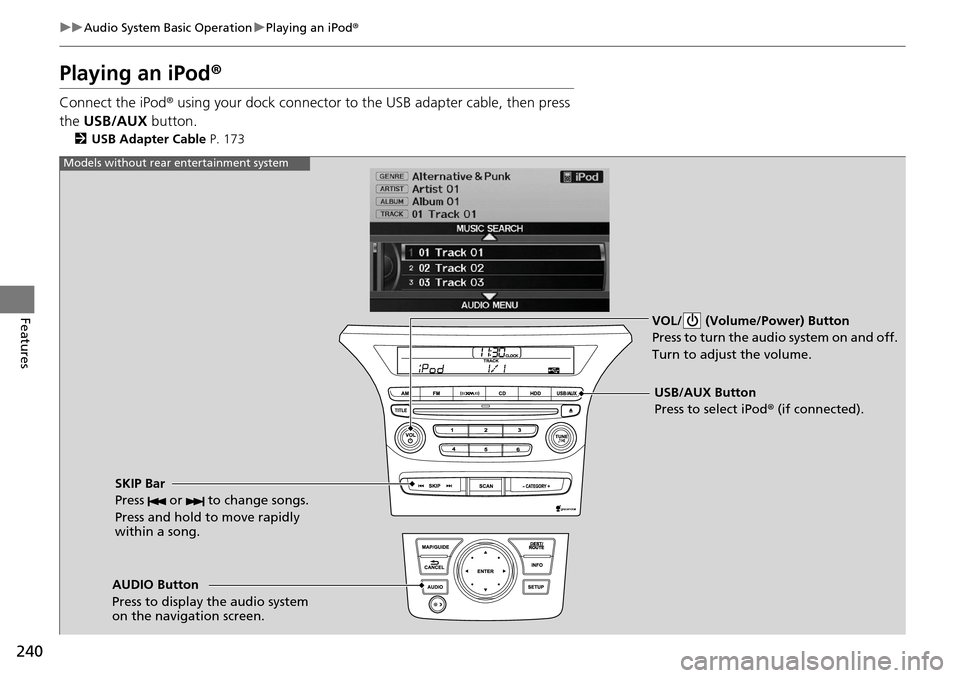
Playing an iPod ®
Connect the iPod ® using your dock connector to th e USB adapter cable, then press
the USB/AUX button.
2USB Adapter Cable P. 173
VOL/ (Volume/Power) Button
Press to turn the audio system on and off.
Turn to adjust the volume.
SKIP Bar
Press or to change songs.
Press and hold to move rapidly
within a song.
USB/AUX Button
Press to select iPod ® (if connected).
Models without rear entertainment system
AUDIO Button
Press to display the audio system
on the navigation screen.
Page 242 of 488
241
uu Audio System Basic Operation u Playing an iPod ®
Continued
Features
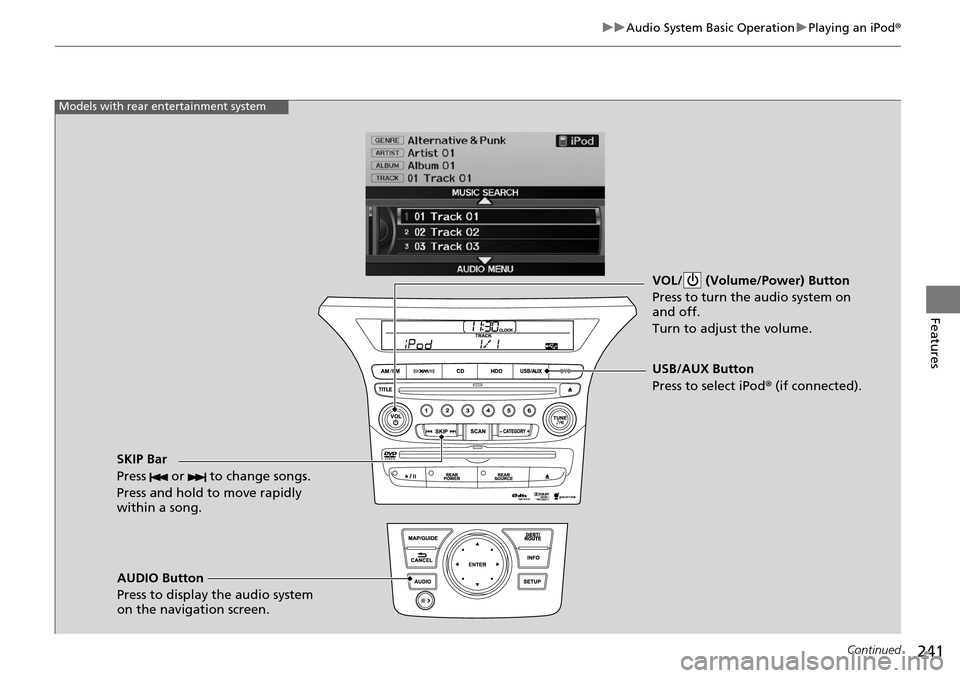
VOL/ (Volume/Power) Button
Press to turn the audio system on
and off.
Turn to adjust the volume.
SKIP Bar
Press or to change songs.
Press and hold to move rapidly
within a song.
AUDIO Button
Press to display the audio system
on the navigation screen. USB/AUX Button
Press to select iPod
® (if connected).
Models with rear entertainment system