replace HONDA PILOT 2014 2.G User Guide
[x] Cancel search | Manufacturer: HONDA, Model Year: 2014, Model line: PILOT, Model: HONDA PILOT 2014 2.GPages: 488, PDF Size: 12.11 MB
Page 75 of 488
74
uu Indicators u
Instrument Panel
IndicatorNameOn/BlinkingExplanationMessage *
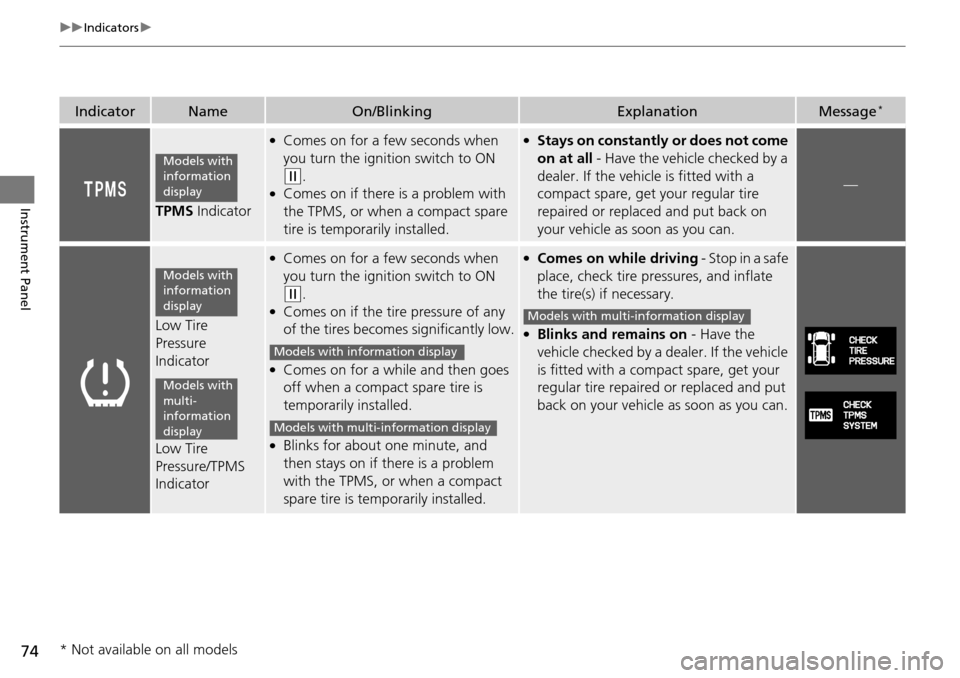
TPMS Indicator
●Comes on for a few seconds when
you turn the ignition switch to ON
(w
.●Comes on if there is a problem with
the TPMS, or when a compact spare
tire is temporarily installed.
●Stays on constantly or does not come
on at all
- Have the vehicle checked by a
dealer. If the vehicle is fitted with a
compact spare, get your regular tire
repaired or replaced and put back on
your vehicle as soon as you can.
—
Low Tire
Pressure
Indicator
Low Tire
Pressure/TPMS
Indicator
●Comes on for a few seconds when
you turn the ignition switch to ON
(w
.●Comes on if the tire pressure of any
of the tires becomes significantly low.
●Comes on for a while and then goes
off when a compact spare tire is
temporarily installed.
●Blinks for about one minute, and
then stays on if th ere is a problem
with the TPMS, or when a compact
spare tire is temporarily installed.
●Comes on while driving - Stop in a safe
place,
check tire pressures, and inflate
the tire(s) if necessary.
●Blinks and remains on - Have the
vehicle checked by a d ealer. If the vehicle
is fitted with a compact spare, get your
regular tire repaired or replaced and put
back on your vehicle as soon as you can.
Models with
information
display
Models with
information
display
Models with
multi-
information
display
Models with info rmation display
Models with multi- information display
Models with multi-information display
* Not available on all models
Page 101 of 488
uu Locking and Unlocking the Doors u Key Types and Functions
100
Controls
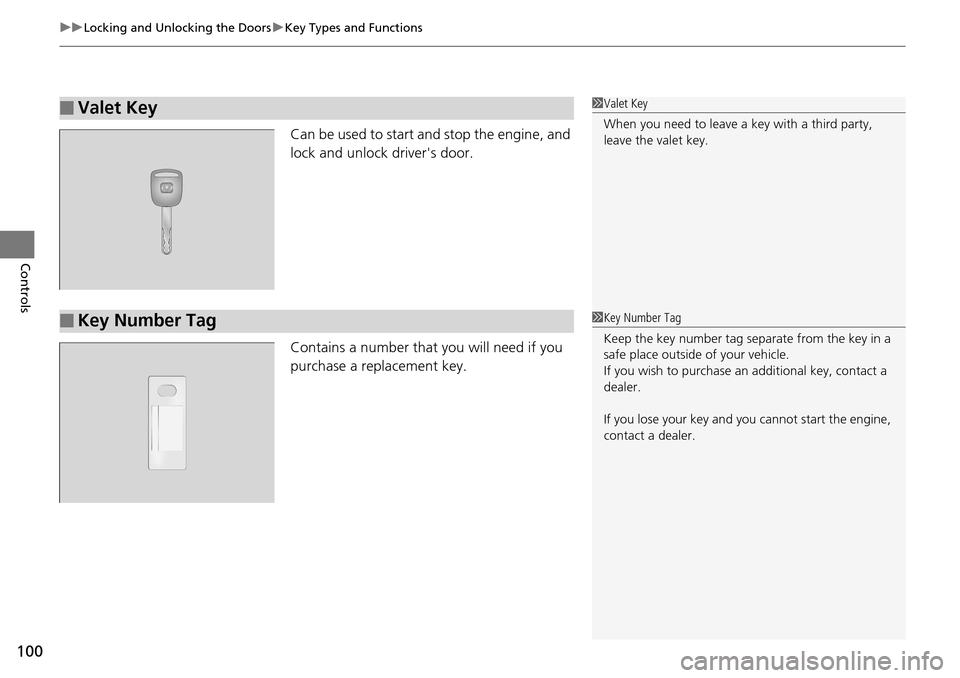
Can be used to start and stop the engine, and
lock and unlock driver's door.
Contains a number that you will need if you
purchase a replacement key.
■Valet Key1Valet Key
When you need to leave a key with a third party,
leave the valet key.
■Key Number Tag1Key Number Tag
Keep the key number tag separate from the key in a
safe place outside of your vehicle.
If you wish to purchase an additional key, contact a
dealer.
If you lose your key and you cannot start the engine,
contact a dealer.
Page 113 of 488
112
uu Opening and Closing the Tailgate u Opening/Closing the Power Tailgate *
Controls
Opening/Closing the Power Tailgate *
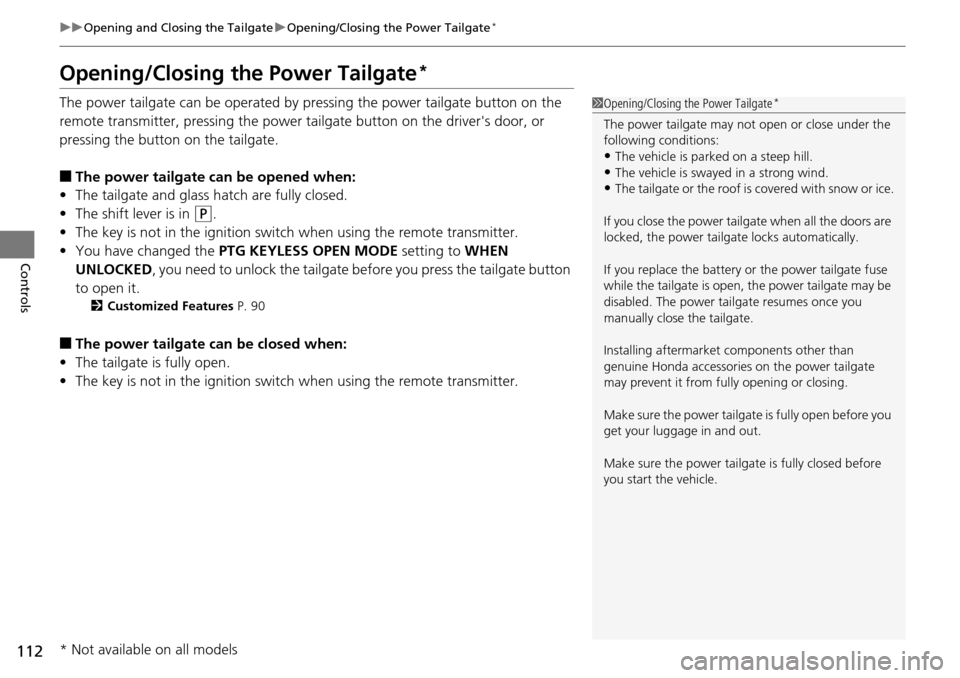
The power tailgate can be operated by pressing the power tailgate button on the
remote transmitter, pressing the power tailgate button on the driver's door, or
pressing the button on the tailgate.
■The power tailgate can be opened when:
• The tailgat
e and glass hatch are fully closed.
• The
shift lever is in (P
.
• The
key is not in the ignition switch when using the remote transmitter.
• You
have changed the PTG KEYLESS OPEN MODE setting to WHEN
UNLOCKED, you need to unlock the tailgate before you press the tailgate button
to open it.
2 Customized Features P. 90
■The power tailgate can be closed when:
• The tailgat
e is fully open.
• The
key is not in the ignition switch when using the remote transmitter.
1Opening/Closing the Power Tailgate *
The power tailgate may not open or close under the
following conditions:
•The vehicle is park ed on a steep hill.
•The vehicle is swayed in a strong wind.•The tailgate or the roof is covered with snow or ice.
If you close the power tail gate when all the doors are
locked, the power tailgate locks automatically.
If you replace the battery or the power tailgate fuse
while the tailgate is open, the power tailgate may be
disabled. The power tail gate resumes once you
manually close the tailgate.
Installing aftermarket components other than
genuine Honda a ccessories on the power tailgate
may prevent it from fully opening or closing.
Make sure the power tailgate is fully open before you
get your luggage in and out.
Make sure the power tailgate is fully closed before
you start the vehicle.
* Not available on all models
Page 120 of 488
119
uu Security System u Security System Alarm *
Controls
■Setting the security system alarm
The security system alarm automatically s
ets when the following conditions have
been met:
• The ign
ition switch is in LOCK (0
, and the key has been removed from the
ignition switch.
• The hoo
d and tailgate are closed.
•All d
oors, the tailgate, and the glass hatc h are locked with the key or the remote
transmitter.
■When the security system alarm sets
The security system alarm indicator in
the instrument panel blinks. When the
blinking interval changes after about 15 se conds, the security system alarm is set.
■To cancel the security system alarm
The security system alarm is canceled when the
vehicle is unlocked using the key or
remote transmitter. The security system al arm indicator goes off at the same time.
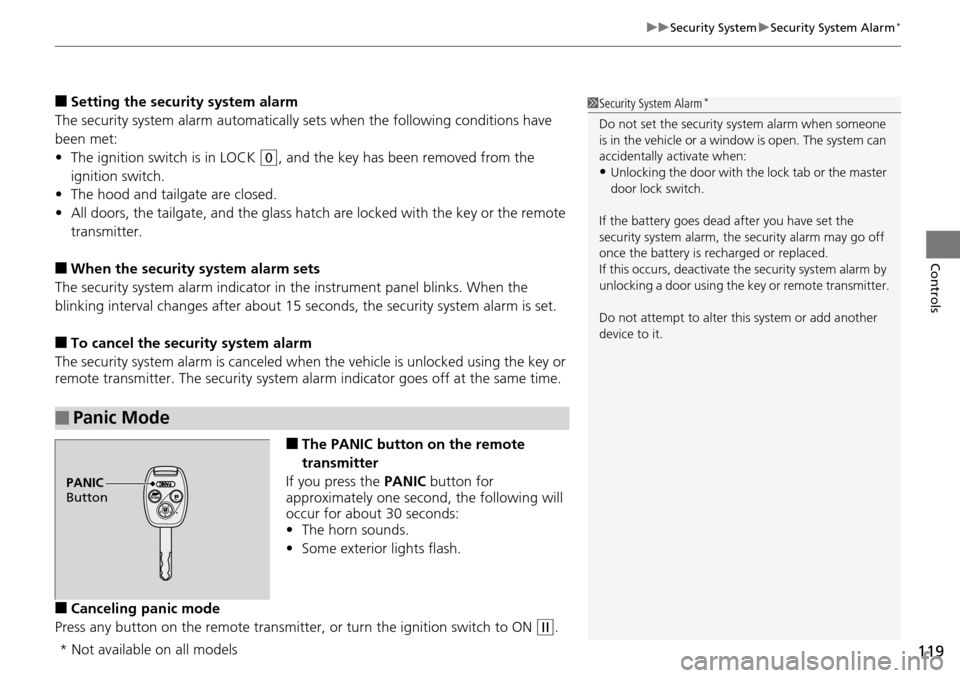
■The PANIC button on the remote
transmitter
If you press the PA
NIC button for
approximately one second, the following will
occur for about 30 seconds:
• The horn so
unds.
• Some
exterior lights flash.
■Canceling panic mode
Press any button on the remote transmitter, or t
urn the ignition switch to ON (w
.
■Panic Mode
1Security System Alarm *
Do not set the security system alarm when someone
is in the vehicle or a window is open. The system can
accidentally activate when:
•Unlocking the door with th e lock tab or the master
door lock switch.
If the battery goes dead after you have set the
security system alarm, the security alarm may go off
once the battery is re charged or replaced.
If this occurs, deactivate the security system alarm by
unlocking a door using the ke y or remote transmitter.
Do not attempt to alter th is system or add another
device to it.
PANIC
Button
* Not available on all models
Page 145 of 488
uu Adjusting the Seats u Adjusting the Seat Positions
144
Controls
Head restraints can be removed for cleaning or repair.
To remove a head restraint:
Pull the restraint up as far as it will go. T
hen push the release button, and pull the
restraint up and out.
To reinstall a head restraint:
Insert the legs back in place, then adjust the head restraint to an a
ppropriate height
while pressing the release button. Pull up on the restraint to make sure it is locked
in position.
After all occupants have adjusted their seats and head restraints, and put on their
seat
belts, it is very important that they continue to sit upright, well back in their
seats, with their feet on the floor, until the vehicle is safely parked and the engine is
off.
Sitting improperly can increase the chance of injury during a crash. For example, if
an oc
cupant slouches, lies down, turns si deways, sits forward, leans forward or
sideways, or puts one or both feet up, the chance of injury during a crash is greatly
increased.
In addition, an occupant who is out of position in the front seat can be seriously or
fatally
injured in a crash by striking interior parts of the vehicle or being struck by an
inflating front airbag.
■Removing and Reinstalling the Head Restraints
■Maintain a Proper Sitting Position
1 Removing and Reinstalling the Head Restraints
3 WARNING
Failure to reinstall, or correctly reinstall, the
head restraints can result in severe injury
during a crash.
Always replace the he ad restraints before
driving.
1 Maintain a Proper Sitting Position
3 WARNING
Sitting improperly or out of position can
result in serious injury or death in a crash.
Always sit upright, well back in the seat,
with your feet on the floor.
Page 174 of 488
173
uu Audio System u USB Adapter Cable
Features
USB Adapter Cable
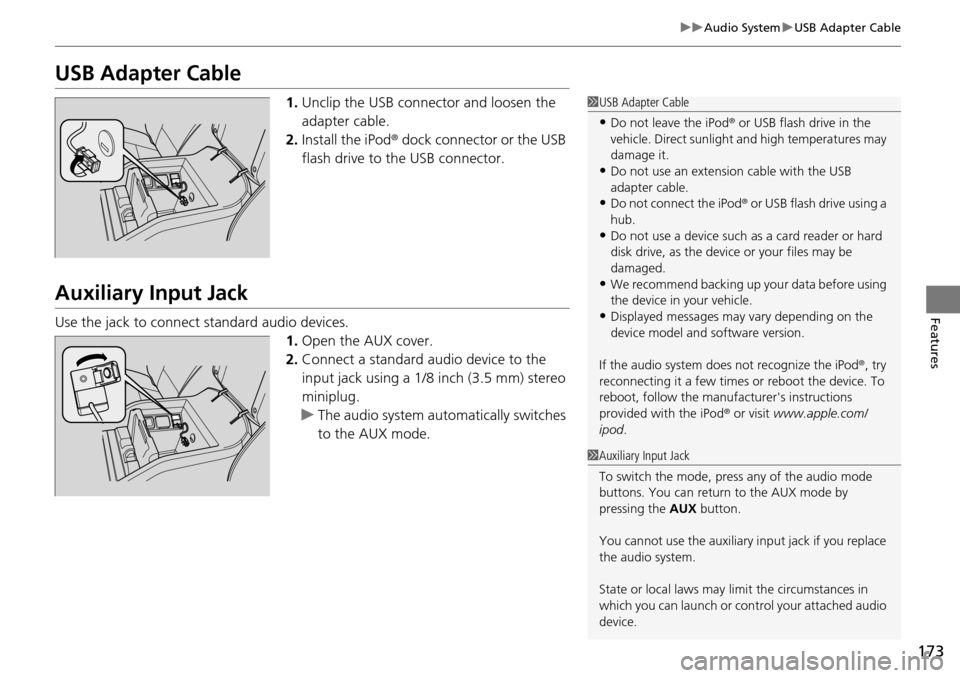
1. Unclip the USB connec tor and loosen the
adapter cable.
2. In
stall the iPod® dock connector or the USB
flash drive to the USB connector.
Auxiliary Input Jack
Use the jack to connect standard audio devices. 1.Open
the AUX cover.
2.Connect
a standard audio device to the
input jack using a 1/8 inch (3.5 mm) stereo
miniplug.
u The
audio system auto matically switches
to the AUX mode.
1 USB Adapter Cable
•Do not leave the iPod ® or USB flash drive in the
vehicle. Direct sunlight and high temperatures may
damage it.
•Do not use an extension cable with the USB
adapter cable.
•Do not connect the iPod ® or USB flash drive using a
hub.
•Do not use a device such as a card reader or hard
disk drive, as the device or your files may be
damaged.
•We recommend backing up yo ur data before using
the device in your vehicle.
•Displayed messages may vary depending on the
device model and software version.
If the audio system does not recognize the iPod®, try
reconnecting it a few times or reboot the device. To
reboot, follow the manufac turer's instructions
provided with the iPod ® or visit www.apple.com/
ipod .
1Auxiliary Input Jack
To switch the mode, pres s any of the audio mode
buttons. You can return to the AUX mode by
pressing the AUX button.
You cannot use the auxiliary input jack if you replace
the audio system.
State or local laws may li mit the circumstances in
which you can launch or cont rol your attached audio
device.
Page 201 of 488
200
uu Audio System Basic Operation u Playing CD Library
Features
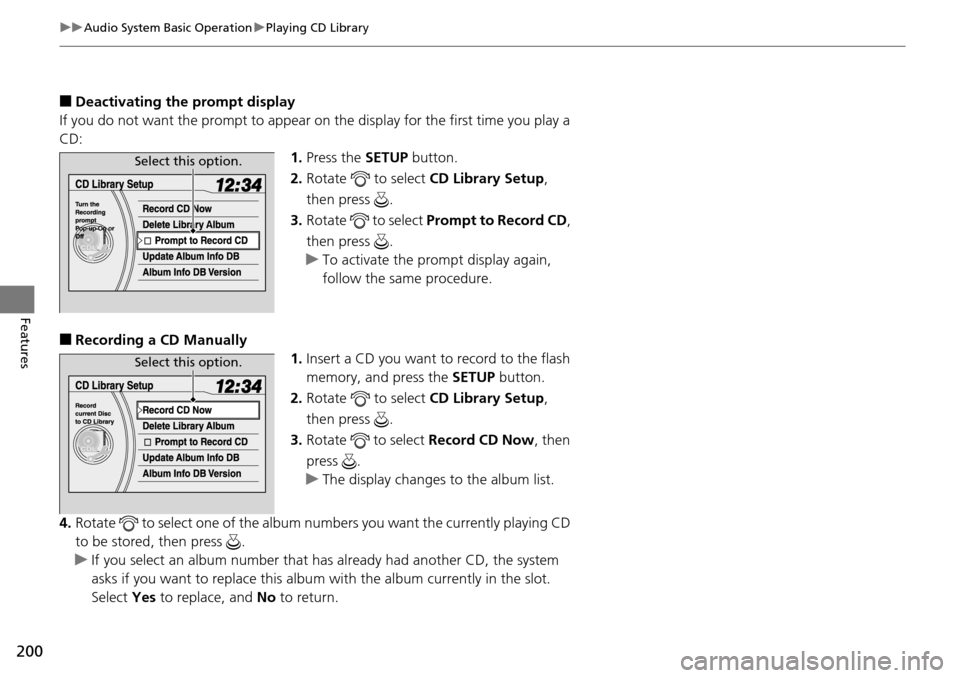
■Deactivating the prompt display
If you do not want the prompt to appear on the display for the first time you play a
CD: 1.Press the SET
UP button.
2. Ro
tate to select CD L ibrary Setup,
then press .
3. Ro
tate to select Prompt to Record CD ,
then press .
u T
o activate the prompt display again,
follow the same procedure.
■Recording a CD Manually 1.Insert a CD
you want to record to the flash
memory, and press the SETUP button.
2. Ro
tate to select CD L ibrary Setup,
then press .
3. Ro
tate to select Re cord CD Now , then
press .
u T
he display changes to the album list.
4. Rotate
to select one of the album numbers you want the currently playing CD
to be stored, then press .
u If y
ou select an album number that ha s already had another CD, the system
asks if you want to replace this albu m with the album currently in the slot.
Select Yes to replace, and No to return.
Select this option.
Select this option.
Page 278 of 488
277
uu HomeLink ® Universal Transceiver * u Training HomeLink
Features
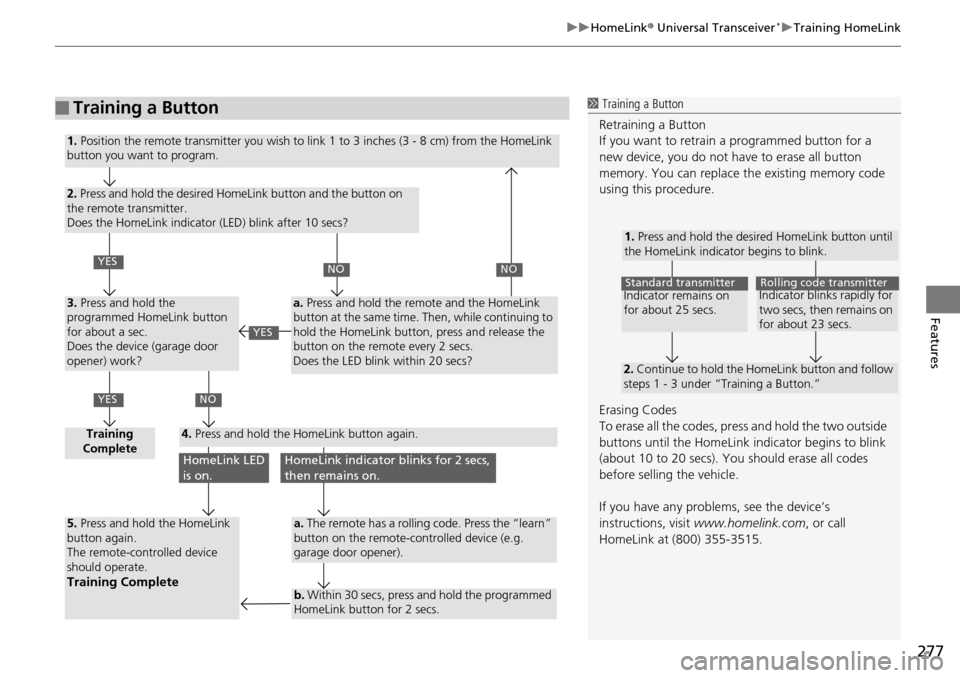
■Training a Button1 Training a Button
Retraining a Button
If you want to retrain a programmed button for a
new device, you do not ha ve to erase all button
memory. You can replace the existing memory code
using this procedure.
Erasing Codes
To erase all the codes, press and hold the two outside
buttons until the HomeLink i ndicator begins to blink
(about 10 to 20 secs). You should erase all codes
before selling the vehicle.
If you have any problems, see the device’s
instructions, visit www.homelink.com , or call
HomeLink at (800) 355-3515.
1. Press and hold the desired HomeLink button until
the HomeLink indicator begins to blink.
2. Continue to hold the HomeLink button and follow
steps 1 - 3 under “Training a Button.”
Indicator remains on
for about 25 secs.Standard transmitterIndicator blinks rapidly for
two secs, then remains on
for about 23 secs.Rolling code transmitter
1. Position the remote transmitter you wish to link 1 to 3 inches (3 - 8 cm) from the HomeLink
button you want to program.
2. Press and hold the desired HomeLink button and the button on
the remote transmitter.
Does the HomeLink indicator (LED) blink after 10 secs?
3. Press and hold the
programmed HomeLink button
for about a sec.
Does the device (garage door
opener) work?
Training
Complete4. Press and hold the HomeLink button again.
5. Press and hold the HomeLink
button again.
The remote-controlled device
should operate.
Training Complete
a. Press and hold the remote and the HomeLink
button at the same time. Then, while continuing to
hold the HomeLink button, press and release the
button on the remote every 2 secs.
Does the LED blink within 20 secs?
a. The remote has a rolling code. Press the “learn”
button on the remote-controlled device (e.g.
garage door opener).
b. Within 30 secs, press and hold the programmed
HomeLink button for 2 secs.
YES
YES
NONO
NO
HomeLink LED
is on.HomeLink indicator blinks for 2 secs,
then remains on.
YES
Page 344 of 488
343
uu When Driving u Starting the Engine
Driving
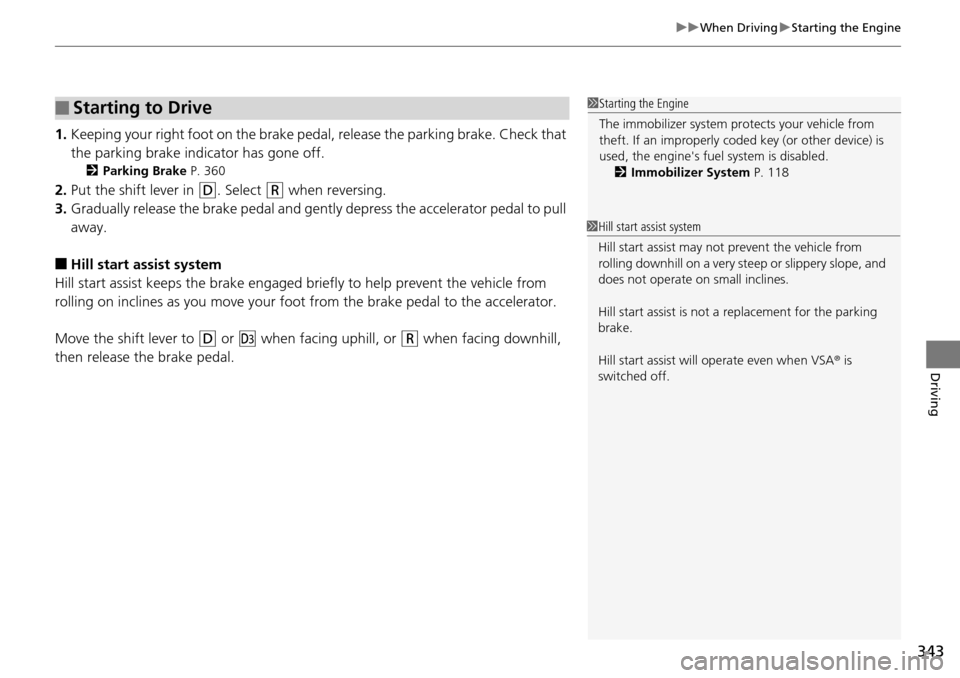
1. Keeping your right foot on the brake pedal, release the parking brake. Check that
the parking brake indicator has gone off.
2 Parking Brake P. 360
2. Put the shift lever in (D
. Select (R
when reversing.
3. Gradua
lly release the brake pedal and gently depress the accelerator pedal to pull
away.
■Hill start assist system
Hill start assist keeps the brake engaged br iefly to
help prevent the vehicle from
rolling on inclines as you move your foot from the brake pedal to the accelerator.
Move the shift lever to
(D
or (d
when facing uphill, or (R
when facing downhill,
then release the brake pedal.
■Starting to Drive1 Starting the Engine
The immobilizer system pr otects your vehicle from
theft. If an improperly code d key (or other device) is
used, the engine's fuel system is disabled.
2 Immobilizer System P. 118
1Hill start assist system
Hill start assist may not prevent the vehicle from
rolling downhill on a very st eep or slippery slope, and
does not operate on small inclines.
Hill start assist is not a replacement for the parking
brake.
Hill start assist will operate even when VSA ® is
switched off.
Page 345 of 488
344
uu When Driving u Precautions While Driving
Driving
Precautions While Driving
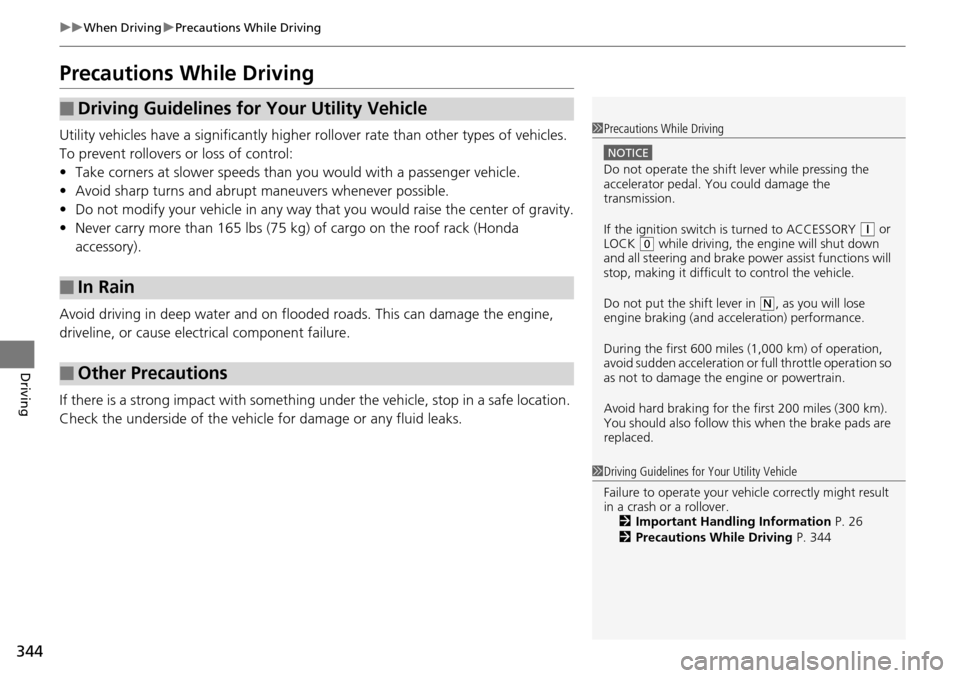
Utility vehicles have a significantly higher rollover rate than other types of vehicles.
To prevent rollovers or loss of control:
• Take corne
rs at slower speeds than yo u would with a passenger vehicle.
• Av
oid sharp turns and abrupt maneuvers whenever possible.
•Do
not modify your vehicle in any way that you would raise the center of gravity.
•Never
carry more than 165 lbs (75 kg ) of cargo on the roof rack (Honda
accessory).
Avoid driving in deep water and on flooded roads. This can damage the engine,
driv
eline, or cause electrical component failure.
If there is a strong impact with something u
nder the vehicle, stop in a safe location.
Check the underside of the vehicle for damage or any fluid leaks.
■Driving Guidelines for Your Utility Vehicle
■In Rain
■Other Precautions
1 Driving Guidelines for Your Utility Vehicle
Failure to operate your vehi cle correctly might result
in a crash or a rollover. 2 Important Handling Information P. 26
2 Precautions While Driving P. 344
1Precautions While Driving
NOTICE
Do not operate the shift lever while pressing the
accelerator pedal. You could damage the
transmission.
If the ignition switch is turned to ACCESSORY
(
q
or
LOCK (
0
while driving, the e ngine will shut down
and all steering and brake pow er assist functions will
stop, making it difficult to control the vehicle.
Do not put the shift lever in
(
N
, as you will lose
engine braking (and acce leration) performance.
During the first 600 miles (1,000 km) of operation,
avoid sudden acceleration or full throttle operation so
as not to damage the engine or powertrain.
Avoid hard braking for the first 200 miles (300 km).
You should also follow this when the brake pads are
replaced.