light HONDA PILOT 2014 2.G Workshop Manual
[x] Cancel search | Manufacturer: HONDA, Model Year: 2014, Model line: PILOT, Model: HONDA PILOT 2014 2.GPages: 488, PDF Size: 12.11 MB
Page 262 of 488
261
uu Rear Entertainment System * u Operating the System
Continued
Features
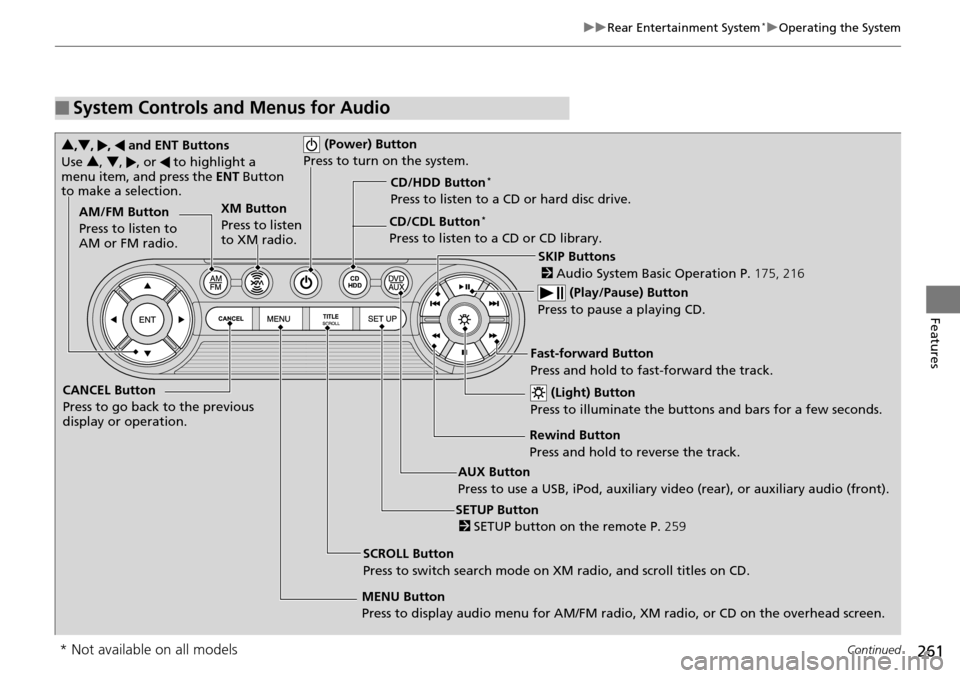
■System Controls and Menus for Audio
(Power) Button
Press to turn on the system.
AUX Button
Press to use a USB, iPod, auxiliary video (rear), or auxiliary audio (front). (Light) Button
Press to illuminate the buttons and bars for a few seconds.
SKIP Buttons
2 Audio System Basic Operation P. 175, 216
(Play/Pause) Button
Press to pause a playing CD.
SCROLL Button
Press to switch search mode on XM radio, and scroll titles on CD.
CANCEL Button
Press to go back to the previous
display or operation.
3
,4 , , and ENT Buttons
Use 3, 4 , , or to highlight a
menu item, and press the ENT Button
to make a selection.
CD/CDL Button *
Press to listen to a CD or CD library.
AM/FM Button
Press to listen to
AM or FM radio.
SETUP Button
2 SETUP button on the remote P. 259
XM Button
Press to listen
to XM radio.
MENU Button
Press to display audio menu for AM/FM radio, XM radio, or CD on the overhead screen.CD/HDD Button
*
Press to listen to a CD or hard disc drive.
Rewind Button
Press and hold to reverse the track.Fast-forward Button
Press and hold to fast-forward the track.
* Not available on all models
Page 275 of 488
uu General Information on the Audio System u Recommended CDs
274
Features
■Protecting CDs
Follow these precautions when handling or storing CDs:
• Store a
CD in its case when it is not being played.
•W
hen wiping a CD, use a soft clean cloth from the center to the outside edge.
•Handle
a CD by its edge. Never touch either surface.
•Never
insert foreign objects into the CD player.
•Keep C
Ds out of direct sunlight and extreme heat.
•Do not place
stabilizer rings or labels on the CD.
• Avoid fingerprints,
liquids, and felt-tip pens on the CD.
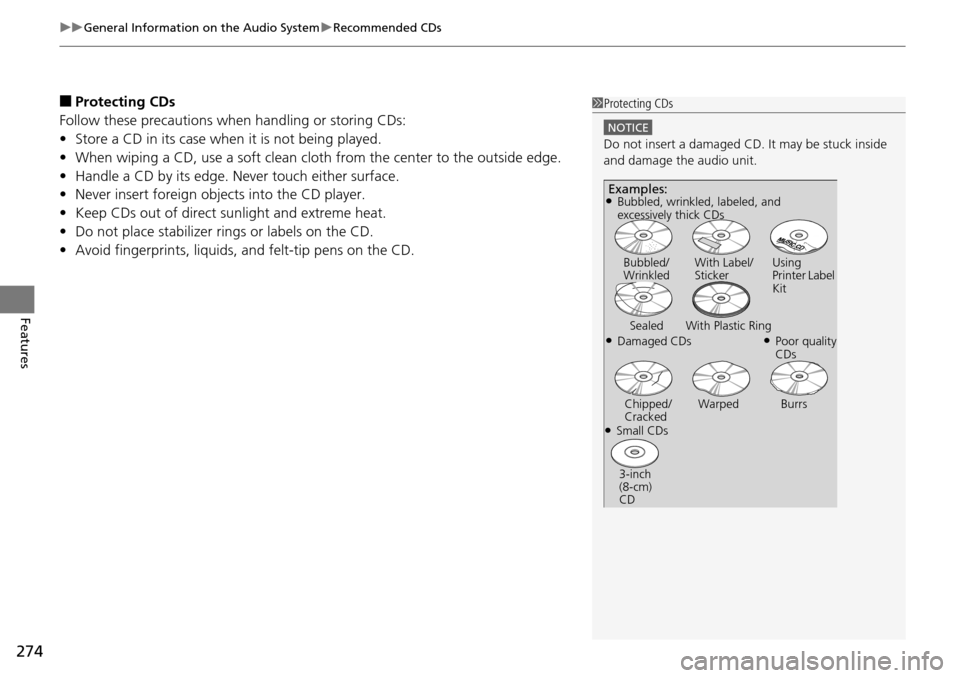
1Protecting CDs
NOTICE
Do not insert a damaged CD. It may be stuck inside
and damage the audio unit.
Examples:
●Damaged CDs Bubbled/
Wrinkled
With Label/
Sticker Using
Printer Label
Kit
Sealed With Plastic Ring●Poor quality
CDs
Chipped/
Cracked Warped Burrs
●Small CDs
3-inch
(8-cm)
CD
●Bubbled, wrinkled, labeled, and
excessively thick CDs
Page 277 of 488
276
Features
HomeLink® Universal Transceiver *
The HomeLink ® Universal Transceiver can be pr ogrammed to operate up to three
remote controlled devices around your home , such as garage doors, lighting, or
home security systems.
Refer to the safety information that comes wi th you
r garage door opener to test that
the safety features are functioning properly. If you do not have the safety
information, contac t the manufacturer.
Before programming HomeLink, make sure th at
people and objects are out of the
way of the garage or gate to prevent potential injury or damage.
When programming a garage door opener, park
just outside the garage door’s
path.
Training HomeLink
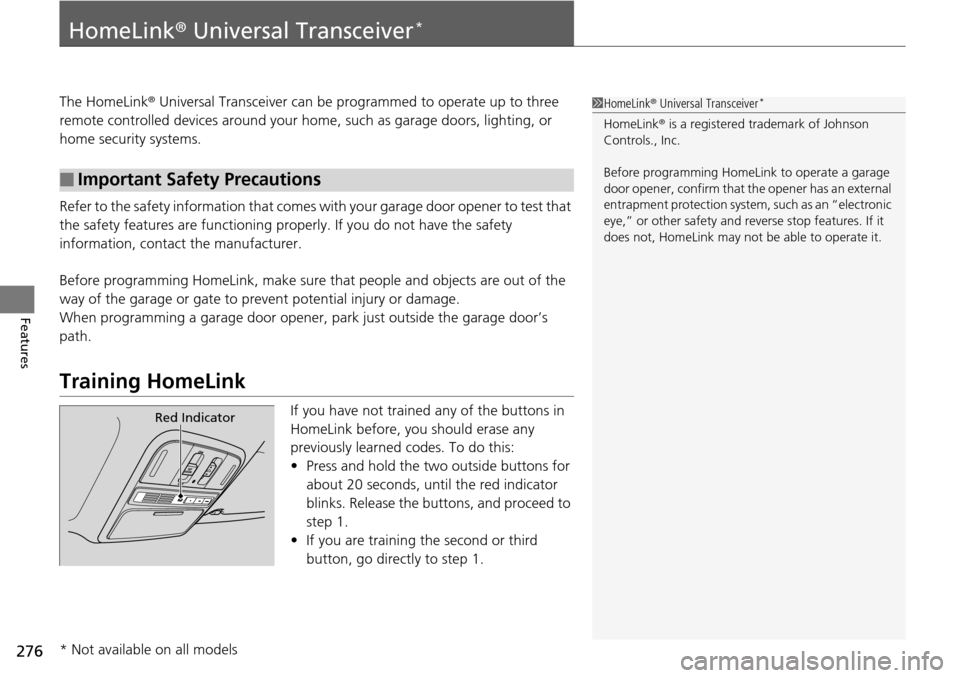
If you have not trained any of the buttons in
HomeLink before, you should erase any
previously learned codes. To do this:
• Press and
hold the two outside buttons for
about 20 seconds, until the red indicator
blinks. Release the bu ttons, and proceed to
step 1.
• If y
ou are training the second or third
button, go directly to step 1.
■Important Safety Precautions
1HomeLink ® Universal Transceiver *
HomeLink® is a registered tra demark of Johnson
Controls., Inc.
Before programming HomeLi nk to operate a garage
door opener, confirm that the opener has an external
entrapment protection system, such as an “electronic
eye,” or other safety and reverse stop features. If it
does not, HomeLink may not be able to operate it.
Red Indicator
* Not available on all models
Page 325 of 488
324
Driving
Before Driving
Driving Preparation
Check the following items before you start driving.
• Make sure there
are no obstructions on the windows, door mirrors, exterior
lights, or other parts of the vehicle.
u Remove
any frost, snow, or ice.
uRemove any sno
w on the roof, as this can slip down and obstruct your field of
vision while driving. If frozen solid , remove ice once it has softened.
u When r
emoving ice from around the wheels, be sure not to damage the wheel
or wheel components.
• Make sure the hood
is securely closed.
u If
the hood opens while driving, your front view will be blocked.
• Make sure the t
ires are in good condition.
u Check air
pressures, and check for damage and excessive wear.
2Checking and Maintaining Tires P. 414
• Make sure there are no people or ob jects behind or around the vehicle.
u There are blind
spots from the inside.
■Exterior Checks1Exterior Checks
NOTICE
When doors are frozen s hut, use warm water around
the door edges to melt any ice. Do not try to force
them open, as this can damage the rubber trim
around the doors. When done, wipe dry to avoid
further freezing.
Do not pour warm water into the key cylinder.
You will be unable to insert key if the water freezes in
the hole.
Heat from the engine and exhaust can ignite
flammable material s left under the hood, causing a
fire. If you've parked y our vehicle for an extended
period, inspect and remove any debris that may have
collected, such as dried grass and leaves that have
fallen or have been carried in for use as a nest by a
small animal. Also check under the hood for leftover
flammable materials after you or someone else has
performed maintenance on your vehicle.
Page 326 of 488
Continued325
uu Before Driving u Driving Preparation
Driving
• Store or secure all items on board properly.
u Carrying too much cargo, or improperly storing it, can affect your vehicle's
handling, stability, sto pping distance, and tires, and make it unsafe.
2Maximum Load Limit P. 327
• Do not pile items higher than the seat height.
u Th
ey can block your view and may be thrown forward in the event of sudden
braking.
• Do not pla
ce anything in the front seat footwells. Make sure to secure the floor
mat.
u An object or unsecured floor m
at can interfere with your brake and accelerator
pedal operation while driving.
• If yo
u have any animals on board, do not let them move around in the vehicle.
u Th
ey may interfere with driving and a crash could occur.
• Secure
ly close and lock al l doors and the tailgate.
2Locking/Unlocking the Doors from the Inside P. 103
• Adjust your seating position properly.
u Adjust the head re
straint, too.
2Adjusting the Seats P. 137
2 Adjusting the Head Restraints P. 141
•Adjust the mirrors and steering wh eel properly for your driving.
u Ad
just them while sitting in the proper driving position.
2 Adjusting the Steering Wheel P. 134
2 Adjusting the Mirrors P. 135
■Interior Checks1Interior Checks
The headlight aim is set by the factory, and does not
need to be adjusted. Howeve r, if you regularly carry
heavy items in the cargo area or tow a trailer, have
the aiming readjusted at a dealer or by a qualified
technician.
Page 334 of 488
Continued333
uu Towing a Trailer u Towing Preparation
Driving
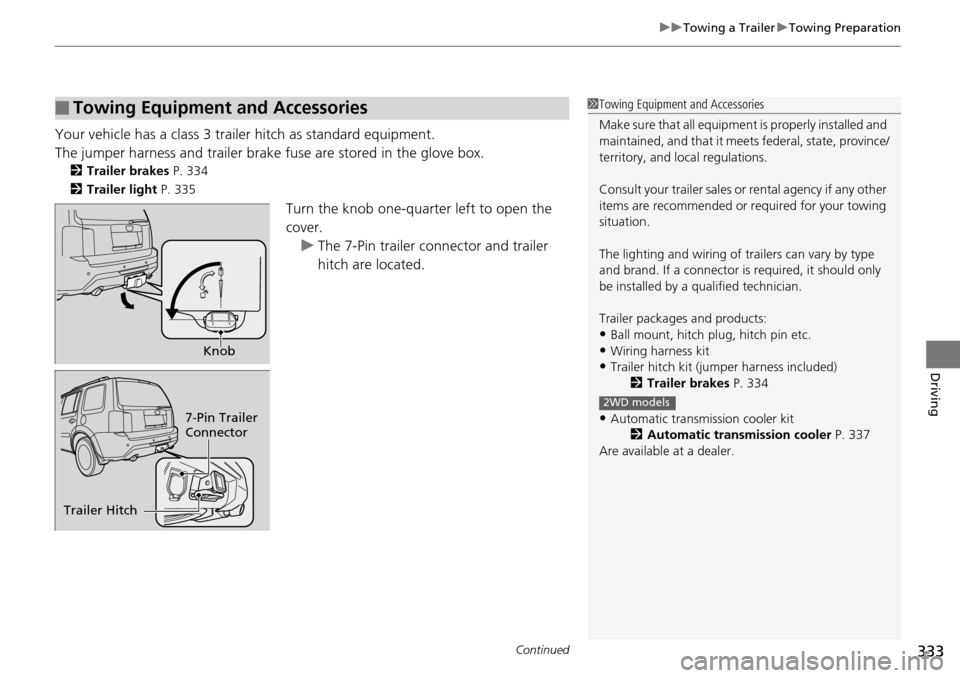
Your vehicle has a class 3 trailer hitch as standard equipment.
The jumper harness and trailer brake fuse are stored in the glove box.
2Trailer brakes P. 334
2 Trailer light P. 335
Turn the knob one-quarter left to open the
cover.
u Th
e 7-Pin trailer connector and trailer
hitch are located.
■Towing Equipment and Accessories1Towing Equipment and Accessories
Make sure that all equipment is properly installed and
maintained, and that it meets federal, state, province/
territory, and lo cal regulations.
Consult your traile r sales or rental agency if any other
items are recommended or required for your towing
situation.
The lighting and wiring of tra ilers can vary by type
and brand. If a connector is required, it should only
be installed by a qua lified technician.
Trailer packages and products:
•Ball mount, hitch plug, hitch pin etc.
•Wiring harness kit•Trailer hitch kit (jum per harness included)
2 Trailer brakes P. 334
•Automatic transmission cooler kit
2Automatic transmission cooler P. 337
Are available at a dealer.
2WD models
Knob
7-Pin Trailer
Connector
Trailer Hitch
Page 335 of 488
uu Towing a Trailer u Towing Preparation
334
Driving
■Trailer brakes
Recommended for any trailer with a total weight of 1,000 lbs (450 kg) or more:
There are two common types of trailer brake s:
surge and electric. Surge brakes are
common for boat trailers, since the brakes will get wet.
If you choose electric brakes, be sure they
are electronically actuated. Do not
attempt to attach trailer brakes to your ve hicle's hydraulic system, as it will lower
braking effectiveness and create a potential hazard.
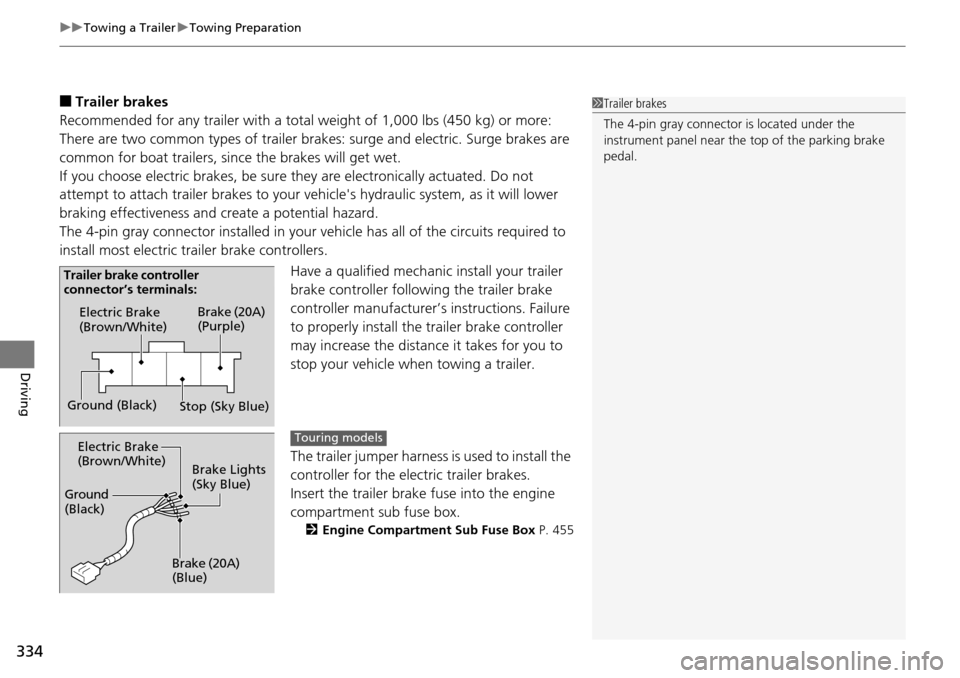
The 4-pin gray connector installed in your vehicle has all of the circuits required to
install m
ost electric trailer brake controllers.
Have a qualified mechanic install your trailer
brake controller following
the trailer brake
controller manufacturer’s instructions. Failure
to properly install the trailer brake controller
may increase the distance it takes for you to
stop your vehicle when towing a trailer.
The trailer jumper harness i
s used to install the
controller for the electric trailer brakes.
Insert the trailer brake fuse into the engine
co
mpartment sub fuse box.
2 Engine Compartment Sub Fuse Box P. 455
1Trailer brakes
The 4-pin gray connector is located under the
instrument panel near the top of the parking brake
pedal.
Electric Brake
(Brown/White)
Ground (Black) Brake (20A)
(Purple)
Stop (Sky Blue)
Trailer brake controller
connector’s terminals:
Electric Brake
(Brown/White)
Ground
(Black)
Brake (20A)
(Blue)Brake Lights
(Sky Blue)Touring models
Page 336 of 488
Continued335
uu Towing a Trailer u Towing Preparation
Driving
■Trailer light
Trailer lights and equipment must comply with federal, sta
te, province/territory, and
local regulations. Check with your local trailer sales or rental agency for the
requirements in the area where you plan to tow.
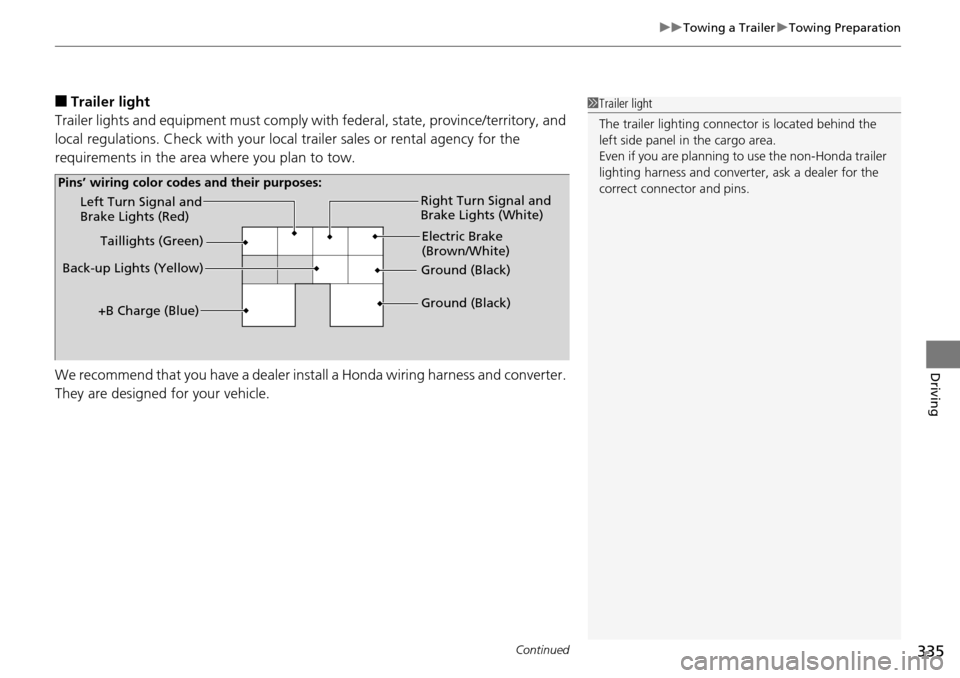
We recommend that you have a dealer inst all
a Honda wiring harness and converter.
They are designed for your vehicle.
1 Trailer light
The trailer lighting connect or is located behind the
left side panel in the cargo area.
Even if you are planning to use the non-Honda trailer
lighting harness and converte r, ask a dealer for the
correct connector and pins.
Left Turn Signal and
Brake Lights (Red)
Back-up Lights (Yellow) Electric Brake
(Brown/White)
Right Turn Signal and
Brake Lights (White)
Ground (Black)
Ground (Black)
Taillights (Green)
+B Charge (Blue)
Pins’ wiring color codes and their purposes:
Page 337 of 488
336
uu Towing a Trailer u Towing Preparation
Driving
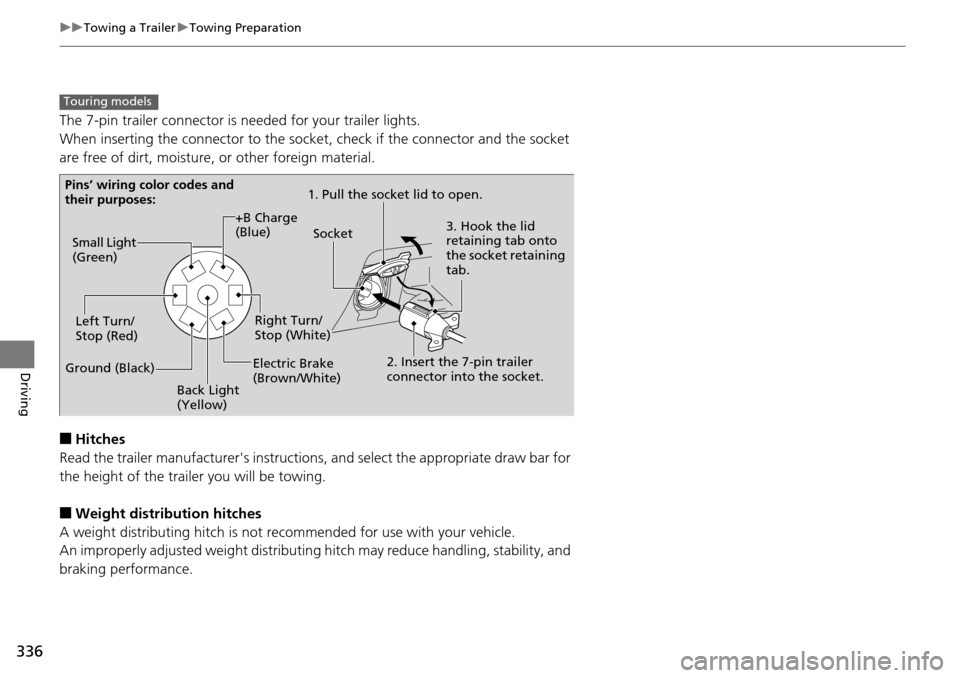
The 7-pin trailer connector is needed for your trailer lights.
When inserting the connector to the socket, check if the connector and the socket
are free of dirt, moisture, or other foreign material.
■Hitches
Read the trailer manufacturer's instructions , and select the appr
opriate draw bar for
the height of the trailer you will be towing.
■Weight distribution hitches
A weight distributing hitch is not recommended for use with your vehicle.
An improperly adjusted weight distributin g hitc
h may reduce handling, stability, and
braking performance.
Touring models
Pins’ wiring color codes and
their purposes: 1. Pull the socket lid to open.
3. Hook the lid
retaining tab onto
the socket retaining
tab.
2. Insert the 7-pin trailer
connector into the socket.
Socket
Back Light
(Yellow)
Left Turn/
Stop (Red)
Electric Brake
(Brown/White)Right Turn/
Stop (White)
Ground (Black) Small Light
(Green)
+B Charge
(Blue)
Page 339 of 488
338
uu Towing a Trailer u Driving Safely with a Trailer
Driving
Driving Safely with a Trailer
• Have the trailer properly serviced and keep it in good condition.
• Make sure that
all the weights and load in the vehicle and trailer are within limits.
2Towing Load Limits P. 329
• When towing more than 3,500lbs (1,590 kg), use of gasoline with a pump octane
number of 91 or higher is recommended.
u Towi
ng performance can be affected by high altitude, high temperature, or
steep uphill.
• Securely attach the hitch,
safety chains, and other necessary parts to the trailer.
• Securely stor
e all the items in and on the tr ailer so that they do not shift while
driving.
• Che
ck if the lights and brakes on the trailer are working properly.
• Che
ck the pressures of the traile r tires, including the spare.
• Drive slower than norm
al.
• Obey poste
d speed limits for vehicles with trailers.
• Use the
(D
position when towing a trailer on level roads.
• Turn
more slowly and with a wider turning arc than normal.
•Allow more
time and distance for braking.
• Do
not brake or turn suddenly.
■Things You Need To Know Before Towing a Trailer
■Towing Speeds and Gears
■Turning and Braking
1Driving Safely with a Trailer
Parking
In addition to the normal precautions, place wheel
chocks at each of the trailer's tires.