ad blue HONDA PILOT 2015 2.G Navigation Manual
[x] Cancel search | Manufacturer: HONDA, Model Year: 2015, Model line: PILOT, Model: HONDA PILOT 2015 2.GPages: 175, PDF Size: 5.87 MB
Page 60 of 175
60
Navigation System
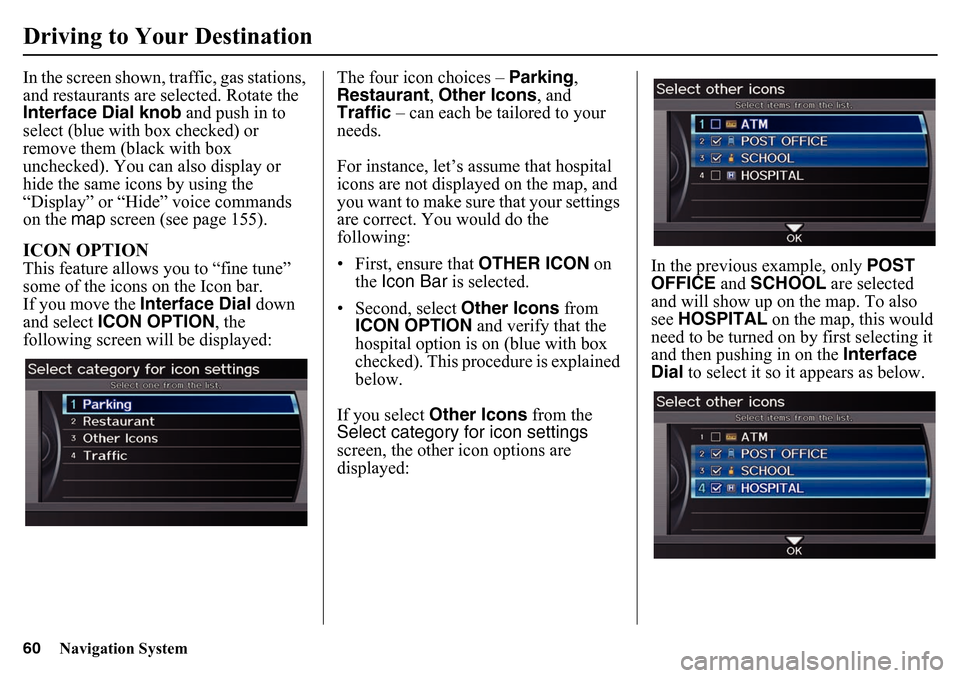
Driving to Your DestinationIn the screen shown, traffic, gas stations,
and restaurants are selected. Rotate the
Interface Dial knob and push in to
select (blue with box checked) or
remove them (black with box
unchecked). You can also display or
hide the same icons by using the
“Display” or “Hide” voice commands
on the map screen (see page 155).ICON OPTIONThis feature allows you to “fine tune”
some of the icons on the Icon bar.
If you move the Interface Dial down
and select ICON OPTION , the
following screen will be displayed: The four icon choices – Parking,
Restaurant
, Other Icons , and
Traffic – can each be tailored to your
needs.
For instance, let’s assume that hospital
icons are not displayed on the map, and
you want to make sure that your settings
are correct. You would do the
following:
• First, ensure that OTHER ICON on
the Icon Bar is selected.
• Second, select Other Icons from
ICON OPTION and verify that the
hospital option is on (blue with box
checked). This procedure is explained
below.
If you select Other Icons from the
Select category for icon settings
screen, the other icon options are
displayed: In the previous example, only
POST
OFFICE and SCHOOL are selected
and will show up on the map. To also
see HOSPITAL on the map, this would
need to be turned on by first selecting it
and then pushing in on the Interface
Dial to select it so it appears as below.
Page 85 of 175
Navigation System85Phone Features
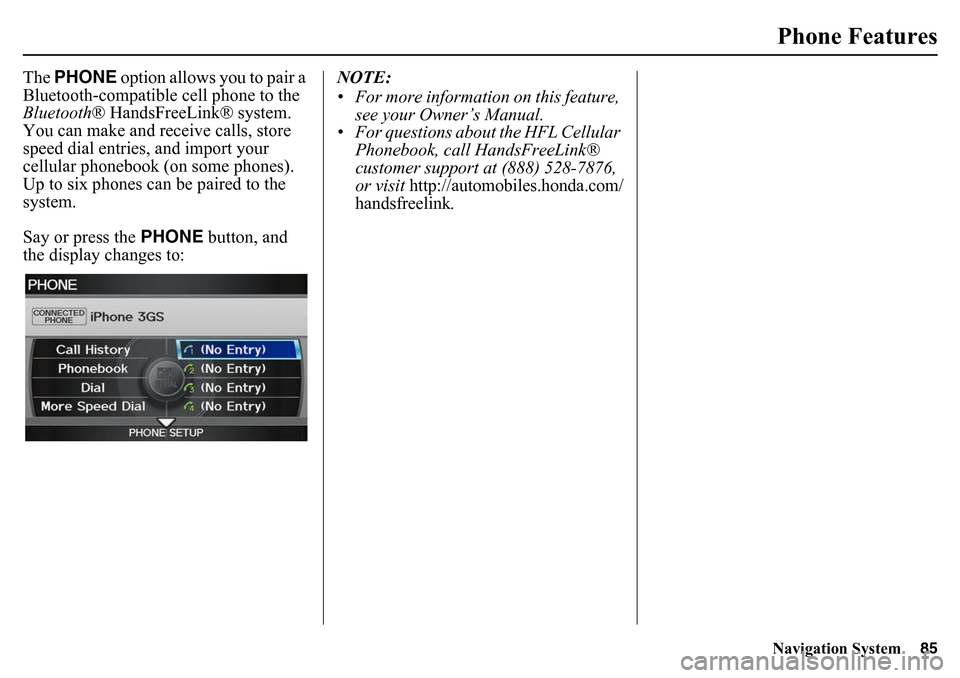
The PHONE option allows you to pair a
Bluetooth-compatible cell phone to the
Bluetooth ® HandsFreeLink® system.
You can make and receive calls, store
speed dial entries, and import your
cellular phonebook (on some phones).
Up to six phones can be paired to the
system.
Say or press the PHONE button, and
the display changes to: NOTE:
• For more information on this feature,
see your Owner’s Manual.
• For questions abou t the HFL Cellular
Phonebook, call HandsFreeLink®
customer support at (888) 528-7876,
or visit
http://automobiles.honda.com/
handsfreelink
.
Page 98 of 175
98
Navigation System
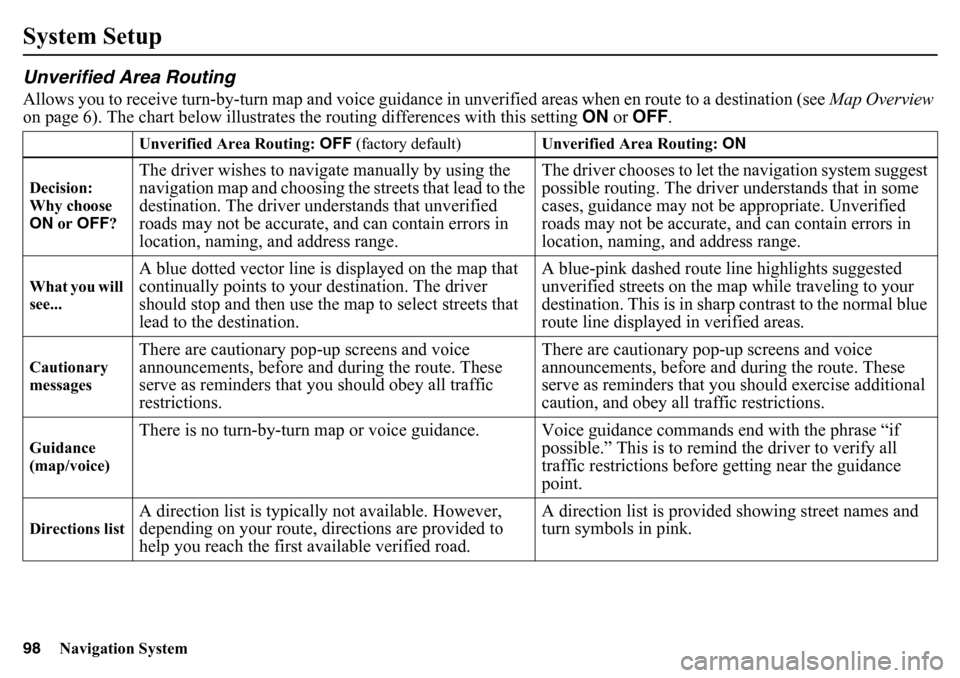
System SetupUnverified Area RoutingAllows you to receive turn-by-turn map and voice guidance in unverified areas when en route to a destination (see Map Overview
on page 6). The chart below illustrates th e routing differences with this setting ON or OFF .
Unverified Area Routing: OFF (factory default) Unverified Area Routing: ON
Decision:
Why choose
ON or OFF ?The driver wishes to naviga te manually by using the
navigation map and choosing th e streets that lead to the
destination. The driver understands that unverified
roads may not be accurate, and can contain errors in
location, naming, and address range. The driver chooses to let th
e navigation system suggest
possible routing. The driver understands that in some
cases, guidance may not be appropriate. Unverified
roads may not be accurate, and can contain errors in
location, naming, and address range.
What you will
see...
A blue dotted vector line is displayed on the map that
continually points to your destination. The driver
should stop and then use the map to select streets that
lead to the destination. A blue-pink dashed route line highlights suggested
unverified streets on the map while traveling to your
destination. This is in sharp
contrast to the normal blue
route line displayed in verified areas.
Cautionary
messages
There are cautionary pop-up screens and voice
announcements, before and during the route. These
serve as reminders that you should obey all traffic
restrictions. There are cautionary pop-up screens and voice
announcements, before and
during the route. These
serve as reminders that you should exercise additional
caution, and obey all traffic restrictions.
Guidance
(map/voice)
There is no turn-by-turn map or voice guidance. V oice guidance commands end with the phrase “if
possible.” This is to remind the driver to verify all
traffic restrictions before getting near the guidance
point.
Directions list
A direction list is typicall y not available. However,
depending on your route, directions are provided to
help you reach the first available verified road. A direction list is provided showing street names and
turn symbols in pink.
Page 100 of 175
100
Navigation System
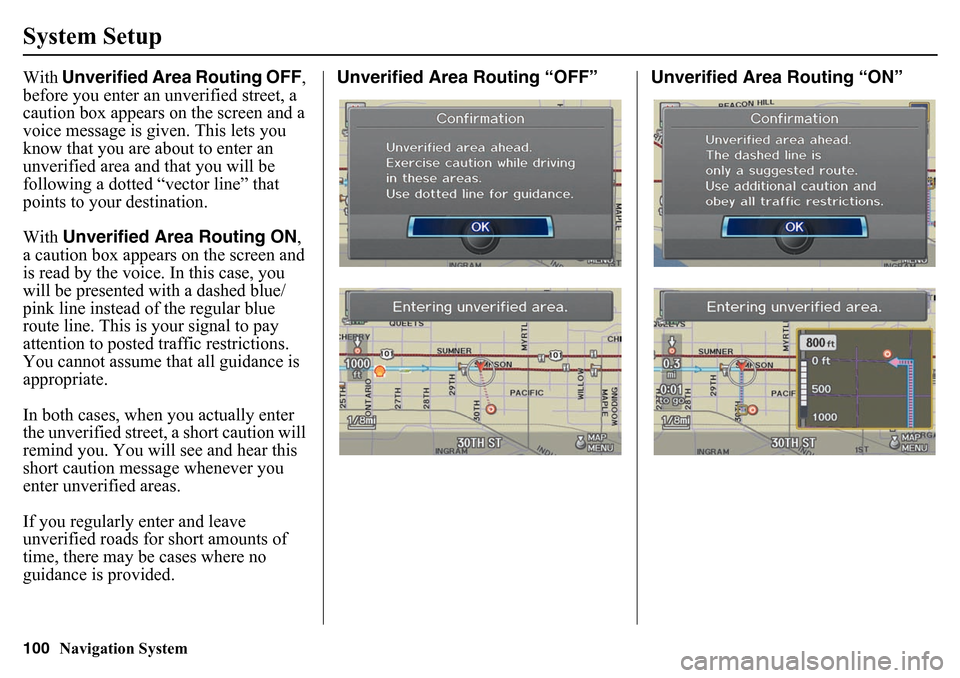
System SetupWith Unverified Area Routing OFF ,
before you enter an unverified street, a
caution box appears on the screen and a
voice message is give n. This lets you
know that you are about to enter an
unverified area and that you will be
following a dotted “vector line” that
points to your destination.
With Unverified Area Routing ON ,
a caution box appears on the screen and
is read by the voice. In this case, you
will be presented with a dashed blue/
pink line instead of the regular blue
route line. This is your signal to pay
attention to posted traffic restrictions.
You cannot assume that all guidance is
appropriate.
In both cases, when you actually enter
the unverified street, a short caution will
remind you. You will see and hear this
short caution messa ge whenever you
enter unverified areas.
If you regularly enter and leave
unverified roads for short amounts of
time, there may be cases where no
guidance is provided. Unverified Area Routing “OFF” Unverified Area Routing “ON”
Page 101 of 175
Navigation System101
System Setup
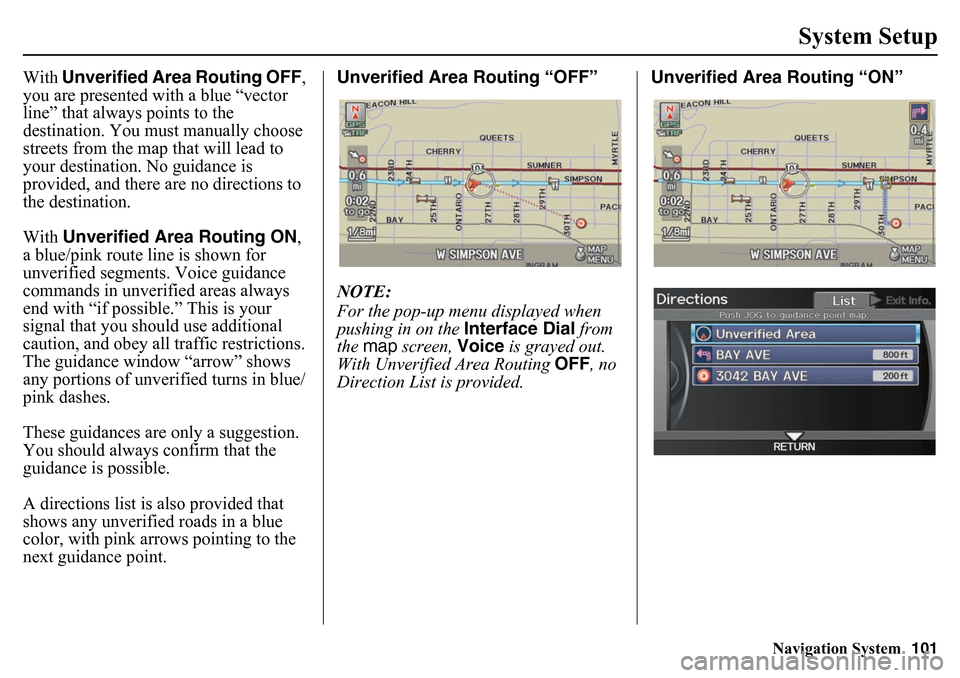
With Unverified Area Routing OFF ,
you are presented with a blue “vector
line” that always points to the
destination. You must manually choose
streets from the map that will lead to
your destination. No guidance is
provided, and there are no directions to
the destination.
With Unverified Area Routing ON ,
a blue/pink route line is shown for
unverified segments. Voice guidance
commands in unverified areas always
end with “if possible.” This is your
signal that you should use additional
caution, and obey all traffic restrictions.
The guidance window “arrow” shows
any portions of unverified turns in blue/
pink dashes.
These guidances are only a suggestion.
You should always confirm that the
guidance is possible.
A directions list is also provided that
shows any unverified roads in a blue
color, with pink a rrows pointing to the
next guidance point. Unverified Area Routing “OFF”
NOTE:
For the pop-up menu displayed when
pushing in on the
Interface Dial from
the map screen, Voice is grayed out.
With Unverified Area Routing OFF, no
Direction List is provided. Unverified Area Routing “ON”
Page 133 of 175
Navigation System133Coverage Areas
Durham
Ajax
Brock
Clarington
Oshawa
Pickering
Scugog
Uxbridge
Whitby
Elgin Aylmer
Bayham
Central Elgin
Dutton/Dunwich
Malahide
Southwold
St. Thomas
West Elgin
Frontenanc Central Frontenac
Frontenac Islands
Kingston
North Frontenac
South Frontenac
Gatineau Gatineau Grey
Blue Mountains
Chatsworth
Georgian Bluffs
Meaford
Grey Highlands
Hanover
Owen Sound
Southgate
West Grey
Haldimand Haldimand
Halton Burlington
Halton Mills
Milton
Oakville
Hamilton Hamilton
Kawartha Lakes Kawartha Lakes
Lambton Brooke-Alvinston
Dawn-Euphemia
Enniskillen
Lambton Shores
Oil Springs Petrolia
Plympton-Wyoming
Point Edward
Sarnia
St. Clair
Warwick
Lanark Beckwith
Carleton Place
Drummond/North Elmsley
Lanark Highlands
Mississippi Mills
Montague
Perth
Smiths Falls
Tay Valley
Leeds and Grenville Athens
Augusta
Brockville
Edwardsburgh/Cardinal
Elizabethtown-Kitley
Front of Yonge
Gananoque
Leeds and the Thousand Islands
Merrickville-Wolford
North Grenville
Prescott
Rideau Lakes
Westport
Page 145 of 175
Navigation System145
Frequently Asked Questions
Guidance, Routing
Problem Solution
The navigation system does not route me the same way I
would go, or the way some other mapping program displays.
Why is this? The navigation system attempts to generate the optimum route. See
Changing the Route Preference
on page 51.
Why is the street I’m on not shown on the map? It has been
here for more than a year. The mapping database is constantly undergoing revision. See page 125 for
ways to obtain the latest detailed coverage information.
The vehicle position icon is not following the road and the
“GPS icon” text in the upper left hand corner of the screen is
white or missing. • The GPS antenna (located in the dashboard) may be blocked by personal
items. For best reception, remove items from the dashboard, such as radar
detectors, cell phones, or loose articles.
• Metallic tinting or other aftermarket devices can interfere with the GPS
reception. Please see your dealer. Also see System Limitations on
page 120.
I entered a destination, but the blue highlighted route and
voice guidance stopped, or turned into a blue/pink dashed line
before I got to my destination. Why is this? Your route has entered an
unverified area. See Unverified Area Routing on
page 98.
The map rotates while I make turns. How can I stop this? Select the North-up map orientation by voice, or by selecting North-up
from the Map menu. See Map Screen on page 52.
Sometimes, I cannot select between the North-up and
Heading-up map orientations. Why is this? The Heading-up map orientation can only
be shown in the lower scales (1/
20 - 1 mile scales). See Map Scale on page 64.
While driving to my destination, the “time to go” display
sometimes increases, even th ough I am getting closer. The “Time to go” is based on actual road speeds. However if your speed
slows down when you encounter slower traffic, the system updates the
“Time to go” based on your actual speed to give you a better estimate of
arrival time.
The vehicle position icon on th e map “lags” a short distance
behind, especially when I arrive at an intersection. Is there
anything wrong? No. When at an in
tersection, the system is un aware of the width of the
intersecting road. Large differences in vehicle position can indicate a
temporary loss of the GPS signal. See GPS Reception Issues on page 120.
Page 151 of 175
Navigation System151
Glossary
GlossaryThe following is a glossary of terms
pertaining to the voice recognition
navigation system.
Avoid Area - Areas you wish to avoid
can be entered into the system, and
will be avoided while routing.
Breadcrumbs - Off-road tracking dots
that can be followed on the map to
retrace your route back to a mapped
(digitized) road. This function can be
turned on/off in the SETUP screen
(Other ).
Database - This consists of the map
data, and the POI (Points of Interest)
data stored on the HDD.
DCA - Detailed Coverage Area. United
States, Canada, and Puerto Rico are
mapped. See page 125 for a list of
these areas. Digitized Road - A road that appears on
the navigation screen. The road name
will appear at the bottom of the
navigation screen. If the user drives
“off road,” the navigation system will
display “breadcrumbs,” depending on
how far you drive from a mapped
road.
Disclaimer Screen - Screen containing
cautionary information. It is meant to
be read carefully and acknowledged
by the client when using the
navigation system.
FAQ - Frequently Asked Questions. See
page 143 for a list of the client FAQs
and troubleshootin g information.
GPS - Global Positioning System. A
network of 24 satellites in orbit
around the earth. The navigation
system can simultaneously receive
signals from up to 12 satellites to
accurately position the vehicle on the
map. GPS Antenna -
Located in the
dashboard, which is in the center of
the dashboard. Electronic items
operating in this general location can
interfere with the GPS signal.
HDD - Hard Disc Drive. The primary
data storage device containing your
vehicle’s navigation and map
software and uploaded wallpaper
images. The HDD can also store
audio files. See the Audio section of
your Owner’s Manual for more
information.
HFL - Bluetooth ® HandsFreeLink®.
Your vehicle is equipped with this
feature, which uses Bluetooth
technology as a wireless link between
the vehicle and your Bluetooth-
compatible cell phone.
Icon - Symbol representing Points of
Interest (POI) that can be displayed
on the map.
Page 161 of 175
Navigation System161
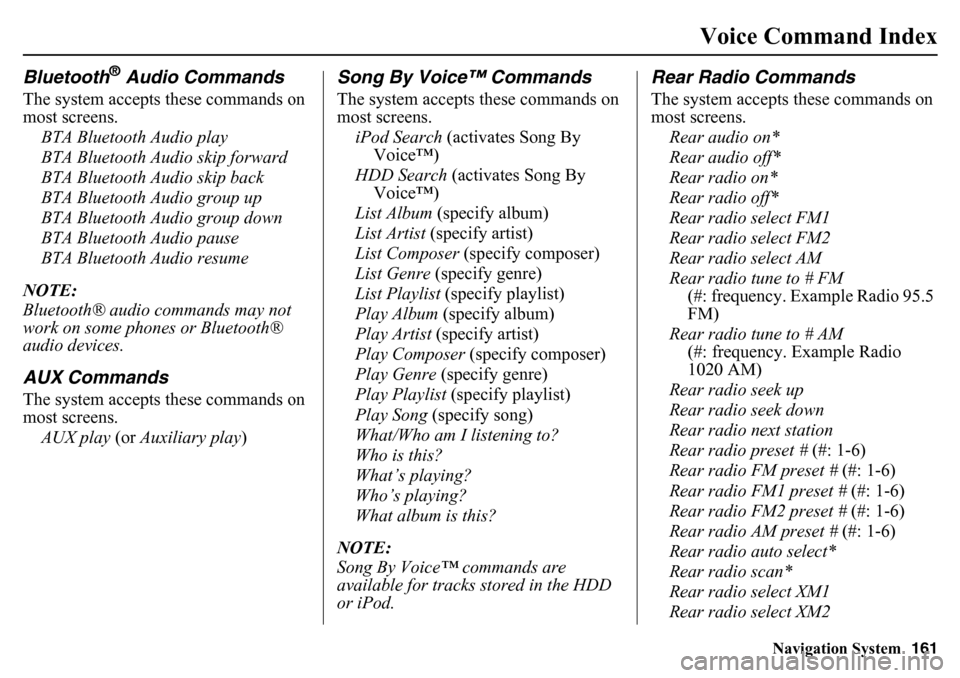
Voice Command Index
Bluetooth
® Audio Commands
The system accepts these commands on
most screens.
BTA Bluetooth Audio play
BTA Bluetooth Audio skip forward
BTA Bluetooth Audio skip back
BTA Bluetooth Audio group up
BTA Bluetooth Audio group down
BTA Bluetooth Audio pause
BTA Bluetooth Audio resume
NOTE:
Bluetooth® audio commands may not
work on some phones or Bluetooth®
audio devices.AUX CommandsThe system accepts these commands on
most screens. AUX play (or Auxiliary play )
Song By Voice™ CommandsThe system accepts these commands on
most screens.
iPod Search (activates Song By
Voice™)
HDD Search (activates Song By Voice™)
List Album (specify album)
List Artist (specify artist)
List Composer (specify composer)
List Genre (specify genre)
List Playlist (specify playlist)
Play Album (specify album)
Play Artist (specify artist)
Play Composer (specify composer)
Play Genre (specify genre)
Play Playlist (specify playlist)
Play Song (specify song)
What/Who am I listening to?
Who is this?
What’s playing?
Who’s playing?
What album is this?
NOTE:
Song By Voice™ commands are
available for tracks stored in the HDD
or iPod.
Rear Radio CommandsThe system accepts these commands on
most screens. Rear audio on*
Rear audio off*
Rear radio on*
Rear radio off*
Rear radio select FM1
Rear radio select FM2
Rear radio select AM
Rear radio tune to # FM (#: frequency. Example Radio 95.5
FM)
Rear radio tune to # AM (#: frequency. Example Radio
1020 AM)
Rear radio seek up
Rear radio seek down
Rear radio next station
Rear radio preset # (#: 1-6)
Rear radio FM preset # (#: 1-6)
Rear radio FM1 preset # (#: 1-6)
Rear radio FM2 preset # (#: 1-6)
Rear radio AM preset # (#: 1-6)
Rear radio auto select*
Rear radio scan*
Rear radio select XM1
Rear radio select XM2
Page 169 of 175
Navigation System169
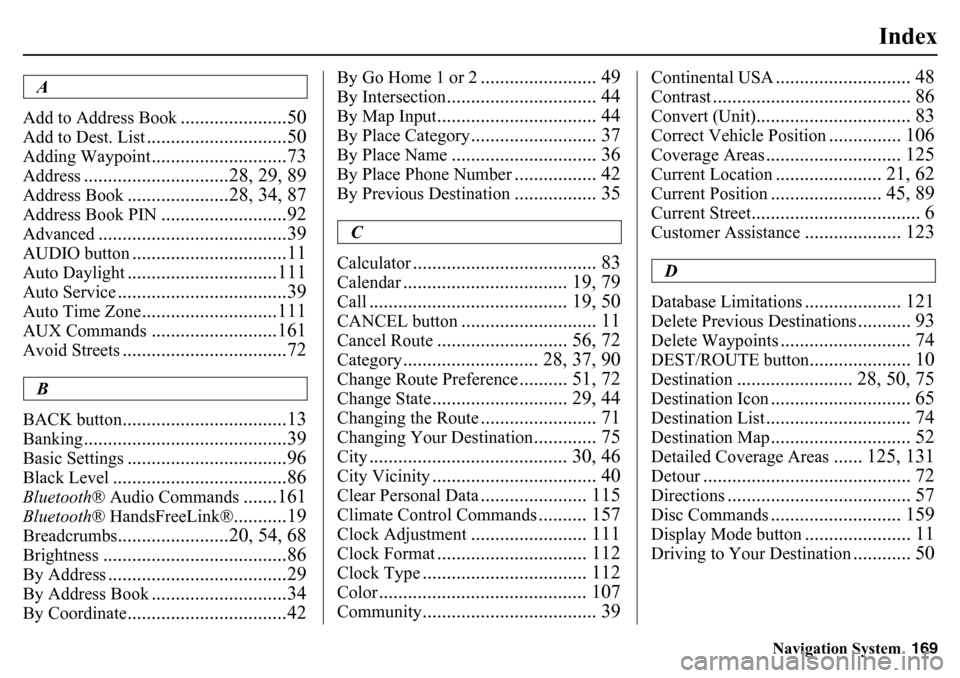
Index
A
Add to Address Book
......................50
Add to Dest. List
.............................50
Adding Waypoint
............................73
Address
..............................28, 29, 89
Address Book
.....................28, 34, 87
Address Book PIN
..........................92
Advanced
.......................................39
AUDIO button
................................11
Auto Daylight
...............................111
Auto Service
...................................39
Auto Time Zone
............................111
AUX Commands
..........................161
Avoid Streets
..................................72
B
BACK button
..................................13
Banking
..........................................39
Basic Settings
.................................96
Black Level
....................................86
Bluetooth ® Audio Commands
.......161
Bluetooth® HandsFreeLink®
...........19
Breadcrumbs
.......................20, 54, 68
Brightness
......................................86
By Address
.....................................29
By Address Book
............................34
By Coordinate
.................................42
By Go Home 1 or 2
........................ 49
By Intersection
............................... 44
By Map Input
................................. 44
By Place Category
.......................... 37
By Place Name
.............................. 36
By Place Phone Number
................. 42
By Previous Destination
................. 35
C
Calculator
...................................... 83
Calendar
.................................. 19, 79
Call
......................................... 19, 50
CANCEL button
............................ 11
Cancel Route
........................... 56, 72
Category
............................ 28, 37, 90
Change Route Preference
.......... 51, 72
Change State
............................ 29, 44
Changing the Route
........................ 71
Changing Your Destination
............. 75
City
......................................... 30, 46
City Vicinity
.................................. 40
Clear Personal Data
...................... 115
Climate Control Commands
.......... 157
Clock Adjustment
........................ 111
Clock Format
............................... 112
Clock Type
.................................. 112
Color
........................................... 107
Community
.................................... 39
Continental USA
............................ 48
Contrast
......................................... 86
Convert (Unit)
................................ 83
Correct Vehicle Position
............... 106
Coverage Areas
............................ 125
Current Location
...................... 21, 62
Current Position
....................... 45, 89
Current Street
................................... 6
Customer Assistance
.................... 123
D
Database Limitations
.................... 121
Delete Previous Destinations
........... 93
Delete Waypoints
........................... 74
DEST/ROUTE button
..................... 10
Destination
........................ 28, 50, 75
Destination Icon
............................. 65
Destination List
.............................. 74
Destination Map
............................. 52
Detailed Coverage Areas
...... 125, 131
Detour
........................................... 72
Directions
...................................... 57
Disc Commands
........................... 159
Display Mode button
...................... 11
Driving to Your Destination
............ 50