Where To HONDA PILOT 2016 3.G Navigation Manual
[x] Cancel search | Manufacturer: HONDA, Model Year: 2016, Model line: PILOT, Model: HONDA PILOT 2016 3.GPages: 145, PDF Size: 8.06 MB
Page 98 of 145
97
uuChanging Your Destination uSearching Near Establishment
Continued
Navigation
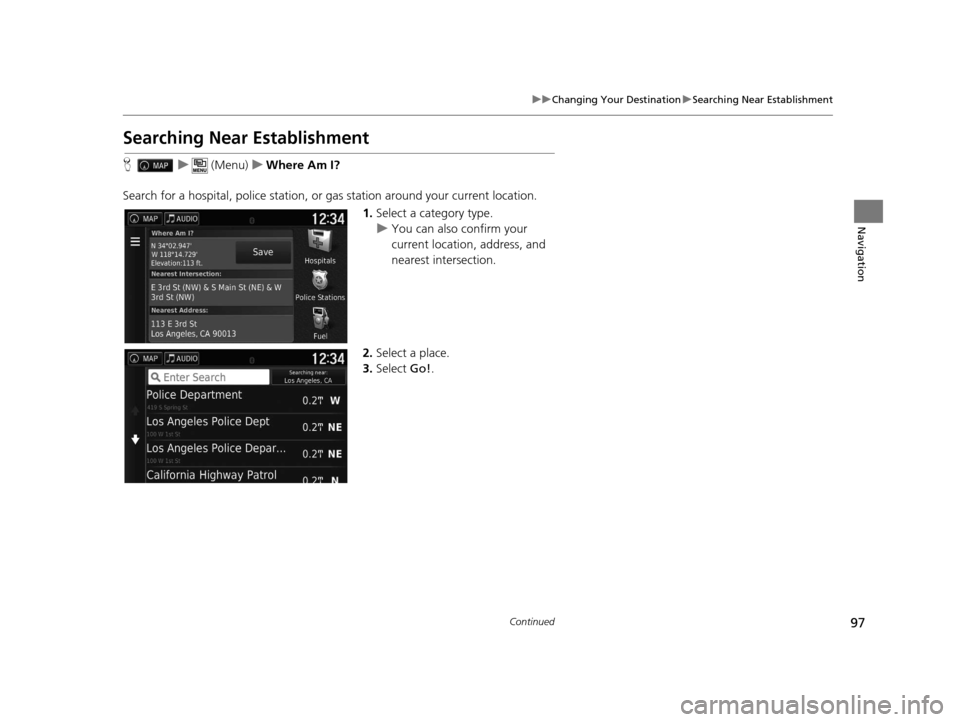
Searching Near Establishment
H u (Menu) uWhere Am I?
Search for a hospital, police station, or gas station around your current location.
1.Select a category type.
u You can also confirm your
current location, address, and
nearest intersection.
2. Select a place.
3. Select Go!.
16 PILOT NAVI-31TG78000.book 97 ページ 2015年4月21日 火曜日 午前8時30分
Page 100 of 145
99
uuChanging Your Destination uEntering a New Destination
Navigation
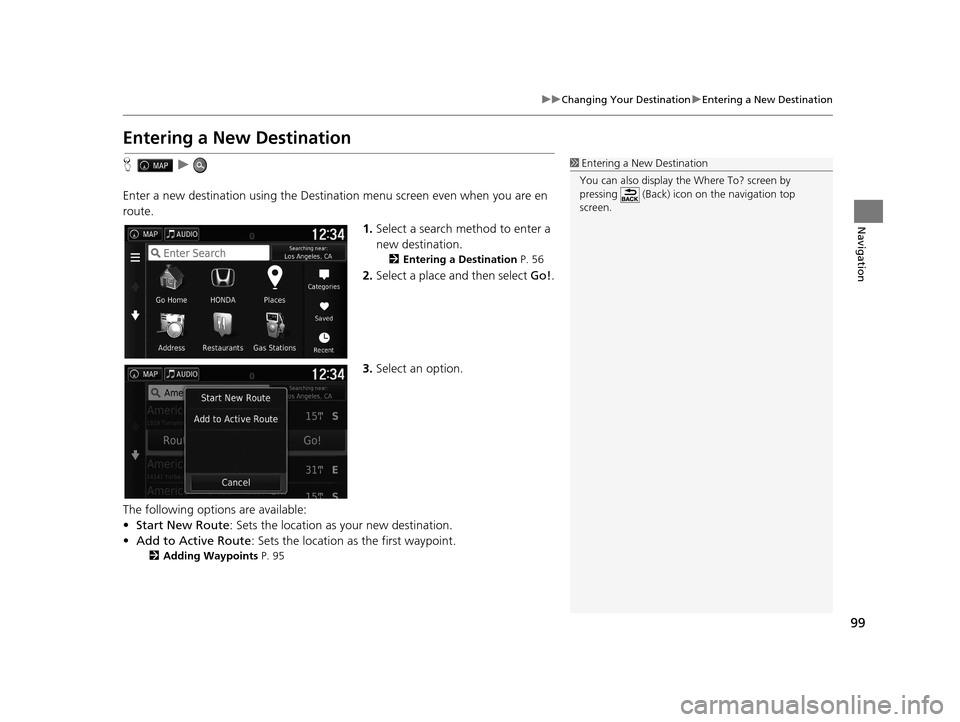
Entering a New Destination
H u
Enter a new destination using the Destinat ion menu screen even when you are en
route.
1.Select a search method to enter a
new destination.
2 Entering a Destination P. 56
2.Select a place and then select Go!.
3. Select an option.
The following options are available:
• Start New Route : Sets the location as your new destination.
• Add to Active Route : Sets the location as the first waypoint.
2Adding Waypoints P. 95
1Entering a New Destination
You can also display the Where To? screen by
pressing (Back) icon on the navigation top
screen.
16 PILOT NAVI-31TG78000.book 99 ページ 2015年4月21日 火曜日 午前8時30分
Page 110 of 145
109
Other Features
This section describes the useful functions incorporated into thenavigation app.
About Apps Menu................................ 110
ecoRouteTM............................................ 111
Setting Up the Vehicle Profile ............... 112
Viewing the Vehicle Profile ................... 114
Calibrating the Fuel Economy ............... 115
Viewing the ecoChallenge Scores ......... 116
Viewing Fuel Economy Information ...... 117
Viewing a Mileage Report .................... 118
Information Functions .......................... 119
Help ..................................................... 119
Where I've Been ................................... 120
Calculator ............................................ 121
Unit Converter ..................................... 122
GPS Information ................................... 123
16 PILOT NAVI-31TG78000.book 109 ページ 2015年4月21日 火曜日 午前8時30分
Page 111 of 145
110
Other Features
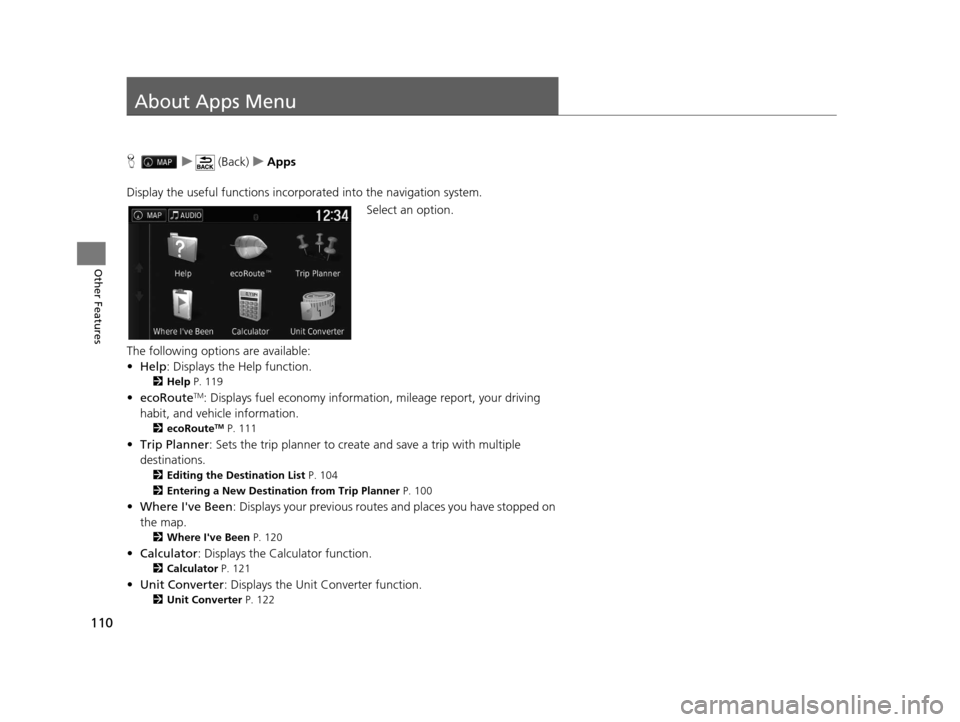
About Apps Menu
Hu (Back) uApps
Display the useful functions incorpor ated into the navigation system.
Select an option.
The following options are available:
• Help : Displays the Help function.
2Help P. 119
•ecoRouteTM: Displays fuel econom y information, mileage report, your driving
habit, and vehicle information.
2 ecoRouteTM P. 111
•Trip Planner : Sets the trip planner to create and save a trip with multiple
destinations.
2 Editing the Destination List P. 104
2 Entering a New Destination from Trip Planner P. 100
•Where I've Been : Displays your previous routes and places you have stopped on
the map.
2 Where I've Been P. 120
•Calculator : Displays the Calculator function.
2Calculator P. 121
•Unit Converter : Displays the Unit Converter function.
2Unit Converter P. 122
16 PILOT NAVI-31TG78000.book 110 ページ 2015年4月21日 火曜日 午前8時30分
Page 121 of 145
uuInformation Functions uWhere I've Been
120
Other Features
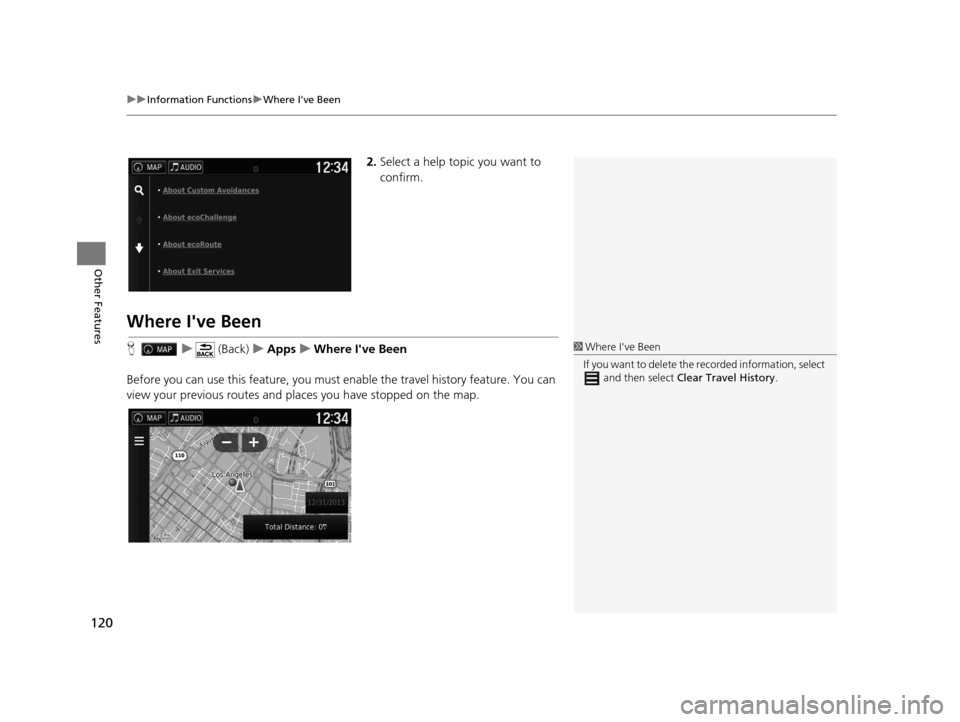
2. Select a help topic you want to
confirm.
Where I've Been
H u (Back) uApps uWhere I've Been
Before you can use this feature, you must enable the travel history feature. You can
view your previous routes and places you have stopped on the map.1 Where I've Been
If you want to delete the re corded information, select
and then select Clear Travel History .
16 PILOT NAVI-31TG78000.book 120 ページ 2015年4月21日 火曜日 午前8時30分
Page 136 of 145
135Continued
Reference Information
Legal Information
User Agreement
The content provided (“Data”) is licensed,
not sold. By opening this package, or
installing, copying, or otherwise using the
Data, you agree to be bound by the terms
of this agreement. If you do not agree to
the terms of this agreement, you are not
permitted to install, copy, use, resell or
transfer the Data. If you wish to reject the
terms of this agreement, and have not
installed, copied, or used the Data, you
must contact your retailer or HERE North
America, LLC (as defined below) within
thirty (30) days of purchase for a refund of
your purchase price. To contact HERE,
please visit www.here.com .
The Data is provided for your personal,
internal use only and may not be resold. It is
protected by copyright, and is subject to the
following terms (this “End User License
Agreement”) and conditions which are
agreed to by you, on the one hand, and
HERE and its licensors (including their
licensors and suppliers) on the other hand.
For purposes of these terms, “HERE” shall
■ END USER TERMS
mean (a) HERE North America, LLC with
respect to Data for the Americas and/or the
Asia Pacific region and (b) HERE Europe B.V.
for Data for Europe, the Middle East and/or
Africa.
The Data includes certain information and
related content provided under license to
HERE from third parties and is subject to the
applicable supplier terms and copyright
notices set forth at the following URL:
http://corporate.navteq.com/
supplier_terms.html.
License Limitati
ons on Use: You agree
that your license to use this Data is limited
to and conditioned on use for solely
personal, noncommercial purposes, and not
for service bureau, timesharing or other
similar purposes. Except as otherwise set
forth herein, you agree not to otherwise
reproduce, copy, modify, decompile,
disassemble or reverse engineer any portion
of this Data, and may not transfer or
distribute it in any form, for any purpose,
except to the extent permitted by
mandatory laws.
■ TERMS AND CONDITIONS
License Limitation
s on Transfer: Your
limited license does not allow transfer or
resale of the Data, except on the condition
that you may transfer the Data and all
accompanying materials on a permanent
basis if: (a) you retain no copies of the Data;
(b) the recipient agrees to the terms of this
End User License Agreement; and (c) you
transfer the Data in the exact same form as
you purchased it by physically transferring
the original media (e.g., the CD-ROM or
DVD you purchased), all original packaging,
all Manuals and other documentation.
Specifically, Multidisc sets may only be
transferred or sold as a complete set as
provided to you and no t as a subset thereof.
Additional License Limitations: Except
where you have been spec ifically licensed to
do so by HERE in a separate written
agreement, and without limiting the
preceding paragraph, your license is
conditioned on use of the Data as
prescribed in this ag reement, and you may
not (a) use this Data with any products,
systems, or applicat ions installed or
otherwise connected to or in
communication with vehicles capable of
vehicle navigation, positioning, dispatch,
16 PILOT NAVI-31TG78000.book 135 ページ 2015年4月21日 火曜日 午前8時30分
Page 137 of 145
136
uuLegal Information uUser Agreement
Reference Information
real time route guidance, fleet management
or similar applications; or (b) with, or in
communication with, including without
limitation, cellular phones, palmtop and
handheld computers, pagers, and personal
digital -assistants or PDAs.
Warning: This Data may contain inaccurate
or incomplete information due to the
passage of time, changing circumstances,
sources used and the nature of collecting
comprehensive geographic Data, any of
which may lead to incorrect results.
No Warranty: This Data is provided to you
“as is”, and you agree to use it at your own
risk. HERE and its licensors (and their
licensors and suppliers) make no
guarantees, representations or warranties
of any kind, express or implied, arising by
law or otherwise, including but not limited
to, content, quality, accuracy,
completeness, effectiveness, reliability,
fitness for a particular purpose, usefulness,
use or results to be obtained from this Data,
or that the Data or server will be
uninterrupted or error free. Disclaimer of Warranty:
HERE AND ITS
LICENSORS (INCLUDING THEIR LICENSORS
AND SUPPLIERS) DISCLAIM ANY
WARRANTIES, EXPRESS OR IMPLIED, OF
QUALITY, PERFORMANCE,
MERCHANTABILITY, FITNESS FOR A
PARTICULAR PURPOSE OR NON-
INFRINGEMENT. Some States, Territories
and Countries do not allow certain warranty
exclusions, so to that extent the above
exclusion may not apply to you.
Disclaimer of Liability: HERE AND ITS
LICENSORS (INCLUDING THEIR LICENSORS
AND SUPPLIERS) SHALL NOT BE LIABLE TO
YOU IN RESPECT OF ANY CLAIM, DEMAND
OR ACTION, IRRESPECTIVE OF THE NATURE
OF THE CAUSE OF THE CLAIM, DEMAND
OR ACTION ALLEGING ANY LOSS, INJURY
OR DAMAGES, DIRECT OR INDIRECT,
WHICH MAY RESULT FROM THE USE OR
POSSESSION OF THIS DATA; OR FOR ANY
LOSS OF PROFIT, REVENUE, CONTRACTS
OR SAVINGS, OR ANY OTHER DIRECT,
INDIRECT, INCIDENTAL, SPECIAL OR
CONSEQUENTIAL DAMAGES ARISING OUT
OF YOUR USE OF OR INABILITY TO USE THIS
DATA, ANY DEFECT IN THIS DATA, OR THE
BREACH OF THESE TERMS OR CONDITIONS, WHETHER IN AN ACTION IN
CONTRACT OR TORT OR BASED ON A
WARRANTY, EVEN IF HERE OR ITS
LICENSORS HAVE BEEN ADVISED OF THE
POSSIBILITY OF SUCH DAMAGES. Some
States, Territories and Countries do not
allow certain liability exclusions or damages
limitations, so to that extent the above may
not apply to you.
Export Control:
You agree not to export
from anywhere any part of the Data or any
direct product thereof except in compliance
with, and with all licenses and approvals
required under, applicable export laws,
rules and regulations, including but not
limited to the laws, rules and regulations
administered by the Office of Foreign Assets
Control of the U.S. Department of
Commerce and the Bureau of Industry and
Security of the U.S. Department of
Commerce. To the extent that any such
export laws, rules or regulations prohibit
HERE from complying with any of its
obligations hereunder to deliver or
distribute Data, such failure shall be excused
and shall not constitute a breach of this
Agreement.
16 PILOT NAVI-31TG78000.book 136 ページ 2015年4月21日 火曜日 午前8時30分
Page 145 of 145
144
Index
N
Navigation................................................... 36
Navigation Top Screen ................................. 3
North Up ..................................................... 30
O
Other Settings ............................................. 45
P
Personal Information .................................. 18
S
Saved Locations.......................................... 19
Deleting............................................... 24, 25
Editing ....................................................... 22
Saving ....................................................... 19
Setting
Data Reset ................................................. 53
Device ....................................................... 51
Display Mode Settings ............................... 26
Language & Keyboard ............................... 48
Map & Vehicle ........................................... 28
Navigation ................................................. 36
Other Settings ........................................... 45
Personal Information.................................. 18
Traffic ........................................................ 44
Start-up ....................................................... 16
Stopping the Route .................................... 93
System Limitations .................................... 132
T
Track Up...................................................... 30
Traffic Indicator...................................................... 6
Setting ...................................................... 44
Traffic Information .................................... 88
Troubleshooting ................................. 12, 126
U
Unit Converter.......................................... 122
Units & Time ............................................... 45
Update System Software
Obtaining Update Data ........................... 134
V
Vehicle ........................................................ 29
Vehicle Profile .................................. 112, 114
Voice Commands Basic Operation ........................................... 5
Voice Commands List .............................. 140
Voice Control System ................................ 17
Voice Control Operation ............................ 11
Voice Recognition ...................................... 17
W
Where I’ve Been....................................... 120
16 PILOT NAVI-31TG78000.book 144 ページ 2015年4月21日 火曜日 午前8時30分