HONDA PILOT 2016 3.G Owners Manual
PILOT 2016 3.G
HONDA
HONDA
https://www.carmanualsonline.info/img/13/6023/w960_6023-0.png
HONDA PILOT 2016 3.G Owners Manual
Page 345 of 661
344
uuCustomized Features u
Features
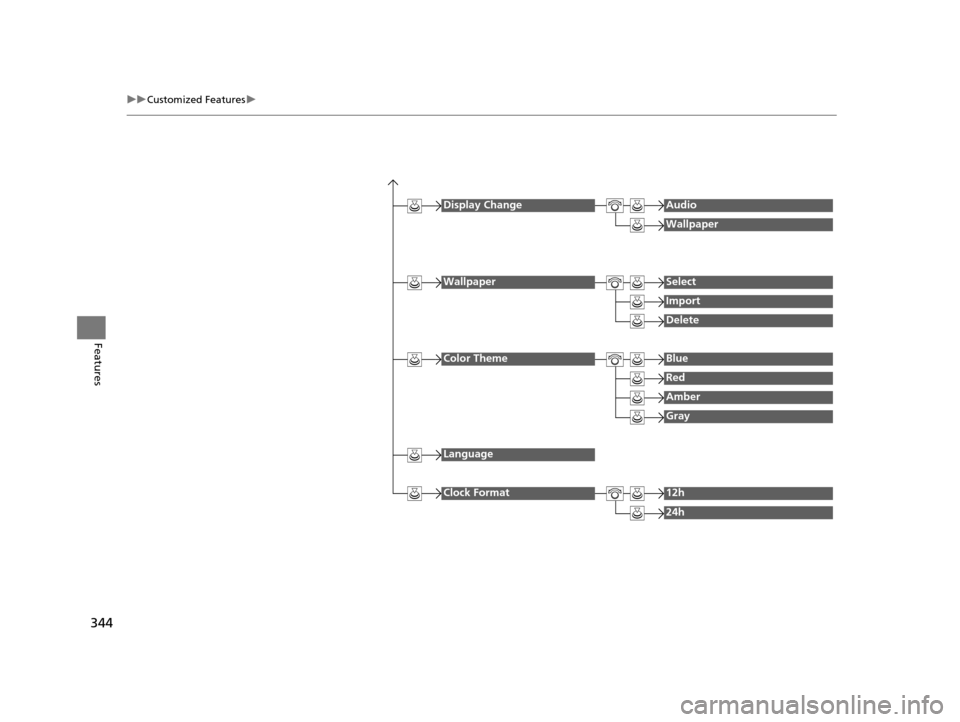
Display ChangeAudio
Wallpaper
WallpaperSelect
Import
Delete
Color ThemeBlue
Red
Amber
Gray
Language
Clock Format12h
24h
16 PILOT-31TG76000.book 344 ページ 2015年6月15日 月曜日 午前11時30分
Page 346 of 661
345
uuCustomized Features u
Continued
Features
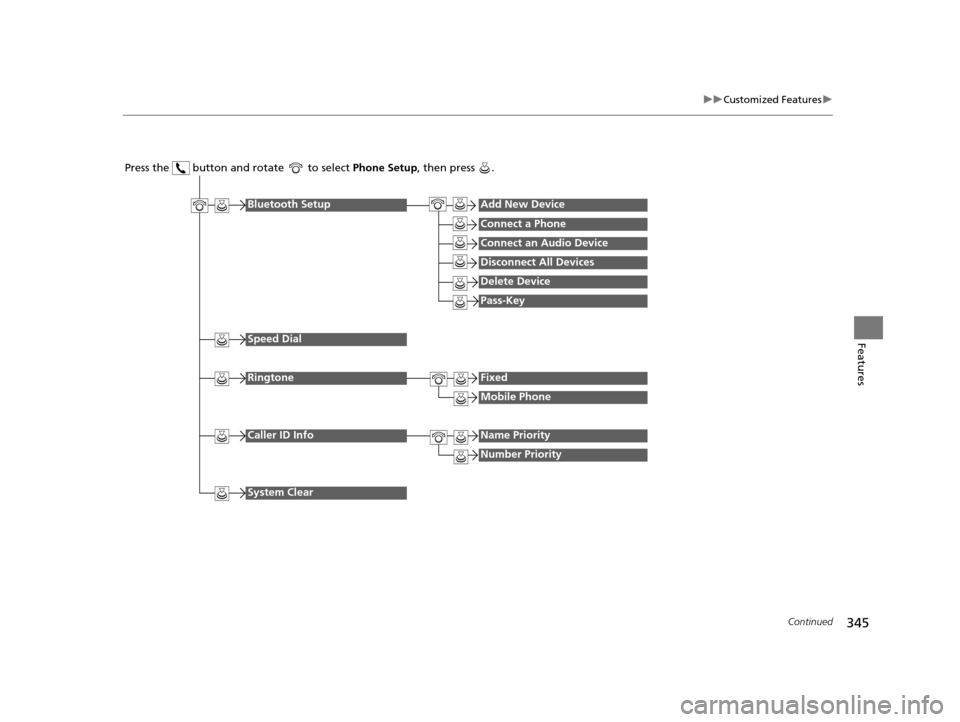
Press the button and rotate to select Phone Setup, then press .
RingtoneFixed
Mobile Phone
Bluetooth SetupAdd New Device
Connect a Phone
Connect an Audio Device
Disconnect All Devices
Delete Device
Pass-Key
Speed Dial
Caller ID InfoName Priority
Number Priority
System Clear
16 PILOT-31TG76000.book 345 ページ 2015年6月15日 月曜日 午前11時30分
Page 347 of 661
346
uuCustomized Features u
Features
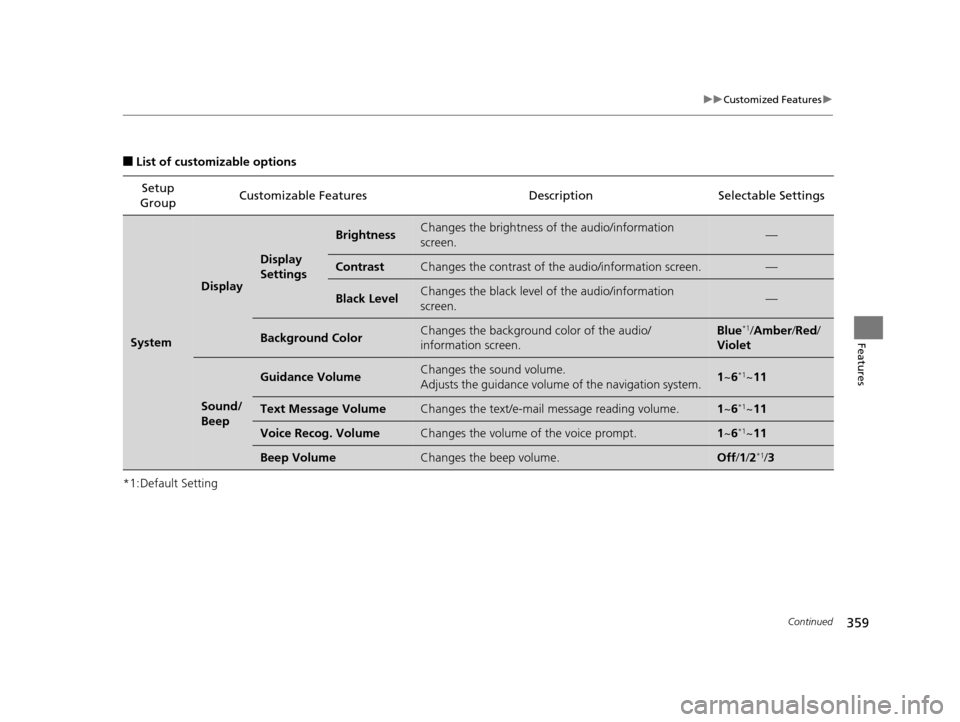
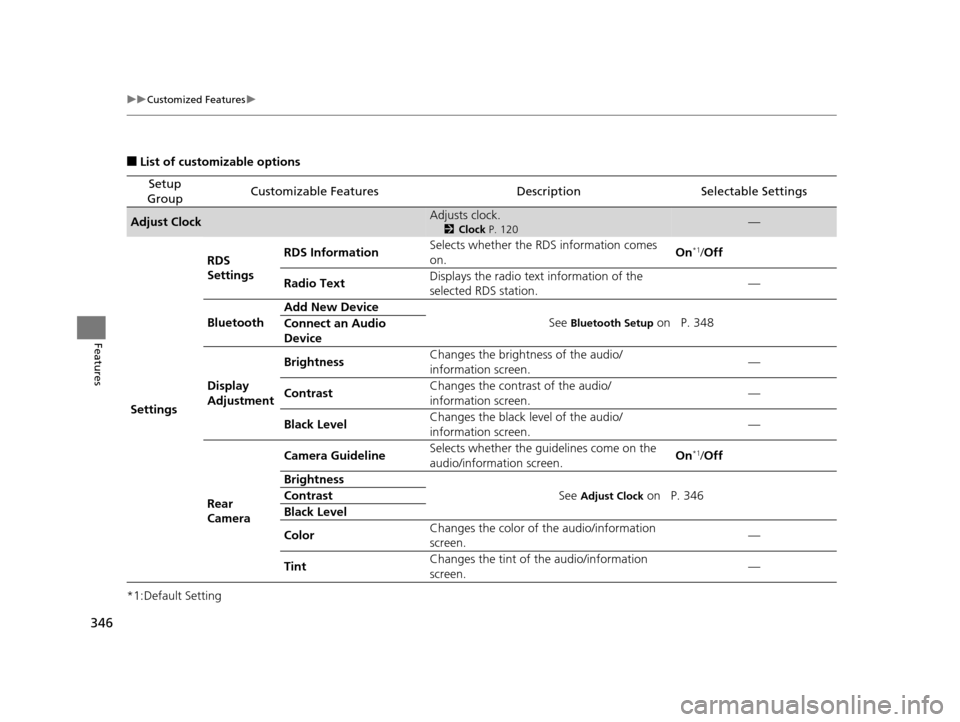
■List of customizable options
*1:Default Setting
Setup
GroupCustomizable FeaturesDescriptionSelectable Settings
Adjust ClockAdjusts clock.
2 Clock P. 120—
Settings RDS
Settings
RDS Information
Selects whether the RDS information comes
on. On
*1/
Off
Radio Text Displays the radio text information of the
selected RDS station. —
Bluetooth Add New Device
See
Bluetooth Setup on P. 348
Connect an Audio
Device
Display
Adjustment Brightness
Changes the brightness of the audio/
information screen. —
Contrast Changes the contrast of the audio/
information screen. —
Black Level Changes the black level of the audio/
information screen.
—
Rear
Camera Camera Guideline
Selects whether the guidelines come on the
audio/information screen. On
*1/
Off
Brightness See
Adjust Clock on P. 346
Contrast
Black Level
Color Changes the color of
the audio/information
screen. —
Tint Changes the tint of
the audio/information
screen. —
16 PILOT-31TG76000.book 346 ページ 2015年6月15日 月曜日 午前11時30分
Page 348 of 661
347
uuCustomized Features u
Continued
Features
*1:Default Setting
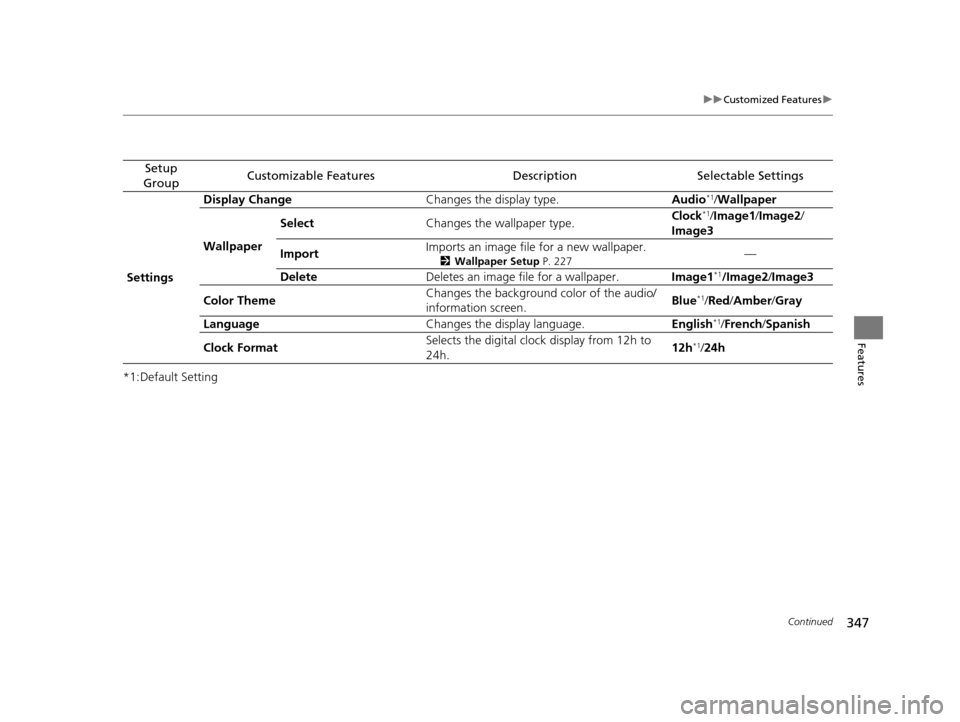
Setup
GroupCustomizable FeaturesDescriptionSelectable Settings
Settings Display Change
Changes the display type. Audio
*1/Wallpaper
Wallpaper Select
Changes the wallpaper type. Clock*1/
Image1 /Image2/
Image3
Import Imports an image file for a new wallpaper.
2
Wallpaper Setup P. 227—
Delete Deletes an image file for a wallpaper. Image1
*1/Image2/Image3
Color Theme Changes the background color of the audio/
information screen.
Blue
*1/
Red /Amber /Gray
Language Changes the display language. English
*1/French /Spanish
Clock Format Selects the digital cloc
k display from 12h to
24h. 12h
*1/
24h
16 PILOT-31TG76000.book 347 ページ 2015年6月15日 月曜日 午前11時30分
Page 349 of 661
348
uuCustomized Features u
Features
*1:Default Setting
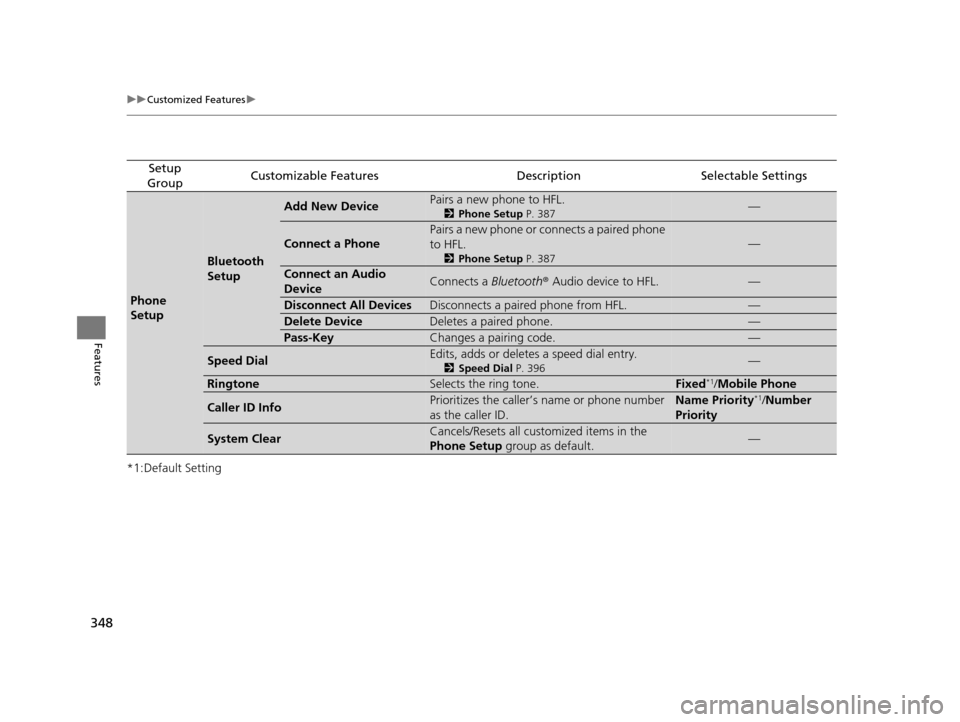
Setup
GroupCustomizable FeaturesDescriptionSelectable Settings
Phone
Setup
Bluetooth
Setup
Add New DevicePairs a new phone to HFL.
2 Phone Setup P. 387—
Connect a Phone
Pairs a new phone or connects a paired phone
to HFL.
2Phone Setup P. 387
—
Connect an Audio
DeviceConnects a Bluetooth® Audio device to HFL.—
Disconnect All DevicesDisconnects a paired phone from HFL.—
Delete DeviceDeletes a paired phone.—
Pass-KeyChanges a pairing code.—
Speed DialEdits, adds or deletes a speed dial entry.
2Speed Dial P. 396—
RingtoneSelects the ring tone.Fixed*1/Mobile Phone
Caller ID InfoPrioritizes the caller’s name or phone number
as the caller ID.Name Priority*1/ Number
Priority
System ClearCancels/Resets all customized items in the
Phone Setup group as default.—
16 PILOT-31TG76000.book 348 ページ 2015年6月15日 月曜日 午前11時30分
Page 350 of 661
Continued349
uuCustomized Features u
Features
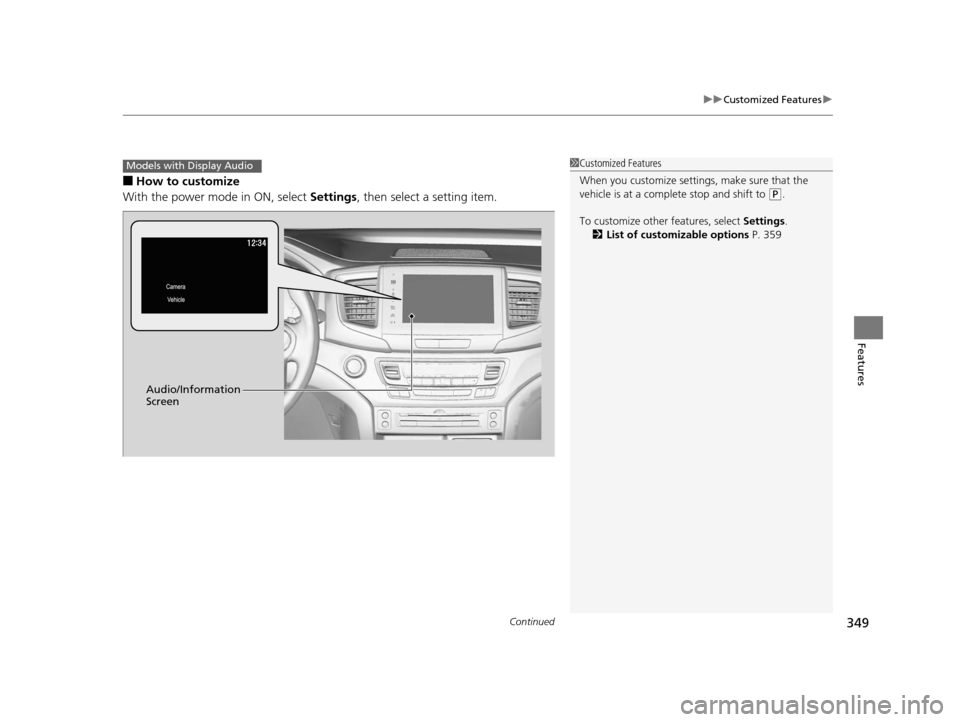
■How to customize
With the power mode in ON, select Settings, then select a setting item.
1Customized Features
When you customize settings, make sure that the
vehicle is at a complete stop and shift to
(P.
To customize other features, select Settings.
2 List of customizable options P. 359
Models with Display Audio
Audio/Information
Screen
16 PILOT-31TG76000.book 349 ページ 2015年6月15日 月曜日 午前11時30分
Page 356 of 661
355
uuCustomized Features u
Continued
Features
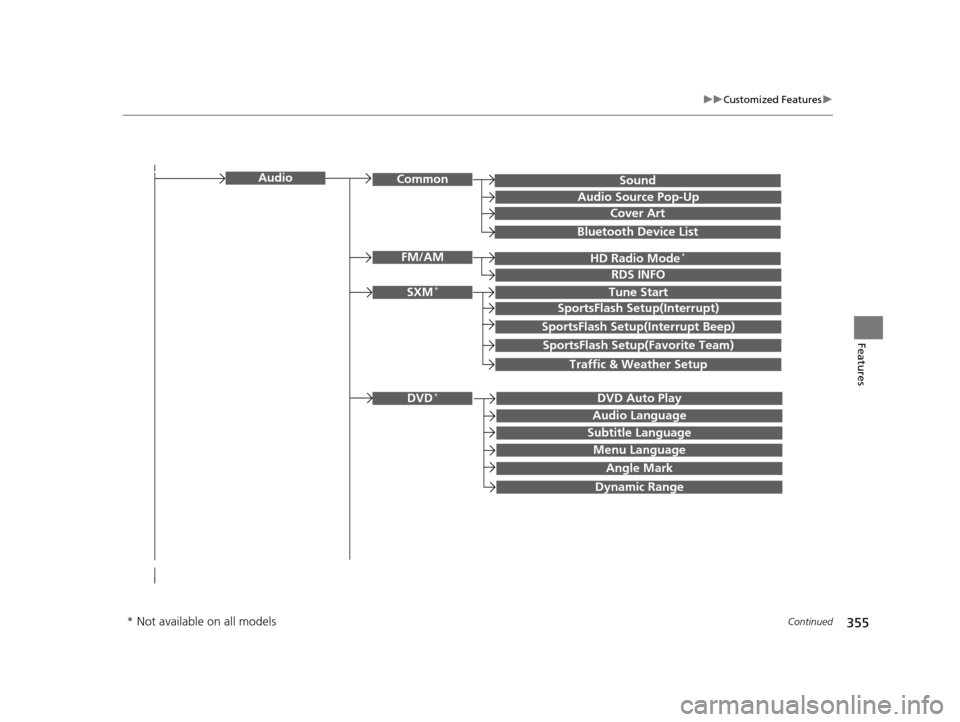
SoundAudioCommon
Audio Source Pop-Up
Cover Art
HD Radio Mode*FM/AM
RDS INFO
SXM*Tune Start
SportsFlash Setup(Interrupt)
SportsFlash Setup(Interrupt Beep)
SportsFlash Setup(Favorite Team)
Traffic & Weather Setup
DVD Auto PlayDVD*
Audio Language
Subtitle Language
Menu Language
Angle Mark
Bluetooth Device List
Dynamic Range
* Not available on all models
16 PILOT-31TG76000.book 355 ページ 2015年6月15日 月曜日 午前11時30分
Page 357 of 661
356
uuCustomized Features u
Features
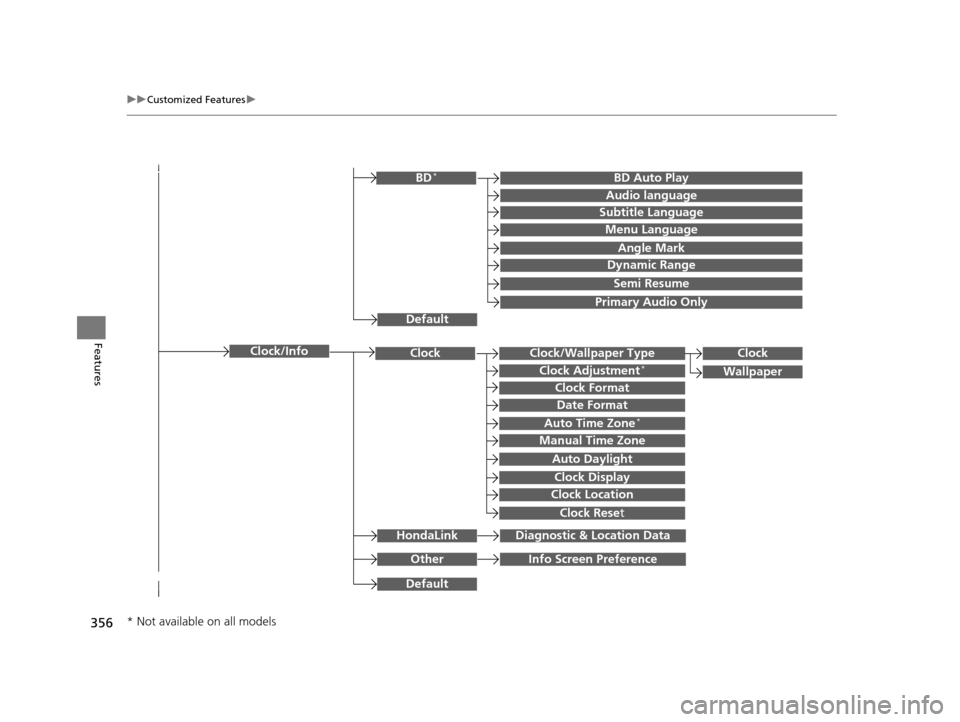
Clock/Wallpaper TypeClockClock
WallpaperClock Adjustment*
Clock Format
Date Format
Auto Time Zone*
Manual Time Zone
Auto Daylight
Clock Display
Clock Location
Clock Reset
OtherInfo Screen Preference
Default
Clock/Info
BD Auto PlayBD*
Audio language
Subtitle Language
Menu Language
Angle Mark
Dynamic Range
Semi Resume
Primary Audio Only
Default
HondaLinkDiagnostic & Location Data
* Not available on all models
16 PILOT-31TG76000.book 356 ページ 2015年6月15日 月曜日 午前11時30分
Page 359 of 661
358
uuCustomized Features u
Features
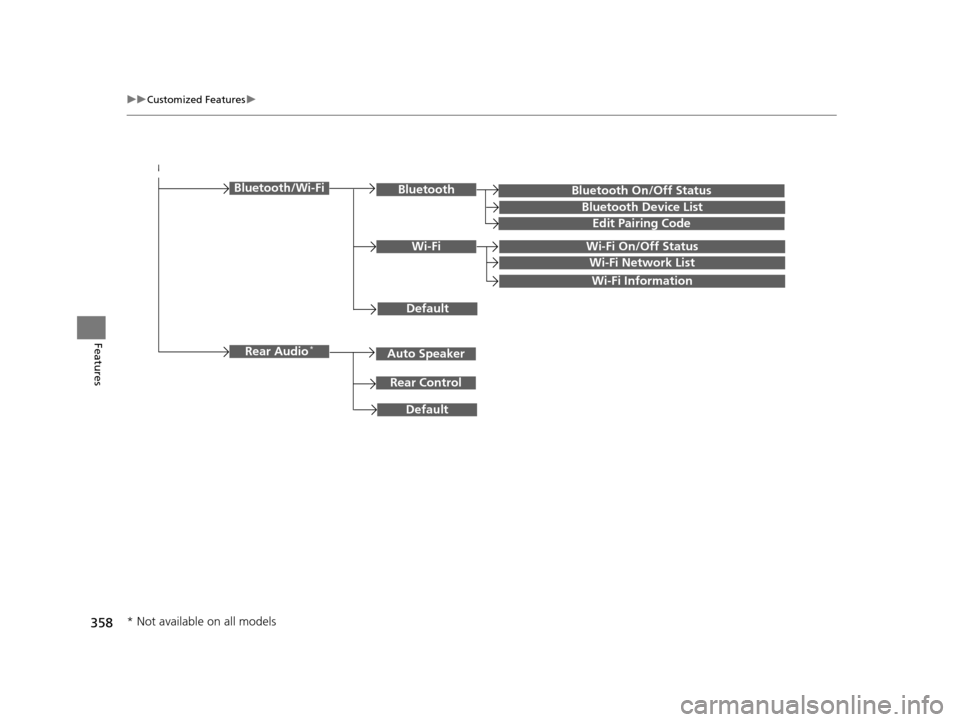
Bluetooth On/Off Status
Default
Bluetooth/Wi-FiBluetooth
Bluetooth Device List
Edit Pairing Code
Wi-FiWi-Fi On/Off Status
Wi-Fi Network List
Wi-Fi Information
Default
Rear Audio*
Rear Control
Auto Speaker
* Not available on all models
16 PILOT-31TG76000.book 358 ページ 2015年6月15日 月曜日 午前11時30分
Page 360 of 661
359
uuCustomized Features u
Continued
Features
■List of customizable options
*1:Default Setting Setup
Group Customizable Features Description Selectable Settings
System
Display
Display
Settings
BrightnessChanges the brightness of
the audio/information
screen.—
ContrastChanges the contrast of the audio/information screen.—
Black LevelChanges the black level of the audio/information
screen.—
Background ColorChanges the background color of the audio/
information screen.Blue*1/ Amber /Red /
Violet
Sound/
Beep
Guidance VolumeChanges the sound volume.
Adjusts the guidance volume of the navigation system.1 ~6*1~11
Text Message VolumeChanges the text/e-mail message reading volume.1~6*1~11
Voice Recog. VolumeChanges the volume of the voice prompt.1~6*1~11
Beep VolumeChanges the beep volume.Off /1 /2*1/ 3
16 PILOT-31TG76000.book 359 ページ 2015年6月15日 月曜日 午前11時30分