Accessory mode HONDA PILOT 2016 3.G Owner's Manual
[x] Cancel search | Manufacturer: HONDA, Model Year: 2016, Model line: PILOT, Model: HONDA PILOT 2016 3.GPages: 661, PDF Size: 37.79 MB
Page 481 of 661
uuWhen Driving uAuto Idle-stop*
480
Driving
The vehicle stops with the gear position in (D and the brake pedal depressed.
■Auto Idle-stop does not activate when:
• The driver’s seat belt is not fastened.
• The engine coolant temperature is low or high.
• The transmission fluid temperature is low or high.
• The vehicle comes to a stop again befo re the vehicle speed reaches 3 mph (5
km/h) after the engine starts.
• Stopped on a steep incline.
• A gear position other than
(D.
• The engine is started with the hood open.
u Turn off the engine. Close the hood before you restart the engine to activate
Auto Idle-stop.
• The battery charge is low.
• The internal temperature of the ba ttery is 14°F (−10°C). or less.
• The climate control system is in use, an d the outside temperature is below −4°F
(−20°C) or over 104°F (40°C).
• The climate control system temperature is set to the Hi or Lo .
• is ON (indicator on).
• When the rear fan is set to maximum speed.
u Auto Idle-stop may not activate under other conditions when the rear climate
control system is in use.
• When the Intelligent Traction Management is set to Snow, Mud, or Sand.
■Auto Idle-stop Activates When:1Auto Idle-stop Activates When:
Do not open the hood while the Auto Idle-stop
function is activated. If the hood is opened, the
engine will not re start automatically.
In this case, restart the engine with the ENGINE
START/STOP button. 2 Starting the Engine P. 461
Pressing the ENGINE START/STOP button changes
the power mode to ACCESSORY even while Auto
Idle-stop is in operation. Once in ACCESSORY, the
engine no longer restarts automatically. Follow the
standard procedure to start the engine. 2 Starting the Engine P. 461
16 PILOT-31TG76000.book 480 ページ 2015年6月15日 月曜日 午前11時30分
Page 617 of 661
616
uuEngine Does Not Start uIf the Smart Entry Remote Battery is Weak
Handling the Unexpected
If the Smart Entry Remote Battery is Weak
If the beeper sounds, the To Start, Hold Remote Near Start Button message
appears on the MID, the ENGINE START/STOP button flashes, and the engine
won’t start, start the engine as follows.
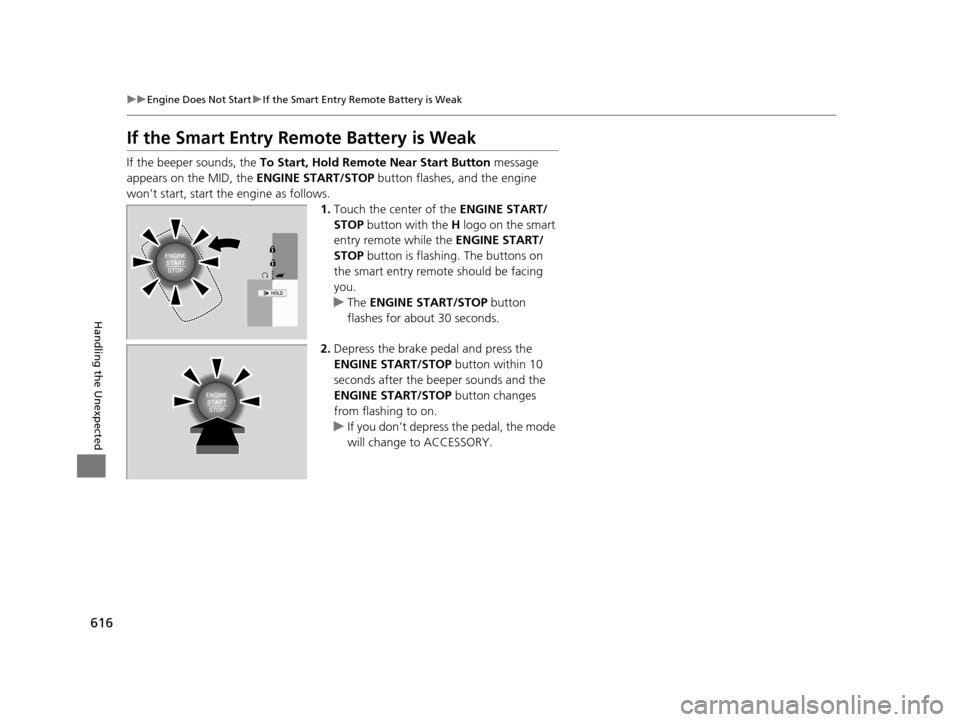
1.Touch the center of the ENGINE START/
STOP button with the H logo on the smart
entry remote while the ENGINE START/
STOP button is flashing. The buttons on
the smart entry remote should be facing
you.
u The ENGINE START/STOP button
flashes for about 30 seconds.
2. Depress the brake pedal and press the
ENGINE START/STOP button within 10
seconds after the beeper sounds and the
ENGINE START/STOP button changes
from flashing to on.
u If you don’t depress the pedal, the mode
will change to ACCESSORY.
16 PILOT-31TG76000.book 616 ページ 2015年6月15日 月曜日 午前11時30分
Page 618 of 661
617
uuEngine Does Not Start uEmergency Engine Stop
Handling the Unexpected
Emergency Engine Stop
The ENGINE START/STOP button may be used to stop the engine due to an
emergency situation even while driving. If you must stop the engine, do either of the
following operations:
• Press and hold the ENGINE START/STOP button for about two seconds.
• Firmly press the ENGINE START/STOP button twice.
The steering wheel will not lock. However, because turning off the engine disables
the power assist the engine provides to the steering and braking systems, it will
require significantly more physical effort an d time to steer and slow the vehicle. Use
both feet on the brake pedal to slow down the vehicle and stop immediately in a
safe place.
The gear position auto matically changes to
(P after the vehicle comes to a complete
stop. Then, the power mode changes to VEHICLE OFF.
The gear position auto matically changes to
(P after the vehicle comes to a complete
stop. Then press the ENGINE START/STOP button twice without depressing the
brake pedal to change the mode VEHICLE OFF.
The power mode is in ACCESSORY when the engine is stopped.
To change the mode to VEHICLE OF F, change the gear position to
(P after the
vehicle comes to a complete stop.
Then press the ENGINE START/STOP button twice without depressing the brake
pedal.
1 Emergency Engine Stop
Do not press the button while driving unless it is
absolutely necessary for th e engine to be switched
off.
Automatic transmission models with electronic gear selector for U.S. models
Automatic transmission models with elec tronic gear selector for Canadian models
Automatic transmission models with shift lever
Automatic transmission models with shift lever for Canadian models
16 PILOT-31TG76000.book 617 ページ 2015年6月15日 月曜日 午前11時30分
Page 650 of 661
Index
649
Index
Index
A
ABS (Anti-lock Brake System).................. 529
AC Power Outlet ...................................... 197
Accessories and Modifications ................ 553
Accessory Power Sockets ......................... 196
Adaptive Cruise Control (ACC) ................ 491
Indicator ................................................... 92
Adaptive Cruise Control (ACC) with Low
Speed Follow (LSF) Indicator ................................................... 92
Additives
Coolant .................................................. 571
Engine Oil ............................................... 566
Washer ................................................... 574
Additives, Engine Oil ............................... 566
Adjusting Armrest .................................................. 186
Front Seats.............................................. 174
Head Restraints ....................... 179, 180, 181
Mirrors.................................................... 171
Rear Seats ............................................... 183
Second Row Seat .................................... 176
Steering Wheel ....................................... 170
Temperature ........................................... 116
Agile Handling Assist System .................. 517
Aha
TM........................................................ 290
Air Conditioning System (Climate Control System) .................................................... 210
Changing the Mode................................ 211
Defrosting the Windshield and Windows .............................................. 211 Dust and Pollen Filter ............................... 599
Recirculation/Fresh Air Mode ................... 211
Sensor ..................................................... 216
Synchronized Mode ................................. 213
Using Automatic Climate Control ............ 210
Air Conditioning System (Heating and Cooling System) ...................................... 205
Cooling ................................................... 207
Defrosting the Windshield and Windows ............................................... 208
Heating ................................................... 206
Air Pressure ....................................... 586, 639
Airbags ........................................................ 45
Advanced Airbags ..................................... 51
After a Collision ......................................... 49
Airbag Care ............................................... 57
Event Data Recorder .................................... 0
Front Airbags (SRS) .................................... 48
Indicator .............................................. 55, 83
Passenger Airbag Off Indicator .................. 56
Sensors ...................................................... 45
Side Airbags .............................................. 52
Side Curtain Airbags .................................. 54
All-wheel drive (AWD) Indicator ............... 89
AM/FM Radio .................................... 231, 265
Anti-lock Brake System (ABS) .................. 529
Indicator .................................................... 83
Armrest ..................................................... 186
Audio Remote Controls ............................ 222
Audio System .................................... 218, 242
Adjusting the Sound ........................ 229, 258 Audio/Information Screen................ 225, 243
Auxiliary Input Jack.................................. 220
Changing the Home Screen Icon Layout .. 247
Closing Apps ........................................... 257
Display Setup .................................. 230, 259
Error Messages ........................................ 304
General Information ................................ 308
Home Screen........................................... 250
Limitations for Manual Operation ............ 260
MP3/WMA/AAC ...................... 236, 278, 291
Playing a CD............................................ 278
Reactivating ............................................ 221
Recommended CDs ................................. 309
Remote Controls ..................................... 222
Security Code .......................................... 221
Selecting an Audio Source ....................... 260
Status Area ............................................. 256
Theft Protection ...................................... 221
USB Flash Drives ...................................... 311
USB Port.................................................. 219
Wallpaper Setup.............................. 227, 248
Audio/Information Screen ............... 225, 243
Authorized Manuals ................................ 647
Auto Door Locking/Unlocking ................. 134
Customize ............................................... 367
Auto High-Beam System .......................... 159
Auto high-beam system Indicator............. 87
Auto Idle-stop ........................................... 479
OFF Button .............................................. 479
Auto Idle-stop In dicator (Green)............... 90
16 PILOT-31TG76000.book 649 ページ 2015年6月15日 月曜日 午前11時30分