display HONDA PILOT 2016 3.G Owner's Guide
[x] Cancel search | Manufacturer: HONDA, Model Year: 2016, Model line: PILOT, Model: HONDA PILOT 2016 3.GPages: 661, PDF Size: 37.79 MB
Page 117 of 661
uuGauges and Multi-Information Display (MID) uMID
116
Instrument Panel
Shows the outside temperature in Fahr enheit (U.S.) or Celsius (Canada).
■Adjusting the outside temperature display
Adjust the temperature reading up to ±5°F or ±3°C if the temperature reading
seems incorrect.
Shows the total number of miles (U.S.) or kilometers (Canada) driven since the last
reset. Meters A and B can be used to measure two separate trips.
■Resetting a trip meter
To reset a trip meter, display it, then press and hold the RESET button until the trip
meter is reset to 0.0.
Shows the estimated average fuel economy of each trip meter in mpg (U.S.) or l/100
km (Canada). The display is updated at set intervals. When a trip meter is reset, the
average fuel economy is also reset.
■Outside Temperature*
■Trip Meter
■Average Fuel Economy
1 Outside Temperature*
The temperature sensor is located in the front
bumper.
Road heat and exhaust fr om another vehicle can
affect the temperature reading when your vehicle
speed is less than 19 mph (30 km/h).
It may take several minutes for the display to be
updated after the temperature reading has stabilized.
Use the audio/information screen’s customized
features to correct the temperature. 2 Customized Features P. 342
1Trip Meter
Switch between trip meter A and trip meter B by
pressing the button.
1Average Fuel Economy
You can change when to reset the average fuel
economy.
2 Customized Features P. 342
* Not available on all models
16 PILOT-31TG76000.book 116 ページ 2015年6月15日 月曜日 午前11時30分
Page 118 of 661
117
uuGauges and Multi-Info rmation Display (MID)uMID
Instrument Panel
Shows the estimated distance you can travel on the remaining fuel. This distance is
estimated from the fuel economy of your previous trips.
Shows the instant fuel economy as a bar gr aph in mpg (U.S.) or l/100 km (Canada).
Shows you turn-by-turn driv ing directions to your destination linked with the
navigation system.
2 Refer to the navigation system
Shows each tire’s pressure.
2TPMS with Tire Fill Assist P. 523
Shows the remaining oil life and Maintenance MinderTM.
2Maintenance MinderTM P. 559
■Range
■Instant Fuel Economy
■Turn-by-Turn Directions
■Tire Pressure Monitor
■Engine Oil Life and Maintenance Items
1Turn-by-Turn Directions
The multi-information disp lay shows a compass when
the route guidance is not used.
You can select whether the turn-by-turn display
comes on or not during the route guidance.
2 Customized Features P. 342
2 Refer to the navigation system
Models with navigation system
16 PILOT-31TG76000.book 117 ページ 2015年6月15日 月曜日 午前11時30分
Page 121 of 661
120
Controls
Clock
Adjusting the Clock
You can adjust the time manually in the audio/information screen, with the power
mode in ON.
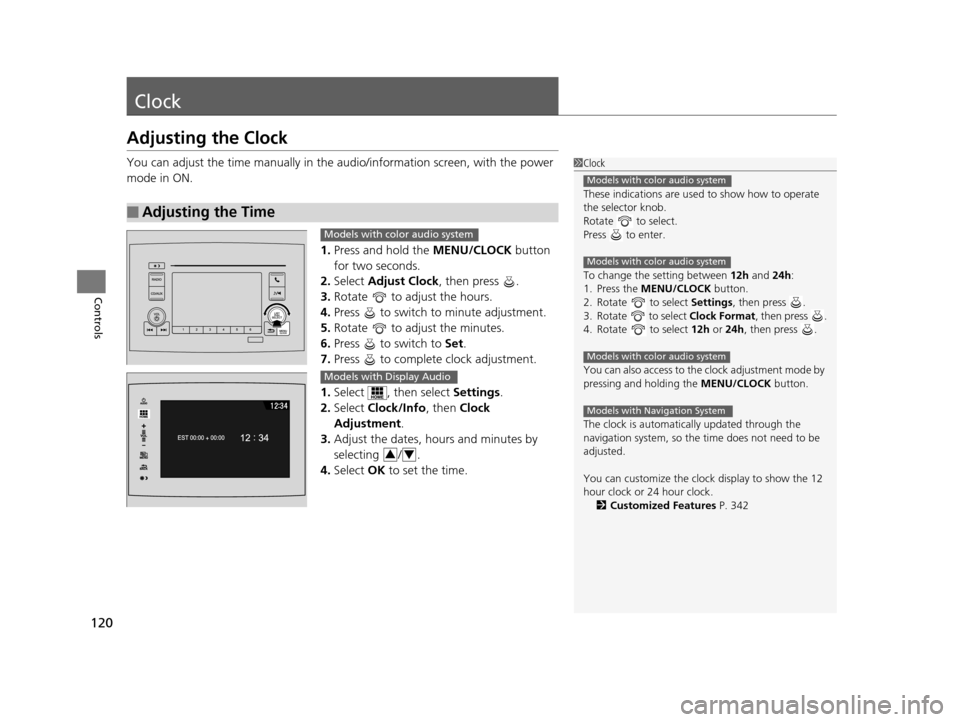
1.Press and hold the MENU/CLOCK button
for two seconds.
2. Select Adjust Clock , then press .
3. Rotate to adjust the hours.
4. Press to switch to minute adjustment.
5. Rotate to adjust the minutes.
6. Press to switch to Set.
7. Press to complete clock adjustment.
1. Select , then select Settings.
2. Select Clock/Info , then Clock
Adjustment .
3. Adjust the dates, hours and minutes by
selecting / .
4. Select OK to set the time.
■Adjusting the Time
1Clock
These indications are used to show how to operate
the selector knob.
Rotate to select.
Press to enter.
To change the setting between 12h and 24h:
1. Press the MENU/CLOCK button.
2. Rotate to select Settings, then press .
3. Rotate to select Clock Format, then press .
4. Rotate to select 12h or 24h , then press .
You can also access to the clock adjustment mode by
pressing and holding the MENU/CLOCK button.
The clock is automatica lly updated through the
navigation system, so the ti me does not need to be
adjusted.
You can customize the clock display to show the 12
hour clock or 24 hour clock. 2 Customized Features P. 342
Models with color audio system
Models with color audio system
Models with color audio system
Models with Navigation System
Models with color audio system
Models with Display Audio
34
16 PILOT-31TG76000.book 120 ページ 2015年6月15日 月曜日 午前11時30分
Page 167 of 661
166
uuOperating the Switches Around the Steering Wheel uBrightness Control
Controls
Brightness Control
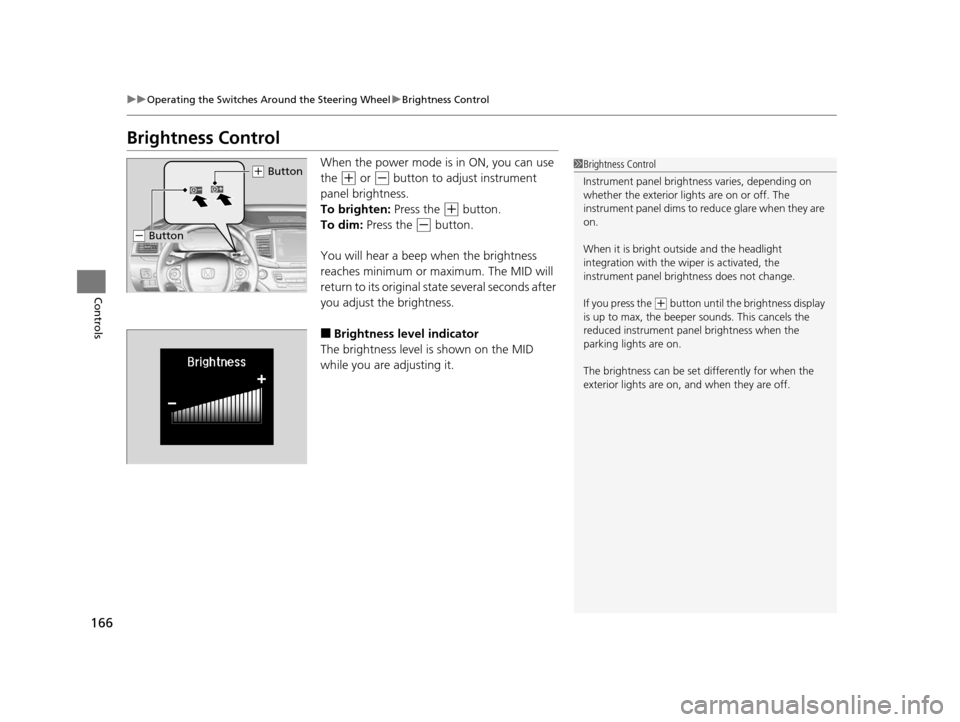
When the power mode is in ON, you can use
the
(+ or (- button to adjust instrument
panel brightness.
To brighten: Press the
(+ button.
To dim: Press the
(- button.
You will hear a beep when the brightness
reaches minimum or maximum. The MID will
return to its original state several seconds after
you adjust the brightness.
■Brightness level indicator
The brightness level is shown on the MID
while you are adjusting it.
1 Brightness Control
Instrument panel brightne ss varies, depending on
whether the exterior lights are on or off. The
instrument panel dims to reduce glare when they are
on.
When it is bright out side and the headlight
integration with the wi per is activated, the
instrument panel bri ghtness does not change.
If you press the
( + button until the brightness display
is up to max, the beeper sounds. This cancels the
reduced instrument panel brightness when the
parking lights are on.
The brightness can be set differently for when the
exterior lights are on, and when they are off.
( + Button
(- Button
16 PILOT-31TG76000.book 166 ページ 2015年6月15日 月曜日 午前11時30分
Page 211 of 661
210
Controls
Climate Control System*
Using Automatic Climate Control
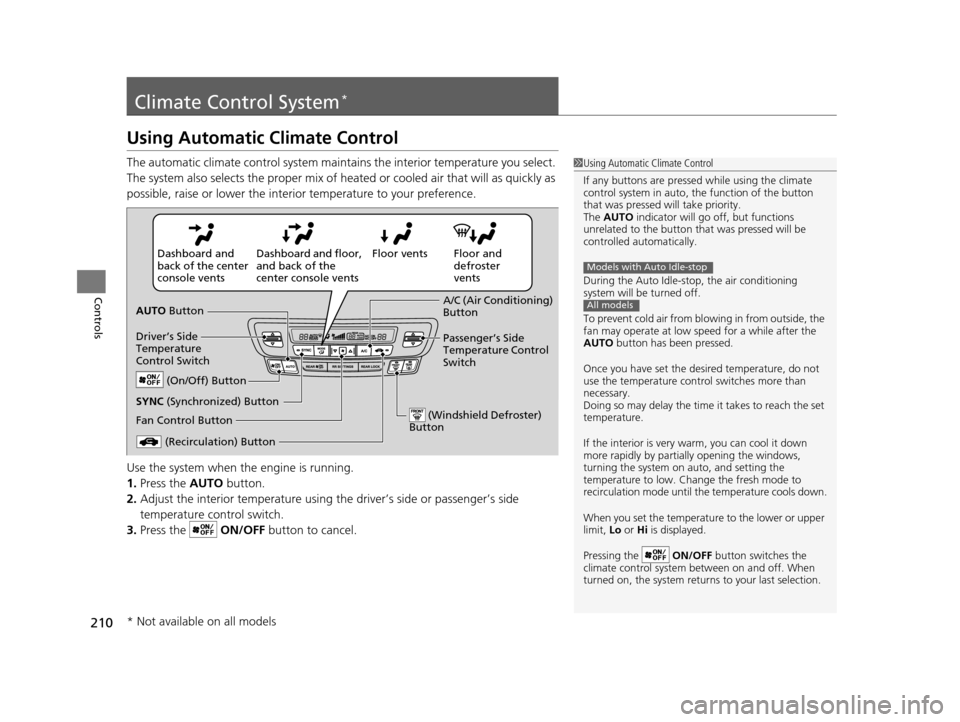
The automatic climate control system maintains the interior temperature you select.
The system also selects the proper mix of heated or cooled air that will as quickly as
possible, raise or lower the interior temperature to your preference.
Use the system when the engine is running.
1. Press the AUTO button.
2. Adjust the interior temperature using the driver’s side or passenger’s side
temperature control switch.
3. Press the ON/OFF button to cancel.1Using Automatic Climate Control
If any buttons are presse d while using the climate
control system in auto, the function of the button
that was pressed will take priority.
The AUTO indicator will go off, but functions
unrelated to the button th at was pressed will be
controlled automatically.
During the Auto Idle-stop, the air conditioning
system will be turned off.
To prevent cold air from bl owing in from outside, the
fan may operate at low speed for a while after the
AUTO button has been pressed.
Once you have set the de sired temperature, do not
use the temperature control switches more than
necessary.
Doing so may delay the time it takes to reach the set
temperature.
If the interior is very warm, you can cool it down
more rapidly by partial ly opening the windows,
turning the system on auto, and setting the
temperature to low. Change the fresh mode to
recirculation mode until the temperature cools down.
When you set the temperat ure to the lower or upper
limit, Lo or Hi is displayed.
Pressing the ON/OFF button switches the
climate control system be tween on and off. When
turned on, the system returns to your last selection.
Models with Auto Idle-stop
All models
Floor and
defroster
vents
Floor vents
Dashboard and floor,
and back of the
center console vents
Dashboard and
back of the center
console vents
AUTO Button
Driver’s Side
Temperature
Control Switch
(Recirculation) Button
Fan Control Button A/C (Air Conditioning)
Button
Passenger’s Side
Temperature Control
Switch
(On/Off) Button
(Windshield Defroster)
Button
SYNC (Synchronized) Button
* Not available on all models
16 PILOT-31TG76000.book 210 ページ 2015年6月15日 月曜日 午前11時30分
Page 215 of 661
214
uuClimate Control System*uRear Climate Control System
Controls
Rear Climate Control System
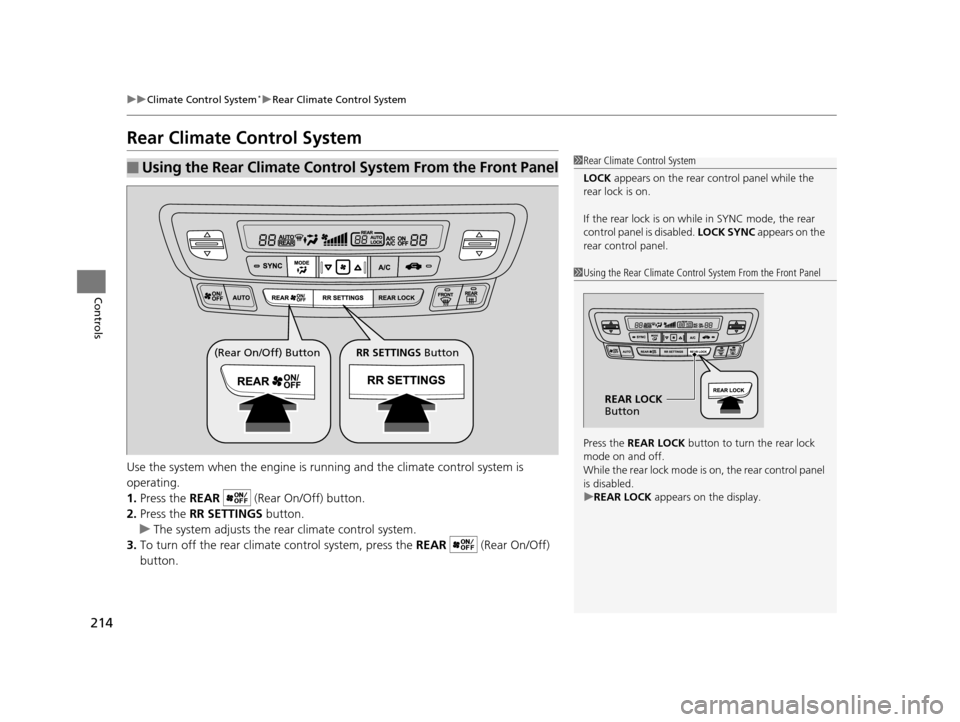
Use the system when the engine is running and the climate control system is
operating.
1. Press the REAR (Rear On/Off) button.
2. Press the RR SETTINGS button.
u The system adjusts the rear climate control system.
3. To turn off the rear climate control system, press the REAR (Rear On/Off)
button.
■Using the Rear Climate Control System From the Front Panel1 Rear Climate Control System
LOCK appears on the rear control panel while the
rear lock is on.
If the rear lock is on while in SYNC mode, the rear
control panel is disabled. LOCK SYNC appears on the
rear control panel.
1 Using the Rear Climate Control System From the Front Panel
Press the REAR LOCK button to turn the rear lock
mode on and off.
While the rear lock mode is on, the rear control panel
is disabled.
u REAR LOCK appears on the display.
REAR LOCK
Button
(Rear On/Off) Button RR SETTINGS Button
16 PILOT-31TG76000.book 214 ページ 2015年6月15日 月曜日 午前11時30分
Page 218 of 661
217
Features
This chapter describes how to operate technology features.
Audio SystemAbout Your Audio System ................ 218
USB Port(s) ....................................... 219
Auxiliary Input Jack .......................... 220
Audio System Theft Protection ......... 221
Audio Remote Controls .................... 222
Audio System Basic Operation ........ 224
Audio System Basic Operation ........ 242
Models with color audio system
Models with Display Audio
Audio Error Messages...................... 304
CD Player*....................................... 304
iPod/USB Flash Drive ........................ 305
Pandora ®
*....................................... 306
Android/Apps .................................. 307
General Information on the Audio
System ............................................. 308
SiriusXM ® Radio Service ................... 308
Recommended CD
*......................... 309
Compatible iPod, iPhone, and USB Flash Drives............................................. 311
About Open Source Licenses ............ 312 Blu-ray/DVD Rear Entertainment
System
*........................................... 313
Customized Features ........................ 342
HomeLink ® Universal Transceiver
*.. 378
Bluetooth ® HandsFreeLink® ............. 381
Bluetooth ® HandsFreeLink® ............. 406
Compass
*.......................................... 439
Compass Calibration........................ 439
Compass Zone Selection .................. 440
Models with color audio system
Models with Display Audio
* Not available on all models
16 PILOT-31TG76000.book 217 ページ 2015年6月15日 月曜日 午前11時30分
Page 220 of 661
219
uuAudio System uUSB Port(s)
Features
USB Port(s)
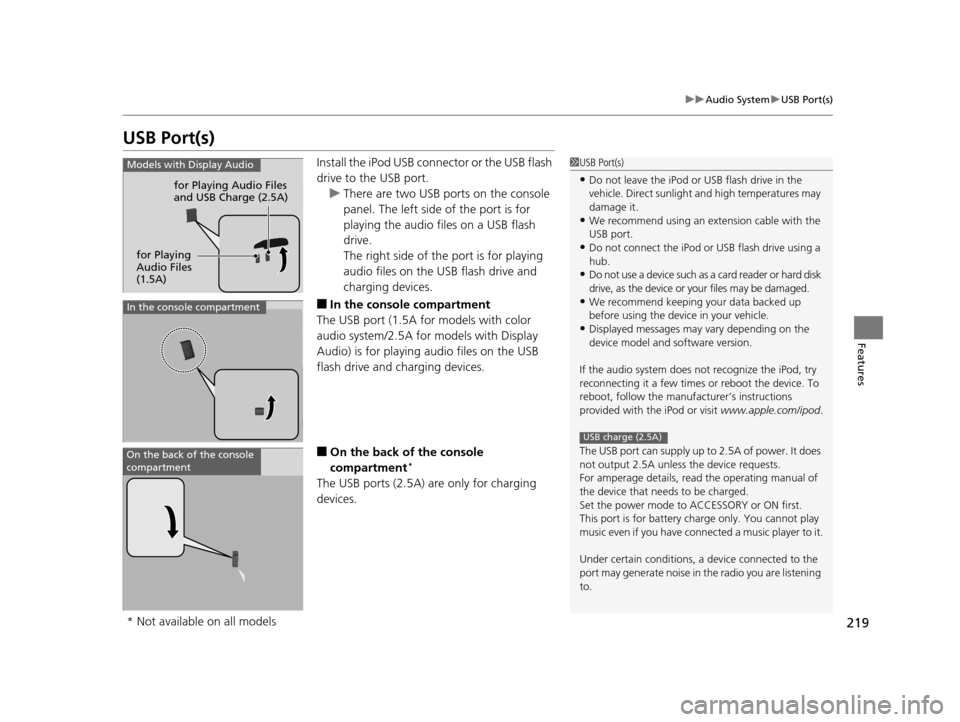
Install the iPod USB connector or the USB flash
drive to the USB port.
u There are two USB ports on the console
panel. The left side of the port is for
playing the audio files on a USB flash
drive.
The right side of th e port is for playing
audio files on the USB flash drive and
charging devices.
■In the consol e compartment
The USB port (1.5A for models with color
audio system/2.5A for models with Display
Audio) is for playing audio files on the USB
flash drive and charging devices.
■On the back of the console
compartment*
The USB ports (2.5A) are only for charging
devices.
1 USB Port(s)
•Do not leave the iPod or USB flash drive in the
vehicle. Direct sunlight and high temperatures may
damage it.
•We recommend using an extension cable with the
USB port.
•Do not connect the iPod or USB flash drive using a
hub.
•Do not use a device such as a card reader or hard disk
drive, as the device or your files may be damaged.
•We recommend keeping y our data backed up
before using the device in your vehicle.
•Displayed messages may vary depending on the
device model and software version.
If the audio system does not recognize the iPod, try
reconnecting it a few times or reboot the device. To
reboot, follow the manufac turer’s instructions
provided with the iPod or visit www.apple.com/ipod.
The USB port can supply up to 2.5A of power. It does
not output 2.5A unless the device requests.
For amperage details, read the operating manual of
the device that ne eds to be charged.
Set the power mode to ACCESSORY or ON first.
This port is for battery charge only. You cannot play
music even if you have conne cted a music player to it.
Under certain condi tions, a device connected to the
port may generate noise in the radio you are listening
to.
USB charge (2.5A)
Models with Display Audio
for Playing Audio Files
and USB Charge (2.5A)
for Playing
Audio Files
(1.5A)
In the console compartment
On the back of the console
compartment
* Not available on all models
16 PILOT-31TG76000.book 219 ページ 2015年6月15日 月曜日 午前11時30分
Page 221 of 661
220
uuAudio System uAuxiliary Input Jack
Features
Auxiliary Input Jack
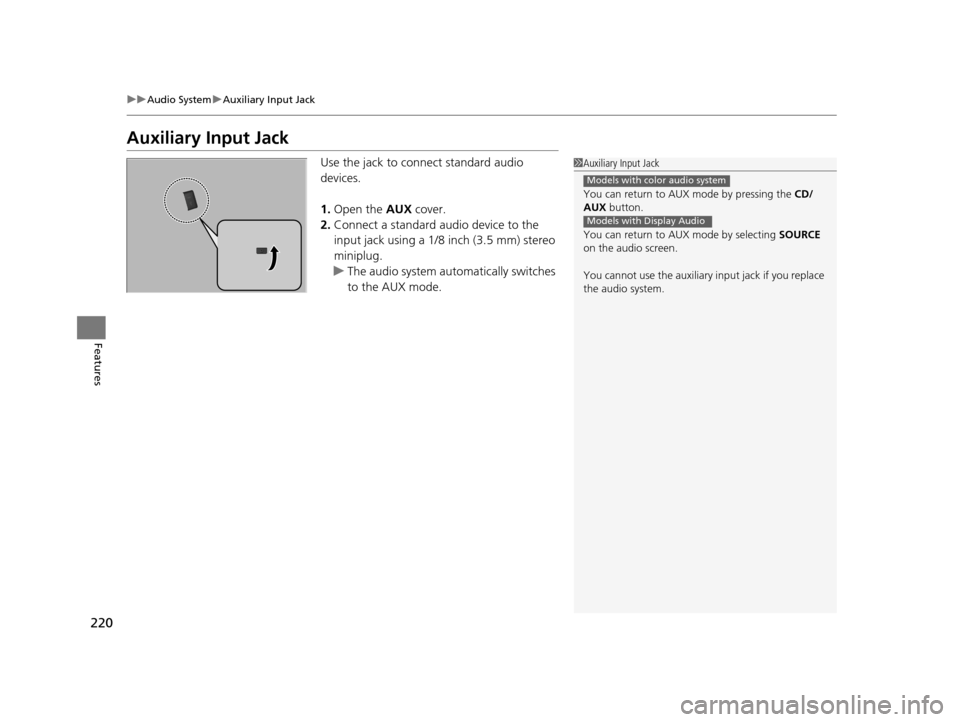
Use the jack to connect standard audio
devices.
1. Open the AUX cover.
2. Connect a standard audio device to the
input jack using a 1/8 inch (3.5 mm) stereo
miniplug.
u The audio system automatically switches
to the AUX mode.1Auxiliary Input Jack
You can return to AUX mode by pressing the CD/
AUX button.
You can return to AUX mode by selecting SOURCE
on the audio screen.
You cannot use the auxiliary input jack if you replace
the audio system.
Models with color audio system
Models with Display Audio
16 PILOT-31TG76000.book 220 ページ 2015年6月15日 月曜日 午前11時30分
Page 222 of 661
221
uuAudio System uAudio System Theft Protection
Features
Audio System Theft Protection
The audio system is disabled when it is disconnected from the power source, such as
when the battery is disconnected or goes dead. In certain conditions, the system
may display ENTER CODE
*1/Enter code*2. If this occurs, r eactivate the audio
system.
■Reactivating the audio system
1. Set the power mode to ON.
2. Turn on the audio system.
3. Press and hold the audio system powe r button for more than two seconds.
u The audio system is reac tivated when the audio co ntrol unit establishes a
connection with the vehicl e control unit. If the control unit fails to recognize
the audio unit, you must go to a deal er and have the audio unit checked.
*1: Models with color audio system
*2: Models with Display Audio
16 PILOT-31TG76000.book 221 ページ 2015年6月15日 月曜日 午前11時30分