display HONDA PILOT 2016 3.G Manual PDF
[x] Cancel search | Manufacturer: HONDA, Model Year: 2016, Model line: PILOT, Model: HONDA PILOT 2016 3.GPages: 661, PDF Size: 37.79 MB
Page 268 of 661
267
uuAudio System Basic Operation uPlaying AM/FM Radio
Continued
Features
Samples each of the strongest stations on the selected band for 10 seconds. To turn
off scan, select Cancel or .
If your iPod/iPhone is connected to the USB port, you can store the TAG information.
If the iPod/iPhone is not connected to the audio system, the information is stored in
the audio system temporarily, then once the device is connected to the system, data
is transferred to the iPod/iPhone.
To store the TAG information to the iP od/iPhone or the audio system, select TAG.
Displays the TAG information saved to the audio system.
1. Select .
2. Select Song Tag List .
■Scan
■Tag Song to Device
■Tagged Song List
Models with HD RadioTM
Models with HD RadioTM
16 PILOT-31TG76000.book 267 ページ 2015年6月15日 月曜日 午前11時30分
Page 269 of 661
uuAudio System Basic Operation uPlaying AM/FM Radio
268
Features
Displays the subchannel list when an HD RadioTM station is selected while listening to
an FM station.
1. Select .
2. Select HD Subchannel .
3. Select the channel number.
Provides text data information related to your selected RDS-capable FM station.
■To find an RDS station from Station List
1. Select the open/close icon to display a list while listening to an FM station.
2. Select the Station List tab.
3. Select the station.
■Manual update
Updates your available station list at any time.
1. Select the open/close icon to display a list while listening to an FM station.
2. Select the Station List tab.
3. Select Refresh .
■HD Subchannel
■Radio Data System (RDS)
Models with HD RadioTM
1Radio Data System (RDS)
When you select an RDS-capable FM station, the RDS
automatically turns on, and the frequency display
changes to the station name. However, when the
signals of that station become weak, the display
changes from the statio n name to the frequency.
16 PILOT-31TG76000.book 268 ページ 2015年6月15日 月曜日 午前11時30分
Page 270 of 661
269
uuAudio System Basic Operation uPlaying AM/FM Radio
Features
■Radio text
Displays the radio text informat ion of the selected RDS station.
1. Select .
2. Select View Radio Text .
■Scan
Samples each of the strongest stations on the selected band for 10 seconds.
To turn off scan, select Cancel or .
16 PILOT-31TG76000.book 269 ページ 2015年6月15日 月曜日 午前11時30分
Page 271 of 661
270
uuAudio System Basic Operation uPlaying SiriusXM ® Radio
Features
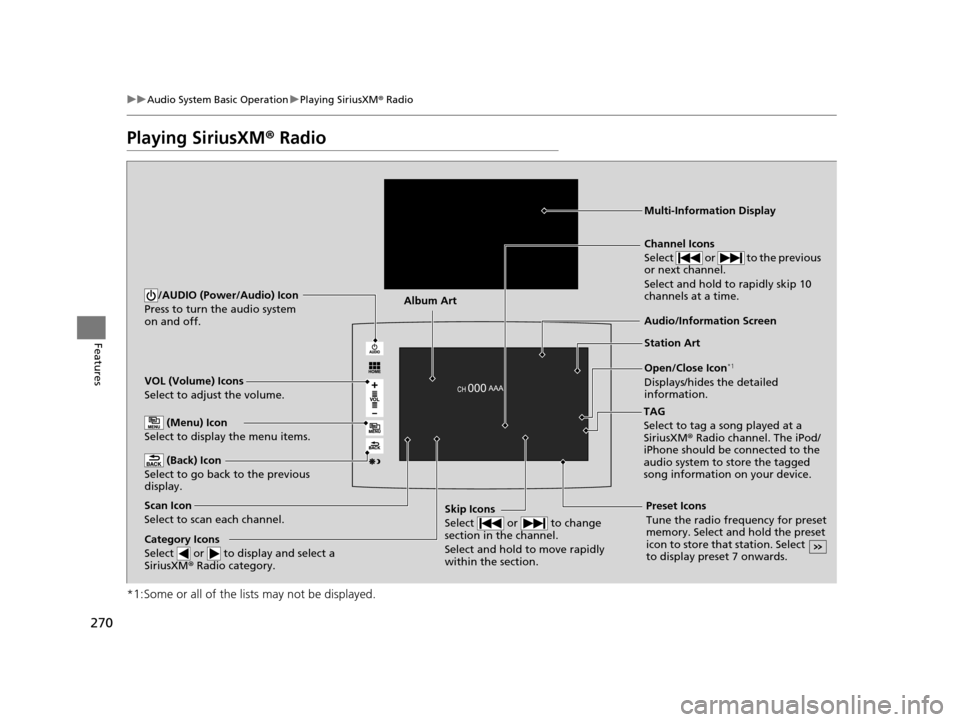
Playing SiriusXM ® Radio
*1:Some or all of the lists may not be displayed.
VOL (Volume) Icons
Select to adjust the volume.
(Back) Icon
Select to go back to the previous
display.
Channel Icons
Select or to the previous
or next channel.
Select and hold to rapidly skip 10
channels at a time.
/AUDIO (Power/Audio) Icon
Press to turn the audio system
on and off.
Open/Close Icon*1
Displays/hides the detailed
information.
(Menu) Icon
Select to display the menu items.
TAG
Select to tag a song played at a
SiriusXM® Radio channel. The iPod/
iPhone should be connected to the
audio system to store the tagged
song information on your device.
Category Icons
Select or to display and select a
SiriusXM ® Radio category.
Audio/Information Screen
Scan Icon
Select to scan each channel. Preset Icons
Tune the radio frequency for preset
memory. Select and hold the preset
icon to store that station. Select
to display preset 7 onwards.Skip Icons
Select or to change
section in the channel.
Select and hold to move rapidly
within the section.
Multi-Information Display
Album Art
Station Art
16 PILOT-31TG76000.book 270 ページ 2015年6月15日 月曜日 午前11時30分
Page 273 of 661
uuAudio System Basic Operation uPlaying SiriusXM ® Radio
272
Features
To store a channel:
1. Tune to the selected channel.
2. Select to hold the preset number for the station you want to store.
3. Select Replace .
You can also store a channel by the following procedure.
1. Tune to the selected channel.
2. Select the open/close ic on to display a list.
3. Select the Preset tab.
4. Select and hold the preset number for the station you want to store.
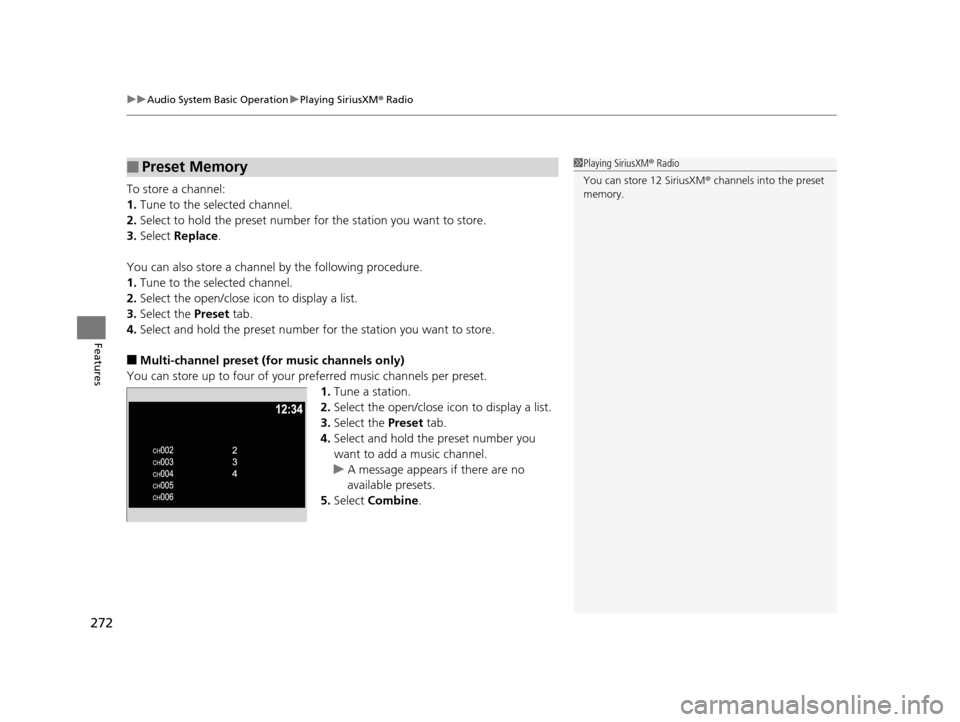
■Multi-channel preset (for music channels only)
You can store up to four of your pr eferred music channels per preset.
1. Tune a station.
2. Select the open/close ic on to display a list.
3. Select the Preset tab.
4. Select and hold the preset number you
want to add a music channel.
u A message appears if there are no
available presets.
5. Select Combine .
■Preset Memory1Playing SiriusXM ® Radio
You can store 12 SiriusXM ® channels into the preset
memory.
16 PILOT-31TG76000.book 272 ページ 2015年6月15日 月曜日 午前11時30分
Page 274 of 661
Continued273
uuAudio System Basic Operation uPlaying SiriusXM ® Radio
Features
Suggested channel listing received from SiriusXM ® can be displayed and selected.
1. Select the open/close icon to display a channel list.
2. Select the Channel List tab.
3. Select the featured channel list title you want to listen to.
u The selected channel list of the title is displayed.
4. Select the channel.
■Listening to Featured Channels1Listening to Featured Channels
Up to three featured channels by SiriusXM ® can be
displayed.
Featured channel li sts are at the top of the channel
list.
16 PILOT-31TG76000.book 273 ページ 2015年6月15日 月曜日 午前11時30分
Page 278 of 661
277
uuAudio System Basic Operation uPlaying SiriusXM ® Radio
Features
Sample each channel on the selected mode for 10 seconds.
1. Select Scan.
2. Select Scan Channels.
u You can select the desired channel by songs using Scan Songs in Presets.
To turn off scan, select Cancel.
If your iPhone/iPod is connected to the US B port, you can store the TAG information.
If the iPod/iPhone is not connected to the audio system, the information is stored in
the audio system tempor arily. Once the device is conn ected to the system, data is
transferred to the iPod/iPhone.
To store the TAG information to the iP od/iPhone, or the audio system, select TAG.
Displays the TAG information saved to the audio system.
1. Select .
2. Select Tagged Song List .
■Scan
■Tag Song to Device
■Tagged Song List
1Scan
The “Scan Songs in Preset s” function is based on
TuneScan
TM technology of SiriusXM ®.
The “Featured Channels ” function is based on
Featured Favorites
TM technology of SiriusXM ®.
TuneScan
TM and Featured FavoritesTM are registered
trademarks of SiriusXM ® Radio, Inc.
16 PILOT-31TG76000.book 277 ページ 2015年6月15日 月曜日 午前11時30分
Page 279 of 661
278
uuAudio System Basic Operation uPlaying a CD*
Features
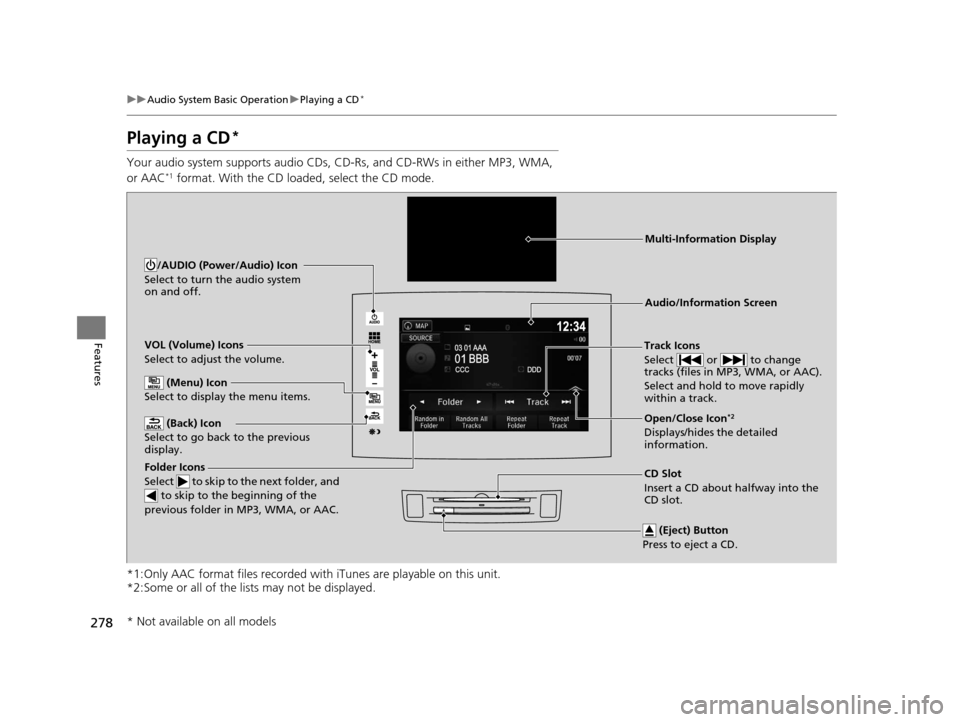
Playing a CD*
Your audio system supports audio CDs, CD-Rs, and CD-RWs in either MP3, WMA,
or AAC*1 format. With the CD loaded, select the CD mode.
*1:Only AAC format files recorded with iTunes are playable on this unit.
*2:Some or all of the lists may not be displayed.
VOL (Volume) Icons
Select to adjust the volume.
(Back) Icon
Select to go back to the previous
display.Track Icons
Select or to change
tracks (files in MP3, WMA, or AAC).
Select and hold to move rapidly
within a track.
/AUDIO (Power/Audio) Icon
Select to turn the audio system
on and off.
Open/Close Icon*2
Displays/hides the detailed
information.
(Menu) Icon
Select to display the menu items.
(Eject) Button
Press to eject a CD.
Audio/Information Screen
Folder Icons
Select to skip to the next folder, and
to skip to the beginning of the
previous folder in MP3, WMA, or AAC.
Multi-Information Display
CD Slot
Insert a CD about halfway into the
CD slot.
* Not available on all models
16 PILOT-31TG76000.book 278 ページ 2015年6月15日 月曜日 午前11時30分
Page 280 of 661
Continued279
uuAudio System Basic Operation uPlaying a CD*
Features
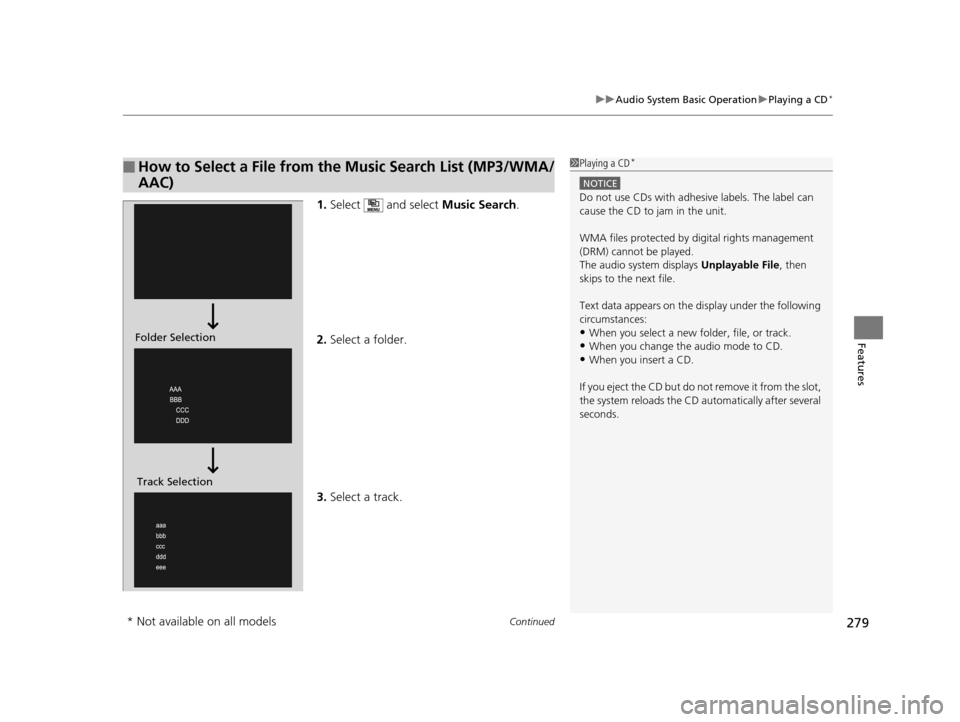
1. Select and select Music Search.
2. Select a folder.
3. Select a track.
■How to Select a File from the Music Search List (MP3/WMA/
AAC)1Playing a CD*
NOTICE
Do not use CDs with adhesive labels. The label can
cause the CD to jam in the unit.
WMA files protected by di gital rights management
(DRM) cannot be played.
The audio system displays Unplayable File, then
skips to the next file.
Text data appears on the di splay under the following
circumstances:
•When you select a new folder, file, or track.
•When you change the audio mode to CD.
•When you insert a CD.
If you eject the CD but do not remove it from the slot,
the system reloads the CD automatically after several
seconds.
Folder Selection
Track Selection
* Not available on all models
16 PILOT-31TG76000.book 279 ページ 2015年6月15日 月曜日 午前11時30分
Page 282 of 661
281
uuAudio System Basic Operation uPlaying an iPod
Continued
Features
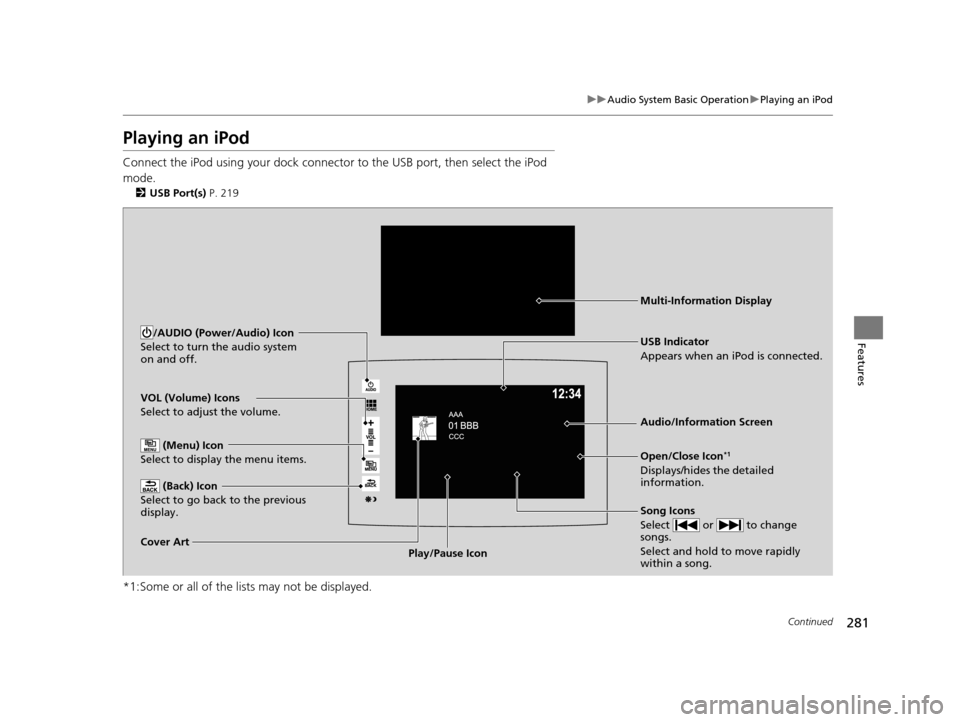
Playing an iPod
Connect the iPod using your dock connector to the USB port, then select the iPod
mode.
2 USB Port(s) P. 219
*1:Some or all of the lists may not be displayed.
VOL (Volume) Icons
Select to adjust the volume.
(Back) Icon
Select to go back to the previous
display.
Song Icons
Select or to change
songs.
Select and hold to move rapidly
within a song.
/AUDIO (Power/Audio) Icon
Select to turn the audio system
on and off.
Open/Close Icon*1
Displays/hides the detailed
information.
(Menu) Icon
Select to display the menu items.
Cover Art Audio/Information Screen
USB Indicator
Appears when an iPod is connected.
Play/Pause Icon
Multi-Information Display
16 PILOT-31TG76000.book 281 ページ 2015年6月15日 月曜日 午前11時30分