warning HONDA PILOT 2016 3.G Workshop Manual
[x] Cancel search | Manufacturer: HONDA, Model Year: 2016, Model line: PILOT, Model: HONDA PILOT 2016 3.GPages: 661, PDF Size: 37.79 MB
Page 192 of 661
191
uuInterior Lights/Interior Convenience Items uInterior Convenience Items
Continued
Controls
Interior Convenience Items
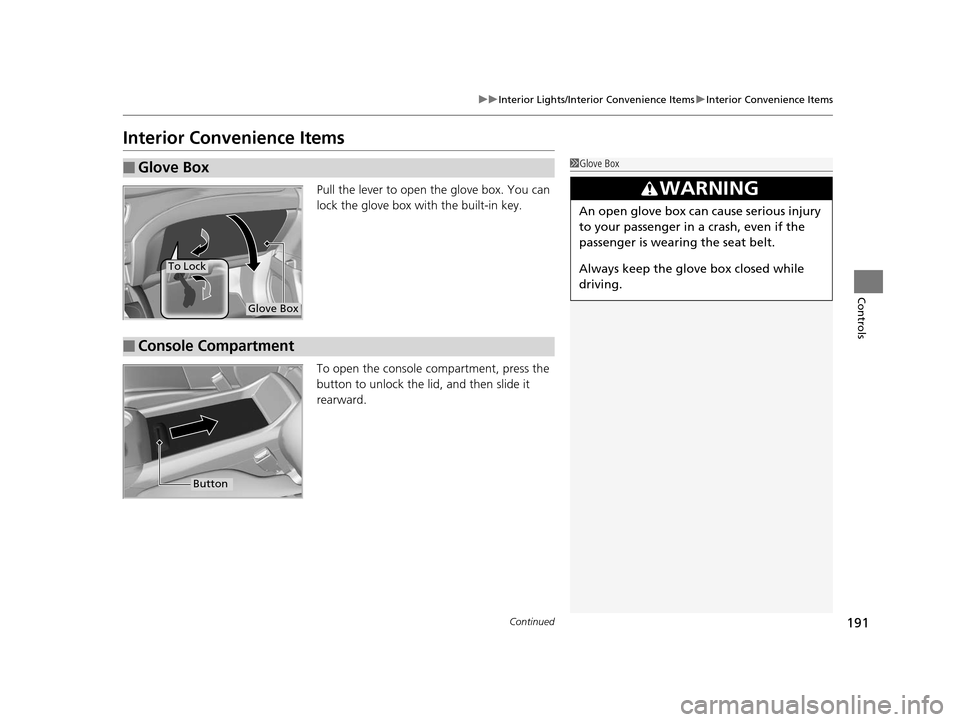
Pull the lever to open the glove box. You can
lock the glove box with the built-in key.
To open the console co mpartment, press the
button to unlock the lid, and then slide it
rearward.
■Glove Box1 Glove Box
3WARNING
An open glove box can cause serious injury
to your passenger in a crash, even if the
passenger is wearing the seat belt.
Always keep the glove box closed while
driving.
Glove Box
To Lock
■Console Compartment
Button
16 PILOT-31TG76000.book 191 ページ 2015年6月15日 月曜日 午前11時30分
Page 202 of 661
Continued201
uuInterior Lights/Interior Convenience Items uInterior Convenience Items
Controls
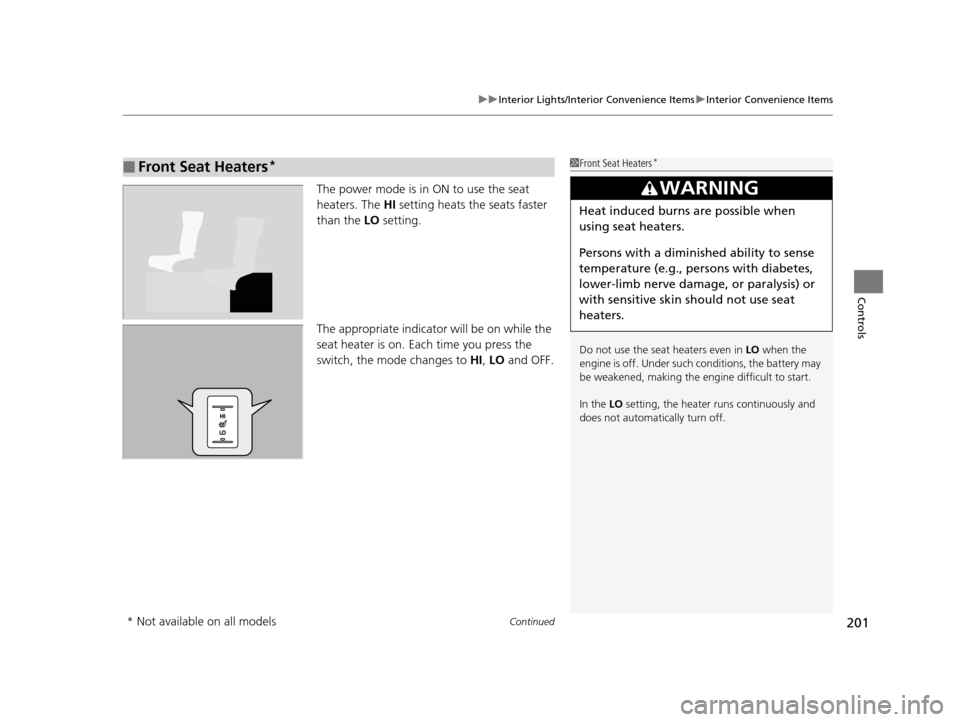
The power mode is in ON to use the seat
heaters. The HI setting heats the seats faster
than the LO setting.
The appropriate indicato r will be on while the
seat heater is on. Each time you press the
switch, the mode changes to HI, LO and OFF.
■Front Seat Heaters*1Front Seat Heaters*
Do not use the seat heaters even in LO when the
engine is off. Under such conditions, the battery may
be weakened, making the engine difficult to start.
In the LO setting, the heater runs continuously and
does not automatically turn off.
3WARNING
Heat induced burns are possible when
using seat heaters.
Persons with a diminished ability to sense
temperature (e.g., persons with diabetes,
lower-limb nerve damage, or paralysis) or
with sensitive skin should not use seat
heaters.
* Not available on all models
16 PILOT-31TG76000.book 201 ページ 2015年6月15日 月曜日 午前11時30分
Page 203 of 661
uuInterior Lights/Interior Convenience Items uInterior Convenience Items
202
Controls
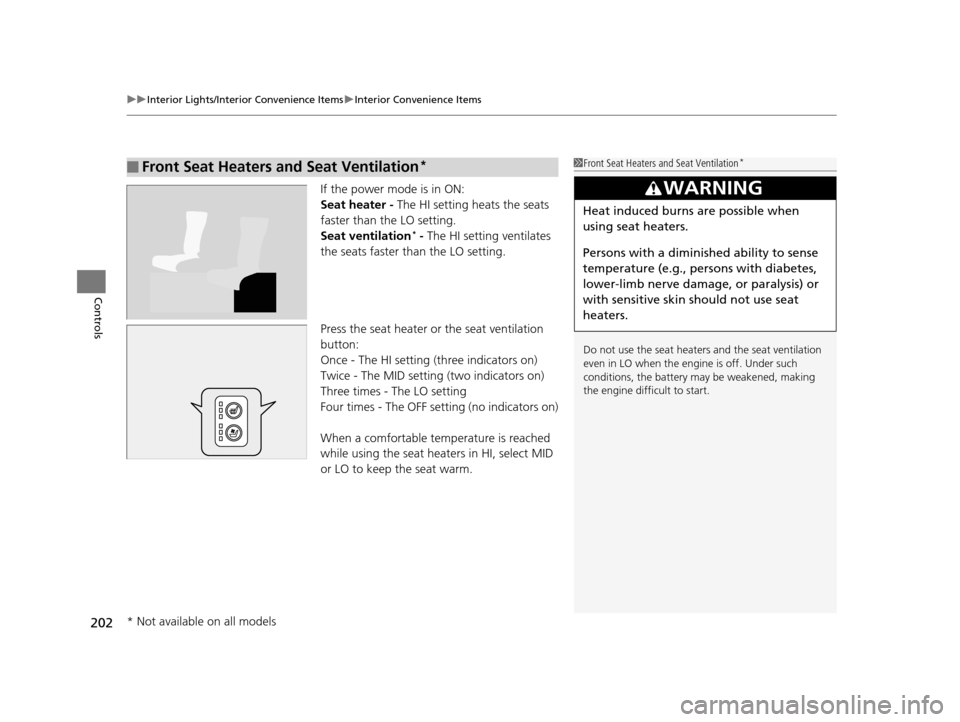
If the power mode is in ON:
Seat heater - The HI setting heats the seats
faster than the LO setting.
Seat ventilation
* - The HI setting ventilates
the seats faster than the LO setting.
Press the seat heater or the seat ventilation
button:
Once - The HI setting (three indicators on)
Twice - The MID setting (two indicators on)
Three times - The LO setting
Four times - The OFF setting (no indicators on)
When a comfortable temperature is reached
while using the seat heaters in HI, select MID
or LO to keep the seat warm.
■Front Seat Heaters and Seat Ventilation*1 Front Seat Heaters and Seat Ventilation*
Do not use the seat heater s and the seat ventilation
even in LO when the engine is off. Under such
conditions, the battery ma y be weakened, making
the engine difficult to start.
3WARNING
Heat induced burns are possible when
using seat heaters.
Persons with a diminished ability to sense
temperature (e.g., persons with diabetes,
lower-limb nerve damage, or paralysis) or
with sensitive skin should not use seat
heaters.
* Not available on all models
16 PILOT-31TG76000.book 202 ページ 2015年6月15日 月曜日 午前11時30分
Page 204 of 661
Continued203
uuInterior Lights/Interior Convenience Items uInterior Convenience Items
Controls
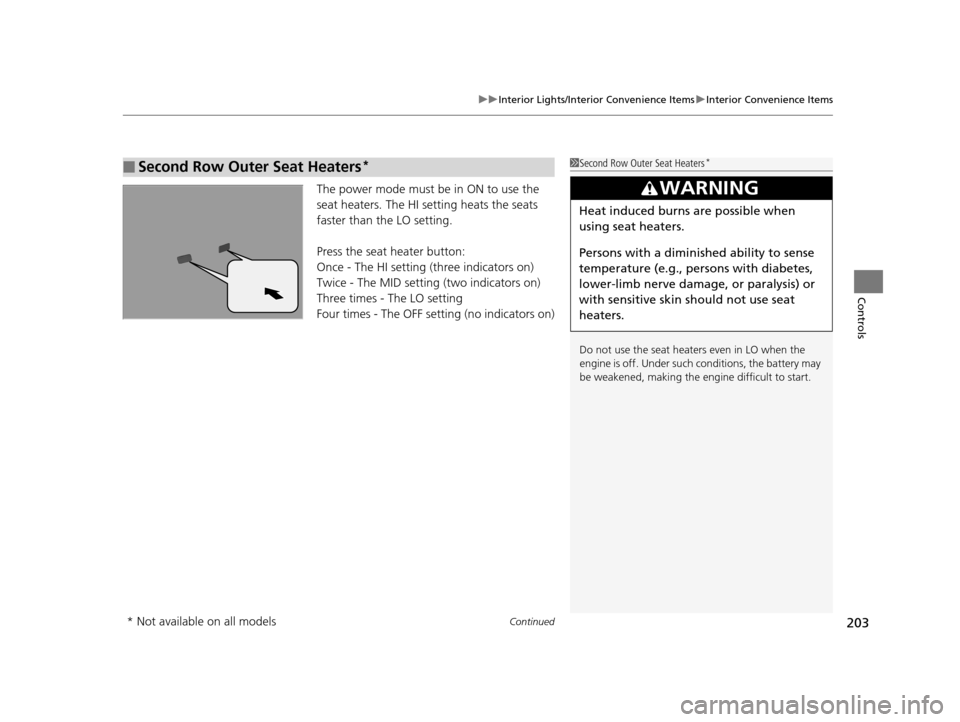
The power mode must be in ON to use the
seat heaters. The HI setting heats the seats
faster than the LO setting.
Press the seat heater button:
Once - The HI setting (three indicators on)
Twice - The MID setting (two indicators on)
Three times - The LO setting
Four times - The OFF setting (no indicators on)
■Second Row Outer Seat Heaters*1Second Row Outer Seat Heaters*
Do not use the seat heaters even in LO when the
engine is off. Under such conditions, the battery may
be weakened, making the engine difficult to start.
3WARNING
Heat induced burns are possible when
using seat heaters.
Persons with a diminished ability to sense
temperature (e.g., persons with diabetes,
lower-limb nerve damage, or paralysis) or
with sensitive skin should not use seat
heaters.
* Not available on all models
16 PILOT-31TG76000.book 203 ページ 2015年6月15日 月曜日 午前11時30分
Page 353 of 661
352
uuCustomized Features u
Features
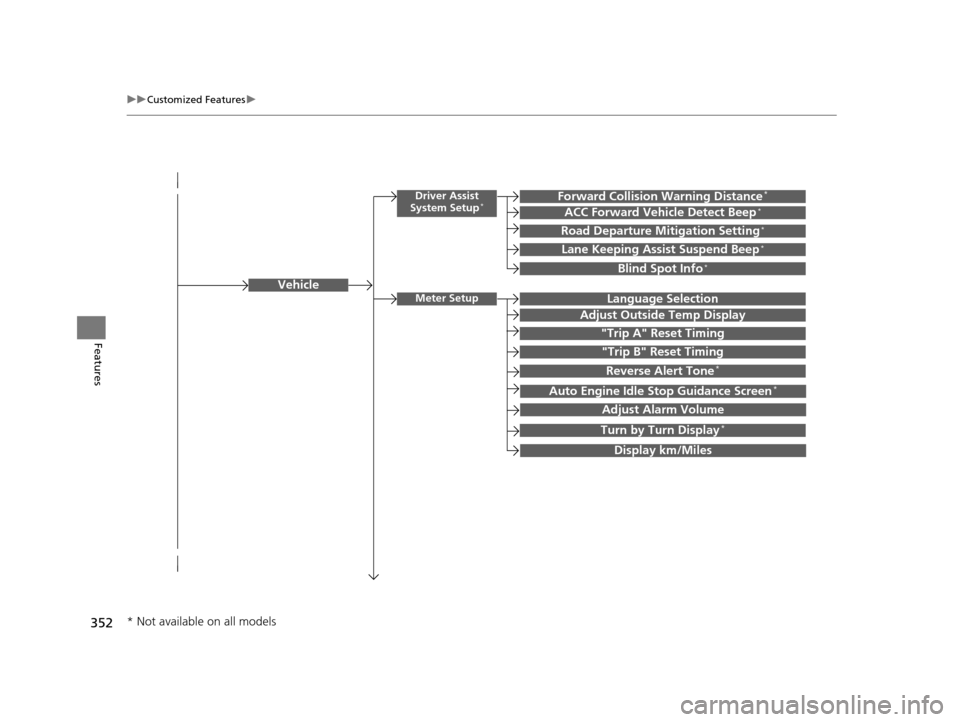
Vehicle
Driver Assist
System Setup*Forward Collision Warning Distance*
ACC Forward Vehicle Detect Beep*
Road Departure Mitigation Setting*
Lane Keeping Assist Suspend Beep*
Blind Spot Info*
Meter SetupLanguage Selection
Adjust Outside Temp Display
"Trip A" Reset Timing
"Trip B" Reset Timing
Reverse Alert Tone*
Auto Engine Idle Stop Guidance Screen*
Adjust Alarm Volume
Turn by Turn Display*
Display km/Miles
* Not available on all models
16 PILOT-31TG76000.book 352 ページ 2015年6月15日 月曜日 午前11時30分
Page 364 of 661
363
uuCustomized Features u
Continued
Features
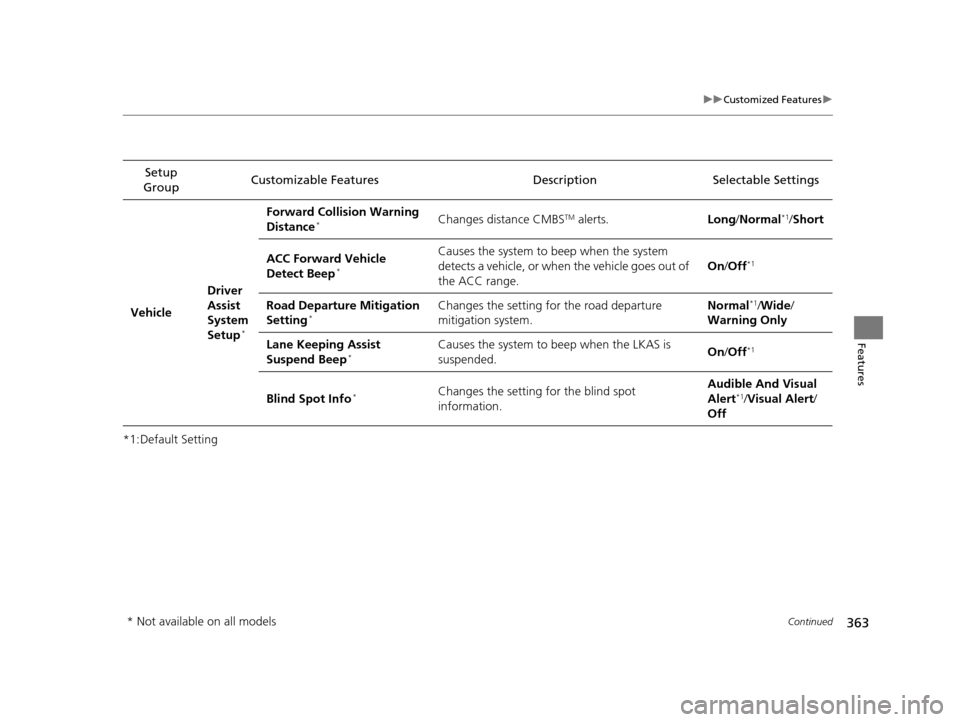
*1:Default SettingSetup
Group Customizable Features Description Selectable Settings
Vehicle Driver
Assist
System
Setup
*
Forward Collision Warning
Distance*Changes distance CMBSTM alerts.
Long/Normal*1/Short
ACC Forward Vehicle
Detect Beep
*
Causes the system to beep when the system
detects a vehicle, or when the vehicle goes out of
the ACC range. On
/Off*1
Road Departure Mitigation
Setting*Changes the setting for the road departure
mitigation system. Normal*1/
Wide /
Warning Only
Lane Keeping Assist
Suspend Beep
*Causes the system to be ep when the LKAS is
suspended. On
/Off*1
Blind Spot Info*Changes the setting for the blind spot
information. Audible And Visual
Alert*1/
Visual Alert /
Off
* Not available on all models
16 PILOT-31TG76000.book 363 ページ 2015年6月15日 月曜日 午前11時30分
Page 365 of 661
364
uuCustomized Features u
Features
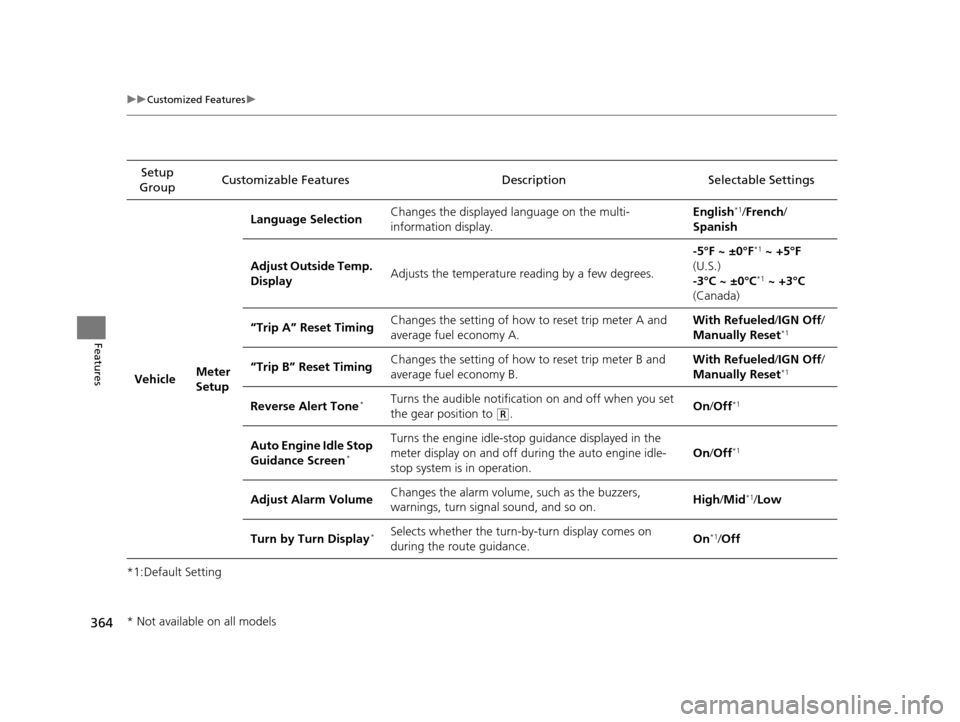
*1:Default SettingSetup
Group Customizable Features Description Selectable Settings
Vehicle Meter
SetupLanguage Selection
Changes the displayed language on the multi-
information display. English
*1/
French /
Spanish
Adjust Outside Temp.
Display Adjusts the temperature reading by a few degrees. -5°F ~ ±0°F
*1
~ +5°F
(U.S.)
-3°C ~ ±0°C
*1 ~ +3°C
(Canada)
“Trip A” Reset Timing Changes the setting of how to reset trip meter A and
average fuel economy A. With Refueled
/IGN Off /
Manually Reset
*1
“Trip B” Reset Timing Changes the setting of how to reset trip meter B and
average fuel economy B. With Refueled
/IGN Off /
Manually Reset*1
Reverse Alert Tone*Turns the audible notification on and off when you set
the gear position to
(R. On
/Off*1
Auto Engine Idle Stop
Guidance Screen*
Turns the engine idle-stop guidance displayed in the
meter display on and off duri ng the auto engine idle-
stop system is in operation. On
/Off*1
Adjust Alarm Volume Changes the alarm volume, such as the buzzers,
warnings, turn signal sound, and so on. High
/Mid*1/Low
Turn by Turn Display
*Selects whether the turn-by-turn display comes on
during the route guidance. On*1/
Off
* Not available on all models
16 PILOT-31TG76000.book 364 ページ 2015年6月15日 月曜日 午前11時30分
Page 446 of 661
445
uuBefore Driving uMaximum Load Limit
Continued
Driving
Maximum Load Limit
The maximum load for your ve hicle is 1,173 lbs (532 kg).
The maximum load for your ve hicle is 1,340 lbs (608 kg).
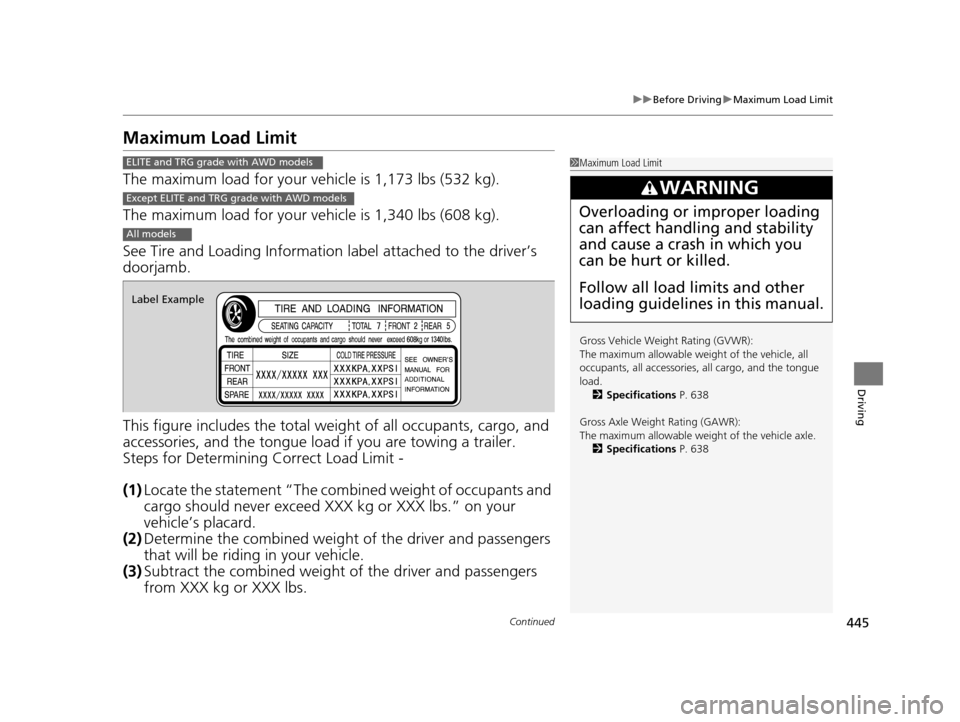
See Tire and Loading Information label attached to the driver’s
doorjamb.
This figure includes the total weig ht of all occupants, cargo, and
accessories, and the tongue load if you are towing a trailer.
Steps for Determining Correct Load Limit -
(1) Locate the statement “The comb ined weight of occupants and
cargo should never exceed XXX kg or XXX lbs.” on your
vehicle’s placard.
(2) Determine the combined weight of the driver and passengers
that will be riding in your vehicle.
(3) Subtract the combined weight of the driver and passengers
from XXX kg or XXX lbs.
1Maximum Load Limit
Gross Vehicle Weight Rating (GVWR):
The maximum allowable weight of the vehicle, all
occupants, all a ccessories, all cargo, and the tongue
load. 2 Specifications P. 638
Gross Axle Weight Rating (GAWR):
The maximum allowable weight of the vehicle axle. 2 Specifications P. 638
3WARNING
Overloading or improper loading
can affect handling and stability
and cause a crash in which you
can be hurt or killed.
Follow all load limits and other
loading guidelines in this manual.
ELITE and TRG grade with AWD models
Except ELITE and TRG grade with AWD models
All models
Label Example
16 PILOT-31TG76000.book 445 ページ 2015年6月15日 月曜日 午前11時30分
Page 449 of 661
448
Driving
Towing a Trailer
Towing Preparation
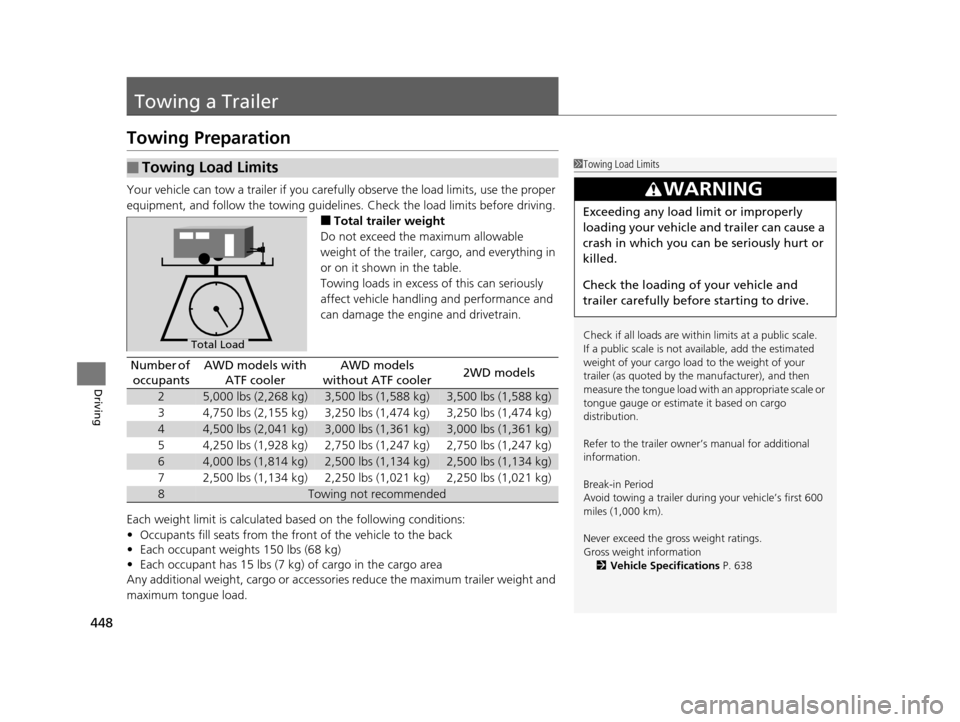
Your vehicle can tow a trailer if you carefully observe the load limits, use the proper
equipment, and follow the towing guidelin es. Check the load limits before driving.
■Total trailer weight
Do not exceed the maximum allowable
weight of the trailer, cargo, and everything in
or on it shown in the table.
Towing loads in excess of this can seriously
affect vehicle handling and performance and
can damage the engine and drivetrain.
Each weight limit is calculated based on the following conditions:
• Occupants fill seats from the front of the vehicle to the back
• Each occupant weights 150 lbs (68 kg)
• Each occupant has 15 lbs (7 kg) of cargo in the cargo area
Any additional weight, cargo or accessori es reduce the maximum trailer weight and
maximum tongue load.
■Towing Load Limits1 Towing Load Limits
Check if all loads are within limits at a public scale.
If a public scale is not available, add the estimated
weight of your cargo load to the weight of your
trailer (as quoted by the manufacturer), and then
measure the tongue load with an appropriate scale or
tongue gauge or estima te it based on cargo
distribution.
Refer to the trailer owner’s manual for additional
information.
Break-in Period
Avoid towing a trailer duri ng your vehicle’s first 600
miles (1,000 km).
Never exceed the gross weight ratings.
Gross weight information 2 Vehicle Specifications P. 638
3WARNING
Exceeding any load limit or improperly
loading your vehicle and trailer can cause a
crash in which you can be seriously hurt or
killed.
Check the loading of your vehicle and
trailer carefully before starting to drive.
Total Load
Number of
occupantsAWD models with ATF coolerAWD models
without ATF cooler2WD models
25,000 lbs (2,268 kg)3,500 lbs (1,588 kg)3,500 lbs (1,588 kg)
34,750 lbs (2,155 kg)3,250 lbs (1,474 kg)3,250 lbs (1,474 kg)
44,500 lbs (2,041 kg)3,000 lbs (1,361 kg)3,000 lbs (1,361 kg)
54,250 lbs (1,928 kg)2,750 lbs (1,247 kg)2,750 lbs (1,247 kg)
64,000 lbs (1,814 kg)2,500 lbs (1,134 kg)2,500 lbs (1,134 kg)
72,500 lbs (1,134 kg)2,250 lbs (1,021 kg)2,250 lbs (1,021 kg)
8Towing not recommended
16 PILOT-31TG76000.book 448 ページ 2015年6月15日 月曜日 午前11時30分
Page 460 of 661
459
Driving
Off-Highway Driving Guidelines
General Information
Your vehicle has been designed primarily for use on pavement, however, its higher
ground clearance allows you to occasionally travel on unpaved roads. It is not
designed for trail-blazing, or othe r challenging off-road activities.
If you decide to drive on unpaved roads, you will find that it requires somewhat
different driving skills and that your vehicl e will handle somewhat differently than it
does on pavement. Pay attention to the precau tions and tips in this section, and get
acquainted with your vehicle before leaving the pavement.
Important Safety Precautions
To avoid loss of control or rollover, be sure to follow all precautions and
recommendations:
• Be sure to store cargo properly and do not exceed your cargo load limits.
2 Maximum Load Limit P. 445
•Whenever you drive, make su re you and your passengers always wear seat belts.
• Keep your speed low, and never go faster than the conditions allow.
• It’s up to you to continually assess the situation and drive within the limits.
1Off-Highway Driving Guidelines
Failure to operate your vehi cle correctly might result
in a crash or a rollover. 2 Important Handling Information
* P. 34
2 Precautions While Driving P. 467
Spinning the tires excessivel y can also damage the
Intelligent VTM4 (i-VTM4) system.
3WARNING
Improperly operating this vehicle on or off
pavement can cause a crash or rollover in
which you and your passengers can be
seriously injured or killed.
• Follow all instructions and guidelines in
this owner’s manual.
• Keep your speed low, and don’t drive
faster than conditions permit.
* Not available on all models
16 PILOT-31TG76000.book 459 ページ 2015年6月15日 月曜日 午前11時30分