warning HONDA PILOT 2016 3.G Repair Manual
[x] Cancel search | Manufacturer: HONDA, Model Year: 2016, Model line: PILOT, Model: HONDA PILOT 2016 3.GPages: 661, PDF Size: 37.79 MB
Page 464 of 661
Continued463
uuWhen Driving uStarting the Engine
Driving
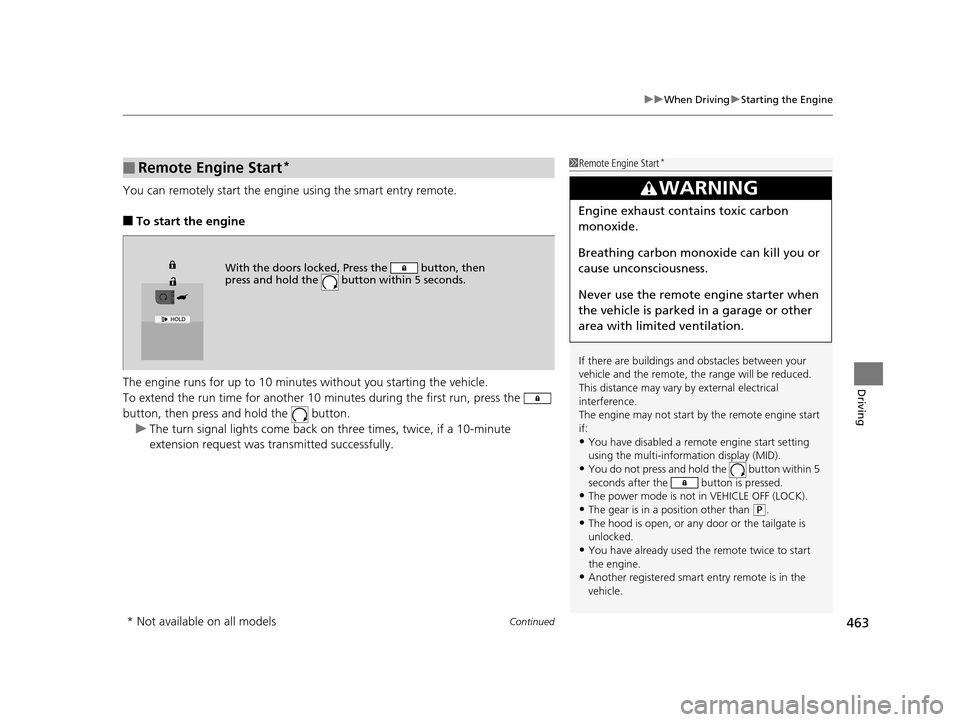
You can remotely start the engine using the smart entry remote.
■To start the engine
The engine runs for up to 10 minu tes without you starting the vehicle.
To extend the run time for another 10 mi nutes during the first run, press the
button, then press an d hold the button.
u The turn signal lights co me back on three times, twice, if a 10-minute
extension request was transmitted successfully.
■Remote Engine Start*1 Remote Engine Start*
If there are buildings an d obstacles between your
vehicle and the remote, th e range will be reduced.
This distance may vary by external electrical
interference.
The engine may not start by the remote engine start
if:
•You have disabled a remo te engine start setting
using the multi-information display (MID).
•You do not press and hold the button within 5
seconds after the button is pressed.
•The power mode is not in VEHICLE OFF (LOCK).•The gear is in a position other than ( P.
•The hood is open, or any door or the tailgate is
unlocked.
•You have already used the remote twice to start
the engine.
•Another registered smart entry remote is in the
vehicle.
3WARNING
Engine exhaust contains toxic carbon
monoxide.
Breathing carbon monoxide can kill you or
cause unconsciousness.
Never use the remote engine starter when
the vehicle is parked in a garage or other
area with limited ventilation.
With the doors locked, Press the button, then
press and hold the button within 5 seconds.
* Not available on all models
16 PILOT-31TG76000.book 463 ページ 2015年6月15日 月曜日 午前11時30分
Page 472 of 661
471
uuWhen Driving uShifting
Continued
Driving
Shifting
Change the gear position in accordance with your driving needs.
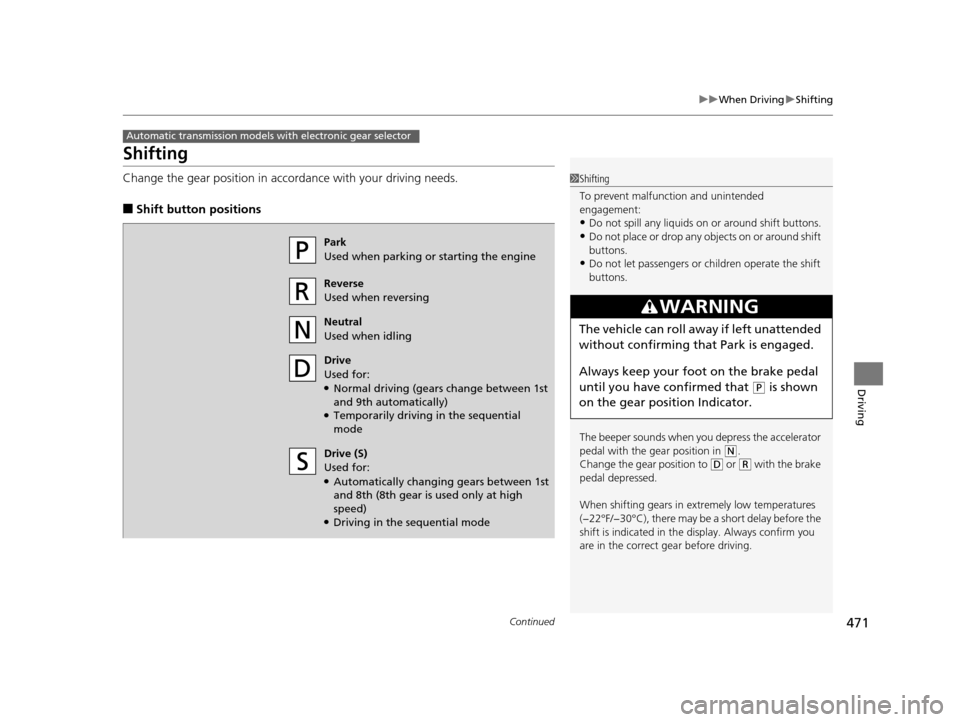
■Shift button positions
Automatic transmission models with electronic gear selector
1Shifting
To prevent malfunc tion and unintended
engagement:
•Do not spill any liquids on or around shift buttons.•Do not place or drop any objects on or around shift
buttons.
•Do not let passengers or ch ildren operate the shift
buttons.
The beeper sounds when you depress the accelerator
pedal with the gear position in
( N.
Change the gear position to
( D or (R with the brake
pedal depressed.
When shifting gears in extremely low temperatures
(−22°F/−30°C), there may be a short delay before the
shift is indicated in the di splay. Always confirm you
are in the correct gear before driving.
3WARNING
The vehicle can roll aw ay if left unattended
without confirming th at Park is engaged.
Always keep your foot on the brake pedal
until you have confirmed that
( P is shown
on the gear position Indicator.
Park
Used when parking or starting the engine
Reverse
Used when reversing
Neutral
Used when idling
Drive
Used for:
●Normal driving (gears change between 1st
and 9th automatically)
●Temporarily driving in the sequential
mode
Drive (S)
Used for:
●Automatically changing gears between 1st
and 8th (8th gear is used only at high
speed)
●Driving in the sequential mode
16 PILOT-31TG76000.book 471 ページ 2015年6月15日 月曜日 午前11時30分
Page 487 of 661
486
uuWhen Driving uCruise Control
Driving
Cruise Control
Maintains a constant vehicle speed without having to keep your foot on the
accelerator. Use cruise control on freeways or open roads where you can travel at a
constant speed with little acceleration or deceleration.1Cruise Control
It may not be possible to maintain a constant speed
when driving uphill or downhill.
When not using cruise control:
Turn off cruise control by pressing the CRUISE
*/
MAIN* button.
While in the ECON mode, it may take relatively more
time to accelerate to maintain the set speed.
Cruise control is not available when the Intelligent
Traction Manageme nt Snow, Mud or Sand modes
are in operation.
3WARNING
Improper use of the cruise control can lead
to a crash.
Use the cruise control only when traveling
on open highways in good weather.
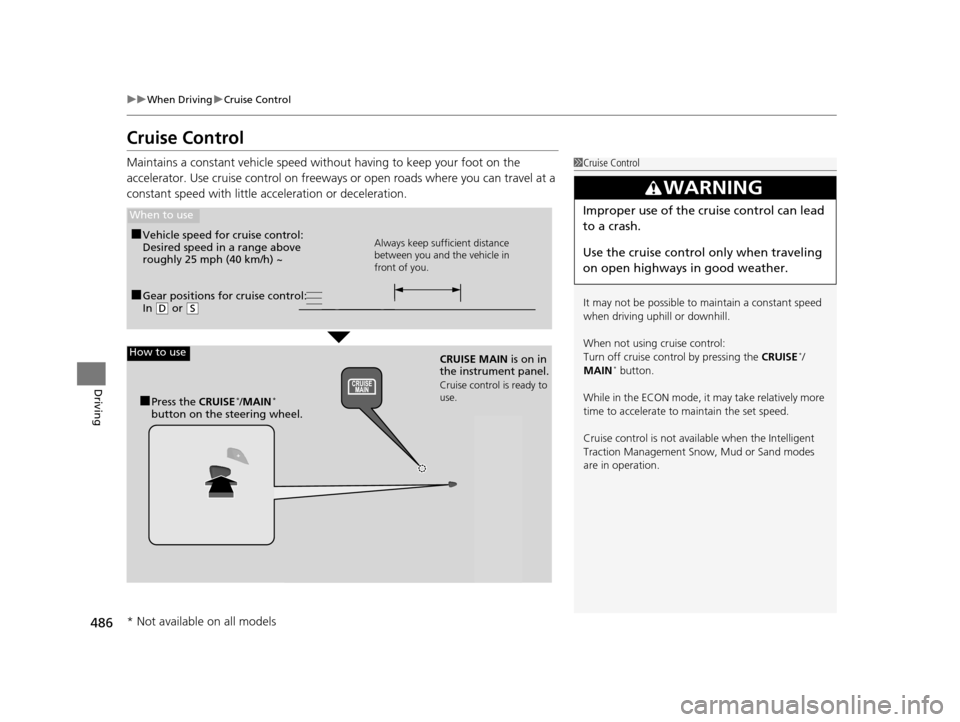
■Gear positions for cruise control:
In ( D or (S
When to use
Always keep sufficient distance
between you and the vehicle in
front of you.■Vehicle speed for cruise control:
Desired speed in a range above
roughly 25 mph (40 km/h) ~
How to use
CRUISE MAIN is on in
the instrument panel.
Cruise control is ready to
use.
■Press the CRUISE*/MAIN*
button on the steering wheel.
* Not available on all models
16 PILOT-31TG76000.book 486 ページ 2015年6月15日 月曜日 午前11時30分
Page 492 of 661
491
uuWhen Driving uAdaptive Cruise Control (ACC)*
Continued
Driving
Adaptive Cruise Control (ACC)*
Helps maintain a constant vehicle speed and a set follo wing distance behind a
vehicle detected ahead of yours, without you having to keep your foot on the brake
or the accelerator.1 Adaptive Cruise Control (ACC)*
ACC can not be activated if Intelligent Traction
Management sett ing is snow, sand or mud.
3WARNING
Improper use of ACC can lead to a crash.
Use ACC only when traveling on open
highways in good weather.
3WARNING
ACC has limited braking capability.
When your vehicle speed drops below 22
mph, ACC will automatically cancel and no
longer will apply your vehicle's brakes.
Always be prepared to apply the brake
pedal when conditions require.
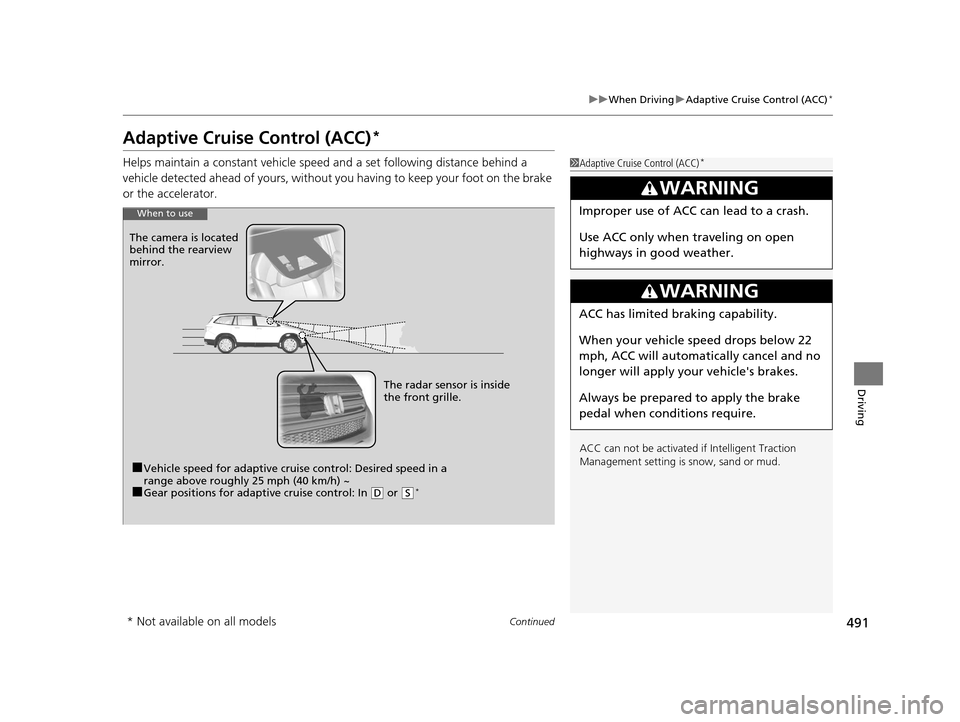
When to use
■Vehicle speed for adaptive crui se control: Desired speed in a
range above roughly 25 mph (40 km/h) ~
■Gear positions for adapti ve cruise control: In (D or (S*
The radar sensor is inside
the front grille.
The camera is located
behind the rearview
mirror.
* Not available on all models
16 PILOT-31TG76000.book 491 ページ 2015年6月15日 月曜日 午前11時30分
Page 505 of 661
uuWhen Driving uRoad Departure Mitigation (RDM) System*
504
Driving
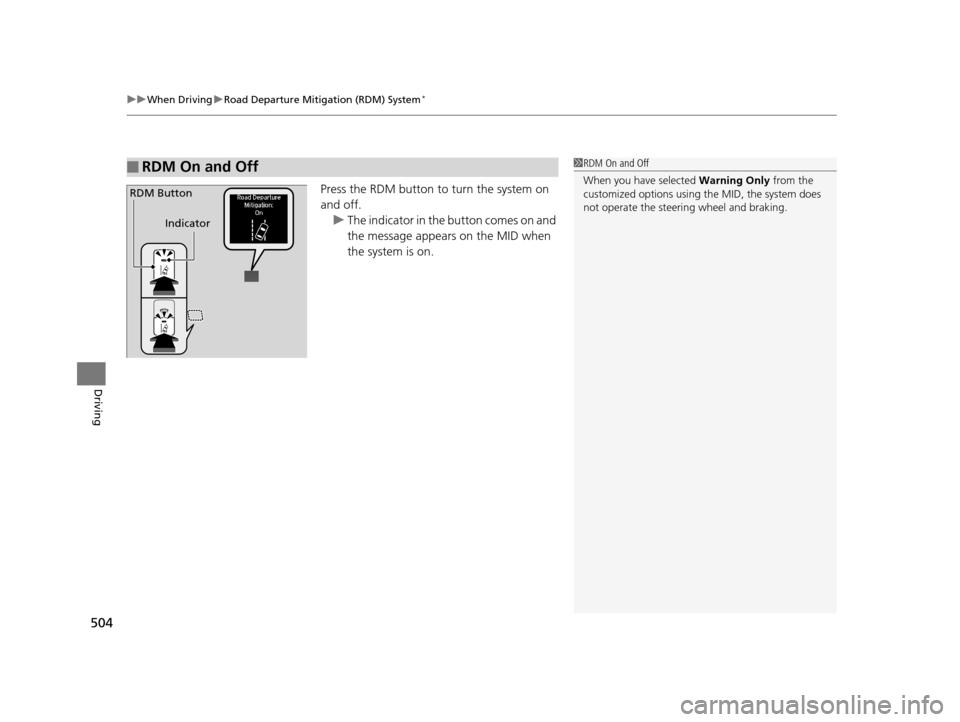
Press the RDM button to turn the system on
and off.
u The indicator in the button comes on and
the message appears on the MID when
the system is on.
■RDM On and Off1RDM On and Off
When you have selected Warning Only from the
customized options using the MID, the system does
not operate the steeri ng wheel and braking.
RDM Button
Indicator
16 PILOT-31TG76000.book 504 ページ 2015年6月15日 月曜日 午前11時30分
Page 508 of 661
507
uuWhen Driving uLane Keeping Assist System (LKAS)*
Continued
Driving
Lane Keeping Assist System (LKAS)*
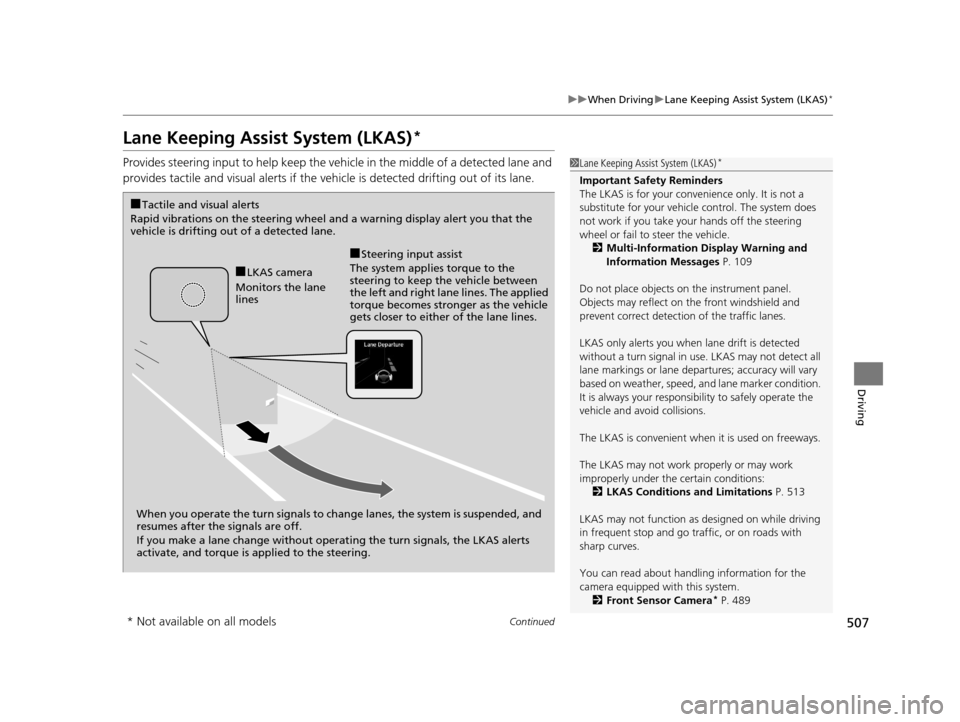
Provides steering input to help keep the vehicle in the middle of a detected lane and
provides tactile and visual al erts if the vehicle is detected drifting out of its lane.1Lane Keeping Assist System (LKAS)*
Important Safety Reminders
The LKAS is for your convenience only. It is not a
substitute for your vehicl e control. The system does
not work if you take y our hands off the steering
wheel or fail to steer the vehicle.
2 Multi-Information Display Warning and
Information Messages P. 109
Do not place objects on the instrument panel.
Objects may reflect on th e front windshield and
prevent correct detectio n of the traffic lanes.
LKAS only alerts you when lane drift is detected
without a turn signal in use. LKAS may not detect all
lane markings or lane departures; a ccuracy will vary
based on weather, speed, an d lane marker condition.
It is always your responsibility to safely operate the
vehicle and avoid collisions.
The LKAS is convenient when it is used on freeways.
The LKAS may not work properly or may work
improperly under the certain conditions: 2 LKAS Conditions and Limitations P. 513
LKAS may not function as designed on while driving
in frequent stop and go traf fic, or on roads with
sharp curves.
You can read about handling information for the
camera equipped with this system. 2 Front Sensor Camera
* P. 489
When you operate the turn signals to chan ge lanes, the system is suspended, and
resumes after the signals are off.
If you make a lane change without operat ing the turn signals, the LKAS alerts
activate, and torque is applied to the steering.
■LKAS camera
Monitors the lane
lines
■Tactile and visual alerts
Rapid vibrations on the steering wheel and a warning display alert you that the
vehicle is drifting out of a detected lane.
■Steering input assist
The system applies torque to the
steering to keep the vehicle between
the left and right lane lines. The applied
torque becomes stronger as the vehicle
gets closer to either of the lane lines.
* Not available on all models
16 PILOT-31TG76000.book 507 ページ 2015年6月15日 月曜日 午前11時30分
Page 509 of 661
uuWhen Driving uLane Keeping Assist System (LKAS)*
508
Driving
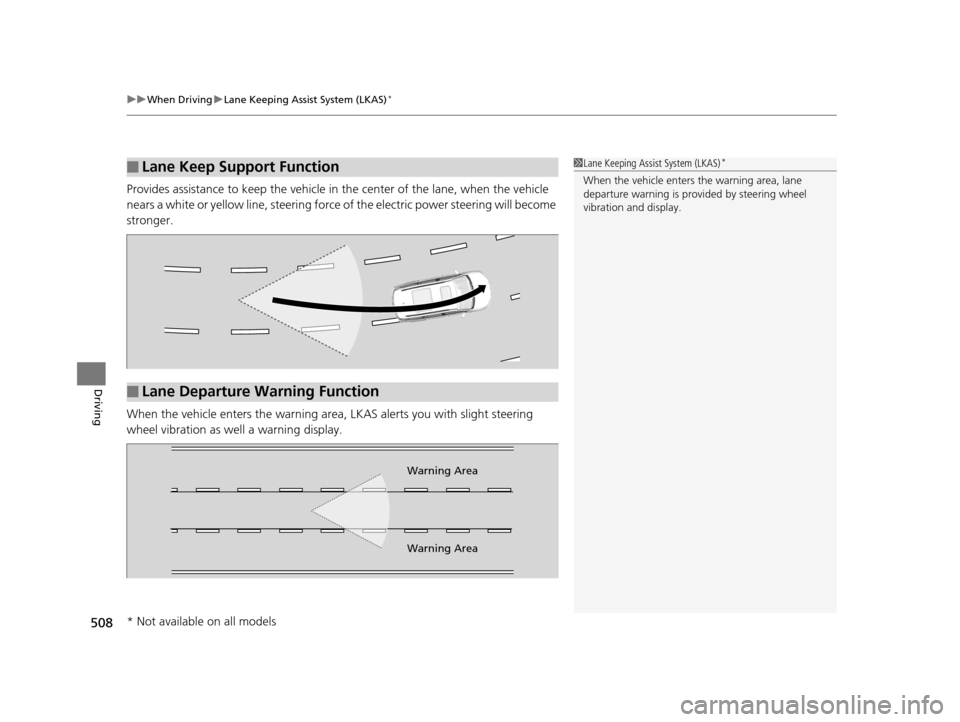
Provides assistance to keep the vehicle in the center of the lane, when the vehicle
nears a white or yellow line, steering force of the electric power steering will become
stronger.
When the vehicle enters th e warning area, LKAS alerts you with slight steering
wheel vibration as we ll a warning display.
■Lane Keep Support Function1Lane Keeping Assist System (LKAS)*
When the vehicle enters the warning area, lane
departure warning is prov ided by steering wheel
vibration and display.
■Lane Departure Warning Function
Warning Area
Warning Area
* Not available on all models
16 PILOT-31TG76000.book 508 ページ 2015年6月15日 月曜日 午前11時30分
Page 519 of 661
518
uuWhen Driving uBlind spot information (BSI) System*
Driving
Blind spot information (BSI) System*
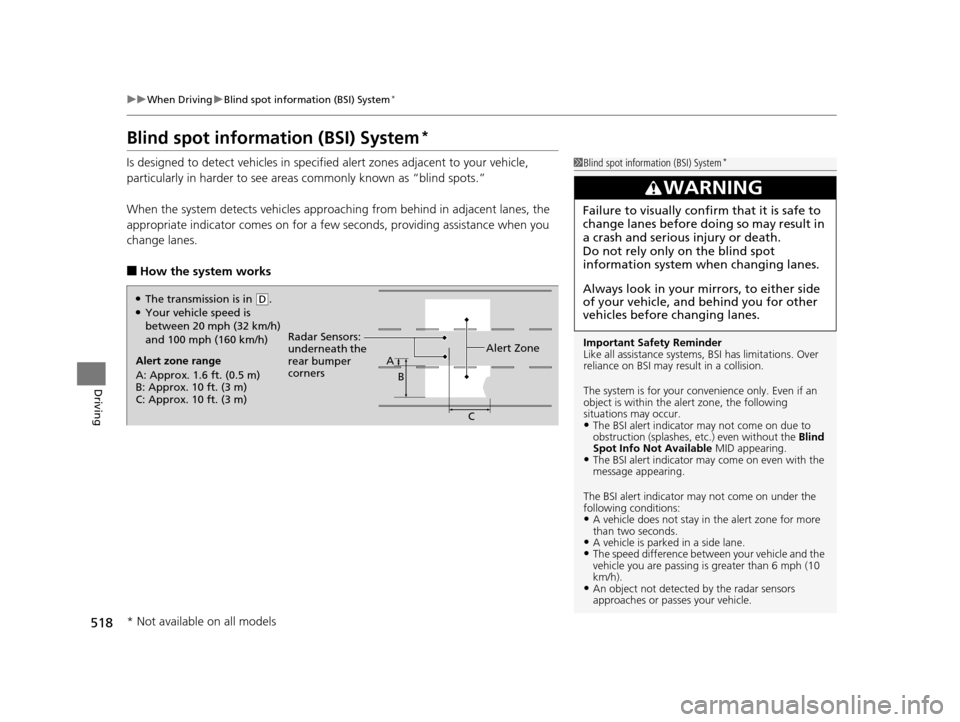
Is designed to detect vehicl es in specified alert zones adjacent to your vehicle,
particularly in harder to see areas commonly known as “blind spots.”
When the system detects vehi cles approaching from behind in adjacent lanes, the
appropriate indicator comes on for a few se conds, providing assistance when you
change lanes.
■How the system works
1 Blind spot inform ation (BSI) System*
Important Safety Reminder
Like all assistance systems, BSI has limitations. Over
reliance on BSI may result in a collision.
The system is for your convenience only. Even if an
object is within the alert zone, the following
situations may occur.
•The BSI alert indicator may not come on due to
obstruction (splashes, et c.) even without the Blind
Spot Info Not Available MID appearing.
•The BSI alert indicator may come on even with the
message appearing.
The BSI alert i ndicator may not come on under the
following conditions:
•A vehicle does not stay in the alert zone for more
than two seconds.
•A vehicle is parked in a side lane.•The speed difference betw een your vehicle and the
vehicle you are passing is greater than 6 mph (10
km/h).
•An object not detected by the radar sensors
approaches or passes your vehicle.
3WARNING
Failure to visually confirm that it is safe to
change lanes before doing so may result in
a crash and serious injury or death.
Do not rely only on the blind spot
information system wh en changing lanes.
Always look in your mirrors, to either side
of your vehicle, and behind you for other
vehicles before changing lanes.
Alert zone range
A: Approx. 1.6 ft. (0.5 m)
B: Approx. 10 ft. (3 m)
C: Approx. 10 ft. (3 m) Radar Sensors:
underneath the
rear bumper
corners
Alert ZoneA
B
C
●The transmission is in (D.●Your vehicle speed is
between 20 mph (32 km/h)
and 100 mph (160 km/h)
* Not available on all models
16 PILOT-31TG76000.book 518 ページ 2015年6月15日 月曜日 午前11時30分
Page 521 of 661
520
uuWhen Driving uLaneWatchTM*
Driving
LaneWatchTM*
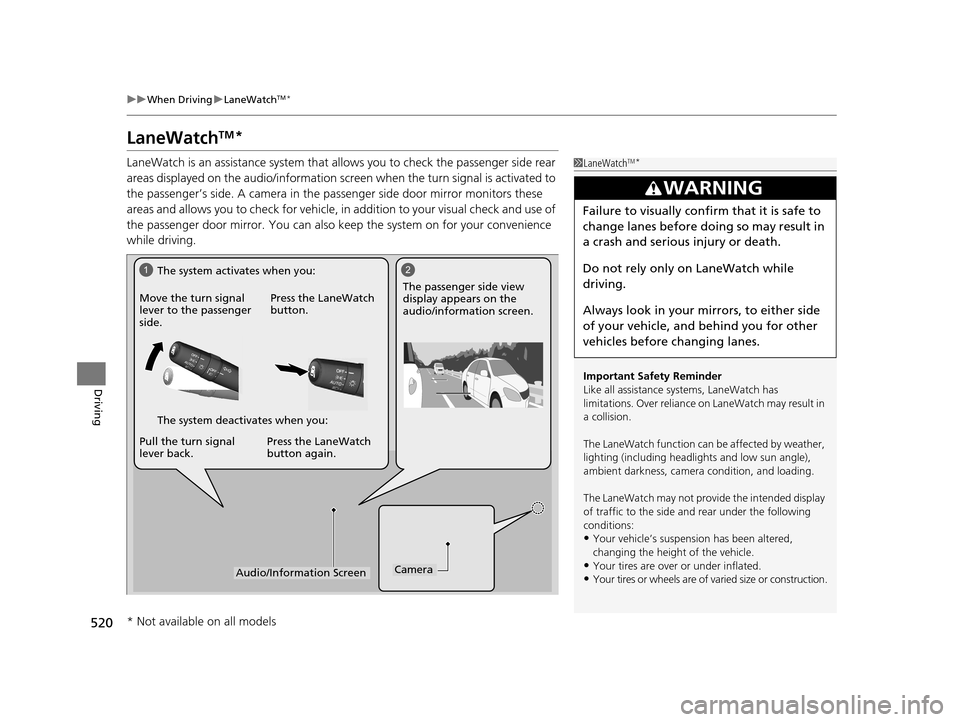
LaneWatch is an assistance system that allows you to check the passenger side rear
areas displayed on the audio/in formation screen when the turn signal is activated to
the passenger’s side. A camera in the passenger side door mirror monitors these
areas and allows you to check for vehicle, in addition to your visual check and use of
the passenger door mirror. You can also keep the system on for your convenience
while driving.1 LaneWatchTM*
Important Safety Reminder
Like all assistance systems, LaneWatch has
limitations. Over reliance on LaneWatch may result in
a collision.
The LaneWatch func tion can be affected by weather,
lighting (including headli ghts and low sun angle),
ambient darkness, camera condition, and loading.
The LaneWatch may not prov ide the intended display
of traffic to the side and rear under the following
conditions:
•Your vehicle’s suspension has been altered,
changing the height of the vehicle.
•Your tires are over or under inflated.
•Your tires or wheels are of varied size or construction.
3WARNING
Failure to visually confirm that it is safe to
change lanes before doing so may result in
a crash and serious injury or death.
Do not rely only on LaneWatch while
driving.
Always look in your mirrors, to either side
of your vehicle, and behind you for other
vehicles before changing lanes.
12
CameraAudio/Information Screen
Move the turn signal
lever to the passenger
side.
Press the LaneWatch
button.
Pull the turn signal
lever back. Press the LaneWatch
button again. The passenger side view
display appears on the
audio/information screen.
The system activates when you:
The system deactivates when you:
* Not available on all models
16 PILOT-31TG76000.book 520 ページ 2015年6月15日 月曜日 午前11時30分
Page 528 of 661
527Continued
Driving
Braking
Brake System
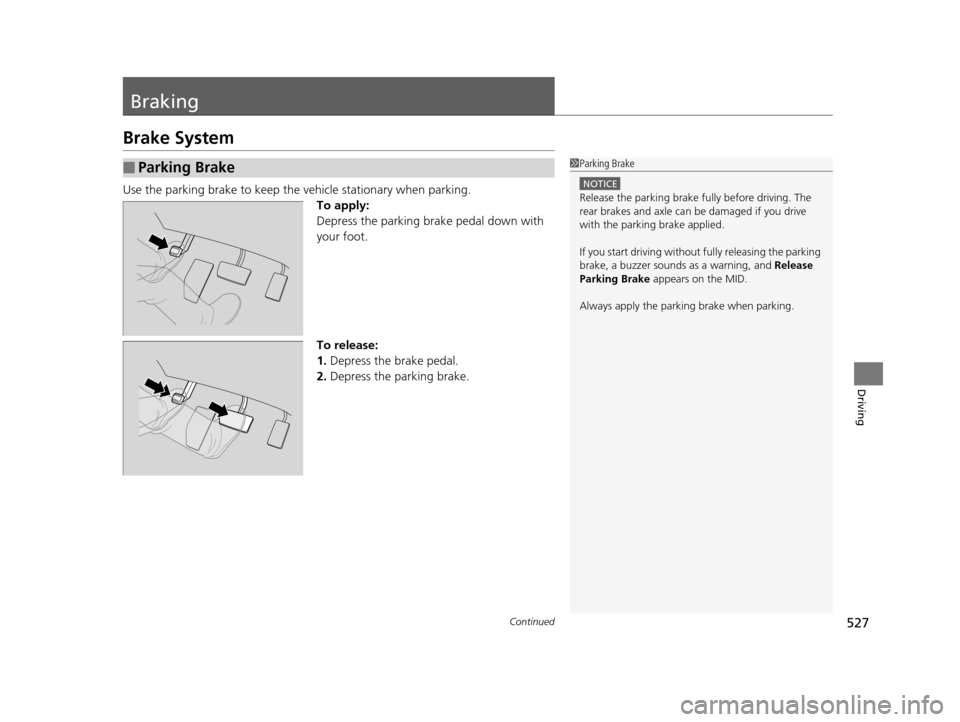
Use the parking brake to keep the vehicle stationary when parking.
To apply:
Depress the parking brake pedal down with
your foot.
To release:
1. Depress the brake pedal.
2. Depress the parking brake.
■Parking Brake1Parking Brake
NOTICE
Release the parking brake fu lly before driving. The
rear brakes and axle can be damaged if you drive
with the parki ng brake applied.
If you start driving without fully releasing the parking
brake, a buzzer sounds as a warning, and Release
Parking Brake appears on the MID.
Always apply the parki ng brake when parking.
16 PILOT-31TG76000.book 527 ページ 2015年6月15日 月曜日 午前11時30分