ESP HONDA PILOT 2017 3.G User Guide
[x] Cancel search | Manufacturer: HONDA, Model Year: 2017, Model line: PILOT, Model: HONDA PILOT 2017 3.GPages: 673
Page 245 of 673
uuAudio System Basic Operation uAudio/Information Screen
244
Features
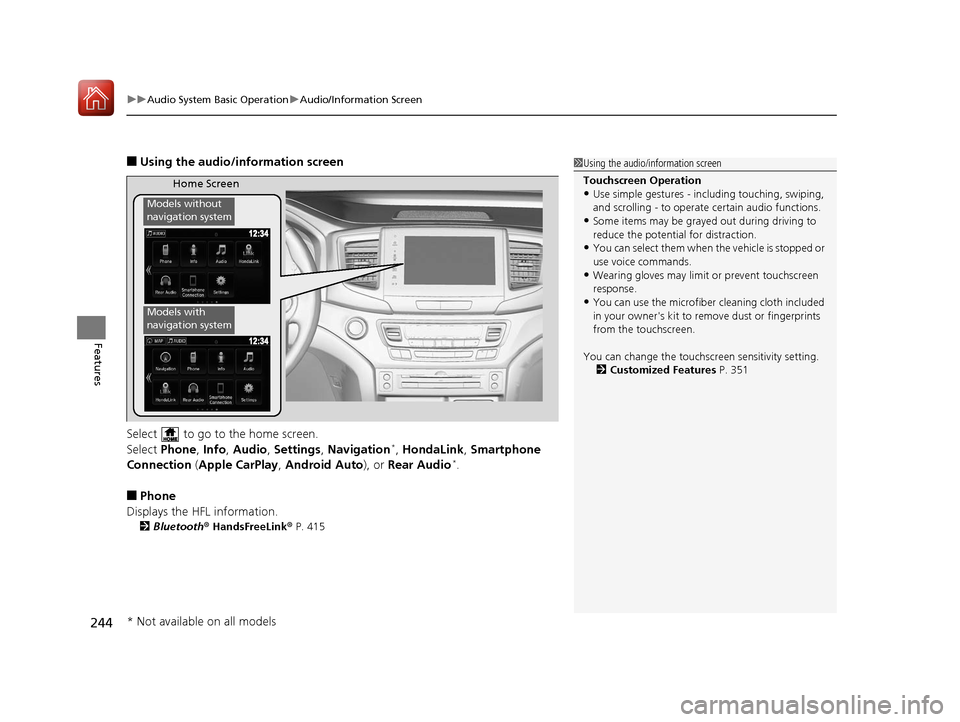
■Using the audio/information screen
Select to go to the home screen.
Select Phone, Info, Audio , Settings , Navigation
*, HondaLink , Smartphone
Connection ( Apple CarPlay , Android Auto ), or Rear Audio*.
■Phone
Displays the HFL information.
2 Bluetooth® HandsFreeLink ® P. 415
1 Using the audio/in formation screen
Touchscreen Operation
•Use simple gestures - in cluding touching, swiping,
and scrolling - to operate certain audio functions.
•Some items may be grayed out during driving to
reduce the potential for distraction.
•You can select them when the vehicle is stopped or
use voice commands.
•Wearing gloves may limit or prevent touchscreen
response.
•You can use the microfiber cleaning cloth included
in your owner's kit to remo ve dust or fingerprints
from the touchscreen.
You can change the touchs creen sensitivity setting.
2 Customized Features P. 351
Home Screen
Models without
navigation system
Models with
navigation system
* Not available on all models
17 PILOT-31TG76100.book 244 ページ 2016年9月20日 火曜日 午後4時9分
Page 259 of 673
uuAudio System Basic Operation uAudio/Information Screen
258
Features
Some of the audio system's apps can be updated wirelessly when connected via Wi-
Fi, or Bluetooth ® in conjunction with the HondaLink ® app installed on a compatible
iOS or Android device. If an update is available, the audio system beeps and a
notification is displayed at the top of th e screen with the respective app's update
icon.
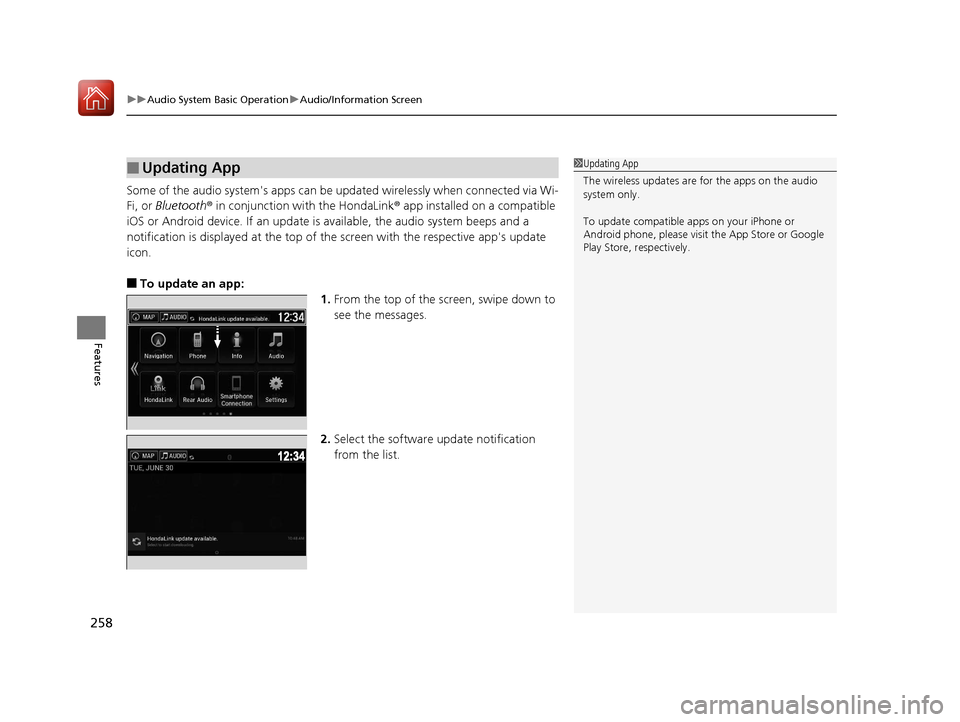
■To update an app: 1.From the top of the screen, swipe down to
see the messages.
2. Select the software update notification
from the list.
■Updating App1Updating App
The wireless updates are for the apps on the audio
system only.
To update compatible a pps on your iPhone or
Android phone, please visit the App Store or Google
Play Store, respectively.
17 PILOT-31TG76100.book 258 ページ 2016年9月20日 火曜日 午後4時9分
Page 314 of 673
313
uuAudio Error Messages uAndroid/Apps*
Features
Android/Apps*
If an error occurs while using the audio system or apps, you may see the following
error messages. If you cannot clear the error message, contact a dealer.
*1:****part is variable characters, and will change depending upon where an error
occurs.
Error MessageSolution
Unfortunately, **** has
stopped.Error has occurred within app, select OK on the screen to close the app.
**** is not responding.
Would you like to close it?
App is not responding.
Select Wait if you can wait for a response from app a little longer. If it does not respond even if you keep
waiting, select OK to close the app and start it up. If the error message continues, perform Factory Data
Reset .
2Defaulting All the Settings P. 386
* Not available on all models
17 PILOT-31TG76100.book 313 ページ 2016年9月20日 火曜日 午後4時9分
Page 320 of 673
319
uuGeneral Information on the Audio System uLegal Information on Apple CarPlayTM/Android AutoTM
Features
YOU EXPRESSLY ACKNOWLEDGE AND AGREE THAT USE OF APPLE CARPLAY OR ANDROID AUTO (“THE APPLICATIONS”) IS AT YOUR
SOLE RISK AND THAT THE ENTIRE RISK AS TO SATISFACTORY Q UALITY, PERFORMANCE, ACCURACY AND EFFORT IS WITH YOU TO THE
MAXIMUM EXTENT PERMITTED BY APPLICABLE LAW, AND THAT TH E APPLICATIONS AND INFORMATION ON THE APPLICATIONS IS
PROVIDED “AS IS” AND “AS AVAILABLE,” WITH ALL FAUL TS AND WITHOUT WARRANTY OF ANY KIND, AND HONDA HEREBY
DISCLAIMS ALL WARRANTIES AND CONDITIONS WITH RESPECT TO THE APPLICATIONS AND INFORMATION ON THE APPLICATIONS,
EITHER EXPRESS, IMPLIED OR STATUTORY, INCLUDING, BUT NOT LIMITED TO, THE IMPLIED WARRANTIES AND/OR CONDITIONS OF
MERCHANTABILITY, SATISFACTORY QUALITY, FITNESS FOR A PA RTICULAR PURPOSE, ACCURACY, QUIET ENJOYMENT, AND NON-
INFRINGEMENT OF THIRD PARTY RIGHTS. NO ORAL OR WRITTEN INFORMATION OR ADVICE GIVEN BY HONDA OR AN AUTHORIZED
REPRESENTATIVE SHALL CREATE A WARRANTY. AS EXAMPLES, AND WITHOUT LIMITATION, HONDA DISCLAIMS ANY WARRANTY
REGARDING THE ACCURACY OF DATA PROVIDED BY THE APPLI CATIONS, SUCH AS THE ACCURACY OF DIRECTIONS, ESTIMATED
TRAVEL TIME, SPEED LIMITS, ROAD CONDITIONS, NEWS, WEATHER, TRAF FIC, OR OTHER CONTENT PROVIDED BY APPLE, GOOGLE, THEIR
AFFILIATES, OR THIRD PARTY PROVIDERS; HONDA DOES NOT GUARANTEE AGAINST LO SS OF APPLICATION DATA, WHICH MAY BE LOST
AT ANY TIME; HONDA DOES NOT GUARANTEE THAT THE APPLICATIO NS OR ANY SERVICES PROVIDED THROUGH THEM WILL BE
PROVIDED AT ALL TIMES OR THAT ANY OR ALL SERVICES WILL BE AVAILABLE AT ANY PA RTICULAR TIME OR LOCATION. FOR EXAMPLE,
SERVICES MAY BE SUSPENDED OR INTERRUPTED WITHOUT NOTICE FOR REPAIR, MAINTENANCE, SECURITY FIXES, UPDATES, ETC.,
SERVICES MAY BE UNAVAILABLE IN YOUR AREA OR LOCATION, ETC. IN ADDITION, YOU UNDERSTAND THAT CHANGES IN THIRD PARTY
TECHNOLOGY OR GOVERNMENT REGULATION MAY RENDER THE SERVICES AND/OR APPLICATIONS OBSOLETE AND/OR UNUSABLE.
TO THE EXTENT NOT PROHIBITED BY LAW, IN NO EVENT SHALL HONDA OR ITS AFFILIATES BE LIABLE FOR PERSONAL INJURY, OR ANY
INCIDENTAL, SPECIAL, INDIRECT OR CO NSEQUENTIAL DAMAGES WHATSOEVER, INCLUDING, WITHOUT LIMITATION, DAMAGES FOR
LOSS OF PROFITS, CORRUPTION OR LOSS OF DATA, FAILURE TO TRANSMIT OR RECEIVE ANY DATA, BUSINESS INTERRUPTION OR ANY
OTHER COMMERCIAL DAMAGES OR LOSSES, ARISIN G OUT OF OR RELATED TO THE APPLICATIONS OR YOUR USE OF OR INABILITY TO
USE THE APPLICATIONS OR INFORMATION ON THE APPLICATIONS, HOWEVER CAUSED, REGARDLESS OF THE THEORY OF LIABILITY
(CONTRACT, TORT OR OTHERWISE) AND EVEN IF HONDA WERE ADVISED OF THE POSSIBILITY OF SUCH DAMAGES. SOME STATES AND
JURISDICTIONS DISALLOW THE EXCLUSION OR LIMITATION OF LI ABILITY FOR DAMAGES, SO THESE LIMITATIONS AND EXCLUSIONS MAY
NOT APPLY TO YOU. IN NO EVENT SHALL HONDA’S TOTAL LIABILITY TO YOU FOR ALL DAMAGES (OTHER THAN AS MAY BE REQUIRED
BY APPLICABLE LAW IN CASES INVOLVING PERSONAL INJURY) EXCE ED THE AMOUNT OF FIVE DOLLARS ($5.00). THE FOREGOING
LIMITATIONS WILL APPLY EVEN IF THE ABOVE STATED REMEDY FAILS OF ITS ESSENTIAL PURPOSE.
■DISCLAIMER OF WARRANTIES; LIMITATION ON LIABILITY
17 PILOT-31TG76100.book 319 ページ 2016年9月20日 火曜日 午後4時9分
Page 348 of 673
347
uuBlu-ray/DVD Rear Entertainment System*uPlayable Discs
Continued
Features
■OSS
This product contains software licensed under GNU General Public License (GPL) or GNU Lesser General Public License (LGPL), etc.
You have the right of acquisition, modification, and distribution of the source code of the GPL/LGPL software. You may download Source
Code from the following website at no charge.
URL: http://www.embedded-carmultimedia .jp/linux/oss/download/MP_632_34W913
The website provides the Source Code “As Is ” and without warranty of any kind. By downloading Source Code, you expressly assume all
risk and liability associated wi th downloading and using the Source Code and comp lying with the user agreements that accompany each
Source Code.
Please note that we cannot respond to any inquiries regarding the source code.
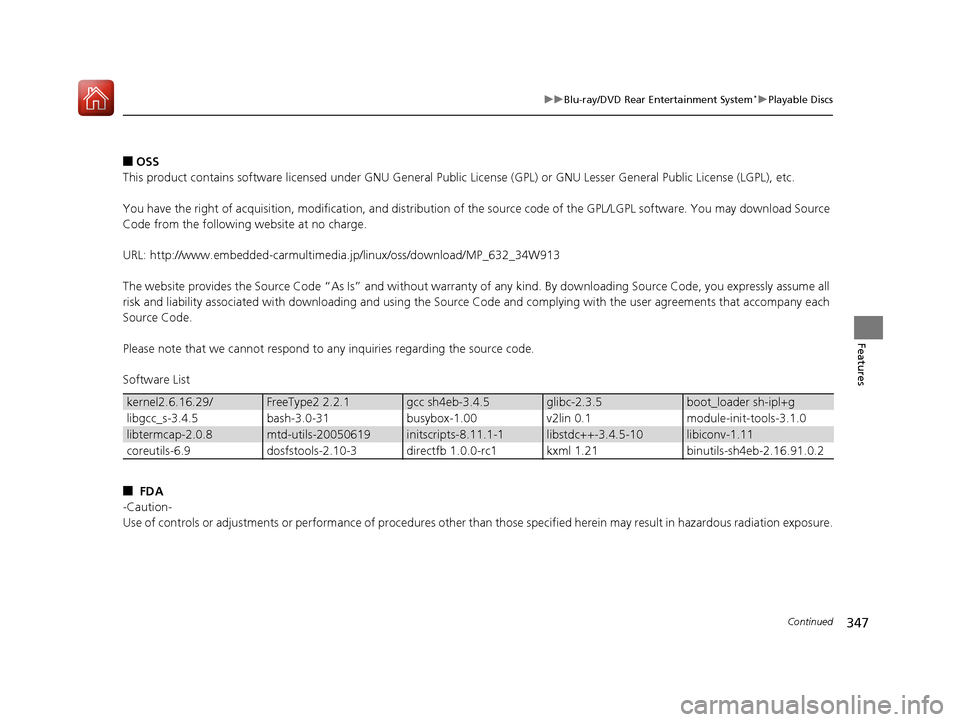
Software List
■ FDA
-Caution-
Use of controls or adjustments or performance of procedures othe r than those specified herein may result in hazardous radiation exposure.
kernel2.6.16.29/FreeType2 2.2.1gcc sh4eb-3.4.5glibc-2.3.5boot_loader sh-ipl+g
libgcc_s-3.4.5bash-3.0-31busybox-1.00v2lin 0.1module-init-tools-3.1.0
libtermcap-2.0.8mtd-utils-20050619initscripts-8.11.1-1libstdc++-3.4.5-10libiconv-1.11
coreutils-6.9dosfstools-2.10-3directfb 1.0.0-rc1kxml 1.21binutils-sh4eb-2.16.91.0.2
17 PILOT-31TG76100.book 347 ページ 2016年9月20日 火曜日 午後4時9分
Page 392 of 673
391
uuBluetooth ® HandsFreeLink ®u Using HFL
Features
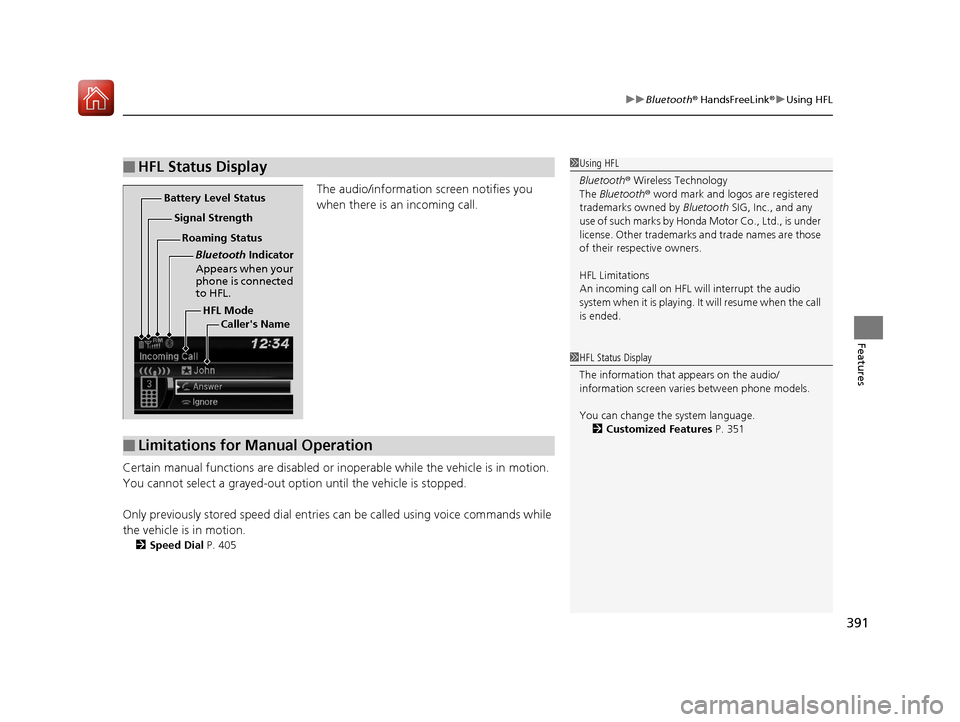
The audio/information screen notifies you
when there is an incoming call.
Certain manual functions are disabled or inoperable while the vehicle is in motion.
You cannot select a grayed-out option until the vehicle is stopped.
Only previously stored speed dial entrie s can be called using voice commands while
the vehicle is in motion.
2 Speed Dial P. 405
■HFL Status Display1Using HFL
Bluetooth ® Wireless Technology
The Bluetooth ® word mark and logos are registered
trademarks owned by Bluetooth SIG, Inc., and any
use of such marks by Honda Motor Co., Ltd., is under
license. Other trademarks and trade names are those
of their respective owners.
HFL Limitations
An incoming call on HFL will interrupt the audio
system when it is playing. It will resume when the call
is ended.
HFL Mode
Battery Level Status
Signal Strength
Bluetooth Indicator
Appears when your
phone is connected
to HFL.
Roaming Status
Caller's Name
■Limitations for Manual Operation
1HFL Status Display
The information that appears on the audio/
information screen vari es between phone models.
You can change the system language. 2 Customized Features P. 351
17 PILOT-31TG76100.book 391 ページ 2016年9月20日 火曜日 午後4時9分
Page 393 of 673
392
uuBluetooth ® HandsFreeLink ®u HFL Menus
Features
HFL Menus
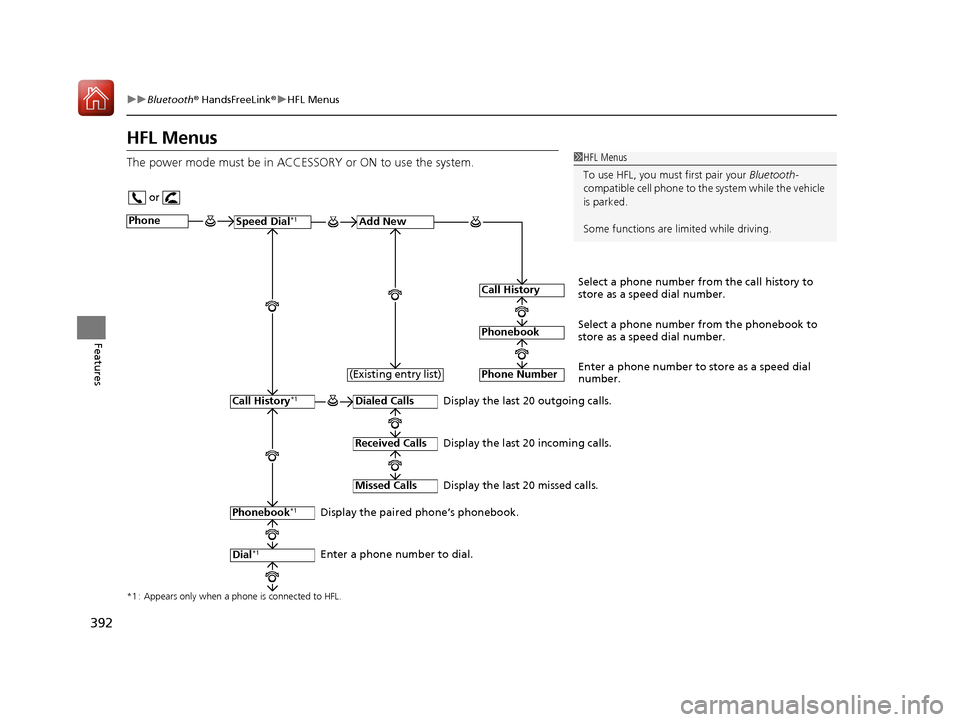
The power mode must be in ACCESSORY or ON to use the system.1HFL Menus
To use HFL, you must first pair your Bluetooth-
compatible cell phone to th e system while the vehicle
is parked.
Some functions are li mited while driving.
or
Display the last 20 outgoing calls.
Display the last 20 incoming calls.
Display the last 20 missed calls.
*1 : Appears only when a phone is connected to HFL.
PhoneSpeed Dial*1Add New
Select a phone number from the call history to
store as a speed dial number.
Call History
PhonebookSelect a phone number from the phonebook to
store as a speed dial number.
Phone Number
Enter a phone number to store as a speed dial
number.
Dialed Calls
Received Calls
Missed Calls
Phonebook*1
Dial*1
Call History*1
Display the paired phone’s phonebook.
Enter a phone number to dial. (Existing entry list)
17 PILOT-31TG76100.book 392 ページ 2016年9月20日 火曜日 午後4時9分
Page 417 of 673
uuBluetooth ® HandsFreeLink ®u Using HFL
416
Features
(Pick-up) button: Press to go directly to the ph one screen, or to answer an
incoming call.
(Hang-up/back) button: Press to end a call, go back to the previous
command, or cancel a command.
(Talk) button: Press to call a number with a stored voice tag.
(Menu) button: Press to display Speed Dial, Call History , or Redial on the
phone screen.
(+ (- button: Press to select an item displayed on the phone screen.
SOURCE button: Press to call a number listed in the selected item on the phone
screen.
To go to the Phone menu screen:
1. Select .
2. Select Phone to switch the display to the phone screen.
3. Select .
1Bluetooth ® HandsFreeLink ®
Bluetooth ® Wireless Technology
The Bluetooth ® word mark and logos are registered
trademarks owned by Bluetooth SIG, Inc., and any
use of such marks by Honda Motor Co., Ltd., is under
license. Other trademarks and trade names are those
of their respective owners.
HFL Limitations
An incoming call on HFL will interrupt the audio
s y s te m wh e n it is p la y i n g . It wi ll re s u m e w h en t h e c a l l
is ended.
17 PILOT-31TG76100.book 416 ページ 2016年9月20日 火曜日 午後4時9分
Page 479 of 673
478
uuWhen Driving uAutomatic Transmission
Driving
Automatic Transmission
The engine runs at a higher id le speed and creeping increases.
Keep the brake pedal firmly depressed when stopped.
Quickly depressing the accelerator pedal while driving uphill may cause the
transmission to drop to a lower gear, unex pectedly increasing vehicle speed. Depress
the accelerator pedal carefully, especi ally on slippery roads and curves.
■Creeping
■Kickdown
1Driving Guidelines for Your Utility Vehicle
Failure to operate your vehicle correctly might result
in a crash or a rollover. 2 Important Handling Information
* P. 34
2 Precautions While Driving P. 477
* Not available on all models
17 PILOT-31TG76100.book 478 ページ 2016年9月20日 火曜日 午後4時9分
Page 485 of 673
uuWhen Driving uShifting
484
Driving
In freezing or sub-freezing conditions, the electronic gear selector response may be
slow.
Always depress the brake pedal before changing the gear position to
(P, and
confirm that
(P is shown on the gear position in dicator before releasing the brake.
■When opening the driver’s door
If you open the driver’s door under the following conditions, the gear position
automatically changes to
(P.
• The vehicle is stationary with the engine running, or moving at 1 mph (2 km/h) or
slower.
• The transmission is in other than
(P.
• You have unfastened the driver side seat belt.
u If you manually change the gear position from
(P with the brake pedal
depressed, the gear position will automatically return to
(P once you release
the brake pedal.
■When turning off the power mode
If you turn the engine off wh ile the vehicle is stationary, and the transmission is in
other than
(P, the gear position automatically changes to (P.
1 When opening the driver’s door
You should always select
(P before opening the
driver’s door.
Make sure to park the vehicle in a safe place. 2 When Stopped P. 552
If you want to drive the ve hicle after the gear position
has automatically changed to
( P under the described
conditions, close the door, fasten the seat belt,
depress the brake pedal, then change the gear
position.
If you leave the vehicle, tu rn off the engine and lock
the doors.
17 PILOT-31TG76100.book 484 ページ 2016年9月20日 火曜日 午後4時9分