fuel HONDA PILOT 2017 3.G User Guide
[x] Cancel search | Manufacturer: HONDA, Model Year: 2017, Model line: PILOT, Model: HONDA PILOT 2017 3.GPages: 673
Page 115 of 673
114
uuGauges and Multi-Information Display (MID) uMID
Instrument Panel
MID
The MID shows the odometer, trip meter, ou tside temperature indicator, and other
gauges. It also displays important messages such as warnings and other helpful
information.
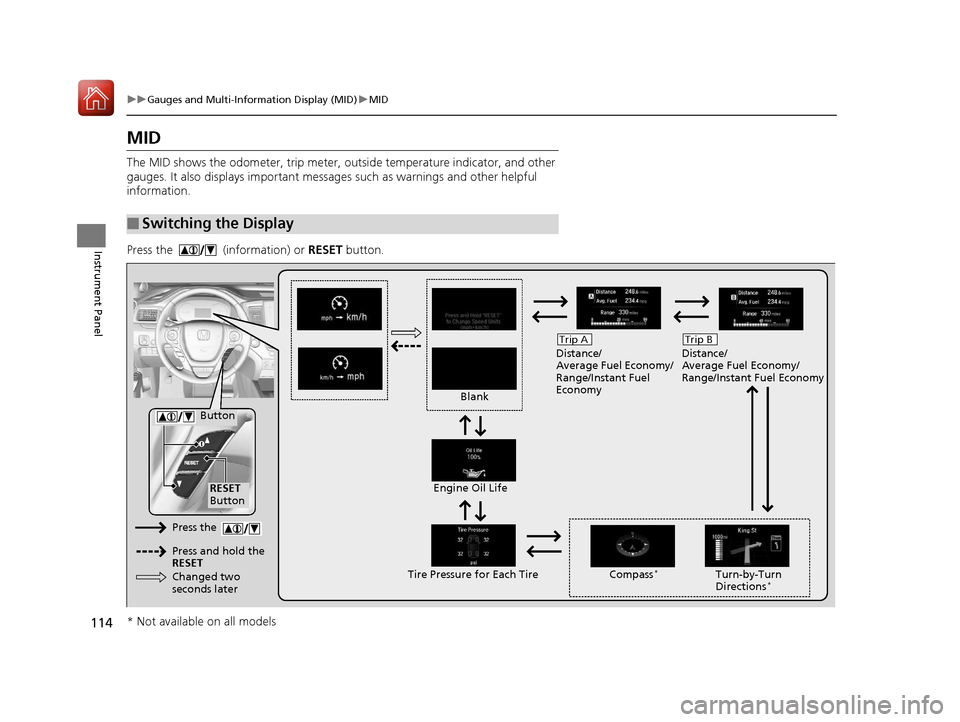
Press the (information) or RESET button.
■Switching the Display
Blank Distance/
Average Fuel Economy/
Range/Instant Fuel
Economy
Trip A
Tire Pressure for Each TireEngine Oil Life
Turn-by-Turn
Directions*
RESET
Button Compass
*
Button
Distance/
Average Fuel Economy/
Range/Instant Fuel Economy
Trip B
Press the
Press and hold the
RESET
Changed two
seconds later
* Not available on all models
17 PILOT-31TG76100.book 114 ページ 2016年9月20日 火曜日 午後4時9分
Page 117 of 673
uuGauges and Multi-Information Display (MID) uMID
116
Instrument Panel
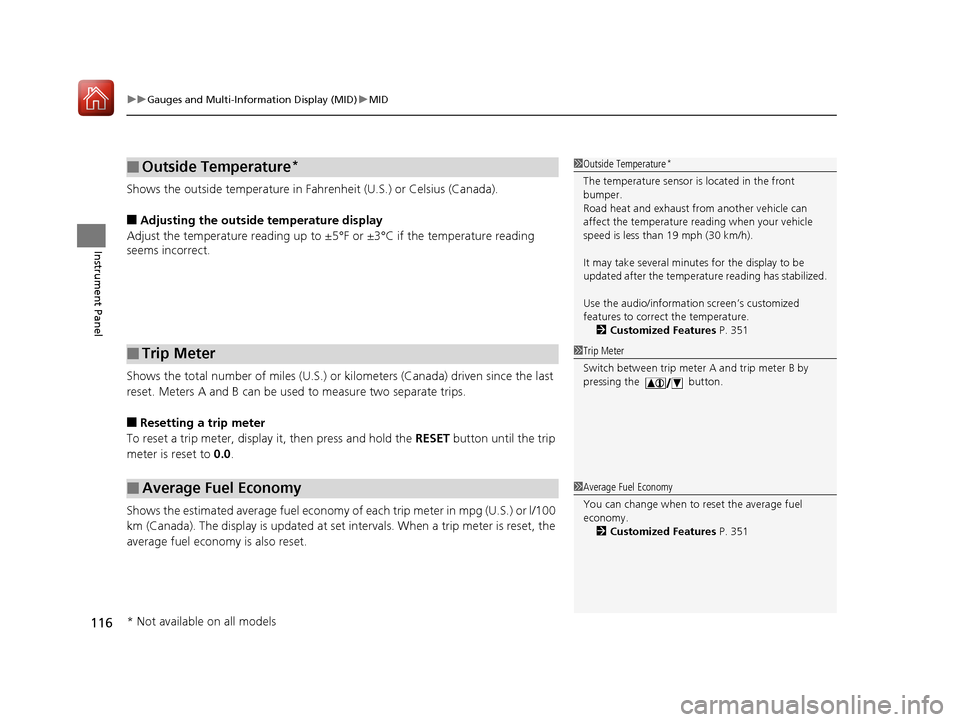
Shows the outside temperature in Fahr enheit (U.S.) or Celsius (Canada).
■Adjusting the outside temperature display
Adjust the temperature reading up to ±5°F or ±3°C if the temperature reading
seems incorrect.
Shows the total number of miles (U.S.) or kilometers (Canada) driven since the last
reset. Meters A and B can be used to measure two separate trips.
■Resetting a trip meter
To reset a trip meter, display it, then press and hold the RESET button until the trip
meter is reset to 0.0.
Shows the estimated average fuel economy of each trip meter in mpg (U.S.) or l/100
km (Canada). The display is updated at set intervals. When a trip meter is reset, the
average fuel economy is also reset.
■Outside Temperature*
■Trip Meter
■Average Fuel Economy
1 Outside Temperature*
The temperature sensor is located in the front
bumper.
Road heat and exhaust fr om another vehicle can
affect the temperature reading when your vehicle
speed is less than 19 mph (30 km/h).
It may take several minutes for the display to be
updated after the temperature reading has stabilized.
Use the audio/information screen’s customized
features to correct the temperature.
2 Customized Features P. 351
1Trip Meter
Switch between trip meter A and trip meter B by
pressing the button.
1Average Fuel Economy
You can change when to reset the average fuel
economy.
2 Customized Features P. 351
* Not available on all models
17 PILOT-31TG76100.book 116 ページ 2016年9月20日 火曜日 午後4時9分
Page 118 of 673
117
uuGauges and Multi-Info rmation Display (MID)uMID
Instrument Panel
Shows the estimated distance you can travel on the remaining fuel. This distance is
estimated from the fuel economy of your previous trips.
Shows the instant fuel economy as a bar gr aph in mpg (U.S.) or l/100 km (Canada).
Shows you turn-by-turn driv ing directions to your destination linked with the
navigation system.
2 Refer to the Navigation System Manual
Shows each tire’s pressure.
2Tire Pressure Monitoring System (TPMS) with Tire Fill Assist P. 535
Shows the remaining oil life and Maintenance MinderTM.
2Maintenance MinderTM P. 571
■Range
■Instant Fuel Economy
■Turn-by-Turn Directions
■Tire Pressure Monitor
■Engine Oil Life and Maintenance Items
1Turn-by-Turn Directions
The multi-information disp lay shows a compass when
the route guidance is not used.
You can select whether the turn-by-turn display
comes on or not during the route guidance. 2 Customized Features P. 351
Models with navigation system
17 PILOT-31TG76100.book 117 ページ 2016年9月20日 火曜日 午後4時9分
Page 374 of 673
373
uuCustomized Features u
Continued
Features
*1:Default SettingSetup
Group Customizable Features Description Selectable Settings
Vehicle Meter
SetupLanguage Selection
Changes the displayed language on the multi-
information display. English
*1/
French /
Spanish
Adjust Outside Temp.
Display Adjusts the temperature reading by a few degrees. -5°F ~ ±0°F
*1
~ +5°F
(U.S.)
-3°C ~ ±0°C
*1 ~ +3°C
(Canada)
“Trip A” Reset Timing Changes the setting of how to reset trip meter A and
average fuel economy A. With Refueled
/IGN Off /
Manually Reset
*1
“Trip B” Reset Timing Changes the setting of how to reset trip meter B and
average fuel economy B. With Refueled
/IGN Off /
Manually Reset*1
Reverse Alert Tone*Turns the audible notification on and off when you set
the gear position to
(R. On
/Off*1
Auto Engine Idle Stop
Guidance Screen*
Turns the engine idle-stop guidance displayed in the
meter display on and off during the auto engine idle-
stop system is in operation. On
/Off*1
Adjust Alarm Volume Changes the alarm volume, such as the buzzers,
warnings, turn signal sound, and so on. High
/Mid*1/Low
Turn by Turn Display
*Selects whether the turn-by-turn display comes on
during the route guidance. On*1/
Off
* Not available on all models
17 PILOT-31TG76100.book 373 ページ 2016年9月20日 火曜日 午後4時9分
Page 452 of 673
451
Driving
This chapter discusses driving, refueling, and information on items such as accessories.
Before Driving................................... 452
Towing a Trailer ................................ 458
Off-Highway Driving Guidelines ..... 469
When Driving Starting the Engine .......................... 471
Automatic Transmission ................... 478
Shifting ............................................ 479
Auto Idle-stop
*................................ 489
Intelligent Traction Management*.... 495
Cruise Control*................................ 497
Front Sensor Camera*...................... 500
Adaptive Cruise Control (ACC)*....... 502Road Departure Mi tigation (RDM)
System*...................................... 514Lane Keeping Assist System (LKAS)*.. 519
Vehicle Stability Assist (VSA ®), aka Electronic
Stability Control (ESC), System ............. 527
Agile Handling Assist ....................... 529
Blind spot inform ation (BSI) System*.... 530
LaneWatchTM*.................................. 532Intelligent VTM4 (i-VTM4)*................. 534Tire Pressure Monitoring System (TPMS) with Tire Fill Assist .......................... 535
Tire Pressure Monitoring System (TPMS) -
Required Federal Explanation ......... 537
Braking Brake System ................................... 539
Anti-lock Brake System (ABS) ........... 541
Brake Assist System.......................... 542 Collision Mitigation Braking System
TM
(CMBSTM)*..................................... 543
Parking Your Vehicle
When Stopped ................................ 552
Parking Sensor System
*................... 553
Cross Traffic Monitor*..................... 557
Multi-view rear camera*.................. 561
Refueling Fuel Information .............................. 562
How to Refuel ................................. 563
Fuel Economy and CO
2 Emissions
Improving Fuel Economy and Reducing
CO
2 Emissions ................................ 565
* Not available on all models
17 PILOT-31TG76100.book 451 ページ 2016年9月20日 火曜日 午後4時9分
Page 473 of 673
uuWhen Driving uStarting the Engine
472
Driving
You can turn the engine off when the vehicle is completely stopped.
1. Change the gear position to
(P.
2. Press the ENGINE START/STOP button with your foot on the brake pedal.
■Stopping the Engine1Starting the Engine
The immobilizer system pr otects your vehicle from
theft.
If an improperly c oded device is used, the engine’s
fuel system is disabled. 2 Immobilizer System P. 143
17 PILOT-31TG76100.book 472 ページ 2016年9月20日 火曜日 午後4時9分
Page 481 of 673
uuWhen Driving uShifting
480
Driving
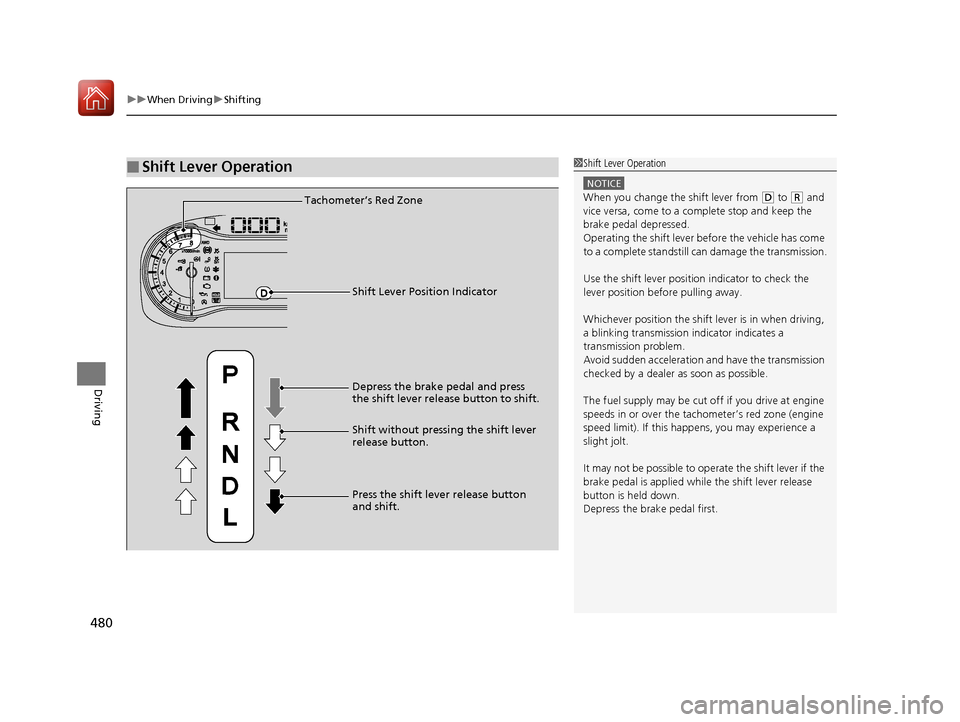
■Shift Lever Operation1Shift Lever Operation
NOTICE
When you change the shift lever from (D to (R and
vice versa, come to a complete stop and keep the
brake pedal depressed.
Operating the shift lever be fore the vehicle has come
to a complete standstill can damage the transmission.
Use the shift lever positi on indicator to check the
lever position befo re pulling away.
Whichever position the shift lever is in when driving,
a blinking transmission indicator indicates a
transmission problem.
Avoid sudden acceleration and have the transmission
checked by a dealer as soon as possible.
The fuel supply may be cut of f if you drive at engine
speeds in or over the tachometer’s red zone (engine
speed limit). If this happe ns, you may experience a
slight jolt.
It may not be possible to operate the shift lever if the
brake pedal is applied while the shift lever release
button is held down.
Depress the brake pedal first.Tachometer’s Red Zone
Shift Lever Position Indicator
Depress the brake pedal and press
the shift lever release button to shift.
Shift without pressing the shift lever
release button.
Press the shift lever release button
and shift.
17 PILOT-31TG76100.book 480 ページ 2016年9月20日 火曜日 午後4時9分
Page 484 of 673
Continued483
uuWhen Driving uShifting
Driving
■Shift Operation1Shift Operation
NOTICE
When you change (D to (R and visa versa, depress
the brake pedal to come to a complete stop, then
select the intended gear position while maintaining
brake pressure.
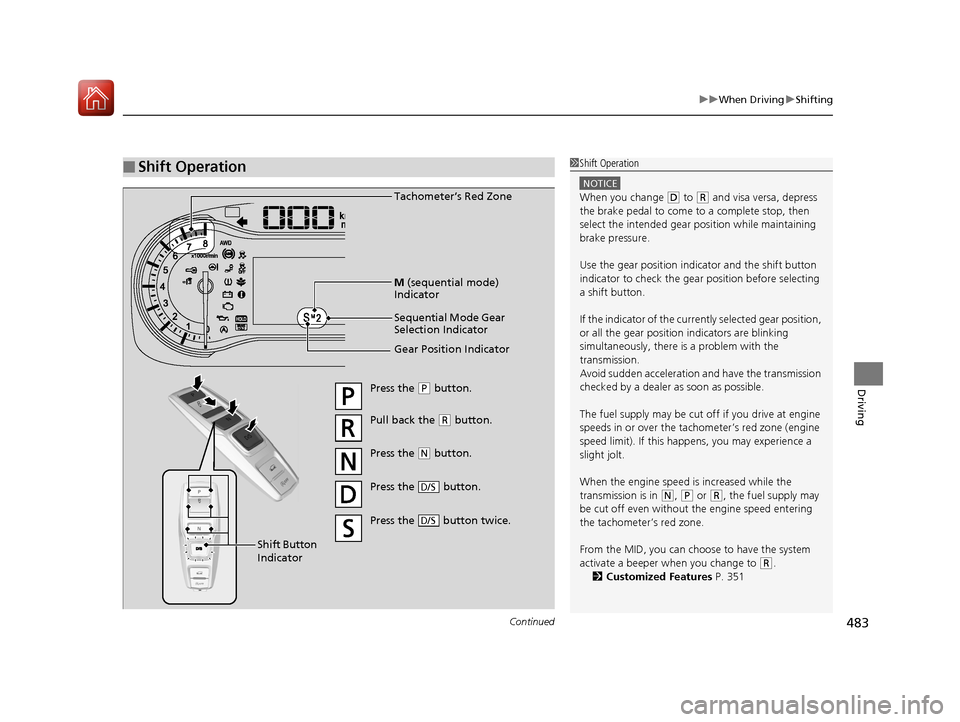
Use the gear position indicator and the shift button
indicator to check the gear position before selecting
a shift button.
If the indicator of the curren tly selected gear position,
or all the gear position indicators are blinking
simultaneously, there is a problem with the
transmission.
Avoid sudden acceleration and have the transmission
checked by a dealer as soon as possible.
The fuel supply may be cut of f if you drive at engine
speeds in or over the tachometer’s red zone (engine
speed limit). If this happe ns, you may experience a
slight jolt.
When the engine speed is increased while the
transmission is in
( N, (P or (R, the fuel supply may
be cut off even without the engine speed entering
the tachometer’s red zone.
From the MID, you can choose to have the system
activate a beeper when you change to
( R.
2 Customized Features P. 351
Gear Position Indicator Tachometer’s Red Zone
Press the (P button.
Pull back the ( R button.
Press the
( N button.
Press the button.
D/S
Shift Button
Indicator M
(sequential mode)
Indicator
Sequential Mode Gear
Selection Indicator
Press the button twice.D/S
17 PILOT-31TG76100.book 483 ページ 2016年9月20日 火曜日 午後4時9分
Page 489 of 673
uuWhen Driving uShifting
488
Driving
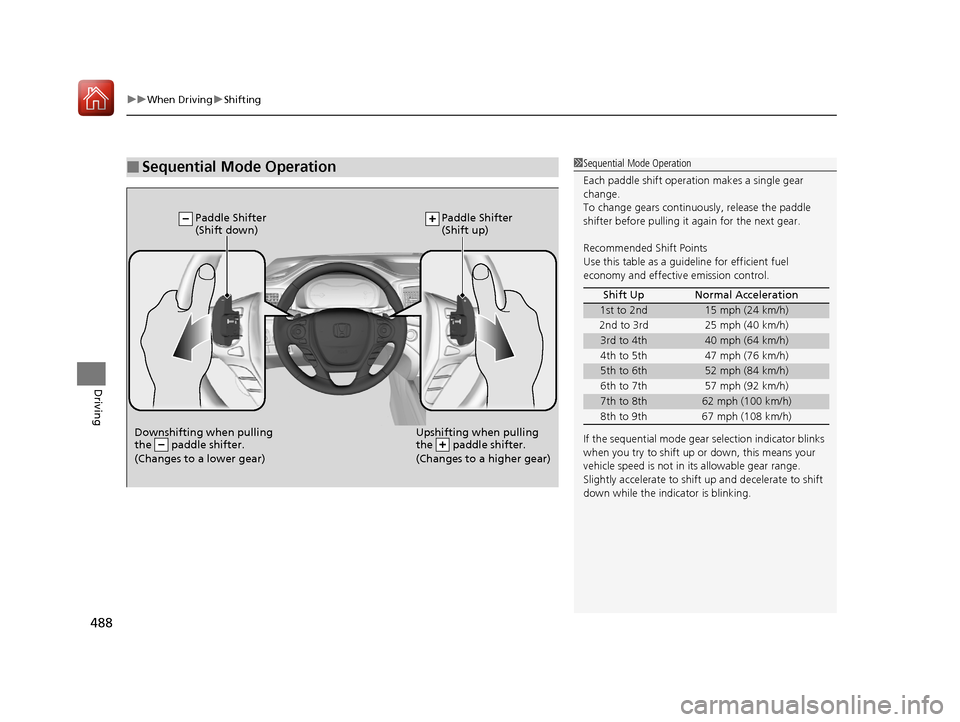
■Sequential Mode Operation1Sequential Mode Operation
Each paddle shift operation makes a single gear
change.
To change gears continuously, release the paddle
shifter before pulling it again for the next gear.
Recommended Shift Points
Use this table as a guideline for efficient fuel
economy and effectiv e emission control.
If the sequential mode gear selection indicator blinks
when you try to shift up or down, this means your
vehicle speed is not in its allowable gear range.
Slightly accelerate to shift up and decelerate to shift
down while the indi cator is blinking.
Shift Up Normal Acceleration
1st to 2nd15 mph (24 km/h)
2nd to 3rd 25 mph (40 km/h)
3rd to 4th40 mph (64 km/h)
4th to 5th 47 mph (76 km/h)
5th to 6th52 mph (84 km/h)
6th to 7th 57 mph (92 km/h)
7th to 8th62 mph (100 km/h)
8th to 9th 67 mph (108 km/h)
Downshifting when pulling
the paddle shifter.
(Changes to a lower gear)Upshifting when pulling
the paddle shifter.
(Changes to a higher gear)
Paddle Shifter
(Shift down) Paddle Shifter
(Shift up)
17 PILOT-31TG76100.book 488 ページ 2016年9月20日 火曜日 午後4時9分
Page 490 of 673
489
uuWhen Driving uAuto Idle-stop*
Continued
Driving
Auto Idle-stop*
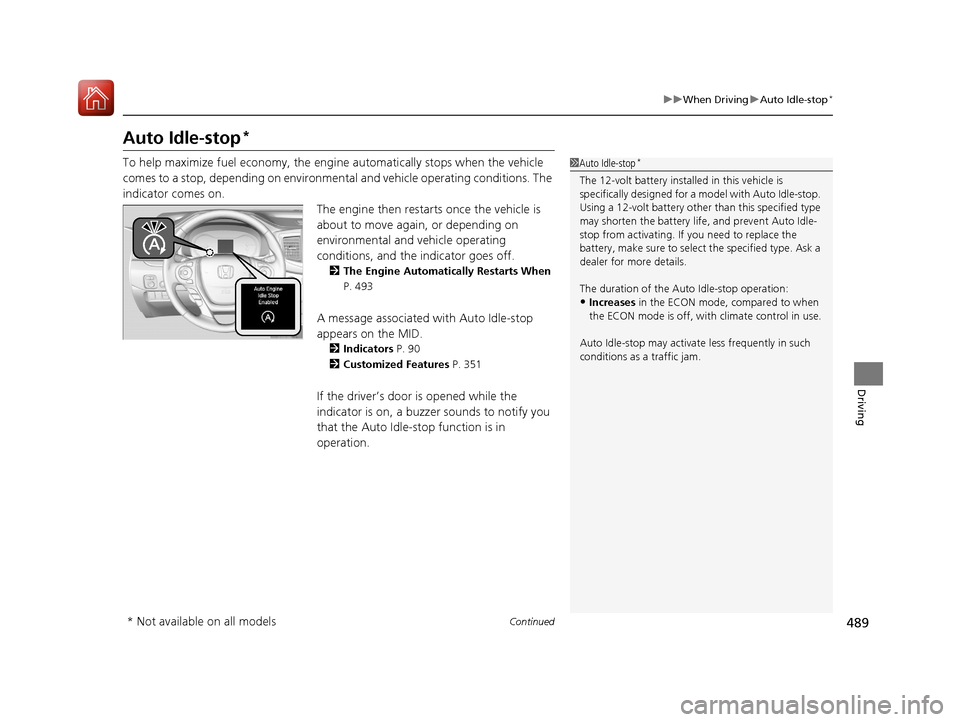
To help maximize fuel economy, the engi ne automatically stops when the vehicle
comes to a stop, depending on environmental and vehicle operating conditions. The
indicator comes on. The engine then restarts once the vehicle is
about to move again, or depending on
environmental and vehicle operating
conditions, and the indicator goes off.
2The Engine Automatically Restarts When
P. 493
A message associated with Auto Idle-stop
appears on the MID.
2 Indicators P. 90
2 Customized Features P. 351
If the driver’s door is opened while the
indicator is on, a buzzer sounds to notify you
that the Auto Idle-stop function is in
operation.
1Auto Idle-stop*
The 12-volt battery insta lled in this vehicle is
specifically designed for a m odel with Auto Idle-stop.
Using a 12-volt battery other than this specified type
may shorten the battery life , and prevent Auto Idle-
stop from activating. If you need to replace the
battery, make sure to select the specified type. Ask a
dealer for more details.
The duration of the Auto Idle-stop operation:
•Increases in the ECON mode, compared to when
the ECON mode is off, with climate control in use.
Auto Idle-stop may activate less frequently in such
conditions as a traffic jam.
* Not available on all models
17 PILOT-31TG76100.book 489 ページ 2016年9月20日 火曜日 午後4時9分