key HONDA PILOT 2017 3.G User Guide
[x] Cancel search | Manufacturer: HONDA, Model Year: 2017, Model line: PILOT, Model: HONDA PILOT 2017 3.GPages: 673
Page 139 of 673
138
uuOpening and Closing the Tailgate uOpening/Closing the Power Tailgate*
Controls
Opening/Closing the Power Tailgate*
The power tailgate can be operated by pressing the power tailgate button on the
remote transmitter or driver's door, or pressing the button on the tailgate.
■The power tailgate can be opened when:
• The tailgate is fully closed.
• The transmission is in
(P.
• Press and hold the tailgat e button on the remote transmitter for about one
second when the power mode is in VEHICLE OFF (LOCK).
u If you have changed the Keyless Open Mode setting to When Unlocked ,
you need to unlock the tailgate before you press the tailgate button to open it.
2Customized Features P. 351
■The power tailgate can be closed when:
• The tailgate is fully open.
• Press and hold the tailgat e button on the remote transmitter for about one
second when the power mode is in VEHICLE OFF (LOCK).
1Opening/Closing the Power Tailgate*
NOTICE
Do not push or pull on the power tailgate when it is
being automatically opened or closed.
Forcibly opening or closing the power tailgate while
in operation can deform the tailgate frame.
When operating the power tailgate, make sure there is
enough space around your vehicle. People near the
tailgate may be seriously hurt if the tailgate hits or closes on
their heads. Be especially cautious if children are around.
The power tailgate may not open or close under the
following conditions:
•The vehicle is park ed on a steep hill.•The vehicle is swayed in a strong wind.•The tailgate or the roof is covered with snow or ice.
If you close the power tail gate when all the doors are
locked, the power tailgate locks automatically.
If you replace the battery or the power tailgate fuse while
the tailgate is open, the power tailgate may be disabled.
The power tailgate resumes once you manually close the
tailgate and wait for about five minutes.
Installing aftermarket com ponents other than Honda
genuine accessories on the power tailgate may
prevent it from fully opening or closing.
Make sure the power tailgate is fully open before you
get your luggage in and out.
Make sure the power tailgat e is fully closed before
you start the vehicle.
* Not available on all models
17 PILOT-31TG76100.book 138 ページ 2016年9月20日 火曜日 午後4時9分
Page 140 of 673
Continued139
uuOpening and Closing the Tailgate uOpening/Closing the Power Tailgate*
Controls
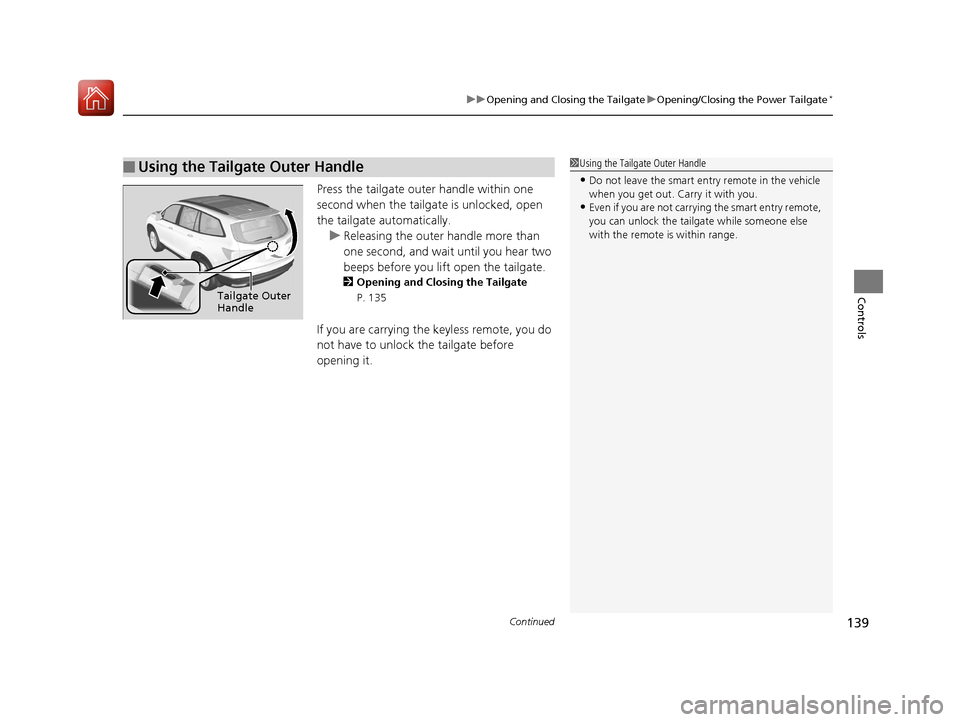
Press the tailgate oute r handle within one
second when the tailgat e is unlocked, open
the tailgate automatically. u Releasing the outer handle more than
one second, and wait until you hear two
beeps before you lift open the tailgate.
2Opening and Closing the Tailgate
P. 135
If you are carrying the keyless remote, you do
not have to unlock the tailgate before
opening it.
■Using the Tailgate Outer Handle1 Using the Tailgate Outer Handle
•Do not leave the smart entry remote in the vehicle
when you get out. Carry it with you.
•Even if you are not carrying the smart entry remote,
you can unlock the tailga te while someone else
with the remote is within range.
Tailgate Outer
Handle
17 PILOT-31TG76100.book 139 ページ 2016年9月20日 火曜日 午後4時9分
Page 144 of 673
143Continued
Controls
Security System
Immobilizer System
The immobilizer system prevents a key that has not been pre-registered from
starting the engine. Each key contains electronic transmitters that use electronic
signals to verify the key.
Pay attention to the follo wing when pressing the ENGINE START/STOP button:
• Do not allow objects that emit strong radio waves near the ENGINE START/
STOP button.
• Make sure the key is not covered by or touching a metal object.
• Do not bring a key from another vehicle’s immobilizer system with the smart entry
remote.
Security System Alarm
The security system alarm activates when the tailgate, hood or doors are forcibly
opened. The alarm does not go off if the tailgate or doors are opened with the key,
remote transmitter or smart entry system.
However, the alarm goes off when a door is opened with the key, then the hood is
opened before the power mode is set to ON.
However, the alarm goes off when a door is opened with the key, then the hood is
opened or gear position is changed from out of
(P before the power mode is set to
ON.
■When the security system alarm activates
The horn sounds intermittently , some exterior lights flash.
1Immobilizer System
NOTICE
Leaving the smart entry remote in the vehicle can
result in theft or accident al movement of the vehicle.
Always take the key with you whenever you leave the
vehicle unattended.
Do not alter the system or add other devices to it.
Doing so may damage the system and make your
vehicle inoperable.
1 Security System Alarm
The security alarm continues for a maximum of two
minutes until the security system alarm deactivates.
Except automatic transmission models with shift lever
Automatic transmission models with shift lever
17 PILOT-31TG76100.book 143 ページ 2016年9月20日 火曜日 午後4時9分
Page 145 of 673
uuSecurity System uSecurity System Alarm
144
Controls
■To deactivate the security system alarm
Unlock the vehicle using the key, remote transmitter, or smart entry system. The
system, along with the horn and flashing lights, is deactivated.
■Setting the security system alarm
The security system alarm automatically sets when the following conditions have
been met:
• The power mode is set to VEHICLE OFF (LOCK).
• The hood is closed.
• All doors and the tailgate are locked from outside with the key, remote
transmitter, or smart entry system.
■When the security system alarm sets
The security system alarm indicator in the instrument panel blinks. When the
blinking interval changes after about 15 seconds, the security system alarm is set.
■To cancel the security system alarm
The security system alarm is canceled when the vehicle is unlocked using the key,
remote transmitter, smart entry system, or th e power mode is set to ON. The security
system alarm indicator goe s off at the same time.
1Security System Alarm
Do not set the security system alarm when someone
is in the vehicle or a window is open. The system can
accidentally activate when:
•Unlocking the door with the lock tab.•Opening the hood with the hood release.
If the battery goes dead after you have set the
security system alarm, the security alarm may go off
once the battery is re charged or replaced.
If this occurs, deactivate the security system alarm by
unlocking a door using the ke y, remote transmitter,
or smart entry system.
Do not attempt to alter th is system or add another
device to it.
17 PILOT-31TG76100.book 144 ページ 2016年9月20日 火曜日 午後4時9分
Page 148 of 673
147
uuOpening and Closing the Windows uOpening/Closing the Power Windows
Controls
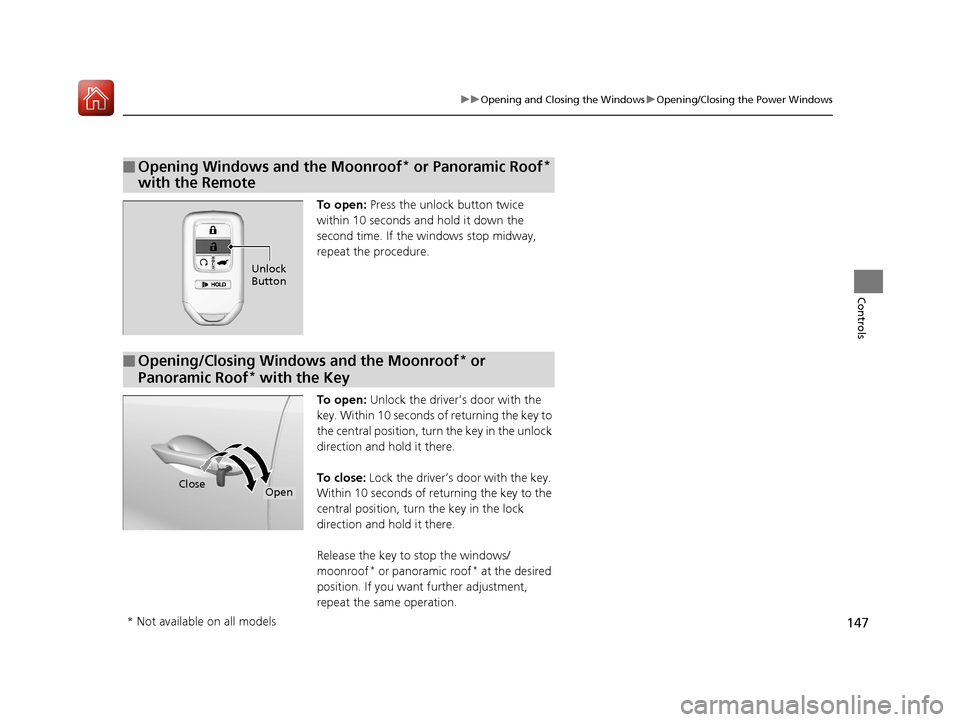
To open: Press the unlock button twice
within 10 seconds and hold it down the
second time. If the windows stop midway,
repeat the procedure.
To open: Unlock the driver’s door with the
key. Within 10 seconds of returning the key to
the central position, turn the key in the unlock
direction and hold it there.
To close: Lock the driver’s door with the key.
Within 10 seconds of re turning the key to the
central position, turn the key in the lock
direction and hold it there.
Release the key to stop the windows/
moonroof
* or panoramic roof* at the desired
position. If you want further adjustment,
repeat the same operation.
■Opening Windows and the Moonroof* or Panoramic Roof*
with the Remote
Unlock
Button
■Opening/Closing Windows and the Moonroof* or
Panoramic Roof
* with the Key
CloseOpen
* Not available on all models
17 PILOT-31TG76100.book 147 ページ 2016年9月20日 火曜日 午後4時9分
Page 149 of 673
148
Controls
Moonroof*
Opening and Closing the Moonroof
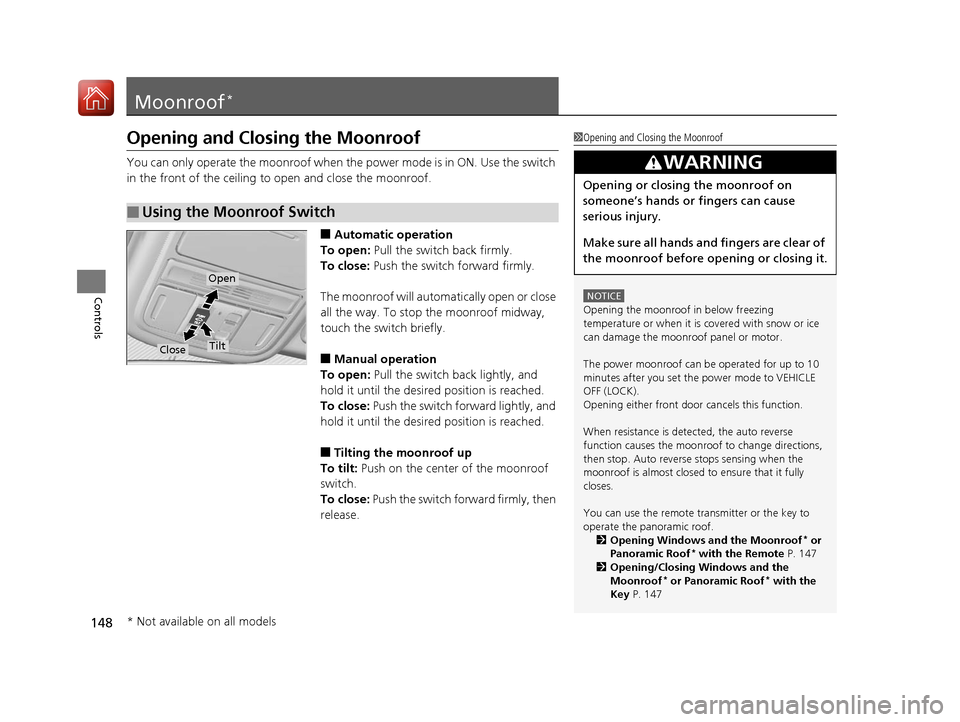
You can only operate the moonroof when the power mode is in ON. Use the switch
in the front of the ceiling to open and close the moonroof.
■Automatic operation
To open: Pull the switch back firmly.
To close: Push the switch forward firmly.
The moonroof will automa tically open or close
all the way. To stop the moonroof midway,
touch the switch briefly.
■Manual operation
To open: Pull the switch back lightly, and
hold it until the desired position is reached.
To close: Push the switch forward lightly, and
hold it until the desired position is reached.
■Tilting the moonroof up
To tilt: Push on the center of the moonroof
switch.
To close: Push the switch forward firmly, then
release.
■Using the Moonroof Switch
1 Opening and Closing the Moonroof
NOTICE
Opening the moonroof in below freezing
temperature or when it is covered with snow or ice
can damage the moonr oof panel or motor.
The power moonroof can be operated for up to 10
minutes after you set the power mode to VEHICLE
OFF (LOCK).
Opening either front door cancels this function.
When resistance is detected, the auto reverse
function causes the moonroof to change directions,
then stop. Auto reverse stops sensing when the
moonroof is almost closed to ensure that it fully
closes.
You can use the remote transmitter or the key to
operate the panoramic roof. 2 Opening Windows and the Moonroof
* or
Panoramic Roof* with the Remote P. 147
2 Opening/Closing Windows and the
Moonroof
* or Panoramic Roof* with the
Key P. 147
3WARNING
Opening or closing the moonroof on
someone’s hands or fingers can cause
serious injury.
Make sure all hands and fingers are clear of
the moonroof before opening or closing it.
Open
CloseTilt
* Not available on all models
17 PILOT-31TG76100.book 148 ページ 2016年9月20日 火曜日 午後4時9分
Page 150 of 673
149Continued
Controls
Panoramic Roof*
Opening/Closing the Panoramic Roof
You can only operate the panoramic roof switches when the power mode is in ON.
Use the switch in the front of the ceilin g to open and close the panoramic roof.
1Opening/Closing the Panoramic Roof
NOTICE
Opening the panoramic roof in below freezing
temperature or when it is covered with snow or ice
can damage the panoramic roof panel or motor.
The panoramic roof and s unshade can be operated
for up to 10 minutes after y ou set the power mode to
VEHICLE OFF (LOCK).
Opening either front door cancels this function.
When resistance is detected, the auto reverse
function causes the panor amic roof to change
directions, then stop. Au to reverse stops sensing
when the panoramic roof is almost closed to ensure
that it fully closes. Make sure that all objects,
including fingers, are clear of the panoramic roof.
You can use the remote transmitter or the key to
operate the panoramic roof. 2 Opening Windows and the Moonroof
* or
Panoramic Roof* with the Remote P. 147
2 Opening/Closing Windows and the
Moonroof
* or Panoramic Roof* with the
Key P. 147
3WARNING
Opening or closing the panoramic roof on
someone’s hands or fingers can cause
serious injury.
Make sure all hands and fingers are clear of
the panoramic roof before opening or
closing it.
* Not available on all models
17 PILOT-31TG76100.book 149 ページ 2016年9月20日 火曜日 午後4時9分
Page 192 of 673
191
uuInterior Lights/Interior Convenience Items uInterior Convenience Items
Continued
Controls
Interior Convenience Items
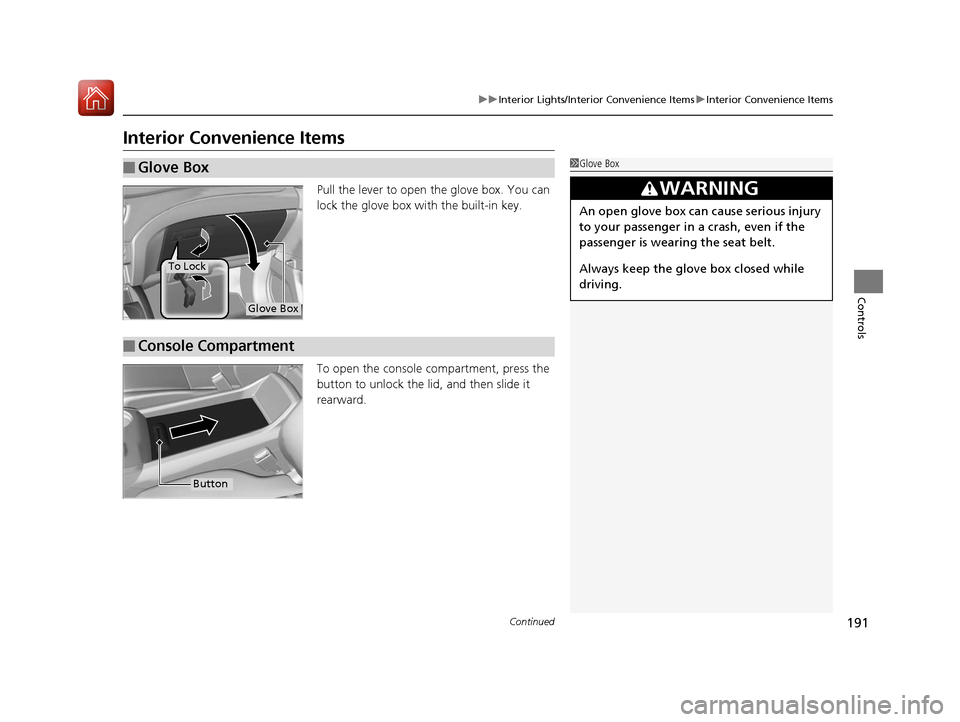
Pull the lever to open the glove box. You can
lock the glove box with the built-in key.
To open the console co mpartment, press the
button to unlock the lid, and then slide it
rearward.
■Glove Box1 Glove Box
3WARNING
An open glove box can cause serious injury
to your passenger in a crash, even if the
passenger is wearing the seat belt.
Always keep the glove box closed while
driving.
Glove Box
To Lock
■Console Compartment
Button
17 PILOT-31TG76100.book 191 ページ 2016年9月20日 火曜日 午後4時9分
Page 308 of 673
Continued307
uuAudio System Basic Operation uAndroid AutoTM
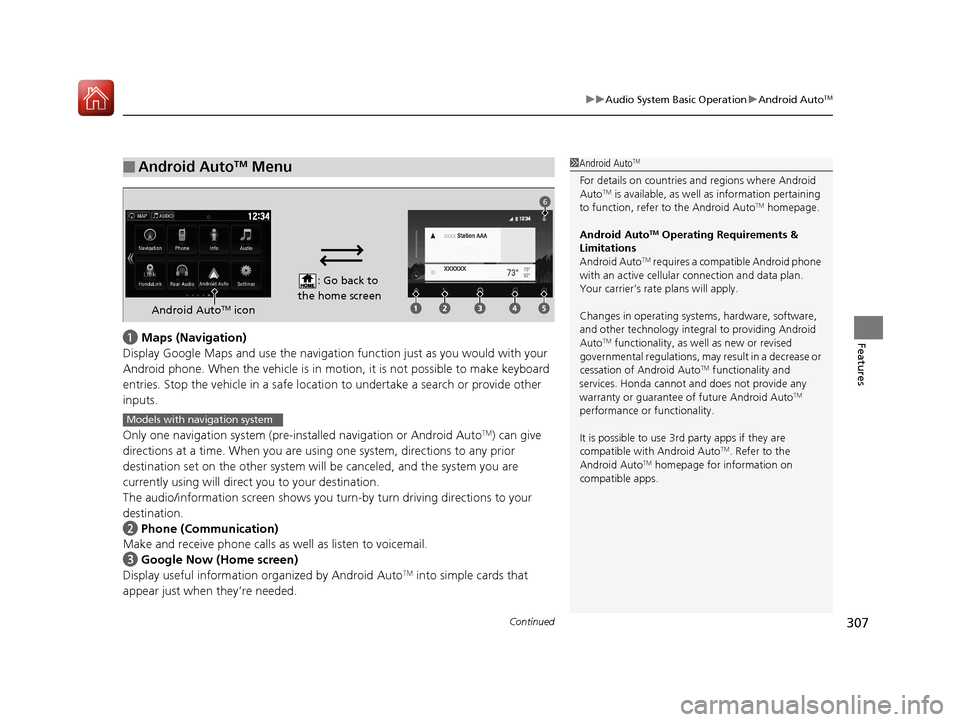
Featuresa Maps (Navigation)
Display Google Maps and use the navigation function just as you would with your
Android phone. When the vehicle is in motion, it is not possible to make keyboard
entries. Stop the vehicle in a safe locati on to undertake a search or provide other
inputs.
Only one navigation system (pre-installed navigation or Android Auto
TM) can give
directions at a time. When you are using one system, directions to any prior
destination set on the other system will be canceled, and the system you are
currently using will direct you to your destination.
The audio/information screen shows you turn-by turn driving directions to your
destination.
b Phone (Communication)
Make and receive phone calls as well as listen to voicemail.
c Google Now (Home screen)
Display useful information organized by Android Auto
TM into simple cards that
appear just when they’re needed.
■Android AutoTM Menu1 Android AutoTM
For details on c ountries and regions where Android
AutoTM is available, as well as information pertaining
to function, refer to the Android AutoTM homepage.
Android Auto
TM Operating Requirements &
Limitations
Android Auto
TM requires a compatible Android phone
with an active cellular connection and data plan.
Your carrier’s rate plans will apply.
Changes in operating system s, hardware, software,
and other technology integr al to providing Android
Auto
TM functionality, as we ll as new or revised
governmental regulations, may result in a decrease or
cessation of Android Auto
TM functionality and
services. Honda cannot a nd does not provide any
warranty or guarantee of future Android Auto
TM
performance or functionality.
It is possible to use 3r d party apps if they are
compatible with Android Auto
TM. Refer to the
Android AutoTM homepage for information on
compatible apps.
: Go back to
the home screen
Android AutoTM icon
6
Models with navigation system
17 PILOT-31TG76100.book 307 ページ 2016年9月20日 火曜日 午後4時9分
Page 355 of 673
354
uuCustomized Features u
Features
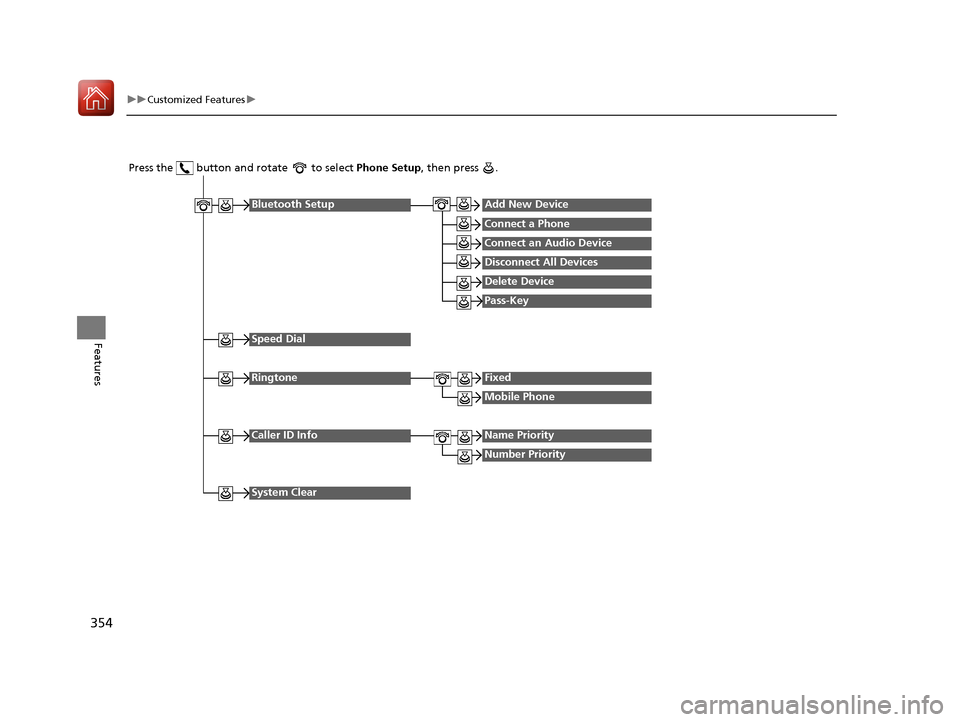
Press the button and rotate to select Phone Setup, then press .
RingtoneFixed
Mobile Phone
Bluetooth SetupAdd New Device
Connect a Phone
Connect an Audio Device
Disconnect All Devices
Delete Device
Pass-Key
Speed Dial
Caller ID InfoName Priority
Number Priority
System Clear
17 PILOT-31TG76100.book 354 ページ 2016年9月20日 火曜日 午後4時9分