transmission HONDA PILOT 2017 3.G User Guide
[x] Cancel search | Manufacturer: HONDA, Model Year: 2017, Model line: PILOT, Model: HONDA PILOT 2017 3.GPages: 673
Page 144 of 673
143Continued
Controls
Security System
Immobilizer System
The immobilizer system prevents a key that has not been pre-registered from
starting the engine. Each key contains electronic transmitters that use electronic
signals to verify the key.
Pay attention to the follo wing when pressing the ENGINE START/STOP button:
• Do not allow objects that emit strong radio waves near the ENGINE START/
STOP button.
• Make sure the key is not covered by or touching a metal object.
• Do not bring a key from another vehicle’s immobilizer system with the smart entry
remote.
Security System Alarm
The security system alarm activates when the tailgate, hood or doors are forcibly
opened. The alarm does not go off if the tailgate or doors are opened with the key,
remote transmitter or smart entry system.
However, the alarm goes off when a door is opened with the key, then the hood is
opened before the power mode is set to ON.
However, the alarm goes off when a door is opened with the key, then the hood is
opened or gear position is changed from out of
(P before the power mode is set to
ON.
■When the security system alarm activates
The horn sounds intermittently , some exterior lights flash.
1Immobilizer System
NOTICE
Leaving the smart entry remote in the vehicle can
result in theft or accident al movement of the vehicle.
Always take the key with you whenever you leave the
vehicle unattended.
Do not alter the system or add other devices to it.
Doing so may damage the system and make your
vehicle inoperable.
1 Security System Alarm
The security alarm continues for a maximum of two
minutes until the security system alarm deactivates.
Except automatic transmission models with shift lever
Automatic transmission models with shift lever
17 PILOT-31TG76100.book 143 ページ 2016年9月20日 火曜日 午後4時9分
Page 154 of 673
153
uuOperating the Switches Around the Steering Wheel uENGINE START/STOP Button
Continued
Controls
If you leave the vehicle for 30 to 60 minutes with the transmission in (P and the
power mode in ACCESSORY, the vehicle automa tically goes into the mode similar to
VEHICLE OFF (LOCK) to avoid the battery drain.
When in this mode:
The steering wheel does not lock.
You cannot lock or unlock doors with th e remote transmitter or the smart entry
system.
Press the ENGINE START/STOP button to switch the mode to VEHICLE OFF (LOCK).
If you open the driver’s door when the power mode is set to ACCESSORY, a warning
beeper sounds.
■Automatic Power Off
■Power Mode Reminder
Canadian models
17 PILOT-31TG76100.book 153 ページ 2016年9月20日 火曜日 午後4時9分
Page 157 of 673
156
uuOperating the Switches Around the Steering Wheel uLight Switches
Controls
Light Switches
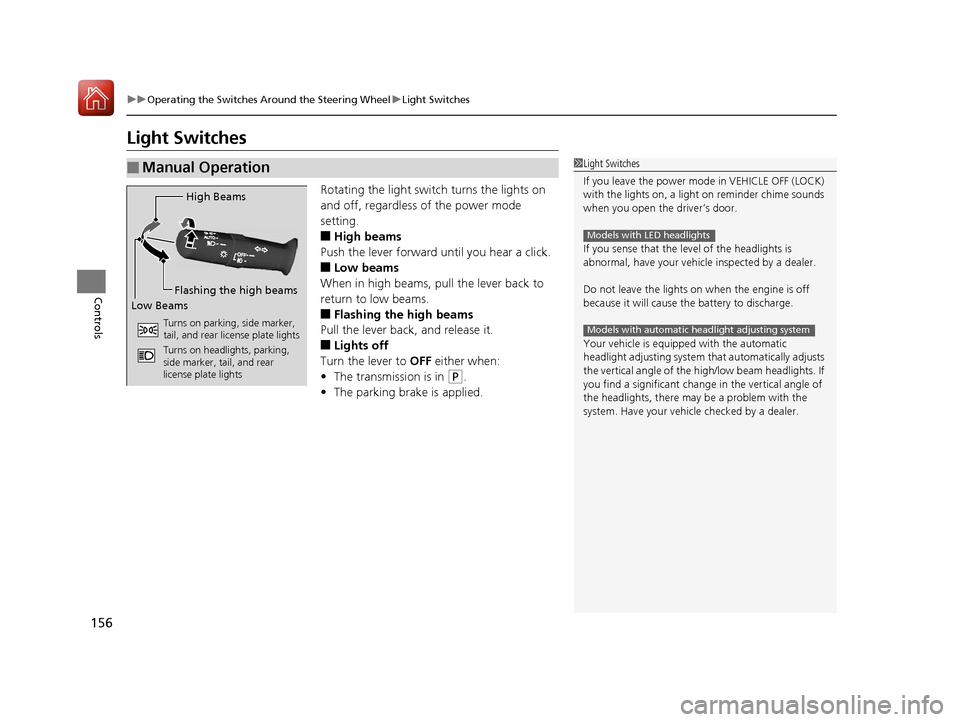
Rotating the light switch turns the lights on
and off, regardless of the power mode
setting.
■High beams
Push the lever forward until you hear a click.
■Low beams
When in high beams, pull the lever back to
return to low beams.
■Flashing the high beams
Pull the lever back, and release it.
■Lights off
Turn the lever to OFF either when:
• The transmission is in
(P.
• The parking brake is applied.
■Manual Operation1Light Switches
If you leave the power mode in VEHICLE OFF (LOCK)
with the lights on, a light on reminder chime sounds
when you open the driver’s door.
If you sense that the le vel of the headlights is
abnormal, have your vehicle inspected by a dealer.
Do not leave the lights on when the engine is off
because it will cause the battery to discharge.
Your vehicle is equipped with the automatic
headlight adjusting system that automatically adjusts
the vertical angle of the high/low beam headlights. If
you find a significant change in the vertical angle of
the headlights, there may be a problem with the
system. Have your vehicle checked by a dealer.
Models with LED headlights
Models with automatic headlight adjusting system
High Beams
Flashing the high beams
Low Beams
Turns on parking, side marker,
tail, and rear license plate lights
Turns on headlights, parking,
side marker, tail, and rear
license plate lights
17 PILOT-31TG76100.book 156 ページ 2016年9月20日 火曜日 午後4時9分
Page 167 of 673
uuOperating the Switches Around the Steering Wheel uWipers and Washers
166
Controls
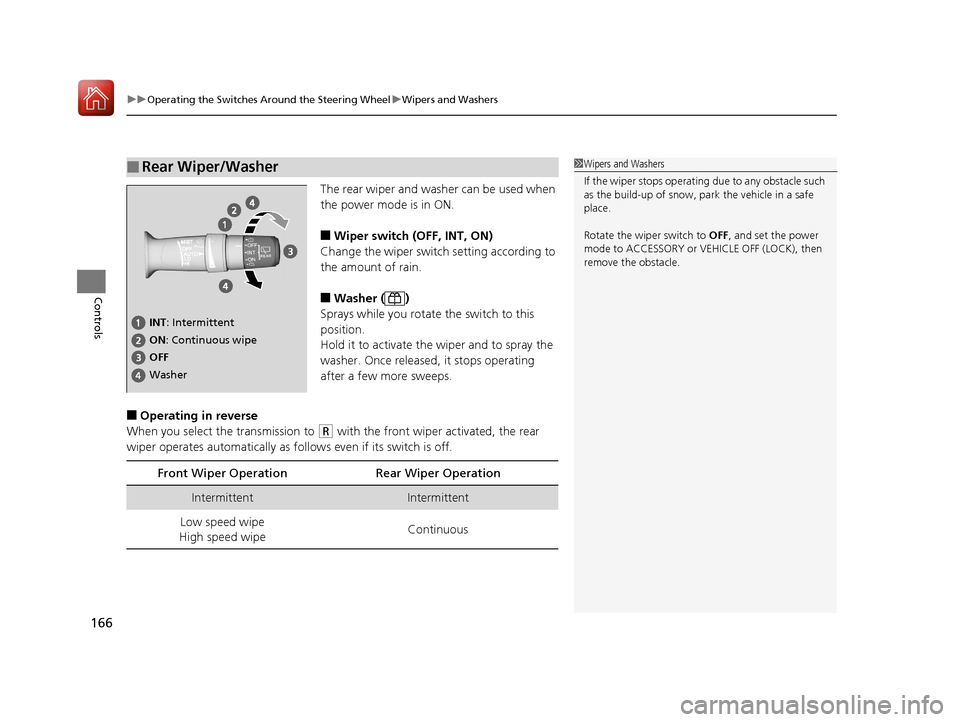
The rear wiper and washer can be used when
the power mode is in ON.
■Wiper switch (OFF, INT, ON)
Change the wiper switch setting according to
the amount of rain.
■Washer ( )
Sprays while you rotate the switch to this
position.
Hold it to activate the wiper and to spray the
washer. Once released, it stops operating
after a few more sweeps.
■Operating in reverse
When you select the transmission to
(R with the front wiper activated, the rear
wiper operates automatically as fo llows even if its switch is off.
■Rear Wiper/Washer1Wipers and Washers
If the wiper stops operating due to any obstacle such
as the build-up of snow, pa rk the vehicle in a safe
place.
Rotate the wipe r switch to OFF, and set the power
mode to ACCESSORY or VEHICLE OFF (LOCK), then
remove the obstacle.
INT : Intermittent
OFF ON : Continuous wipe
Washer
Front Wiper Op eration Rear Wiper Operation
IntermittentIntermittent
Low speed wipe
High speed wipe Continuous
17 PILOT-31TG76100.book 166 ページ 2016年9月20日 火曜日 午後4時9分
Page 170 of 673
169
uuOperating the Switches Around the Steering Wheel uDriving Position Memory System*
Continued
Controls
Driving Position Memory System*
You can store two driver’s seat (except for power lumbar) and door mirror positions
with the driving position memory system.
When you unlock and open the driver’s door with a remote transmitter, or smart
entry system, the seat and door mirrors adjust automatically to one of the two preset
positions.
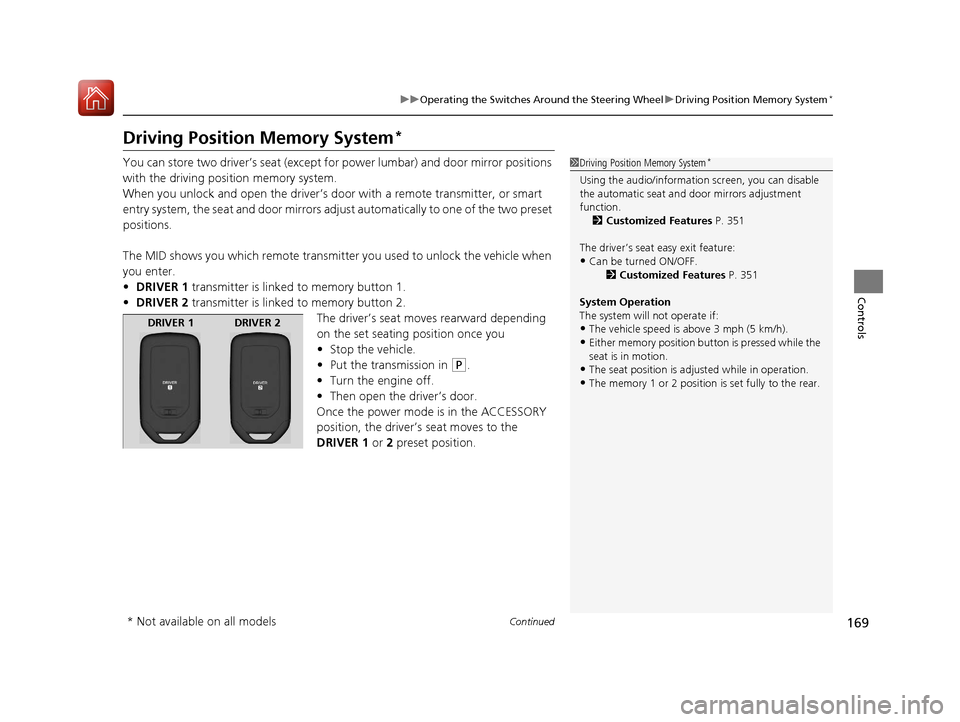
The MID shows you which remote transmitter you used to unlock the vehicle when
you enter.
• DRIVER 1 transmitter is linked to memory button 1.
• DRIVER 2 transmitter is linked to memory button 2.
The driver’s seat moves rearward depending
on the set seating position once you
•Stop the vehicle.
• Put the transmission in
(P.
• Turn the engine off.
• Then open the driver’s door.
Once the power mode is in the ACCESSORY
position, the driver’s seat moves to the
DRIVER 1 or 2 preset position.
1 Driving Position Memory System*
Using the audio/informati on screen, you can disable
the automatic seat and d oor mirrors adjustment
function. 2 Customized Features P. 351
The driver’s seat easy exit feature:
•Can be turned ON/OFF. 2Customized Features P. 351
System Operation
The system will not operate if:
•The vehicle speed is above 3 mph (5 km/h).•Either memory position button is pressed while the
seat is in motion.
•The seat position is adju sted while in operation.•The memory 1 or 2 position is set fully to the rear.
DRIVER 1 DRIVER 2
* Not available on all models
17 PILOT-31TG76100.book 169 ページ 2016年9月20日 火曜日 午後4時9分
Page 173 of 673
172
Controls
Adjusting the Mirrors
Interior Rearview Mirror
Adjust the angle of the rearview mirror when you are sitting in the correct driving
position.
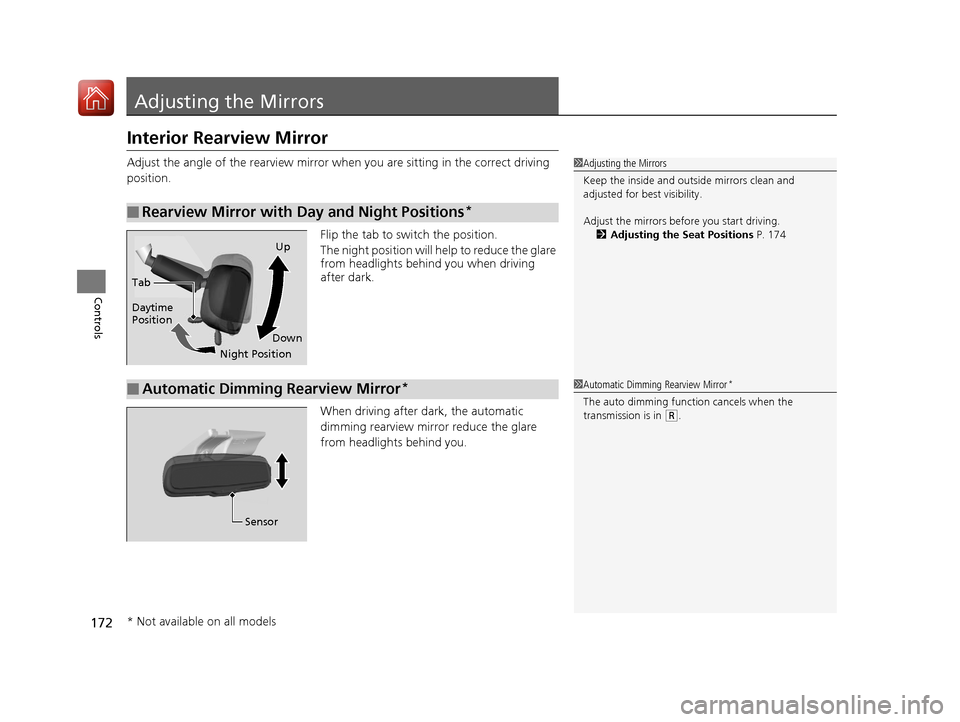
Flip the tab to switch the position.
The night position will help to reduce the glare
from headlights behind you when driving
after dark.
When driving after dark, the automatic
dimming rearview mirror reduce the glare
from headlights behind you.
■Rearview Mirror with Day and Night Positions*
1 Adjusting the Mirrors
Keep the inside and out side mirrors clean and
adjusted for best visibility.
Adjust the mirrors befo re you start driving.
2 Adjusting the Seat Positions P. 174
Tab
Daytime
Position
Night PositionUp
Down
■Automatic Dimming Rearview Mirror*1 Automatic Dimming Rearview Mirror*
The auto dimming function cancels when the
transmission is in
(R.
Sensor
* Not available on all models
17 PILOT-31TG76100.book 172 ページ 2016年9月20日 火曜日 午後4時9分
Page 301 of 673
300
uuAudio System Basic Operation uWi-Fi Connection
Features
Wi-Fi Connection
You can connect the display audio to the Internet using Wi-Fi and browse websites
or use online services on the audio/information screen. If your phone has wireless
hotspot capabilities, the system can be te thered to the phone. Use the following
steps to setup.
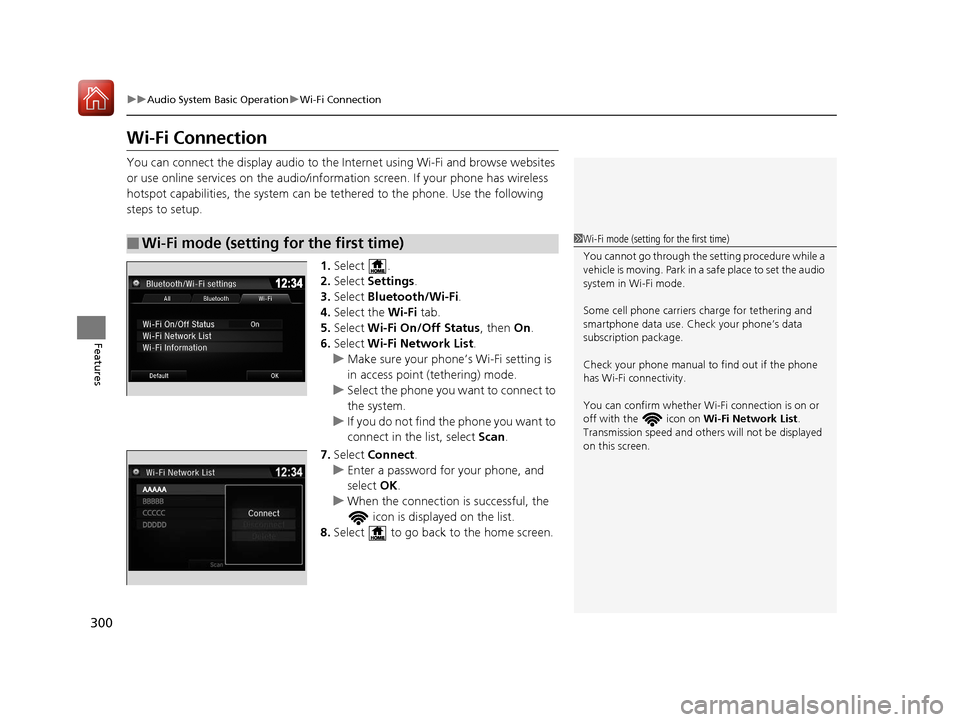
1.Select .
2. Select Settings .
3. Select Bluetooth/Wi-Fi .
4. Select the Wi-Fi tab.
5. Select Wi-Fi On/Off Status , then On.
6. Select Wi-Fi Network List .
u Make sure your phone’s Wi-Fi setting is
in access point (tethering) mode.
u Select the phone you want to connect to
the system.
u If you do not find the phone you want to
connect in the list, select Scan.
7. Select Connect .
u Enter a password for your phone, and
select OK.
u When the connection is successful, the
icon is displayed on the list.
8. Select to go back to the home screen.
■Wi-Fi mode (setting for the first time)1Wi-Fi mode (setting for the first time)
You cannot go through the setting procedure while a
vehicle is moving. Park in a safe place to set the audio
system in Wi-Fi mode.
Some cell phone carriers charge for tethering and
smartphone data use. Check your phone’s data
subscription package.
Check your phone manual to find out if the phone
has Wi-Fi connectivity.
You can confirm whether Wi -Fi connection is on or
off with the icon on Wi-Fi Network List.
Transmission speed and others will not be displayed
on this screen.
17 PILOT-31TG76100.book 300 ページ 2016年9月20日 火曜日 午後4時9分
Page 305 of 673
uuAudio System Basic Operation uApple CarPlayTM
304
Features
■Maps
Display Apple CarPlayTM map and use the navigation function just as you would on
your iPhone.
Only one navigation system (pre-installed navigation or Apple CarPlay
TM map) can
give directions at a time. When you are using one system, directions to any prior
destination set on the other system will be canceled, and the system you are
currently using will direct you to your destination.
After you have connected your iPhone to the system via the 1.5A USB port, use the
following procedure to set up Apple CarPlay
TM. Use of Apple CarPlayTM will result in
the transmission of certain user and vehicle information (such as vehicle location,
speed, and status) to your iPhone to enhance the Apple CarPlay
TM experience. You
will need to consent to the sharing of this information on th e audio/information
screen.
■Enabling Apple CarPlayTM
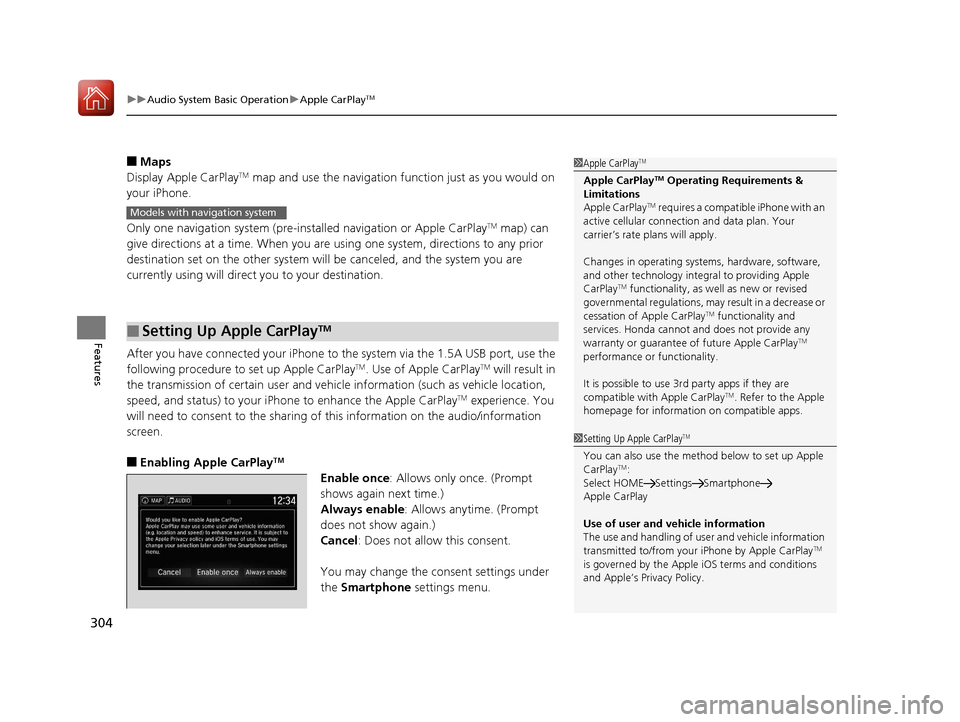
Enable once : Allows only once. (Prompt
shows again next time.)
Always enable : Allows anytime. (Prompt
does not show again.)
Cancel : Does not allow this consent.
You may change the consent settings under
the Smartphone settings menu.
■Setting Up Apple CarPlayTM
1Apple CarPlayTM
Apple CarPlayTM Operating Requirements &
Limitations
Apple CarPlay
TM requires a compatible iPhone with an
active cellular connecti on and data plan. Your
carrier’s rate plans will apply.
Changes in operating system s, hardware, software,
and other technology integr al to providing Apple
CarPlay
TM functionality, as we ll as new or revised
governmental regulations, may result in a decrease or
cessation of Apple CarPlay
TM functionality and
services. Honda cannot a nd does not provide any
warranty or guarantee of future Apple CarPlay
TM
performance or functionality.
It is possible to use 3r d party apps if they are
compatible with Apple CarPlay
TM. Refer to the Apple
homepage for information on compatible apps.
Models with navigation system
1 Setting Up Apple CarPlayTM
You can also use the method below to set up Apple
CarPlayTM:
Select HOME Settings Smartphone
Apple CarPlay
Use of user and vehicle information
The use and handling of user and vehicle information
transmitted to/from your iPhone by Apple CarPlay
TM
is governed by the Appl e iOS terms and conditions
and Apple’s Privacy Policy.
17 PILOT-31TG76100.book 304 ページ 2016年9月20日 火曜日 午後4時9分
Page 452 of 673
451
Driving
This chapter discusses driving, refueling, and information on items such as accessories.
Before Driving................................... 452
Towing a Trailer ................................ 458
Off-Highway Driving Guidelines ..... 469
When Driving Starting the Engine .......................... 471
Automatic Transmission ................... 478
Shifting ............................................ 479
Auto Idle-stop
*................................ 489
Intelligent Traction Management*.... 495
Cruise Control*................................ 497
Front Sensor Camera*...................... 500
Adaptive Cruise Control (ACC)*....... 502Road Departure Mi tigation (RDM)
System*...................................... 514Lane Keeping Assist System (LKAS)*.. 519
Vehicle Stability Assist (VSA ®), aka Electronic
Stability Control (ESC), System ............. 527
Agile Handling Assist ....................... 529
Blind spot inform ation (BSI) System*.... 530
LaneWatchTM*.................................. 532Intelligent VTM4 (i-VTM4)*................. 534Tire Pressure Monitoring System (TPMS) with Tire Fill Assist .......................... 535
Tire Pressure Monitoring System (TPMS) -
Required Federal Explanation ......... 537
Braking Brake System ................................... 539
Anti-lock Brake System (ABS) ........... 541
Brake Assist System.......................... 542 Collision Mitigation Braking System
TM
(CMBSTM)*..................................... 543
Parking Your Vehicle
When Stopped ................................ 552
Parking Sensor System
*................... 553
Cross Traffic Monitor*..................... 557
Multi-view rear camera*.................. 561
Refueling Fuel Information .............................. 562
How to Refuel ................................. 563
Fuel Economy and CO
2 Emissions
Improving Fuel Economy and Reducing
CO
2 Emissions ................................ 565
* Not available on all models
17 PILOT-31TG76100.book 451 ページ 2016年9月20日 火曜日 午後4時9分
Page 463 of 673
uuTowing a Trailer uTowing Preparation
462
Driving
Towing generally requires a variety of supplemental equipment.
To ensure the best quality, we recomme nd that you purchase Honda equipment
whenever possible.
■Trailer brakes
Recommended for any trailer with a total weight of 1,000 lbs (450 kg) or more:
There are two common types of trailer brake s: surge and electric. Surge brakes are
common for boat trailers, since the brakes will get wet.
If you choose electric brakes, be sure th ey are electronically actuated. Do not
attempt to attach trailer brakes to your ve hicle’s hydraulic system, as it will lower
braking effectiveness and create a potential hazard.
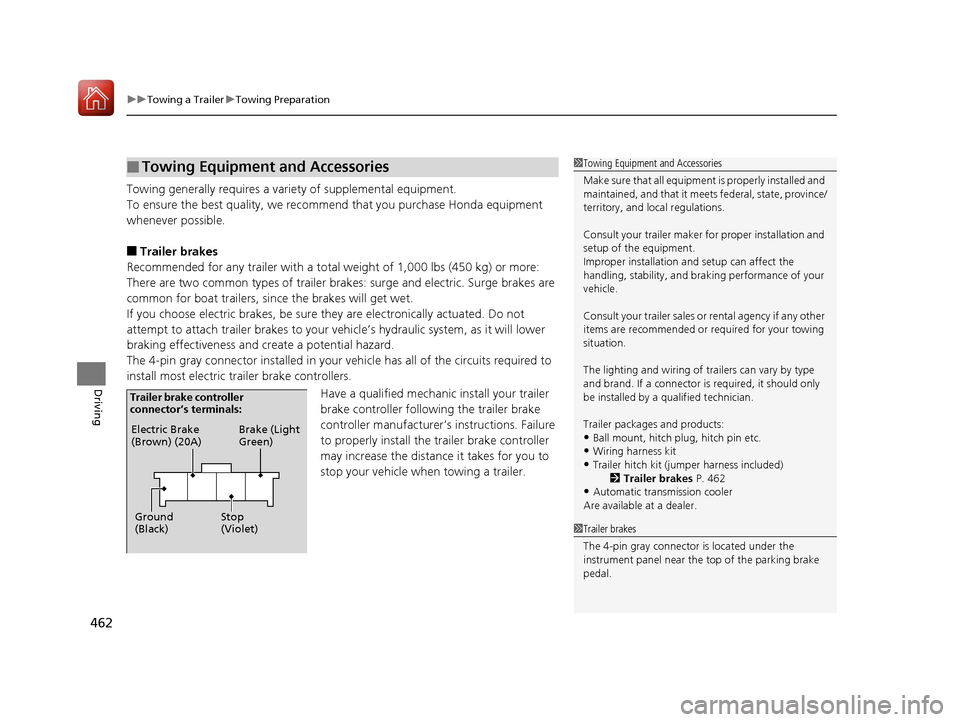
The 4-pin gray connector installed in your vehicle has all of the circuits required to
install most electric trailer brake controllers.
Have a qualified mechanic install your trailer
brake controller following the trailer brake
controller manufacturer’s instructions. Failure
to properly install the trailer brake controller
may increase the distance it takes for you to
stop your vehicle when towing a trailer.
■Towing Equipment and Accessories1 Towing Equipment and Accessories
Make sure that all equipment is properly installed and
maintained, and that it meets federal, state, province/
territory, and lo cal regulations.
Consult your trai ler maker for prope r installation and
setup of the equipment.
Improper installation and setup can affect the
handling, stability, and br aking performance of your
vehicle.
Consult your traile r sales or rental agency if any other
items are recommended or required for your towing
situation.
The lighting and wiring of tra ilers can vary by type
and brand. If a connector is required, it should only
be installed by a qua lified technician.
Trailer packages and products:
•Ball mount, hitch plug, hitch pin etc.•Wiring harness kit
•Trailer hitch kit (jum per harness included)
2 Trailer brakes P. 462
•Automatic transmission cooler
Are available at a dealer.
1 Trailer brakes
The 4-pin gray connector is located under the
instrument panel near the top of the parking brake
pedal.
Electric Brake
(Brown) (20A)
Ground
(Black) Brake (Light
Green)
Stop
(Violet)
Trailer brake controller
connector’s terminals:
17 PILOT-31TG76100.book 462 ページ 2016年9月20日 火曜日 午後4時9分