warning lights HONDA PILOT 2017 3.G User Guide
[x] Cancel search | Manufacturer: HONDA, Model Year: 2017, Model line: PILOT, Model: HONDA PILOT 2017 3.GPages: 673
Page 634 of 673
633Continued
Handling the Unexpected
Jump Starting
Turn off the power to electric devices, such as audio and lights. Turn off the engine,
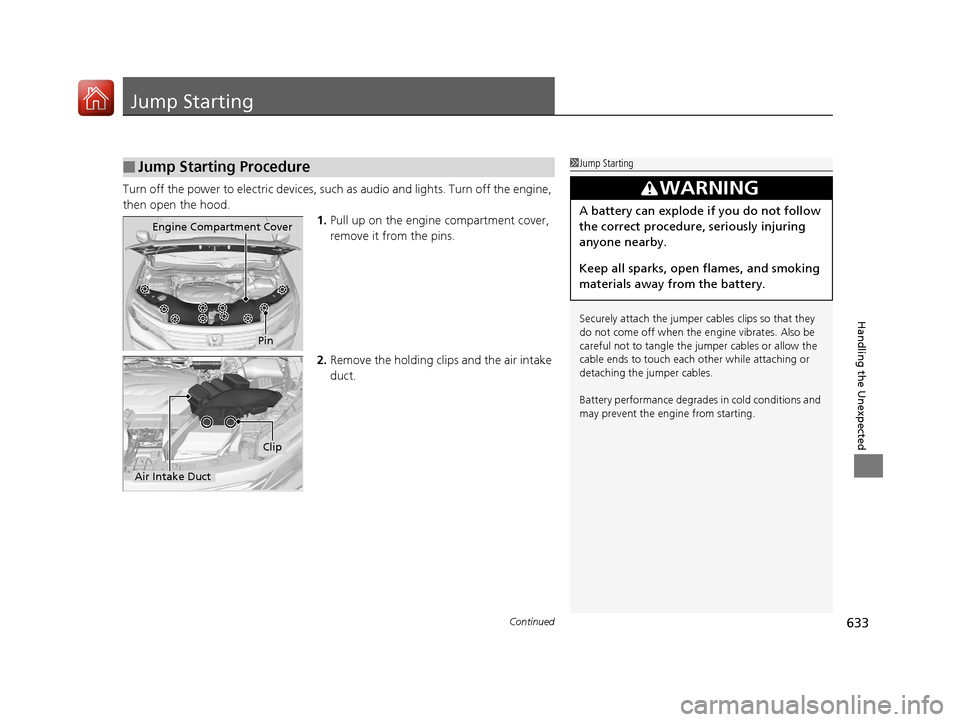
then open the hood. 1.Pull up on the engine compartment cover,
remove it from the pins.
2. Remove the holding clip s and the air intake
duct.
■Jump Starting Procedure1 Jump Starting
Securely attach the jumper cables clips so that they
do not come off when the e ngine vibrates. Also be
careful not to tangle the ju mper cables or allow the
cable ends to touch each other while attaching or
detaching the jumper cables.
Battery performance degrades in cold conditions and
may prevent the engi ne from starting.
3WARNING
A battery can explode if you do not follow
the correct procedure, seriously injuring
anyone nearby.
Keep all sparks, open flames, and smoking
materials away from the battery.
Pin
Engine Compartment Cover
Air Intake Duct
Clip
17 PILOT-31TG76100.book 633 ページ 2016年9月20日 火曜日 午後4時9分
Page 637 of 673
636
Handling the Unexpected
Overheating
How to Handle Overheating
Overheating symptoms are as follows:
•The temperature gauge needle is at the mark or the engine suddenly loses
power.
• Steam or spray comes out of the engine compartment.
■First thing to do
1. Immediately park the vehicle in a safe place.
2. Turn off all accessories and turn on the hazard warning lights.
u No steam or spray present: Keep the engine running and open the hood.
u Steam or spray is present: Turn off the engine and wait until it subsides.
Then, open the hood.
1 How to Handle Overheating
NOTICE
Continuing to drive with the temperature gauge
needle at the mark may damage the engine.
3WARNING
Steam and spray from an overheated
engine can seriously scald you.
Do not open the hood if steam is coming
out.
H
H
17 PILOT-31TG76100.book 636 ページ 2016年9月20日 火曜日 午後4時9分
Page 639 of 673
638
Handling the Unexpected
Indicator, Coming On/Blinking
If the Low Oil Pressure Indicator Comes On
■Reasons for the indicator to come on
Comes on when the engine oil pressure is low.
■What to do as soon as the indicator comes on
1. Immediately park the vehicle on level ground in a safe place.
2. If necessary, turn the ha zard warning lights on.
■What to do after parking the vehicle
1. Stop the engine and let it sit for about three minutes.
2. Open the hood and check the oil level.
2 Oil Check P. 579
3.Start the engine and check the low oil pressure indicator.
u The indicator goes off: Start driving again.
u The indicator does not go off within 10 seconds: Stop the engine
and contact a dealer for repairs immediately.
If the Charging System Indicator Comes On
■Reasons for the indicator to come on
Comes on when the battery is not being charged.
■What to do when the indicator comes on
Turn off the climate con trol system, rear defogger, and other electrical
systems, and immediately contact a dealer for repairs.
1 If the Low Oil Pressure Indicator Comes On
NOTICE
Running the engine with low oil pressure can cause
serious mechanical damage almost immediately.
1If the Charging System Indicator Comes On
If you need to stop temporarily, do not turn off the
engine. Restarting the engi ne may rapidly discharge
the battery.
17 PILOT-31TG76100.book 638 ページ 2016年9月20日 火曜日 午後4時9分
Page 642 of 673
641
uuIndicator, Coming On/Blinking uIf the Low Tire Pressure/Tire Pressure Monitoring System (TPMS) Indicator Comes On or Blinks
Handling the Unexpected
If the Low Tire Pressure/T ire Pressure Monitoring
System (TPMS) Indicator Comes On or Blinks
■Reasons for the indicator to come on or blink
A tire pressure is significantly low. If there is a problem with the TPMS
with Tire Fill Assist or the compact spare tire
* is installed, the indicator
blinks for about one minute, and then stays on.
■What to do when th e indicator comes on
Stop your vehicle in a safe place. Ch eck the tire pressure and adjust the
pressure to the specified level. The spec ified tire pressure is on a label on
the driver side doorjamb.
■What to do when the indicator blinks
Have the tire inspected by a dealer as soon as possible. If the compact
spare tire
* causes the indicator to blink, ch ange the tire to a full-size tire.
The indicator goes off after driving for a few miles (kilometers).
If the Transmission Indicator Blinks along with the
Warning Message*
■Reasons for the indicator to blink
There is a problem with the transmission.
■What to do when the indicator blinks
• Immediately have your vehicle inspected by a dealer.
• Select
(N after starting the engine.
u Check if the
(N position in the instrume nt panel and the indicator
on the
(N button light/blink.
u The engine cannot be turned on unless the parking brake is set.
2 Starting the Engine P. 471
1If the Low Tire Pressure/Tire Pressure Monitoring System (TPMS)
Indicator Comes On or Blinks
NOTICE
Driving on an extremely unde rinflated tire can cause
it to overheat. An overheated tire can fail. Always
inflate your tires to the prescribed level.
TPMS with Tire Fill Assist provides visual and audible
assistance during tire pre ssure adjustment. With the
power mode in ON, while y ou adjust tire pressure up
or down, the system alerts you as follows:
Below recommended pressure: The beeper
sounds and exterior lights flash once every five
seconds.
At recommended pressure: The beeper sounds
and exterior lights flash ra pidly for ~ five seconds.
Above recommended pressure: The beeper
sounds and lights flash twice every three seconds.
1 If the Transmission Indicator Blinks along with the Warning
Message*
You may not be able to start the engine.
Make sure to set the pa rking brake when parking
your vehicle.
Call a professional towing service if you need to tow
your vehicle. 2 Emergency Towing P. 647
* Not available on all models
17 PILOT-31TG76100.book 641 ページ 2016年9月20日 火曜日 午後4時9分
Page 668 of 673
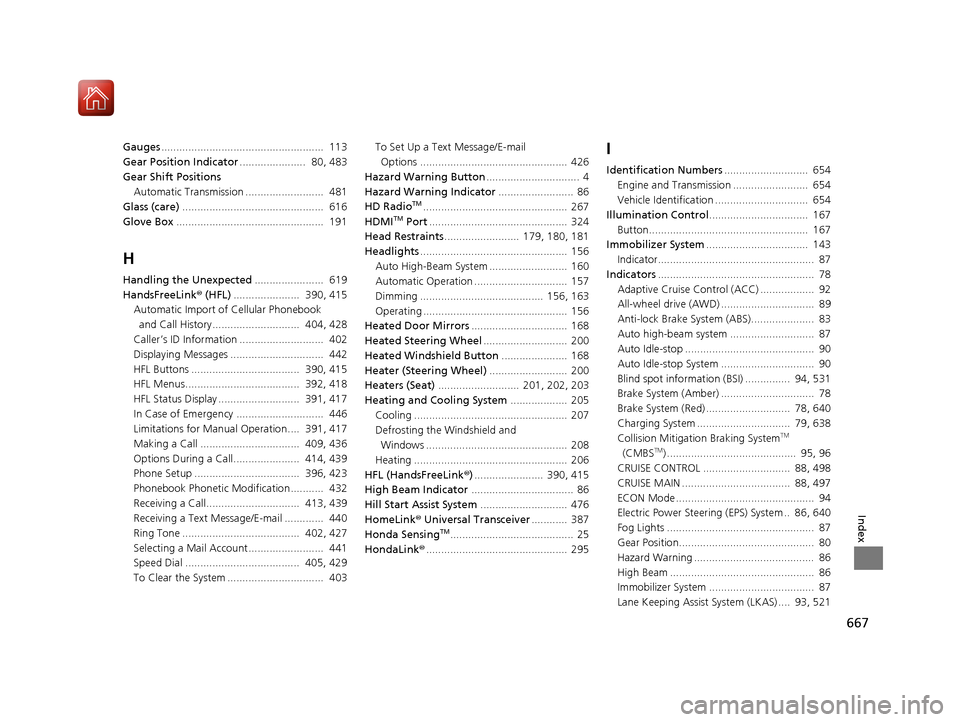
667
Index
Gauges...................................................... 113
Gear Position Indicator ...................... 80, 483
Gear Shift Positions Automatic Transmission .......................... 481
Glass (care) ............................................... 616
Glove Box ................................................. 191
H
Handling the Unexpected ....................... 619
HandsFreeLink ® (HFL) ...................... 390, 415
Automatic Import of Cellular Phonebook
and Call History............................. 404, 428
Caller’s ID Information ............................ 402
Displaying Messages ............................... 442
HFL Buttons .................................... 390, 415
HFL Menus...................................... 392, 418
HFL Status Display ........................... 391, 417
In Case of Emergency ............................. 446
Limitations for Manual Operation.... 391, 417
Making a Call ................................. 409, 436
Options During a Call...................... 414, 439
Phone Setup ................................... 396, 423
Phonebook Phonetic Modification........... 432
Receiving a Call............................... 413, 439
Receiving a Text Message/E-mail ............. 440
Ring Tone ....................................... 402, 427
Selecting a Mail Account......................... 441
Speed Dial ...................................... 405, 429
To Clear the System ................................ 403 To Set Up a Text Message/E-mail
Options ................................................. 426
Hazard Warning Button ............................... 4
Hazard Warning Indicator ......................... 86
HD Radio
TM................................................ 267
HDMITM Port .............................................. 324
Head Restraints ......................... 179, 180, 181
Headlights ................................................. 156
Auto High-Beam System .......................... 160
Automatic Operation ............................... 157
Dimming ......................................... 156, 163
Operating ................................................ 156
Heated Door Mirrors ................................ 168
Heated Steering Wheel ............................ 200
Heated Windshield Button ...................... 168
Heater (Steering Wheel) .......................... 200
Heaters (Seat) ........................... 201, 202, 203
Heating and Cooling System ................... 205
Cooling ................................................... 207
Defrosting the Windshield and Windows ............................................... 208
Heating ................................................... 206
HFL (HandsFreeLink ®)....................... 390, 415
High Beam Indicator .................................. 86
Hill Start Assist System ............................. 476
HomeLink® Universal Transceiver ............ 387
Honda Sensing
TM......................................... 25
HondaLink® ............................................... 295
I
Identification Numbers ............................ 654
Engine and Transmission ......................... 654
Vehicle Identification ............................... 654
Illumination Control ................................. 167
Button..................................................... 167
Immobilizer System .................................. 143
Indicator.................................................... 87
Indicators .................................................... 78
Adaptive Cruise Control (ACC) .................. 92
All-wheel drive (AWD) ............................... 89
Anti-lock Brake System (ABS)..................... 83
Auto high-beam system ............................ 87
Auto Idle-stop ........................................... 90
Auto Idle-stop System ............................... 90
Blind spot information (BSI) ............... 94, 531
Brake System (Amber) ............................... 78
Brake System (Red) ............................ 78, 640
Charging System ............................... 79, 638
Collision Mitigati on Braking System
TM
(CMBSTM) ........................................... 95, 96
CRUISE CONTROL ............................. 88, 498
CRUISE MAIN .................................... 88, 497
ECON Mode .............................................. 94
Electric Power Steering (EPS) System .. 86, 640
Fog Lights ................................................. 87
Gear Position............................................. 80
Hazard Warning ........................................ 86
High Beam ................................................ 86
Immobilizer System ................................... 87
Lane Keeping Assist System (LKAS) .... 93, 521
17 PILOT-31TG76100.book 667 ページ 2016年9月20日 火曜日 午後4時9分