tailgate HONDA PILOT 2017 3.G Owner's Guide
[x] Cancel search | Manufacturer: HONDA, Model Year: 2017, Model line: PILOT, Model: HONDA PILOT 2017 3.GPages: 673
Page 145 of 673
uuSecurity System uSecurity System Alarm
144
Controls
■To deactivate the security system alarm
Unlock the vehicle using the key, remote transmitter, or smart entry system. The
system, along with the horn and flashing lights, is deactivated.
■Setting the security system alarm
The security system alarm automatically sets when the following conditions have
been met:
• The power mode is set to VEHICLE OFF (LOCK).
• The hood is closed.
• All doors and the tailgate are locked from outside with the key, remote
transmitter, or smart entry system.
■When the security system alarm sets
The security system alarm indicator in the instrument panel blinks. When the
blinking interval changes after about 15 seconds, the security system alarm is set.
■To cancel the security system alarm
The security system alarm is canceled when the vehicle is unlocked using the key,
remote transmitter, smart entry system, or th e power mode is set to ON. The security
system alarm indicator goe s off at the same time.
1Security System Alarm
Do not set the security system alarm when someone
is in the vehicle or a window is open. The system can
accidentally activate when:
•Unlocking the door with the lock tab.•Opening the hood with the hood release.
If the battery goes dead after you have set the
security system alarm, the security alarm may go off
once the battery is re charged or replaced.
If this occurs, deactivate the security system alarm by
unlocking a door using the ke y, remote transmitter,
or smart entry system.
Do not attempt to alter th is system or add another
device to it.
17 PILOT-31TG76100.book 144 ページ 2016年9月20日 火曜日 午後4時9分
Page 189 of 673
188
Controls
Interior Lights/Interior Convenience Items
Interior Lights
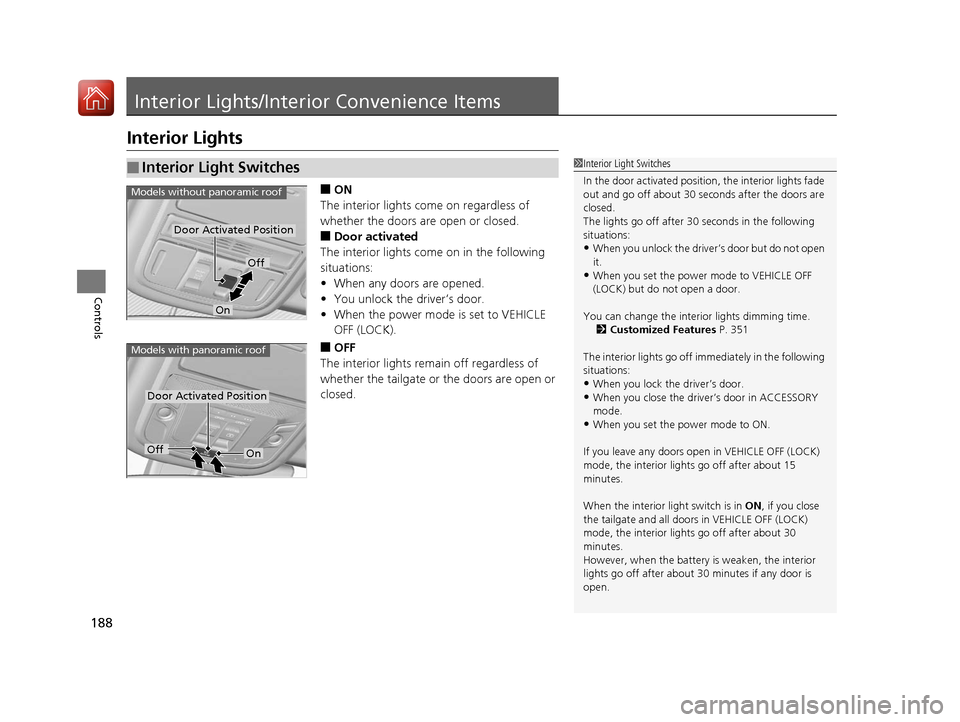
■ON
The interior lights come on regardless of
whether the doors are open or closed.
■Door activated
The interior lights come on in the following
situations:
• When any doors are opened.
• You unlock the driver’s door.
• When the power mode is set to VEHICLE
OFF (LOCK).
■OFF
The interior lights remain off regardless of
whether the tailgate or the doors are open or
closed.
■Interior Light Switches1 Interior Light Switches
In the door activated position, the interior lights fade
out and go off about 30 se conds after the doors are
closed.
The lights go off after 30 seconds in the following
situations:
•When you unlock the driver’s door but do not open
it.
•When you set the power mode to VEHICLE OFF
(LOCK) but do not open a door.
You can change the interi or lights dimming time.
2 Customized Features P. 351
The interior lights go off i mmediately in the following
situations:
•When you lock the driver’s door.
•When you close the driver’s door in ACCESSORY
mode.
•When you set the power mode to ON.
If you leave any doors open in VEHICLE OFF (LOCK)
mode, the interior light s go off after about 15
minutes.
When the interior light switch is in ON, if you close
the tailgate and all doors in VEHICLE OFF (LOCK)
mode, the interior light s go off after about 30
minutes.
However, when the battery is weaken, the interior
lights go off after about 30 minutes if any door is
open.
Door Activated Position
Off
On
Models without panoramic roof
Door Activated Position
Models with panoramic roof
OffOn
17 PILOT-31TG76100.book 188 ページ 2016年9月20日 火曜日 午後4時9分
Page 191 of 673
190
uuInterior Lights/Interior Convenience Items uInterior Lights
Controls
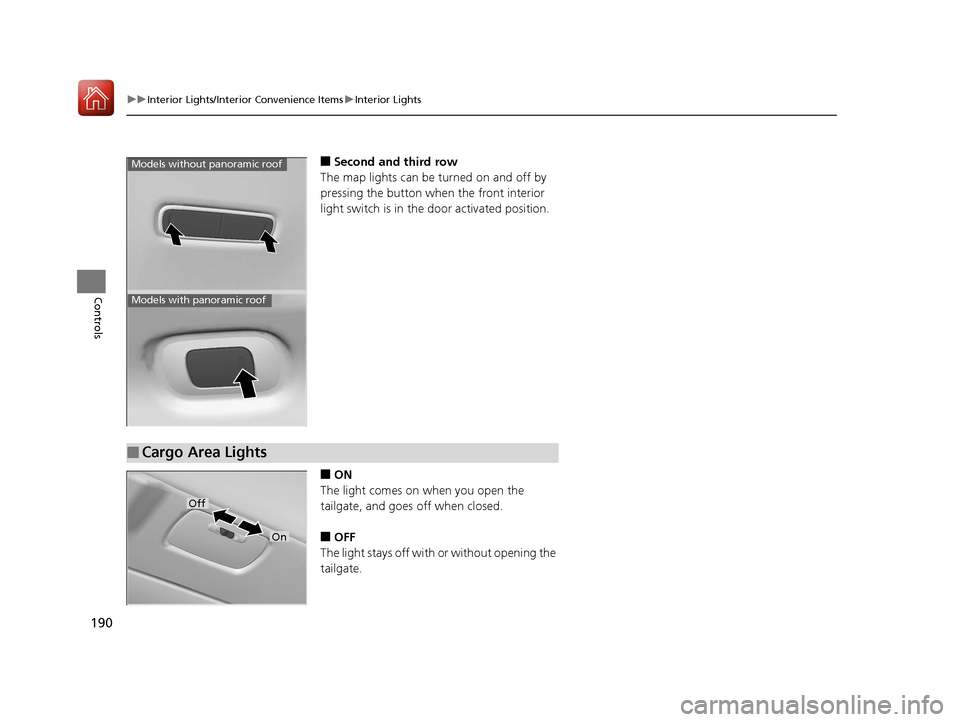
■Second and third row
The map lights can be turned on and off by
pressing the button when the front interior
light switch is in the door activated position.
■ON
The light comes on when you open the
tailgate, and goes off when closed.
■OFF
The light stays off with or without opening the
tailgate.
Models without panoramic roof
Models with panoramic roof
■Cargo Area Lights
Off
On
17 PILOT-31TG76100.book 190 ページ 2016年9月20日 火曜日 午後4時9分
Page 364 of 673
363
uuCustomized Features u
Continued
Features
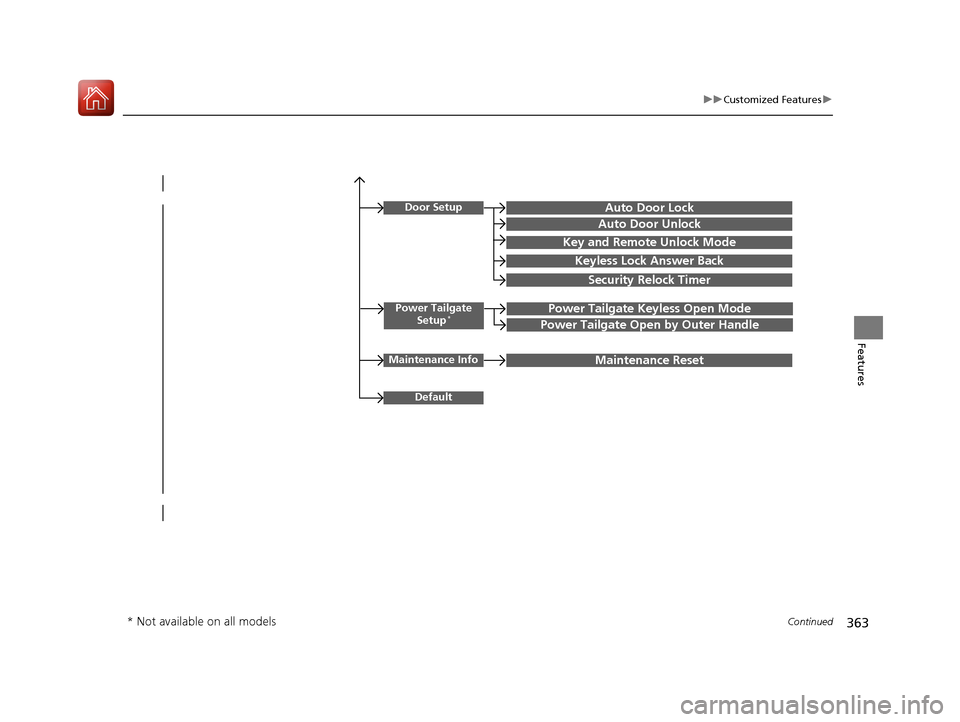
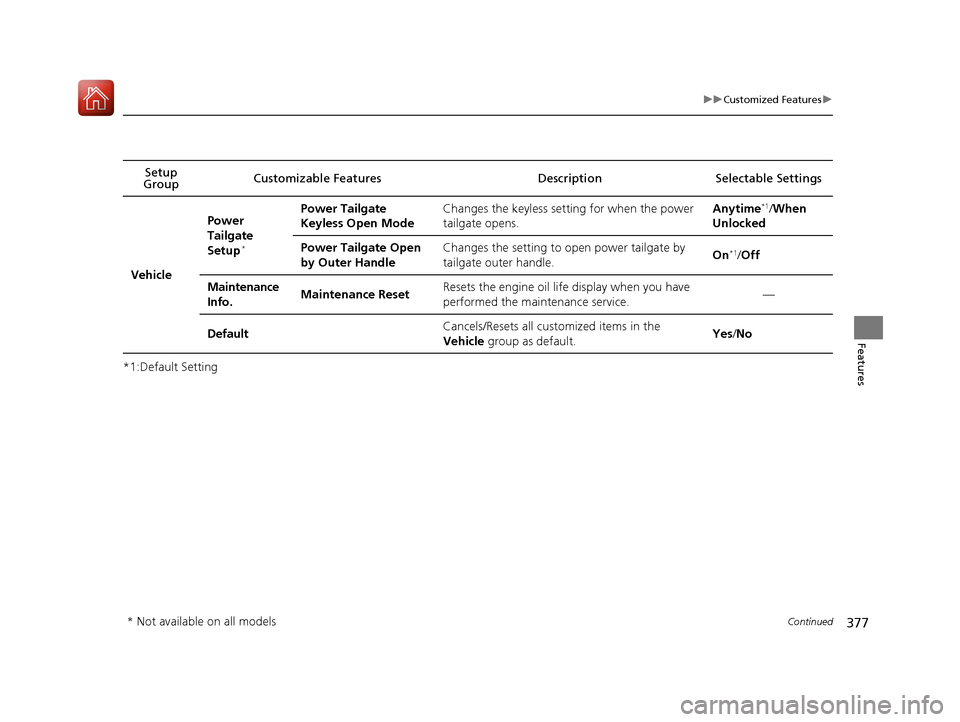
Power Tailgate
Setup*Power Tailgate Keyless Open Mode
Power Tailgate Open by Outer Handle
Door SetupAuto Door Lock
Auto Door Unlock
Key and Remote Unlock Mode
Keyless Lock Answer Back
Security Relock Timer
Maintenance InfoMaintenance Reset
Default
* Not available on all models
17 PILOT-31TG76100.book 363 ページ 2016年9月20日 火曜日 午後4時9分
Page 378 of 673
377
uuCustomized Features u
Continued
Features
*1:Default SettingSetup
Group Customizable Features Description Selectable Settings
Vehicle
Power
Tailgate
Setup
*
Power Tailgate
Keyless Open ModeChanges the keyless setting for when the power
tailgate opens.Anytime*1/
When
Unlocked
Power Tailgate Open
by Outer HandleChanges the setting to open power tailgate by
tailgate outer handle.On*1/ Off
Maintenance
Info.Maintenance ResetResets the engine oil life display when you have
performed the maintenance service.—
DefaultCancels/Resets all cust omized items in the
Vehicle group as default.Yes/No
* Not available on all models
17 PILOT-31TG76100.book 377 ページ 2016年9月20日 火曜日 午後4時9分
Page 454 of 673
Continued453
uuBefore Driving uDriving Preparation
Driving
• Store or secure all items on board properly.
u Carrying too much cargo, or improperly storing it, can affect your vehicle’s
handling, stability, sto pping distance, and tires, and make it unsafe.
2Maximum Load Limit P. 455
•Do not pile items higher than the seat height.
u They can block your view and may be thrown forward in the event of sudden
braking.
• Do not place anything in the front seat footwells. Make sure to secure the floor
mat.
u An object or unsecured floor mat can in terfere with your brake and accelerator
pedal operation while driving.
• If you have any animals on board, do not let them move around in the vehicle.
u They may interfere with driv ing and a crash could occur.
• Securely close and lock al l doors and the tailgate.
2Locking/Unlocking the Doors from the Inside P. 131
•Adjust your seating position properly.
u Adjust the head restraint, too.
2Adjusting the Seats P. 174
2 Adjusting the Head Restraints P. 179
•Adjust the mirrors and steering wh eel properly for your driving.
u Adjust them while sitting in the proper driving position.
2 Adjusting the Steering Wheel P. 171
2 Adjusting the Mirrors P. 172
■Interior Checks1Interior Checks
The headlight aim is set by the factory, and does not
need to be adjusted. Howeve r, if you regularly carry
heavy items in the cargo area or tow a trailer, have
the aiming readjusted at a dealer or by a qualified
technician.
17 PILOT-31TG76100.book 453 ページ 2016年9月20日 火曜日 午後4時9分
Page 475 of 673
uuWhen Driving uStarting the Engine
474
Driving
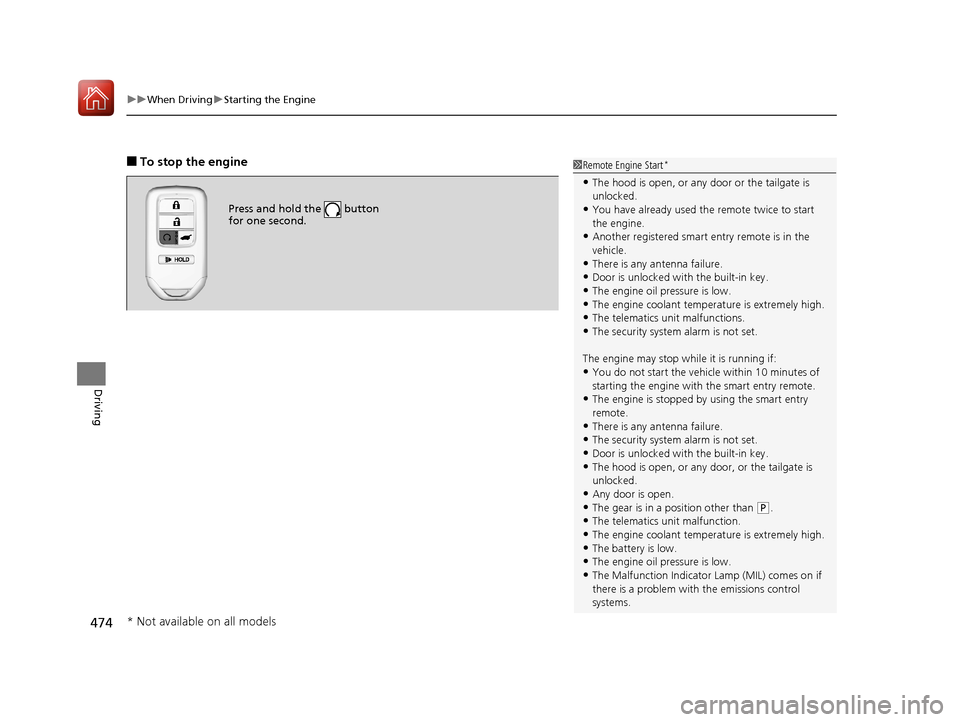
■To stop the engine
Press and hold the button
for one second.
1Remote Engine Start*
•The hood is open, or any door or the tailgate is
unlocked.
•You have already used the remote twice to start
the engine.
•Another registered smart entry remote is in the
vehicle.
•There is any antenna failure.•Door is unlocked with the built-in key.
•The engine oil pressure is low.
•The engine coolant temper ature is extremely high.
•The telematics unit malfunctions.•The security system alarm is not set.
The engine may stop whil e it is running if:
•You do not start the vehicl e within 10 minutes of
starting the engine with the smart entry remote.
•The engine is stopped by using the smart entry
remote.
•There is any antenna failure.
•The security system alarm is not set.•Door is unlocked with the built-in key.
•The hood is open, or any door, or the tailgate is
unlocked.
•Any door is open.
•The gear is in a position other than ( P.
•The telematics unit malfunction.•The engine coolant temper ature is extremely high.
•The battery is low.
•The engine oil pressure is low.•The Malfunction Indicator Lamp (MIL) comes on if
there is a problem with the emissions control
systems.
* Not available on all models
17 PILOT-31TG76100.book 474 ページ 2016年9月20日 火曜日 午後4時9分
Page 562 of 673
561
Driving
Multi-view rear camera*
About Your Multi-view rear camera
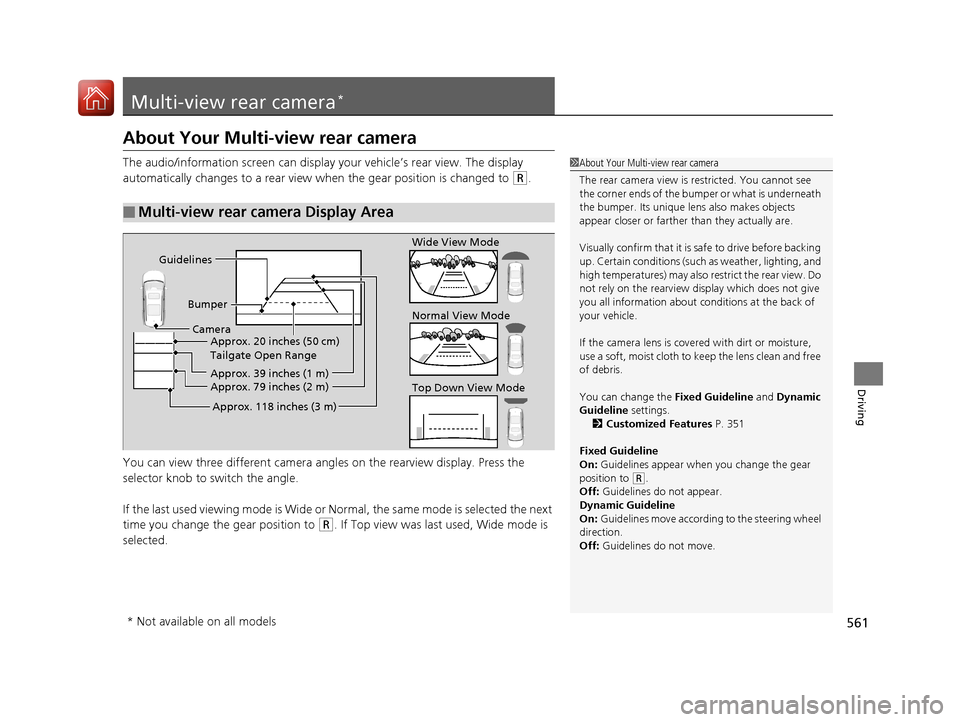
The audio/information screen can display your vehicle’s rear view. The display
automatically changes to a rear view when the gear position is changed to
(R.
You can view three differen t camera angles on the rearview display. Press the
selector knob to switch the angle.
If the last used viewing mode is Wide or Normal, the same mode is selected the next
time you change the gear position to
(R. If Top view was last used, Wide mode is
selected.
■Multi-view rear camera Display Area
1 About Your Multi-view rear camera
The rear camera view is restricted. You cannot see
the corner ends of the bum per or what is underneath
the bumper. Its unique le ns also makes objects
appear closer or farther than they actually are.
Visually confirm that it is safe to drive before backing
up. Certain conditions (such as weather, lighting, and
high temperatures) may also re strict the rear view. Do
not rely on the rearview display which does not give
you all information about conditions at the back of
your vehicle.
If the camera lens is cove red with dirt or moisture,
use a soft, moist cloth to keep the lens clean and free
of debris.
You can change the Fixed Guideline and Dynamic
Guideline settings. 2 Customized Features P. 351
Fixed Guideline
On: Guidelines appear when you change the gear
position to
( R.
Off: Guidelines do not appear.
Dynamic Guideline
On: Guidelines move according to the steering wheel
direction.
Off: Guidelines do not move.
Guidelines
BumperCamera Approx. 20 inches (50 cm)
Tailgate Open Range
Approx. 39 inches (1 m)
Approx. 79 inches (2 m)
Approx. 118 inches (3 m)
Wide View Mode
Normal View Mode
Top Down View Mode
* Not available on all models
17 PILOT-31TG76100.book 561 ページ 2016年9月20日 火曜日 午後4時9分
Page 620 of 673
619
Handling the Unexpected
This chapter explains how to handle unexpected troubles.
ToolsTypes of Tools .................................. 620
If a Tire Goes Flat Changing a Flat Tire ......................... 621
Engine Does Not Start Checking the Engine ........................ 629
If the Smart Entry Remote Battery is Weak .......................................... 630
Emergency Engine Stop ................... 631
Shift Lever Does Not Move*............ 632
Jump Starting .................................... 633 Overheating
How to Handle Overheating............. 636
Indicator, Coming On/Blinking
If the Low Oil Pressure Indicator Comes On ............................................. 638
If the Charging System Indicator Comes
On ................................................. 638
If the Malfunction Indicator Lamp Comes On or Blinks ................................... 639
If the Brake System Indicator (Red) Comes On .................................................... 640
If the Electric Power Steering (EPS) System
Indicator Comes On ............................... 640
If the Low Tire Pressure/Tire Pressure Monitoring System (TPMS) Indicator Comes
On or Blinks........................................ 641
If the Transmission I ndicator Blinks along
with the Warning Message*.......... 641
Fuses
Fuse Locations ................................. 642
Inspecting and Changing Fuses ........ 646
Emergency Towing ........................... 647
When You Cannot Unlock the Fuel Fill Door.. 648
RefuelingRefueling From a Portable Fuel Container .... 649
When You Cannot Open the Tailgate.. 650
* Not available on all models
17 PILOT-31TG76100.book 619 ページ 2016年9月20日 火曜日 午後4時9分
Page 649 of 673
648
Handling the Unexpected
When You Cannot Unlock the Fuel Fill Door
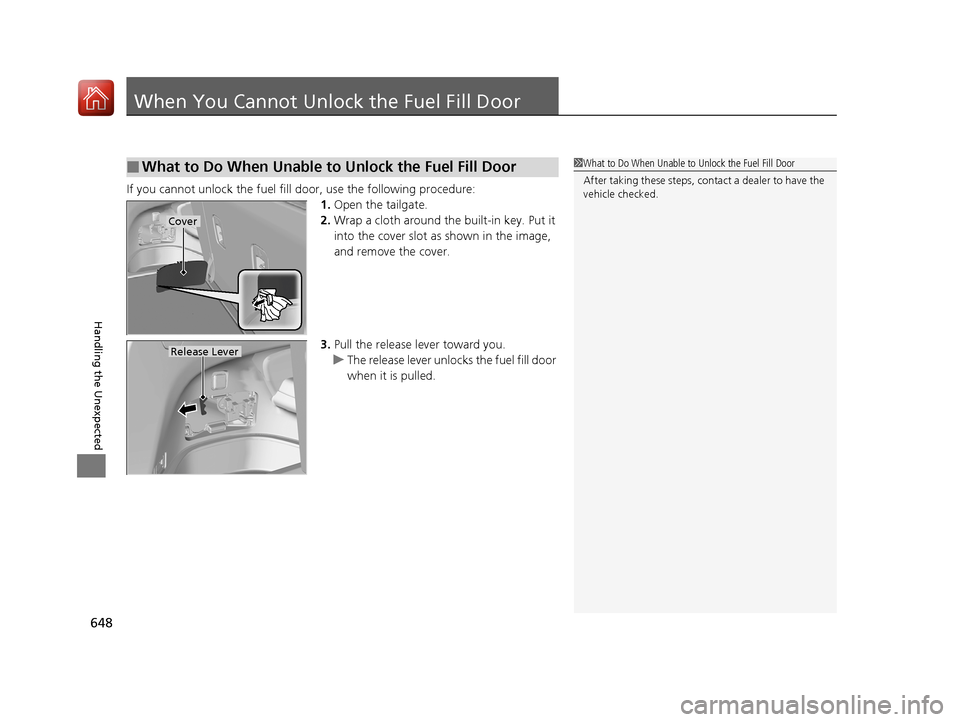
If you cannot unlock the fuel fill door, use the following procedure:1.Open the tailgate.
2. Wrap a cloth around the built-in key. Put it
into the cover slot as shown in the image,
and remove the cover.
3. Pull the release lever toward you.
u The release lever unlocks the fuel fill door
when it is pulled.
■What to Do When Unable to Unlock the Fuel Fill Door1What to Do When Unable to Unlock the Fuel Fill Door
After taking these steps, cont act a dealer to have the
vehicle checked.
Cover
Release Lever
17 PILOT-31TG76100.book 648 ページ 2016年9月20日 火曜日 午後4時9分