ECU HONDA PILOT 2017 3.G Service Manual
[x] Cancel search | Manufacturer: HONDA, Model Year: 2017, Model line: PILOT, Model: HONDA PILOT 2017 3.GPages: 673
Page 454 of 673
Continued453
uuBefore Driving uDriving Preparation
Driving
• Store or secure all items on board properly.
u Carrying too much cargo, or improperly storing it, can affect your vehicle’s
handling, stability, sto pping distance, and tires, and make it unsafe.
2Maximum Load Limit P. 455
•Do not pile items higher than the seat height.
u They can block your view and may be thrown forward in the event of sudden
braking.
• Do not place anything in the front seat footwells. Make sure to secure the floor
mat.
u An object or unsecured floor mat can in terfere with your brake and accelerator
pedal operation while driving.
• If you have any animals on board, do not let them move around in the vehicle.
u They may interfere with driv ing and a crash could occur.
• Securely close and lock al l doors and the tailgate.
2Locking/Unlocking the Doors from the Inside P. 131
•Adjust your seating position properly.
u Adjust the head restraint, too.
2Adjusting the Seats P. 174
2 Adjusting the Head Restraints P. 179
•Adjust the mirrors and steering wh eel properly for your driving.
u Adjust them while sitting in the proper driving position.
2 Adjusting the Steering Wheel P. 171
2 Adjusting the Mirrors P. 172
■Interior Checks1Interior Checks
The headlight aim is set by the factory, and does not
need to be adjusted. Howeve r, if you regularly carry
heavy items in the cargo area or tow a trailer, have
the aiming readjusted at a dealer or by a qualified
technician.
17 PILOT-31TG76100.book 453 ページ 2016年9月20日 火曜日 午後4時9分
Page 468 of 673
467
uuTowing a Trailer uDriving Safely with a Trailer
Continued
Driving
Driving Safely with a Trailer
• Have the trailer properly servic ed and keep it in good condition.
• Make sure that all the weights and load in the vehicle and trailer are within limits.
2Towing Load Limits P. 458
•When towing more than 3,500 lbs (1,590 kg), use of gasoline with a pump
octane number of 87 or higher is recommended.
u Towing performance can be affected by high altitude, high temperature, or
steep uphill.
• Securely attach the hitch, safety chains, and other necessary parts to the trailer.
• Securely store all the items in and on the tra iler so that they do not shift while
driving.
• Check if the lights and brakes on the trailer are working properly.
• Check the pressures of the traile r tires, including the spare.
• Drive slower than normal.
• Obey posted speed limits fo r vehicles with trailers.
• Use the
(D position when towing a trailer on level roads.
• Turn more slowly and with a wider turning arc than normal.
• Allow more time and distance for braking.
• Do not brake or turn suddenly.
■Things You Need To Know Before Towing a Trailer
■Towing Speeds and Gears
■Turning and Braking
1Driving Safely with a Trailer
Operating speed when towing a trailer is restricted
up to 62 mph (100 km/h).
Parking
In addition to the normal precautions, place wheel
chocks at each of the trailer’s tires.
1Towing Speeds and Gears
When towing a fixed-sided trailer (e.g., camper), do
not exceed 55 mph (88 km/h).
At higher speeds, the trai ler may sway or affect
vehicle handling.
17 PILOT-31TG76100.book 467 ページ 2016年9月20日 火曜日 午後4時9分
Page 475 of 673
uuWhen Driving uStarting the Engine
474
Driving
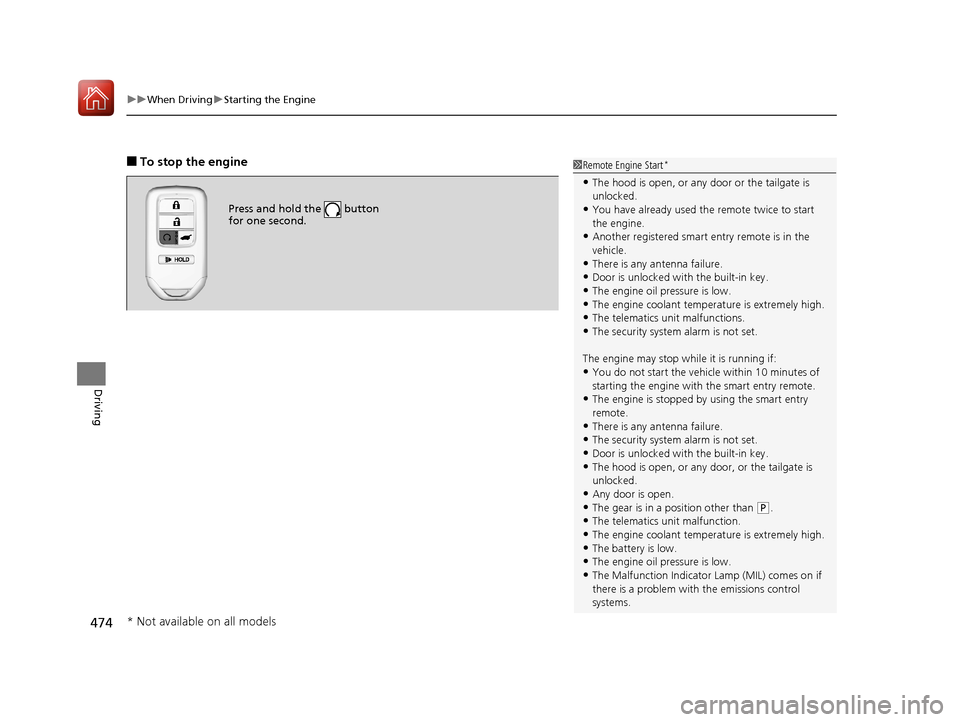
■To stop the engine
Press and hold the button
for one second.
1Remote Engine Start*
•The hood is open, or any door or the tailgate is
unlocked.
•You have already used the remote twice to start
the engine.
•Another registered smart entry remote is in the
vehicle.
•There is any antenna failure.•Door is unlocked with the built-in key.
•The engine oil pressure is low.
•The engine coolant temper ature is extremely high.
•The telematics unit malfunctions.•The security system alarm is not set.
The engine may stop whil e it is running if:
•You do not start the vehicl e within 10 minutes of
starting the engine with the smart entry remote.
•The engine is stopped by using the smart entry
remote.
•There is any antenna failure.
•The security system alarm is not set.•Door is unlocked with the built-in key.
•The hood is open, or any door, or the tailgate is
unlocked.
•Any door is open.
•The gear is in a position other than ( P.
•The telematics unit malfunction.•The engine coolant temper ature is extremely high.
•The battery is low.
•The engine oil pressure is low.•The Malfunction Indicator Lamp (MIL) comes on if
there is a problem with the emissions control
systems.
* Not available on all models
17 PILOT-31TG76100.book 474 ページ 2016年9月20日 火曜日 午後4時9分
Page 577 of 673
576
uuMaintenance Under the Hood uOpening the Hood
Maintenance
Opening the Hood
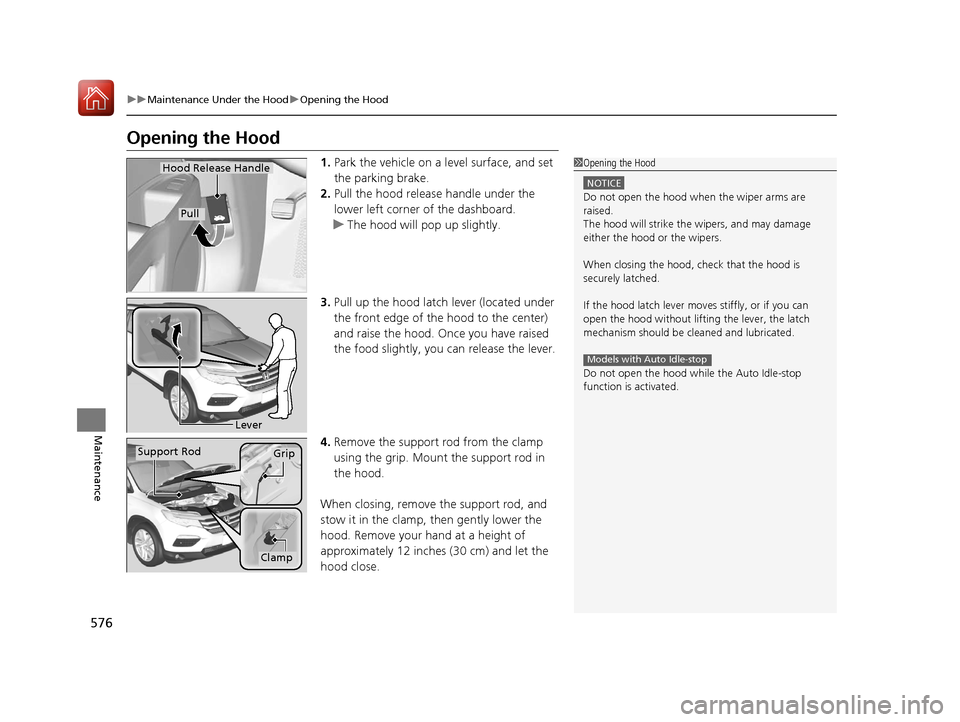
1. Park the vehicle on a level surface, and set
the parking brake.
2. Pull the hood release handle under the
lower left corner of the dashboard.
u The hood will pop up slightly.
3. Pull up the hood latch lever (located under
the front edge of the hood to the center)
and raise the hood. On ce you have raised
the food slightly, you can release the lever.
4. Remove the support rod from the clamp
using the grip. Mount the support rod in
the hood.
When closing, remove the support rod, and
stow it in the clamp, then gently lower the
hood. Remove your hand at a height of
approximately 12 inches (30 cm) and let the
hood close.1 Opening the Hood
NOTICE
Do not open the hood when the wiper arms are
raised.
The hood will strike the wipers, and may damage
either the hood or the wipers.
When closing the hood, check that the hood is
securely latched.
If the hood latch lever moves stiffly, or if you can
open the hood without lifti ng the lever, the latch
mechanism should be cleaned and lubricated.
Do not open the hood while the Auto Idle-stop
function is activated.
Models with Auto Idle-stop
Hood Release Handle
Pull
Lever
Support RodGrip
Clamp
17 PILOT-31TG76100.book 576 ページ 2016年9月20日 火曜日 午後4時9分
Page 581 of 673
580
uuMaintenance Under the Hood uAdding Engine Oil
Maintenance
Adding Engine Oil
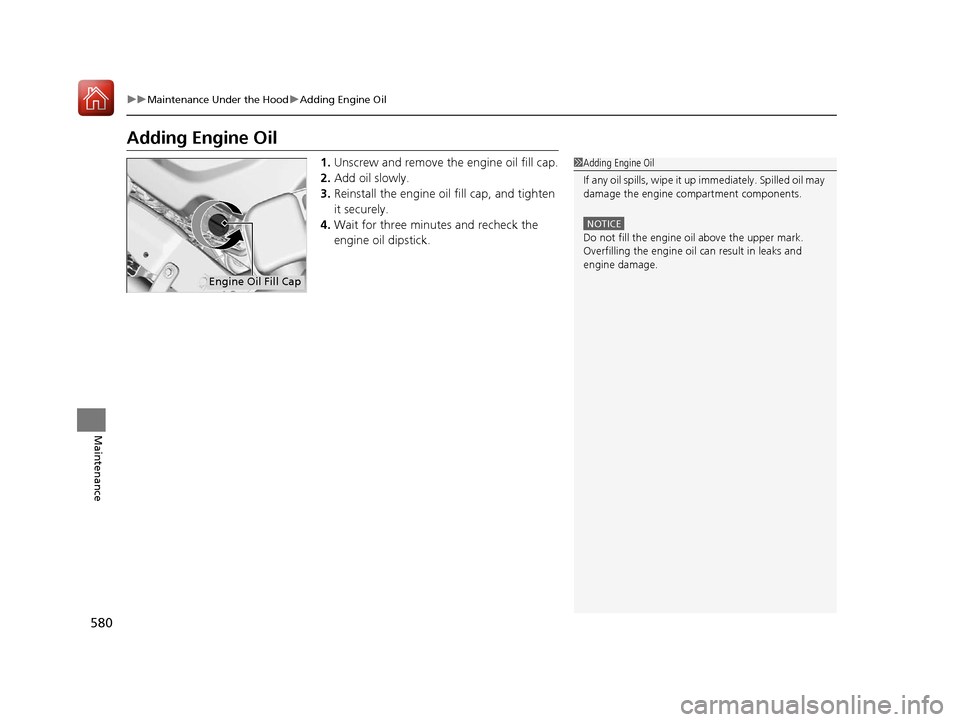
1. Unscrew and remove the engine oil fill cap.
2. Add oil slowly.
3. Reinstall the engine oil fill cap, and tighten
it securely.
4. Wait for three minutes and recheck the
engine oil dipstick.1Adding Engine Oil
If any oil spills, wipe it up immediately. Spilled oil may
damage the engine compartment components.
NOTICE
Do not fill the engine oil above the upper mark.
Overfilling the engine oil can result in leaks and
engine damage.
Engine Oil Fill Cap
17 PILOT-31TG76100.book 580 ページ 2016年9月20日 火曜日 午後4時9分
Page 583 of 673
uuMaintenance Under the Hood uChanging the Engine Oil and Oil Filter
582
Maintenance
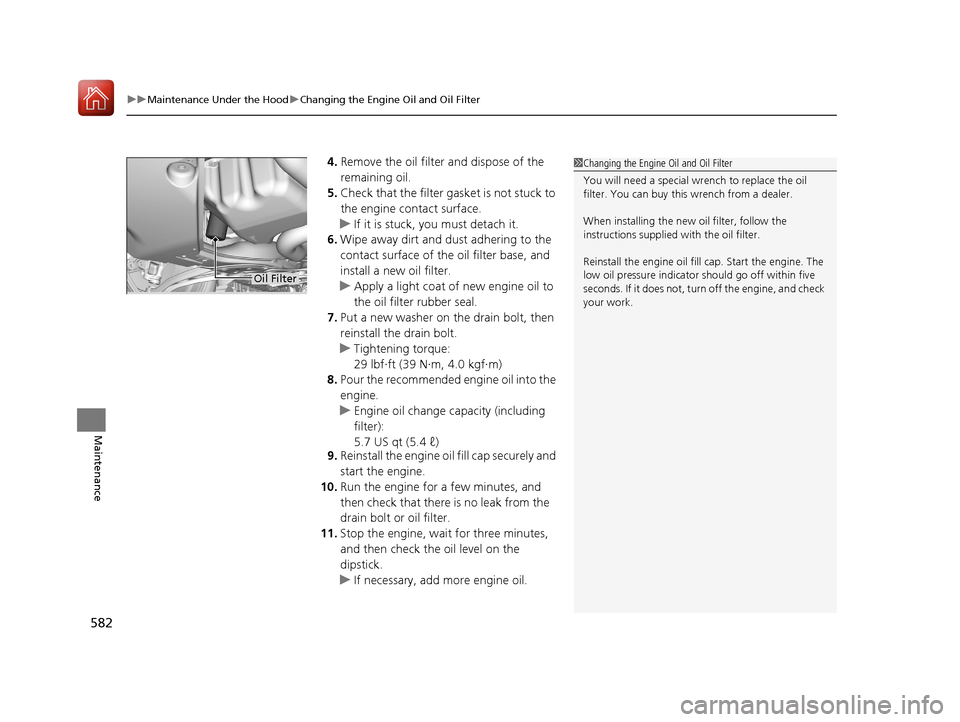
4. Remove the oil filter and dispose of the
remaining oil.
5. Check that the filter ga sket is not stuck to
the engine contact surface.
u If it is stuck, you must detach it.
6. Wipe away dirt and dust adhering to the
contact surface of the oil filter base, and
install a new oil filter.
u Apply a light coat of new engine oil to
the oil filter rubber seal.
7. Put a new washer on the drain bolt, then
reinstall the drain bolt.
u Tightening torque:
29 lbf∙ft (39 N∙m, 4.0 kgf∙m)
8. Pour the recommended engine oil into the
engine.
u Engine oil change capacity (including
filter):
5.7 US qt (5.4 ℓ)
9. Reinstall the engine oil fill cap securely and
start the engine.
10. Run the engine for a few minutes, and
then check that there is no leak from the
drain bolt or oil filter.
11. Stop the engine, wait for three minutes,
and then check the oil level on the
dipstick.
u If necessary, add more engine oil.1Changing the Engine Oil and Oil Filter
You will need a special wrench to replace the oil
filter. You can buy this wrench from a dealer.
When installing the new oil filter, follow the
instructions supplied with the oil filter.
Reinstall the engine oil fill cap. Start the engine. The
low oil pressure indicator should go off within five
seconds. If it does not, turn off the engine, and check
your work.
Oil Filter
17 PILOT-31TG76100.book 582 ページ 2016年9月20日 火曜日 午後4時9分
Page 615 of 673
uuCleaning uInterior Care
614
Maintenance
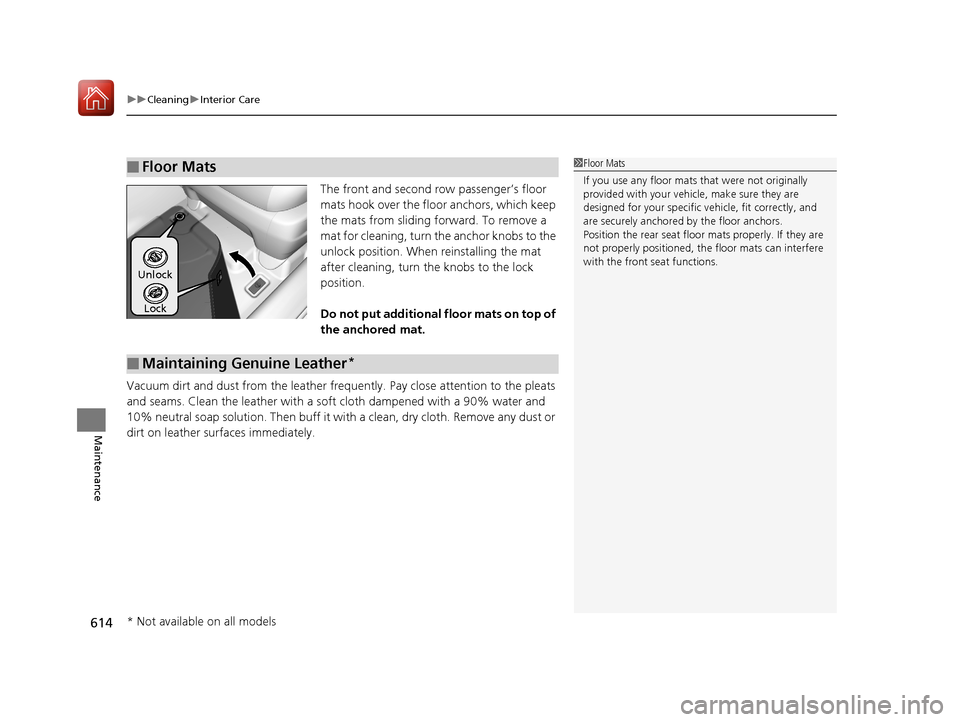
The front and second row passenger’s floor
mats hook over the fl oor anchors, which keep
the mats from sliding forward. To remove a
mat for cleaning, turn th e anchor knobs to the
unlock position. When reinstalling the mat
after cleaning, turn the knobs to the lock
position.
Do not put additional floor mats on top of
the anchored mat.
Vacuum dirt and dust from the leather freq uently. Pay close attention to the pleats
and seams. Clean the leather with a so ft cloth dampened with a 90% water and
10% neutral soap solution. Then buff it with a clean, dry cloth. Remove any dust or
dirt on leather surfaces immediately.
■Floor Mats1 Floor Mats
If you use any floor mats that were not originally
provided with your vehicle, make sure they are
designed for your specific ve hicle, fit correctly, and
are securely anchored by the floor anchors.
Position the rear seat floor mats properly. If they are
not properly positioned, the floor mats can interfere
with the front seat functions.
Lock
Unlock
■Maintaining Genuine Leather*
* Not available on all models
17 PILOT-31TG76100.book 614 ページ 2016年9月20日 火曜日 午後4時9分
Page 628 of 673
Continued627
uuIf a Tire Goes Flat uChanging a Flat Tire
Handling the Unexpected
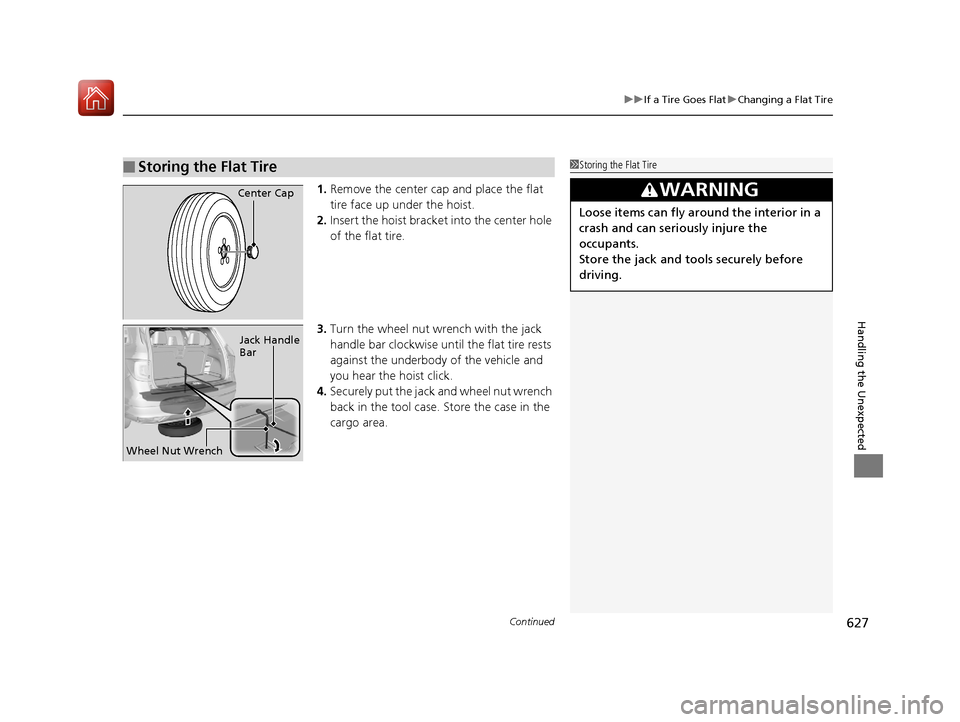
1. Remove the center cap and place the flat
tire face up under the hoist.
2. Insert the hoist bracke t into the center hole
of the flat tire.
3. Turn the wheel nut wrench with the jack
handle bar clockwise until the flat tire rests
against the underbody of the vehicle and
you hear the hoist click.
4. Securely put the jack and wheel nut wrench
back in the tool case. Store the case in the
cargo area.
■Storing the Flat Tire1Storing the Flat Tire
3WARNING
Loose items can fly around the interior in a
crash and can seriously injure the
occupants.
Store the jack and tools securely before
driving.
Center Cap
Wheel Nut Wrench Jack Handle
Bar
17 PILOT-31TG76100.book 627 ページ 2016年9月20日 火曜日 午後4時9分
Page 634 of 673
633Continued
Handling the Unexpected
Jump Starting
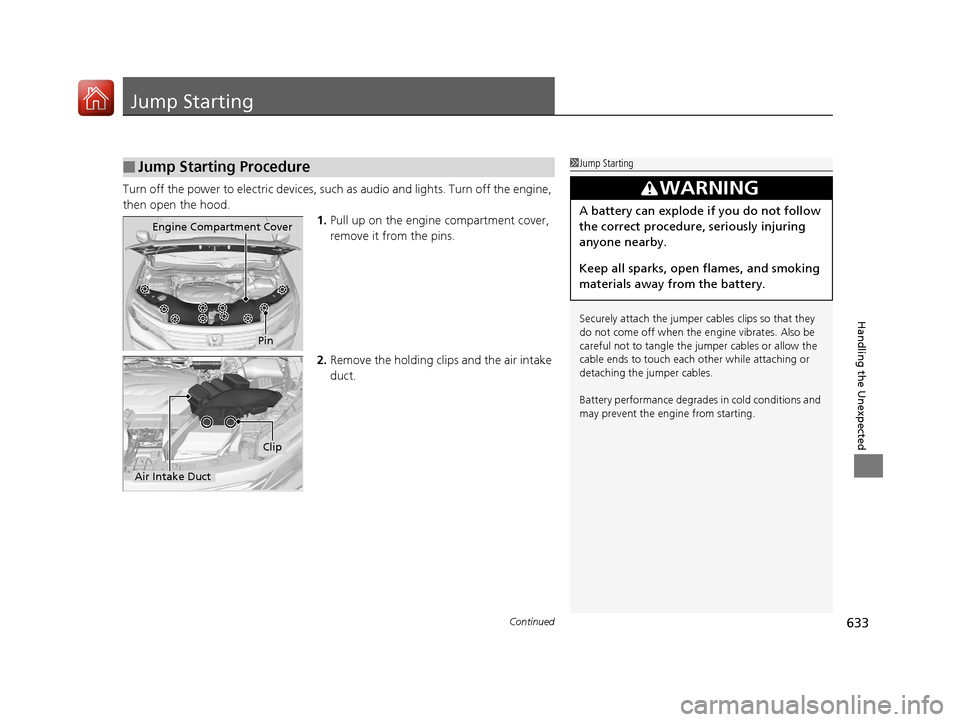
Turn off the power to electric devices, such as audio and lights. Turn off the engine,
then open the hood. 1.Pull up on the engine compartment cover,
remove it from the pins.
2. Remove the holding clip s and the air intake
duct.
■Jump Starting Procedure1 Jump Starting
Securely attach the jumper cables clips so that they
do not come off when the e ngine vibrates. Also be
careful not to tangle the ju mper cables or allow the
cable ends to touch each other while attaching or
detaching the jumper cables.
Battery performance degrades in cold conditions and
may prevent the engi ne from starting.
3WARNING
A battery can explode if you do not follow
the correct procedure, seriously injuring
anyone nearby.
Keep all sparks, open flames, and smoking
materials away from the battery.
Pin
Engine Compartment Cover
Air Intake Duct
Clip
17 PILOT-31TG76100.book 633 ページ 2016年9月20日 火曜日 午後4時9分
Page 664 of 673
Index
663
Index
Index
A
ABS (Anti-lock Brake System).................. 541
AC Power Outlet ...................................... 197
Accessories and Modifications ................ 618
Accessory Power Sockets ......................... 196
Adaptive Cruise Control (ACC) ................ 502
Indicator ................................................... 92
Adaptive Cruise Control (ACC) with Low
Speed Follow (LSF) Indicator ................................................... 92
Additives
Coolant .................................................. 583
Engine Oil ............................................... 578
Washer ................................................... 586
Additives, Engine Oil ............................... 578
Adjusting Armrest .................................................. 186
Front Seats.............................................. 174
Head Restraints ....................... 179, 180, 181
Mirrors.................................................... 172
Rear Seats ............................................... 183
Second Row Seat .................................... 176
Steering Wheel ....................................... 171
Temperature ........................................... 116
Agile Handling Assist System .................. 529
Air Conditioning System (Climate Control System) ...................................... 210
Changing the Mode................................ 211
Defrosting the Windshield and Windows .............................................. 211
Dust and Pollen Filter .............................. 612 Recirculation/Fresh Air Mode ................... 211
Sensor ..................................................... 216
Synchronized Mode ................................. 213
Using Automatic Climate Control ............ 210
Air Conditioning System (Heating and
Cooling System) ...................................... 205
Cooling ................................................... 207
Defrosting the Windshield and
Windows ............................................... 208
Heating ................................................... 206
Air Pressure ....................................... 598, 653
Airbags ........................................................ 45
Advanced Airbags ..................................... 51
After a Collision ......................................... 49
Airbag Care ............................................... 57
Event Data Recorder .................................... 0
Front Airbags (SRS) .................................... 48
Indicator .............................................. 55, 83
Passenger Airbag Off Indicator .................. 56
Sensors ...................................................... 45
Side Airbags .............................................. 52
Side Curtain Airbags .................................. 54
All-wheel drive (AWD) Indicator ............... 89
AM/FM Radio .................................... 231, 267
Android Auto
TM........................................ 306
Anti-lock Brake System (ABS) .................. 541
Indicator .................................................... 83
Apple CarPlay
TM........................................ 303
Armrest ..................................................... 186
Audio Remote Controls ............................ 222
Audio System ............................ 218, 224, 242 Adjusting the Sound........................ 229, 260
AM/FM Radio .................................. 231, 267
Android Auto
TM....................................... 306
Apple CarPlayTM....................................... 303
Audio/Information Screen................ 225, 243
Auxiliary Input Jack.................................. 220
Changing the Home Screen Icon Layout .. 247
Closing Apps ........................................... 257
Display Setup .................................. 230, 261
Error Messages ........................................ 310
General Information ................................ 314
Home Screen........................................... 250
HondaLink ®............................................. 295
How to use Siri ® Eyes Free ....................... 302
iPod ................................................ 233, 281
Limitations for Manual Operation ............ 262
MP3/WMA/AAC ...................... 236, 278, 290
Pandora ®................................................. 288
Playing a CD............................................ 278
Playing Bluetooth ® Audio ................ 239, 293
Playing SiriusXM ® Radio .......................... 271
Reactivating ............................................ 221
Recommended CDs ................................. 315
Remote Controls ..................................... 222
Security Code .......................................... 221
Selecting an Audio Source ....................... 262
Song By Voice
TM (SBV) ............................. 284
Status Area ............................................. 256
Theft Protection ...................................... 221
Updating Apps ........................................ 258
USB Flash Drives ...................... 236, 290, 317
17 PILOT-31TG76100.book 663 ページ 2016年9月20日 火曜日 午後4時9分