remote control HONDA PILOT 2017 3.G Service Manual
[x] Cancel search | Manufacturer: HONDA, Model Year: 2017, Model line: PILOT, Model: HONDA PILOT 2017 3.GPages: 673
Page 338 of 673
Continued337
uuBlu-ray/DVD Rear Entertainment System*uFront Control Panel Operation
Features
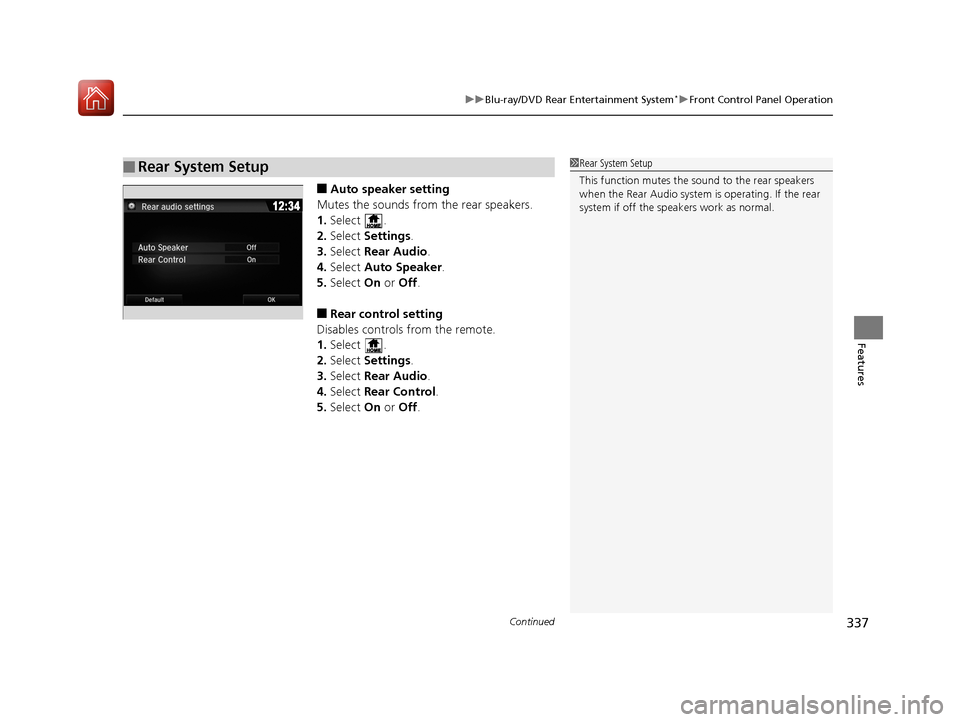
■Auto speaker setting
Mutes the sounds from the rear speakers.
1. Select .
2. Select Settings .
3. Select Rear Audio.
4. Select Auto Speaker .
5. Select On or Off .
■Rear control setting
Disables controls from the remote.
1. Select .
2. Select Settings .
3. Select Rear Audio.
4. Select Rear Control .
5. Select On or Off .
■Rear System Setup1Rear System Setup
This function mutes the sound to the rear speakers
when the Rear Audio system is operating. If the rear
system if off the speakers work as normal.
17 PILOT-31TG76100.book 337 ページ 2016年9月20日 火曜日 午後4時9分
Page 342 of 673
Continued341
uuBlu-ray/DVD Rear Entertainment System*uPlaying Audio
Features
To play the AM/FM radio, press the AM/FM button on the remote.
When you press the MENU button on the remote while the radio is playing, the
audio menu appears on the overhead screen.
The available functions are the same as those of the front audio system. The TUNE/
SKIP bar on the remote works the same as the Skip/Seek icons (<>) on the front
touch screen for AM/FM radio operation.
2 Playing AM/FM Radio P. 267
To play the SiriusXM ® radio, press the SXM button on the remote.
When you press the MENU button on the remote while the radio is playing, the
audio menu appears on the overhead screen.
The available functions are the same as those of the front audio system. The TUNE/
SKIP bar on the remote works the same as the Skip/Seek icons (<>) on the front
touch screen for SiriusXM® radio operation.
2 Playing SiriusXM ® Radio* P. 271
To change the mode between ca tegory and channel, press the TITLE/SCROLL
button on the remote for five seconds.
■Playing AM/FM Radio in the Rear
■Playing SiriusXM® Radio in the Rear*
1System Controls
You can operate the Blu-ray/DVD rear entertainment
system on the front display.
* Not available on all models
17 PILOT-31TG76100.book 341 ページ 2016年9月20日 火曜日 午後4時9分
Page 386 of 673
385
uuCustomized Features u
Features
*1:Default SettingSetup Group Customizable Features
Description Selectable Settings
Bluetooth/
Wi-Fi
Bluetooth
Bluetooth On/Off
StatusSelects to display the Bluetooth® status.On*1/Off
Bluetooth Device
ListPairs a new phone to HFL, edits or deletes a paired
phone, or creates a security PIN.
2 Phone Setup P. 423
—
Edit Pairing CodeEdits a pairing code.
2To change the pairing code setting P. 424Random/Fixed*1
Wi-Fi
Wi-Fi On/Off StatusChanges the Wi-Fi mode.On /Off*1
Wi-Fi Network ListConnects, disconnects, or deletes the Wi-Fi device.—
Wi-Fi InformationShows the Wi-Fi information of the device.—
DefaultCancels/Resets all customized items in the
Bluetooth/Wi-Fi group as default.Yes/No
Rear Audio*
Auto SpeakerTurns the rear speakers on and off.On /Off*1
Rear ControlTurns the rear remote co ntrol function on and off.On/Off*1
DefaultCancels/Resets all customized items in the Rear
Audio group as default.Yes/No
SmartphoneApple CarPlaySets up the Apple CarPlayTM connection.—
Android AutoSets up the Android AutoTM connection.—
* Not available on all models
17 PILOT-31TG76100.book 385 ページ 2016年9月20日 火曜日 午後4時9分
Page 388 of 673
387
Features
HomeLink® Universal Transceiver*
The HomeLink ® Universal Transceiver can be programmed to operate up to three
remote controlled devices around your home, such as garage doors, lighting, or
home security systems.
Refer to the safety information that came wi th your garage door opener to test that
the safety features are functioning properly. If you do not have the safety
information, contact the manufacturer.
Before programming HomeLink, make sure that people and objects are out of the
way of the garage or gate to prevent potential injury or damage.
When programming a garage door opener, pa rk just outside the garage door’s path.
■Important Safety Precautions
1HomeLink ® Universal Transceiver*
Before programming HomeLi nk to operate a garage
door opener, confirm that the opener has an external
entrapment protection system, such as an “electronic
eye,” or other safety and re verse stop features. If it
does not, HomeLink may not be able to operate it.
* Not available on all models
17 PILOT-31TG76100.book 387 ページ 2016年9月20日 火曜日 午後4時9分
Page 390 of 673
389
uuHomeLink ® Universal Transceiver*u Training HomeLink
Features
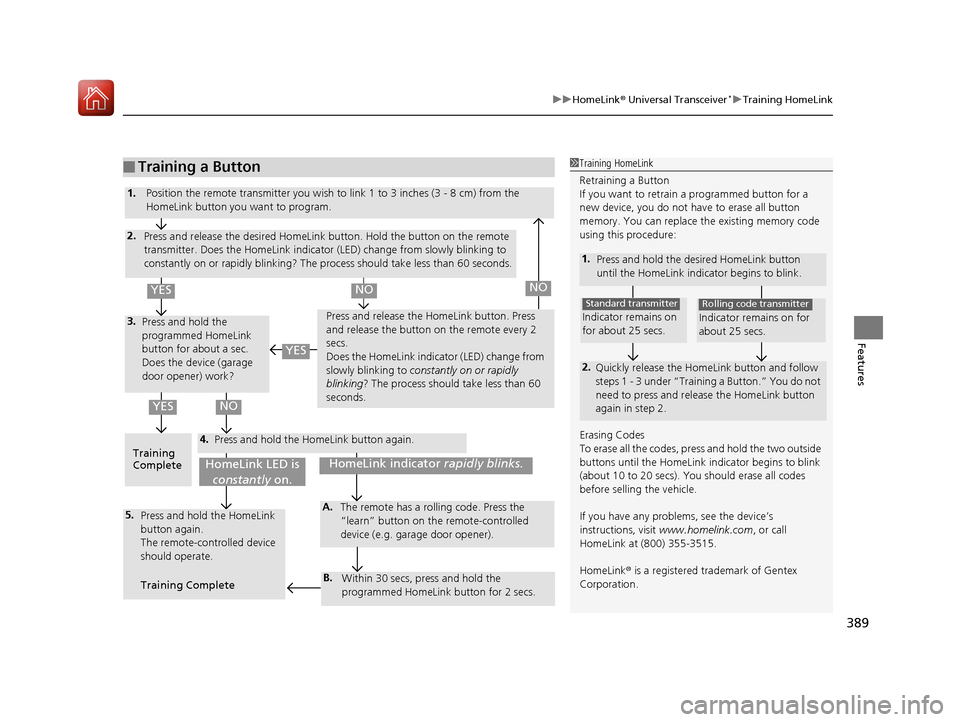
■Training a Button1Training HomeLink
Retraining a Button
If you want to retrain a programmed button for a
new device, you do not ha ve to erase all button
memory. You can replace the existing memory code
using this procedure:
1. Press and hold the desired HomeLink button
until the HomeLink indi cator begins to blink.
2.
Quickly release the Home Link button and follow
steps 1 - 3 under “Training a Button.” You do not
need to press and rele ase the HomeLink button
again in step 2.
Indicator remains on
for about 25 secs.
Standard transmitter
Indicator remains on for
about 25 secs.
Rolling code transmitter
Erasing Codes
To erase all the codes, press and hold the two outside
buttons until the HomeLink i ndicator begins to blink
(about 10 to 20 secs). You should erase all codes
before selling the vehicle.
If you have any problems, see the device’s
instructions, visit www.homelink.com , or call
HomeLink at (800) 355-3515.
HomeLink® is a registered tra demark of Gentex
Corporation.4.
3.
2.
5.A.
B.
1. Position the remote transmitter you wish to link 1 to 3 inches (3 - 8 cm) from the
HomeLink button you want to program.
Press and release the desi red HomeLink button. Hold the button on the remote
transmitter. Does the HomeLink indicato r (LED) change from slowly blinking to
constantly on or rapidly blinking? The pr ocess should take less than 60 seconds.
Press and hold the
programmed HomeLink
button for about a sec.
Does the device (garage
door opener) work? Press and release the Ho
meLink button. Press
and release the button on the remote every 2
secs.
Does the HomeLink indicator (LED) change from
slowly blinking to constantly on or rapidly
blinking ? The process should take less than 60
seconds.
Training
Complete Press and hold the HomeLink button again.
Press and hold the HomeLink
button again.
The remote-controlled device
should operate.
Training Complete The remote has a ro
lling code. Press the
“learn” button on the remote-controlled
device (e.g. garage door opener).
Within 30 secs, press and hold the
programmed HomeLink button for 2 secs.
HomeLink indicator rapidly blinks.HomeLink LED is
constantly on.
YESNO
YES
YESNONO
17 PILOT-31TG76100.book 389 ページ 2016年9月20日 火曜日 午後4時9分
Page 391 of 673
390
Features
Bluetooth® HandsFreeLink ®
Bluetooth® HandsFreeLink ® (HFL) allows you to place and receive phone calls using
your vehicle’s audio system, without handling your cell phone.
Using HFL
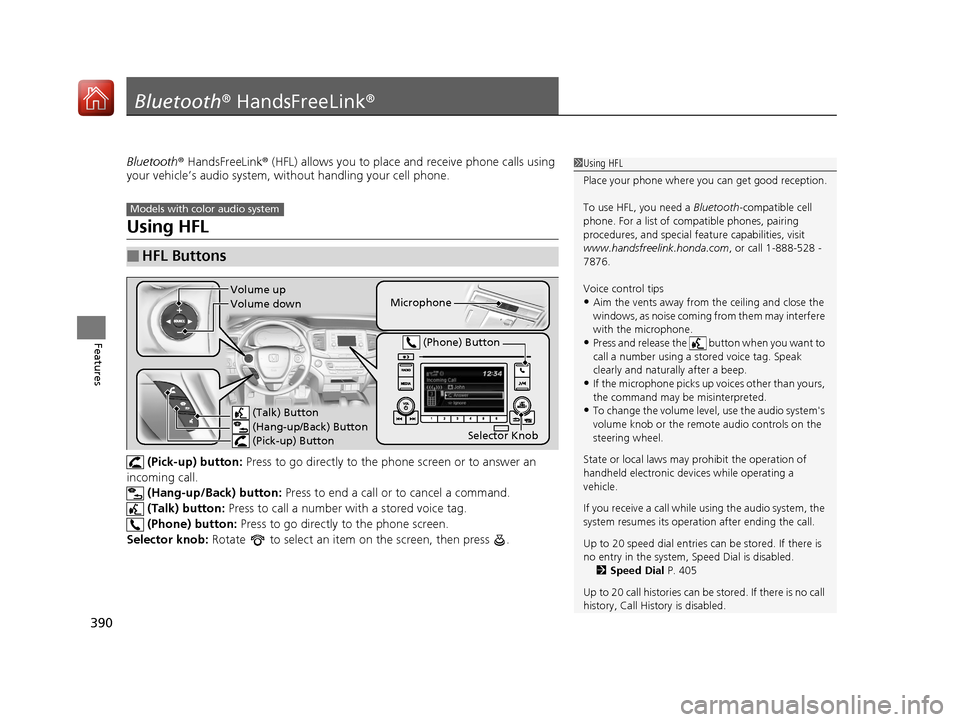
(Pick-up) button: Press to go directly to the ph one screen or to answer an
incoming call. (Hang-up/Back) button: Press to end a call or to cancel a command.
(Talk) button: Press to call a number with a stored voice tag.
(Phone) button: Press to go directly to the phone screen.
Selector knob: Rotate to select an item on the screen, then press .
■HFL Buttons
1 Using HFL
Place your phone where y ou can get good reception.
To use HFL, you need a Bluetooth-compatible cell
phone. For a list of compatible phones, pairing
procedures, and special fe ature capabilities, visit
www.handsfreelink.honda.com , or call 1-888-528 -
7876.
Voice control tips
•Aim the vents away from the ceiling and close the
windows, as noise coming fr om them may interfere
with the microphone.
•Press and release the button when you want to
call a number using a st ored voice tag. Speak
clearly and naturally after a beep.
•If the microphone picks up vo ices other than yours,
the command may be misinterpreted.
•To change the volume level, use the audio system's
volume knob or the remote audio controls on the
steering wheel.
State or local laws may pr ohibit the operation of
handheld electronic devi ces while operating a
vehicle.
If you receive a call while using the audio system, the
system resumes its operati on after ending the call.
Up to 20 speed dial entries can be stored. If there is
no entry in the system, Speed Dial is disabled. 2 Speed Dial P. 405
Up to 20 call histories can be stored. If there is no call
history, Call History is disabled.
Models with color audio system
Microphone
(Talk) Button
(Hang-up/Back) Button
(Pick-up) Button
Selector Knob
(Phone) Button
Volume up
Volume down
17 PILOT-31TG76100.book 390 ページ 2016年9月20日 火曜日 午後4時9分
Page 416 of 673
415Continued
Features
Bluetooth® HandsFreeLink ®
Bluetooth® HandsFreeLink ® (HFL) allows you to place and receive phone calls using
your vehicle’s audio system, without handling your cell phone.
Using HFL
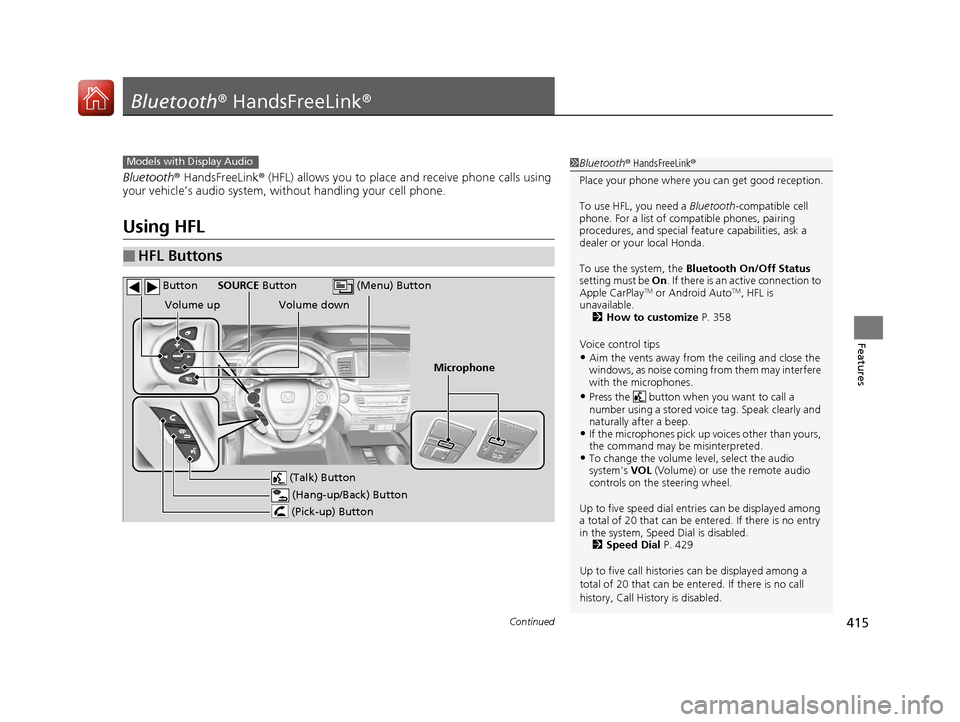
■HFL Buttons
1 Bluetooth ® HandsFreeLink ®
Place your phone where y ou can get good reception.
To use HFL, you need a Bluetooth-compatible cell
phone. For a list of compatible phones, pairing
procedures, and special fe ature capabilities, ask a
dealer or your local Honda.
To use the system, the Bluetooth On/Off Status
setting must be On . If there is an active connection to
Apple CarPlay
TM or Android AutoTM, HFL is
unavailable. 2 How to customize P. 358
Voice control tips
•Aim the vents away from the ceiling and close the
windows, as noise coming fr om them may interfere
with the microphones.
•Press the button when you want to call a
number using a stored voic e tag. Speak clearly and
naturally after a beep.
•If the microphones pick up vo ices other than yours,
the command may be misinterpreted.
•To change the volume level, select the audio
system's VOL (Volume) or use the remote audio
controls on the steering wheel.
Up to five speed dial entries can be displayed among
a total of 20 that can be en tered. If there is no entry
in the system, Speed Dial is disabled. 2 Speed Dial P. 429
Up to five call historie s can be displayed among a
total of 20 that can be entered. If there is no call
history, Call History is disabled.
Models with Display Audio
(Talk) Button
Volume up
Microphone
(Hang-up/Back) Button
(Pick-up) Button
Volume down
SOURCE Button
(Menu) Button
Button
17 PILOT-31TG76100.book 415 ページ 2016年9月20日 火曜日 午後4時9分
Page 472 of 673
471Continued
Driving
When Driving
Starting the Engine
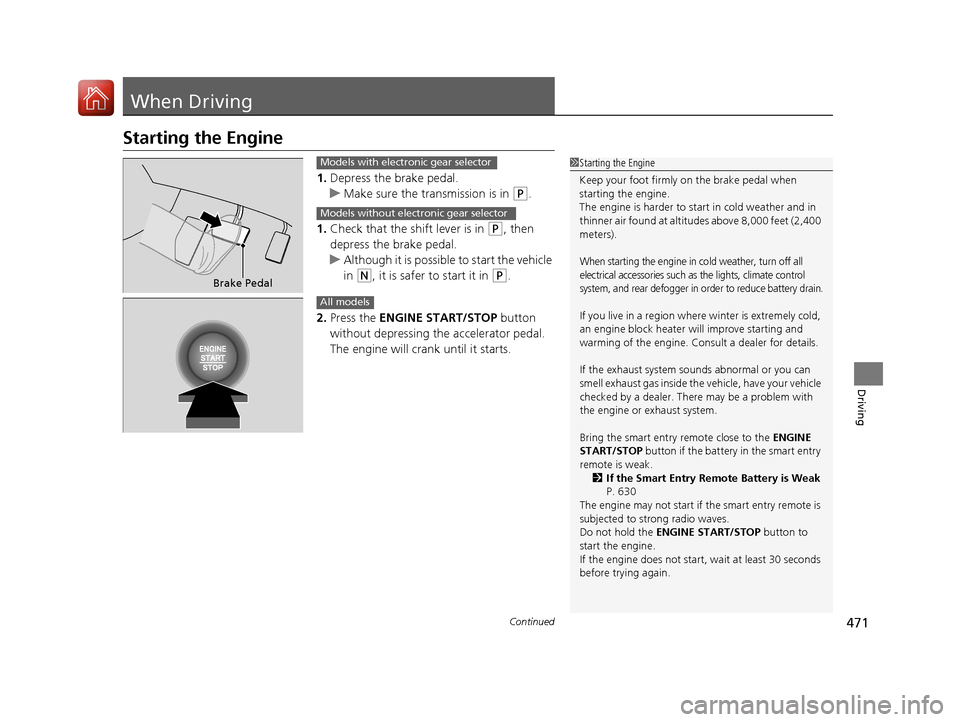
1.Depress the brake pedal.
u Make sure the transmission is in
(P.
1. Check that the shift lever is in
(P, then
depress the brake pedal.
u Although it is possible to start the vehicle
in
(N, it is safer to start it in (P.
2. Press the ENGINE START/STOP button
without depressing the accelerator pedal.
The engine will crank until it starts.
1 Starting the Engine
Keep your foot firmly on the brake pedal when
starting the engine.
The engine is harder to st art in cold weather and in
thinner air found at altitudes above 8,000 feet (2,400
meters).
When starting the engine in cold weather, turn off all
electrical accessories such as the lights, climate control
system, and rear defogger in order to reduce battery drain.
If you live in a region where winter is extremely cold,
an engine block heater will improve starting and
warming of the engine. Cons ult a dealer for details.
If the exhaust system sounds abnormal or you can
smell exhaust gas inside the vehicle, have your vehicle
checked by a dealer. There may be a problem with
the engine or exhaust system.
Bring the smart entry remote close to the ENGINE
START/STOP button if the battery in the smart entry
remote is weak. 2 If the Smart Entry Remote Battery is Weak
P. 630
The engine may not start if the smart entry remote is
subjected to strong radio waves.
Do not hold the ENGINE START/STOP button to
start the engine.
If the engine does not start, wait at least 30 seconds
before trying again.
Brake Pedal
Models with electronic gear selector
Models without electronic gear selector
All models
17 PILOT-31TG76100.book 471 ページ 2016年9月20日 火曜日 午後4時9分
Page 475 of 673
uuWhen Driving uStarting the Engine
474
Driving
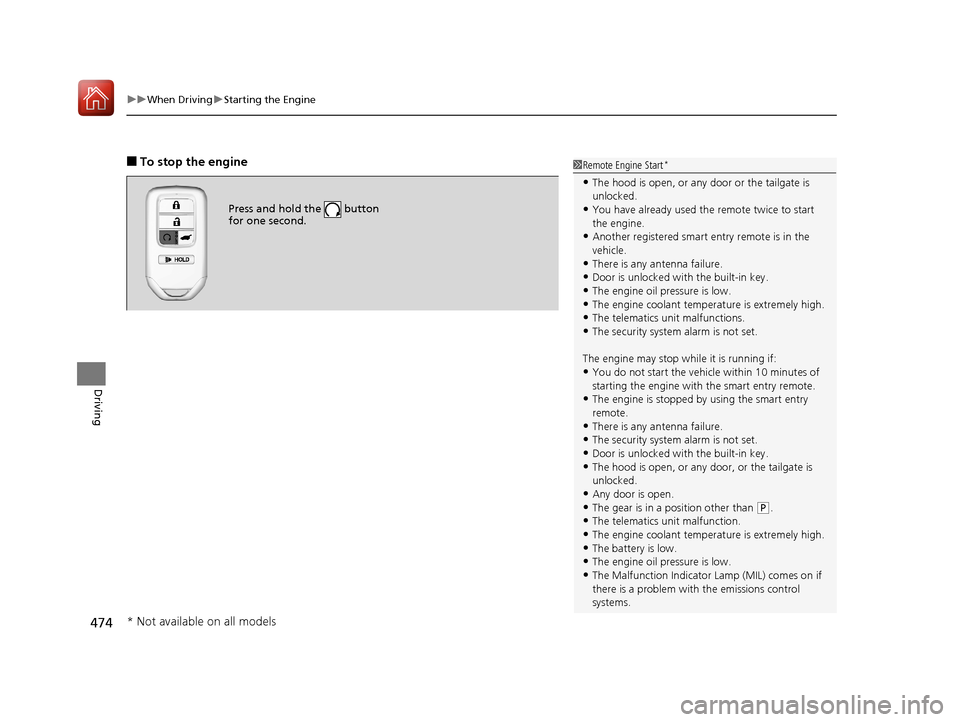
■To stop the engine
Press and hold the button
for one second.
1Remote Engine Start*
•The hood is open, or any door or the tailgate is
unlocked.
•You have already used the remote twice to start
the engine.
•Another registered smart entry remote is in the
vehicle.
•There is any antenna failure.•Door is unlocked with the built-in key.
•The engine oil pressure is low.
•The engine coolant temper ature is extremely high.
•The telematics unit malfunctions.•The security system alarm is not set.
The engine may stop whil e it is running if:
•You do not start the vehicl e within 10 minutes of
starting the engine with the smart entry remote.
•The engine is stopped by using the smart entry
remote.
•There is any antenna failure.
•The security system alarm is not set.•Door is unlocked with the built-in key.
•The hood is open, or any door, or the tailgate is
unlocked.
•Any door is open.
•The gear is in a position other than ( P.
•The telematics unit malfunction.•The engine coolant temper ature is extremely high.
•The battery is low.
•The engine oil pressure is low.•The Malfunction Indicator Lamp (MIL) comes on if
there is a problem with the emissions control
systems.
* Not available on all models
17 PILOT-31TG76100.book 474 ページ 2016年9月20日 火曜日 午後4時9分
Page 476 of 673
Continued475
uuWhen Driving uStarting the Engine
Driving
1Remote Engine Start*
While the engine is running, the vehicle will
automatically preconditi on inside the vehicle.
When it is warm outside:
•The climate control system is activated in
recirculation mode.
•The seat ventilat ion is activated*.
When it is cold outside:
•The defroster is activated at a moderately warm
temperature.
•The rear defogger and door mirror heaters are
activated*.
•The seat heaters and heated steering wheel are
activated*.
2 Heated Steering Wheel* P. 200
2 Front Seat Heaters and Seat
Ventilation
* P. 202, 203
* Not available on all models
17 PILOT-31TG76100.book 475 ページ 2016年9月20日 火曜日 午後4時9分