language HONDA PILOT 2018 (in English) User Guide
[x] Cancel search | Manufacturer: HONDA, Model Year: 2018, Model line: PILOT, Model: HONDA PILOT 2018Pages: 695, PDF Size: 48.42 MB
Page 382 of 695
380
uuCustomized Features u
Features
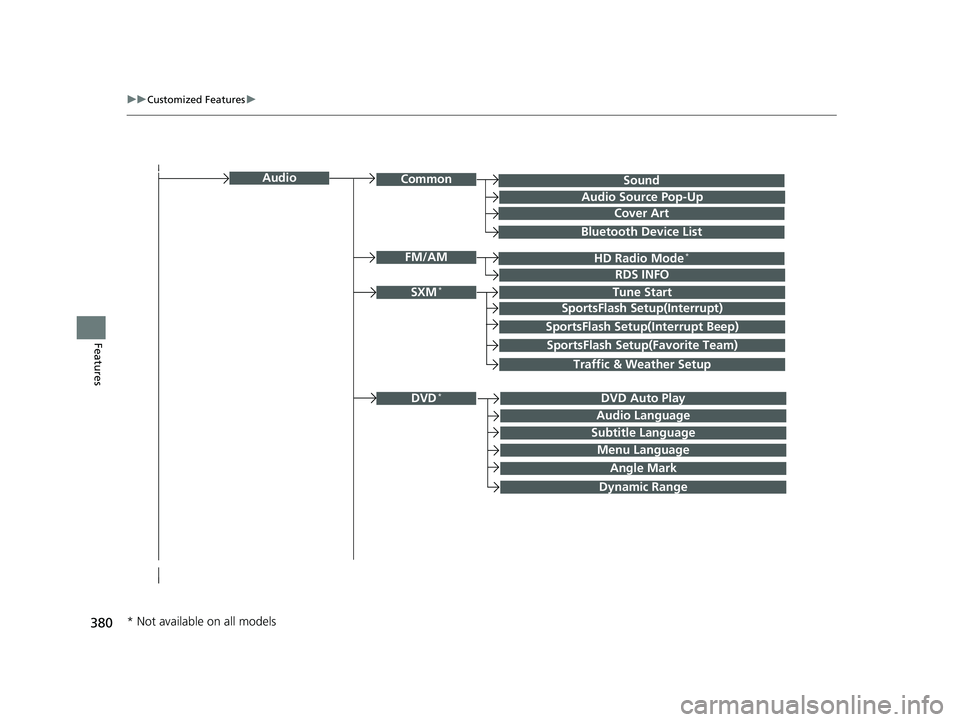
SoundAudioCommon
Audio Source Pop-Up
Cover Art
HD Radio Mode*FM/AM
RDS INFO
SXM*Tune Start
SportsFlash Setup(Interrupt)
SportsFlash Setup(Interrupt Beep)
SportsFlash Setup(Favorite Team)
Traffic & Weather Setup
DVD Auto PlayDVD*
Audio Language
Subtitle Language
Menu Language
Angle Mark
Bluetooth Device List
Dynamic Range
* Not available on all models
18 PILOT-31TG76200.book 380 ページ 2018年3月30日 金曜日 午前11時51分
Page 383 of 695
381
uuCustomized Features u
Continued
Features
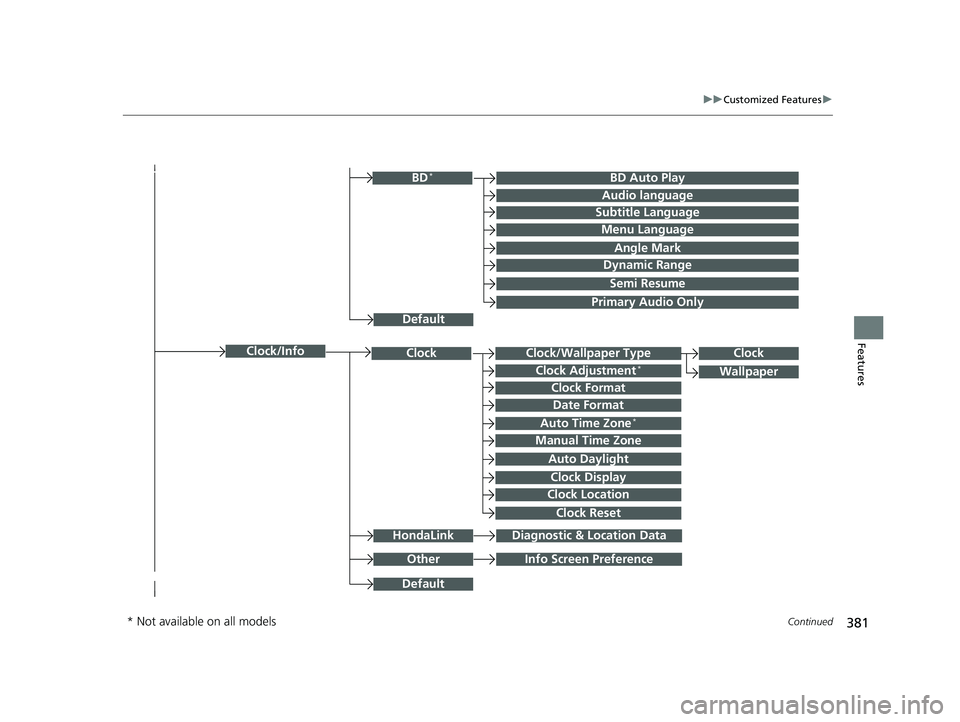
Clock/Wallpaper TypeClockClock
WallpaperClock Adjustment*
Clock Format
Date Format
Auto Time Zone*
Manual Time Zone
Auto Daylight
Clock Display
Clock Location
Clock Reset
OtherInfo Screen Preference
Default
Clock/Info
BD Auto PlayBD*
Audio language
Subtitle Language
Menu Language
Angle Mark
Dynamic Range
Semi Resume
Primary Audio Only
Default
HondaLinkDiagnostic & Location Data
* Not available on all models
18 PILOT-31TG76200.book 381 ページ 2018年3月30日 金曜日 午前11時51分
Page 389 of 695
387
uuCustomized Features u
Continued
Features
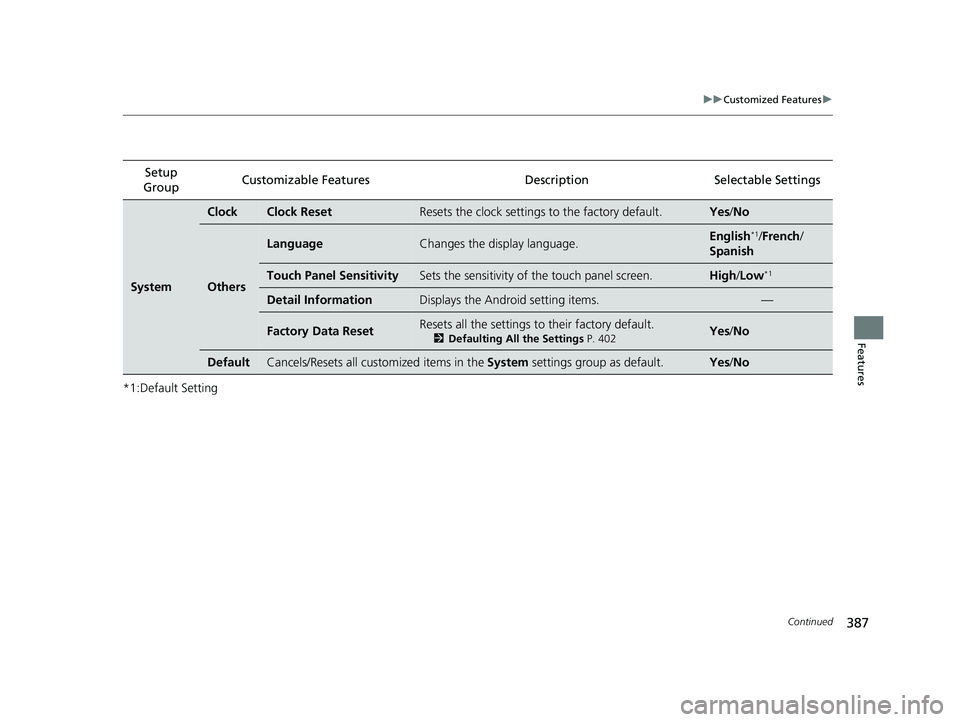
*1:Default SettingSetup
Group Customizable Features Description Selectable Settings
System
ClockClock ResetResets the clock settings to the factory default.Yes
/No
Others
LanguageChanges the display language.English*1/French /
Spanish
Touch Panel SensitivitySets the sensitivity of the touch panel screen.High/Low*1
Detail InformationDisplays the Android setting items.—
Factory Data ResetResets all the settings to their factory default.
2 Defaulting All the Settings P. 402Yes /No
DefaultCancels/Resets all customized items in the System settings group as default.Yes/No
18 PILOT-31TG76200.book 387 ページ 2018年3月30日 金曜日 午前11時51分
Page 391 of 695
389
uuCustomized Features u
Continued
Features
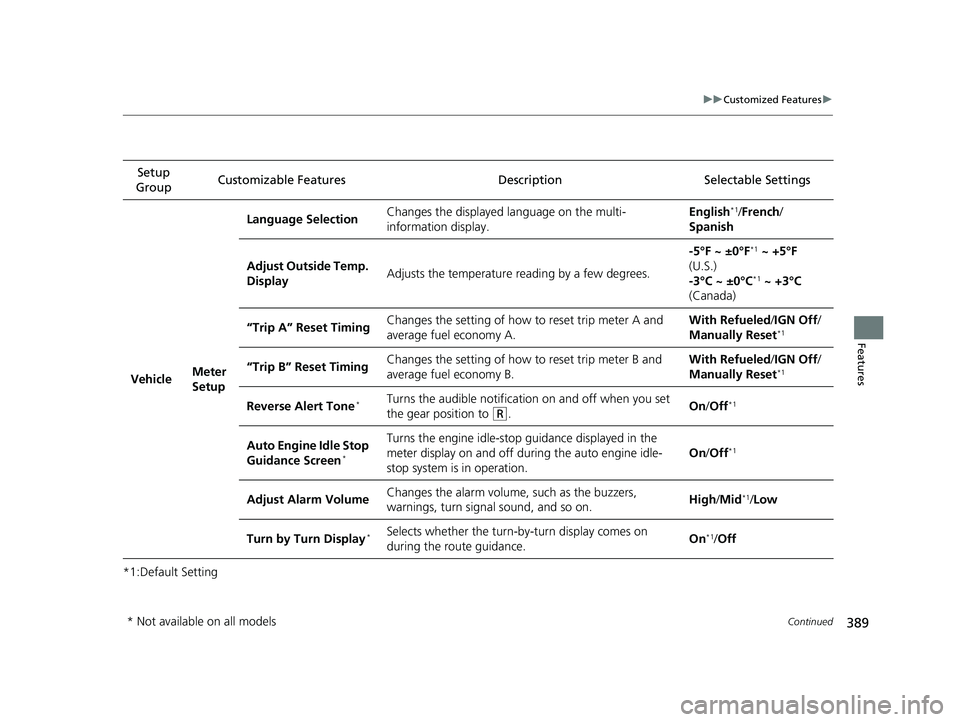
*1:Default SettingSetup
Group Customizable Features Description Selectable Settings
Vehicle Meter
SetupLanguage Selection
Changes the displayed language on the multi-
information display. English
*1/
French /
Spanish
Adjust Outside Temp.
Display Adjusts the temperature reading by a few degrees. -5°F ~ ±0°F
*1
~ +5°F
(U.S.)
-3°C ~ ±0°C
*1 ~ +3°C
(Canada)
“Trip A” Reset Timing Changes the setting of how to reset trip meter A and
average fuel economy A. With Refueled
/IGN Off /
Manually Reset
*1
“Trip B” Reset Timing Changes the setting of how to reset trip meter B and
average fuel economy B. With Refueled
/IGN Off /
Manually Reset*1
Reverse Alert Tone*Turns the audible notificati on on and off when you set
the gear position to
(R. On
/Off*1
Auto Engine Idle Stop
Guidance Screen*
Turns the engine idle-stop guidance displayed in the
meter display on and off during the auto engine idle-
stop system is in operation. On
/Off*1
Adjust Alarm Volume Changes the alarm volume,
such as the buzzers,
warnings, turn signal sound, and so on. High
/Mid*1/Low
Turn by Turn Display
*Selects whether the turn-by-turn display comes on
during the route guidance. On*1/
Off
* Not available on all models
18 PILOT-31TG76200.book 389 ページ 2018年3月30日 金曜日 午前11時51分
Page 398 of 695
396
uuCustomized Features u
Features
*1:Default SettingSetup
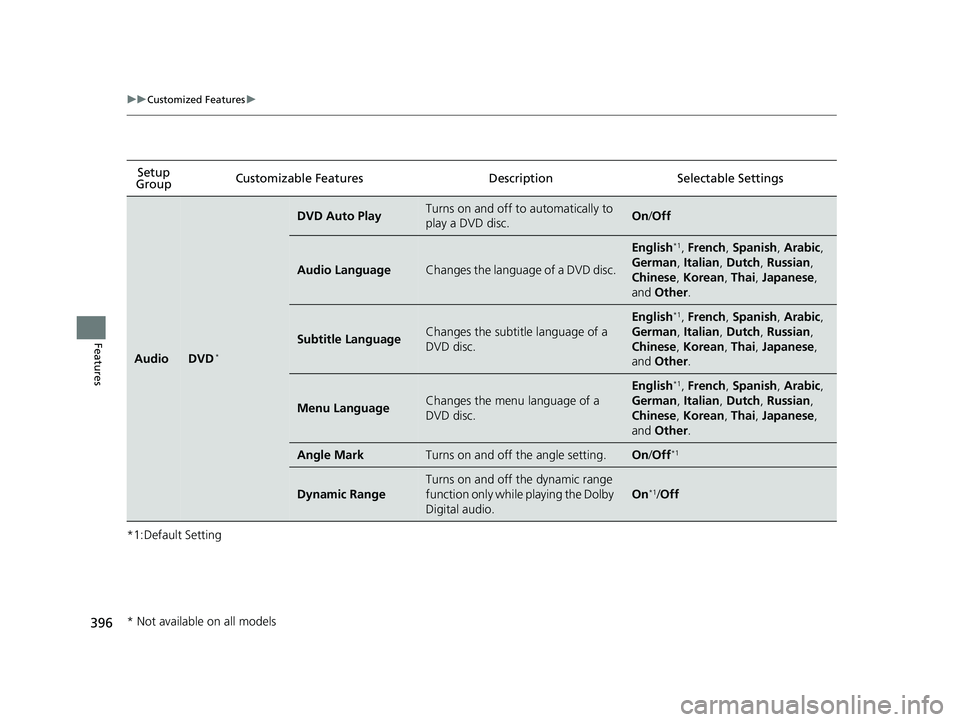
Group Customizable Features Desc
ription Selectable Settings
AudioDVD*
DVD Auto PlayTurns on and off to automatically to
play a DVD disc.On/Off
Audio LanguageChanges the language of a DVD disc.
English*1, French , Spanish , Arabic ,
German , Italian, Dutch, Russian,
Chinese , Korean , Thai , Japanese ,
and Other .
Subtitle LanguageChanges the subtitle language of a
DVD disc.
English*1, French , Spanish , Arabic ,
German , Italian, Dutch, Russian,
Chinese , Korean , Thai , Japanese ,
and Other .
Menu LanguageChanges the menu language of a
DVD disc.
English*1, French , Spanish , Arabic ,
German , Italian, Dutch, Russian,
Chinese , Korean , Thai , Japanese ,
and Other .
Angle MarkTurns on and off the angle setting.On/Off*1
Dynamic Range
Turns on and off the dynamic range
function only while playing the Dolby
Digital audio.
On*1/Off
* Not available on all models
18 PILOT-31TG76200.book 396 ページ 2018年3月30日 金曜日 午前11時51分
Page 399 of 695
397
uuCustomized Features u
Continued
Features
*1:Default SettingSetup
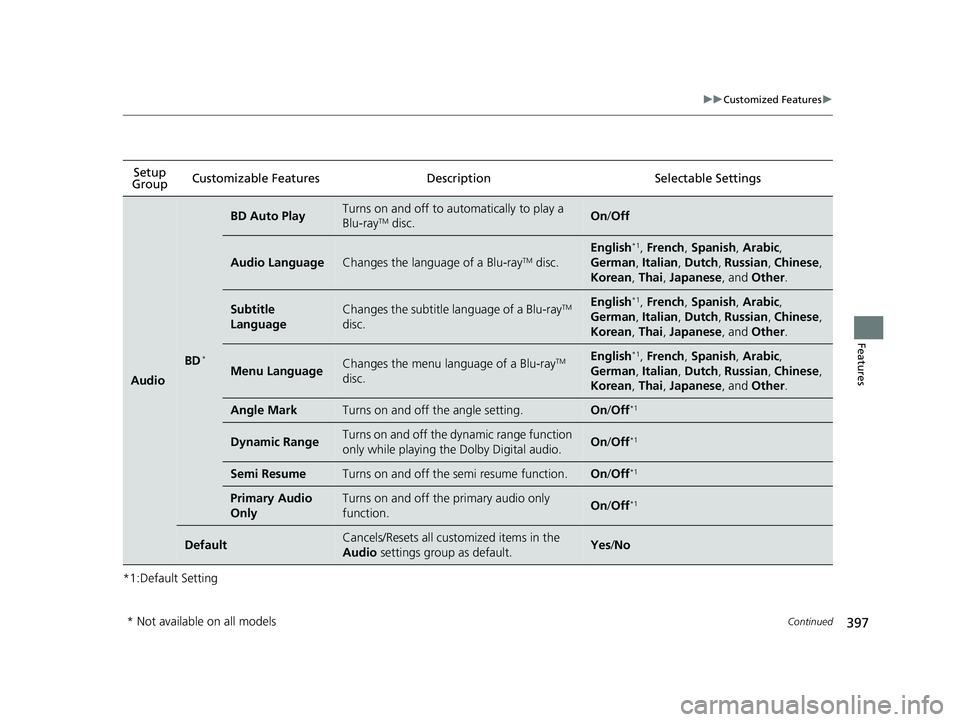
Group Customizable Features Descri
ption Selectable Settings
Audio
BD*
BD Auto PlayTurns on and off to automatically to play a
Blu-rayTM disc.On/Off
Audio LanguageChanges the language of a Blu-rayTM disc.
English*1, French , Spanish , Arabic,
German , Italian , Dutch , Russian , Chinese ,
Korean , Thai , Japanese , and Other .
Subtitle
LanguageChanges the subtitle language of a Blu-rayTM
disc.English*1, French , Spanish , Arabic,
German , Italian , Dutch , Russian , Chinese ,
Korean , Thai , Japanese , and Other .
Menu LanguageChanges the menu language of a Blu-rayTM
disc.English*1, French , Spanish , Arabic,
German , Italian , Dutch , Russian , Chinese ,
Korean , Thai , Japanese , and Other .
Angle MarkTurns on and off the angle setting.On/Off*1
Dynamic RangeTurns on and off the dy namic range function
only while playing the Dolby Digital audio.On /Off*1
Semi ResumeTurns on and off the semi resume function.On /Off*1
Primary Audio
OnlyTurns on and off the primary audio only
function.On /Off*1
DefaultCancels/Resets all cust omized items in the
Audio settings group as default.Yes/No
* Not available on all models
18 PILOT-31TG76200.book 397 ページ 2018年3月30日 金曜日 午前11時51分
Page 409 of 695
407
uuBluetooth ® HandsFreeLink ®u Using HFL
Features
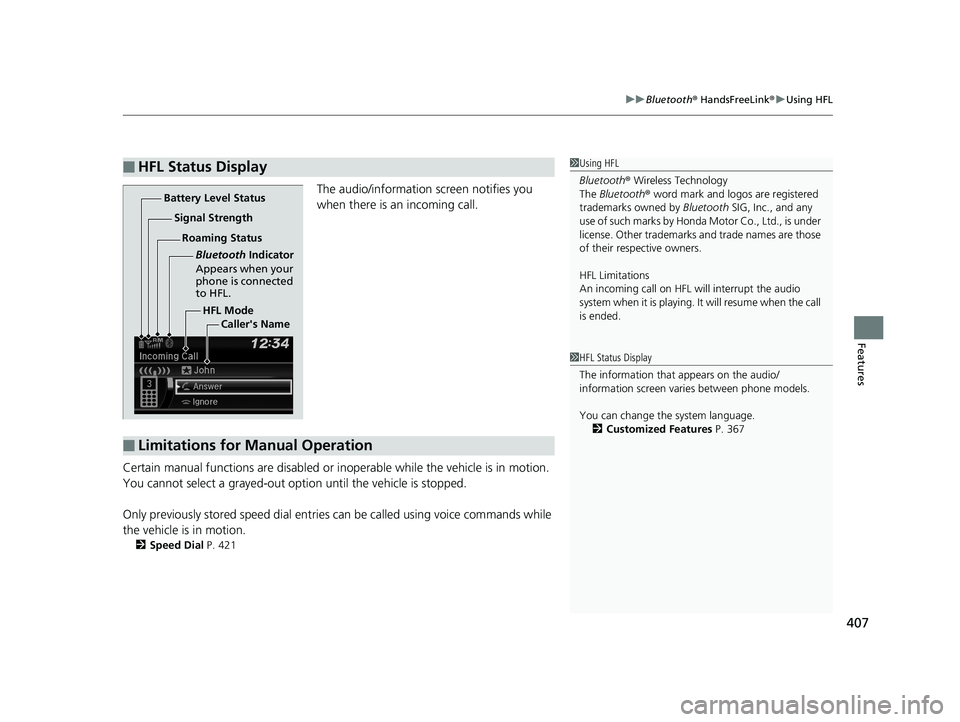
The audio/information screen notifies you
when there is an incoming call.
Certain manual functions are disabled or inoperable while the vehicle is in motion.
You cannot select a grayed-out option until the vehicle is stopped.
Only previously stored speed dial entrie s can be called using voice commands while
the vehicle is in motion.
2 Speed Dial P. 421
■HFL Status Display1Using HFL
Bluetooth ® Wireless Technology
The Bluetooth ® word mark and logos are registered
trademarks owned by Bluetooth SIG, Inc., and any
use of such marks by Honda Motor Co., Ltd., is under
license. Other trademarks and trade names are those
of their respective owners.
HFL Limitations
An incoming call on HFL will interrupt the audio
system when it is playing. It will resume when the call
is ended.
HFL Mode
Battery Level Status
Signal Strength
Bluetooth Indicator
Appears when your
phone is connected
to HFL.
Roaming Status
Caller's Name
■Limitations for Manual Operation
1HFL Status Display
The information that appears on the audio/
information screen vari es between phone models.
You can change the system language. 2 Customized Features P. 367
18 PILOT-31TG76200.book 407 ページ 2018年3月30日 金曜日 午前11時51分
Page 435 of 695
433
uuBluetooth ® HandsFreeLink ®u Using HFL
Features
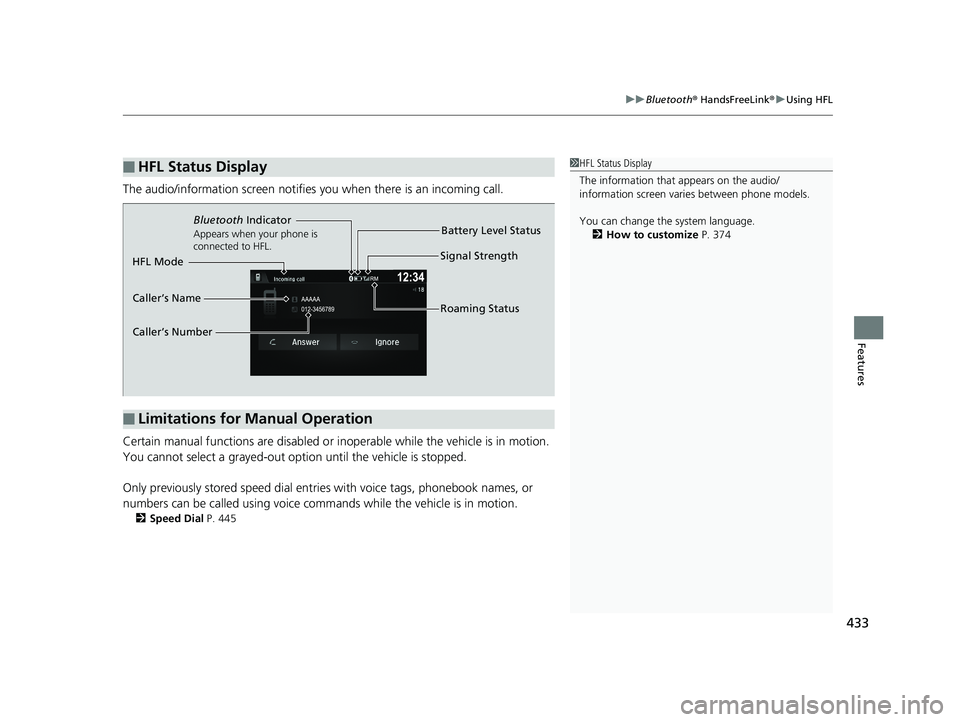
The audio/information scr een notifies you when there is an incoming call.
Certain manual functions are disabled or inoperable while the vehicle is in motion.
You cannot select a grayed-out option until the vehicle is stopped.
Only previously stored speed dial entries with voice tags, phonebook names, or
numbers can be called using voice commands while the vehicle is in motion.
2 Speed Dial P. 445
■HFL Status Display1HFL Status Display
The information that appears on the audio/
information screen vari es between phone models.
You can change the system language. 2 How to customize P. 374
■Limitations for Manual Operation
Bluetooth Indicator
Appears when your phone is
connected to HFL.
Signal Strength
HFL Mode Battery Level Status
Caller’s Name
Caller’s Number Roaming Status
18 PILOT-31TG76200.book 433 ページ 2018年3月30日 金曜日 午前11時51分
Page 688 of 695
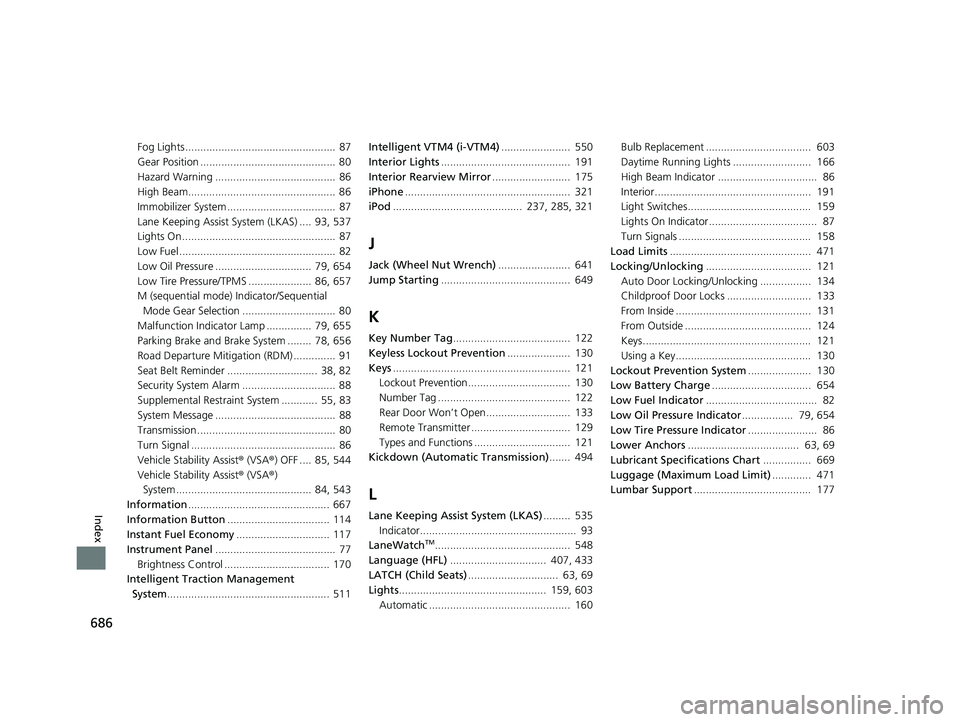
686
Index
Fog Lights .................................................. 87
Gear Position ............................................. 80
Hazard Warning ........................................ 86
High Beam................................................. 86
Immobilizer System .................................... 87
Lane Keeping Assist System (LKAS) .... 93, 537
Lights On ................................................... 87
Low Fuel .................................................... 82
Low Oil Pressure ................................ 79, 654
Low Tire Pressure/TPMS ..................... 86, 657
M (sequential mode) Indicator/Sequential Mode Gear Selection ............................... 80
Malfunction Indicator Lamp ............... 79, 655
Parking Brake and Brak e System ........ 78, 656
Road Departure Mitigation (RDM) .............. 91
Seat Belt Reminder .............................. 38, 82
Security System Alarm ............................... 88
Supplemental Restraint System ............ 55, 83
System Message ........................................ 88
Transmission .............................................. 80
Turn Signal ................................................ 86
Vehicle Stability Assist ® (VSA ®) OFF .... 85, 544
Vehicle Stability Assist ® (VSA ®)
System ............................................. 84, 543
Information ............................................... 667
Information Button .................................. 114
Instant Fuel Economy ............................... 117
Instrument Panel ........................................ 77
Brightness Control ................................... 170
Intelligent Traction Management System ...................................................... 511 Intelligent VTM4 (i-VTM4)
....................... 550
Interior Lights ........................................... 191
Interior Rearview Mirror .......................... 175
iPhone ....................................................... 321
iPod ........................................... 237, 285, 321
J
Jack (Wheel Nut Wrench) ........................ 641
Jump Starting ........................................... 649
K
Key Number Tag ....................................... 122
Keyless Lockout Prevention ..................... 130
Keys ........................................................... 121
Lockout Prevention.................................. 130
Number Tag ............................................ 122
Rear Door Won’t Open............................ 133
Remote Transmitter ................................. 129
Types and Functions ................................ 121
Kickdown (Automatic Transmission) ....... 494
L
Lane Keeping Assist System (LKAS)......... 535
Indicator.................................................... 93
LaneWatch
TM............................................. 548
Language (HFL) ................................ 407, 433
LATCH (Child Seats) .............................. 63, 69
Lights ................................................. 159, 603
Automatic ............................................... 160 Bulb Replacement ................................... 603
Daytime Running Lights .......................... 166
High Beam Indicator ................................. 86
Interior.................................................... 191
Light Switches......................................... 159
Lights On Indicator.................................... 87
Turn Signals ............................................ 158
Load Limits ............................................... 471
Locking/Unlocking ................................... 121
Auto Door Locking/Unlocking ................. 134
Childproof Door Locks ............................ 133
From Inside ............................................. 131
From Outside .......................................... 124
Keys........................................................ 121
Using a Key............................................. 130
Lockout Prevention System ..................... 130
Low Battery Charge ................................. 654
Low Fuel Indicator ..................................... 82
Low Oil Pressure Indicator ................. 79, 654
Low Tire Pressure Indicator ....................... 86
Lower Anchors ..................................... 63, 69
Lubricant Specifications Chart ................ 669
Luggage (Maximum Load Limit) ............. 471
Lumbar Support ....................................... 177
18 PILOT-31TG76200.book 686 ページ 2018年3月30日 金曜日 午前11時51分