parking brake HONDA PILOT 2018 (in English) User Guide
[x] Cancel search | Manufacturer: HONDA, Model Year: 2018, Model line: PILOT, Model: HONDA PILOT 2018Pages: 695, PDF Size: 48.42 MB
Page 168 of 695
166
uuOperating the Switches Around the Steering Wheel uDaytime Running Lights
Controls
Daytime Running Lights
The daytime running lights come on when the following conditions have been met:
• The power mode is in ON.
• The headlight switch is AUTO or OFF .
• The parking brake is released.
The lights remain on even if you set the parking brake. Setting the power mode to
VEHICLE OFF (LOCK) will turn off the daytime running lights.
The daytime running lights are off once the headlight switch is turned on, or when
the head light switch is in AUTO and it is getting darker outside.
18 PILOT-31TG76200.book 166 ページ 2018年3月30日 金曜日 午前11時51分
Page 175 of 695
173
uuOperating the Switches Around the Steering Wheel uDriving Position Memory System*
Controls
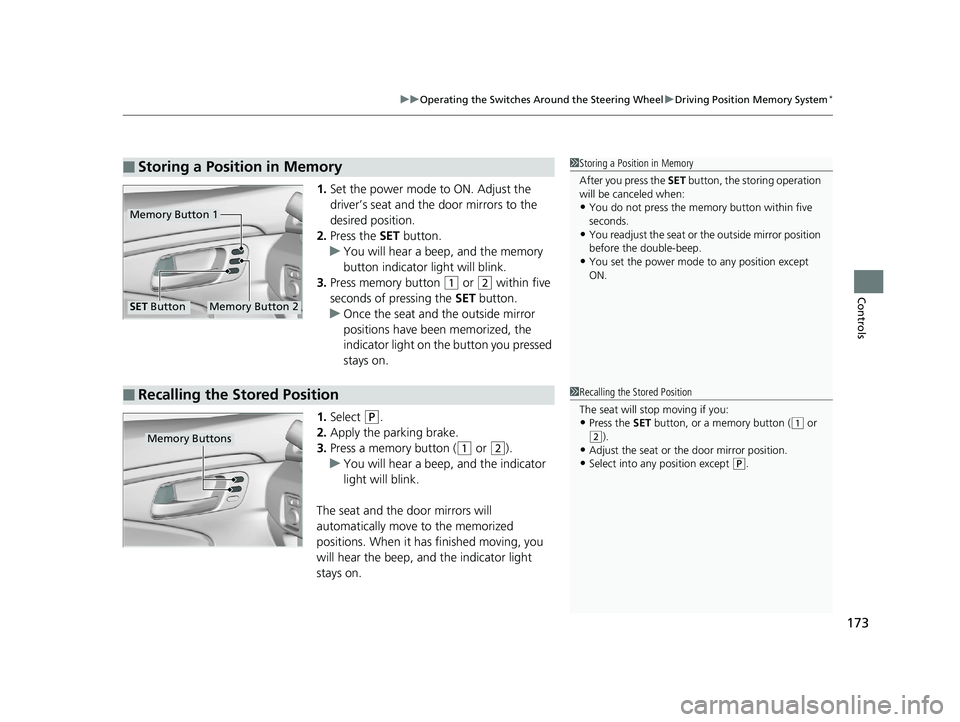
1. Set the power mode to ON. Adjust the
driver’s seat and the door mirrors to the
desired position.
2. Press the SET button.
u You will hear a beep, and the memory
button indicator light will blink.
3. Press memory button
(1 or (2 within five
seconds of pressing the SET button.
u Once the seat and the outside mirror
positions have been memorized, the
indicator light on the button you pressed
stays on.
1. Select
(P.
2. Apply the parking brake.
3. Press a memory button (
(1 or (2).
u You will hear a beep, and the indicator
light will blink.
The seat and the door mirrors will
automatically move to the memorized
positions. When it has finished moving, you
will hear the beep, and the indicator light
stays on.
■Storing a Position in Memory1 Storing a Position in Memory
After you press the SET button, the storing operation
will be canceled when:
•You do not press the memory button within five
seconds.
•You readjust the seat or the outside mirror position
before the double-beep.
•You set the power mode to any position except
ON.
Memory Button 1
Memory Button 2SET Button
■Recalling the Stored Position1 Recalling the Stored Position
The seat will st op moving if you:
•Press the SET button, or a memory button ((1 or
(2).•Adjust the seat or the door mirror position.
•Select into any position except (P.
Memory Buttons
18 PILOT-31TG76200.book 173 ページ 2018年3月30日 金曜日 午前11時51分
Page 469 of 695
467
Driving
This chapter discusses driving and refueling.
Before Driving................................... 468
Towing a Trailer ................................ 474
Off-Highway Driving Guidelines ..... 485
When Driving Starting the Engine .......................... 487
Automatic Transmission ................... 494
Shifting ............................................ 495
Auto Idle-stop
*................................ 505
Intelligent Traction Management*.... 511
Cruise Control*................................ 513
Front Sensor Camera*...................... 516
Adaptive Cruise Control (ACC)*....... 518Road Departure Mi tigation (RDM)
System*...................................... 530Lane Keeping Assist System (LKAS)*.. 535
Vehicle Stability Assist ® (VSA ®), aka Electronic
Stability Control (ESC), System ............. 543
Agile Handling Assist ....................... 545
Blind spot inform ation (BSI) System*.... 546
LaneWatchTM*.................................. 548Intelligent VTM4 (i-VTM4)*................. 550Tire Pressure Monitoring System (TPMS) with Tire Fill Assist .......................... 551
Tire Pressure Monitoring System (TPMS) -
Required Federal Explanation ......... 553
Braking Brake System ................................... 555
Anti-lock Brake System (ABS) ........... 557
Brake Assist System.......................... 558 Collision Mitigation Braking System
TM
(CMBSTM)*..................................... 559
Parking Your Vehicle
When Stopped ................................ 568
Parking Sensor System
*................... 570
Cross Traffic Monitor*..................... 574
Multi-view rear camera .................... 578
Refueling Fuel Information .............................. 579
How to Refuel ................................. 580
Fuel Economy and CO
2 Emissions
Improving Fuel Economy and Reducing
CO
2 Emissions ................................ 582
* Not available on all models
18 PILOT-31TG76200.book 467 ページ 2018年3月30日 金曜日 午前11時51分
Page 480 of 695
uuTowing a Trailer uTowing Preparation
478
Driving
Towing generally requires a variety of supplemental equipment.
To ensure the best quality, we recomme nd that you purchase Honda equipment
whenever possible.
■Trailer brakes
Recommended for any trailer with a total weight of 1,000 lbs (450 kg) or more:
There are two common types of trailer brake s: surge and electric. Surge brakes are
common for boat trailers, since the brakes will get wet.
If you choose electric brakes, be sure th ey are electronically actuated. Do not
attempt to attach trailer brakes to your ve hicle’s hydraulic system, as it will lower
braking effectiveness and create a potential hazard.
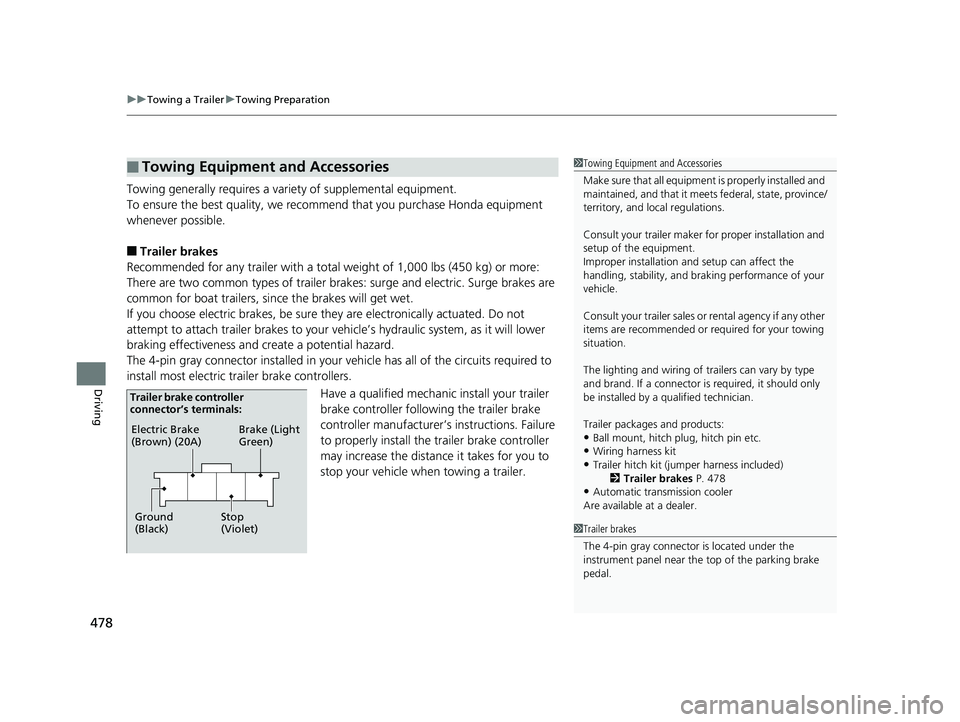
The 4-pin gray connector installed in your vehicle has all of the circuits required to
install most electric trailer brake controllers.
Have a qualified mechanic install your trailer
brake controller following the trailer brake
controller manufacturer’ s instructions. Failure
to properly install the trailer brake controller
may increase the distance it takes for you to
stop your vehicle when towing a trailer.
■Towing Equipment and Accessories1 Towing Equipment and Accessories
Make sure that all equipment is properly installed and
maintained, and that it meets federal, state, province/
territory, and lo cal regulations.
Consult your trai ler maker for prope r installation and
setup of the equipment.
Improper installation and setup can affect the
handling, stability, and br aking performance of your
vehicle.
Consult your traile r sales or rental agency if any other
items are recommended or required for your towing
situation.
The lighting and wiring of tra ilers can vary by type
and brand. If a connector is required, it should only
be installed by a qua lified technician.
Trailer packages and products:
•Ball mount, hitch plug, hitch pin etc.•Wiring harness kit
•Trailer hitch kit (jum per harness included)
2 Trailer brakes P. 478
•Automatic transmission cooler
Are available at a dealer.
1 Trailer brakes
The 4-pin gray connector is located under the
instrument panel near the top of the parking brake
pedal.
Electric Brake
(Brown) (20A)
Ground
(Black) Brake (Light
Green)
Stop
(Violet)
Trailer brake controller
connector’s terminals:
18 PILOT-31TG76200.book 478 ページ 2018年3月30日 金曜日 午前11時51分
Page 485 of 695
483
uuTowing a Trailer uDriving Safely with a Trailer
Continued
Driving
Driving Safely with a Trailer
• Have the trailer properly servic ed and keep it in good condition.
• Make sure that all the weights and load in the vehicle and trailer are within limits.
2Towing Load Limits P. 474
•When towing more than 3,500 lbs (1,590 kg), use of gasoline with a pump
octane number of 87 or higher is recommended.
u Towing performance can be affected by high altitude, high temperature, or
steep uphill.
• Securely attach the hitch, safety chains, and other necessary parts to the trailer.
• Securely store all the items in and on the tra iler so that they do not shift while
driving.
• Check if the lights and brakes on the trailer are working properly.
• Check the pressures of the traile r tires, including the spare.
• Drive slower than normal.
• Obey posted speed limits fo r vehicles with trailers.
• Use the
(D position when towing a trailer on level roads.
• Turn more slowly and with a wider turning arc than normal.
• Allow more time and distance for braking.
• Do not brake or turn suddenly.
■Things You Need To Know Before Towing a Trailer
■Towing Speeds and Gears
■Turning and Braking
1Driving Safely with a Trailer
Operating speed when towing a trailer is restricted
up to 62 mph (100 km/h).
Parking
In addition to the normal precautions, place wheel
chocks at each of the trailer’s tires.
1Towing Speeds and Gears
When towing a fixed-sided trailer (e.g., camper), do
not exceed 55 mph (88 km/h).
At higher speeds, the trai ler may sway or affect
vehicle handling.
18 PILOT-31TG76200.book 483 ページ 2018年3月30日 金曜日 午前11時51分
Page 494 of 695
uuWhen Driving uStarting the Engine
492
Driving
1. Depress the brake pedal and press the ENGINE START/STOP button
simultaneously.
2. Keeping your right foot on the brake peda l, release the parking brake. Check that
the parking brake indicator has gone off.
2 Parking Brake P. 555
3.Change the gear position to (D. Select (R when reversing.
4. Gradually release the brake pedal and gently depress the accelerator pedal to pull
away.
■Hill start assist system
Hill start assist keeps the brake engaged br iefly to help prevent the vehicle from
rolling on inclines as you move your fo ot from the brake pedal to the accelerator.
Change the gear position to
(D, *, (S*, or (L* when facing uphill, or (R when
facing downhill, then release the brake pedal.
The brakes remain engaged briefly as you release the brake pedal.
■Starting to Drive1 Starting to Drive
The engine stops when the gear position is changed
from
( P before the ENGINE START/STOP button is
pressed. Follow the step 1 when starting to drive.
When the engine was started using the smart entry
remote*When the engine was started using the smart entry remote*
When the engine was started in any case
D4
1 Hill start assist system
Hill start assist may not prevent the vehicle from
rolling downhill on a very steep or slippe ry slope, and
will not operate on small inclines.
Hill start assist is not a replacement for the parking
brake.
* Not available on all models
18 PILOT-31TG76200.book 492 ページ 2018年3月30日 金曜日 午前11時51分
Page 497 of 695
495
uuWhen Driving uShifting
Continued
Driving
Shifting
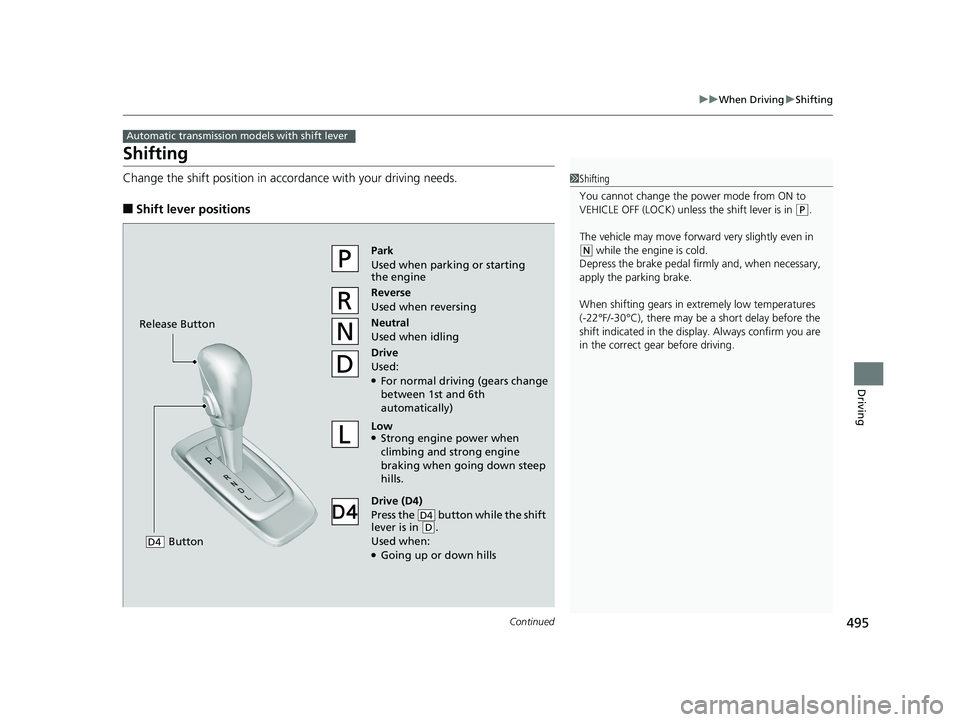
Change the shift position in accordance with your driving needs.
■Shift lever positions
Automatic transmission models with shift lever
1Shifting
You cannot change the pow er mode from ON to
VEHICLE OFF (LOCK) unless the shift lever is in
( P.
The vehicle may move forward very slightly even in
(N while the engine is cold.
Depress the brake pe dal firmly and, when necessary,
apply the parking brake.
When shifting gears in extremely low temperatures
(-22°F/-30°C), there may be a short delay before the
shift indicated in the display. Always confirm you are
in the correct gear before driving.Park
Used when parking or starting
the engine
Reverse
Used when reversing
Neutral
Used when idling
Drive
Used:
●For normal driving (gears change
between 1st and 6th
automatically)
Low●Strong engine power when
climbing and strong engine
braking when going down steep
hills.
Drive (D4)
Press the button while the shift
lever is in
( D.
Used when:
●Going up or down hills
D4
Release Button
Button
D4
18 PILOT-31TG76200.book 495 ページ 2018年3月30日 金曜日 午前11時51分
Page 499 of 695
497
uuWhen Driving uShifting
Continued
Driving
Shifting
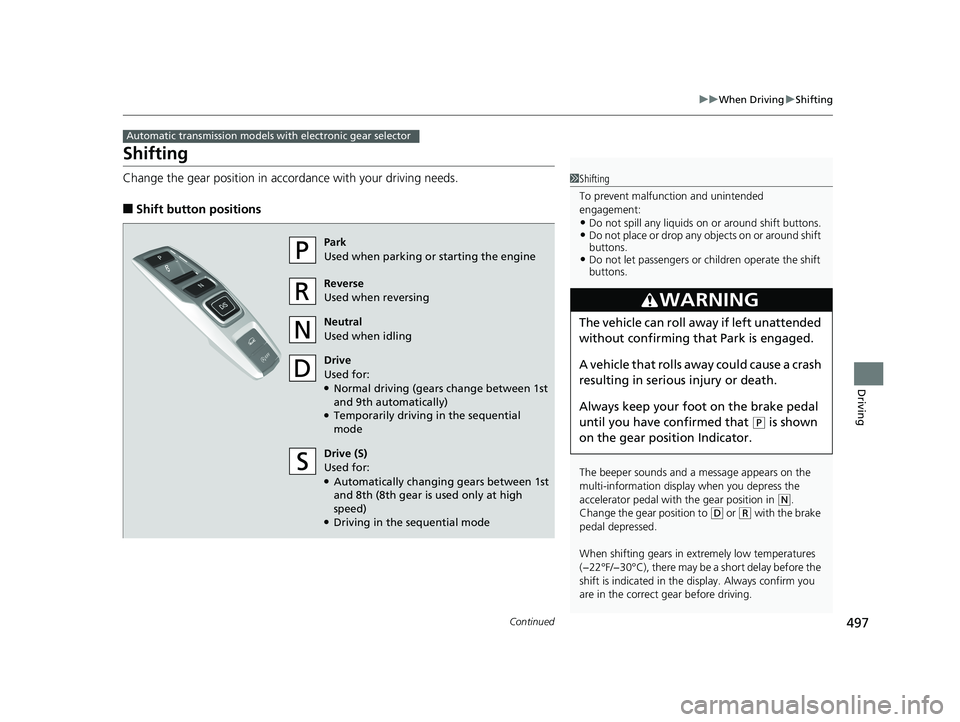
Change the gear position in accordance with your driving needs.
■Shift button positions
Automatic transmission models with electronic gear selector
1Shifting
To prevent malfunc tion and unintended
engagement:
•Do not spill any liquids on or around shift buttons.•Do not place or drop any objects on or around shift
buttons.
•Do not let passengers or ch ildren operate the shift
buttons.
The beeper sounds and a message appears on the
multi-information display when you depress the
accelerator pedal with the gear position in
( N.
Change the gear position to
( D or (R with the brake
pedal depressed.
When shifting gears in extremely low temperatures
(−22°F/−30°C), there may be a short delay before the
shift is indicated in the di splay. Always confirm you
are in the correct gear before driving.
3WARNING
The vehicle can roll aw ay if left unattended
without confirming th at Park is engaged.
A vehicle that rolls away could cause a crash
resulting in serious injury or death.
Always keep your foot on the brake pedal
until you have confirmed that
( P is shown
on the gear position Indicator.
Park
Used when parking or starting the engine
Reverse
Used when reversing
Neutral
Used when idling
Drive
Used for:
●Normal driving (gears change between 1st
and 9th automatically)
●Temporarily driving in the sequential
mode
Drive (S)
Used for:
●Automatically changing gears between 1st
and 8th (8th gear is used only at high
speed)
●Driving in the sequential mode
18 PILOT-31TG76200.book 497 ページ 2018年3月30日 金曜日 午前11時51分
Page 500 of 695
498
uuWhen Driving uShifting
Driving
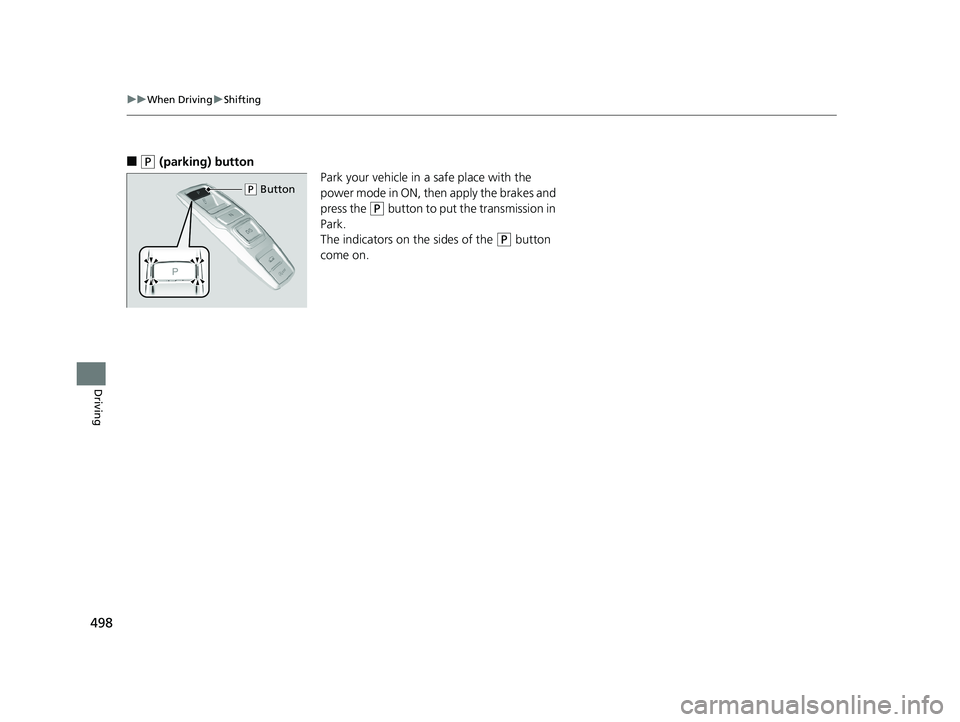
■(P (parking) button
Park your vehicle in a safe place with the
power mode in ON, then apply the brakes and
press the
(P button to put the transmission in
Park.
The indicators on the sides of the
(P button
come on.
( P Button
18 PILOT-31TG76200.book 498 ページ 2018年3月30日 金曜日 午前11時51分
Page 525 of 695
523
uuWhen Driving uAdaptive Cruise Control (ACC)*
Continued
Driving
The system may automatically shut off and the ACC indicator will come on under
certain conditions. Some examples of thes e conditions are listed below. Other
conditions may reduce some of the ACC functions.
2 Front Sensor Camera* P. 516
■Environmental conditions
Driving in bad weather (r ain, fog, snow, etc.).
■Roadway conditions
Driving on a snowy or wet roadway (obscure d lane marking, vehicle tracks, reflected
lights, road spra y, high contrast).
■Vehicle conditions
• The outside of the windshield is blocked by dirt, mud, leaves, wet snow, etc.
• An abnormal tire or wheel condition (wro ng sized, varied size or construction,
improperly inflated, co mpact spare tire, etc.).
• The camera temperature gets too hot.
• The parking brake is applied.
• When the front grille is dirty.
• The vehicle is tilted due to a heavy load or suspension modifications.
• When tire chains are installed.
■ACC Conditions and Limitations
* Not available on all models
18 PILOT-31TG76200.book 523 ページ 2018年3月30日 金曜日 午前11時51分