ECO mode HONDA PILOT 2018 (in English) Workshop Manual
[x] Cancel search | Manufacturer: HONDA, Model Year: 2018, Model line: PILOT, Model: HONDA PILOT 2018Pages: 695, PDF Size: 48.42 MB
Page 130 of 695
uuLocking and Unlocking the Doors uLocking/Unlocking the Doors from the Outside
128
Controls
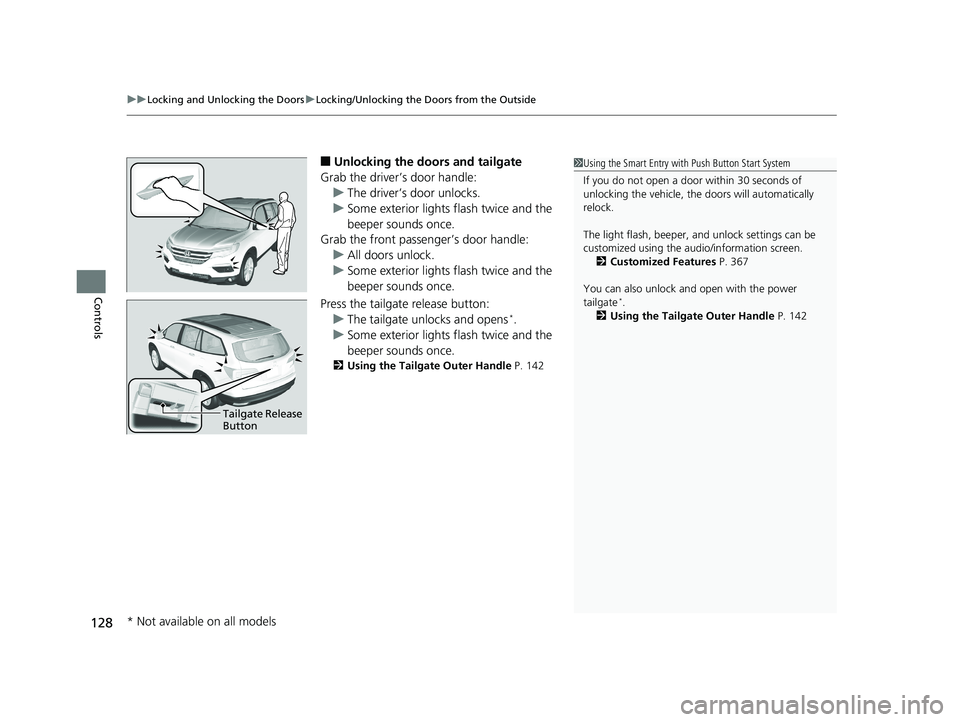
■Unlocking the doors and tailgate
Grab the driver’s door handle: u The driver’s door unlocks.
u Some exterior lights flash twice and the
beeper sounds once.
Grab the front passenger’s door handle:
u All doors unlock.
u Some exterior lights flash twice and the
beeper sounds once.
Press the tailgate release button: u The tailgate unlocks and opens
*.
u Some exterior lights flash twice and the
beeper sounds once.
2 Using the Tailgate Outer Handle P. 142
1Using the Smart Entry with Push Button Start System
If you do not open a door within 30 seconds of
unlocking the vehicle, th e doors will automatically
relock.
The light flash, beeper, a nd unlock settings can be
customized using the audio/information screen. 2 Customized Features P. 367
You can also unlock and open with the power
tailgate
*.
2 Using the Tailgate Outer Handle P. 142
Tailgate Release
Button
* Not available on all models
18 PILOT-31TG76200.book 128 ページ 2018年3月30日 金曜日 午前11時51分
Page 131 of 695
Continued129
uuLocking and Unlocking the Doors uLocking/Unlocking the Doors from the Outside
Controls
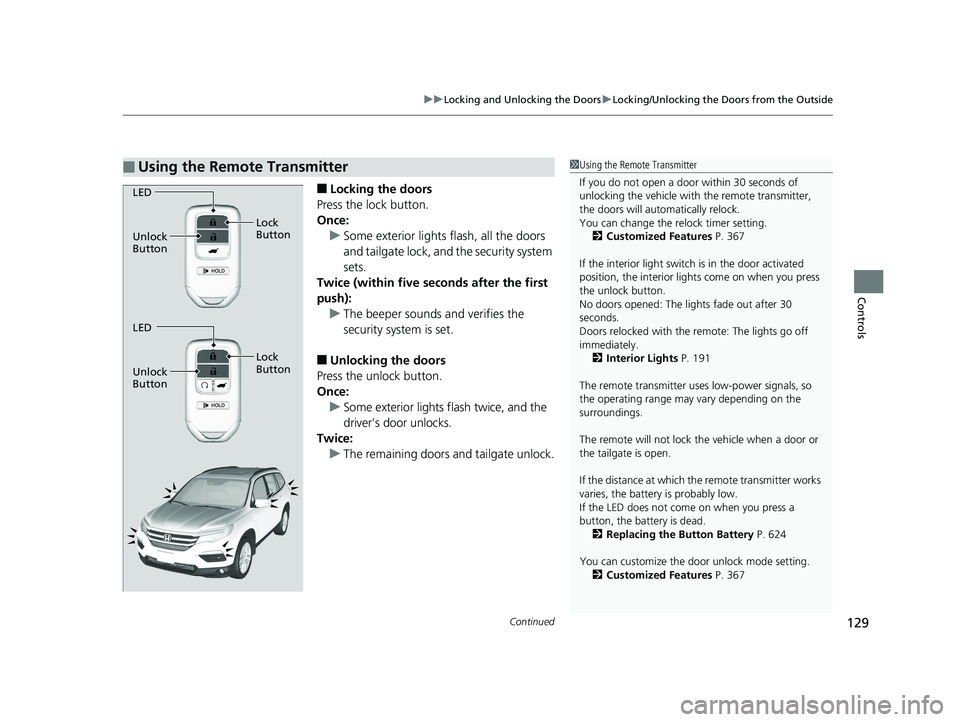
■Locking the doors
Press the lock button.
Once: u Some exterior lights flash, all the doors
and tailgate lock, and the security system
sets.
Twice (within five se conds after the first
push):
u The beeper sounds and verifies the
security system is set.
■Unlocking the doors
Press the unlock button.
Once: u Some exterior lights flash twice, and the
driver’s door unlocks.
Twice:
u The remaining doors and tailgate unlock.
■Using the Remote Transmitter1Using the Remote Transmitter
If you do not open a door within 30 seconds of
unlocking the vehicle with the remote transmitter,
the doors will auto matically relock.
You can change the relock timer setting.
2 Customized Features P. 367
If the interior light switch is in the door activated
position, the interior light s come on when you press
the unlock button.
No doors opened: The li ghts fade out after 30
seconds.
Doors relocked with the remote: The lights go off
immediately. 2 Interior Lights P. 191
The remote transmitter us es low-power signals, so
the operating range may vary depending on the
surroundings.
The remote will not lock th e vehicle when a door or
the tailgate is open.
If the distance at which the remote transmitter works
varies, the batter y is probably low.
If the LED does not come on when you press a
button, the battery is dead. 2 Replacing the Button Battery P. 624
You can customize the door unlock mode setting. 2 Customized Features P. 367
LED
Unlock
Button Lock
Button
LED
Unlock
Button Lock
Button
18 PILOT-31TG76200.book 129 ページ 2018年3月30日 金曜日 午前11時51分
Page 132 of 695
uuLocking and Unlocking the Doors uLocking/Unlocking the Doors from the Outside
130
Controls
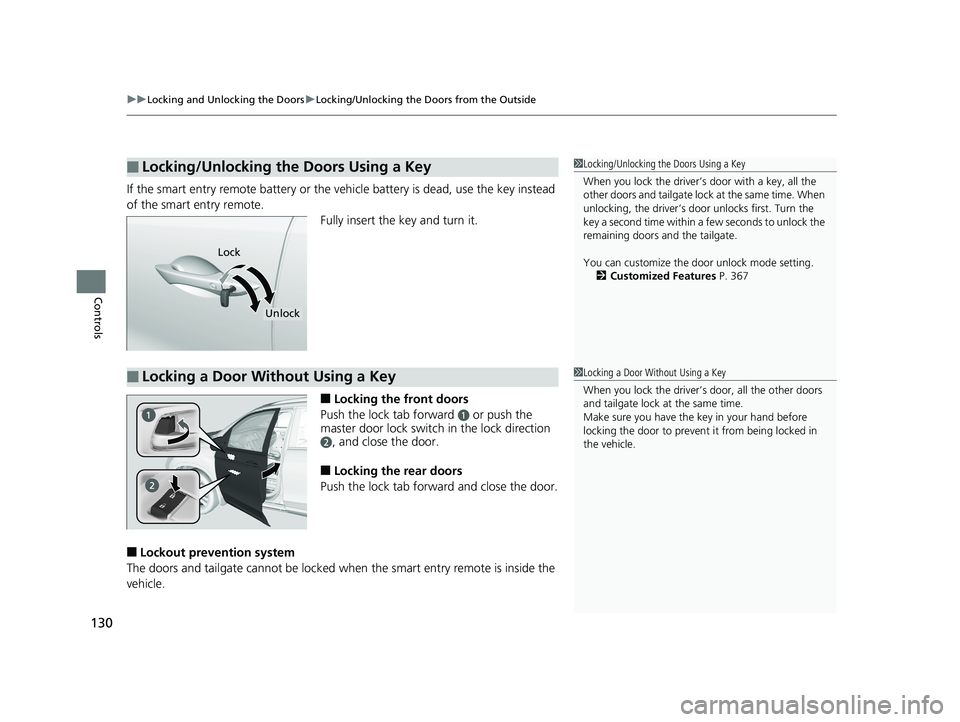
If the smart entry remote battery or the ve hicle battery is dead, use the key instead
of the smart entry remote. Fully insert the key and turn it.
■Locking the front doors
Push the lock tab forward
a or push the
master door lock switch in the lock direction
b, and close the door.
■Locking the rear doors
Push the lock tab forward and close the door.
■Lockout prevention system
The doors and tailgate cannot be locked when the smart entry remote is inside the
vehicle.
■Locking/Unlocking the Doors Using a Key1 Locking/Unlocking the Doors Using a Key
When you lock the driver’s door with a key, all the
other doors and tail gate lock at the same time. When
unlocking, the driver’s door unlocks first. Turn the
key a second time within a few seconds to unlock the
remaining doors a nd the tailgate.
You can customize the door unlock mode setting. 2 Customized Features P. 367
Lock
Unlock
■Locking a Door Without Using a Key1Locking a Door Without Using a Key
When you lock the driver’s door, all the other doors
and tailgate lock at the same time.
Make sure you have the key in your hand before
locking the door to prevent it from being locked in
the vehicle.
18 PILOT-31TG76200.book 130 ページ 2018年3月30日 金曜日 午前11時51分
Page 138 of 695
136
uuLocking and Unlocking the Doors uCustomizing the Auto Door Locking/Unlocking Setting
Controls
*1:Default setting
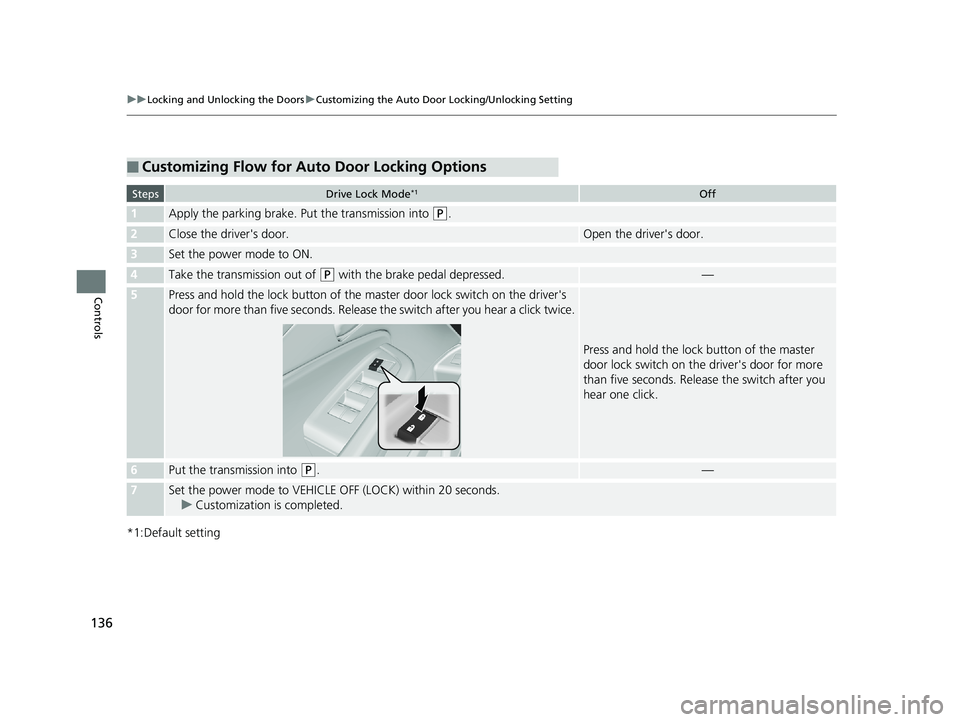
■Customizing Flow for Auto Door Locking Options
StepsDrive Lock Mode*1Off
1Apply the parking brake. Put the transmission into (P.
2Close the driver's door.Open the driver's door.
3Set the power mode to ON.
4Take the transmission out of (P with the brake pedal depressed.—
5Press and hold the lock button of the master door lock switch on the driver's
door for more than five seconds. Release the switch after you hear a click twice.
Press and hold the lock button of the master
door lock switch on the driver's door for more
than five seconds. Releas e the switch after you
hear one click.
6Put the transmission into (P.—
7Set the power mode to VEHICLE OFF (LOCK) within 20 seconds.
u Customization is completed.
18 PILOT-31TG76200.book 136 ページ 2018年3月30日 金曜日 午前11時51分
Page 139 of 695
137
uuLocking and Unlocking the Doors uCustomizing the Auto Door Locking/Unlocking Setting
Controls
*1:Default setting
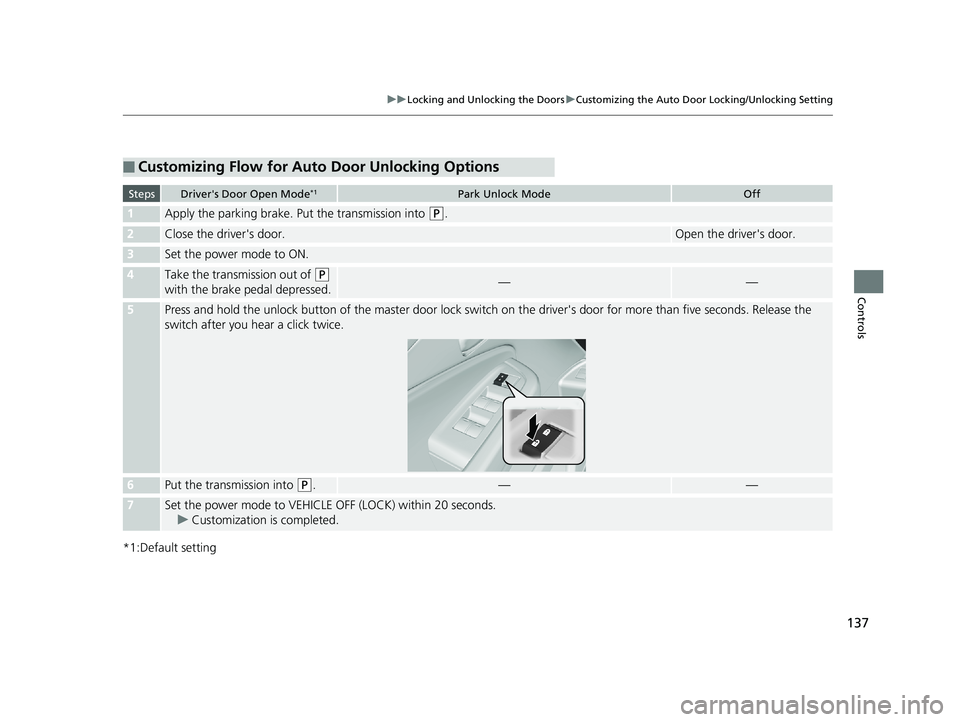
■Customizing Flow for Auto Door Unlocking Options
StepsDriver's Door Open Mode*1Park Unlock ModeOff
1Apply the parking brake. Put the transmission into (P.
2Close the driver's door.Open the driver's door.
3Set the power mode to ON.
4Take the transmission out of (P
with the brake pedal depressed.——
5Press and hold the unlock button of the master door lock switch on the driver's door for more than five seconds. Release the
switch after you h ear a click twice.
6Put the transmission into (P.——
7Set the power mode to VEHICLE OFF (LOCK) within 20 seconds.
u Customization is completed.
18 PILOT-31TG76200.book 137 ページ 2018年3月30日 金曜日 午前11時51分
Page 141 of 695
139
uuOpening and Closing the Tailgate uOpening/Closing the Tailgate Using the Tailgate Outer Handle
Continued
Controls
Opening/Closing the Tailgate Using the Tailgate
Outer Handle
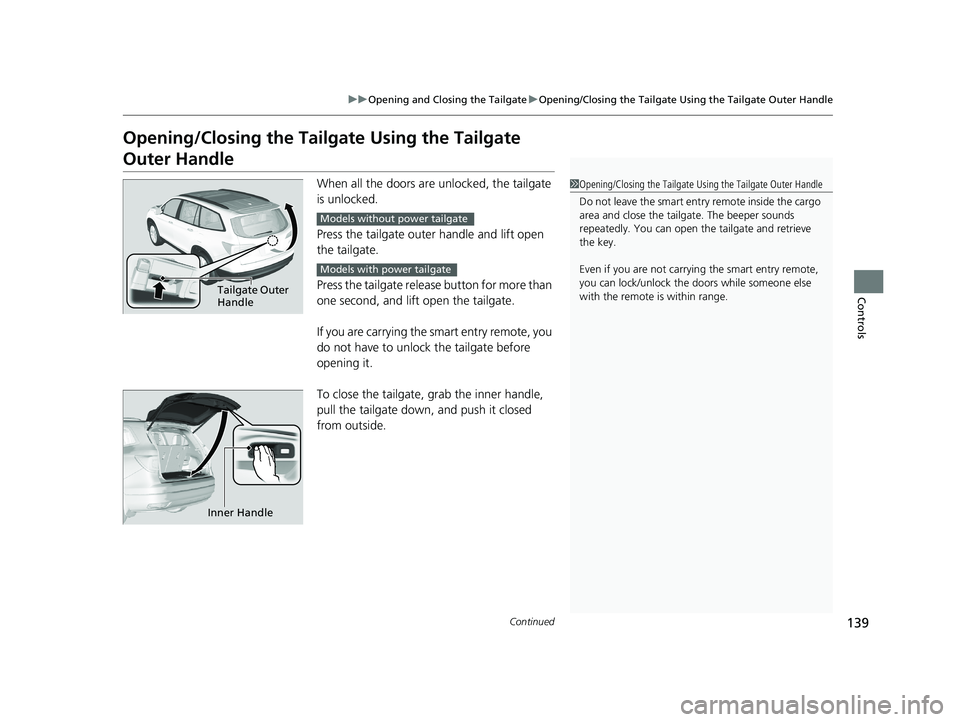
When all the doors are unlocked, the tailgate
is unlocked.
Press the tailgate outer handle and lift open
the tailgate.
Press the tailgate release button for more than
one second, and lift open the tailgate.
If you are carrying the smart entry remote, you
do not have to unlock the tailgate before
opening it.
To close the tailgate, grab the inner handle,
pull the tailgate down, and push it closed
from outside.1 Opening/Closing the Tailgate Using the Tailgate Outer Handle
Do not leave the smart entry remote inside the cargo
area and close the tailga te. The beeper sounds
repeatedly. You can open th e tailgate and retrieve
the key.
Even if you are not carrying the smart entry remote,
you can lock/unlock the doors while someone else
with the remote is within range.
Tailgate Outer
Handle
Models without power tailgate
Models with power tailgate
Inner Handle
18 PILOT-31TG76200.book 139 ページ 2018年3月30日 金曜日 午前11時51分
Page 143 of 695
141
uuOpening and Closing the Tailgate uOpening/Closing the Power Tailgate*
Continued
Controls
Opening/Closing the Power Tailgate*
The power tailgate can be operated by pr essing the power tailgate button on the
remote transmitter or driver's door, or pressing the button on the tailgate.
■The power tailgate can be opened when:
• The tailgate is fully closed.
• The transmission is in
(P.
• Press and hold the tailgate button on the remote transmitter for about one
second when the power mode is in VEHICLE OFF (LOCK).
u If you have changed the Keyless Open Mode setting to When Unlocked ,
you need to unlock the tailgate before yo u press the tailgate button to open it.
2Customized Features P. 367
■The power tailgate ca n be closed when:
• The tailgate is fully open.
• Press and hold the tailgate button on the remote transmitter for about one
second when the power mode is in VEHICLE OFF (LOCK).
1Opening/Closing the Power Tailgate*
NOTICE
Do not push or pull on the power tailgate when it is
being automatically opened or closed.
Forcibly opening or closing the power tailgate while
in operation can deform the tailgate frame.
When operating the power tailgate, make sure there is
enough space around your vehicle. People near the
tailgate may be seriously hurt if the tailgate hits or closes on
their heads. Be especially ca utious if children are around.
The power tailgate may not open or close under the
following conditions:
•The vehicle is park ed on a steep hill.•The vehicle is swayed in a strong wind.•The tailgate or the roof is covered with snow or ice.
If you close the power tail gate when all the doors are
locked, the power tailgate locks automatically.
3WARNING
Closing a power tailgate while anyone is in
the path of the tailgate can cause serious
injury.
Make sure everyone is clear before closing
the power tailgate.
* Not available on all models
18 PILOT-31TG76200.book 141 ページ 2018年3月30日 金曜日 午前11時51分
Page 144 of 695
uuOpening and Closing the Tailgate uOpening/Closing the Power Tailgate*
142
Controls
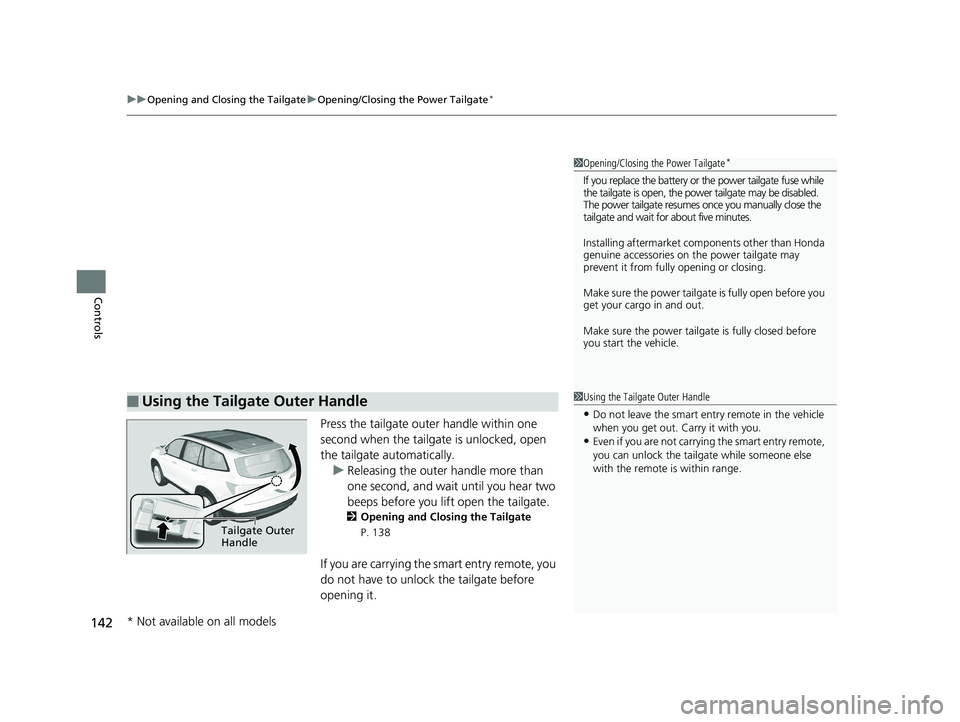
Press the tailgate outer handle within one
second when the tailgate is unlocked, open
the tailgate automatically.
u Releasing the outer handle more than
one second, and wait until you hear two
beeps before you lift open the tailgate.
2 Opening and Closing the Tailgate
P. 138
If you are carrying the smart entry remote, you
do not have to unlock the tailgate before
opening it.
■Using the Tailgate Outer Handle
1 Opening/Closing the Power Tailgate*
If you replace the battery or the power tailgate fuse while
the tailgate is open, the power tailgate may be disabled.
The power tailgate resumes once you manually close the
tailgate and wait for about five minutes.
Installing aftermarket com ponents other than Honda
genuine accessories on the power tailgate may
prevent it from fully opening or closing.
Make sure the power tailgate is fully open before you
get your cargo in and out.
Make sure the power tailgat e is fully closed before
you start the vehicle.
1 Using the Tailgate Outer Handle
•Do not leave the smart entry remote in the vehicle
when you get out. Carry it with you.
•Even if you are not carrying the smart entry remote,
you can unlock the tailga te while someone else
with the remote is within range.
Tailgate Outer
Handle
* Not available on all models
18 PILOT-31TG76200.book 142 ページ 2018年3月30日 金曜日 午前11時51分
Page 145 of 695
Continued143
uuOpening and Closing the Tailgate uOpening/Closing the Power Tailgate*
Controls
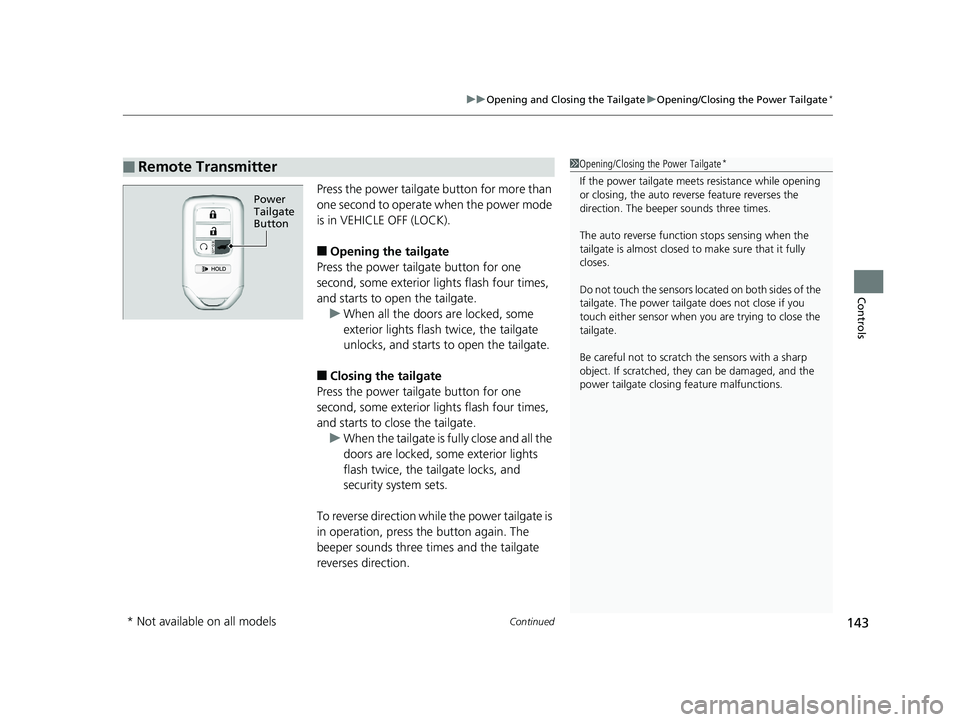
Press the power tailgate button for more than
one second to operate when the power mode
is in VEHICLE OFF (LOCK).
■Opening the tailgate
Press the power tailgate button for one
second, some exterior lights flash four times,
and starts to open the tailgate. u When all the doors are locked, some
exterior lights flash twice, the tailgate
unlocks, and starts to open the tailgate.
■Closing the tailgate
Press the power tailgate button for one
second, some exterior lights flash four times,
and starts to close the tailgate. u When the tailgate is fu lly close and all the
doors are locked, some exterior lights
flash twice, the tailgate locks, and
security system sets.
To reverse direction while the power tailgate is
in operation, press th e button again. The
beeper sounds three times and the tailgate
reverses direction.
■Remote Transmitter1 Opening/Closing the Power Tailgate*
If the power tailgate meet s resistance while opening
or closing, the auto reverse feature reverses the
direction. The beeper sounds three times.
The auto reverse function stops sensing when the
tailgate is almost closed to make sure that it fully
closes.
Do not touch the sensors located on both sides of the
tailgate. The power tailga te does not close if you
touch either sensor when you are trying to close the
tailgate.
Be careful not to scratch the sensors with a sharp
object. If scratched, they can be damaged, and the
power tailgate closing feature malfunctions.
Power
Tailgate
Button
* Not available on all models
18 PILOT-31TG76200.book 143 ページ 2018年3月30日 金曜日 午前11時51分
Page 150 of 695
148
uuSecurity System uSecurity System Alarm
Controls
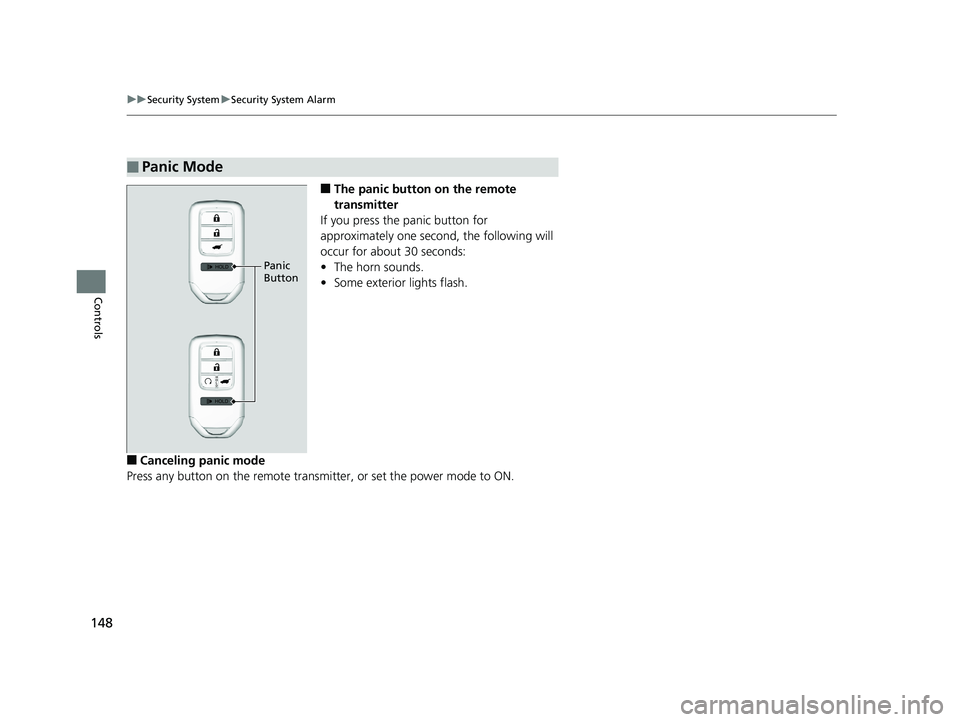
■The panic button on the remote
transmitter
If you press the panic button for
approximately one seco nd, the following will
occur for about 30 seconds:
• The horn sounds.
• Some exterior lights flash.
■Canceling panic mode
Press any button on the remote transmitter, or set the power mode to ON.
■Panic Mode
Panic
Button
18 PILOT-31TG76200.book 148 ページ 2018年3月30日 金曜日 午前11時51分