instrument panel HONDA PILOT 2018 (in English) Workshop Manual
[x] Cancel search | Manufacturer: HONDA, Model Year: 2018, Model line: PILOT, Model: HONDA PILOT 2018Pages: 695, PDF Size: 48.42 MB
Page 393 of 695
391
uuCustomized Features u
Continued
Features
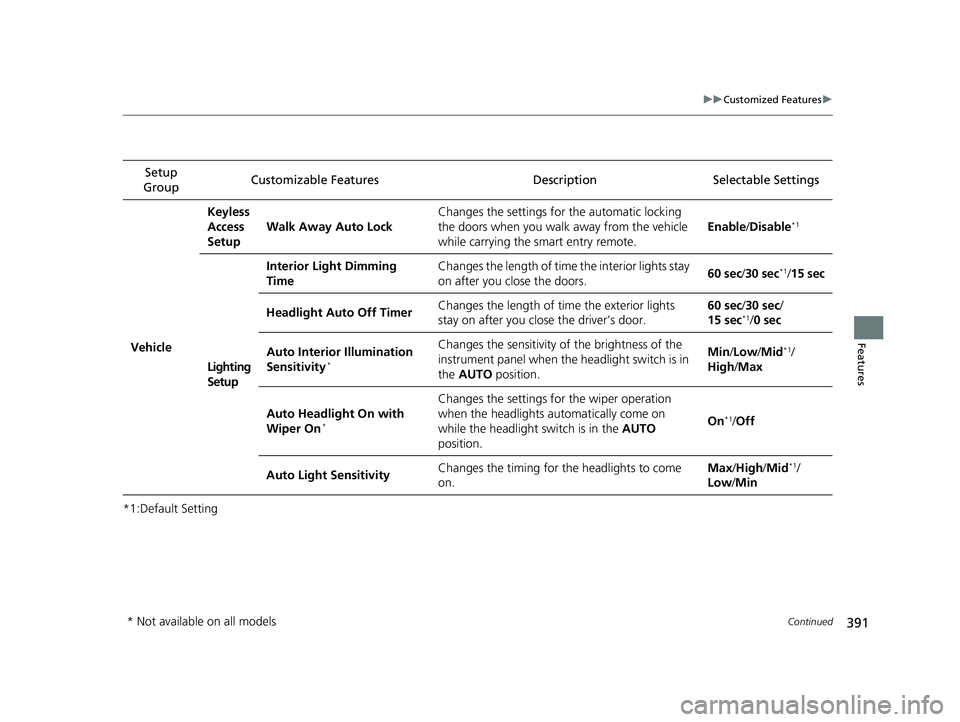
*1:Default SettingSetup
Group Customizable Features Description Selectable Settings
VehicleKeyless
Access
Setup
Walk Away Auto Lock Changes the settings for the automatic locking
the doors when you walk
away from the vehicle
while carrying the smart entry remote. Enable
/Disable
*1
Lighting
Setup Interior Light Dimming
Time
Changes the length of time the interior lights stay
on after you close the doors.
60 sec
/30 sec
*1/15 sec
Headlight Auto Off Timer Changes the length of time the exterior lights
stay on after you close the driver’s door. 60 sec/
30 sec/
15 sec
*1/ 0 sec
Auto Interior Illumination
Sensitivity
*
Changes the sensitivity of the brightness of the
instrument panel when the headlight switch is in
the AUTO position. Min
/Low /Mid*1/
High /Max
Auto Headlight On with
Wiper On
*
Changes the settings fo r the wiper operation
when the headlights automatically come on
while the headlight switch is in the AUTO
position. On
*1/
Off
Auto Light Sensitivity Changes the timing for the headlights to come
on. Max
/High /Mid
*1/
Low /Min
* Not available on all models
18 PILOT-31TG76200.book 391 ページ 2018年3月30日 金曜日 午前11時51分
Page 480 of 695
uuTowing a Trailer uTowing Preparation
478
Driving
Towing generally requires a variety of supplemental equipment.
To ensure the best quality, we recomme nd that you purchase Honda equipment
whenever possible.
■Trailer brakes
Recommended for any trailer with a total weight of 1,000 lbs (450 kg) or more:
There are two common types of trailer brake s: surge and electric. Surge brakes are
common for boat trailers, since the brakes will get wet.
If you choose electric brakes, be sure th ey are electronically actuated. Do not
attempt to attach trailer brakes to your ve hicle’s hydraulic system, as it will lower
braking effectiveness and create a potential hazard.
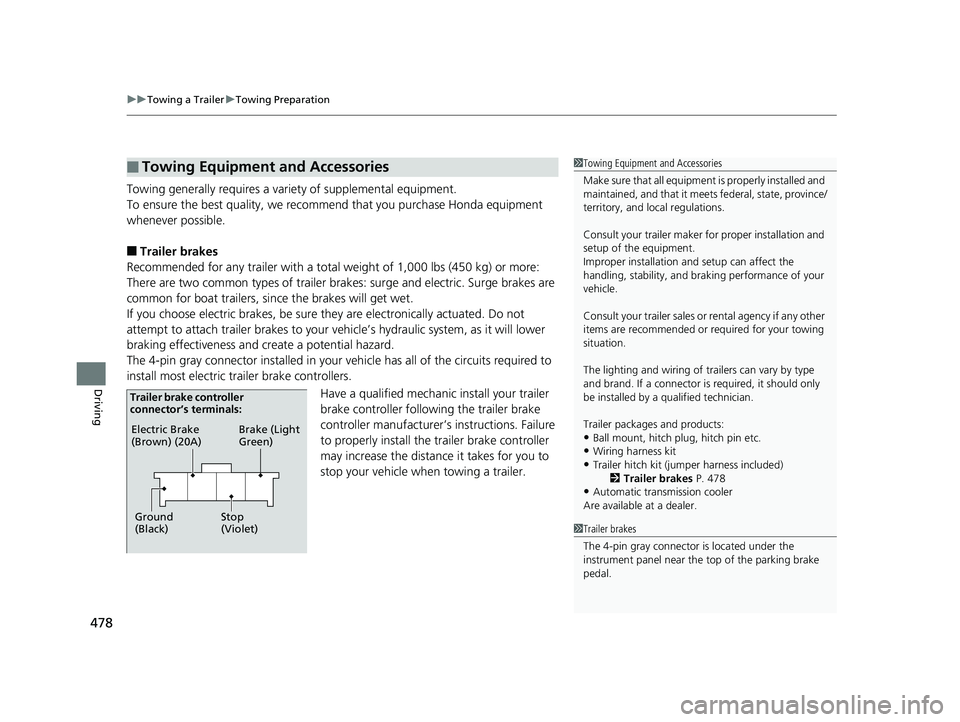
The 4-pin gray connector installed in your vehicle has all of the circuits required to
install most electric trailer brake controllers.
Have a qualified mechanic install your trailer
brake controller following the trailer brake
controller manufacturer’ s instructions. Failure
to properly install the trailer brake controller
may increase the distance it takes for you to
stop your vehicle when towing a trailer.
■Towing Equipment and Accessories1 Towing Equipment and Accessories
Make sure that all equipment is properly installed and
maintained, and that it meets federal, state, province/
territory, and lo cal regulations.
Consult your trai ler maker for prope r installation and
setup of the equipment.
Improper installation and setup can affect the
handling, stability, and br aking performance of your
vehicle.
Consult your traile r sales or rental agency if any other
items are recommended or required for your towing
situation.
The lighting and wiring of tra ilers can vary by type
and brand. If a connector is required, it should only
be installed by a qua lified technician.
Trailer packages and products:
•Ball mount, hitch plug, hitch pin etc.•Wiring harness kit
•Trailer hitch kit (jum per harness included)
2 Trailer brakes P. 478
•Automatic transmission cooler
Are available at a dealer.
1 Trailer brakes
The 4-pin gray connector is located under the
instrument panel near the top of the parking brake
pedal.
Electric Brake
(Brown) (20A)
Ground
(Black) Brake (Light
Green)
Stop
(Violet)
Trailer brake controller
connector’s terminals:
18 PILOT-31TG76200.book 478 ページ 2018年3月30日 金曜日 午前11時51分
Page 515 of 695
513
uuWhen Driving uCruise Control*
Continued
Driving
Cruise Control*
Maintains a constant vehicle speed without having to keep your foot on the
accelerator. Use cruise control on freeways or open road s where you can travel at a
constant speed with little ac celeration or deceleration.1Cruise Control*
It may not be possible to maintain a constant speed
when driving uphill or downhill.
When not using cruise control:
Turn off cruise control by pressing the CRUISE
button.
While in the ECON mode, it may take relatively more
time to accelerate to maintain the set speed.
Cruise control is not available when the Intelligent
Traction Management Snow, Mud
* or Sand* modes
are in operation.
3WARNING
Improper use of the cruise control can lead
to a crash.
Use the cruise control only when traveling
on open highways in good weather.
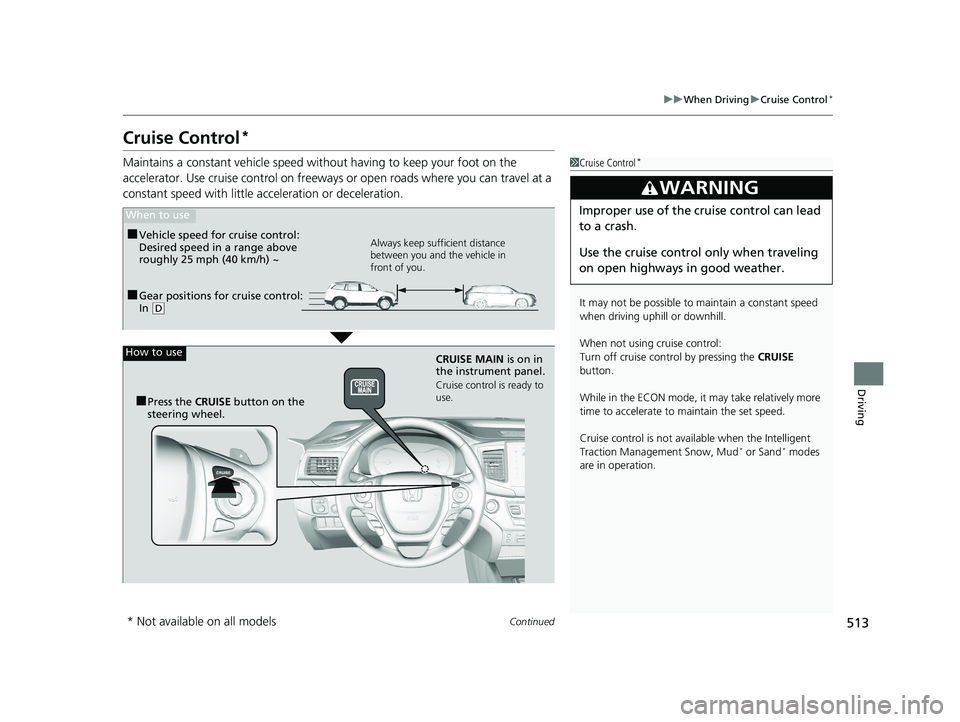
■Gear positions for cruise control:
In ( D
When to use
Always keep sufficient distance
between you and the vehicle in
front of you.■Vehicle speed for cruise control:
Desired speed in a range above
roughly 25 mph (40 km/h) ~
How to use
CRUISE MAIN is on in
the instrument panel.
Cruise control is ready to
use.
■Press the CRUISE button on the
steering wheel.
* Not available on all models
18 PILOT-31TG76200.book 513 ページ 2018年3月30日 金曜日 午前11時51分
Page 518 of 695
516
uuWhen Driving uFront Sensor Camera*
Driving
Front Sensor Camera*
The camera, used in systems such as LKAS, RDM, ACC, and CMBSTM, is designed to
detect an object that triggers any of the systems to operate its functions.
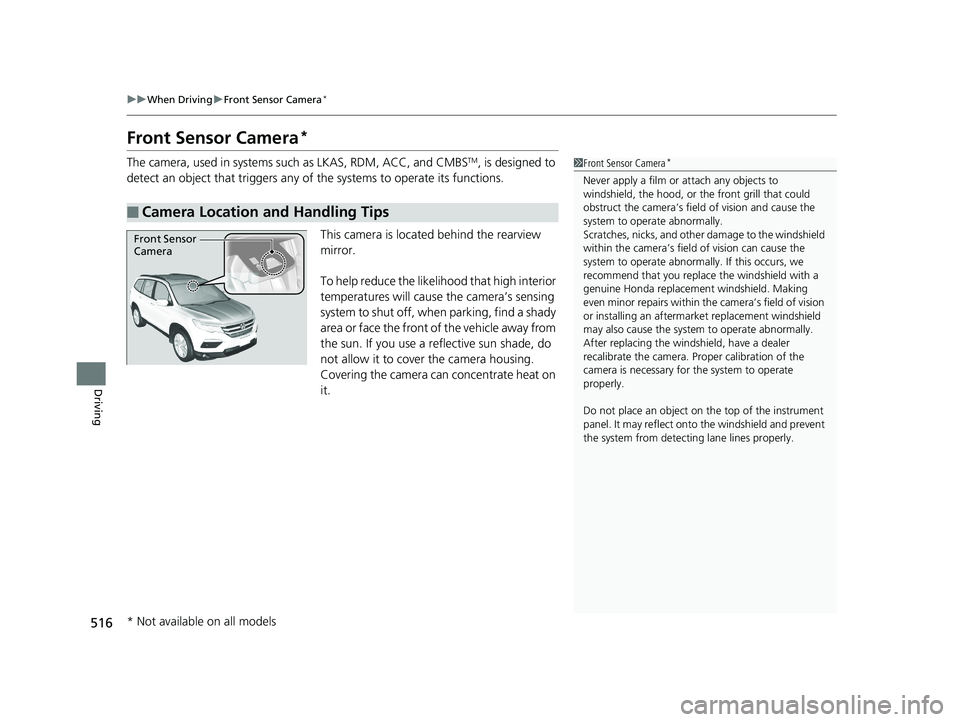
This camera is located behind the rearview
mirror.
To help reduce the likelihood that high interior
temperatures will cause the camera’s sensing
system to shut off, when parking, find a shady
area or face the front of the vehicle away from
the sun. If you use a re flective sun shade, do
not allow it to cover the camera housing.
Covering the camera can concentrate heat on
it.
■Camera Location and Handling Tips
1 Front Sensor Camera*
Never apply a film or attach any objects to
windshield, the hood, or the front grill that could
obstruct the camera’s fiel d of vision and cause the
system to operate abnormally.
Scratches, nicks, and othe r damage to the windshield
within the camera’s fiel d of vision can cause the
system to operate abnormall y. If this occurs, we
recommend that you replac e the windshield with a
genuine Honda replacem ent windshield. Making
even minor repairs within th e camera’s field of vision
or installing an aftermarket replacement windshield
may also cause the system to operate abnormally.
After replacing the winds hield, have a dealer
recalibrate the camera. Pr oper calibration of the
camera is necessary for the system to operate
properly.
Do not place an object on the top of the instrument
panel. It may reflect onto the windshield and prevent
the system from detecting lane lines properly.
Front Sensor
Camera
* Not available on all models
18 PILOT-31TG76200.book 516 ページ 2018年3月30日 金曜日 午前11時51分
Page 537 of 695
535
uuWhen Driving uLane Keeping Assist System (LKAS)*
Continued
Driving
Lane Keeping Assist System (LKAS)*
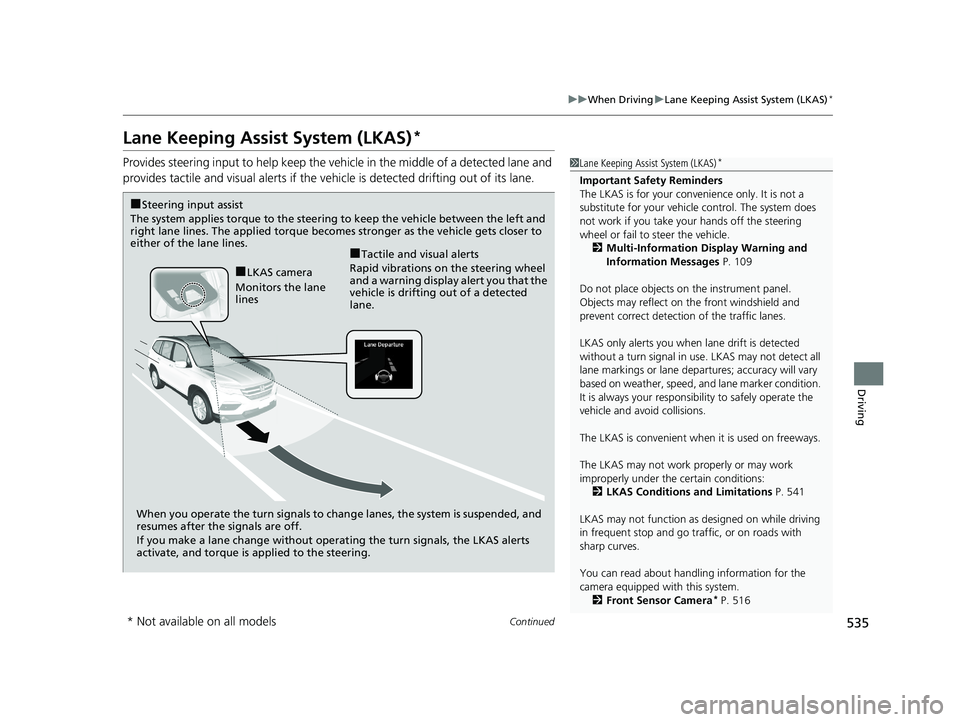
Provides steering input to help keep the vehicle in the middle of a detected lane and
provides tactile and visual al erts if the vehicle is detected drifting out of its lane.1Lane Keeping Assist System (LKAS)*
Important Safety Reminders
The LKAS is for your convenience only. It is not a
substitute for your vehicl e control. The system does
not work if you take y our hands off the steering
wheel or fail to steer the vehicle.
2 Multi-Information Display Warning and
Information Messages P. 109
Do not place objects on the instrument panel.
Objects may reflect on th e front windshield and
prevent correct detectio n of the traffic lanes.
LKAS only alerts you when lane drift is detected
without a turn signal in use. LKAS may not detect all
lane markings or lane departures; a ccuracy will vary
based on weather, speed, an d lane marker condition.
It is always your responsibility to safely operate the
vehicle and avoid collisions.
The LKAS is convenient when it is used on freeways.
The LKAS may not work properly or may work
improperly under the certain conditions: 2 LKAS Conditions and Limitations P. 541
LKAS may not function as designed on while driving
in frequent stop and go traf fic, or on roads with
sharp curves.
You can read about handling information for the
camera equipped with this system. 2 Front Sensor Camera
* P. 516
When you operate the turn signals to chan ge lanes, the system is suspended, and
resumes after the signals are off.
If you make a lane change without operat ing the turn signals, the LKAS alerts
activate, and torque is applied to the steering.
■LKAS camera
Monitors the lane
lines
■Tactile and visual alerts
Rapid vibrations on the steering wheel
and a warning display alert you that the
vehicle is drifting out of a detected
lane.
■Steering input assist
The system applies torque to the steering to keep the vehicle between the left and
right lane lines. The applied torque becomes stronger as the vehicle gets closer to
either of the lane lines.
* Not available on all models
18 PILOT-31TG76200.book 535 ページ 2018年3月30日 金曜日 午前11時51分
Page 564 of 695
uuBraking uCollision Mitigation Braking SystemTM (CMBSTM)*
562
Driving
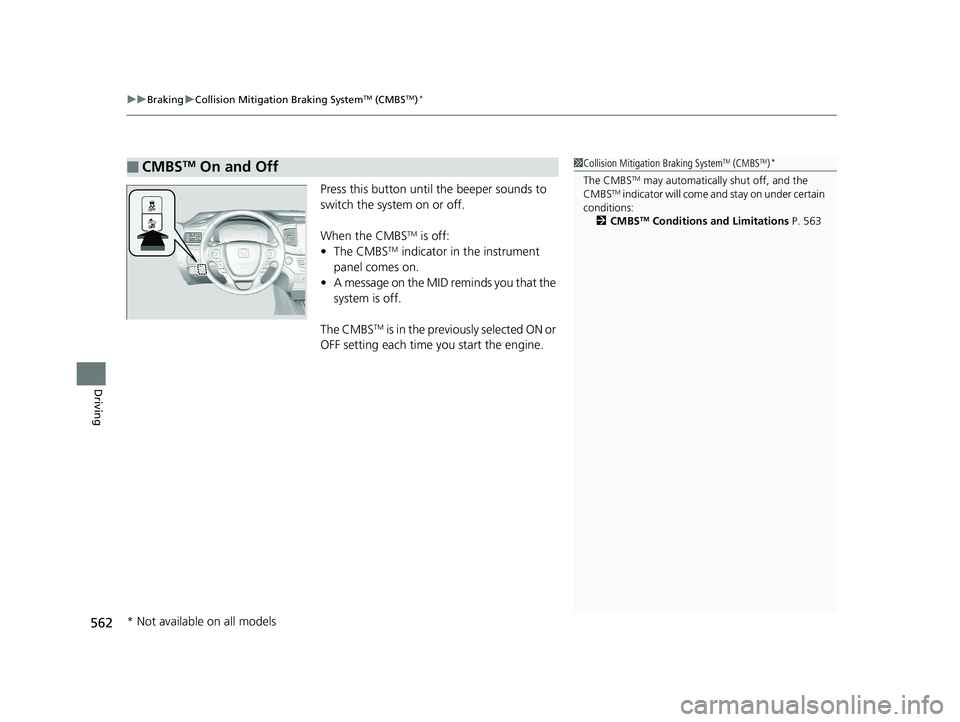
Press this button until the beeper sounds to
switch the system on or off.
When the CMBS
TM is off:
• The CMBSTM indicator in the instrument
panel comes on.
• A message on the MID reminds you that the
system is off.
The CMBS
TM is in the previously selected ON or
OFF setting each time you start the engine.
■CMBSTM On and Off1 Collision Mitigation Braking SystemTM (CMBSTM)*
The CMBSTM may automatically shut off, and the
CMBSTM indicator will come and stay on under certain
conditions:
2 CMBS
TM Conditions and Limitations P. 563
* Not available on all models
18 PILOT-31TG76200.book 562 ページ 2018年3月30日 金曜日 午前11時51分
Page 684 of 695
682
Index
USB Flash Drives ...................... 240, 294, 321
USB Port .................................................. 223
Voice Operation....................................... 267
Wallpaper Setup .............................. 231, 252
Wi-Fi Connection ..................................... 304
Audio/Information Screen ................ 229, 247
Authorized Manuals ................................. 677
Auto Door Locking/Unlocking ................. 134
Customize ............................................... 392
Auto High-Beam System .......................... 163
Auto high-beam system Indicator ............. 87
Auto Idle-stop ........................................... 505
OFF Button .............................................. 506
Auto Idle-stop Indicator (Green) ............... 90
Auto Idle-stop System Indicator (Amber) .. 90
Automatic Intermittent Wipers ............... 168
Automatic Lighting .................................. 160
Automatic Transmission ........................... 494
Creeping ................................................. 494
Fluid ........................................................ 601
Kickdown ................................................ 494
Operating the Shift Button....................... 499
Shift Lever Does Not Move....................... 648
Shift Lever Operation ............................... 496
Shifting............................................ 495, 497
Auxiliary Input Jack .................................. 224
Average Fuel Economy ............................. 116B
Back-Up Light........................................... 608
Battery ...................................................... 622
Charging System Indicator................. 79, 654
Jump Starting .......................................... 649
Maintenance (Checking the Battery) ........ 622
Belts (Seat) .................................................. 37
Beverage Holders ..................................... 198
Blind spot information (BSI) System ........ 546
Indicator.................................................... 94
Bluetooth® Audio............................. 243, 297
Bluetooth® HandsFreeLink ®............. 406, 431
Blu-ray/DVD Rear Entertainment System ..................................................... 338
Audio Sources for Front and Rear Seats ... 359
Auxiliary Console Panel ........................... 339
DVD or Blu-ray
TM Player Error Messages ... 366
Front Control Panel Operation ................. 352
HDMI
TM Port ............................................ 340
Initial Settings.......................................... 350
Operating the Blu-ray/DVD rear entertainment system ............................ 352
Operating the System .............................. 341
Overhead Screen ..................................... 341
Playable Disc Region Codes ..................... 364
Playable Disc Types .................................. 364
Playable Discs .......................................... 360
Playing a Disc in the Rear......................... 358
Playing a DVD/Blu-ray
TM........................... 342
Playing AM/FM Radio in the Rear............. 357 Playing an iPod and a USB Flash Drive in
the Rear ................................................ 358
Playing Audio.......................................... 356
Playing SiriusXM ® Radio in the Rear ........ 357
Rear DVD or Blu-ray
TM Menu ................... 343
Rear System Setup .................................. 353
Recommended Discs ............................... 365
Screen and Surround Settings ................. 346
Selecting the Audio S ource using Front
Control Panel ........................................ 352
Setting the DVD or Blu-ray
TM Menu ......... 354
System Controls .............................. 342, 356
USB Ports ................................................ 340
Wireless Headphones .............................. 338
Booster Seats (For Children) ...................... 73
Brake System ............................................ 555
Anti-lock Brake System (ABS) .................. 557
Brake Assist System................................. 558
Brake System Indicator .............................. 78
Fluid ....................................................... 602
Foot Brake .............................................. 556
Indicator ........................................... 78, 656
Parking Brake.......................................... 555
Brake System (Amber) Indicator ................................................... 78
Brake System (Red) Indicator ........................................... 78, 656
Brightness Control (Instrument Panel) ... 170
Bulb Replacement .................................... 603
Back-Up Light ......................................... 608
Brake Light and Turn Signal Lights .......... 607
18 PILOT-31TG76200.book 682 ページ 2018年3月30日 金曜日 午前11時51分
Page 688 of 695
686
Index
Fog Lights .................................................. 87
Gear Position ............................................. 80
Hazard Warning ........................................ 86
High Beam................................................. 86
Immobilizer System .................................... 87
Lane Keeping Assist System (LKAS) .... 93, 537
Lights On ................................................... 87
Low Fuel .................................................... 82
Low Oil Pressure ................................ 79, 654
Low Tire Pressure/TPMS ..................... 86, 657
M (sequential mode) Indicator/Sequential Mode Gear Selection ............................... 80
Malfunction Indicator Lamp ............... 79, 655
Parking Brake and Brak e System ........ 78, 656
Road Departure Mitigation (RDM) .............. 91
Seat Belt Reminder .............................. 38, 82
Security System Alarm ............................... 88
Supplemental Restraint System ............ 55, 83
System Message ........................................ 88
Transmission .............................................. 80
Turn Signal ................................................ 86
Vehicle Stability Assist ® (VSA ®) OFF .... 85, 544
Vehicle Stability Assist ® (VSA ®)
System ............................................. 84, 543
Information ............................................... 667
Information Button .................................. 114
Instant Fuel Economy ............................... 117
Instrument Panel ........................................ 77
Brightness Control ................................... 170
Intelligent Traction Management System ...................................................... 511 Intelligent VTM4 (i-VTM4)
....................... 550
Interior Lights ........................................... 191
Interior Rearview Mirror .......................... 175
iPhone ....................................................... 321
iPod ........................................... 237, 285, 321
J
Jack (Wheel Nut Wrench) ........................ 641
Jump Starting ........................................... 649
K
Key Number Tag ....................................... 122
Keyless Lockout Prevention ..................... 130
Keys ........................................................... 121
Lockout Prevention.................................. 130
Number Tag ............................................ 122
Rear Door Won’t Open............................ 133
Remote Transmitter ................................. 129
Types and Functions ................................ 121
Kickdown (Automatic Transmission) ....... 494
L
Lane Keeping Assist System (LKAS)......... 535
Indicator.................................................... 93
LaneWatch
TM............................................. 548
Language (HFL) ................................ 407, 433
LATCH (Child Seats) .............................. 63, 69
Lights ................................................. 159, 603
Automatic ............................................... 160 Bulb Replacement ................................... 603
Daytime Running Lights .......................... 166
High Beam Indicator ................................. 86
Interior.................................................... 191
Light Switches......................................... 159
Lights On Indicator.................................... 87
Turn Signals ............................................ 158
Load Limits ............................................... 471
Locking/Unlocking ................................... 121
Auto Door Locking/Unlocking ................. 134
Childproof Door Locks ............................ 133
From Inside ............................................. 131
From Outside .......................................... 124
Keys........................................................ 121
Using a Key............................................. 130
Lockout Prevention System ..................... 130
Low Battery Charge ................................. 654
Low Fuel Indicator ..................................... 82
Low Oil Pressure Indicator ................. 79, 654
Low Tire Pressure Indicator ....................... 86
Lower Anchors ..................................... 63, 69
Lubricant Specifications Chart ................ 669
Luggage (Maximum Load Limit) ............. 471
Lumbar Support ....................................... 177
18 PILOT-31TG76200.book 686 ページ 2018年3月30日 金曜日 午前11時51分
Page 691 of 695
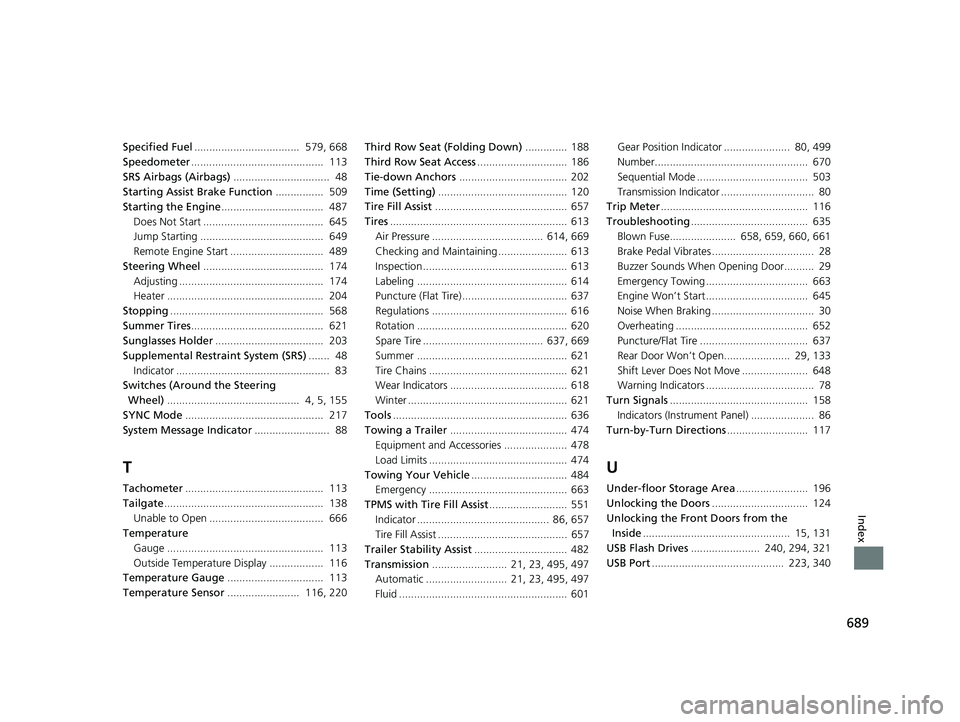
689
Index
Specified Fuel................................... 579, 668
Speedometer ............................................ 113
SRS Airbags (Airbags) ................................ 48
Starting Assist Brake Function ................ 509
Starting the Engine .................................. 487
Does Not Start ........................................ 645
Jump Starting ......................................... 649
Remote Engine Start ............................... 489
Steering Wheel ........................................ 174
Adjusting ................................................ 174
Heater .................................................... 204
Stopping ................................................... 568
Summer Tires ............................................ 621
Sunglasses Holder .................................... 203
Supplemental Restraint System (SRS) ....... 48
Indicator ................................................... 83
Switches (Around the Steering
Wheel) ............................................ 4, 5, 155
SYNC Mode .............................................. 217
System Message Indicator ......................... 88
T
Tachometer.............................................. 113
Tailgate ..................................................... 138
Unable to Open ...................................... 666
Temperature
Gauge .................................................... 113
Outside Temperature Display .................. 116
Temperature Gauge ................................ 113
Temperature Sensor ........................ 116, 220 Third Row Seat (Folding Down)
.............. 188
Third Row Seat Access .............................. 186
Tie-down Anchors .................................... 202
Time (Setting) ........................................... 120
Tire Fill Assist ............................................ 657
Tires ........................................................... 613
Air Pressure ..................................... 614, 669
Checking and Maintaining ....................... 613
Inspection ................................................ 613
Labeling .................................................. 614
Puncture (Flat Tire) ................................... 637
Regulations ............................................. 616
Rotation .................................................. 620
Spare Tire ........................................ 637, 669
Summer .................................................. 621
Tire Chains .............................................. 621
Wear Indicators ....................................... 618
Winter ..................................................... 621
Tools .......................................................... 636
Towing a Trailer ....................................... 474
Equipment and Accessories ..................... 478
Load Limits .............................................. 474
Towing Your Vehicle ................................ 484
Emergency .............................................. 663
TPMS with Tire Fill Assist .......................... 551
Indicator ............................................ 86, 657
Tire Fill Assist ........................................... 657
Trailer Stability Assist ............................... 482
Transmission ......................... 21, 23, 495, 497
Automatic ........................... 21, 23, 495, 497
Fluid ........................................................ 601 Gear Position Indicator ...................... 80, 499
Number................................................... 670
Sequential Mode ..................................... 503
Transmission Indicator ............................... 80
Trip Meter ................................................. 116
Troubleshooting ....................................... 635
Blown Fuse...................... 658, 659, 660, 661
Brake Pedal Vibrates .................................. 28
Buzzer Sounds When Opening Door.......... 29
Emergency Towing .................................. 663
Engine Won’t Start .................................. 645
Noise When Braking .................................. 30
Overheating ............................................ 652
Puncture/Flat Tire .................................... 637
Rear Door Won’t Open...................... 29, 133
Shift Lever Does Not Move ...................... 648
Warning Indicators .................................... 78
Turn Signals .............................................. 158
Indicators (Instrument Panel) ..................... 86
Turn-by-Turn Directions ........................... 117
U
Under-floor Storage Area ........................ 196
Unlocking the Doors ................................ 124
Unlocking the Fron t Doors from the
Inside ................................................. 15, 131
USB Flash Drives ....................... 240, 294, 321
USB Port ............................................ 223, 340
18 PILOT-31TG76200.book 689 ページ 2018年3月30日 金曜日 午前11時51分