lock HONDA PILOT 2018 (in English) Manual PDF
[x] Cancel search | Manufacturer: HONDA, Model Year: 2018, Model line: PILOT, Model: HONDA PILOT 2018Pages: 695, PDF Size: 48.42 MB
Page 181 of 695
Continued179
uuAdjusting the Seats uAdjusting the Seat Positions
Controls
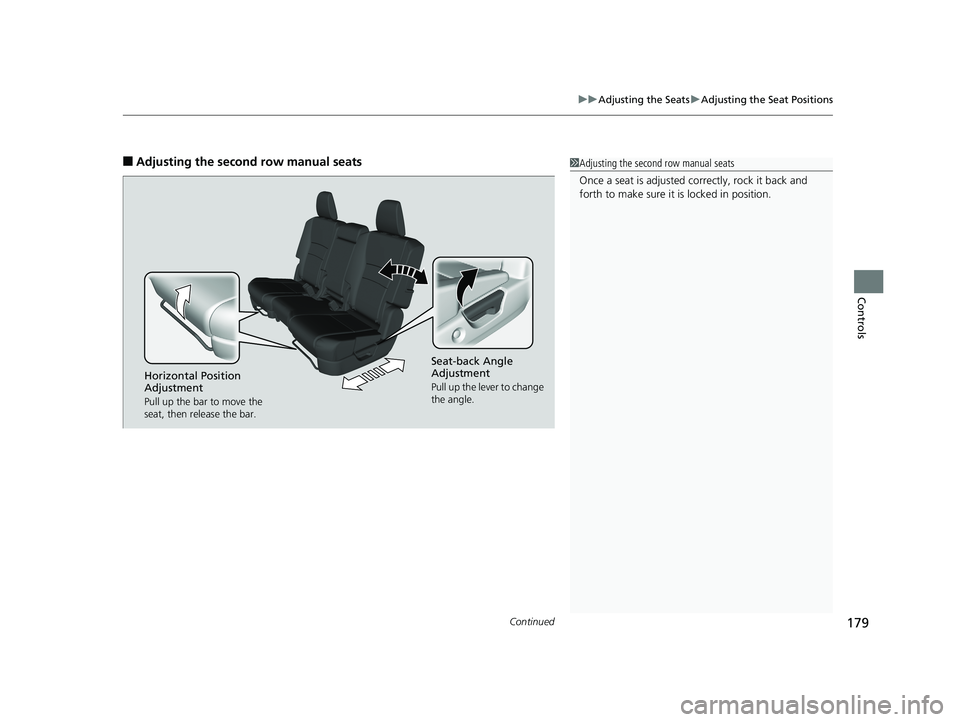
■Adjusting the second row manual seats1Adjusting the second row manual seats
Once a seat is adjusted co rrectly, rock it back and
forth to make sure it is locked in position.
Seat-back Angle
Adjustment
Pull up the lever to change
the angle.Horizontal Position
Adjustment
Pull up the bar to move the
seat, then release the bar.
18 PILOT-31TG76200.book 179 ページ 2018年3月30日 金曜日 午前11時51分
Page 182 of 695
uuAdjusting the Seats uAdjusting the Seat Positions
180
Controls
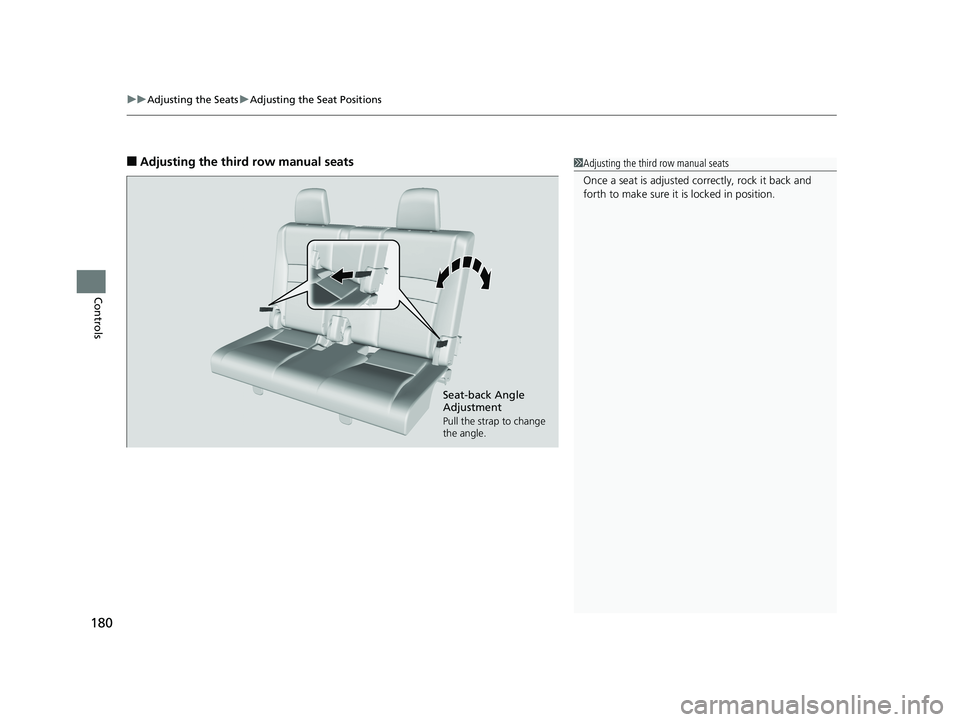
■Adjusting the third row manual seats1Adjusting the third row manual seats
Once a seat is adjusted co rrectly, rock it back and
forth to make sure it is locked in position.
Seat-back Angle
Adjustment
Pull the strap to change
the angle.
18 PILOT-31TG76200.book 180 ページ 2018年3月30日 金曜日 午前11時51分
Page 186 of 695
184
uuAdjusting the Seats uAdjusting the Seat Positions
Controls
To reinstall a head restraint:
Insert the legs back in place, then adjust the head restraint to an appropriate height
while pressing the release button(s). Pull up on the restraint to make sure it is locked
in position.
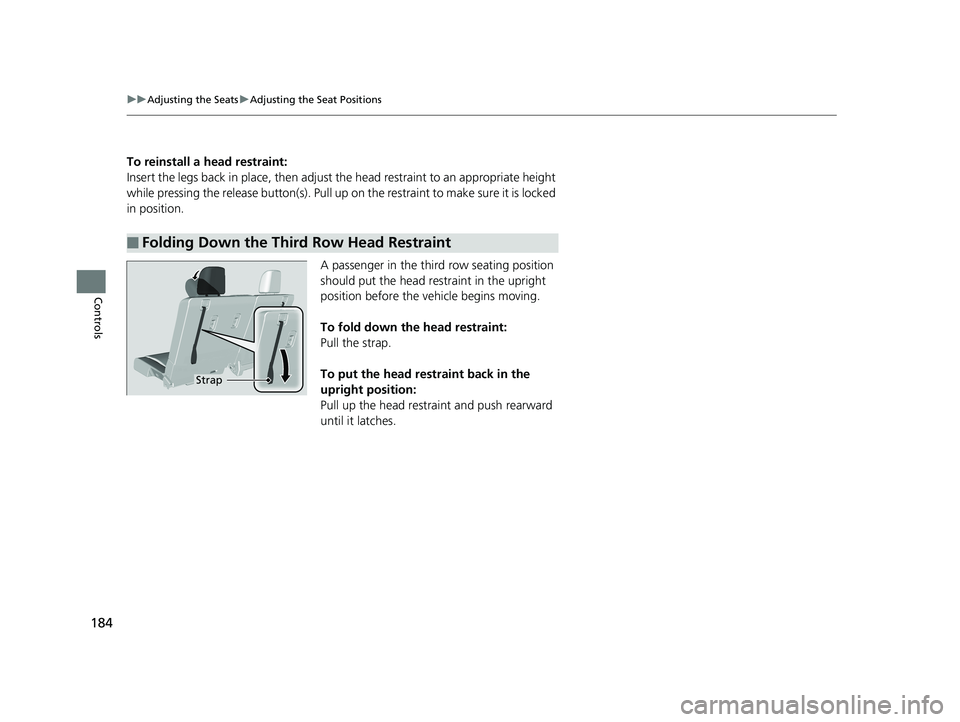
A passenger in the third row seating position
should put the head restraint in the upright
position before the vehicle begins moving.
To fold down the head restraint:
Pull the strap.
To put the head restraint back in the
upright position:
Pull up the head restra int and push rearward
until it latches.
■Folding Down the Third Row Head Restraint
Strap
18 PILOT-31TG76200.book 184 ページ 2018年3月30日 金曜日 午前11時51分
Page 189 of 695
Continued187
uuAdjusting the Seats uRear Seats
Controls
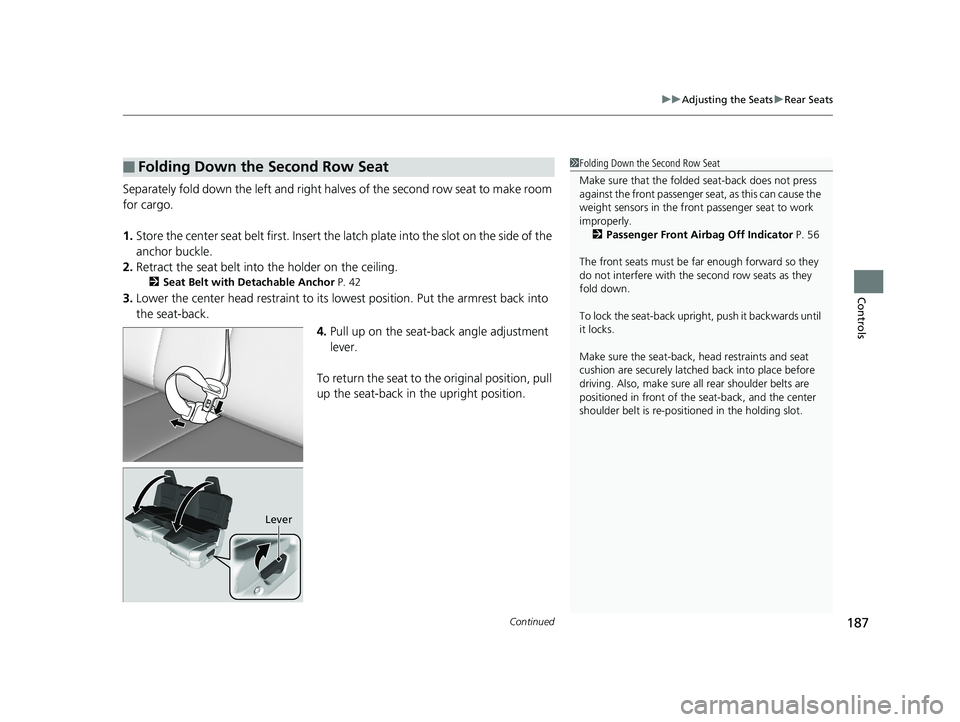
Separately fold down the left and right ha lves of the second row seat to make room
for cargo.
1. Store the center seat belt first. Insert the la tch plate into the slot on the side of the
anchor buckle.
2. Retract the seat belt into the holder on the ceiling.
2 Seat Belt with Detachable Anchor P. 42
3.Lower the center head restraint to its lo west position. Put the armrest back into
the seat-back.
4.Pull up on the seat-back angle adjustment
lever.
To return the seat to th e original position, pull
up the seat-back in the upright position.
■Folding Down the Second Row Seat1 Folding Down the Second Row Seat
Make sure that the folded seat-back does not press
against the front passenger seat, as this can cause the
weight sensors in the front passenger seat to work
improperly. 2 Passenger Front Airbag Off Indicator P. 56
The front seats must be far enough forward so they
do not interfere with the second row seats as they
fold down.
To lock the seat-back upri ght, push it backwards until
it locks.
Make sure the seat-back, head restraints and seat
cushion are securely latche d back into place before
driving. Also, make sure all rear shoulder belts are
positioned in front of the seat-back, and the center
shoulder belt is re-posit ioned in the holding slot.
Lever
18 PILOT-31TG76200.book 187 ページ 2018年3月30日 金曜日 午前11時51分
Page 193 of 695
191Continued
Controls
Interior Lights/Interior Convenience Items
Interior Lights
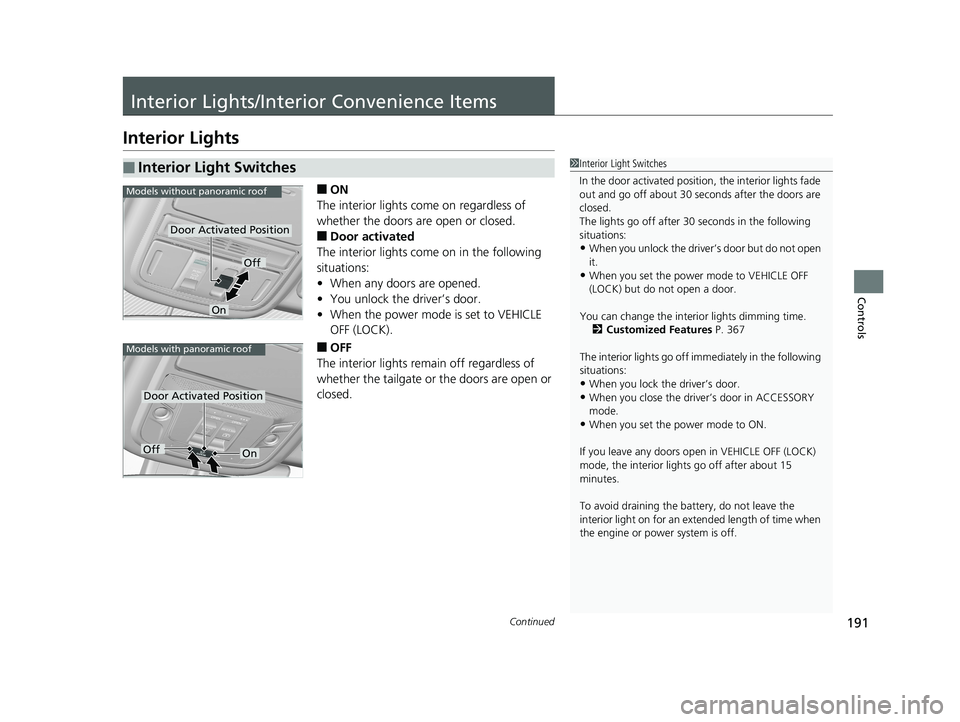
■ON
The interior lights come on regardless of
whether the doors are open or closed.
■Door activated
The interior lights come on in the following
situations:
• When any doors are opened.
• You unlock the driver’s door.
• When the power mode is set to VEHICLE
OFF (LOCK).
■OFF
The interior lights remain off regardless of
whether the tailgate or the doors are open or
closed.
■Interior Light Switches1 Interior Light Switches
In the door activated position, the interior lights fade
out and go off about 30 se conds after the doors are
closed.
The lights go off after 30 seconds in the following
situations:
•When you unlock the driver’s door but do not open
it.
•When you set the power mode to VEHICLE OFF
(LOCK) but do not open a door.
You can change the interi or lights dimming time.
2 Customized Features P. 367
The interior lights go off i mmediately in the following
situations:
•When you lock the driver’s door.
•When you close the driver’s door in ACCESSORY
mode.
•When you set the power mode to ON.
If you leave any doors open in VEHICLE OFF (LOCK)
mode, the interior light s go off after about 15
minutes.
To avoid draining the ba ttery, do not leave the
interior light on for an extended length of time when
the engine or power system is off.
Models without panoramic roof
Door Activated Position
Off
On
Models with panoramic roof
Door Activated Position
OffOn
18 PILOT-31TG76200.book 191 ページ 2018年3月30日 金曜日 午前11時51分
Page 197 of 695
195
uuInterior Lights/Interior Convenience Items uInterior Convenience Items
Continued
Controls
Interior Convenience Items
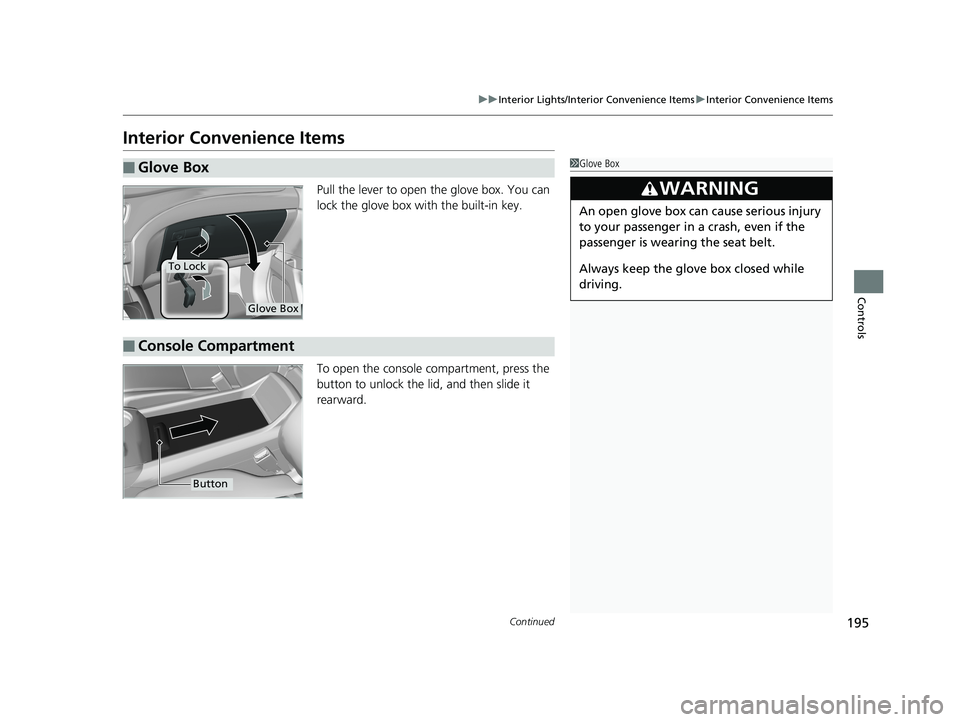
Pull the lever to open the glove box. You can
lock the glove box with the built-in key.
To open the console co mpartment, press the
button to unlock the lid, and then slide it
rearward.
■Glove Box1 Glove Box
3WARNING
An open glove box can cause serious injury
to your passenger in a crash, even if the
passenger is wearing the seat belt.
Always keep the glove box closed while
driving.
Glove Box
To Lock
■Console Compartment
Button
18 PILOT-31TG76200.book 195 ページ 2018年3月30日 金曜日 午前11時51分
Page 203 of 695
Continued201
uuInterior Lights/Interior Convenience Items uInterior Convenience Items
Controls
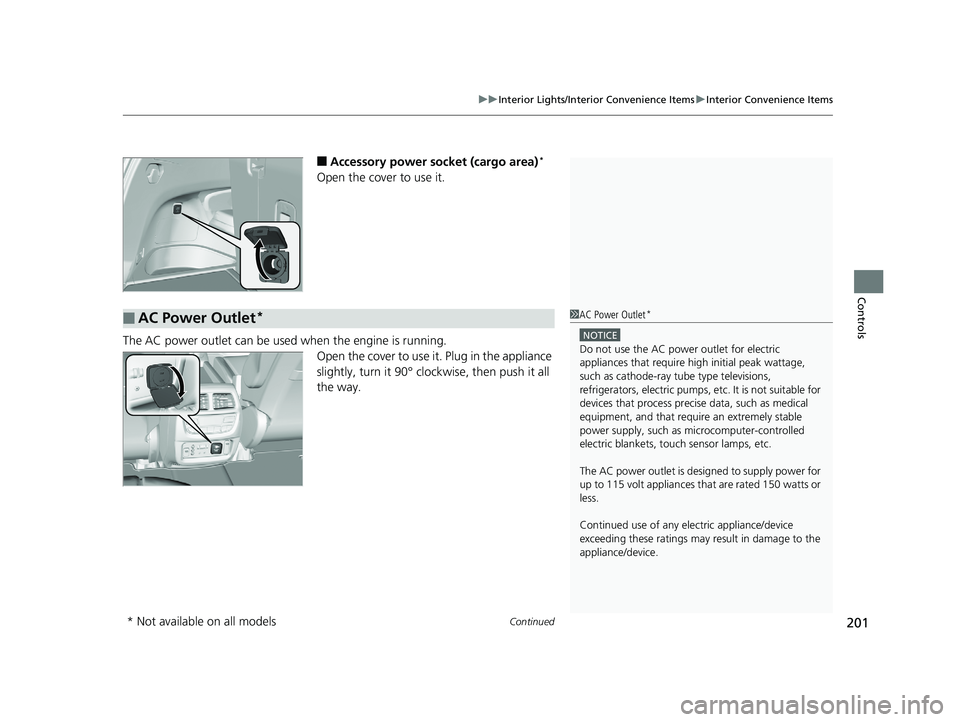
■Accessory power socket (cargo area)*
Open the cover to use it.
The AC power outlet can be used when the engine is running.
Open the cover to use it. Plug in the appliance
slightly, turn it 90° clockwise, then push it all
the way.
■AC Power Outlet*1AC Power Outlet*
NOTICE
Do not use the AC power outlet for electric
appliances that require hi gh initial peak wattage,
such as cathode-ray tube type televisions,
refrigerators, electric pumps, etc. It is not suitable for
devices that process precis e data, such as medical
equipment, and that require an extremely stable
power supply, such as microcomputer-controlled
electric blankets, touc h sensor lamps, etc.
The AC power outlet is desi gned to supply power for
up to 115 volt appliances that are rated 150 watts or
less.
Continued use of any elec tric appliance/device
exceeding these ratings may result in damage to the
appliance/device.
* Not available on all models
18 PILOT-31TG76200.book 201 ページ 2018年3月30日 金曜日 午前11時51分
Page 220 of 695
218
uuClimate Control System*uRear Climate Control System
Controls
Rear Climate Control System
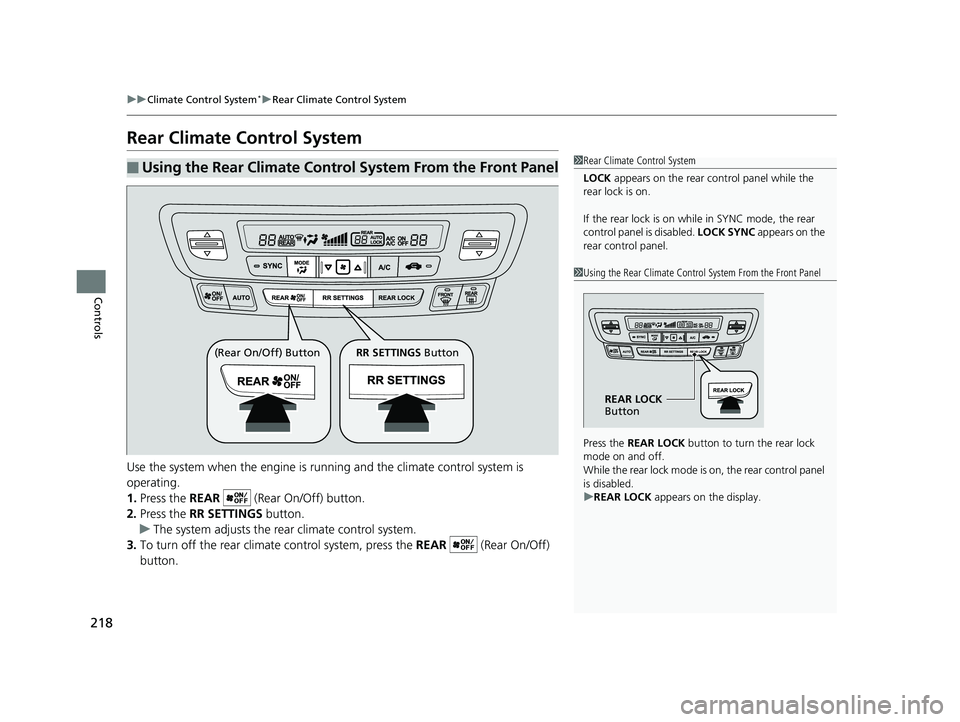
Use the system when the engine is running and the climate control system is
operating.
1. Press the REAR (Rear On/Off) button.
2. Press the RR SETTINGS button.
u The system adjusts the rear climate control system.
3. To turn off the rear climate control system, press the REAR (Rear On/Off)
button.
■Using the Rear Climate Control System From the Front Panel1 Rear Climate Control System
LOCK appears on the rear control panel while the
rear lock is on.
If the rear lock is on while in SYNC mode, the rear
control panel is disabled. LOCK SYNC appears on the
rear control panel.
1 Using the Rear Climate Control System From the Front Panel
Press the REAR LOCK button to turn the rear lock
mode on and off.
While the rear lock mode is on, the rear control panel
is disabled.
u REAR LOCK appears on the display.
REAR LOCK
Button
(Rear On/Off) Button RR SETTINGS Button
18 PILOT-31TG76200.book 218 ページ 2018年3月30日 金曜日 午前11時51分
Page 221 of 695
219
uuClimate Control System*uRear Climate Control System
Controls
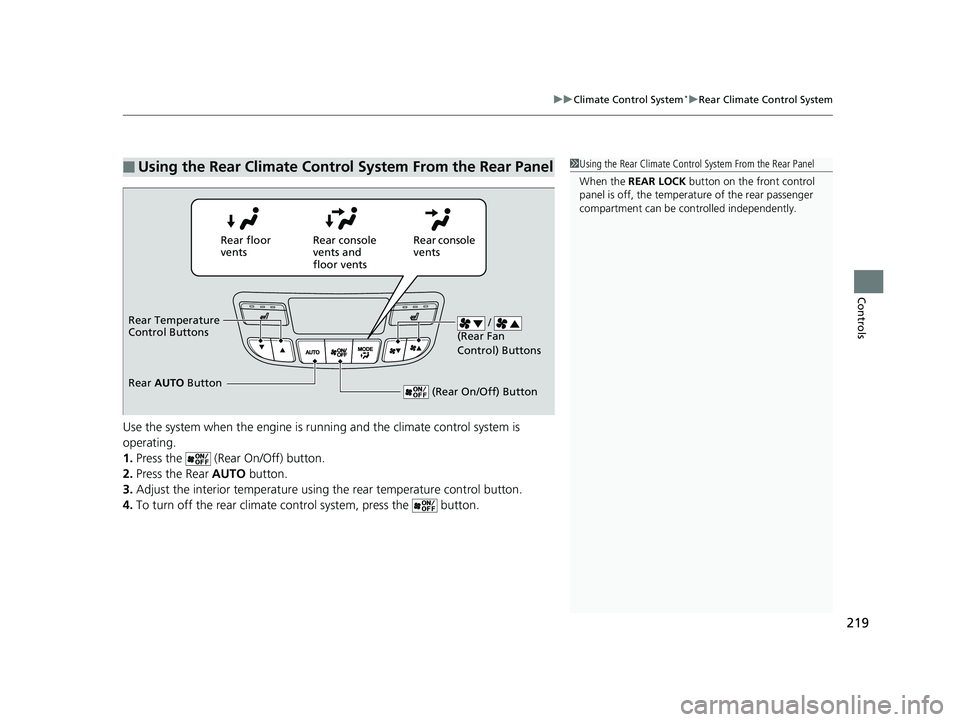
Use the system when the engine is runni ng and the climate control system is
operating.
1. Press the (Rear On/Off) button.
2. Press the Rear AUTO button.
3. Adjust the interior temperature usi ng the rear temperature control button.
4. To turn off the rear climate co ntrol system, press the button.
■Using the Rear Climate Control System From the Rear Panel1Using the Rear Climate Control System From the Rear Panel
When the REAR LOCK button on the front control
panel is off, the temperat ure of the rear passenger
compartment can be cont rolled independently.
Rear floor
ventsRear console
vents and
floor vents Rear console
vents
/
(Rear Fan
Control) Buttons
(Rear On/Off) Button
Rear Temperature
Control Buttons
Rear AUTO Button
18 PILOT-31TG76200.book 219 ページ 2018年3月30日 金曜日 午前11時51分
Page 230 of 695
228
Features
Audio System Basic Operation
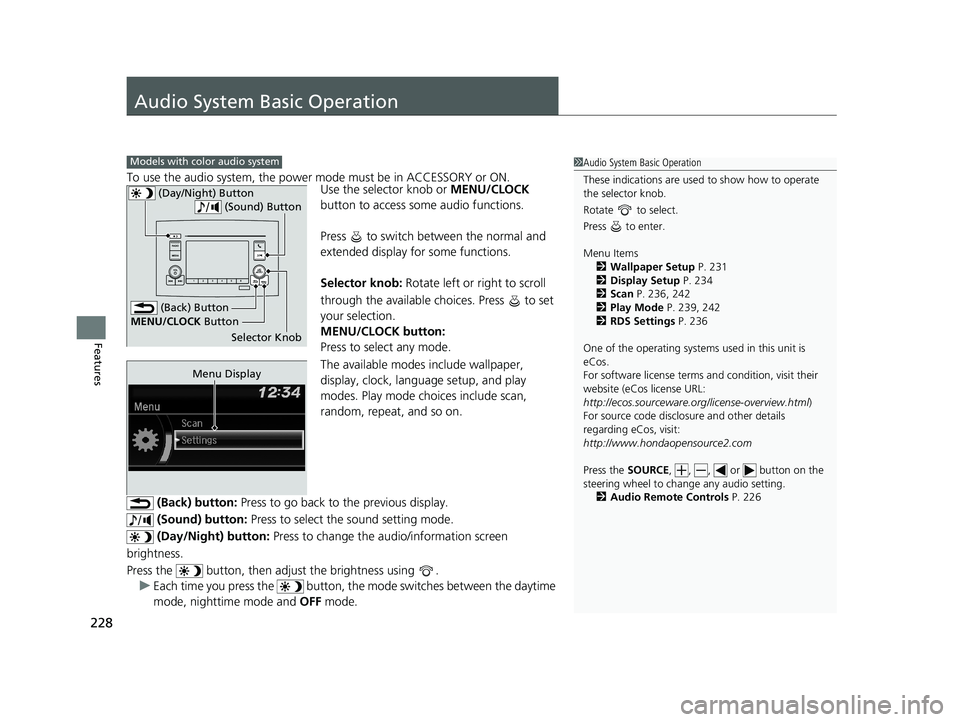
To use the audio system, the power mode must be in ACCESSORY or ON.
Use the selector knob or MENU/CLOCK
button to access some audio functions.
Press to switch between the normal and
extended display fo r some functions.
Selector knob: Rotate left or right to scroll
through the available choices. Press to set
your selection.
MENU/CLOCK button:
Press to select any mode.
The available modes include wallpaper,
display, clock, langu age setup, and play
modes. Play mode choices include scan,
random, repeat, and so on.
(Back) button: Press to go back to the previous display.
(Sound) button: Press to select the sound setting mode.
(Day/Night) button: Press to change the audio/information screen
brightness.
Press the button, then adjust the brightness using . u Each time you press the button, th e mode switches between the daytime
mode, nighttime mode and OFF mode.
Models with color audio system1Audio System Basic Operation
These indications are used to show how to operate
the selector knob.
Rotate to select.
Press to enter.
Menu Items 2 Wallpaper Setup P. 231
2 Display Setup P. 234
2 Scan P. 236, 242
2 Play Mode P. 239, 242
2 RDS Settings P. 236
One of the operating system s used in this unit is
eCos.
For software license terms and condition, visit their
website (eCos license URL:
http://ecos.sourceware.org/license-overview.html )
For source code disclo sure and other details
regarding eCos, visit:
http://www.hondaopensource2.com
Press the SOURCE, , , or button on the
steering wheel to cha nge any audio setting.
2 Audio Remote Controls P. 226
(Back) Button
Selector Knob
MENU/CLOCK
Button
(Day/Night) Button
(Sound) Button
Menu Display
18 PILOT-31TG76200.book 228 ページ 2018年3月30日 金曜日 午前11時51分