wiper blades HONDA PILOT 2018 Owner's Manual (in English)
[x] Cancel search | Manufacturer: HONDA, Model Year: 2018, Model line: PILOT, Model: HONDA PILOT 2018Pages: 695, PDF Size: 48.42 MB
Page 4 of 695
Contents
This owner’s manual should be considered a permanent part of the
vehicle and should remain with the vehicle when it is sold.
This owner’s manual covers all models of your vehicle. You may find
descriptions of equipment and features that are not on your
particular model.
Images throughout this owner’s manu al (including the front cover)
represent features and equipment that are available on some, but
not all, models. Your particular mo del may not have some of these
features.
This owner’s manual is for vehicles sold in the United States and
Canada.
The information and specifications in cluded in this publication were
in effect at the time of approval for printing. Honda Motor Co., Ltd.
reserves the right, however, to discontinue or change specifications
or design at any time without notice and without incurring any
obligation.2 Safe Driving P. 31
For Safe Driving P. 32 Seat Belts P. 37 Airbags P. 45
2Instrument Panel P. 77
Indicators P. 78 Gauges and Multi-Information Display (MID) P. 113
2Controls P. 119
Clock P. 120 Locking and Unlocking the Doors P. 121
Moonroof* P. 151 Panoramic Roof* P. 152
Adjusting the Seats P. 177 Interior Ligh ts/Interior Convenience Items P. 191
2Features P. 221
Audio System P. 222
General Information on the Audio System P. 318
HomeLink ® Universal Transceiver
* P. 403 Bluetooth ® HandsFreeLink ® P. 406
2 Driving P. 467
Before Driving P. 468 Towing a Trailer P. 474
Parking Your Vehicle P. 568Multi-view rear camera P. 578
2Maintenance P. 583
Before Performing Maintenance P. 584 Maintenance MinderTM P. 587
Checking and Maintaining Wiper Blades P. 609
Remote Control and Wireless Headphone Care
* P. 625
Accessories and Modifications P. 634
2 Handling the Unexpected P. 635
Tools P. 636 If a Tire Goes Flat P. 637
Overheating P. 652 Indicator, Coming On/Blinking P. 654
When You Cannot Unlock the Fuel Fill Door P. 664
2 Information P. 667
Specifications P. 668 Identification Numbers P. 670
Emissions Testing P. 673 Warranty Coverages P. 675
18 PILOT-31TG76200.book 2 ページ 2018年3月30日 金曜日 午前11時51分
Page 28 of 695
26
Quick Reference Guide
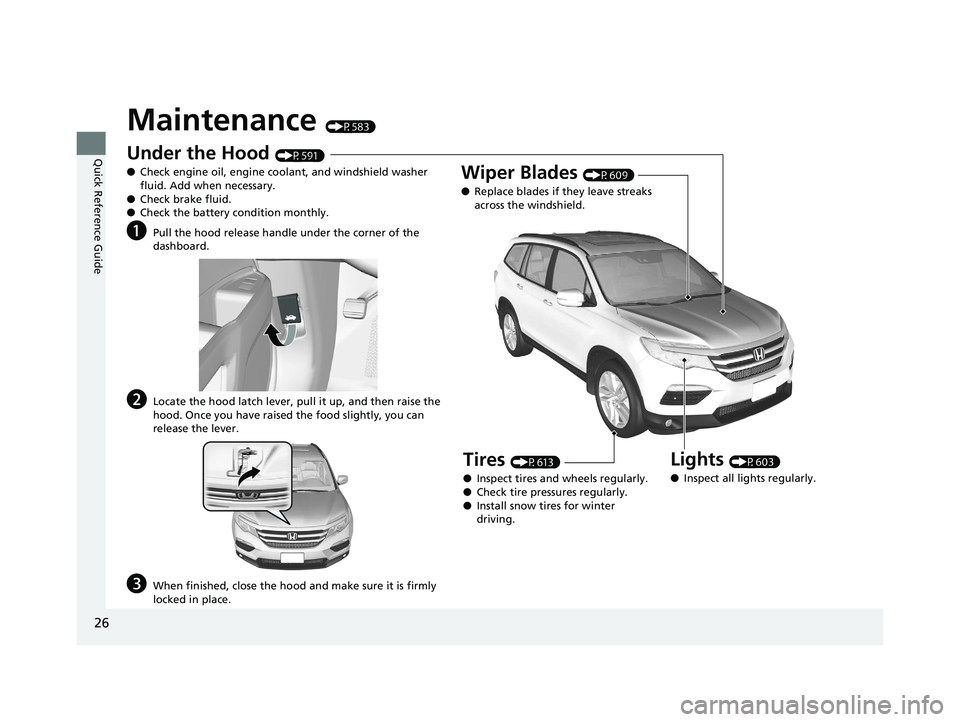
Maintenance (P583)
Under the Hood (P591)
● Check engine oil, engine coolant, and windshield washer
fluid. Add when necessary.
● Check brake fluid.
● Check the battery condition monthly.
aPull the hood release handle under the corner of the
dashboard.
bLocate the hood latch lever, pull it up, and then raise the
hood. Once you have raised the food slightly, you can
release the lever.
cWhen finished, close the hood and make sure it is firmly
locked in place.
Lights (P603)
● Inspect all lights regularly.
Wiper Blades (P609)
● Replace blades if they leave streaks
across the windshield.
Tires (P613)
● Inspect tires and wheels regularly.
● Check tire pressures regularly.
● Install snow tires for winter
driving.
18 PILOT-31TG76200.book 26 ページ 2018年3月30日 金曜日 午前11時51分
Page 169 of 695
167
uuOperating the Switches Around the Steering Wheel uWipers and Washers
Continued
Controls
Wipers and Washers
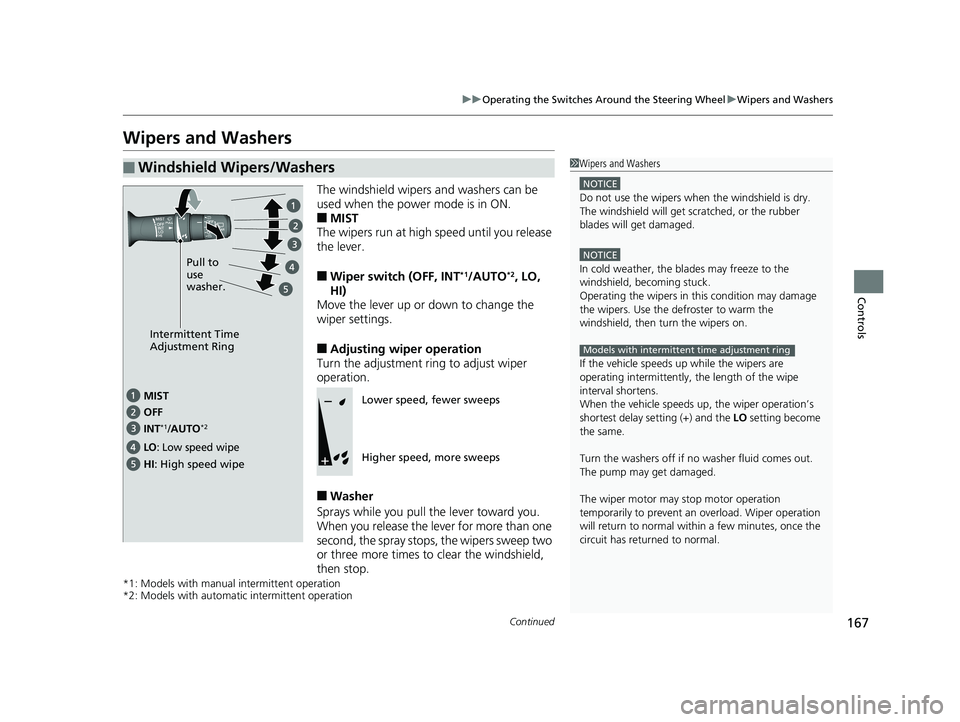
The windshield wipers and washers can be
used when the power mode is in ON.
■MIST
The wipers run at high speed until you release
the lever.
■Wiper switch (OFF, INT*1/AUTO*2, LO,
HI)
Move the lever up or down to change the
wiper settings.
■Adjusting wiper operation
Turn the adjustment ring to adjust wiper
operation.
■Washer
Sprays while you pull the lever toward you.
When you release the le ver for more than one
second, the spray stops, the wipers sweep two
or three more times to clear the windshield,
then stop.
*1: Models with manual intermittent operation
*2: Models with automati c intermittent operation
■Windshield Wipers/Washers1Wipers and Washers
NOTICE
Do not use the wipers when the windshield is dry.
The windshield will get sc ratched, or the rubber
blades will get damaged.
NOTICE
In cold weather, the blades may freeze to the
windshield, becoming stuck.
Operating the wipers in th is condition may damage
the wipers. Use the defroster to warm the
windshield, then turn the wipers on.
If the vehicle speeds up while the wipers are
operating intermittently, the length of the wipe
interval shortens.
When the vehicle speeds up, the wiper operation’s
shortest delay se tting (+) and the LO setting become
the same.
Turn the washers off if no washer fluid comes out.
The pump may get damaged.
The wiper motor may stop motor operation
temporarily to prevent an overload. Wiper operation
will return to normal within a few minutes, once the
circuit has returned to normal.
Models with intermittent time adjustment ring
Intermittent Time
Adjustment Ring
MIST
INT
*1/AUTO*2OFF
LO: Low speed wipe
HI: High speed wipe Pull to
use
washer.
Lower speed, fewer sweeps
Higher speed, more sweeps
18 PILOT-31TG76200.book 167 ページ 2018年3月30日 金曜日 午前11時51分
Page 585 of 695
583
Maintenance
This chapter discusses basic maintenance.
Before Performing MaintenanceInspection and Maintenance ............ 584
Safety When Performing Maintenance ..585
Parts and Fluids Used in Maintenance Service ........................................... 586
Maintenance Minder
TM..................... 587
Maintenance Under the Hood Maintenance Items Under the Hood .. 591
Opening the Hood ........................... 592
Engine Compartment Cover ............. 593
Recommended Engine Oil ................ 594
Oil Check ......................................... 595
Adding Engine Oil ............................ 596
Changing the Engine Oil and Oil Filter ...597 Engine Coolant ................................ 599
Transmission Fluid ............................ 601
Brake Fluid ....................................... 602
Refilling Window Washer Fluid......... 602
Replacing Light Bulbs ....................... 603Checking and Maintaining Wiper Blades... 609Checking and Maintaining Tires
Checking Tires ................................. 613
Tire and Loading Information Label .. 614
Tire Labeling .................................... 614
DOT Tire Quality Grading (U.S. Vehicles).. 616Wear Indicators................................ 618
Tire Service Life ................................ 618 Tire and Wheel Replacement ........... 619
Tire Rotation .................................... 620
Winter Tires ..................................... 621
Battery ............................................... 622
Remote Transmitter Care ................. 624
Remote Control and Wireless Headphone Care
*........................... 625Heating and Cooling System*/Climate
Control System* Maintenance............. 627Cleaning Interior Care .................................... 629
Exterior Care.................................... 631
Accessories and Modifications ........ 634
* Not available on all models
18 PILOT-31TG76200.book 583 ページ 2018年3月30日 金曜日 午前11時51分
Page 586 of 695
584
Maintenance
Before Performing Maintenance
Inspection and Maintenance
For your safety, perform all listed inspections and maintenance to keep your vehicle
in good condition. If you become aware of any abnormality (noise, smell, insufficient
brake fluid, oil residue on the ground, etc.), have your vehicle inspected by a dealer.
(Note, however, that service at a dealer is not mandatory to keep your warranties in
effect.)
■Daily inspections
Perform inspections before long distance trips, when washing the vehicle, or when
refueling.
■Periodic inspections
• Check the automatic transmi ssion fluid level monthly.
2Automatic Transmission Fluid P. 601
•Check the brake fluid level monthly.
2 Checking the Brake Fluid P. 602
•Check the tire pressure monthly. Examin e the tread for wear and foreign objects.
2Checking and Maintaining Tires P. 613
•Check the operation of the exterior lights monthly.
2 Replacing Light Bulbs P. 603
•Check the condition of the wiper bl ades at least every six months.
2Checking and Maintaining Wiper Blades P. 609
■Types of Inspection and Maintenance
1Inspection and Maintenance
Maintenance, replacement, or repair of
emissions control devices and systems may be
done by any automotive repair establishment or
individuals using parts that are “certified” to
EPA standards.
According to state and fede ral regulations, failure to
perform maintenance on the maintenance main
items marked with # will not void your emissions
warranties. However, all ma intenance services should
be performed in accordan ce with the intervals
indicated by the multi-information display (MID).
2 Maintenance Service Items P. 589
If you want to perform complex maintenance tasks
that require more skills a nd tools, you can purchase a
subscription to the Service Express website at
www.techinfo.honda.com .
2 Authorized Manuals P. 677
If you want to perform ma intenance yourself, make
sure that you have the necessary tools and skills first.
After performing ma intenance, update the records in
the separate maintenance booklet.
U.S. models
Automatic transmission models with shift lever
All models
18 PILOT-31TG76200.book 584 ページ 2018年3月30日 金曜日 午前11時51分
Page 611 of 695
609Continued
Maintenance
Checking and Maintaining Wiper Blades
Checking Wiper Blades
If the wiper blade rubber has deteriorated, it will leave streaks and the hard surfaces
of the blade may scratch the window glass.
Changing the Front Wiper Blade Rubber
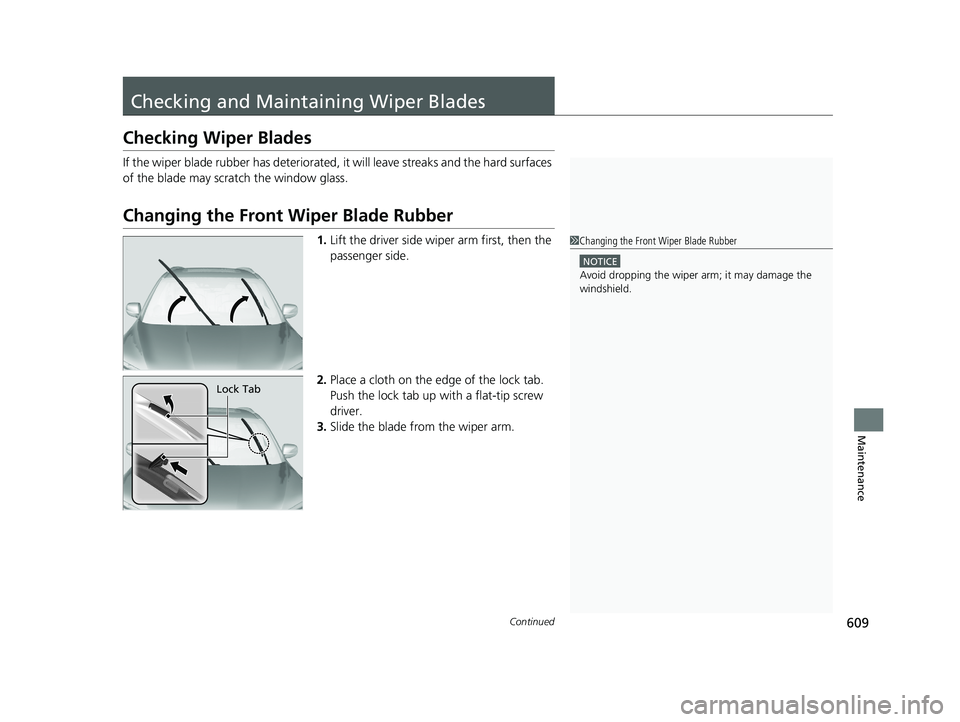
1.Lift the driver side wiper arm first, then the
passenger side.
2. Place a cloth on the edge of the lock tab.
Push the lock tab up with a flat-tip screw
driver.
3. Slide the blade from the wiper arm.1Changing the Front Wiper Blade Rubber
NOTICE
Avoid dropping the wiper ar m; it may damage the
windshield.
Lock Tab
18 PILOT-31TG76200.book 609 ページ 2018年3月30日 金曜日 午前11時51分
Page 612 of 695
610
uuChecking and Maintaining Wiper Blades uChanging the Front Wiper Blade Rubber
Maintenance
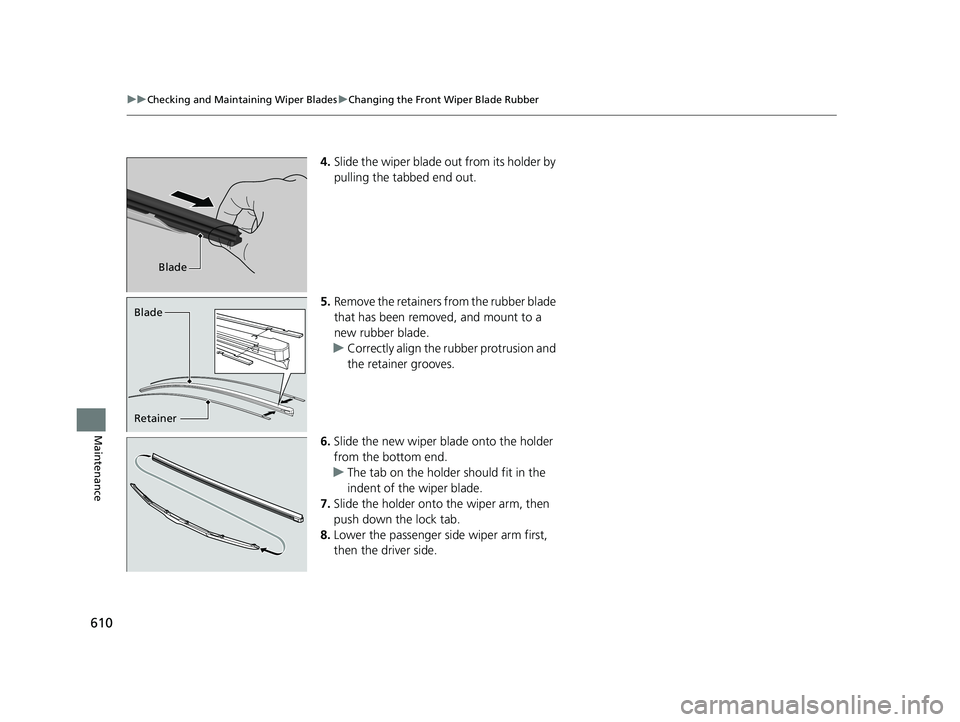
4. Slide the wiper blade out from its holder by
pulling the tabbed end out.
5. Remove the retainers from the rubber blade
that has been removed, and mount to a
new rubber blade.
u Correctly align the rubber protrusion and
the retainer grooves.
6. Slide the new wiper blade onto the holder
from the bottom end.
u The tab on the holder should fit in the
indent of the wiper blade.
7. Slide the holder onto the wiper arm, then
push down the lock tab.
8. Lower the passenger side wiper arm first,
then the driver side.
Blade
Retainer Blade
18 PILOT-31TG76200.book 610 ページ 2018年3月30日 金曜日 午前11時51分
Page 613 of 695
611
uuChecking and Maintaining Wiper Blades uChanging the Rear Wiper Blade Rubber
Continued
Maintenance
Changing the Rear Wiper Blade Rubber
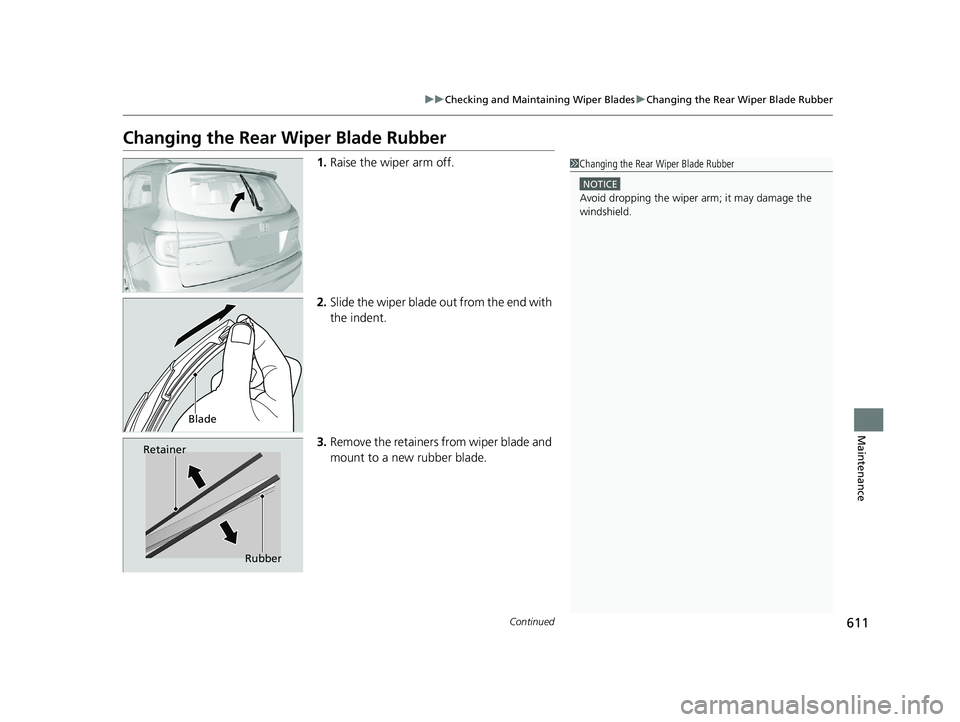
1.Raise the wiper arm off.
2. Slide the wiper blade out from the end with
the indent.
3. Remove the retainers from wiper blade and
mount to a new rubber blade.1Changing the Rear Wiper Blade Rubber
NOTICE
Avoid dropping the wiper ar m; it may damage the
windshield.
Blade
Retainer
Rubber
18 PILOT-31TG76200.book 611 ページ 2018年3月30日 金曜日 午前11時51分
Page 614 of 695
612
uuChecking and Maintaining Wiper Blades uChanging the Rear Wiper Blade Rubber
Maintenance
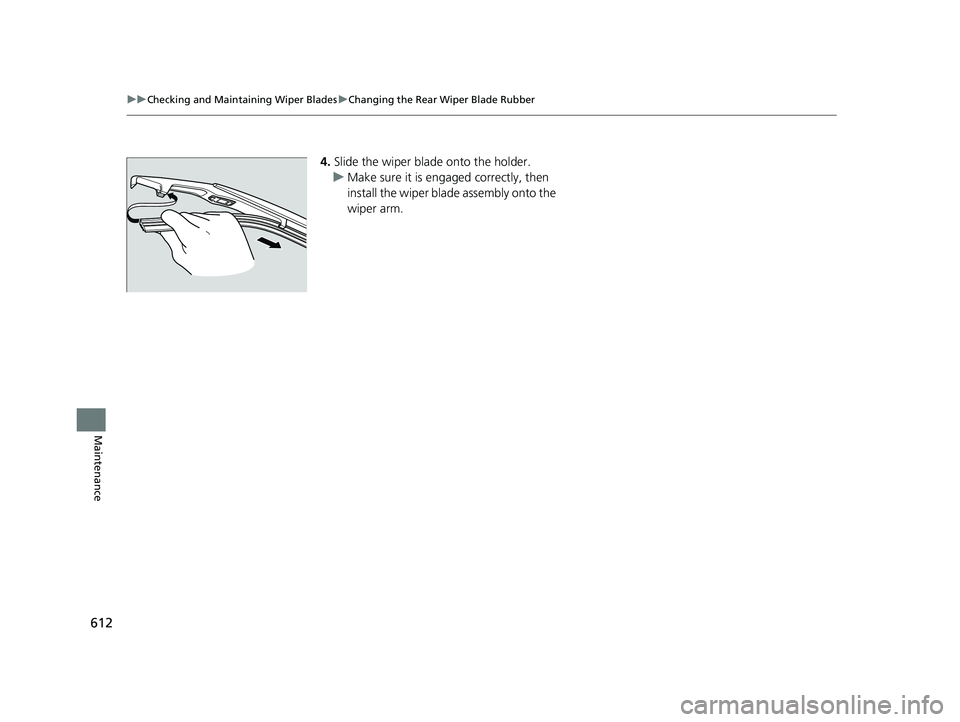
4. Slide the wiper blade onto the holder.
u Make sure it is engaged correctly, then
install the wiper blade assembly onto the
wiper arm.
18 PILOT-31TG76200.book 612 ページ 2018年3月30日 金曜日 午前11時51分
Page 692 of 695
690
Index
V
Vanity Mirrors............................................... 7
Vehicle Identification Number ................. 670
Vehicle Stability Assist ® (VSA ®) ................ 543
Off Button ............................................... 544
System Indicator ................................ 84, 543
Ventilation ............................................... 215
Ventilation ................................................ 209
Viscosity (Oil) ..................................... 594, 669
Voice Control Operation .......................... 267
Audio Commands.................................... 269
Climate Control Commands .................... 270
General Commands ................................. 270
Music Search Commands......................... 270
On Screen Commands ............................. 270
Phone Commands ................................... 269
Useful Commands ................................... 269
Voice Portal Screen .................................. 268
Voice Recognition .................................... 267
W
Wallpaper .......................................... 231, 252
Warning and Information Messages ......... 97
Warning Indicator On/Blinking ................ 654
Warning Labels ........................................... 75
Warranties (Warranty Manual provided
separately) ............................................... 675
Watts ......................................................... 668
Wear Indicators (Tire) ............................... 618
Wheel Nut Wrench (Jack Handle) ............ 641Wi-Fi Connection
...................................... 304
Window Washers ..................................... 167
Adding/Refilling Fluid .............................. 602
Switch ..................................................... 167
Windows (Opening and Closing) ............ 149
Windshield ................................................ 167
Cleaning ................................................. 632
Defrosting ............................................... 212
Defrosting/Defogging .............................. 215
Washer Fluid ........................................... 602
Wiper Blades ........................................... 609
Wipers and Washers................................ 167
Winter Tires .............................................. 621
Snow Tires .............................................. 621
Tire Chains .............................................. 621
Wipers and Washers ................................. 167
Automatic Intermi ttent Wipers ................ 168
Checking and Replacing Wiper Blades ..... 609
Front ....................................................... 167
Rear ........................................................ 169
WMA ......................................... 240, 282, 294
Worn Tires ................................................ 613
18 PILOT-31TG76200.book 690 ページ 2018年3月30日 金曜日 午前11時51分