USB HONDA PILOT 2019 (in English) User Guide
[x] Cancel search | Manufacturer: HONDA, Model Year: 2019, Model line: PILOT, Model: HONDA PILOT 2019Pages: 747, PDF Size: 45.81 MB
Page 256 of 747
uuAudio System Basic Operation uAudio/Information Screen
254
Features
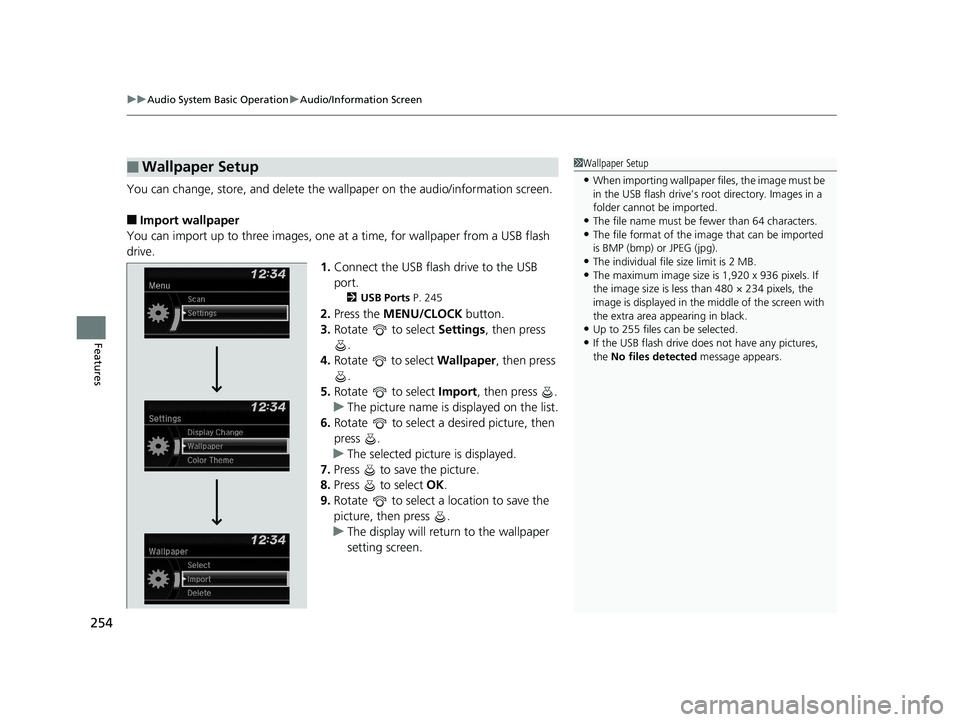
You can change, store, and delete the wa llpaper on the audio/information screen.
■Import wallpaper
You can import up to three images, one at a time, for wallpaper from a USB flash
drive.
1.Connect the USB flash drive to the USB
port.
2 USB Ports P. 245
2.Press the MENU/CLOCK button.
3. Rotate to select Settings, then press
.
4. Rotate to select Wallpaper , then press
.
5. Rotate to select Import, then press .
u The picture name is displayed on the list.
6. Rotate to select a desired picture, then
press .
u The selected picture is displayed.
7. Press to save the picture.
8. Press to select OK.
9. Rotate to select a location to save the
picture, then press .
u The display will return to the wallpaper
setting screen.
■Wallpaper Setup1Wallpaper Setup
•When importing wallpaper files, the image must be
in the USB flash drive’s root directory. Images in a
folder cannot be imported.
•The file name must be fewer than 64 characters.•The file format of the im age that can be imported
is BMP (bmp) or JPEG (jpg).
•The individual file size limit is 2 MB.•The maximum image size is 1,920 x 936 pixels. If
the image size is less than 480 × 234 pixels, the
image is displayed in the middle of the screen with
the extra area appearing in black.
•Up to 255 files can be selected.
•If the USB flash drive doe s not have any pictures,
the No files detected message appears.
19 PILOT HMA ELP-31TG76310.book 254 ページ 2019年3月15日 金曜日 午後6時8分
Page 262 of 747
260
uuAudio System Basic Operation uPlaying an iPod
Features
Playing an iPod
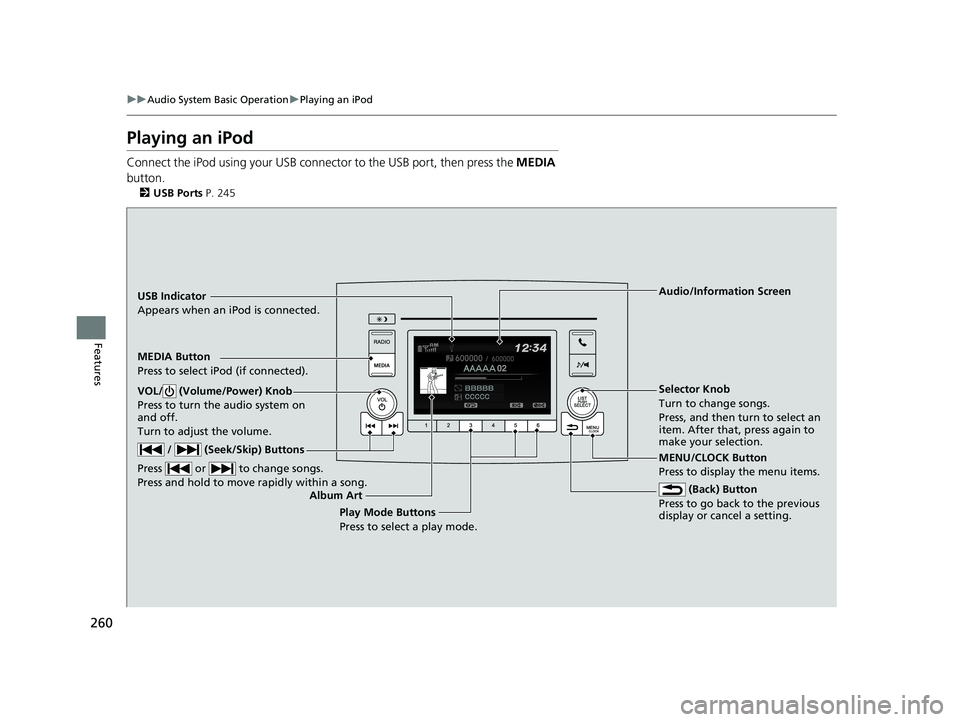
Connect the iPod using your USB connector to the USB port, then press the MEDIA
button.
2 USB Ports P. 245
USB Indicator
Appears when an iPod is connected.
MEDIA Button
Press to select iPod (if connected).
(Back) Button
Press to go back to the previous
display or cancel a setting.
/ (Seek/Skip) Buttons
Press or to change songs.
Press and hold to move rapidly within a song.
VOL/ (Volume/Power) Knob
Press to turn the audio system on
and off.
Turn to adjust the volume.Selector Knob
Turn to change songs.
Press, and then turn to select an
item. After that, press again to
make your selection.
MENU/CLOCK Button
Press to display the menu items. Audio/Information Screen
Album Art Play Mode Buttons
Press to select a play mode.
19 PILOT HMA ELP-31TG76310.book 260 ページ 2019年3月15日 金曜日 午後6時8分
Page 263 of 747
Continued261
uuAudio System Basic Operation uPlaying an iPod
Features
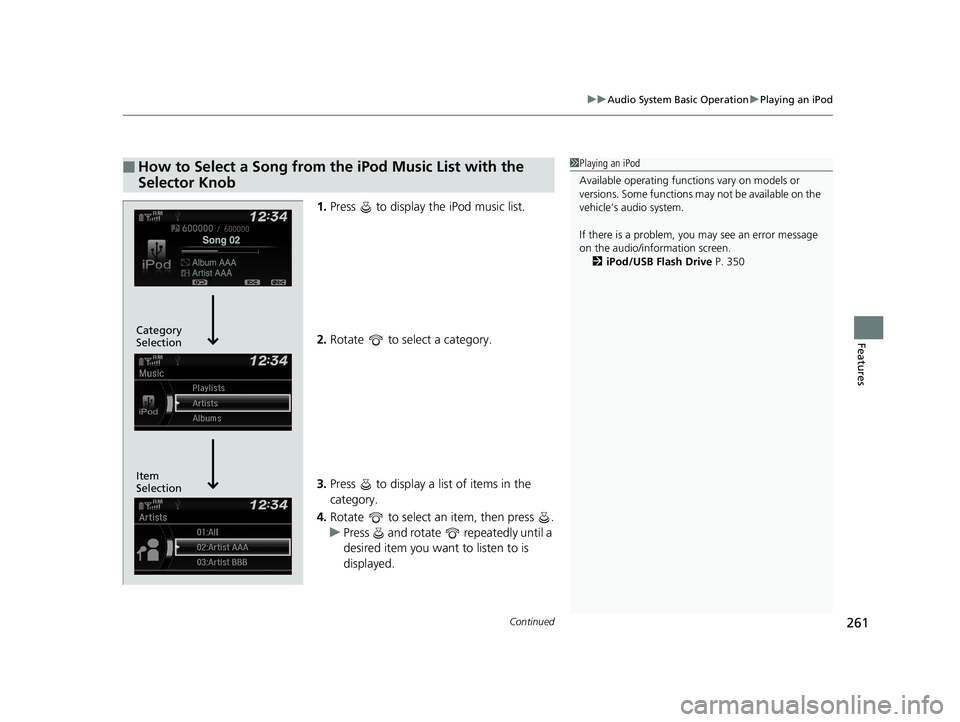
1. Press to display the iPod music list.
2. Rotate to select a category.
3. Press to display a list of items in the
category.
4. Rotate to select an item, then press .
u Press and rotate repeatedly until a
desired item you want to listen to is
displayed.
■How to Select a Song from the iPod Music List with the
Selector Knob1Playing an iPod
Available operating functi ons vary on models or
versions. Some functions ma y not be available on the
vehicle’s audio system.
If there is a problem, you may see an error message
on the audio/information screen. 2 iPod/USB Flash Drive P. 350
Item
Selection Category
Selection
19 PILOT HMA ELP-31TG76310.book 261 ページ 2019年3月15日 金曜日 午後6時8分
Page 265 of 747
263
uuAudio System Basic Operation uPlaying a USB Flash Drive
Continued
Features
Playing a USB Flash Drive
Your audio system reads and plays sound files on a USB flash drive in either MP3,
WMA or AAC*1 format.
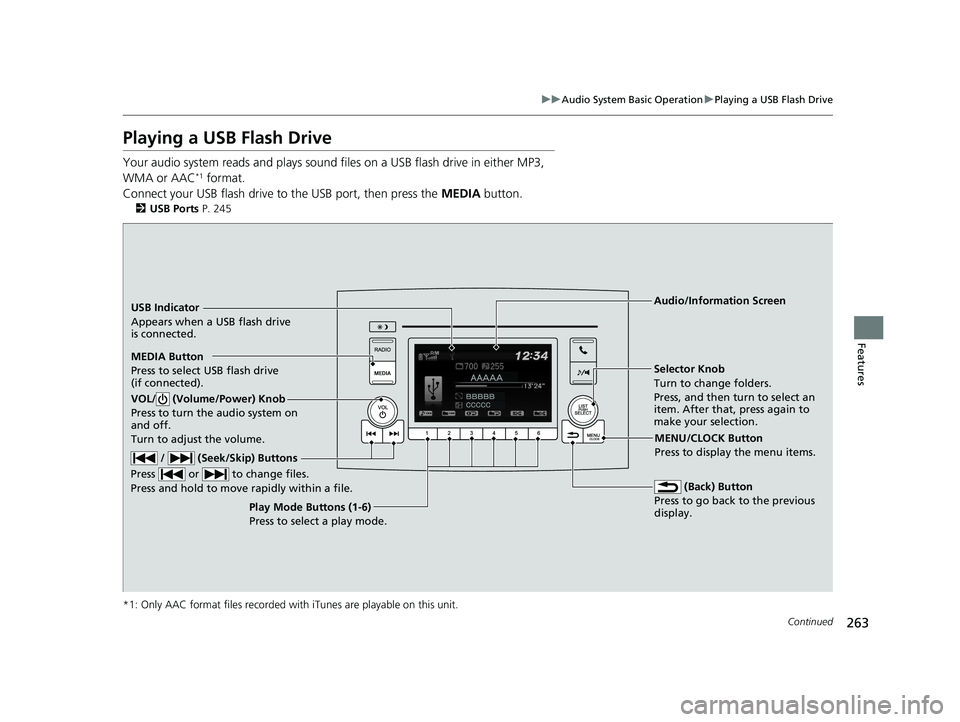
Connect your USB flash drive to the USB port, then press the MEDIA button.
2USB Ports P. 245
*1: Only AAC format files recorded with iTunes are playable on this unit.
USB Indicator
Appears when a USB flash drive
is connected.
MEDIA Button
Press to select USB flash drive
(if connected). (Back) Button
Press to go back to the previous
display.
/ (Seek/Skip) Buttons
Press or to change files.
Press and hold to move rapidly within a file.
VOL/ (Volume/Power) Knob
Press to turn the audio system on
and off.
Turn to adjust the volume.
Selector Knob
Turn to change folders.
Press, and then turn to select an
item. After that, press again to
make your selection.
MENU/CLOCK Button
Press to display the menu items.
Audio/Information Screen
Play Mode Buttons (1-6)
Press to select a play mode.
19 PILOT HMA ELP-31TG76310.book 263 ページ 2019年3月15日 金曜日 午後6時8分
Page 266 of 747
uuAudio System Basic Operation uPlaying a USB Flash Drive
264
Features
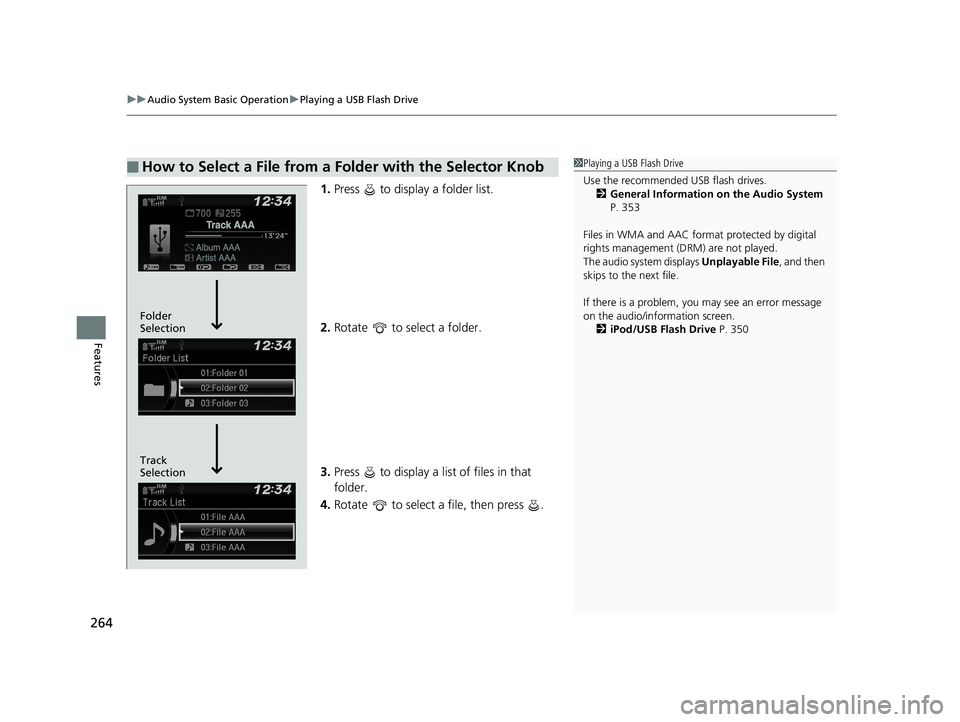
1. Press to display a folder list.
2. Rotate to select a folder.
3. Press to display a list of files in that
folder.
4. Rotate to select a file, then press .
■How to Select a File from a Folder with the Selector Knob1Playing a USB Flash Drive
Use the recommended USB flash drives.
2 General Information on the Audio System
P. 353
Files in WMA and AAC form at protected by digital
rights management (DRM) are not played.
The audio system displays Unplayable File, and then
skips to the next file.
If there is a problem, you may see an error message
on the audio/information screen.
2 iPod/USB Flash Drive P. 350
Track
Selection Folder
Selection
19 PILOT HMA ELP-31TG76310.book 264 ページ 2019年3月15日 金曜日 午後6時8分
Page 267 of 747
265
uuAudio System Basic Operation uPlaying a USB Flash Drive
Features
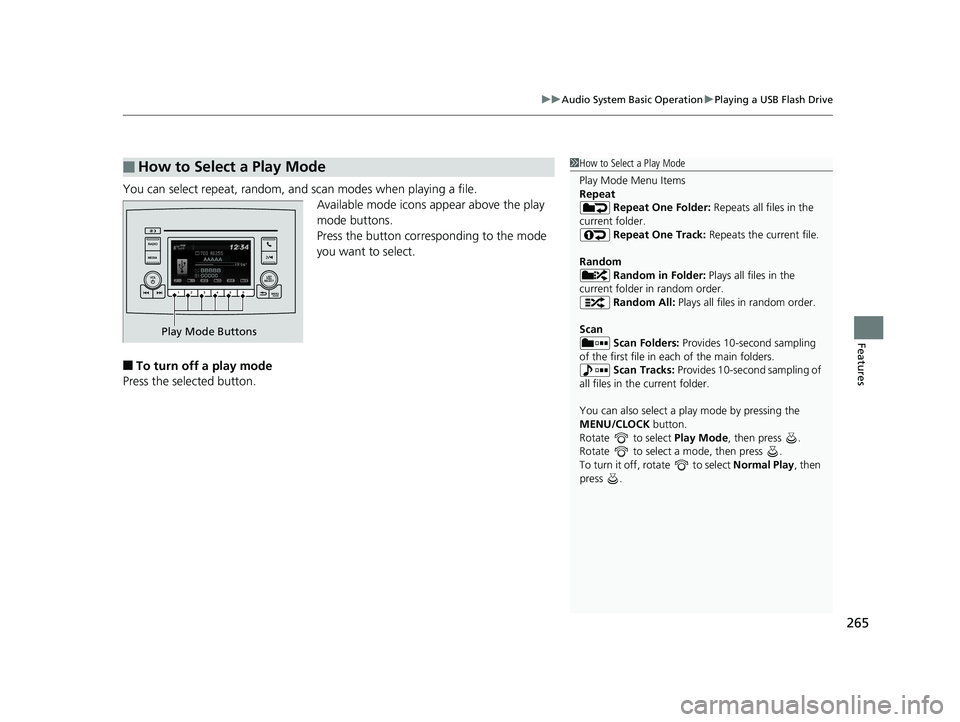
You can select repeat, random, and scan modes when playing a file.
Available mode icons appear above the play
mode buttons.
Press the button corresponding to the mode
you want to select.
■To turn off a play mode
Press the selected button.
■How to Select a Play Mode1 How to Select a Play Mode
Play Mode Menu Items
Repeat
Repeat One Folder: Repeats all files in the
current folder. Repeat One Track: Repeats the current file.
Random Random in Folder: Plays all files in the
current folder in random order. Random All: Plays all files in random order.
Scan Scan Folders: Provides 10-second sampling
of the first file in each of the main folders.
Scan Tracks: Provides 10-second sampling of
all files in the current folder.
You can also select a pl ay mode by pressing the
MENU/CLOCK button.
Rotate to select Play Mode, then press .
Rotate to select a mode, then press .
To turn it off, rotate to select Normal Play, then
press .
Play Mode Buttons
19 PILOT HMA ELP-31TG76310.book 265 ページ 2019年3月15日 金曜日 午後6時8分
Page 269 of 747
Continued267
uuAudio System Basic Operation uPlaying Bluetooth ® Audio
Features
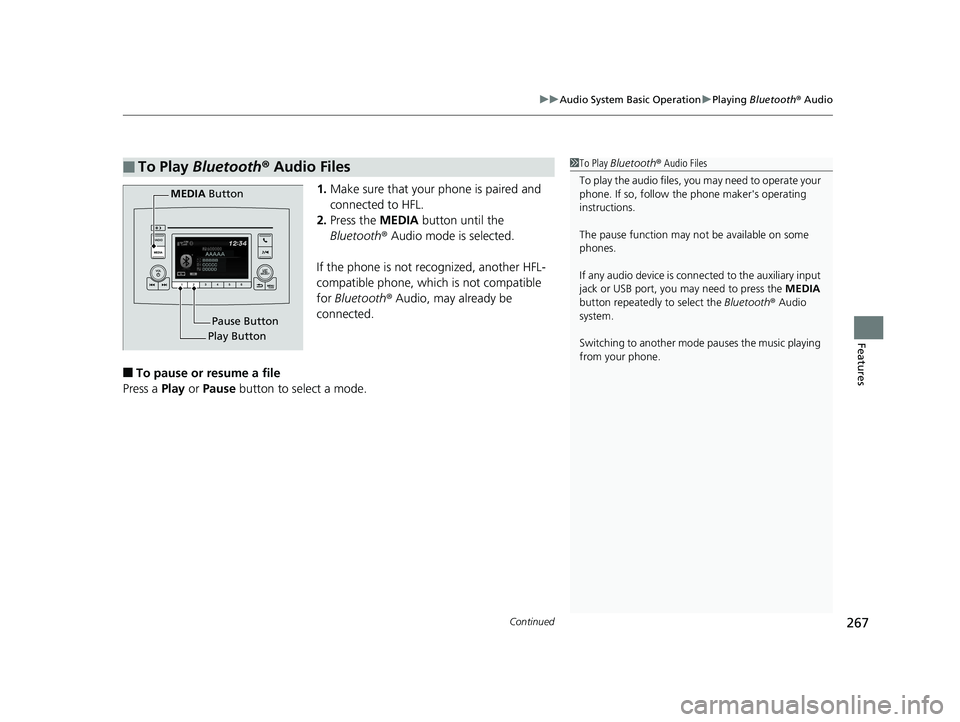
1. Make sure that your phone is paired and
connected to HFL.
2. Press the MEDIA button until the
Bluetooth ® Audio mode is selected.
If the phone is not recognized, another HFL-
compatible phone, which is not compatible
for Bluetooth ® Audio, may already be
connected.
■To pause or resume a file
Press a Play or Pause button to select a mode.
■To Play Bluetooth ® Audio Files1 To Play Bluetooth ® Audio Files
To play the audio files, y ou may need to operate your
phone. If so, follow the phone maker's operating
instructions.
The pause function may no t be available on some
phones.
If any audio device is conne cted to the auxiliary input
jack or USB port, you may need to press the MEDIA
button repeatedly to select the Bluetooth ® Audio
system.
Switching to another mode pauses the music playing
from your phone.
Play Button Pause Button
MEDIA
Button
19 PILOT HMA ELP-31TG76310.book 267 ページ 2019年3月15日 金曜日 午後6時8分
Page 273 of 747
271
uuAudio System Basic Operation uAudio/Information Screen
Continued
Features
■Phone
Displays the HFL information.
2 Bluetooth ® HandsFreeLink ® P. 479
■Trip Computer
Displays the trip computer information.
• Current Drive tab: Displays the current trip information.
• Trip A /Trip B tab: Displays information for the current and three previous drives.
The information is stored every time you reset Trip A/B.
To reset Trip A/B, select Reset.
To change the setting of how to reset Trip A/B, select Settings, then select Trip
A Reset Method or Trip B Reset Method .
■Clock
Displays the clock.
■System Updates
Updates the software version of the audio system.
2 System Updates P. 284
■FM/AM/Sirius XM*/CD*/USB/Bluetooth Audi o/AUX Input/My Honda
Music/Social Playlist
Displays the each audio information.
■Settings
Enters the customizing menu screen.
2 Customized Features P. 432
* Not available on all models
19 PILOT HMA ELP-31TG76310.book 271 ページ 2019年3月15日 金曜日 午後6時8分
Page 276 of 747
uuAudio System Basic Operation uAudio/Information Screen
274
Features
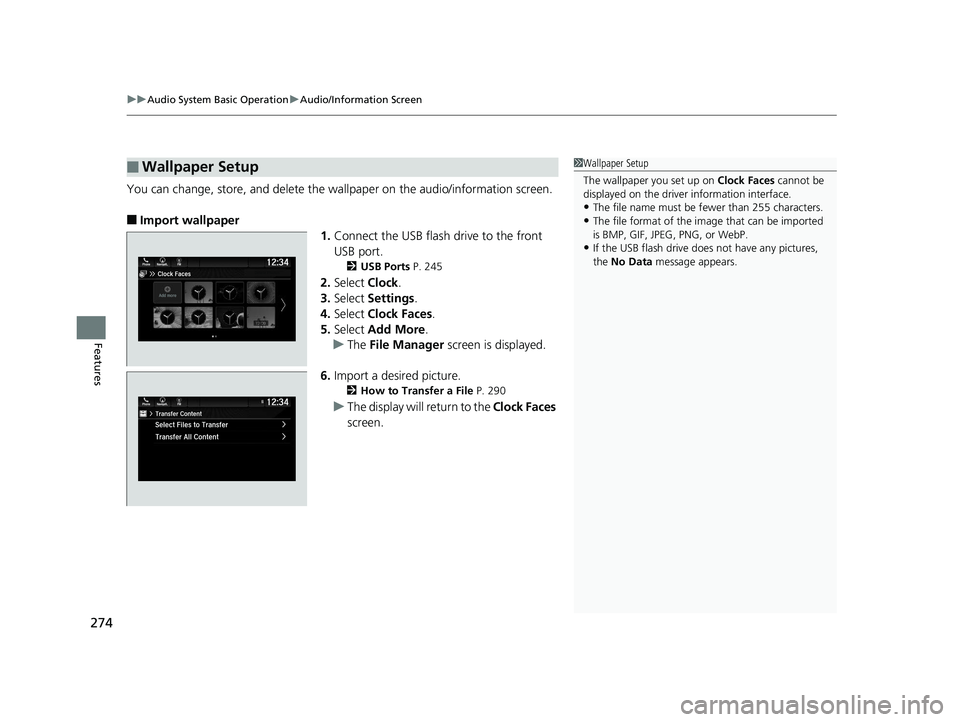
You can change, store, and delete the wa llpaper on the audio/information screen.
■Import wallpaper
1.Connect the USB flash drive to the front
USB port.
2 USB Ports P. 245
2.Select Clock.
3. Select Settings .
4. Select Clock Faces .
5. Select Add More .
u The File Manager screen is displayed.
6. Import a desired picture.
2 How to Transfer a File P. 290
uThe display will return to the Clock Faces
screen.
■Wallpaper Setup1 Wallpaper Setup
The wallpaper you set up on Clock Faces cannot be
displayed on the driver information interface.
•The file name must be fewer than 255 characters.
•The file format of the im age that can be imported
is BMP, GIF, JPEG, PNG, or WebP.
•If the USB flash drive doe s not have any pictures,
the No Data message appears.
19 PILOT HMA ELP-31TG76310.book 274 ページ 2019年3月15日 金曜日 午後6時8分
Page 286 of 747
284
uuAudio System Basic Operation uSystem Updates
Features
System Updates
The audio system’s firmware can be update d with a Wi-Fi connection or with a USB
device.
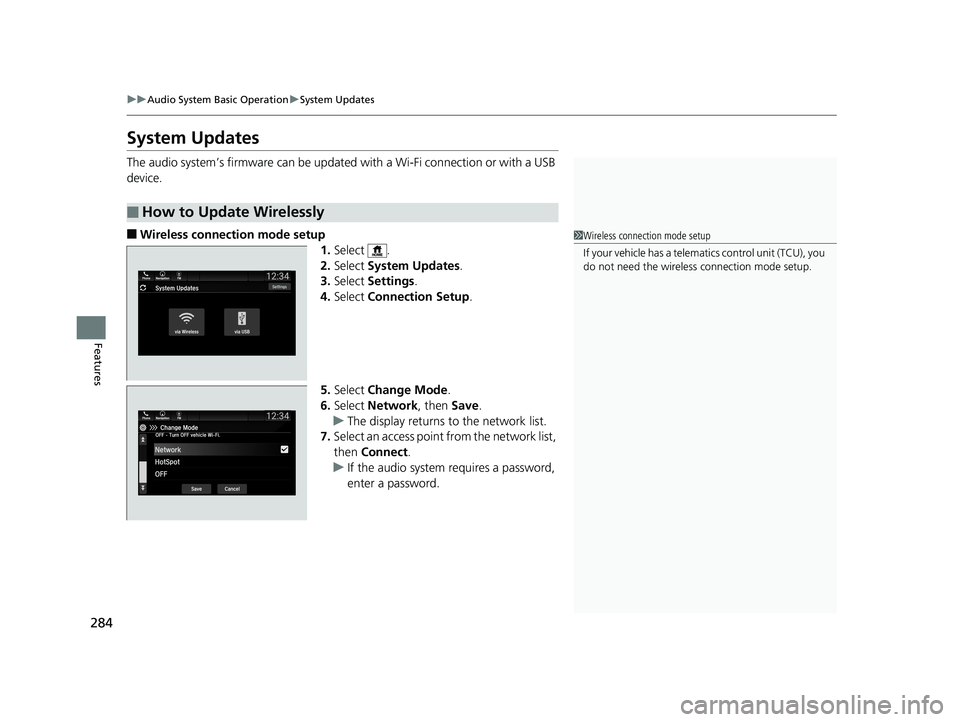
■Wireless connection mode setup 1.Select .
2. Select System Updates .
3. Select Settings .
4. Select Connection Setup .
5. Select Change Mode .
6. Select Network, then Save.
u The display returns to the network list.
7. Select an access point from the network list,
then Connect .
u If the audio system requires a password,
enter a password.
■How to Update Wirelessly
1Wireless connection mode setup
If your vehicle has a telema tics control unit (TCU), you
do not need the wireless connection mode setup.
19 PILOT HMA ELP-31TG76310.book 284 ページ 2019年3月15日 金曜日 午後6時8分