wipers HONDA PILOT 2021 (in English) User Guide
[x] Cancel search | Manufacturer: HONDA, Model Year: 2021, Model line: PILOT, Model: HONDA PILOT 2021Pages: 739, PDF Size: 44.86 MB
Page 593 of 739
Continued591
uuHonda Sensing ®u Lane Keeping Assist System (LKAS)
Driving
The system can be used when th e following conditions are met.
• The lane in which you are driving has detectable lane markers on both sides, and
your vehicle is in the center of the lane.
• The vehicle is travelling between about 45 and 90 mph (72 and 145 km/h).
• You are driving on a straight or slightly curved road.
• The turn signals are off.
• The brake pedal is not depressed.
• The wipers are not in continuous operation.
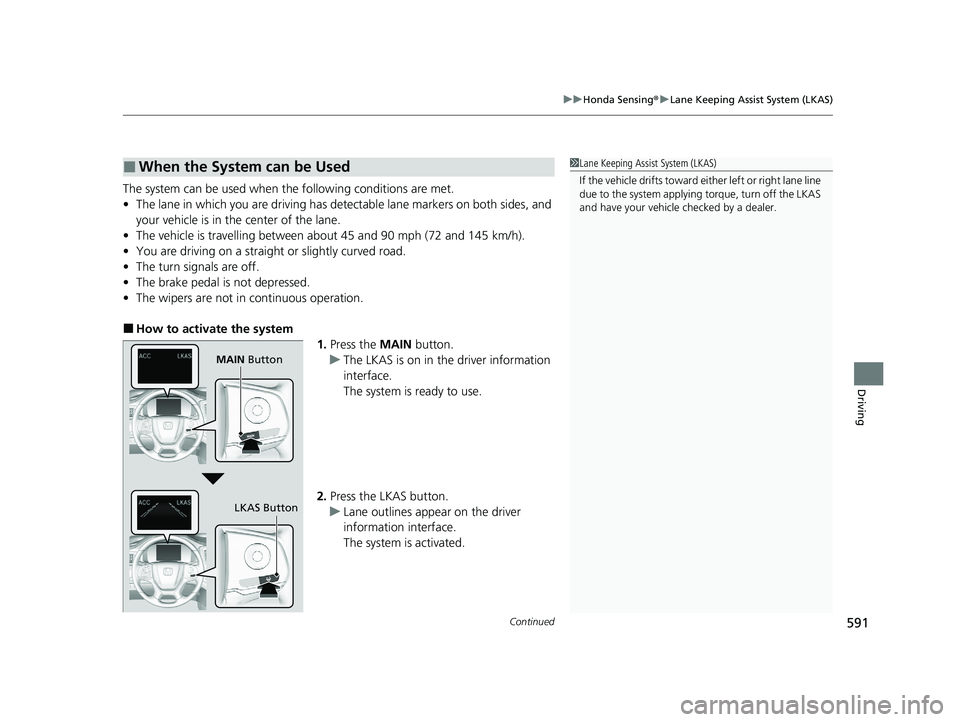
■How to activate the system
1.Press the MAIN button.
u The LKAS is on in the driver information
interface.
The system is ready to use.
2. Press the LKAS button.
u Lane outlines appear on the driver
information interface.
The system is activated.
■When the System can be Used1Lane Keeping Assist System (LKAS)
If the vehicle drifts toward ei ther left or right lane line
due to the system applying torque, turn off the LKAS
and have your vehicle checked by a dealer.
MAIN Button
LKAS Button
21 PILOT-31TG76500.book 591 ページ 2020年3月18日 水曜日 午後4時38分
Page 595 of 739
593
uuHonda Sensing ®u Lane Keeping Assist System (LKAS)
Continued
Driving
■The system operatio n is suspended if
you:
• Set the wipers to continuous operation.
u Turning the wipers off resumes the
LKAS.
• Decrease the vehicle speed to about 40
mph (64 km/h) or less.
u Increasing the vehicle speed to about 45
mph (72 km/h) or more resumes the
LKAS.
• Depress the brake pedal.
u The LKAS resumes and starts detecting
the lane lines again once you release the
brake pedal.
• Set the wiper switch to AUTO and the
wipers operate continuously.
u The LKAS resumes when the wipers stop
or operate intermittently.
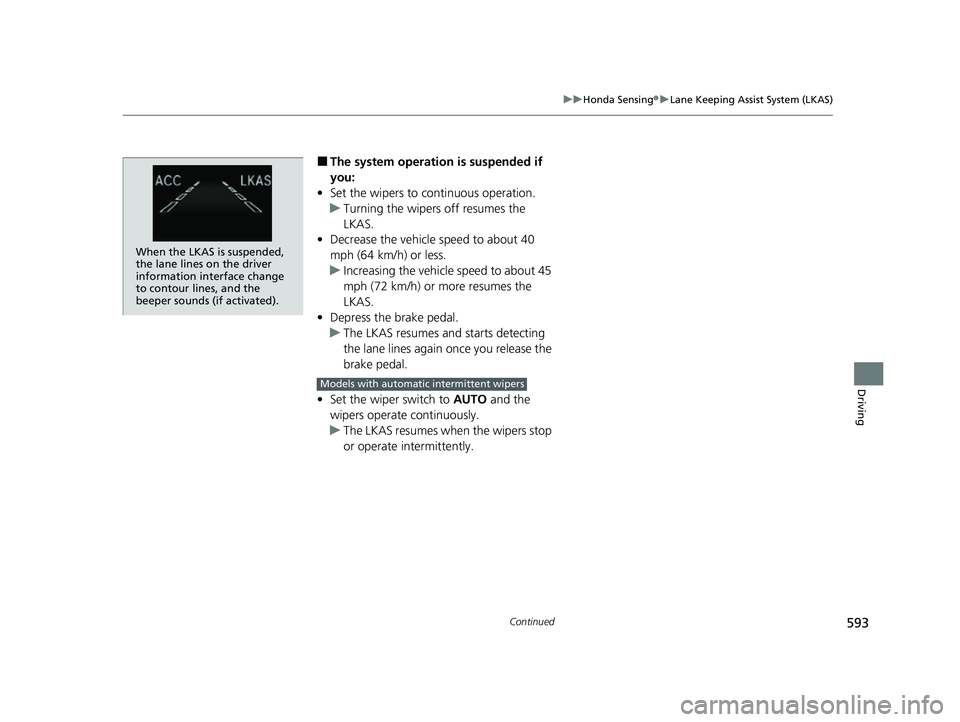
When the LKAS is suspended,
the lane lines on the driver
information interface change
to contour lines, and the
beeper sounds (if activated).
Models with automatic intermittent wipers
21 PILOT-31TG76500.book 593 ページ 2020年3月18日 水曜日 午後4時38分
Page 601 of 739
Continued599
uuHonda Sensing ®u Road Departure Mitigation (RDM) System
Driving
The system becomes ready to start sear ching for lane markings when all the
following conditions are met:
• The vehicle is traveling between about 45 and 90 mph (72 and 145 km/h).
• The vehicle is on a straight or slightly curved road.
• The turn signals are off.
• The brake pedal is not depressed.
• The wipers are not in continuous operation.
• The vehicle is not accelera ting or braking, and the steering wheel is not being
turned.
• The system makes a determination that th e driver is not actively accelerating,
braking or steering.
■How the System Activates1 How the System Activates
The RDM system may automa tically shut off and the
indicator comes and stays on.
2 Indicators P. 82
RDM system function can be impacted when the
vehicle is:
•Not driven within a traffic lane.
•Driven on the inside edge of a curve, or outside of
a lane.
•Driven in a narrow lane.
21 PILOT-31TG76500.book 599 ページ 2020年3月18日 水曜日 午後4時38分
Page 640 of 739
638
uuMaintenance Under the Hood uOpening the Hood
Maintenance
Opening the Hood
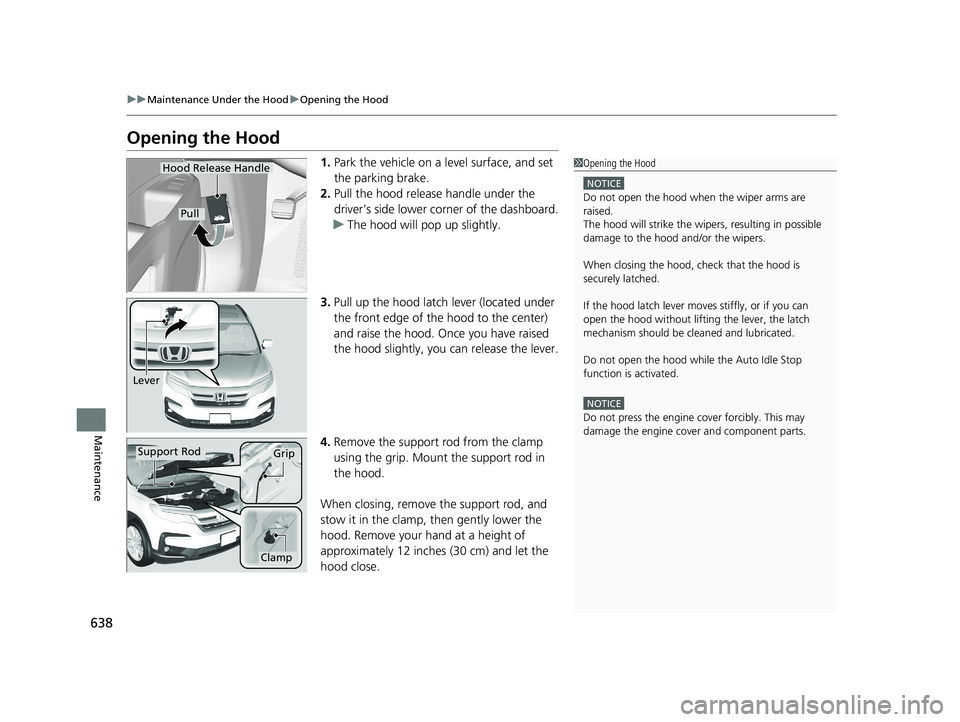
1. Park the vehicle on a level surface, and set
the parking brake.
2. Pull the hood release handle under the
driver's side lower corner of the dashboard.
u The hood will pop up slightly.
3. Pull up the hood latch lever (located under
the front edge of the hood to the center)
and raise the hood. Once you have raised
the hood slightly, you can release the lever.
4. Remove the support rod from the clamp
using the grip. Mount the support rod in
the hood.
When closing, remove the support rod, and
stow it in the clamp, then gently lower the
hood. Remove your hand at a height of
approximately 12 inches (30 cm) and let the
hood close.1 Opening the Hood
NOTICE
Do not open the hood when the wiper arms are
raised.
The hood will strike the wipe rs, resulting in possible
damage to the hood and/or the wipers.
When closing the hood, check that the hood is
securely latched.
If the hood latch lever moves stiffly, or if you can
open the hood without lifti ng the lever, the latch
mechanism should be cl eaned and lubricated.
Do not open the hood while the Auto Idle Stop
function is activated.
NOTICE
Do not press the engine cover forcibly. This may
damage the engine cover and component parts.
Hood Release Handle
Pull
Lever
Support RodGrip
Clamp
21 PILOT-31TG76500.book 638 ページ 2020年3月18日 水曜日 午後4時38分
Page 678 of 739
676
uuCleaning uExterior Care
Maintenance
Exterior Care
Dust off the vehicle body after you drive.
Regularly inspect your vehi cle for scratches on painted surfaces. A scratch on a
painted surface can result in body rust. If you find a scratch, promptly repair it.
Wash the vehicle regularly. Wash more frequently when driving in the following
conditions:
• If driving on roads with road salt.
• If driving in coastal areas.
• If tar, soot, bird droppings, insects, or tree sap are stuck to painted surfaces.
• Fold in the door mirrors.
• For models equipped with automatic inte rmittent wipers, turn the wipers off.
• Make sure to follow the instructions indicated on the automated car wash.
• Keep sufficient distance between the cleaning nozzl e and the vehicle body.
• Take particular care around the windows. St anding too close may cause water to
enter the vehicle interior.
• Do not spray high pressure water directly into the engine compartment. Instead,
use low pressure water and a mild detergent.
■Washing the Vehicle
■Using an Automated Car Wash
■Using High Pressure Cleaners
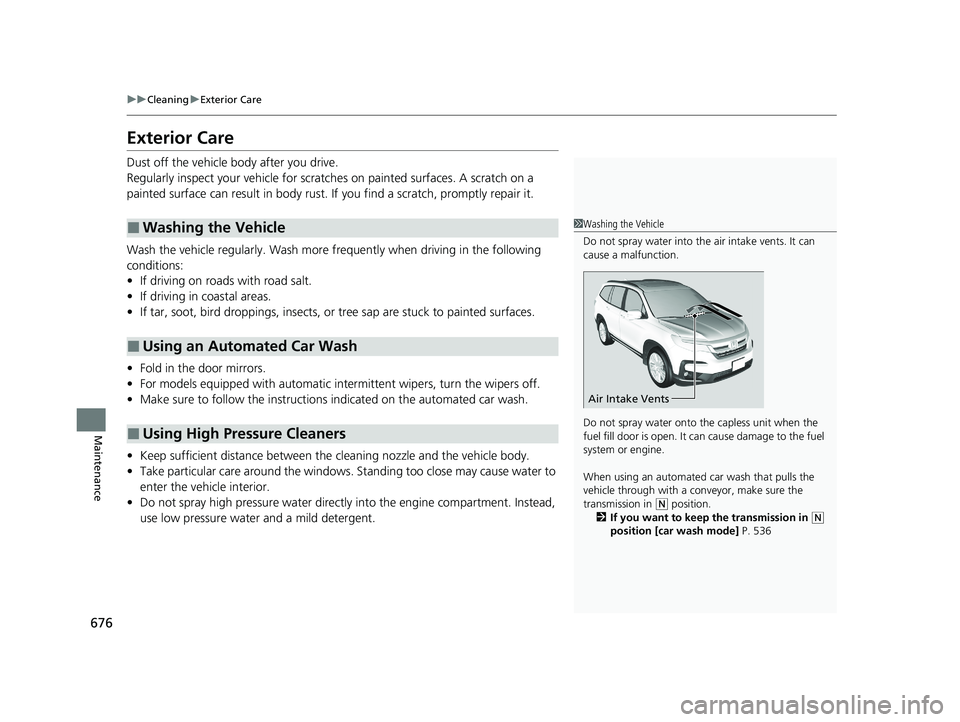
1 Washing the Vehicle
Do not spray water into the air intake vents. It can
cause a malfunction.
Do not spray water onto the capless unit when the
fuel fill door is open. It ca n cause damage to the fuel
system or engine.
When using an automated car wash that pulls the
vehicle through with a c onveyor, make sure the
transmission in
( N position.
2 If you want to keep the transmission in
(N
position [car wash mode] P. 536
Air Intake Vents
21 PILOT-31TG76500.book 676 ページ 2020年3月18日 水曜日 午後4時38分
Page 730 of 739
728
Index
Updating Apps ........................................ 278
USB Flash Drives ...................... 259, 318, 354
USB Port .................................................. 241
Wallpaper Setup .............................. 250, 270
Wi-Fi Connection ..................................... 334
Audio/Information Screen ................ 248, 266
Authorized Manuals ................................. 724
Auto Door Locking/Unlocking ................. 152
Auto High-Beam ....................................... 179
Indicator .................................................... 86
Auto Idle Stop Indicator (Amber) .............. 91
Auto Idle Stop Indicator (Green) ............... 91
Auto Idle-stop ........................................... 540
OFF Button .............................................. 541
Automatic Intermittent Wipers ............... 184
Automatic Lighting .................................. 176
Automatic Transmission ........................... 531
Creeping ................................................. 531
Fluid ........................................................ 647
Kickdown ................................................ 531
Operating the Shift Button....................... 534
Shifting.................................................... 532
Auxiliary Input Jack .................................. 242
Average Fuel Economy ............................. 116
AWD Torque ............................................. 119
B
Battery....................................................... 667
Charging System Indicator ................. 83, 699
Jump Starting .......................................... 694 Maintenance (Checking the Battery) ........ 667
Belts (Seat) .................................................. 39
Beverage Holders ..................................... 215
Blind spot information System ................ 551
Bluetooth® Audio............................. 262, 325
Bluetooth® HandsFreeLink ®........... 452, 477
Blu-ray/DVD Rear Entertainment System ..................................................... 375
Audio Sources for Front and Rear Seats ... 396
Auxiliary Console Panels .......................... 377
DVD or Blu-ray
TM Player Error Messages ... 421
Front Control Panel Operation ................. 388
HDMI
TM Port ............................................ 378
How Much Farther?TM............................. 395
Media Servers.......................................... 395
Operating the System .............................. 379
Overhead Screen ..................................... 378
Playable Disc Region Codes ..................... 419
Playable Disc Types .................................. 419
Playable Discs .......................................... 397
Playing a Disc in the Rear......................... 393
Playing a DVD/Blu-ray
TM........................... 382
Playing a Video Using the HDMITM........... 394
Playing an iPod and a USB Flash Drive in the Rear ................................................ 393
Playing Apps ........................................... 391
Rear DVD or Blu-ray
TM Menu ................... 383
Rear System Setup................................... 389
Recommended Discs ............................... 420
Selecting the App us ing Front Control
Panel ..................................................... 388 Setting the DVD or Blu-ray
TM Menu ......... 390
System Controls .............................. 382, 392
System Settings....................................... 386
Video Accessibility ................................... 380
Wireless Headphones .............................. 376
Booster Seats (For Children) ...................... 77
Brake System ............................................ 606
Anti-lock Brake System (ABS) .................. 608
Brake Assist System................................. 609
Fluid ....................................................... 648
Foot Brake .............................................. 607
Indicator ........................................... 82, 701
Parking Brake.......................................... 606
Brake System (Red)
Indicator ................................................. 701
Brightness Control (Instrument Panel) ... 188
Bulb Replacement .................................... 649
Back-Up Lights ........................................ 653
Brake Lights ............................................ 653
Brake/Taillights........................................ 652
Daytime Running Lights .......................... 650
Fog Lights ............................................... 651
Front Side Marker Lights ......................... 650
Front Turn Signal Lights .......................... 651
Headlights .............................................. 649
High-Mount Brake Light.......................... 653
Parking Lights ......................................... 650
Rear License Plate Lights ......................... 653
Rear Side Marker Lights .......................... 652
Rear Turn Signal Lights............................ 652
21 PILOT-31TG76500.book 728 ページ 2020年3月18日 水曜日 午後4時38分
Page 738 of 739
736
Index
V
Vanity Mirrors............................................... 9
Vehicle Customization .............................. 125
Vehicle Identification Number ................. 716
Vehicle Stability Assist
TM (VSA ®)............... 548
Off Button ............................................... 549
System Indicator ................................ 86, 548
Viscosity (Oil) ..................................... 640, 715
Voice Control Operation .......................... 295
Audio Commands.................................... 297
Phone Commands ................................... 297
Voice Portal Screen .................................. 296
Voice Recognition .................................... 295
W
Wallpaper .......................................... 250, 270
Warning and Information Messages ......... 97
Warning Indicator On/Blinking ................ 699
Warning Labels ........................................... 79
Warnings ................................................... 117
Warranties (Warranty Manual provided separately) ............................................... 721
Watts ......................................................... 714
Wear Indicators (Tire) ............................... 663
Wheel Nut Wrench (Jack Handle) ............ 687
Wi-Fi Connection ...................................... 334
Window Washers ...................................... 183
Adding/Refilling Fluid ............................... 648
Switch ..................................................... 183
Windows (Opening and Closing) ............. 166Windshield
................................................ 183
Cleaning ................................................. 677
Defrosting/Defogging .............................. 232
Washer Fluid ........................................... 648
Wiper Blades ........................................... 654
Wipers and Washers................................ 183
Winter Tires .............................................. 666
Snow Tires .............................................. 666
Tire Chains .............................................. 666
Wipers and Washers ................................. 183
Automatic Intermi ttent Wipers ................ 184
Checking and Replacing Wiper Blades ..... 654
Front ....................................................... 183
Rear ........................................................ 185
Wireless Charger ...................................... 219
WMA ................................. 259, 312, 318, 321
Worn Tires ................................................ 658
21 PILOT-31TG76500.book 736 ページ 2020年3月18日 水曜日 午後4時38分