Auto idle HONDA PILOT 2021 Owner's Manual (in English)
[x] Cancel search | Manufacturer: HONDA, Model Year: 2021, Model line: PILOT, Model: HONDA PILOT 2021Pages: 739, PDF Size: 44.86 MB
Page 10 of 739
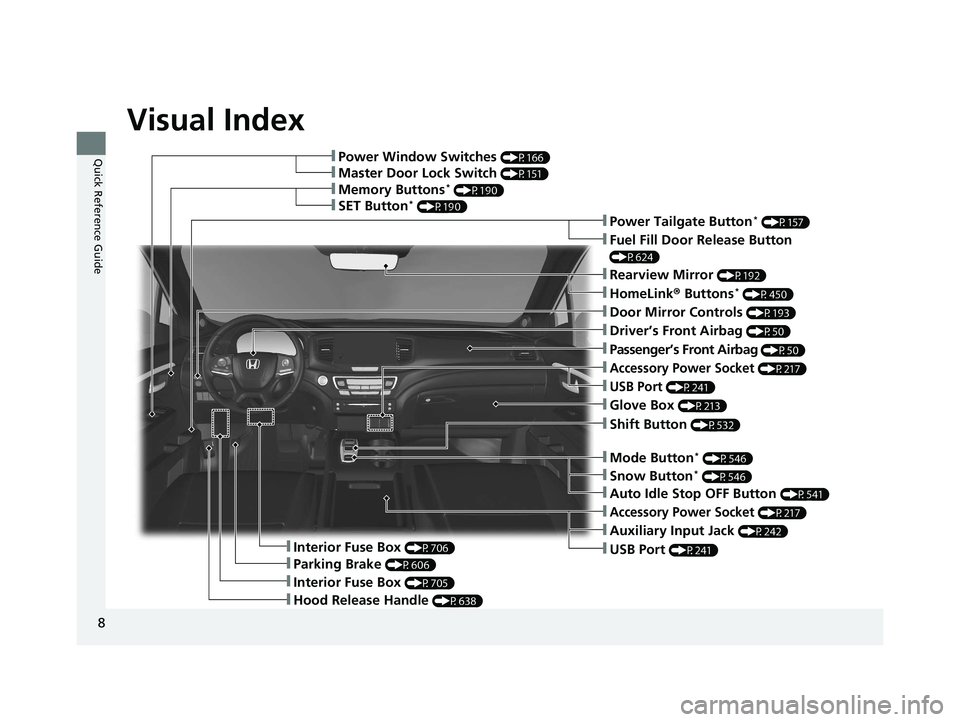
Visual Index
8
Quick Reference Guide❚Power Window Switches (P166)
❚Memory Buttons* (P190)
❚SET Button* (P190)
❚Master Door Lock Switch (P151)
❚Power Tailgate Button* (P157)
❚Fuel Fill Door Release Button
(P624)
❚Door Mirror Controls (P193)
❚Driver’s Front Airbag (P50)
❚Shift Button (P532)
❚Hood Release Handle (P638)
❚Glove Box (P213)
❚Interior Fuse Box (P706)
❚Parking Brake (P606)
❚Interior Fuse Box (P705)
❚Accessory Power Socket (P217)
❚USB Port (P241)
❚Rearview Mirror (P192)
❚HomeLink® Buttons* (P450)
❚Passenger’s Front Airbag (P50)
❚Mode Button* (P546)
❚Accessory Power Socket (P217)
❚Auxiliary Input Jack (P242)
❚USB Port (P241)
❚Auto Idle Stop OFF Button (P541)
❚Snow Button* (P546)
21 PILOT-31TG76500.book 8 ページ 2020年3月18日 水曜日 午後4時38分
Page 13 of 739
11
Quick Reference Guide
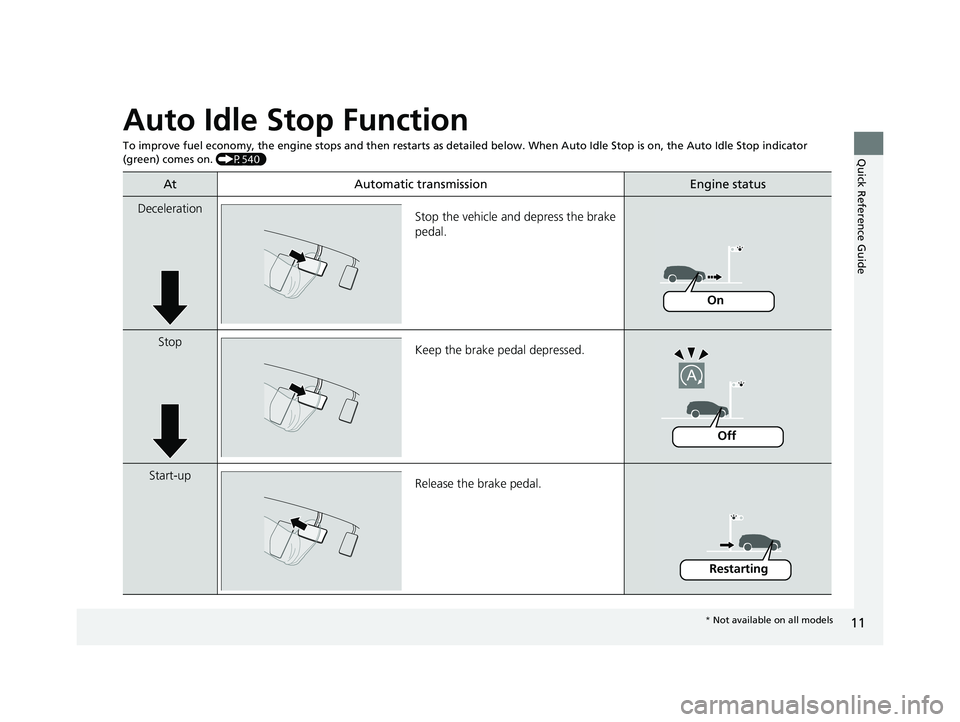
Auto Idle Stop Function
To improve fuel economy, the engine stops and then restarts as detailed below. When Auto Idle Stop is on, the Auto Idle Stop in dicator
(green) comes on. (P540)
At Automatic transmissionEngine status
Deceleration
Stop the vehicle and depress the brake
pedal.
StopKeep the brake pedal depressed.
Start-up Release the brake pedal.
On
Off
Restarting
* Not available on all models
21 PILOT-31TG76500.book 11 ページ 2020年3月18日 水曜日 午後4時38分
Page 16 of 739
14
Quick Reference Guide
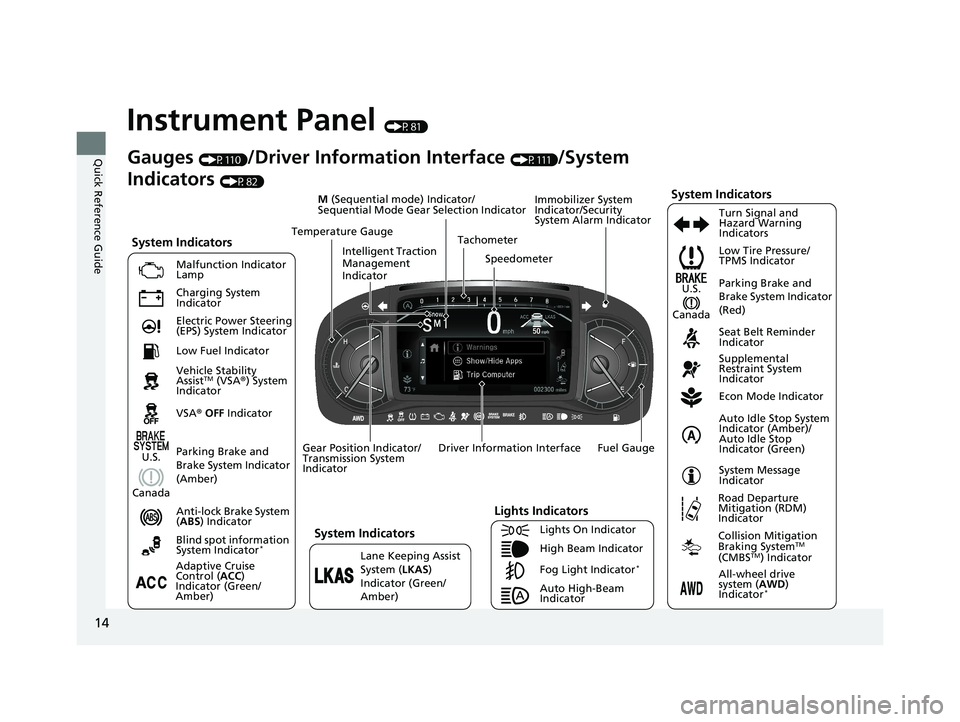
Instrument Panel (P81)
System Indicators
Malfunction Indicator
Lamp
Charging System
Indicator
Anti-lock Brake System
(ABS ) Indicator
Vehicle Stability
Assist
TM (VSA
®) System
Indicator
VSA ® OFF Indicator Low Tire Pressure/
TPMS Indicator
Immobilizer System
Indicator/Security
System Alarm Indicator
Lights Indicators
Lights On Indicator
High Beam Indicator
Fog Light Indicator
*Lane Keeping Assist
System (
LKAS)
Indicator (Green/
Amber) Seat Belt Reminder
Indicator
System Indicators
Econ Mode Indicator
System Message
Indicator Parking Brake and
Brake System Indicator
(Red)
Supplemental
Restraint System
Indicator
Driver Information Interface Tachometer
M
(Sequential mode) Indicator/
Sequential Mode Gear Selection Indicator
Speedometer
Fuel Gauge
Gear Position Indicator/
Transmission System
Indicator Auto Idle Stop System
Indicator (Amber)/
Auto Idle Stop
Indicator (Green)
Gauges (P110)/Driver Information Interface (P111)/System
Indicators
(P82)
Adaptive Cruise
Control ( ACC)
Indicator (Green/
Amber) Turn Signal and
Hazard Warning
Indicators
Electric Power Steering
(EPS) System Indicator
Blind spot information
System Indicator
*
Temperature Gauge
Parking Brake and
Brake System Indicator
(Amber)U.S.
Canada
System Indicators
U.S.
Canada
Low Fuel Indicator
Auto High-Beam
Indicator
Road Departure
Mitigation (RDM)
Indicator
Collision Mitigation
Braking SystemTM
(CMBSTM) Indicator
All-wheel drive
sy
stem ( AWD)
Indicator
*
Intelligent Traction
Management
Indicator
21 PILOT-31TG76500.book 14 ページ 2020年3月18日 水曜日 午後4時38分
Page 32 of 739
30
Quick Reference Guide
Why do the doors lock
after I unlocked the doors?If you do not open the doors within 30 seconds, the doors are
relocked automatically for security.
Why does the beeper
sound when I open the
driver’s door?The beeper sounds when:
●The power mode is in ACCESSORY.
●The exterior lights are left on.
●The Auto Idle Stop is in operation.
Why does a beeper sound
when I walk away from the
vehicle after I close the
door?
The beeper sounds if you move outside the walk away auto lock
operating range before the door completely closes.u Locking the doors and tailgate (Walk away auto lock ®)
(P144)
Why does the beeper
sound when I start driving?The beeper sounds when:
●Driver and/or front passenger are not wearing their seat belts.
●The parking brake pedal is not fully released.
Models with walk away auto lock ®
21 PILOT-31TG76500.book 30 ページ 2020年3月18日 水曜日 午後4時38分
Page 93 of 739
91
uuIndicators u
Continued
Instrument Panel
IndicatorNameOn/BlinkingExplanationMessage
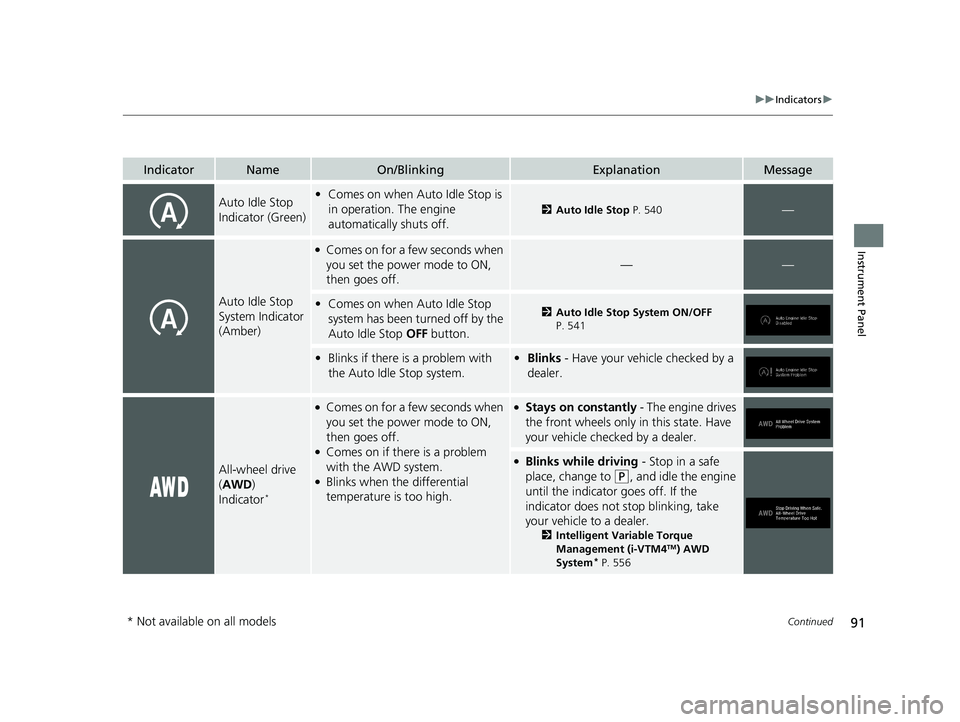
Auto Idle Stop
Indicator (Green)•Comes on when Auto Idle Stop is
in operation. The engine
automatically shuts off.
2 Auto Idle Stop P. 540—
Auto Idle Stop
System Indicator
(Amber)
●Comes on for a few seconds when
you set the power mode to ON,
then goes off.
——
•Comes on when Auto Idle Stop
system has been turned off by the
Auto Idle Stop OFF button.2Auto Idle Stop System ON/OFF
P. 541
• Blinks if there is a problem with
the Auto Idle Stop system.• Blinks - Have your vehicle checked by a
dealer.
All-wheel drive
(AWD )
Indicator
*
●Comes on for a few seconds when
you set the power mode to ON,
then goes off.
●Comes on if there is a problem
with the AWD system.
●Blinks when the differential
temperature is too high.
●Stays on constantly - The engine drives
the front wheels only in this state. Have
your vehicle checked by a dealer.
●Blinks while driving - Stop in a safe
place, change to
(P, and idle the engine
until the indicator goes off. If the
indicator does not stop blinking, take
your vehicle to a dealer.
2 Intelligent Variable Torque
Management (i-VTM4TM) AWD
System* P. 556
* Not available on all models
21 PILOT-31TG76500.book 91 ページ 2020年3月18日 水曜日 午後4時38分
Page 107 of 739
105
uuIndicators uDriver Information Interface Wa rning and Information Messages
Continued
Instrument Panel
MessageConditionExplanation
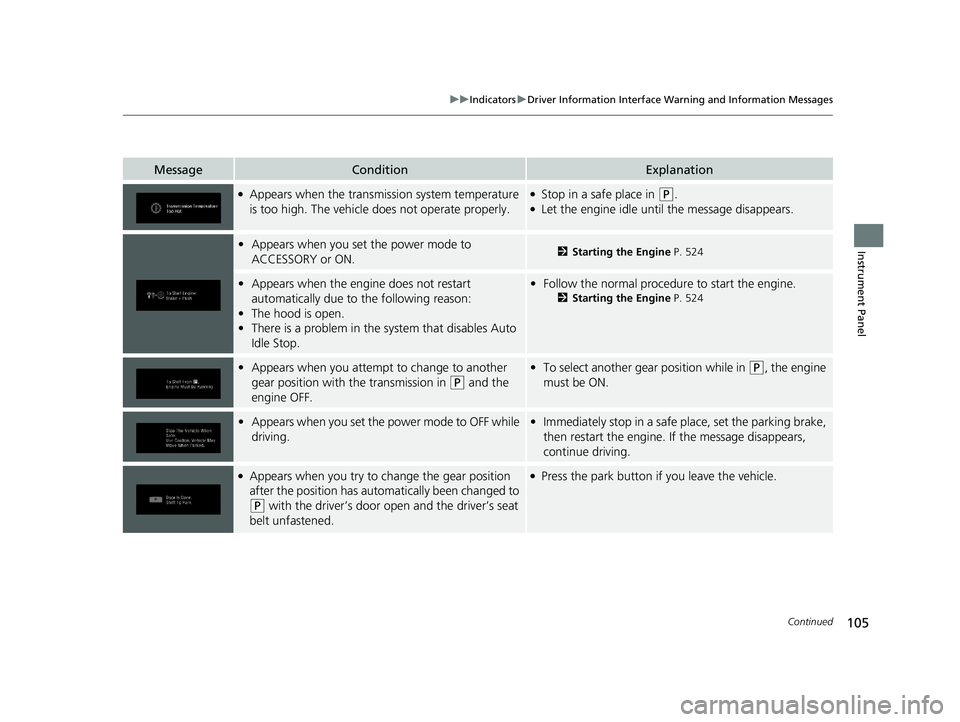
●Appears when the transmission system temperature
is too high. The vehicle does not operate properly.●Stop in a safe place in (P.●Let the engine idle until the message disappears.
•Appears when you set the power mode to
ACCESSORY or ON.2 Starting the Engine P. 524
•Appears when the engine does not restart
automatically due to the following reason:
• The hood is open.
• There is a problem in the sy stem that disables Auto
Idle Stop.• Follow the normal procedure to start the engine.
2 Starting the Engine P. 524
•Appears when you attempt to change to another
gear position with the transmission in
(P and the
engine OFF.
• To select another gear position while in (P, the engine
must be ON.
• Appears when you set the power mode to OFF while
driving.•Immediately stop in a safe place, set the parking brake,
then restart the engine. If the message disappears,
continue driving.
●Appears when you try to change the gear position
after the position has auto matically been changed to
(P with the driver’s door open and the driver’s seat
belt unfastened.
●Press the park button if you leave the vehicle.
21 PILOT-31TG76500.book 105 ページ 2020年3月18日 水曜日 午後4時38分
Page 108 of 739
106
uuIndicators uDriver Information Interface Wa rning and Information Messages
Instrument Panel
MessageConditionExplanation
•Appears if the vehicle is stationary and the
transmission is put into
(N, the driver's seatbelt is
unfastened, and the brake pedal is released, as there
is a risk that the vehicl e might roll unexpectedly.
•Press the (P button before releasing the brake pedal
when idling, parking or exiting the vehicle.
2 Shift Operation P. 534
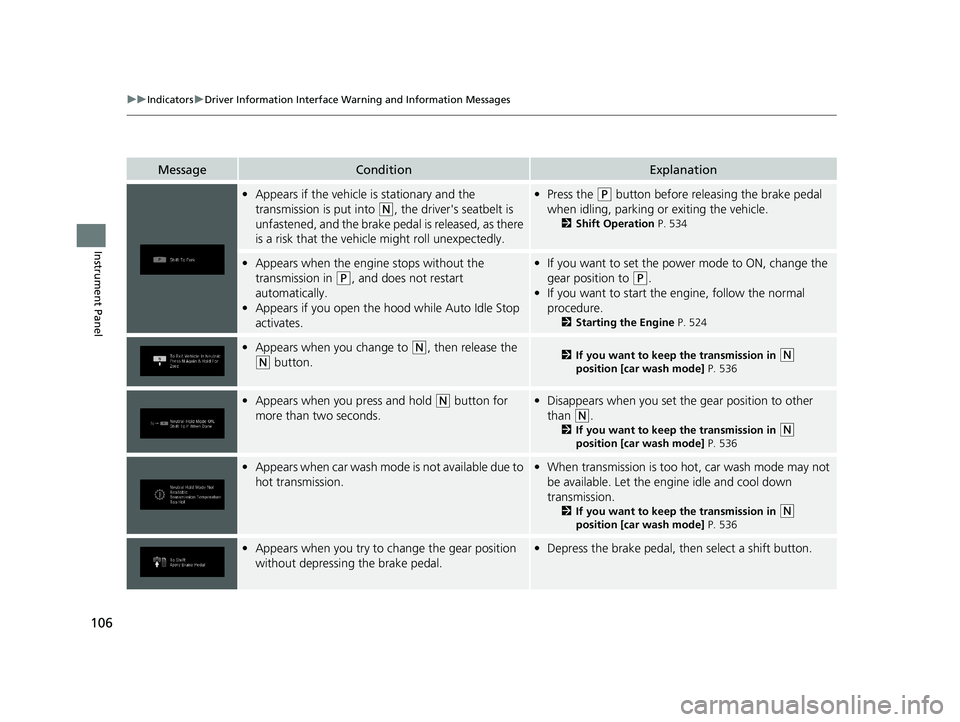
•Appears when the engine stops without the
transmission in
(P, and does not restart
automatically.
• Appears if you open the hood while Auto Idle Stop
activates.
•If you want to set the power mode to ON, change the
gear position to
(P.
• If you want to start the engine, follow the normal
procedure.
2 Starting the Engine P. 524
•Appears when you change to (N, then release the
(N button.2 If you want to keep the transmission in (N
position [car wash mode] P. 536
•Appears when you press and hold (N button for
more than two seconds.• Disappears when you set the gear position to other
than
(N.
2 If you want to keep the transmission in (N
position [car wash mode] P. 536
•Appears when car wash mode is not available due to
hot transmission.• When transmission is too hot, car wash mode may not
be available. Let the engine idle and cool down
transmission.
2 If you want to keep the transmission in (N
position [car wash mode] P. 536
•Appears when you try to change the gear position
without depressing the brake pedal.• Depress the brake pedal, then select a shift button.
21 PILOT-31TG76500.book 106 ページ 2020年3月18日 水曜日 午後4時38分
Page 110 of 739
108
uuIndicators uDriver Information Interface Wa rning and Information Messages
Instrument Panel
*1:Models with color audio system
*2:Models with Display Audio
MessageConditionExplanation
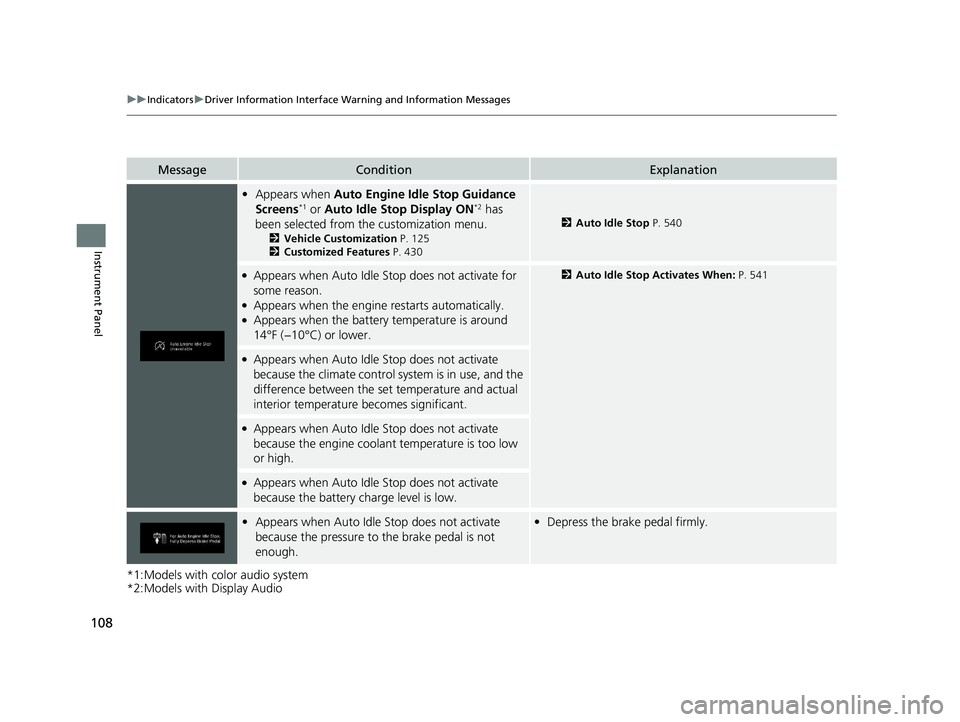
•Appears when Auto Engine Idle Stop Guidance
Screens*1 or Auto Idle Stop Display ON*2 has
been selected from the customization menu.
2 Vehicle Customization P. 125
2 Customized Features P. 430
2Auto Idle Stop P. 540
●Appears when Auto Idle St op does not activate for
some reason.
●Appears when the engine restarts automatically.●Appears when the battery temperature is around
14°F (−10°C) or lower.
2 Auto Idle Stop Activates When: P. 541
●Appears when Auto Idle Stop does not activate
because the climate control sy stem is in use, and the
difference between the set temperature and actual
interior temperature becomes significant.
●Appears when Auto Idle Stop does not activate
because the engine coolant temperature is too low
or high.
●Appears when Auto Idle Stop does not activate
because the battery charge level is low.
• Appears when Auto Idle Stop does not activate
because the pressure to the brake pedal is not
enough.•Depress the brake pedal firmly.
21 PILOT-31TG76500.book 108 ページ 2020年3月18日 水曜日 午後4時38分
Page 111 of 739
109
uuIndicators uDriver Information Interface Wa rning and Information Messages
Instrument Panel
*1:Models with color audio system
*2:Models with Display Audio
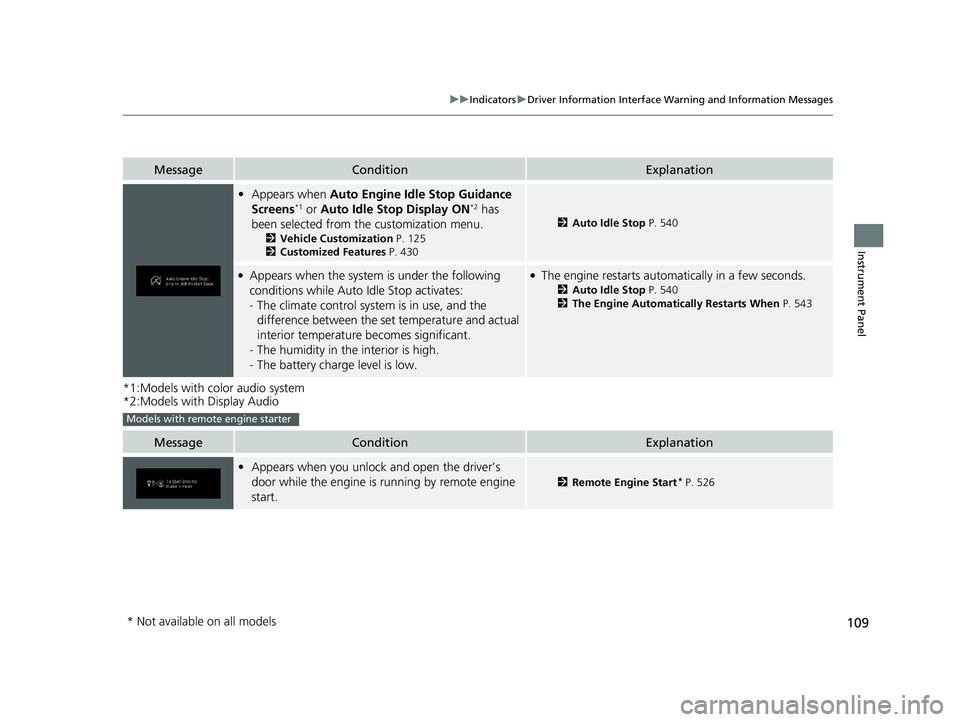
MessageConditionExplanation
•Appears when Auto Engine Idle Stop Guidance
Screens*1 or Auto Idle Stop Display ON*2 has
been selected from the customization menu.
2 Vehicle Customization P. 125
2 Customized Features P. 430
2Auto Idle Stop P. 540
●Appears when the system is under the following
conditions while Auto Idle Stop activates:
-The climate control system is in use, and the
difference between the set temperature and actual
interior temperature becomes significant.
- The humidity in the interior is high.
- The battery charge level is low.●The engine restarts automatically in a few seconds.
2 Auto Idle Stop P. 540
2 The Engine Automatically Restarts When P. 543
MessageConditionExplanation
•Appears when you unlock and open the driver’s
door while the engine is running by remote engine
start.
2 Remote Engine Start* P. 526
Models with remote engine starter
* Not available on all models
21 PILOT-31TG76500.book 109 ページ 2020年3月18日 水曜日 午後4時38分
Page 128 of 739
126
uuGauges and Displays uDriver Information Interface
Instrument Panel
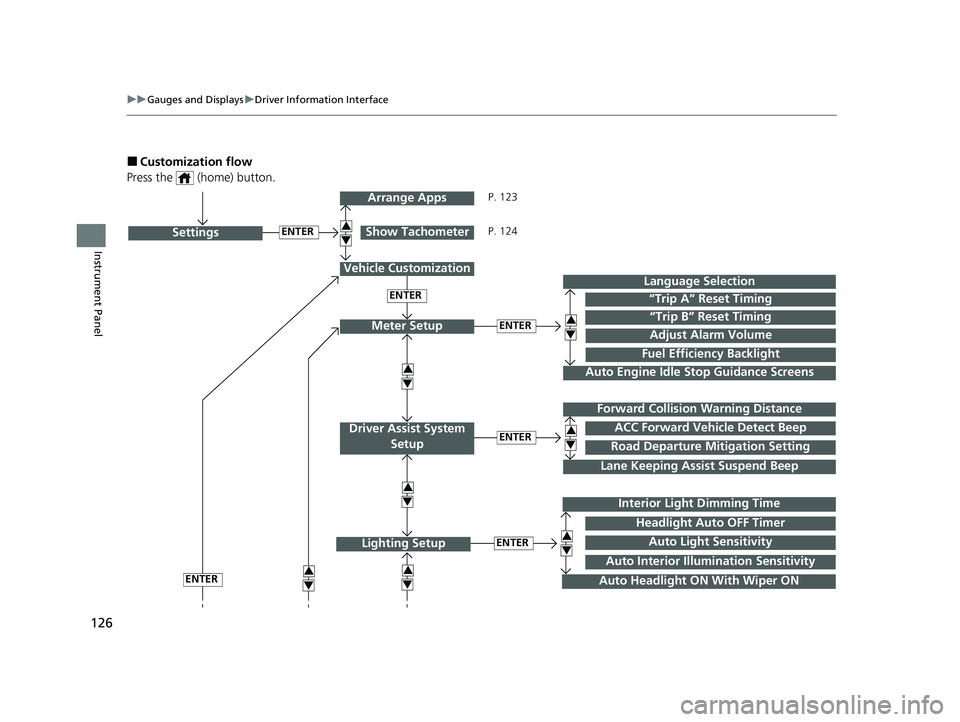
■Customization flow
Press the (home) button.
ENTER“Trip B” Reset Timing
Fuel Efficiency Backlight
“Trip A” Reset Timing
Language Selection
Adjust Alarm VolumeMeter Setup
ENTERSettings
Arrange Apps
Show Tachometer3
4
3
4
3
43
4
3
4
Vehicle Customization
ENTER
P. 123
P. 124
Interior Light Dimming Time
Auto Headlight ON With Wiper ON
ENTERLighting Setup3
4
ENTER
ENTERRoad Departure Mitigation Setting
Lane Keeping Assi st Suspend Beep
ACC Forward Vehicle Detect Beep
Forward Collision Warning Distance
Driver Assist System
Setup
3
4
3
4
Auto Light Sensitivity
Headlight Auto OFF Timer
Auto Interior Illu mination Sensitivity
Auto Engine Idle Stop Guidance Screens
21 PILOT-31TG76500.book 126 ページ 2020年3月18日 水曜日 午後4時38分